park assist LINCOLN MKT 2019 Owners Manual
[x] Cancel search | Manufacturer: LINCOLN, Model Year: 2019, Model line: MKT, Model: LINCOLN MKT 2019Pages: 575, PDF Size: 4.66 MB
Page 6 of 575
Memory Function.........................................135
Rear Seats......................................................137
Heated Seats.................................................146
Climate Controlled Seats...........................147
Universal Garage Door Opener
Universal Garage Door Opener...............149
Auxiliary Power Points
Auxiliary Power Points................................154
Storage Compartments
Center Console............................................156
Overhead Console.......................................157
Starting and Stopping the Engine
General Information....................................158
Keyless Starting............................................158
Starting a Gasoline Engine........................159
Engine Block Heater...................................162
Fuel and Refueling
Safety Precautions.......................................164
Fuel Quality...................................................165
Fuel Filler Funnel Location........................165
Running Out of Fuel....................................166
Refueling.........................................................167
Fuel Consumption........................................170
Engine Emission Control
Emission Law..................................................171
Catalytic Converter......................................172
Transmission
Automatic Transmission..............................175
All-Wheel Drive
Using All-Wheel Drive.................................179
Brakes
General Information.....................................187
Hints on Driving With Anti-Lock Brakes.......................................................................188
Parking Brake................................................188
Traction Control
Principle of Operation.................................189
Using Traction Control................................189
Stability Control
Principle of Operation.................................190
Using Stability Control.................................191
Parking Aids
Principle of Operation.................................192
Rear Parking Aid...........................................192
Active Park Assist.........................................193
Rear View Camera.......................................199
Cruise Control
Principle of Operation................................203
Using Cruise Control..................................203
Using Adaptive Cruise Control................204
Driving Aids
Driver Alert.....................................................212
Lane Keeping System.................................214
Blind Spot Information System.................219
3
MKT (TP4) , enUSA, Edition date: 201803, Second-Printing
Table of Contents
Page 67 of 575
PRINCIPLE OF OPERATION
MyKey allows you to program keys withrestricted driving modes to promote gooddriving habits. All but one of the keysprogrammed to the vehicle can be activatedwith these restricted modes.
Any keys that have not been programmedare referred to as administrator keys oradmin keys. They can be used to:
•Create a MyKey.
•Program configurable MyKey settings.
•Clear all MyKey features.
When you have programmed a MyKey, youcan access the following information usingthe information display:
•How many admin keys and MyKeys areprogrammed to your vehicle.
•The total distance your vehicle hastraveled using a MyKey.
Note:All MyKeys are programmed to thesame settings. You cannot program themindividually.
Note:For vehicles equipped with apush-button start switch: When both a MyKeyand an admin key are present when youstart your vehicle, the system recognizes theadmin key only.
Non-configurable Settings
The following settings cannot be changedby an admin key user:
•Belt-Minder or safety belt reminder. Youcannot disable this feature. The audiosystem will mute when the front seatoccupants’ safety belts are not fastened.
•Early low fuel. The low fuel warning isactivated earlier, giving the MyKey usermore time to refuel.
•Driver assist features, if equipped on yourvehicle, are forced on: parking aid, blindspot information system (BLIS), crosstraffic alert, lane departure warning andforward collision warning system.
•Satellite radio adult content restrictions(available only in some markets).
Configurable Settings
With an admin key, you can configure certainMyKey settings when you first create aMyKey and before you recycle the key orrestart the vehicle. You can also change thesettings afterward with an admin key:
•A vehicle speed limit can be set.Warnings will be shown in the display,followed by an audible tone when yourvehicle reaches the set speed. Youcannot override the set speed by fullydepressing the accelerator pedal or bysetting cruise control.
WARNING: Do not set MyKeymaximum speed limit to a limit that willprevent the driver from maintaining a safespeed considering posted speed limits andprevailing road conditions. The driver isalways responsible to drive in accordancewith local laws and prevailing conditions.Failure to do so could result in accident orinjury.
64
MKT (TP4) , enUSA, Edition date: 201803, Second-Printing
MyKey™
Page 112 of 575
Driver Assist
Cross Traffic
Adaptive or NormalCruise Control
Driver AlertDriver Alert
Driver Alert Disp.
Front Park Aid
Alert, Aid or BothModeLane Keeping Sys
High, Normal or LowIntensity
Rear Park Aid
Trailer Sway
Settings
In this mode, you can configure differentdriver setting choices.
Note:Some items are optional and may notappear.
109
MKT (TP4) , enUSA, Edition date: 201803, Second-Printing
Information Displays
Page 159 of 575
CENTER CONSOLE
Stow items in the cup holder carefully asitems may become loose during hardbraking, acceleration or crashes, includinghot drinks which may spill.
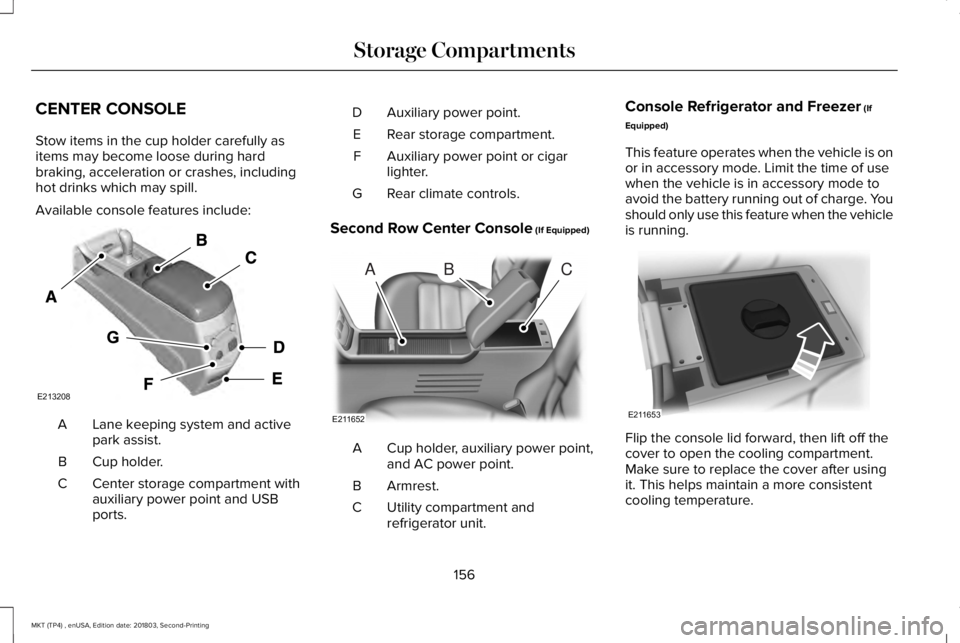
Available console features include:
Lane keeping system and activepark assist.A
Cup holder.B
Center storage compartment withauxiliary power point and USBports.
C
Auxiliary power point.D
Rear storage compartment.E
Auxiliary power point or cigarlighter.F
Rear climate controls.G
Second Row Center Console (If Equipped)
Cup holder, auxiliary power point,and AC power point.A
Armrest.B
Utility compartment andrefrigerator unit.C
Console Refrigerator and Freezer (If
Equipped)
This feature operates when the vehicle is onor in accessory mode. Limit the time of usewhen the vehicle is in accessory mode toavoid the battery running out of charge. Youshould only use this feature when the vehicleis running.
Flip the console lid forward, then lift off thecover to open the cooling compartment.Make sure to replace the cover after usingit. This helps maintain a more consistentcooling temperature.
156
MKT (TP4) , enUSA, Edition date: 201803, Second-Printing
Storage CompartmentsE213208 ABC
E211652 E211653
Page 164 of 575
Automatic Engine Shutdown
For vehicles with a keyless ignition, thisfeature automatically shuts down the engineif it has been idling for an extended period. The ignition also turns off to save batterypower. Before your vehicle shuts down, amessage appears in the information displayshowing a timer counting down. If you donot intervene within 30 seconds, your vehicleshuts down. Another message appears inthe information display to inform you thatyour vehicle has shut down to save fuel. Start your vehicle as normal.
Automatic Engine Shutdown Override
Note: You cannot permanently switch offthe automatic shutdown. When you switchit off temporarily, it turns on at the nextignition cycle.
You can stop the shutdown, or reset thetimer, at any point before the 30-secondcountdown has expired by doing any of thefollowing:
•Interacting with your vehicle, for examplepressing the brake or accelerator pedal.
•You can temporarily switch off theshutdown feature any time the ignition ison using the information display. SeeInformation Displays (page 105). Thefeature only remains off for the currentignition cycle.
•During the 30-second countdown, thesystem prompts you to press OK orRESET to temporarily switch the featureoff for the current ignition cycle only.
Stopping the Engine When YourVehicle is Stationary
1. Shift into park (P).
2. Press the push button ignition switch.
3. Apply the parking brake.
Note:The ignition, all electrical circuits andall warning lamps and indicators will beturned off.
Note:If the engine is idling for 30 minutes,the ignition and engine automatically shutsdown.
Stopping the Engine When YourVehicle is Moving
WARNING: Switching off the enginewhen the vehicle is still moving will resultin a loss of brake and steering assistance.The steering will not lock, but higher effortwill be required. When the ignition isswitched off, some electrical circuits,including air bags, warning lamps andindicators may also be off. If the ignitionwas turned off accidentally, you can shiftinto neutral (N) and re-start the engine.
1. Shift into neutral and use the brakes tobring your vehicle to a safe stop.
2.When your vehicle has stopped, shift intopark (P).
3. Press and hold the push button ignitionswitch, or press it three times within twoseconds.
4. Apply the parking brake.
161
MKT (TP4) , enUSA, Edition date: 201803, Second-Printing
Starting and Stopping the Engine
Page 190 of 575
GENERAL INFORMATION
Note: Occasional brake noise is normal. Ifa metal-to-metal, continuous grinding orcontinuous squeal sound is present, thebrake linings may be worn-out. Have thesystem checked by an authorized dealer. Ifyour vehicle has continuous vibration orshudder in the steering wheel while braking,have it checked by an authorized dealer.
Note:Brake dust may accumulate on thewheels, even under normal drivingconditions. Some dust is inevitable as thebrakes wear and does not contribute tobrake noise. See Cleaning the Wheels(page 310).
Note:Depending on applicable laws andregulations in the country for which yourvehicle was originally built, your brake lampsmay flash during heavy braking. Followingthis, your hazard lights may also flash whenyour vehicle comes to a stop.
See Warning Lamps andIndicators (page 101).
Wet brakes result in reduced brakingefficiency. Gently press the brake pedal afew times when driving from a car wash orstanding water to dry the brakes.
Brake Over Accelerator
In the event the accelerator pedal becomesstuck or entrapped, apply steady and firmpressure to the brake pedal to slow thevehicle and reduce engine power. If youexperience this condition, apply the brakesand bring your vehicle to a safe stop. Movethe transmission to park (P), switch theengine off and apply the parking brake.Inspect the accelerator pedal for anyinterference. If none are found and thecondition persists, have your vehicle towedto the nearest authorized dealer.
Brake Assist
Brake assist detects when you rapidly brakeby measuring the rate at which you press thebrake pedal. It provides maximum brakingefficiency as long as you press the pedal. Itcan also reduce stopping distances in criticalsituations.
Anti-lock Brake System
This system helps you maintain steeringcontrol during emergency stops by keepingthe brakes from locking.
If it illuminates when you aredriving, this indicates amalfunction. Your vehiclecontinues to have normal braking withoutthe anti-lock brake system function. Haveyour vehicle checked as soon as possible.
It also momentarily illuminates when youswitch the ignition on to confirm the lamp isfunctional. If it does not illuminate when youswitch the ignition on, or begins to flash atany time, have the system checked by anauthorized dealer.
187
MKT (TP4) , enUSA, Edition date: 201803, Second-Printing
BrakesE270480
Page 196 of 575
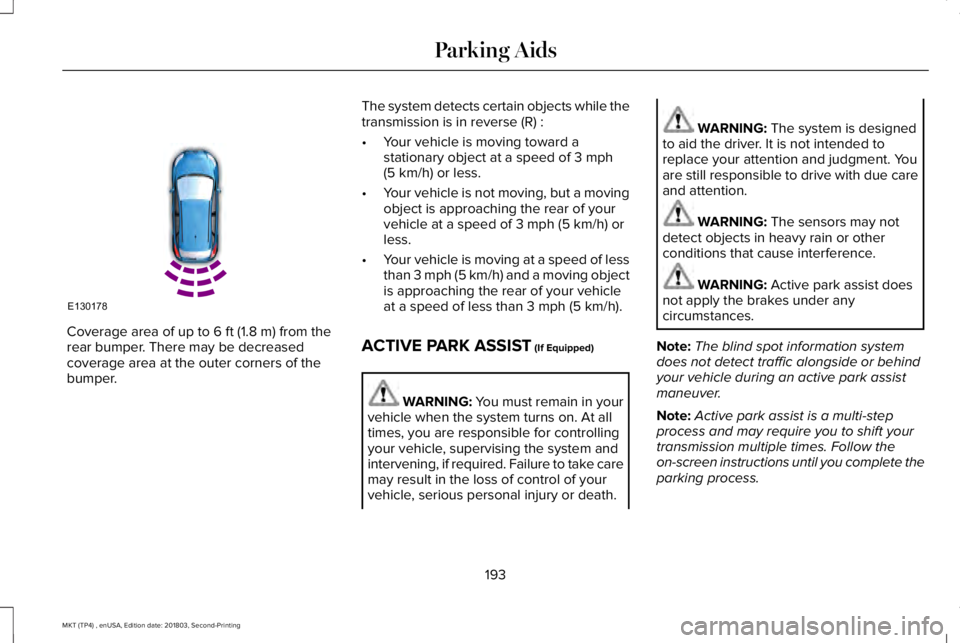
Coverage area of up to 6 ft (1.8 m) from therear bumper. There may be decreasedcoverage area at the outer corners of thebumper.
The system detects certain objects while thetransmission is in reverse (R) :
•Your vehicle is moving toward astationary object at a speed of 3 mph(5 km/h) or less.
•Your vehicle is not moving, but a movingobject is approaching the rear of yourvehicle at a speed of 3 mph (5 km/h) orless.
•Your vehicle is moving at a speed of lessthan 3 mph (5 km/h) and a moving objectis approaching the rear of your vehicleat a speed of less than 3 mph (5 km/h).
ACTIVE PARK ASSIST (If Equipped)
WARNING: You must remain in yourvehicle when the system turns on. At alltimes, you are responsible for controllingyour vehicle, supervising the system andintervening, if required. Failure to take caremay result in the loss of control of yourvehicle, serious personal injury or death.
WARNING: The system is designedto aid the driver. It is not intended toreplace your attention and judgment. Youare still responsible to drive with due careand attention.
WARNING: The sensors may notdetect objects in heavy rain or otherconditions that cause interference.
WARNING: Active park assist doesnot apply the brakes under anycircumstances.
Note:The blind spot information systemdoes not detect traffic alongside or behindyour vehicle during an active park assistmaneuver.
Note:Active park assist is a multi-stepprocess and may require you to shift yourtransmission multiple times. Follow theon-screen instructions until you complete theparking process.
193
MKT (TP4) , enUSA, Edition date: 201803, Second-Printing
Parking AidsE130178
Page 197 of 575
The system detects an available parallelparking space and automatically steers yourvehicle (hands-free) while you control theaccelerator, transmission and brakes. Thesystem visually and audibly guides you topark your vehicle.
If you are uncomfortable with the proximityto any vehicle or object, you may choose tooverride the system by grabbing the steeringwheel or pushing the active park assistbutton.
The system may not operate correctly in anyof the following conditions:
•You use a spare tire or a tire significantlyworn more than the other tires.
•One or more tires are improperly inflated.
•You try to park on a tight curve.
•Something passes between the frontbumper and the parking space. Forexample, a pedestrian or cyclist.
•The edge of the neighboring parkingvehicle is high off the ground. Forexample, a bus, tow truck or flatbedtruck.
•The weather conditions are poor. Forexample, during heavy rain, snow or fog.
Note: Keep the sensors, located on thefascia, free from now, ice and largeaccumulations of dirt. Covered sensors canaffect the systems accuracy. Do not cleanthe sensors with sharp objects.
Note:The sensors may not detect objectswith surfaces that absorb ultrasonic wavesor cause ultrasonic interference. Forexample, motorcycle exhaust, truck airbrakes or horns.
Note:Following a change in tire size, thesystem must recalibrate and operation maybe impaired for a short time.
Do not use the system if:
•You have attached a bike rack, trailer orother object near the sensors on the frontor rear of your vehicle.
•You have attached an overhangingobject to the roof. For example, asurfboard.
•A foreign object damages or obstructsthe sensors.
•The correct tire size is not in use. Forexample, when using a mini-spare tire.
Using Active Park Assist
Press the button to turn the systemon or off.
194
MKT (TP4) , enUSA, Edition date: 201803, Second-Printing
Parking AidsE146186
Page 198 of 575
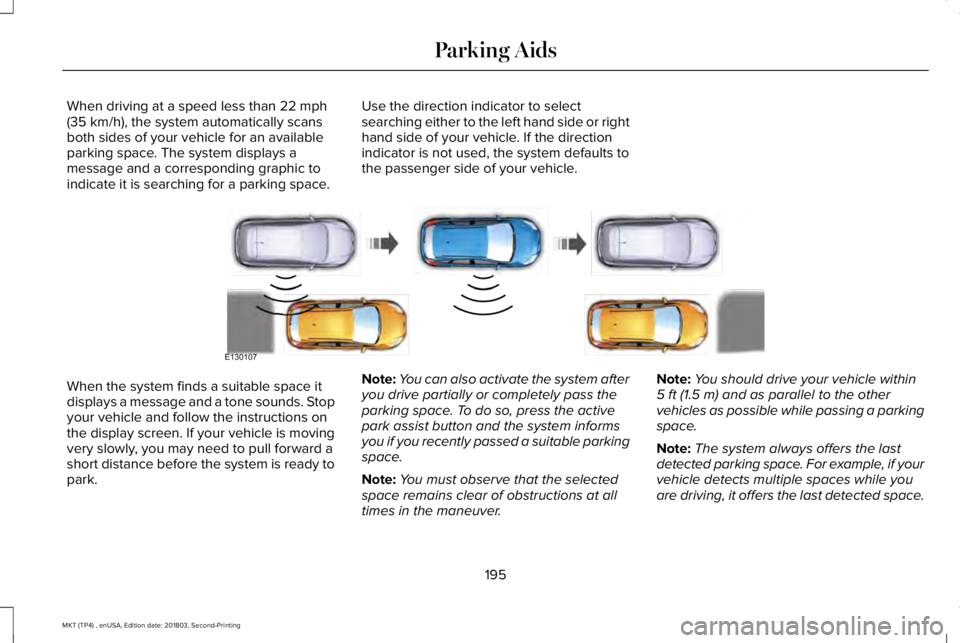
When driving at a speed less than 22 mph(35 km/h), the system automatically scansboth sides of your vehicle for an availableparking space. The system displays amessage and a corresponding graphic toindicate it is searching for a parking space.
Use the direction indicator to selectsearching either to the left hand side or righthand side of your vehicle. If the directionindicator is not used, the system defaults tothe passenger side of your vehicle.
When the system finds a suitable space itdisplays a message and a tone sounds. Stopyour vehicle and follow the instructions onthe display screen. If your vehicle is movingvery slowly, you may need to pull forward ashort distance before the system is ready topark.
Note:You can also activate the system afteryou drive partially or completely pass theparking space. To do so, press the activepark assist button and the system informsyou if you recently passed a suitable parkingspace.
Note:You must observe that the selectedspace remains clear of obstructions at alltimes in the maneuver.
Note:You should drive your vehicle within5 ft (1.5 m) and as parallel to the othervehicles as possible while passing a parkingspace.
Note:The system always offers the lastdetected parking space. For example, if yourvehicle detects multiple spaces while youare driving, it offers the last detected space.
195
MKT (TP4) , enUSA, Edition date: 201803, Second-Printing
Parking AidsE130107
Page 199 of 575
Note:If driven above approximately 22 mph(35 km/h), the display screen shows amessage to alert you to reduce your vehiclespeed.
Automatic Steering into Parking Space
Note:If vehicle speed exceeds 6 mph(9 km/h) or the maneuver is interrupted, forexample driver input is detected, the systemswitches off and you need to take full controlof your vehicle.
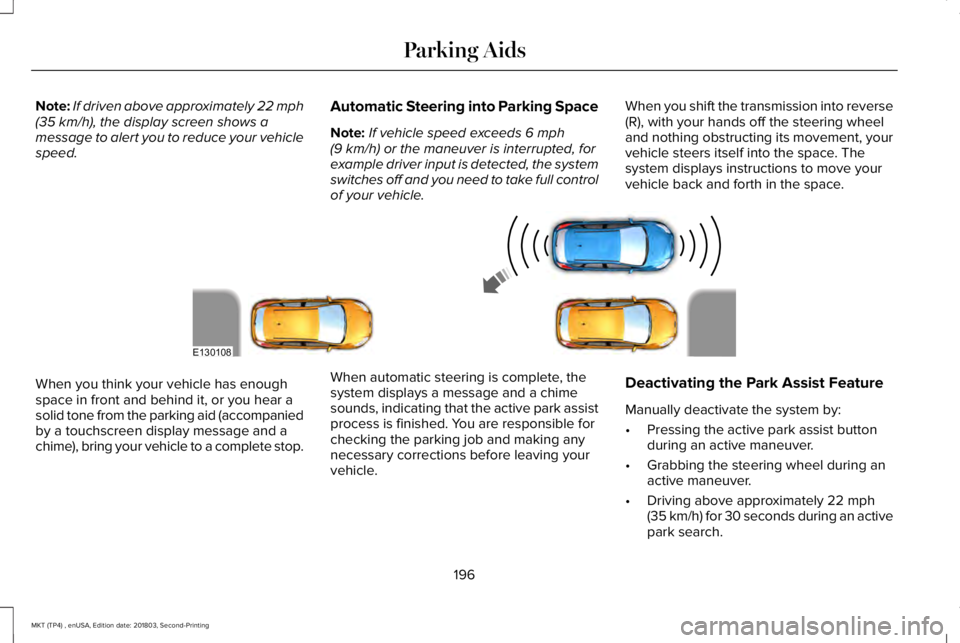
When you shift the transmission into reverse(R), with your hands off the steering wheeland nothing obstructing its movement, yourvehicle steers itself into the space. Thesystem displays instructions to move yourvehicle back and forth in the space.
When you think your vehicle has enoughspace in front and behind it, or you hear asolid tone from the parking aid (accompaniedby a touchscreen display message and achime), bring your vehicle to a complete stop.
When automatic steering is complete, thesystem displays a message and a chimesounds, indicating that the active park assistprocess is finished. You are responsible forchecking the parking job and making anynecessary corrections before leaving yourvehicle.
Deactivating the Park Assist Feature
Manually deactivate the system by:
•Pressing the active park assist buttonduring an active maneuver.
•Grabbing the steering wheel during anactive maneuver.
•Driving above approximately 22 mph(35 km/h) for 30 seconds during an activepark search.
196
MKT (TP4) , enUSA, Edition date: 201803, Second-Printing
Parking AidsE130108