traction control LINCOLN MKT 2019 Owners Manual
[x] Cancel search | Manufacturer: LINCOLN, Model Year: 2019, Model line: MKT, Model: LINCOLN MKT 2019Pages: 575, PDF Size: 4.66 MB
Page 6 of 575
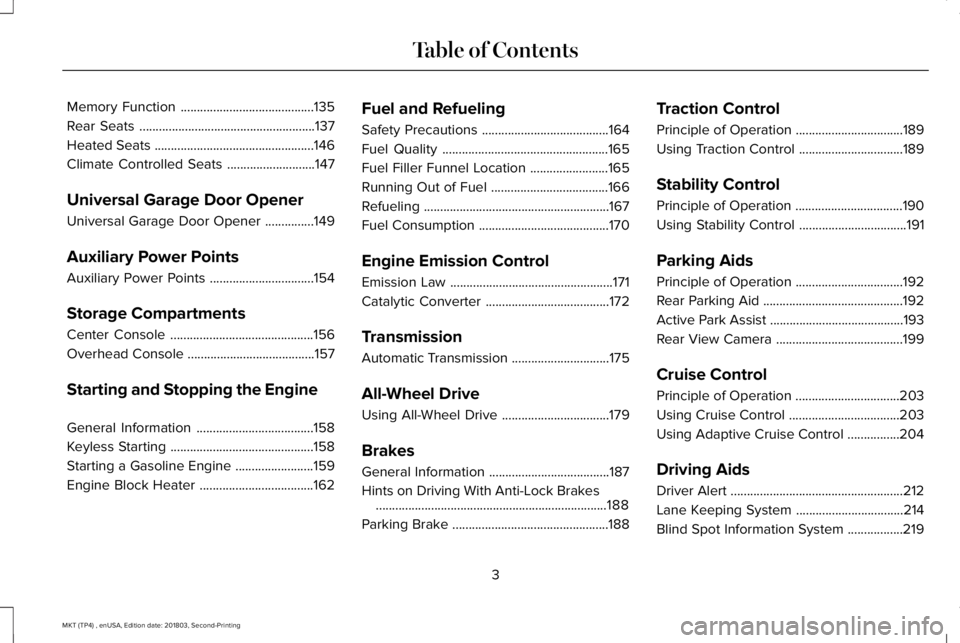
Memory Function.........................................135
Rear Seats......................................................137
Heated Seats.................................................146
Climate Controlled Seats...........................147
Universal Garage Door Opener
Universal Garage Door Opener...............149
Auxiliary Power Points
Auxiliary Power Points................................154
Storage Compartments
Center Console............................................156
Overhead Console.......................................157
Starting and Stopping the Engine
General Information....................................158
Keyless Starting............................................158
Starting a Gasoline Engine........................159
Engine Block Heater...................................162
Fuel and Refueling
Safety Precautions.......................................164
Fuel Quality...................................................165
Fuel Filler Funnel Location........................165
Running Out of Fuel....................................166
Refueling.........................................................167
Fuel Consumption........................................170
Engine Emission Control
Emission Law..................................................171
Catalytic Converter......................................172
Transmission
Automatic Transmission..............................175
All-Wheel Drive
Using All-Wheel Drive.................................179
Brakes
General Information.....................................187
Hints on Driving With Anti-Lock Brakes.......................................................................188
Parking Brake................................................188
Traction Control
Principle of Operation.................................189
Using Traction Control................................189
Stability Control
Principle of Operation.................................190
Using Stability Control.................................191
Parking Aids
Principle of Operation.................................192
Rear Parking Aid...........................................192
Active Park Assist.........................................193
Rear View Camera.......................................199
Cruise Control
Principle of Operation................................203
Using Cruise Control..................................203
Using Adaptive Cruise Control................204
Driving Aids
Driver Alert.....................................................212
Lane Keeping System.................................214
Blind Spot Information System.................219
3
MKT (TP4) , enUSA, Edition date: 201803, Second-Printing
Table of Contents
Page 68 of 575
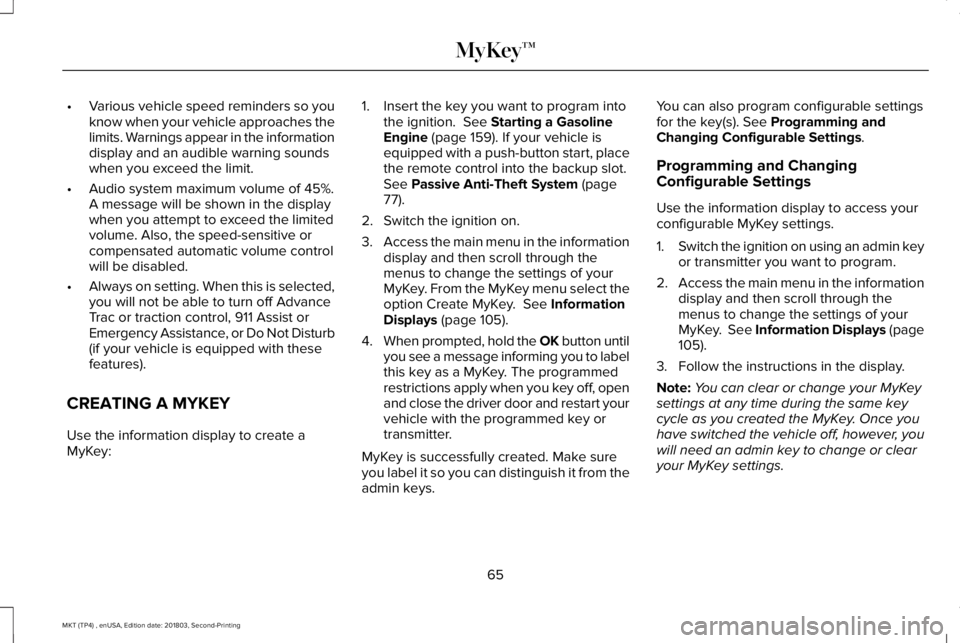
•Various vehicle speed reminders so youknow when your vehicle approaches thelimits. Warnings appear in the informationdisplay and an audible warning soundswhen you exceed the limit.
•Audio system maximum volume of 45%.A message will be shown in the displaywhen you attempt to exceed the limitedvolume. Also, the speed-sensitive orcompensated automatic volume controlwill be disabled.
•Always on setting. When this is selected,you will not be able to turn off AdvanceTrac or traction control, 911 Assist orEmergency Assistance, or Do Not Disturb(if your vehicle is equipped with thesefeatures).
CREATING A MYKEY
Use the information display to create aMyKey:
1. Insert the key you want to program intothe ignition. See Starting a GasolineEngine (page 159). If your vehicle isequipped with a push-button start, placethe remote control into the backup slot.See Passive Anti-Theft System (page77).
2. Switch the ignition on.
3.Access the main menu in the informationdisplay and then scroll through themenus to change the settings of yourMyKey. From the MyKey menu select theoption Create MyKey. See InformationDisplays (page 105).
4.When prompted, hold the OK button untilyou see a message informing you to labelthis key as a MyKey. The programmedrestrictions apply when you key off, openand close the driver door and restart yourvehicle with the programmed key ortransmitter.
MyKey is successfully created. Make sureyou label it so you can distinguish it from theadmin keys.
You can also program configurable settingsfor the key(s). See Programming andChanging Configurable Settings.
Programming and ChangingConfigurable Settings
Use the information display to access yourconfigurable MyKey settings.
1.Switch the ignition on using an admin keyor transmitter you want to program.
2.Access the main menu in the informationdisplay and then scroll through themenus to change the settings of yourMyKey. See Information Displays (page105).
3. Follow the instructions in the display.
Note:You can clear or change your MyKeysettings at any time during the same keycycle as you created the MyKey. Once youhave switched the vehicle off, however, youwill need an admin key to change or clearyour MyKey settings.
65
MKT (TP4) , enUSA, Edition date: 201803, Second-Printing
MyKey™
Page 111 of 575
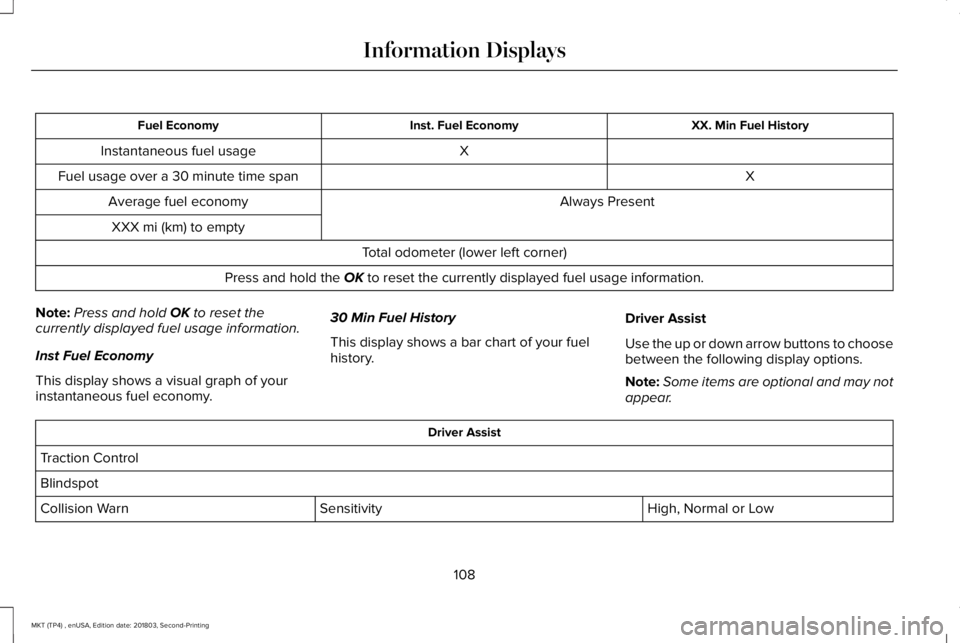
XX. Min Fuel HistoryInst. Fuel EconomyFuel Economy
XInstantaneous fuel usage
XFuel usage over a 30 minute time span
Always PresentAverage fuel economy
XXX mi (km) to empty
Total odometer (lower left corner)
Press and hold the OK to reset the currently displayed fuel usage information.
Note:Press and hold OK to reset thecurrently displayed fuel usage information.
Inst Fuel Economy
This display shows a visual graph of yourinstantaneous fuel economy.
30 Min Fuel History
This display shows a bar chart of your fuelhistory.
Driver Assist
Use the up or down arrow buttons to choosebetween the following display options.
Note:Some items are optional and may notappear.
Driver Assist
Traction Control
Blindspot
High, Normal or LowSensitivityCollision Warn
108
MKT (TP4) , enUSA, Edition date: 201803, Second-Printing
Information Displays
Page 114 of 575
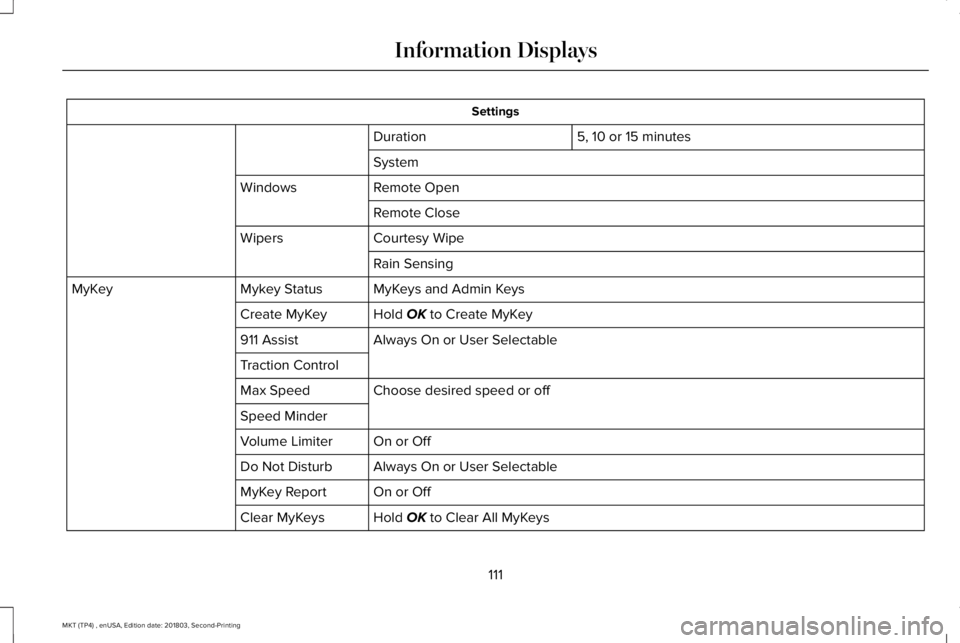
Settings
5, 10 or 15 minutesDuration
System
Remote OpenWindows
Remote Close
Courtesy WipeWipers
Rain Sensing
MyKeys and Admin KeysMykey StatusMyKey
Hold OK to Create MyKeyCreate MyKey
Always On or User Selectable911 Assist
Traction Control
Choose desired speed or offMax Speed
Speed Minder
On or OffVolume Limiter
Always On or User SelectableDo Not Disturb
On or OffMyKey Report
Hold OK to Clear All MyKeysClear MyKeys
111
MKT (TP4) , enUSA, Edition date: 201803, Second-Printing
Information Displays
Page 116 of 575
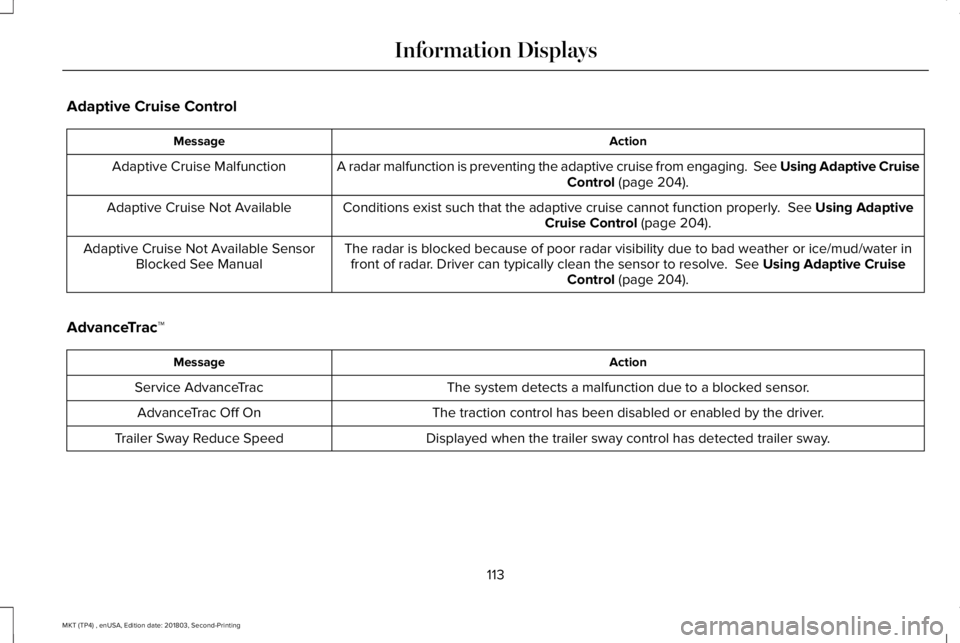
Adaptive Cruise Control
ActionMessage
A radar malfunction is preventing the adaptive cruise from engaging. See Using Adaptive CruiseControl (page 204).Adaptive Cruise Malfunction
Conditions exist such that the adaptive cruise cannot function properly. See Using AdaptiveCruise Control (page 204).Adaptive Cruise Not Available
The radar is blocked because of poor radar visibility due to bad weather or ice/mud/water infront of radar. Driver can typically clean the sensor to resolve. See Using Adaptive CruiseControl (page 204).
Adaptive Cruise Not Available SensorBlocked See Manual
AdvanceTrac™
ActionMessage
The system detects a malfunction due to a blocked sensor.Service AdvanceTrac
The traction control has been disabled or enabled by the driver.AdvanceTrac Off On
Displayed when the trailer sway control has detected trailer sway.Trailer Sway Reduce Speed
113
MKT (TP4) , enUSA, Edition date: 201803, Second-Printing
Information Displays
Page 127 of 575
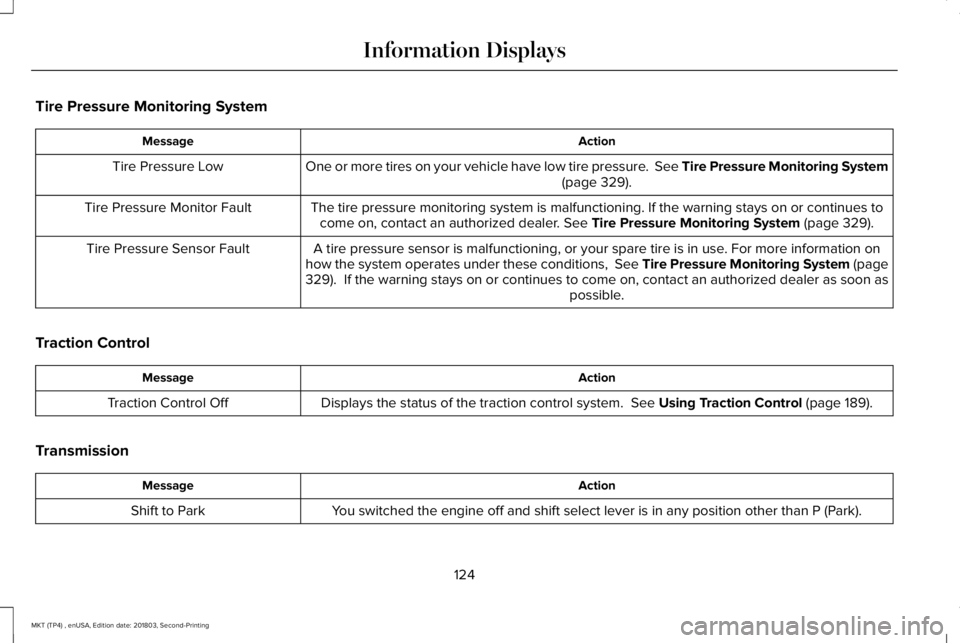
Tire Pressure Monitoring System
ActionMessage
One or more tires on your vehicle have low tire pressure. See Tire Pressure Monitoring System(page 329).Tire Pressure Low
The tire pressure monitoring system is malfunctioning. If the warning stays on or continues tocome on, contact an authorized dealer. See Tire Pressure Monitoring System (page 329).Tire Pressure Monitor Fault
A tire pressure sensor is malfunctioning, or your spare tire is in use. For more information onhow the system operates under these conditions, See Tire Pressure Monitoring System (page329). If the warning stays on or continues to come on, contact an authorized dealer as soon aspossible.
Tire Pressure Sensor Fault
Traction Control
ActionMessage
Displays the status of the traction control system. See Using Traction Control (page 189).Traction Control Off
Transmission
ActionMessage
You switched the engine off and shift select lever is in any position other than P (Park).Shift to Park
124
MKT (TP4) , enUSA, Edition date: 201803, Second-Printing
Information Displays
Page 180 of 575
SelectShift in sport (S):
•Provides a permanent manual gearselection where full control of gearselection is required.
To exit SelectShift mode shift thetransmission into another gear (for example,drive [D]).
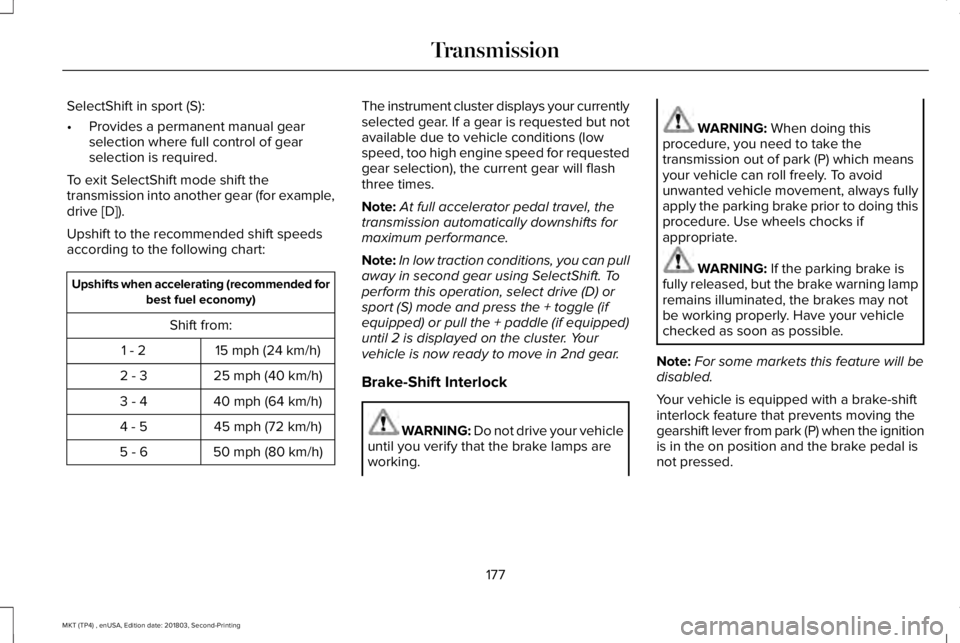
Upshift to the recommended shift speedsaccording to the following chart:
Upshifts when accelerating (recommended forbest fuel economy)
Shift from:
15 mph (24 km/h)1 - 2
25 mph (40 km/h)2 - 3
40 mph (64 km/h)3 - 4
45 mph (72 km/h)4 - 5
50 mph (80 km/h)5 - 6
The instrument cluster displays your currentlyselected gear. If a gear is requested but notavailable due to vehicle conditions (lowspeed, too high engine speed for requestedgear selection), the current gear will flashthree times.
Note:At full accelerator pedal travel, thetransmission automatically downshifts formaximum performance.
Note:In low traction conditions, you can pullaway in second gear using SelectShift. Toperform this operation, select drive (D) orsport (S) mode and press the + toggle (ifequipped) or pull the + paddle (if equipped)until 2 is displayed on the cluster. Yourvehicle is now ready to move in 2nd gear.
Brake-Shift Interlock
WARNING: Do not drive your vehicleuntil you verify that the brake lamps areworking.
WARNING: When doing thisprocedure, you need to take thetransmission out of park (P) which meansyour vehicle can roll freely. To avoidunwanted vehicle movement, always fullyapply the parking brake prior to doing thisprocedure. Use wheels chocks ifappropriate.
WARNING: If the parking brake isfully released, but the brake warning lampremains illuminated, the brakes may notbe working properly. Have your vehiclechecked as soon as possible.
Note:For some markets this feature will bedisabled.
Your vehicle is equipped with a brake-shiftinterlock feature that prevents moving thegearshift lever from park (P) when the ignitionis in the on position and the brake pedal isnot pressed.
177
MKT (TP4) , enUSA, Edition date: 201803, Second-Printing
Transmission
Page 186 of 575
acceleration or braking which could resultin an increased risk of loss of vehiclecontrol, vehicle rollover and/or personalinjury. Use all available road surface toreturn the vehicle to a safe direction oftravel.
•In the event of an emergency stop, avoidskidding the tires and do not attempt anysharp steering wheel movements.
•If the vehicle goes from one type ofsurface to another (that is, from concreteto gravel) there will be a change in theway the vehicle responds to a maneuver(steering, acceleration or braking). Again,avoid these abrupt inputs.
Sand
Most of the time traction control improvestire traction by managing wheel slip throughBrake, Engine, and AWD calibrations.However, during low speed driving, disablingtraction control in deep sand can help keepthe wheels moving to maintain vehiclemomentum.
When driving over sand, try to keep all fourwheels on the most solid area of the trail.Avoid reducing the tire pressures but shiftto a lower gear and drive steadily throughthe terrain. Apply the accelerator slowly andavoid spinning the wheels.
Do not drive your vehicle in deep sand foran extended period of time. This couldcause the AWD system to overheat anddefault to front-wheel drive. If this occurs,an AWD OFF message displays in theinformation display. To resume normal AWDfunction as soon as possible, stop the vehiclein a safe location and stop the engine for atleast 10 minutes. After the engine has beenrestarted and the AWD system hasadequately cooled, the AWD OFF messageturns off and normal AWD function returns. In the event the engine is not stopped, theAWD OFF message turns off when thesystem cools and normal AWD functionreturns.
When driving at slow speeds in deep sandunder high outside temperatures, use L (Low)gear when possible. L (Low) gear operationwill maximize the engine and transmissioncooling capability.
Under severe operating conditions, the A/Cmay cycle on and off to protect overheatingof the engine.
Avoid excessive speed because vehiclemomentum can work against you and causethe vehicle to become stuck to the point thatassistance may be required from anothervehicle. Remember, you may be able to backout the way you came if you proceed withcaution.
Mud and Water
If you must drive through high water, driveslowly. Traction or brake capability may belimited.
When driving through water, determine thedepth; avoid water higher than the bottomof the wheel rims (for cars) or the bottom ofthe hubs (for trucks) (if possible) and proceedslowly. If the ignition system gets wet, thevehicle may stall.
183
MKT (TP4) , enUSA, Edition date: 201803, Second-Printing
All-Wheel Drive (If Equipped)
Page 187 of 575
Once through water, always try the brakes.Wet brakes do not stop the vehicle aseffectively as dry brakes. Drying can beimproved by moving your vehicle slowlywhile applying light pressure on the brakepedal.
Be cautious of sudden changes in vehiclespeed or direction when you are driving inmud. Even AWD vehicles can lose tractionin slick mud. As when you are driving oversand, apply the accelerator slowly and avoidspinning your wheels. If the vehicle doesslide, steer in the direction of the slide untilyou regain control of the vehicle.
After driving through mud, clean off residuestuck to rotating driveshafts and tires. Excessmud stuck on tires and rotating driveshaftscauses an imbalance that could damagedrive components.
Note:Driving through deep water maydamage the transmission.
If the front or rear axle is submerged in water,have the power transfer unit (PTU) or rearaxle serviced by an authorized dealer.
“Tread Lightly” is an educational programdesigned to increase public awareness ofland-use regulations and responsibilities inour nations wilderness areas. Ford MotorCompany joins the U.S. Forest Service andthe Bureau of Land Management inencouraging you to help preserve ournational forest and other public and privatelands by “treading lightly.”
Driving on Hilly or Sloping Terrain
Note:Avoid driving crosswise or turning onsteep slopes or hills. A danger lies in losingtraction, slipping sideways and possiblyrolling over. Whenever driving on a hill,determine beforehand the route you will use.Do not drive over the crest of a hill withoutseeing what conditions are on the other side.Do not drive in reverse over a hill withoutthe aid of an observer.
Although natural obstacles may make itnecessary to travel diagonally up or down ahill or steep incline, you should always try todrive straight up or straight down.
When climbing a steep slope or hill, start ina lower gear rather than downshifting to alower gear from a higher gear once theascent has started. This reduces strain onthe engine and the possibility of stalling.
If you do stall out, do not try to turnaroundbecause you might roll over. It is better toback down to a safe location.
Apply just enough power to the wheels toclimb the hill. Too much power will cause thetires to slip, spin or lose traction, resulting inloss of vehicle control.
184
MKT (TP4) , enUSA, Edition date: 201803, Second-Printing
All-Wheel Drive (If Equipped)E143950
Page 192 of 575
PRINCIPLE OF OPERATION
The traction control system helps avoid drivewheel spin and loss of traction.
If your vehicle begins to slide, the systemapplies the brakes to individual wheels and,when needed, reduces engine power at thesame time. If the wheels spin whenaccelerating on slippery or loose surfaces,the system reduces engine power in orderto increase traction.
USING TRACTION CONTROL
WARNING: The stability and tractioncontrol light illuminates steadily if thesystem detects a failure. Make sure youdid not manually disable the tractioncontrol system using the informationdisplay controls or the switch. If the stabilitycontrol and traction control light is still
illuminating steadily, have the systemserviced by an authorized dealerimmediately. Operating your vehicle withthe traction control disabled could lead toan increased risk of loss of vehicle control,vehicle rollover, personal injury and death.
The system automatically turns on each timeyou switch the ignition on.
If your vehicle is stuck in mud or snow,switching traction control off may bebeneficial as this allows the wheels to spin.
Note:When you switch traction control off,stability control remains fully active.
Switching the System Off
When you switch the system off or on, amessage appears in the information displayshowing system status.
You can switch the system off by either usingthe information display controls or the switch.
Using the Information Display Controls
You can switch this feature off or on in theinformation display. See General Information(page 105).
Using a Switch (If Equipped)
Use the traction control switch on theinstrument panel to switch the system off oron.
System Indicator Lights and Messages
The stability and traction controllight:
•Temporarily illuminates on enginestart-up.
•Flashes when a driving conditionactivates either of the systems.
•Illuminates if a problem occurs in eitherof the systems.
The stability and traction controloff light temporarily illuminates onengine start-up and stays on whenyou switch the traction control system off.
189
MKT (TP4) , enUSA, Edition date: 201803, Second-Printing
Traction ControlE138639 E130458