Roaming Warning
Touch this button to have the system alert you when your phone is in
roaming mode.
Phone Voice Commands
Press the voice button on the steering wheel control. After the
tone, say any of the following commands:
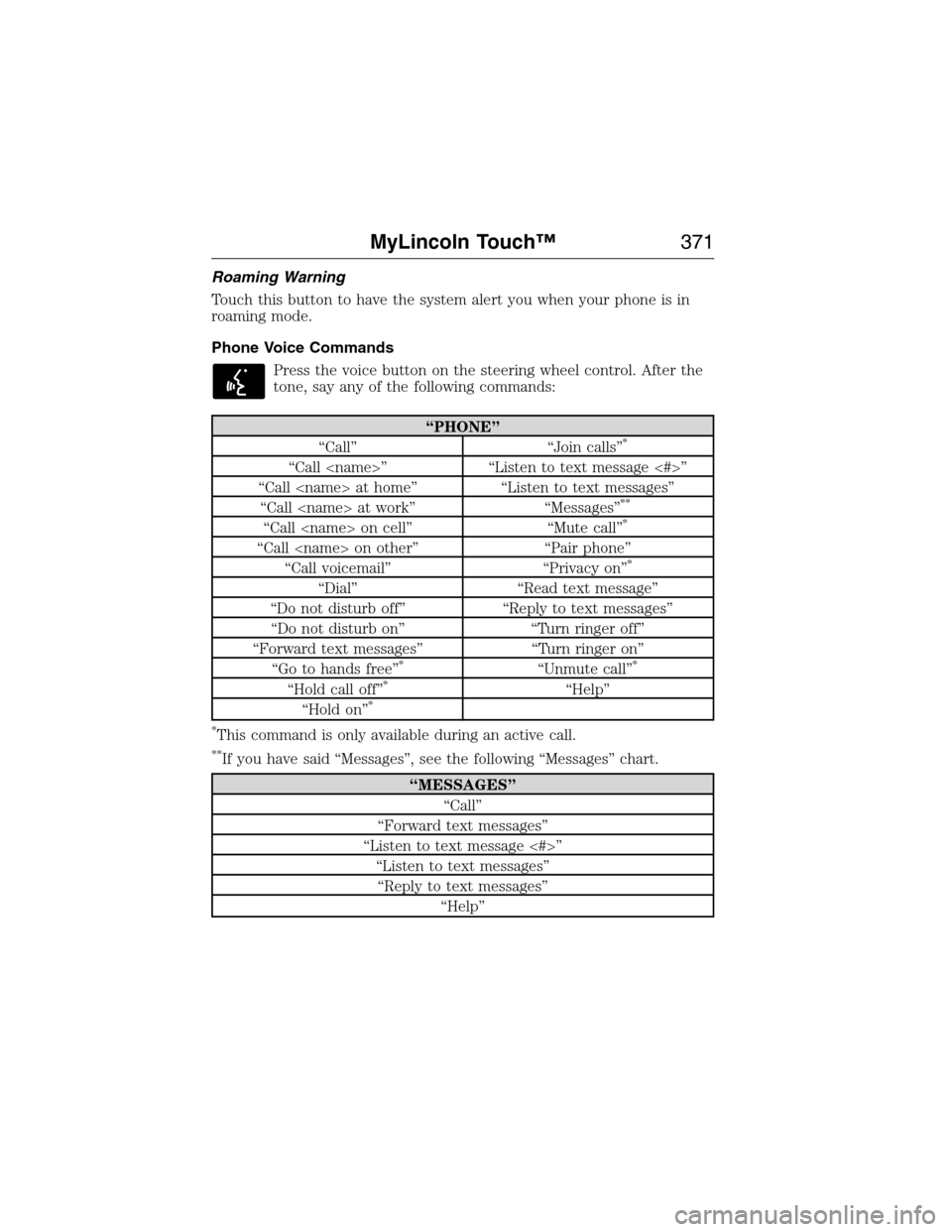
“PHONE”
“Call” “Join calls”*
“Call ” “Listen to text message <#>”
“Call at home” “Listen to text messages”
“Call at work” “Messages”
**
“Call on cell” “Mute call”*
“Call on other” “Pair phone”
“Call voicemail” “Privacy on”*
“Dial” “Read text message”
“Do not disturb off” “Reply to text messages”
“Do not disturb on” “Turn ringer off”
“Forward text messages” “Turn ringer on”
“Go to hands free”
*“Unmute call”*
“Hold call off”*“Help”
“Hold on”*
*
This command is only available during an active call.
**If you have said “Messages”, see the following “Messages” chart.
“MESSAGES”
“Call”
“Forward text messages”
“Listen to text message <#>”
“Listen to text messages”
“Reply to text messages”
“Help”
MyLincoln Touch™371
2014 MKX(mkx)
Owners Guide gf, 1st Printing, June 2014
USA(fus)
3D map modeprovides an elevated perspective of the map. This
viewing angle can be adjusted and the map can be rotated 180
degrees by touching the map twice, and then dragging your finger
along the shaded bar with arrows at the bottom of the map.
Vi e wswitches between full map, street list and exit view in route
guidance.
Menudisplays a pop-up box that allows direct access to navigation
settings, View/Edit Route, Sirius Travel Link, Guidance Mute and Cancel
Route.
Press the speaker button on the map to mute route guidance.
When the light on the button illuminates, the feature is on. The
speaker button appears on the map only when route guidance
is active.
Re-center the map by pressing this icon whenever you scroll
the map away from your vehicle’s current location.
Auto Zoom
Press the green bar to access map mode, then select the+or-zoom
button to bring up the zoom level and Auto buttons on the touchscreen.
When you pressAuto,Auto Zoom turns on andAutodisplays in the
bottom left corner of the screen in the map scale. The map zoom level
then synchronizes with vehicle speed. The slower your vehicle is
traveling, the farther in the map zooms in; the faster your vehicle is
traveling, the farther the map zooms out. To turn the feature off, just
press the+or-button again.
In 3D mode, rotate the map view by swiping your finger across the
shaded bar with the arrows.
The ETA box under the zoom buttons appears when a route is active
and displays the distance and time to your destination. If the button is
pressed, a pop up appears with the destination listed (and waypoint if
applicable) along with mileage and time to destination. You may also
select to have either the estimated time to reach your destination or
your estimated arrival time.
406MyLincoln Touch™
2014 MKX(mkx)
Owners Guide gf, 1st Printing, June 2014
USA(fus)