phone LINCOLN MKX 2015 User Guide
[x] Cancel search | Manufacturer: LINCOLN, Model Year: 2015, Model line: MKX, Model: LINCOLN MKX 2015Pages: 453, PDF Size: 4.04 MB
Page 239 of 453
GETTING ASSISTANCE OUTSIDE THE U.S. AND CANADA
Before exporting your vehicle to a foreign country, contact the
appropriate foreign embassy or consulate. These officials can inform you
of local vehicle registration regulations and where to find unleaded fuel.
If you cannot find unleaded fuel or can only get fuel with an anti-knock
index lower than is recommended for your vehicle, contact our Customer
Relationship Center.
The use of leaded fuel in your vehicle without proper conversion may
damage the effectiveness of your emission control system and may cause
engine knocking or serious engine damage. Ford Motor Company or Ford
of Canada is not responsible for any damage caused by use of improper
fuel. Using leaded fuel may also result in difficulty importing your vehicle
back into the United States.
If your vehicle must be serviced while you are traveling or living
in Asia-Pacific Region, Sub-Saharan Africa, U.S. Virgin Islands,
Central America, the Caribbean, and Israel, contact the nearest
authorized dealer. If the authorized dealer cannot help you,
contact:
FORD MOTOR COMPANY
Customer Relationship Center
1555 Fairlane Drive
Fairlane Business Park #3
Allen Park, Michigan 48101
U.S.A.
Telephone: (313) 594-4857
FAX: (313) 390-0804
Email: [email protected]
For customers in Guam, the Commonwealth of the Northern
Mariana Islands (CNMI), America Samoa, and the U.S. Virgin
Islands, please feel free to call our Toll-Free Number:
(800) 841-FORD (3673)
238Customer Assistance
2014 MKX(mkx)
Owners Guide gf, 1st Printing, June 2014
USA(fus)
Page 240 of 453
If your vehicle must be serviced while you are traveling or living
in Puerto Rico, contact the nearest authorized dealer. If the
authorized dealer cannot help you, contact:
FORD MOTOR COMPANY
Customer Relationship Center
1555 Fairlane Drive
Fairlane Business Park #3
Allen Park, Michigan 48101
Telephone: (800) 841-FORD (3673)
FAX: (313) 390-0804
Email: [email protected]
www.ford.com.pr
If your vehicle must be serviced while you are traveling or living
in the Middle East, contact the nearest authorized dealer. If the
authorized dealer cannot help you, contact:
FORD MOTOR COMPANY
Customer Relationship Center
1555 Fairlane Drive
Fairlane Business Park #3
Allen Park, Michigan 48101
Telephone: +971 4 3326084
Toll-Free Number of the Kingdom of Saudi Arabia: 800 8971409
Local Telephone Number of Kuwait: 24810575
FAX: +971 4 3327299
Email: [email protected]
www.me.ford.com
If you buy your vehicle in North America and then relocate to any of the
above locations, register your vehicle identification number (VIN) and
new address with Ford Motor Company Export Operations & Global
Growth Initiatives by emailing [email protected].
If you are in another foreign country, contact the nearest
authorized dealer. In the event your inquiry is unresolved,
communicate your concern with the dealership’s Sales Manager,
Service Manager or Customer Relations Manager. If you require
additional assistance or clarification, please contact the
respective Customer Relationship Center as previously listed.
Customers in the U.S. should call 1-800-392-3673.
Customer Assistance239
2014 MKX(mkx)
Owners Guide gf, 1st Printing, June 2014
USA(fus)
Page 325 of 453
•Cargo area protector
•Bumper protector
•Wheel locks
•Hitch-mounted parking sensors*
•Car cover*
*The accessory manufacturer designs, develops and therefore warrants
Lincoln Licensed Accessories, and does not design or test these
accessories to Lincoln Motor Company engineering requirements.
Contact an authorized Lincoln dealer for the manufacturer’s limited
warranty details, and request a copy of the Lincoln Licensed Accessories
product limited warranty from the accessory manufacturer.
For maximum vehicle performance, keep the following information in
mind when adding accessories or equipment to your vehicle:
•When adding accessories, equipment, passengers and luggage to your
vehicle, do not exceed the total weight capacity of the vehicle or of
the front or rear axle (GVWR or GAWR as indicated on the Safety
Compliance Certification label). Ask an authorized dealer for specific
weight information.
•The Federal Communications Commission (FCC) and Canadian Radio
Telecommunications Commission (CRTC) regulate the use of mobile
communications systems that are equipped with radio transmitters, for
example, two-way radios, telephones and theft alarms. Any such
equipment installed in your vehicle should comply with Federal
Communications Commission (FCC) and Canadian Radio
Telecommunications Commission (CRTC) regulations and should be
installed only by an authorized dealer.
•An authorized dealer needs to install mobile communications systems.
Improper installation may harm the operation of your vehicle,
particularly if their manufacturer did not design the mobile
communication device specifically for automotive use.
•If you or an authorized Lincoln dealer add any non-Lincoln electrical
or electronic accessories or components to the vehicle, you may
adversely affect battery performance and durability. In addition, you
may adversely affect the performance of other electrical systems in
the vehicle.
324Accessories
2014 MKX(mkx)
Owners Guide gf, 1st Printing, June 2014
USA(fus)
Page 333 of 453
GENERAL INFORMATION
WARNING:Driving while distracted can result in loss of vehicle
control, crash and injury. We strongly recommend that you use
extreme caution when using any device that may take your focus off
the road. Your primary responsibility is the safe operation of your
vehicle. We recommend against the use of any hand-held device while
driving and encourage the use of voice-operated systems when possible.
Make sure you are aware of all applicable local laws that may affect the
use of electronic devices while driving.
You can also set up the certain convenience features using MyLincoln
Mobile over the internet or smartphone application. For more information
on MyLincoln Mobile, and to set up your MyLincoln Mobile account, visit
http://support.lincoln.com/owner-services/mylincoln-mobile-app.
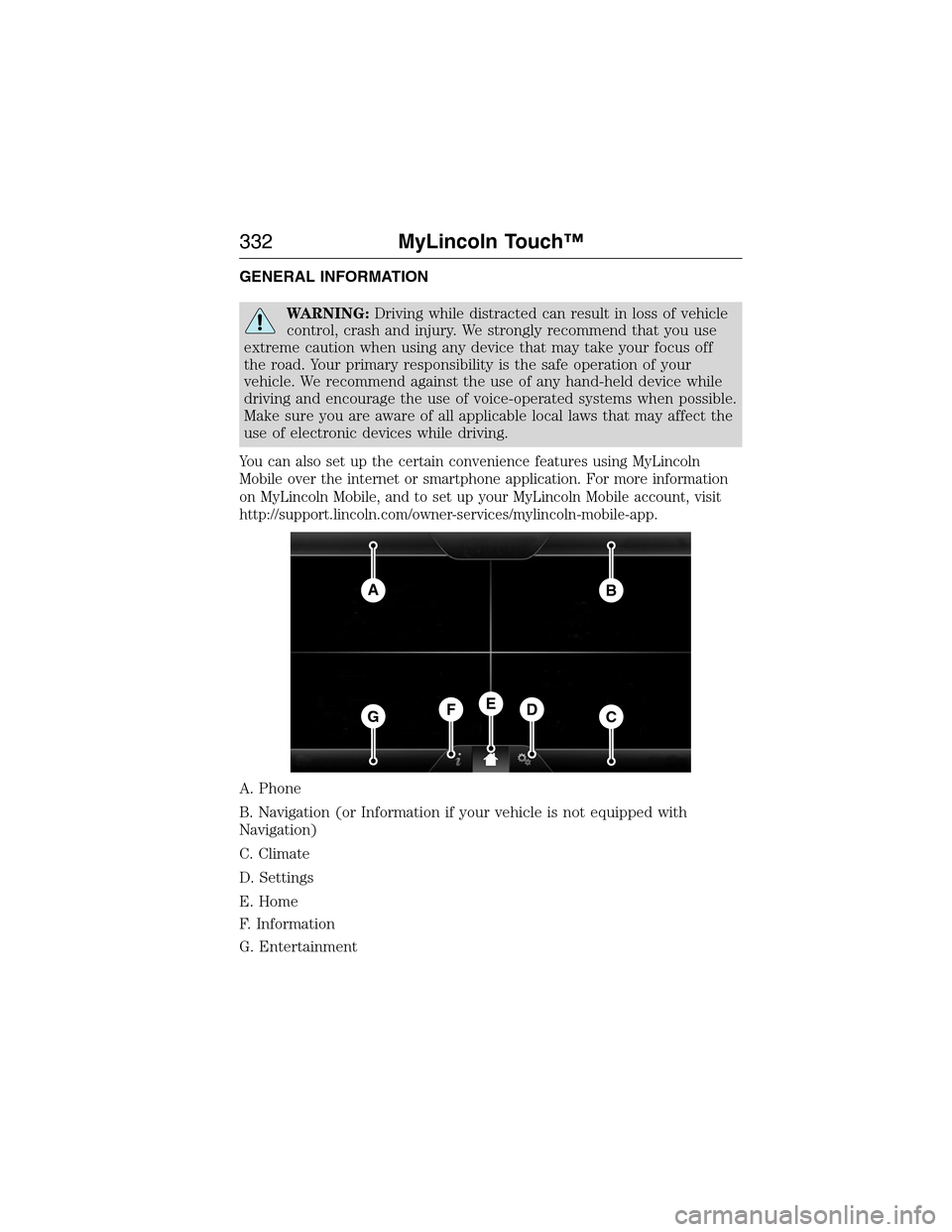
A. Phone
B. Navigation (or Information if your vehicle is not equipped with
Navigation)
C. Climate
D. Settings
E. Home
F. Information
G. Entertainment
AB
GCDFE
332MyLincoln Touch™
2014 MKX(mkx)
Owners Guide gf, 1st Printing, June 2014
USA(fus)
Page 334 of 453
This system uses a four-corner strategy to provide quick access several
vehicle features and settings. The touchscreen provides easy interaction
with your cellular phone, multimedia, climate control and navigation
system. The corners display any active modes within those menus, such
as phone status or the climate temperature.
Note:Some features are not available while your vehicle is moving.
Note:Your system is equipped with a feature that allows you to access
and control audio features for 30 minutes after you switch the ignition
off (and no doors open).
PHONE
Press to select any of the following:
•Making Calls
•Quick Dial
•Phonebook
•Call History
•Text Messaging
•Settings
NAVIGATION
Press to select any of the following:
•My Home
•Favorites
•Previous Destinations
•Point of Interest
•Emergency
•Street Address
•Intersection
•City Center
•Map
•Edit Route
•Cancel Route
CLIMATE
Press to select any of the following:
•Driver Settings
•Recirculated Air
•Auto
•Dual
•Passenger Settings
•A/C
•Defrost
MyLincoln Touch™333
2014 MKX(mkx)
Owners Guide gf, 1st Printing, June 2014
USA(fus)
Page 338 of 453
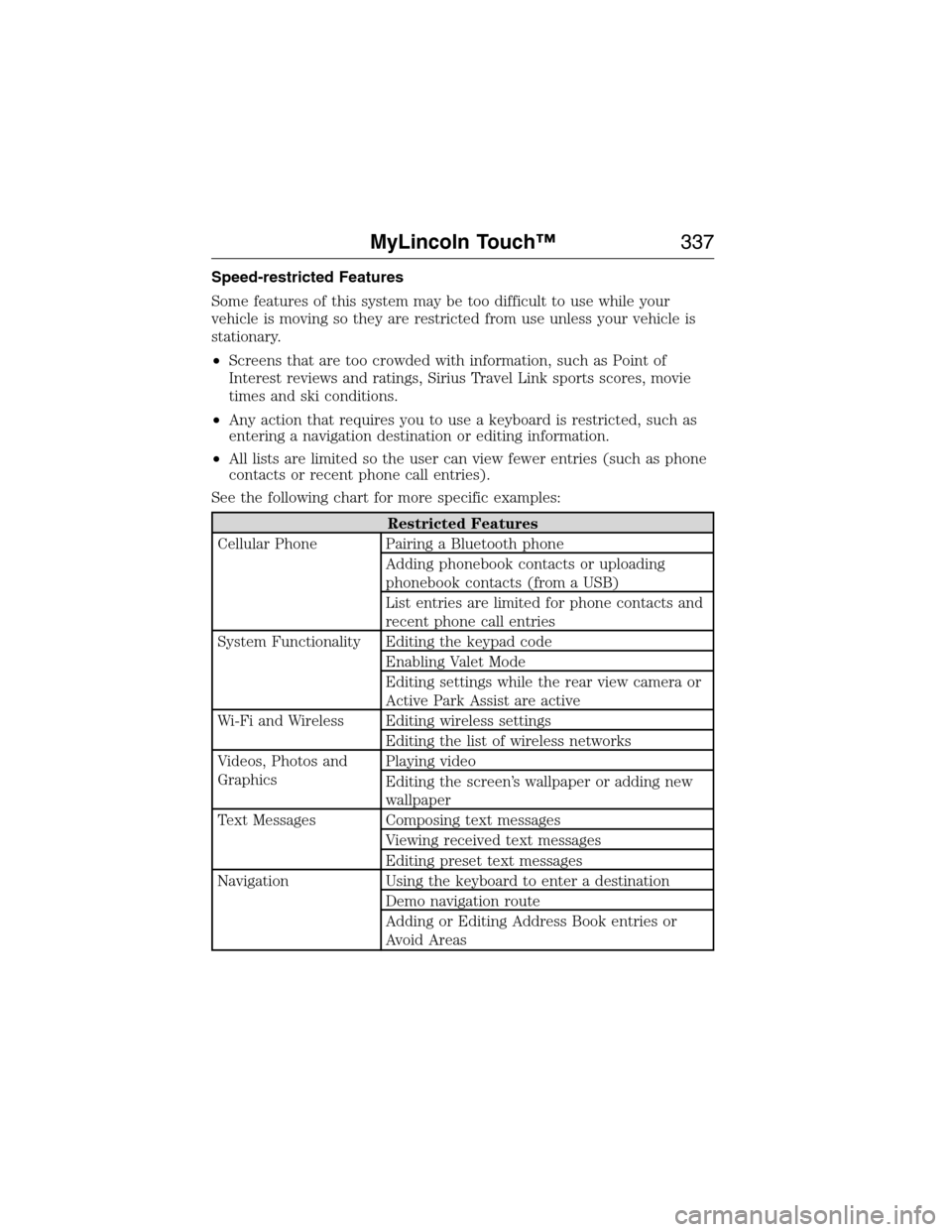
Speed-restricted Features
Some features of this system may be too difficult to use while your
vehicle is moving so they are restricted from use unless your vehicle is
stationary.
•Screens that are too crowded with information, such as Point of
Interest reviews and ratings, Sirius Travel Link sports scores, movie
times and ski conditions.
•Any action that requires you to use a keyboard is restricted, such as
entering a navigation destination or editing information.
•All lists are limited so the user can view fewer entries (such as phone
contacts or recent phone call entries).
See the following chart for more specific examples:
Restricted Features
Cellular Phone Pairing a Bluetooth phone
Adding phonebook contacts or uploading
phonebook contacts (from a USB)
List entries are limited for phone contacts and
recent phone call entries
System Functionality Editing the keypad code
Enabling Valet Mode
Editing settings while the rear view camera or
Active Park Assist are active
Wi-Fi and Wireless Editing wireless settings
Editing the list of wireless networks
Videos, Photos and
GraphicsPlaying video
Editing the screen’s wallpaper or adding new
wallpaper
Text Messages Composing text messages
Viewing received text messages
Editing preset text messages
Navigation Using the keyboard to enter a destination
Demo navigation route
Adding or Editing Address Book entries or
Avoid Areas
MyLincoln Touch™337
2014 MKX(mkx)
Owners Guide gf, 1st Printing, June 2014
USA(fus)
Page 339 of 453
Privacy Information
When a cellular phone is connected to SYNC, the system creates a profile
within your vehicle that is linked to that cellular phone. This profile is
created in order to offer you more cellular features and to operate more
efficiently. Among other things, this profile may contain data about your
cellular phone book, text messages (read and unread), and call history,
including history of calls when your cell phone was not connected to the
system. In addition, if you connect a media device, the system creates and
retains an index of supported media content. The system also records a
short development log of approximately 10 minutes of all recent system
activity. The log profile and other system data may be used to improve the
system and help diagnose any problems that may occur.
The cellular profile, media device index, and development log remain in
the vehicle unless you delete them and are generally accessible only in
the vehicle when the cellular phone or media player is connected. If you
no longer plan to use the system or the vehicle, we recommend you
perform a Master Reset to erase all stored information.
System data cannot be accessed without special equipment and access to
the vehicle’s SYNC module. Ford Motor Company and Ford of Canada do
not access the system data for any purpose other than as described
absent consent, a court order, or where required by law enforcement,
other government authorities, or other third parties acting with lawful
authority. Other parties may seek to access the information
independently of Ford Motor Company and Ford of Canada. For further
privacy information, see the sections on 911 Assist, Vehicle Health
Report, and Traffic, Directions and Information.
Privacy Notice for GPS Mapping with MyLincoln Mobile in the
United States and Canada
MyLincoln Mobile allows for GPS mapping when a vehicle is registered to
a MyLincoln Mobile account. To remove the vehicle from the account,
thereby removing GPS mapping ability, a Master Reset can be performed
in the vehicle. SeeSettingsin the MyLincoln Touch chapter.
Prior to transferring ownership of a vehicle, owners may choose to
execute a Master Reset or Factory Reset (completed via the MyLincoln
Mobile website). Either method will remove the vehicle from all
MyLincoln Mobile accounts.
It is recommended that new owners conduct a Master Reset upon taking
possession of the vehicle to remove it from any existing MyLincoln Mobile
accounts. The new owner can activate a MyLincoln Mobile account by
going to http://support.lincoln.com/owner-services/mylincoln-mobile-app and
following the registration process.
338MyLincoln Touch™
2014 MKX(mkx)
Owners Guide gf, 1st Printing, June 2014
USA(fus)
Page 340 of 453
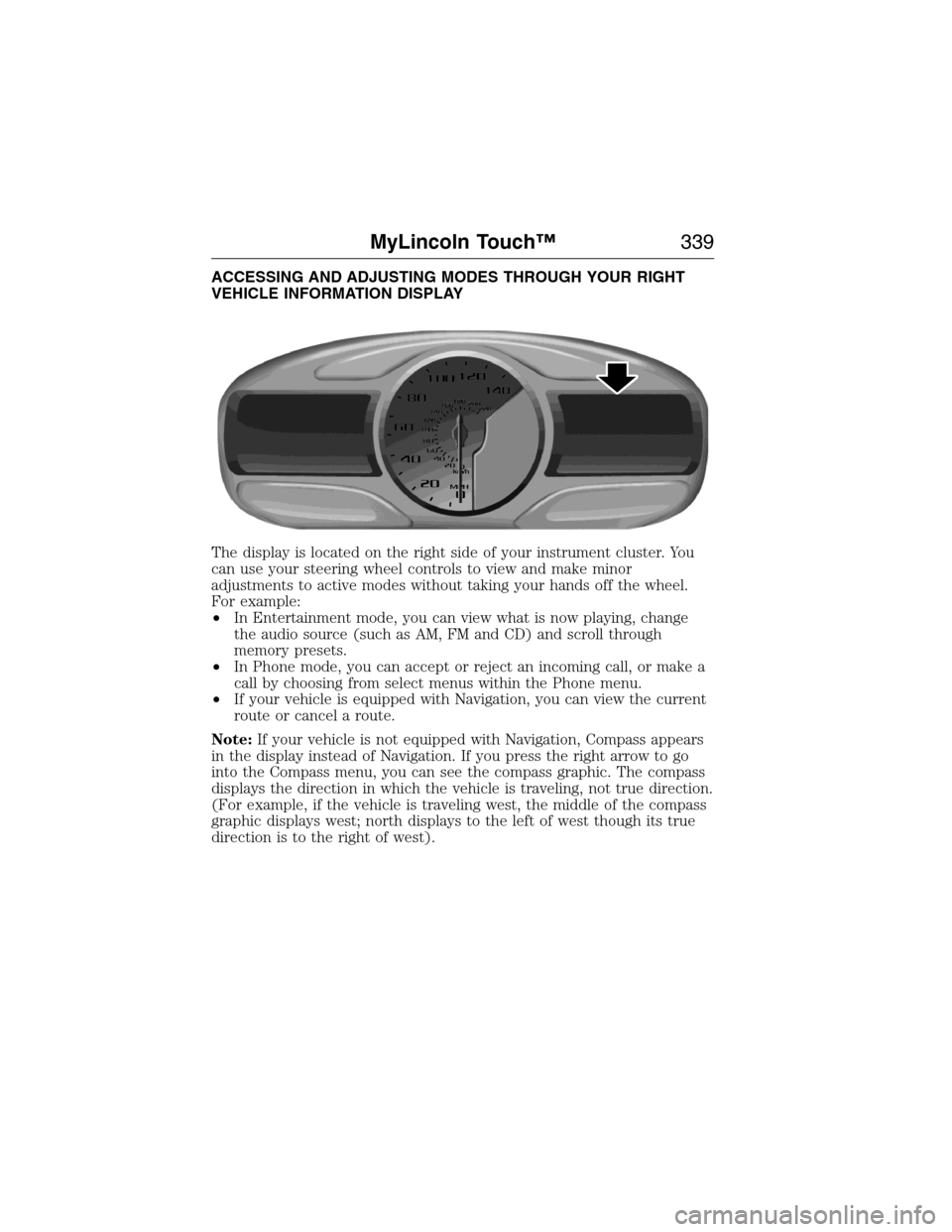
ACCESSING AND ADJUSTING MODES THROUGH YOUR RIGHT
VEHICLE INFORMATION DISPLAY
The display is located on the right side of your instrument cluster. You
can use your steering wheel controls to view and make minor
adjustments to active modes without taking your hands off the wheel.
For example:
•In Entertainment mode, you can view what is now playing, change
the audio source (such as AM, FM and CD) and scroll through
memory presets.
•In Phone mode, you can accept or reject an incoming call, or make a
call by choosing from select menus within the Phone menu.
•If your vehicle is equipped with Navigation, you can view the current
route or cancel a route.
Note:If your vehicle is not equipped with Navigation, Compass appears
in the display instead of Navigation. If you press the right arrow to go
into the Compass menu, you can see the compass graphic. The compass
displays the direction in which the vehicle is traveling, not true direction.
(For example, if the vehicle is traveling west, the middle of the compass
graphic displays west; north displays to the left of west though its true
direction is to the right of west).
MyLincoln Touch™339
2014 MKX(mkx)
Owners Guide gf, 1st Printing, June 2014
USA(fus)
Page 343 of 453
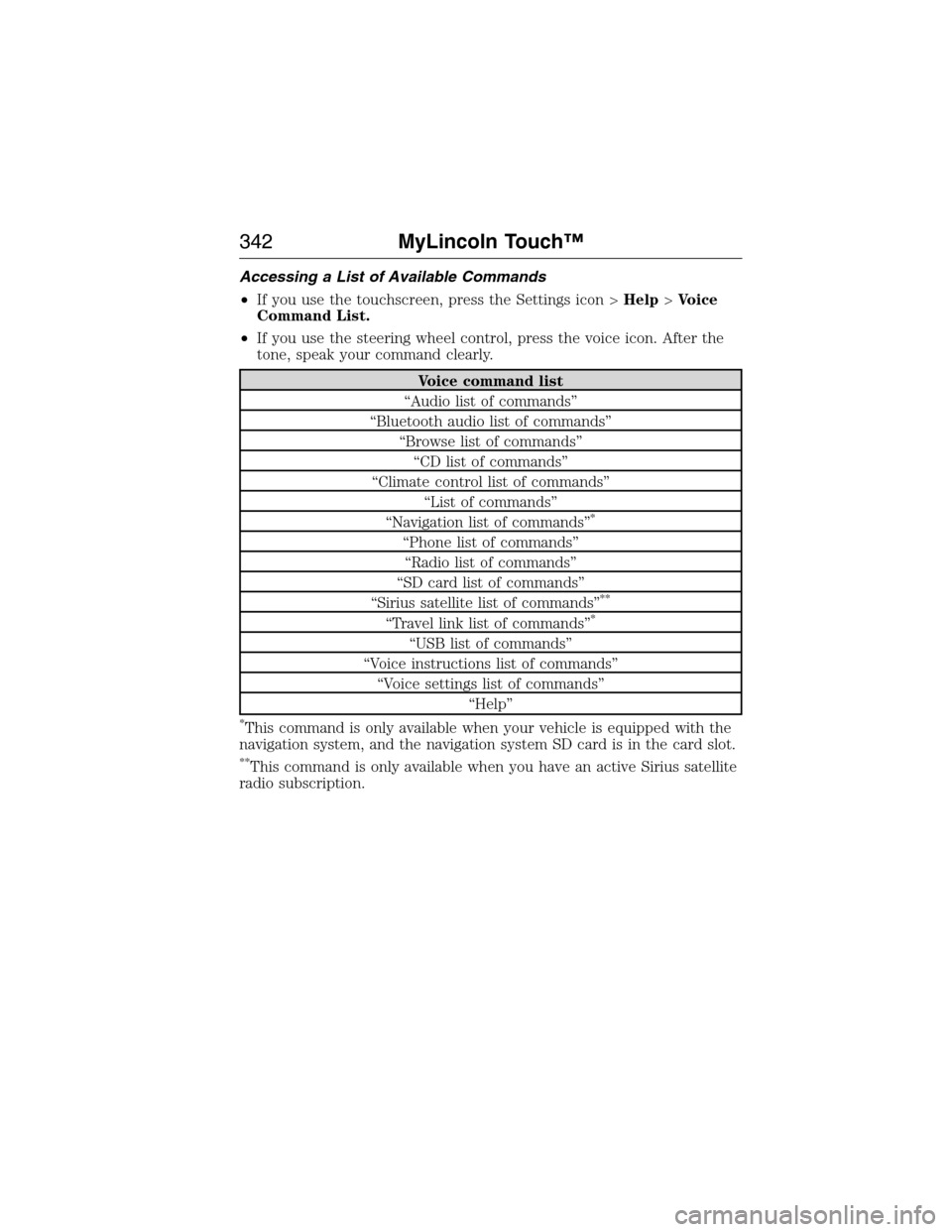
Accessing a List of Available Commands
•If you use the touchscreen, press the Settings icon >Help>Voice
Command List.
•If you use the steering wheel control, press the voice icon. After the
tone, speak your command clearly.
Voice command list
“Audio list of commands”
“Bluetooth audio list of commands”
“Browse list of commands”
“CD list of commands”
“Climate control list of commands”
“List of commands”
“Navigation list of commands”
*
“Phone list of commands”
“Radio list of commands”
“SD card list of commands”
“Sirius satellite list of commands”
**
“Travel link list of commands”*
“USB list of commands”
“Voice instructions list of commands”
“Voice settings list of commands”
“Help”
*This command is only available when your vehicle is equipped with the
navigation system, and the navigation system SD card is in the card slot.
**This command is only available when you have an active Sirius satellite
radio subscription.
342MyLincoln Touch™
2014 MKX(mkx)
Owners Guide gf, 1st Printing, June 2014
USA(fus)
Page 344 of 453
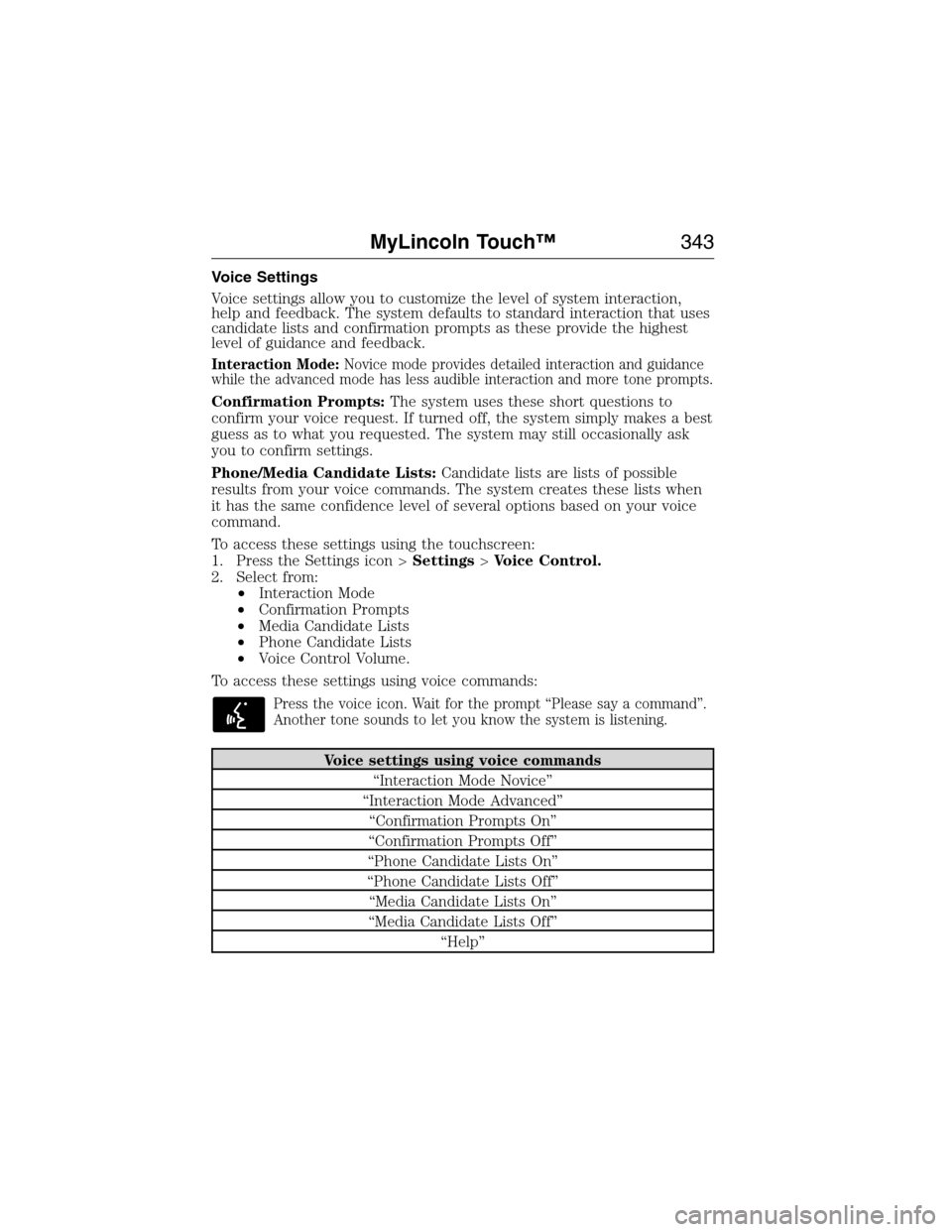
Voice Settings
Voice settings allow you to customize the level of system interaction,
help and feedback. The system defaults to standard interaction that uses
candidate lists and confirmation prompts as these provide the highest
level of guidance and feedback.
Interaction Mode:Novice mode provides detailed interaction and guidance
while the advanced mode has less audible interaction and more tone prompts.
Confirmation Prompts:The system uses these short questions to
confirm your voice request. If turned off, the system simply makes a best
guess as to what you requested. The system may still occasionally ask
you to confirm settings.
Phone/Media Candidate Lists:Candidate lists are lists of possible
results from your voice commands. The system creates these lists when
it has the same confidence level of several options based on your voice
command.
To access these settings using the touchscreen:
1. Press the Settings icon >Settings>Voice Control.
2. Select from:
•Interaction Mode
•Confirmation Prompts
•Media Candidate Lists
•Phone Candidate Lists
•Voice Control Volume.
To access these settings using voice commands:
Press the voice icon. Wait for the prompt “Please say a command”.
Another tone sounds to let you know the system is listening.
Voice settings using voice commands
“Interaction Mode Novice”
“Interaction Mode Advanced”
“Confirmation Prompts On”
“Confirmation Prompts Off”
“Phone Candidate Lists On”
“Phone Candidate Lists Off”
“Media Candidate Lists On”
“Media Candidate Lists Off”
“Help”
MyLincoln Touch™343
2014 MKX(mkx)
Owners Guide gf, 1st Printing, June 2014
USA(fus)