air condition LINCOLN MKX 2015 Owner's Manual
[x] Cancel search | Manufacturer: LINCOLN, Model Year: 2015, Model line: MKX, Model: LINCOLN MKX 2015Pages: 453, PDF Size: 4.04 MB
Page 259 of 453
The service engine soon indicator will illuminate.
If the engine reaches a preset over-temperature condition, the engine
will automatically switch to alternating cylinder operation. Each disabled
cylinder acts as an air pump and cools the engine.
When this occurs the vehicle will still operate. However:
•The engine power will be limited.
•The air conditioning system will be disabled.
Continued operation will increase the engine temperature and the engine
will completely shut down, causing steering and braking effort to
increase.
Once the engine temperature cools, the engine can be restarted. Take
your vehicle to an authorized dealer as soon as possible to minimize
engine damage.
When Fail-Safe Mode is Activated
WARNING:Fail-safe mode is for use during emergencies only.
Operate the vehicle in fail-safe mode only as long as necessary to
bring the vehicle to rest in a safe location and seek immediate repairs.
When in fail-safe mode, the vehicle will have limited power, will not be
able to maintain high-speed operation, and may completely shut down
without warning, potentially losing engine power, power steering assist,
and power brake assist, which may increase the possibility of a crash
resulting in serious injury.
WARNING:Never remove the coolant reservoir cap while the
engine is running or hot.
You have limited engine power when in the fail-safe mode, so drive the
vehicle with caution. The vehicle will not be able to maintain high-speed
operation and the engine will run rough. Remember that the engine is
capable of completely shutting down automatically to prevent engine
damage, therefore:
1. Pull off the road as soon as safely possible and turn off the engine.
2. Arrange for the vehicle to be taken to an authorized dealer.
3. If this is not possible, wait a short period for the engine to cool.
258Maintenance
2014 MKX(mkx)
Owners Guide gf, 1st Printing, June 2014
USA(fus)
Page 269 of 453
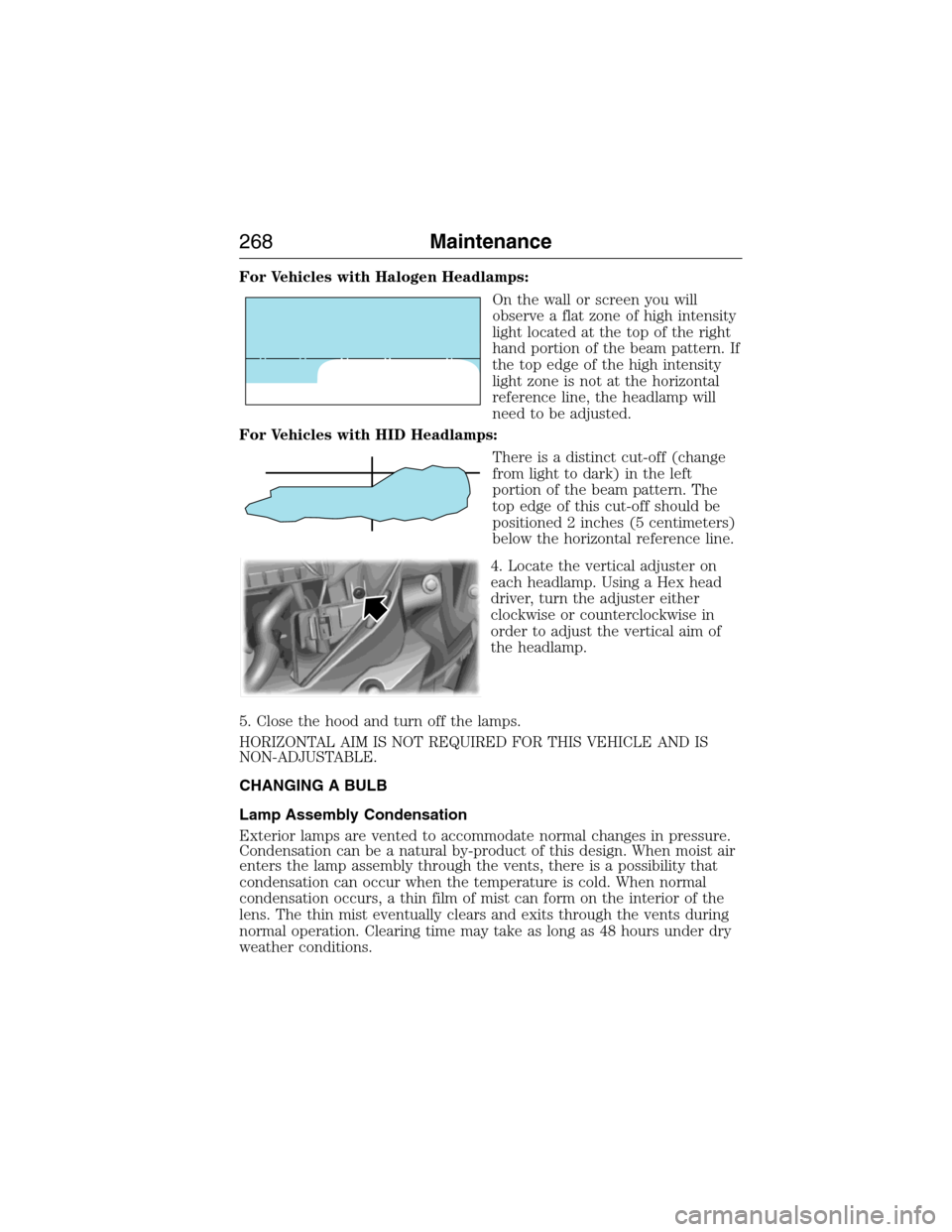
For Vehicles with Halogen Headlamps:
On the wall or screen you will
observe a flat zone of high intensity
light located at the top of the right
hand portion of the beam pattern. If
the top edge of the high intensity
light zone is not at the horizontal
reference line, the headlamp will
need to be adjusted.
For Vehicles with HID Headlamps:
There is a distinct cut-off (change
from light to dark) in the left
portion of the beam pattern. The
top edge of this cut-off should be
positioned 2 inches (5 centimeters)
below the horizontal reference line.
4. Locate the vertical adjuster on
each headlamp. Using a Hex head
driver, turn the adjuster either
clockwise or counterclockwise in
order to adjust the vertical aim of
the headlamp.
5. Close the hood and turn off the lamps.
HORIZONTAL AIM IS NOT REQUIRED FOR THIS VEHICLE AND IS
NON-ADJUSTABLE.
CHANGING A BULB
Lamp Assembly Condensation
Exterior lamps are vented to accommodate normal changes in pressure.
Condensation can be a natural by-product of this design. When moist air
enters the lamp assembly through the vents, there is a possibility that
condensation can occur when the temperature is cold. When normal
condensation occurs, a thin film of mist can form on the interior of the
lens. The thin mist eventually clears and exits through the vents during
normal operation. Clearing time may take as long as 48 hours under dry
weather conditions.
268Maintenance
2014 MKX(mkx)
Owners Guide gf, 1st Printing, June 2014
USA(fus)
Page 298 of 453
6. Visually inspect the tires to make sure there are no nails or other
objects embedded that could poke a hole in the tire and cause an air
leak.
7. Check the sidewalls to make sure there are no gouges, cuts or bulges.
Inspecting Your Tires and Wheel Valve Stems
Periodically inspect the tire treads for uneven or excessive wear and
remove objects such as stones, nails or glass that may be wedged in the
tread grooves. Check the tire and valve stems for holes, cracks, or cuts
that may permit air leakage and repair or replace the tire and replace
the valve stem. Inspect the tire sidewalls for cracking, cuts, bruises and
other signs of damage or excessive wear. If internal damage to the tire is
suspected, have the tire demounted and inspected in case it needs to be
repaired or replaced. For your safety, tires that are damaged or show
signs of excessive wear should not be used because they are more likely
to blow out or fail.
Improper or inadequate vehicle maintenance can cause tires to wear
abnormally. Inspect all your tires, including the spare, frequently, and
replace them if one or more of the following conditions exist:
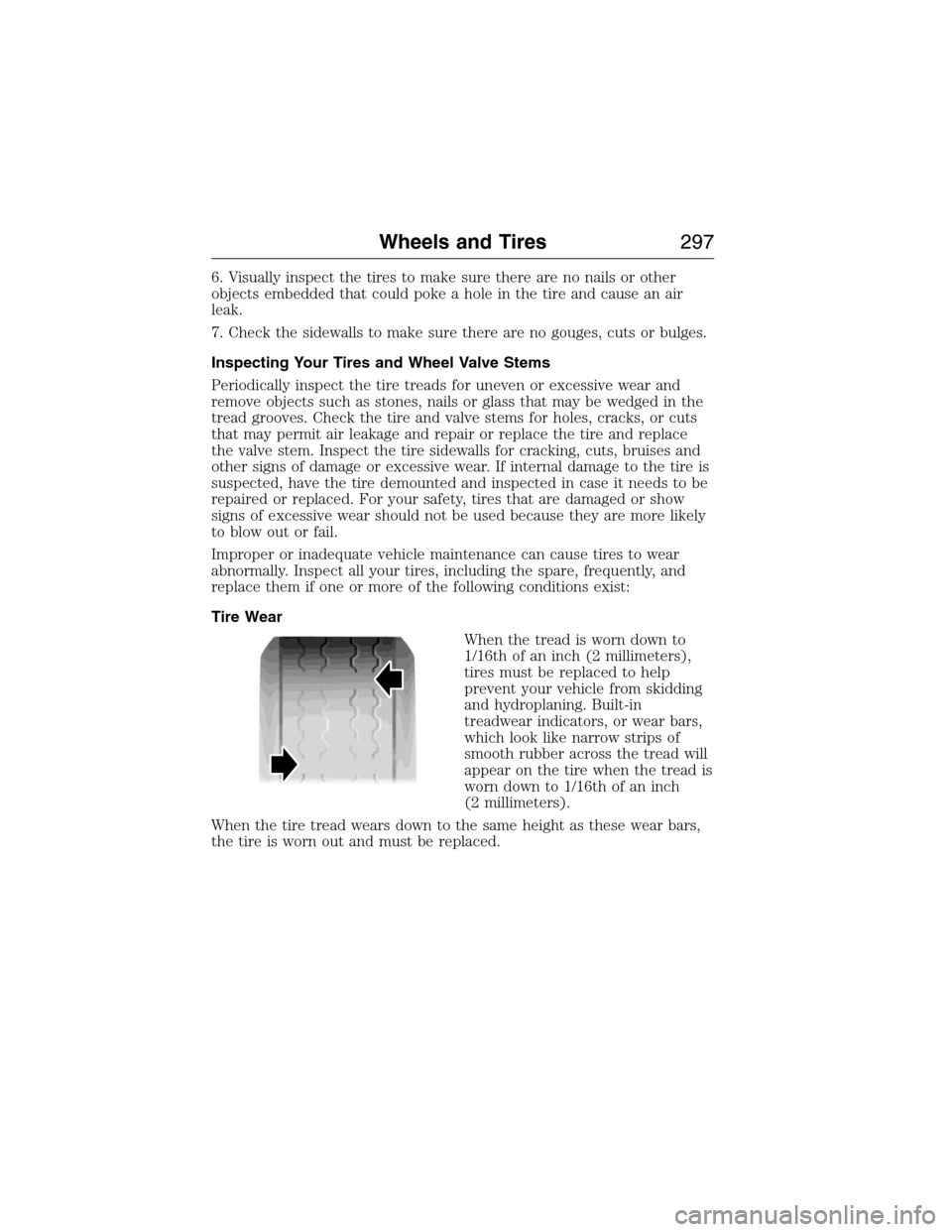
Tire Wear
When the tread is worn down to
1/16th of an inch (2 millimeters),
tires must be replaced to help
prevent your vehicle from skidding
and hydroplaning. Built-in
treadwear indicators, or wear bars,
which look like narrow strips of
smooth rubber across the tread will
appear on the tire when the tread is
worn down to 1/16th of an inch
(2 millimeters).
When the tire tread wears down to the same height as these wear bars,
the tire is worn out and must be replaced.
Wheels and Tires297
2014 MKX(mkx)
Owners Guide gf, 1st Printing, June 2014
USA(fus)
Page 319 of 453
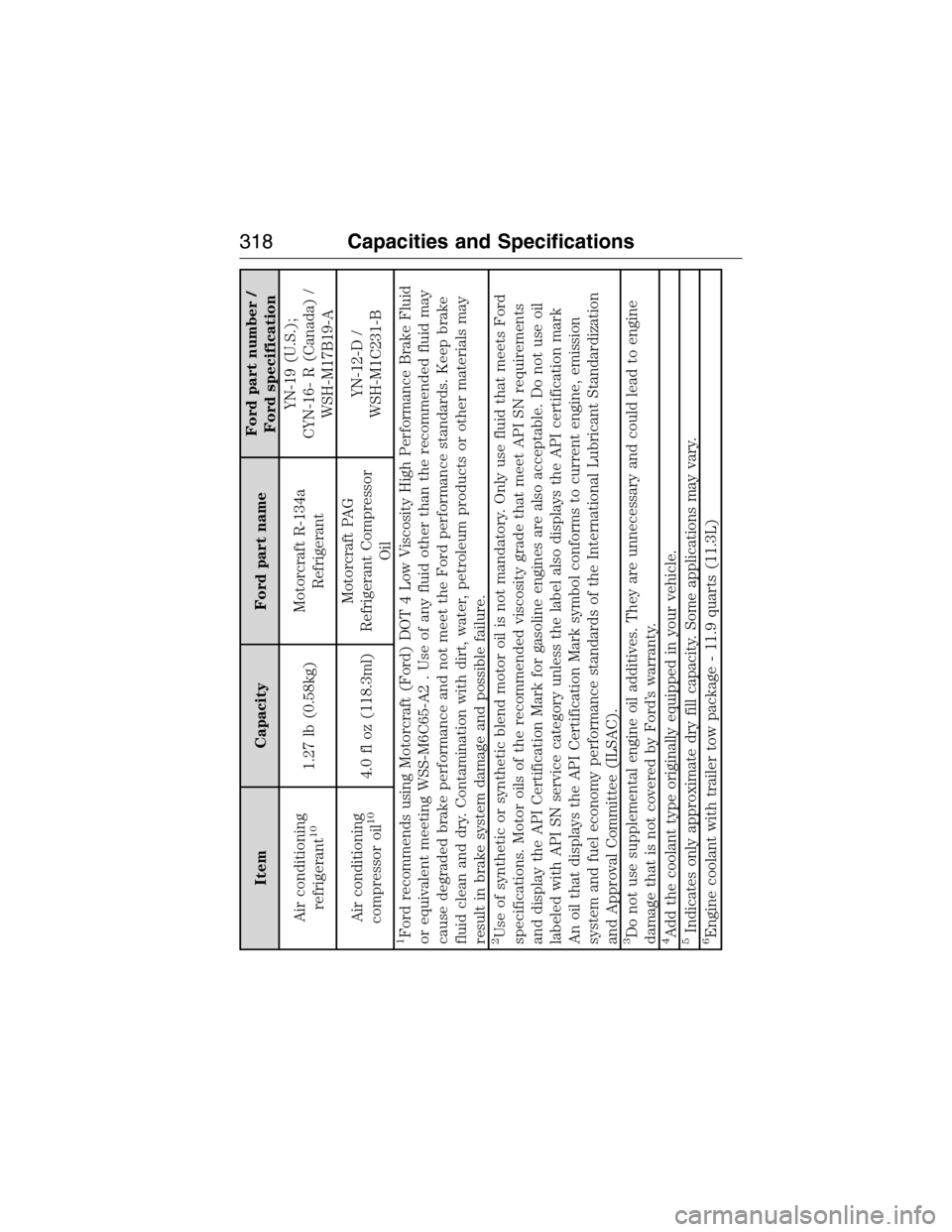
Item Capacity Ford part nameFord part number /
Ford specification
Air conditioning
refrigerant
10
1.27 lb (0.58kg)Motorcraft R-134a
RefrigerantYN-19 (U.S.);
CYN-16- R (Canada) /
WSH-M17B19-A
Air conditioning
compressor oil
10
4.0 fl oz (118.3ml)Motorcraft PAG
Refrigerant Compressor
OilYN-12-D /
WSH-M1C231-B
1Ford recommends using Motorcraft (Ford) DOT 4 Low Viscosity High Performance Brake Fluid
or equivalent meeting WSS-M6C65-A2 . Use of any fluid other than the recommended fluid may
cause degraded brake performance and not meet the Ford performance standards. Keep brake
fluid clean and dry. Contamination with dirt, water, petroleum products or other materials may
result in brake system damage and possible failure.2Use of synthetic or synthetic blend motor oil is not mandatory. Only use fluid that meets Ford
specifications. Motor oils of the recommended viscosity grade that meet API SN requirements
and display the API Certification Mark for gasoline engines are also acceptable. Do not use oil
labeled with API SN service category unless the label also displays the API certification mark
An oil that displays the API Certification Mark symbol conforms to current engine, emission
system and fuel economy performance standards of the International Lubricant Standardization
and Approval Committee (ILSAC).3Do not use supplemental engine oil additives. They are unnecessary and could lead to engine
damage that is not covered by Ford’s warranty.4Add the coolant type originally equipped in your vehicle.5Indicates only approximate dry fill capacity. Some applications may vary.6Engine coolant with trailer tow package - 11.9 quarts (11.3L)
318Capacities and Specifications
2014 MKX(mkx)
Owners Guide gf, 1st Printing, June 2014
USA(fus)
Page 320 of 453
Item Capacity Ford part nameFord part number /
Ford specification
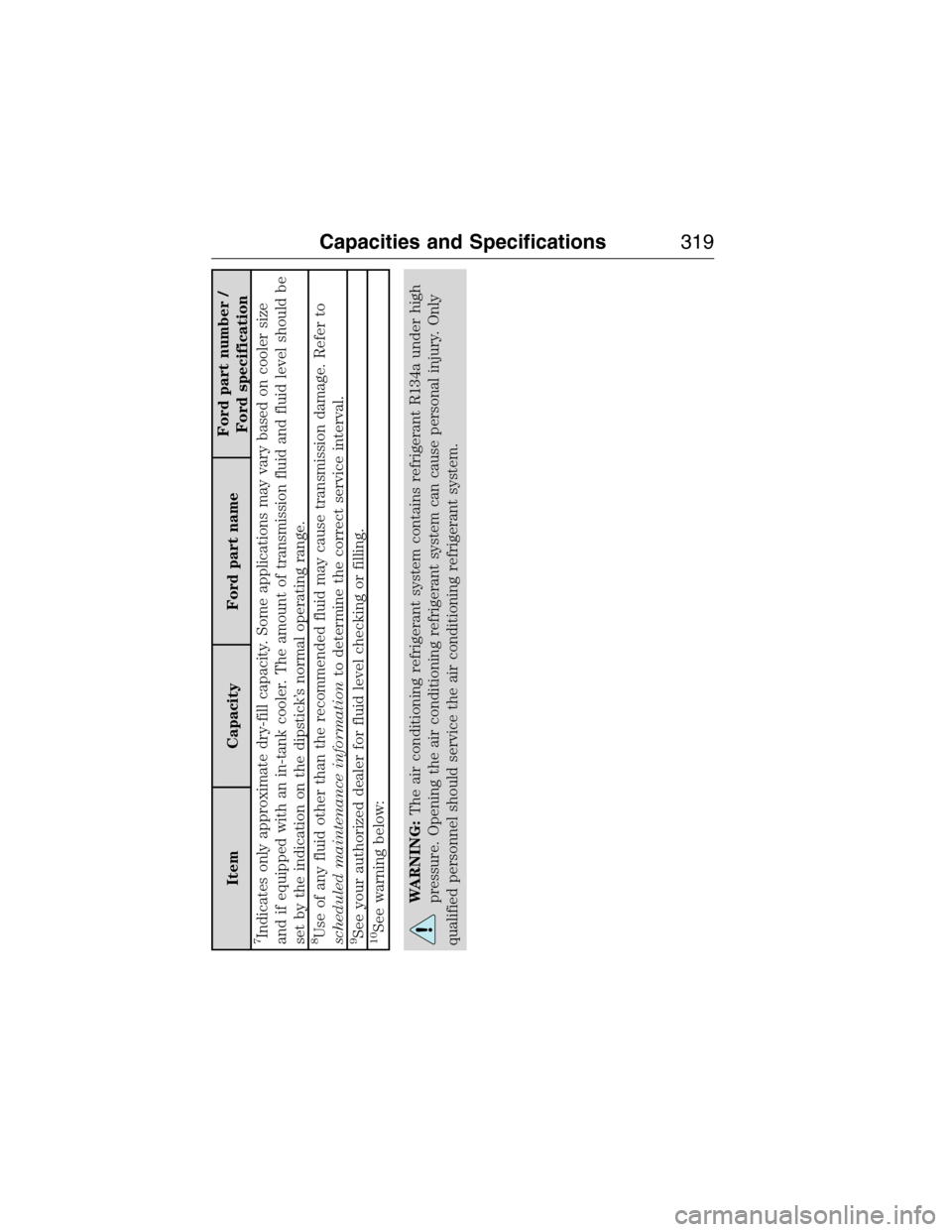
7Indicates only approximate dry-fill capacity. Some applications may vary based on cooler size
and if equipped with an in-tank cooler. The amount of transmission fluid and fluid level should be
set by the indication on the dipstick’s normal operating range.8Use of any fluid other than the recommended fluid may cause transmission damage. Refer to
scheduled maintenance informationto determine the correct service interval.9See your authorized dealer for fluid level checking or filling.10See warning below:
WARNING:The air conditioning refrigerant system contains refrigerant R134a under high
pressure. Opening the air conditioning refrigerant system can cause personal injury. Only
qualified personnel should service the air conditioning refrigerant system.
Capacities and Specifications319
2014 MKX(mkx)
Owners Guide gf, 1st Printing, June 2014
USA(fus)
Page 337 of 453
Support
The SYNC support team is available to help you with any questions you
cannot answer on your own.
Monday-Saturday, 8:30am-9:00pm EST.
Sunday, 10:30am-7:30pm EST.
In the United States, call: 1–800–392–3673.
In Canada, call: 1–800–565–3673.
Times are subject to change due to holidays.
Safety Information
WARNING:Driving while distracted can result in loss of vehicle
control, crash and injury. We strongly recommend that you use
extreme caution when using any device that may take your focus off
the road. Your primary responsibility is the safe operation of your
vehicle. We recommend against the use of any handheld device while
driving and encourage the use of voice-operated systems when possible.
Make sure you are aware of all applicable local laws that may affect the
use of electronic devices while driving.
When using SYNC:
•Do not operate playing devices if the power cords or cables are
broken, split or damaged. Place cords and cables out of the way, so
they do not interfere with the operation of pedals, seats,
compartments or safe driving abilities.
•Do not leave playing devices in your vehicle during extreme conditions
as it could cause them damage. See your device’s manual for further
information.
•Do not attempt to service or repair the system. See your authorized
dealer.
For your safety, some SYNC functions are speed-dependent. Their use is
limited to when your vehicle is traveling at speeds under 3 mph
(5 km/h).
Make sure that you review your device’s manual before using it with
SYNC.
336MyLincoln Touch™
2014 MKX(mkx)
Owners Guide gf, 1st Printing, June 2014
USA(fus)
Page 338 of 453
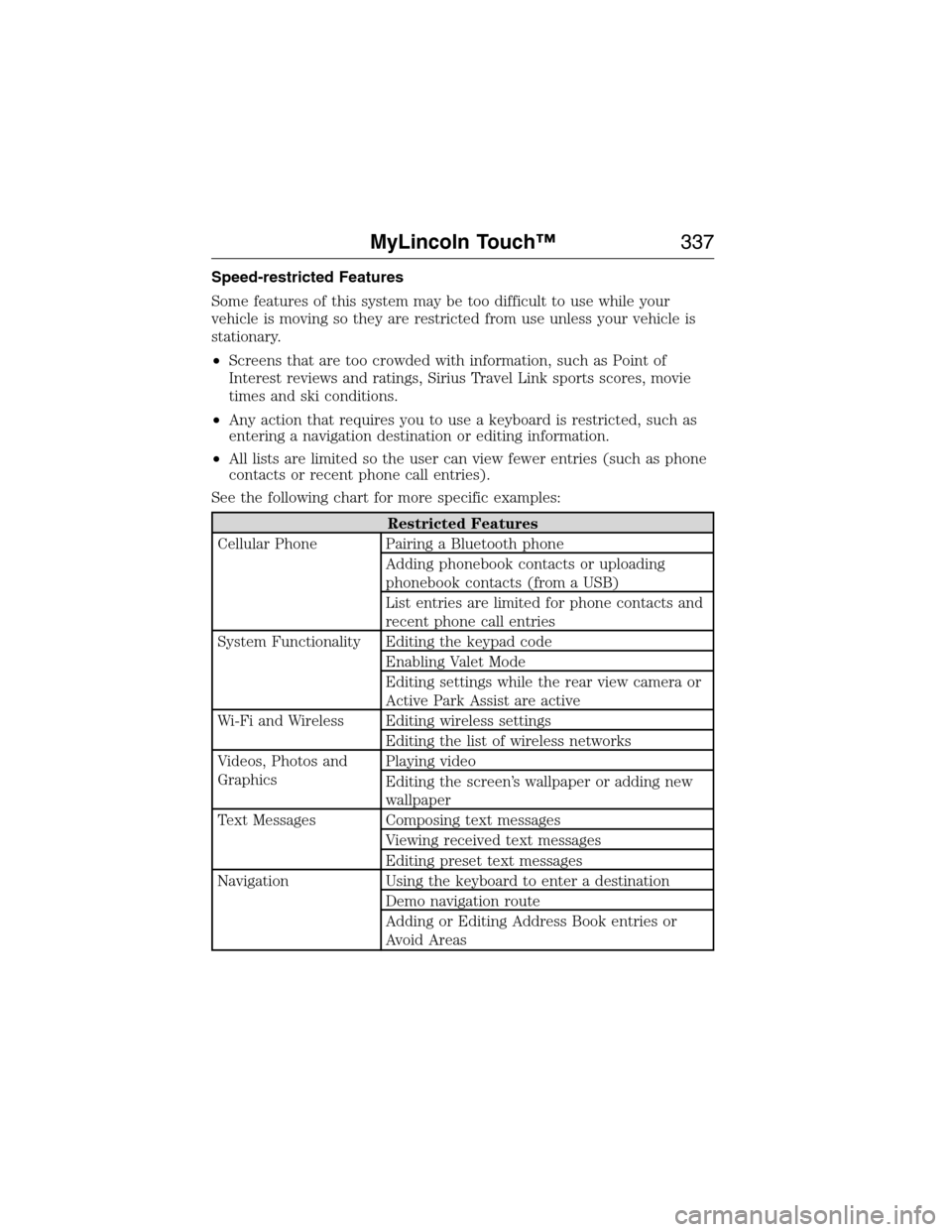
Speed-restricted Features
Some features of this system may be too difficult to use while your
vehicle is moving so they are restricted from use unless your vehicle is
stationary.
•Screens that are too crowded with information, such as Point of
Interest reviews and ratings, Sirius Travel Link sports scores, movie
times and ski conditions.
•Any action that requires you to use a keyboard is restricted, such as
entering a navigation destination or editing information.
•All lists are limited so the user can view fewer entries (such as phone
contacts or recent phone call entries).
See the following chart for more specific examples:
Restricted Features
Cellular Phone Pairing a Bluetooth phone
Adding phonebook contacts or uploading
phonebook contacts (from a USB)
List entries are limited for phone contacts and
recent phone call entries
System Functionality Editing the keypad code
Enabling Valet Mode
Editing settings while the rear view camera or
Active Park Assist are active
Wi-Fi and Wireless Editing wireless settings
Editing the list of wireless networks
Videos, Photos and
GraphicsPlaying video
Editing the screen’s wallpaper or adding new
wallpaper
Text Messages Composing text messages
Viewing received text messages
Editing preset text messages
Navigation Using the keyboard to enter a destination
Demo navigation route
Adding or Editing Address Book entries or
Avoid Areas
MyLincoln Touch™337
2014 MKX(mkx)
Owners Guide gf, 1st Printing, June 2014
USA(fus)
Page 374 of 453
Note:This feature does not function properly if you have enabled caller
ID blocking on your mobile phone. Make sure your mobile phone is not
blocking caller ID before using SYNC Services.
Note:The driver is ultimately responsible for the safe operation of the
vehicle, and therefore, must evaluate whether it is safe to follow the
suggested directions. Any navigation features are provided only as an aid.
Make your driving decisions based on your observations of local
conditions and existing traffic regulations. Do not follow the route
suggestions if doing so would result in an unsafe or illegal maneuver, if
you would be placed in an unsafe situation, or if you would be directed
into an area that you consider unsafe. Maps used by this system may be
inaccurate because of errors, changes in roads, traffic conditions or
driving conditions.
Note:When you connect, the service uses GPS technology and advanced
vehicle sensors to collect your vehicle’s current location, travel direction
and speed to help provide you with the directions, traffic reports, or
business searches you request. Further, to provide the services you
request, for continuous improvement, the service may collect and record
call details and voice communications. For more information, see SYNC
Services Terms and Conditions at www.SYNCMyRide.com. If you do not
want Ford or its service providers to collect your vehicle travel
information or other information identified in the Terms and Conditions,
do not subscribe or use the service.
SYNC Services uses advanced vehicle sensors, integrated GPS technology
and comprehensive map and traffic data, to give you personalized traffic
reports, precise turn-by-turn directions, business search, news, sports,
weather and more. For a complete list of services, or to learn more,
please visit www.SYNCMyRide.com.
Connecting to SYNC Services Using Voice Commands
Press the voice button on the steering wheel controls.
1. When prompted, say “Services”. This initiates an outgoing call to
SYNC Services using your paired and connected Bluetooth-enabled
cellular phone.
2. Once you connect to the service, follow the voice prompts to request
the desired service, such as “Traffic” or “Directions”. You can also
say, “What are my choices?” to receive a list of available services
from which to choose.
3. Say, “Services” to return to the Services main menu or for help, say,
“Help”.
MyLincoln Touch™373
2014 MKX(mkx)
Owners Guide gf, 1st Printing, June 2014
USA(fus)
Page 386 of 453
From this screen, you can also make other adjustments, such as 12– or
24–hour mode, activate GPS time synchronization and have the system
automatically update for new time zones.
You can also turn the outside air temperature display on and off. It
appears at the top center of the touchscreen, next to the time and date.
The system automatically saves any updates you make to the settings.
Display
You can adjust the touchscreen display through the touchscreen or by
pressing the voice button on your steering wheel controls and when
prompted, say, “Display settings”.
Press the Settings icon >Display,to access and make
adjustments using the touchscreen.
•
Brightnessallows you to make the screen display brighter or dimmer.
•Auto DIM, when set toOn,lets you use the Auto Dim Manual Offset
feature. When set toOff,screen brightness does not change.
•Modeallows you to set the screen to a certain brightness or have the
system automatically change based on the outside light level, or turn
the display off.
•If you selectAUTOorNIGHT,you have the options of turning the
display’s Auto Dim feature on or off and changing the Auto Dim
Manual Offset feature.
•Auto Dim Manual Offsetallows you to adjust screen dimming as the
outside lighting conditions change from day to night. This feature also
allows you to adjust screen brightness using the instrument panel
dimming control.
Edit Wallpaper
•You can have your touchscreen display the default photo or upload
your own.
Uploading Photos for Your Home Screen Wallpaper
Note:You cannot load photos directly from your camera. You must
access the photos either from your USB mass storage device or from an
SD card.
Note:Photographs with extremely large dimensions (such as 2048 x 1536)
may not be compatible and appear as a blank (black) image on the display.
Your system allows you to upload and view up to 32 photos.
To access, press the Settings icon >Display>Edit Wallpaper,and
then follow the system prompts to upload your photographs.
MyLincoln Touch™385
2014 MKX(mkx)
Owners Guide gf, 1st Printing, June 2014
USA(fus)
Page 398 of 453
F.A/C:Touch to turn the air conditioning on or off.
•Use with recirculated air to improve cooling performance and
efficiency.
•Engages automatically in MAX A/C, defrost and floor/defrost.
G.AUTO:Touch to engage automatic operation, then set the
temperature using the temperature control. The system automatically
controls:
•Fan speed
•Airflow distribution
•A/Conoroff
•Outside or recirculated air.
H.Rear defroster:Touch to turn the rear window defroster and heated
mirrors.
I.Defrost:Touch to clear the windshield of fog and thin ice. Touch
again to return to the previous airflow selection. When on, defrost:
•Provides outside air to reduce window fogging.
•Distributes air through the windshield defroster vents and demister
vents.
J.Manual controls:Select any of the following airflow distribution
modes:
•Floor and Defrost:Distributes air through the windshield defroster
vents, demister vents, floor vents and rear seat floor vents, and
provides outside air to reduce window fogging.
•Panel:Distributes air through the instrument panel vents.
•Panel and Floor:Distributes air through the instrument panel vents,
demister vents, floor vents and rear seat floor vents.
•Floor:Distributes air through the demister vents, floor vents and
rear seat floor vents.
K.Driver settings:Depending on your vehicle and option package, you
may have the following features:
•Touch+or–to adjust the temperature.
•If your vehicle is equipped with heated seats, touch the heated seat
icon to control the heated seat. See theSeatschapter.
•If your vehicle is equipped with cooled seats, touch the cooled seat
icon to control the cooled seat. See theSeatschapter.
•Touch and holdMyTempto select a temperature you would like your
vehicle to remember and maintain for you.
•If your vehicle is equipped with a heated steering wheel, touch the
heated steering wheel icon to warm the steering wheel.
Note:If your vehicle is equipped with a wood-trimmed steering wheel, it
does not heat between the 10 o’clock and 2 o’clock positions.
MyLincoln Touch™397
2014 MKX(mkx)
Owners Guide gf, 1st Printing, June 2014
USA(fus)