transmission LINCOLN MKX 2015 Owner's Guide
[x] Cancel search | Manufacturer: LINCOLN, Model Year: 2015, Model line: MKX, Model: LINCOLN MKX 2015Pages: 453, PDF Size: 4.04 MB
Page 175 of 453
HILL START ASSIST
WARNING:The hill start assist feature does not replace the
parking brake. When you leave the vehicle, always apply the
parking brake and shift the transmission into park (P).
WARNING:You must remain in the vehicle once you have
activated the hill start assist feature.
WARNING:During all times, you are responsible for controlling
the vehicle, supervising the hill start assist system and
intervening, if required.
WARNING:If the engine is revved excessively, or if a
malfunction is detected when the hill start assist feature is active,
the hill start assist feature will be deactivated.
Hill start assist keeps your vehicle stationary long enough to move your
foot from the brake pedal to the accelerator pedal when your vehicle is
on a slope.
The brakes are released automatically once the engine has developed
sufficient drive to prevent the vehicle from rolling down the slope. This
is an advantage when pulling away on a slope, (for example from a car
park ramp, traffic lights or when reversing uphill into a parking space).
Using Hill Start Assist
1. Press the brake pedal to bring the vehicle to a complete standstill.
Keep the brake pedal pressed.
2. If the sensors detect that the vehicle is on a slope, the hill start assist
feature will be activated automatically.
3. When you remove your foot from the brake pedal, the vehicle will
remain on the slope without rolling away for approximately two or three
seconds. This hold time will automatically be extended if you are in the
process of driving off.
4. Drive off in the normal manner. The brakes will be released
automatically.
174Brakes
2014 MKX(mkx)
Owners Guide gf, 1st Printing, June 2014
USA(fus)
Page 178 of 453
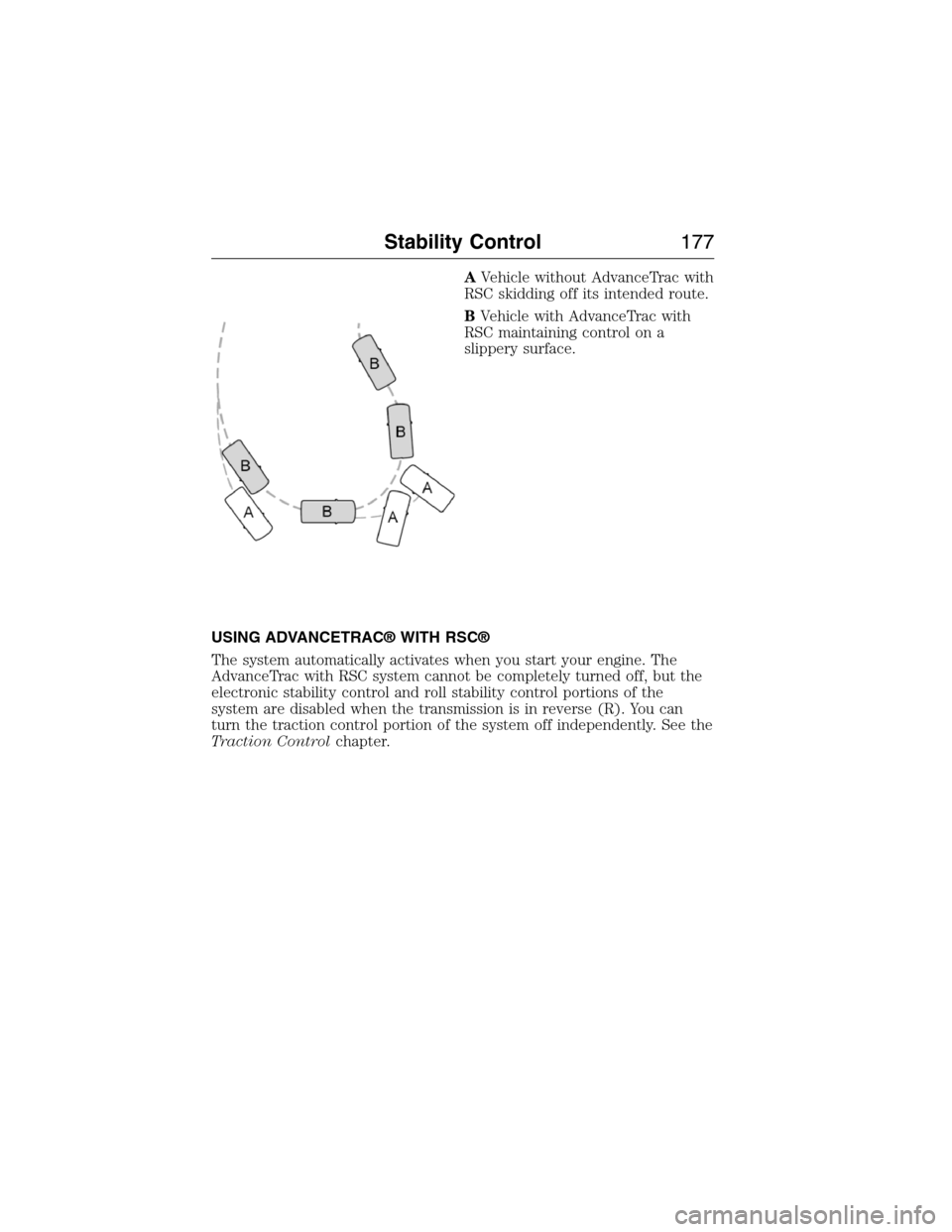
AVehicle without AdvanceTrac with
RSC skidding off its intended route.
BVehicle with AdvanceTrac with
RSC maintaining control on a
slippery surface.
USING ADVANCETRAC® WITH RSC®
The system automatically activates when you start your engine. The
AdvanceTrac with RSC system cannot be completely turned off, but the
electronic stability control and roll stability control portions of the
system are disabled when the transmission is in reverse (R). You can
turn the traction control portion of the system off independently. See the
Traction Controlchapter.
Stability Control177
2014 MKX(mkx)
Owners Guide gf, 1st Printing, June 2014
USA(fus)
Page 180 of 453
The system can be turned off using the information display control.
Refer to theInformation Displaychapter.
If a fault is present in the system, a warning message appears in the
information display and does not allow the driver to switch the faulted
system on.
Note:If your vehicle is equipped with MyKey®, it is possible to prevent
turning the sensing system off. Refer to theMyKey®chapter.
Using the Rear Sensing System
The rear sensors are only active when the transmission is inR.Asthe
vehicle moves closer to the obstacle, the rate of the audible warning
increases. When the obstacle is fewer than 12 inches (30 centimeters)
away, the warning sounds continuously. If a stationary or receding object
is detected farther than 12 inches (30 centimeters) from the side of the
vehicle, the tone sounds for only three seconds. Once the system detects
an object approaching, the warning sounds again.
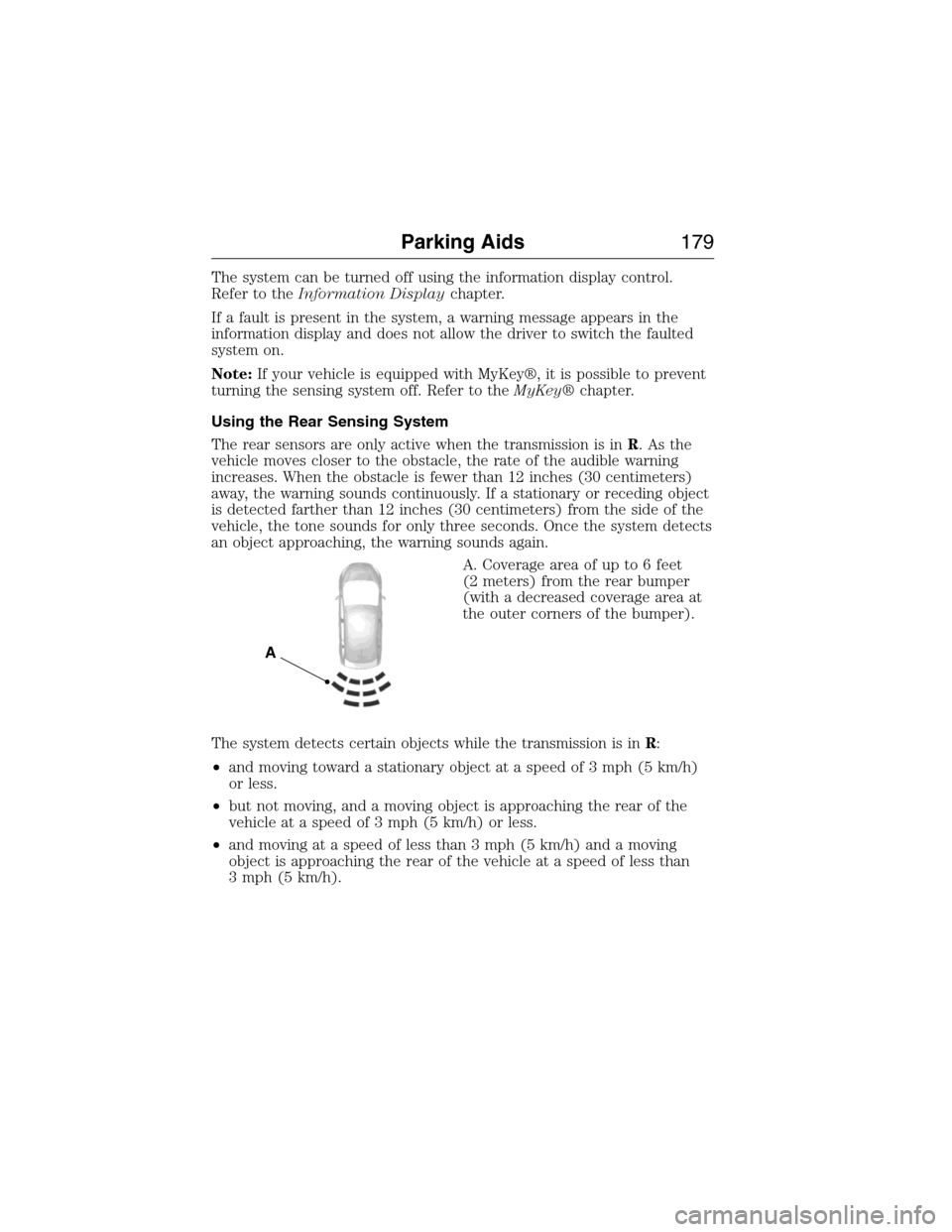
A. Coverage area of up to 6 feet
(2 meters) from the rear bumper
(with a decreased coverage area at
the outer corners of the bumper).
The system detects certain objects while the transmission is inR:
•and moving toward a stationary object at a speed of 3 mph (5 km/h)
or less.
•but not moving, and a moving object is approaching the rear of the
vehicle at a speed of 3 mph (5 km/h) or less.
•and moving at a speed of less than 3 mph (5 km/h) and a moving
object is approaching the rear of the vehicle at a speed of less than
3 mph (5 km/h).
A
Parking Aids179
2014 MKX(mkx)
Owners Guide gf, 1st Printing, June 2014
USA(fus)
Page 182 of 453
Using the Rear View Camera System
The rear view camera system displays what is behind your vehicle when
you place the transmission in R (Reverse). The system uses two types of
guides to help you see what is behind your vehicle:
1. Fixed guidelines: Show the actual path the vehicle is moving in while
reversing in a straight line, which can be helpful when backing into a
parking space or aligning the vehicle with another object behind the
vehicle.
2. Centerline: Helps align the center of the vehicle with an object (i.e. a
trailer).
Note:If the transmission is in R (Reverse) and the liftgate is ajar, no
rear view camera features are displayed.
Note:If the image comes on while the transmission is not in R
(Reverse), have the system inspected by your authorized dealer.
Note:When towing, the camera only sees what is being towed behind
the vehicle. This might not provide adequate coverage as it usually
provides in normal operation and some objects might not be seen. In
some vehicles, the guidelines may disappear once the trailer tow
connector is engaged.
Note:The camera may not operate correctly under the following
conditions:
•Nighttime or dark areas if one or both reverse lamps are not
operating.
•The camera’s view is obstructed by mud, water or debris. Clean the
lens with a soft, lint-free cloth and non-abrasive cleaner.
•The rear of the vehicle is hit or damaged, causing the camera to
become misaligned.
Adjusting the Rear View Camera Settings
To access any of the rear view camera system settings, make the
following selections in the touch screen when the transmission is not in
R (Reverse):
1. Menu
2. Vehicle
3. Camera Settings
After changing a system setting, the touch screen shows a preview of the
feature(s) selected.
Parking Aids181
2014 MKX(mkx)
Owners Guide gf, 1st Printing, June 2014
USA(fus)
Page 183 of 453
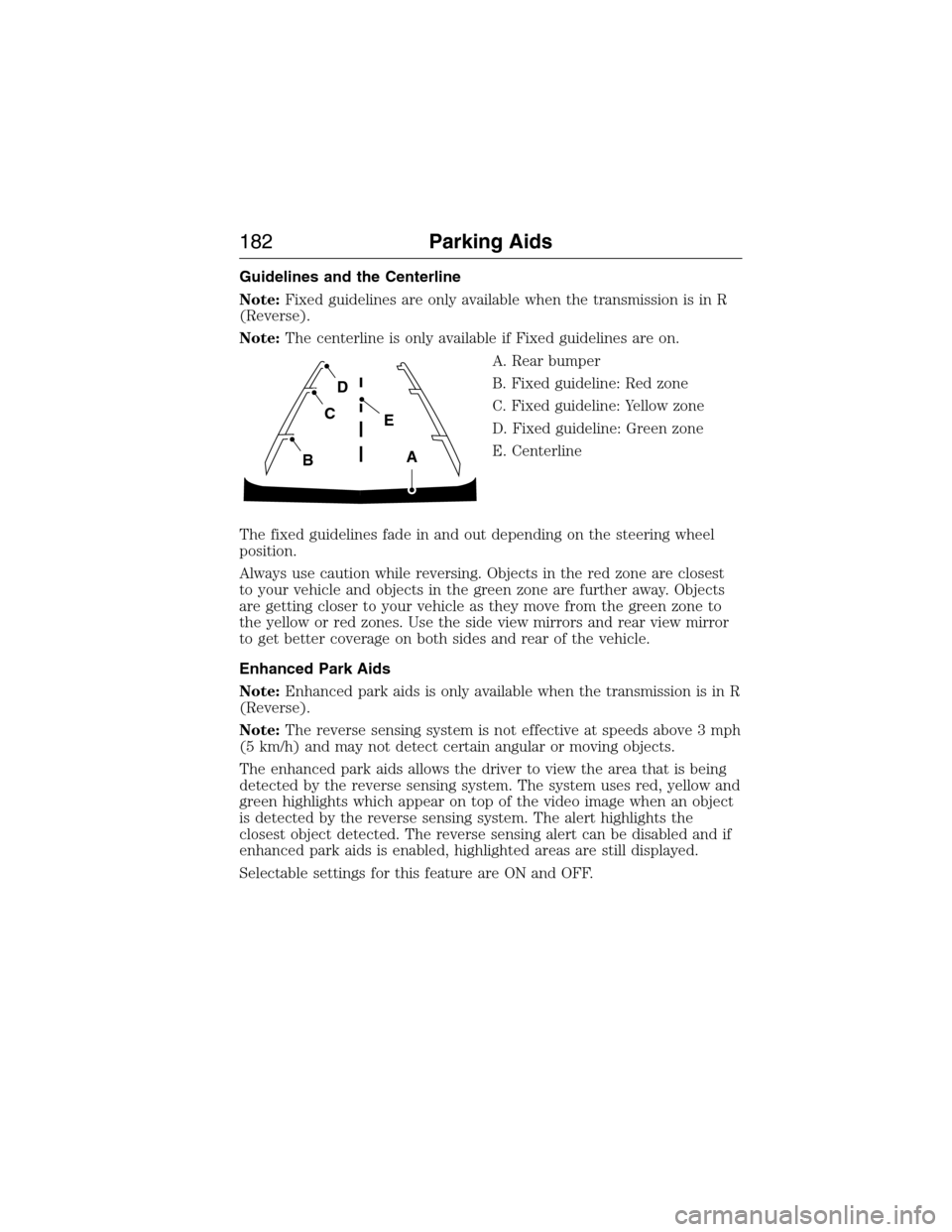
Guidelines and the Centerline
Note:Fixed guidelines are only available when the transmission is in R
(Reverse).
Note:The centerline is only available if Fixed guidelines are on.
A. Rear bumper
B. Fixed guideline: Red zone
C. Fixed guideline: Yellow zone
D. Fixed guideline: Green zone
E. Centerline
The fixed guidelines fade in and out depending on the steering wheel
position.
Always use caution while reversing. Objects in the red zone are closest
to your vehicle and objects in the green zone are further away. Objects
are getting closer to your vehicle as they move from the green zone to
the yellow or red zones. Use the side view mirrors and rear view mirror
to get better coverage on both sides and rear of the vehicle.
Enhanced Park Aids
Note:Enhanced park aids is only available when the transmission is in R
(Reverse).
Note:The reverse sensing system is not effective at speeds above 3 mph
(5 km/h) and may not detect certain angular or moving objects.
The enhanced park aids allows the driver to view the area that is being
detected by the reverse sensing system. The system uses red, yellow and
green highlights which appear on top of the video image when an object
is detected by the reverse sensing system. The alert highlights the
closest object detected. The reverse sensing alert can be disabled and if
enhanced park aids is enabled, highlighted areas are still displayed.
Selectable settings for this feature are ON and OFF.
A
E
D
C
B
182Parking Aids
2014 MKX(mkx)
Owners Guide gf, 1st Printing, June 2014
USA(fus)
Page 184 of 453
Manual Zoom
WARNING:When manual zoom is on, the full area behind the
vehicle is not shown. Be aware of your surroundings when using
the manual zoom feature.
Note:Manual zoom is only available when the transmission is in R
(Reverse).
Note:When manual zoom is enabled, only the centerline is shown.
Allows the driver to get a closer view of an object behind the vehicle.
The zoomed image keeps the bumper in the image to provide a
reference. The zoom is only active while the transmission is in R
(Reverse), When the transmission is shifted out of R (Reverse), the
feature automatically turns off and must be reset when it is used again.
Selectable settings for this feature are OFF and ON. Press the zoom
button to change the view. The default setting for the manual zoom is
OFF.
Rear Camera Delay
When shifting the transmission out of R (Reverse) and into any gear
other than P (Park), the camera image remains in the display until the
vehicle speed reaches 6 mph (10 km/h). This occurs when the rear
camera delay feature is on, or until a radio button is selected.
Selectable settings for this feature are ON and OFF. The default setting
for the rear camera delay is OFF.
Parking Aids183
2014 MKX(mkx)
Owners Guide gf, 1st Printing, June 2014
USA(fus)
Page 195 of 453
BLIND SPOT INFORMATION SYSTEM (BLIS®) WITH CROSS
TRAFFIC ALERT (CTA) (IF EQUIPPED)
WARNING:To help avoid injuries, NEVER use the BLIS® as a
replacement for using the interior and exterior mirrors and
looking over your shoulder before changing lanes. BLIS® is not a
replacement for careful driving.
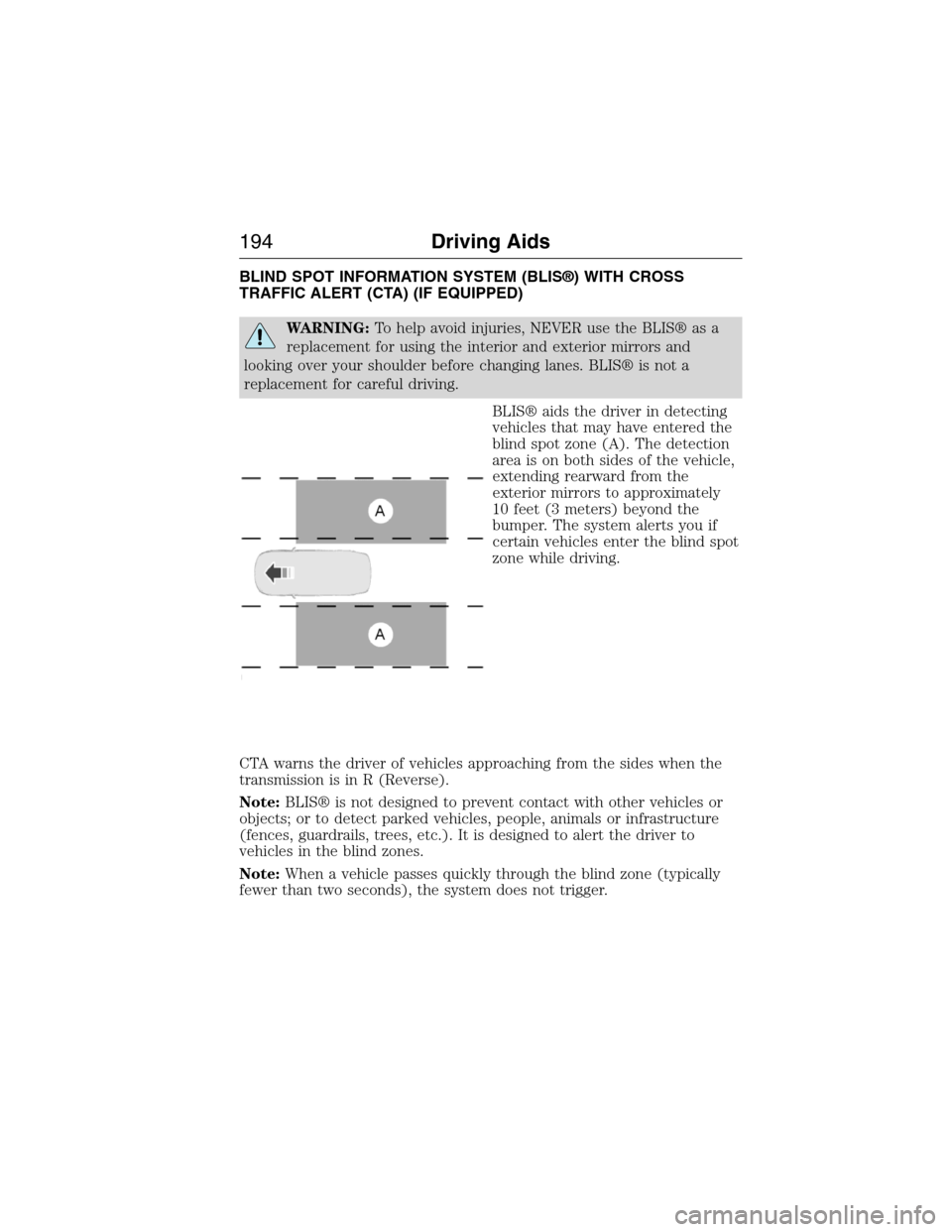
BLIS® aids the driver in detecting
vehicles that may have entered the
blind spot zone (A). The detection
area is on both sides of the vehicle,
extending rearward from the
exterior mirrors to approximately
10 feet (3 meters) beyond the
bumper. The system alerts you if
certain vehicles enter the blind spot
zone while driving.
CTA warns the driver of vehicles approaching from the sides when the
transmission is in R (Reverse).
Note:BLIS® is not designed to prevent contact with other vehicles or
objects; or to detect parked vehicles, people, animals or infrastructure
(fences, guardrails, trees, etc.). It is designed to alert the driver to
vehicles in the blind zones.
Note:When a vehicle passes quickly through the blind zone (typically
fewer than two seconds), the system does not trigger.
194Driving Aids
2014 MKX(mkx)
Owners Guide gf, 1st Printing, June 2014
USA(fus)
Page 196 of 453
Using the Systems
BLIS® turns on when the engine is started and the vehicle is driven
forward above 3 mph (5 km/h); it remains on while the transmission is in
D (Drive) or N (Neutral). If shifted out of D (Drive) or N (Neutral), the
system enters CTA mode. Once shifted back into D (Drive), BLIS® turns
back on when the vehicle is driven above 3 mph (5 km/h).
Note:BLIS® does not function in R (Reverse) or P (Park) or provide
any additional warning when a turn signal is on.
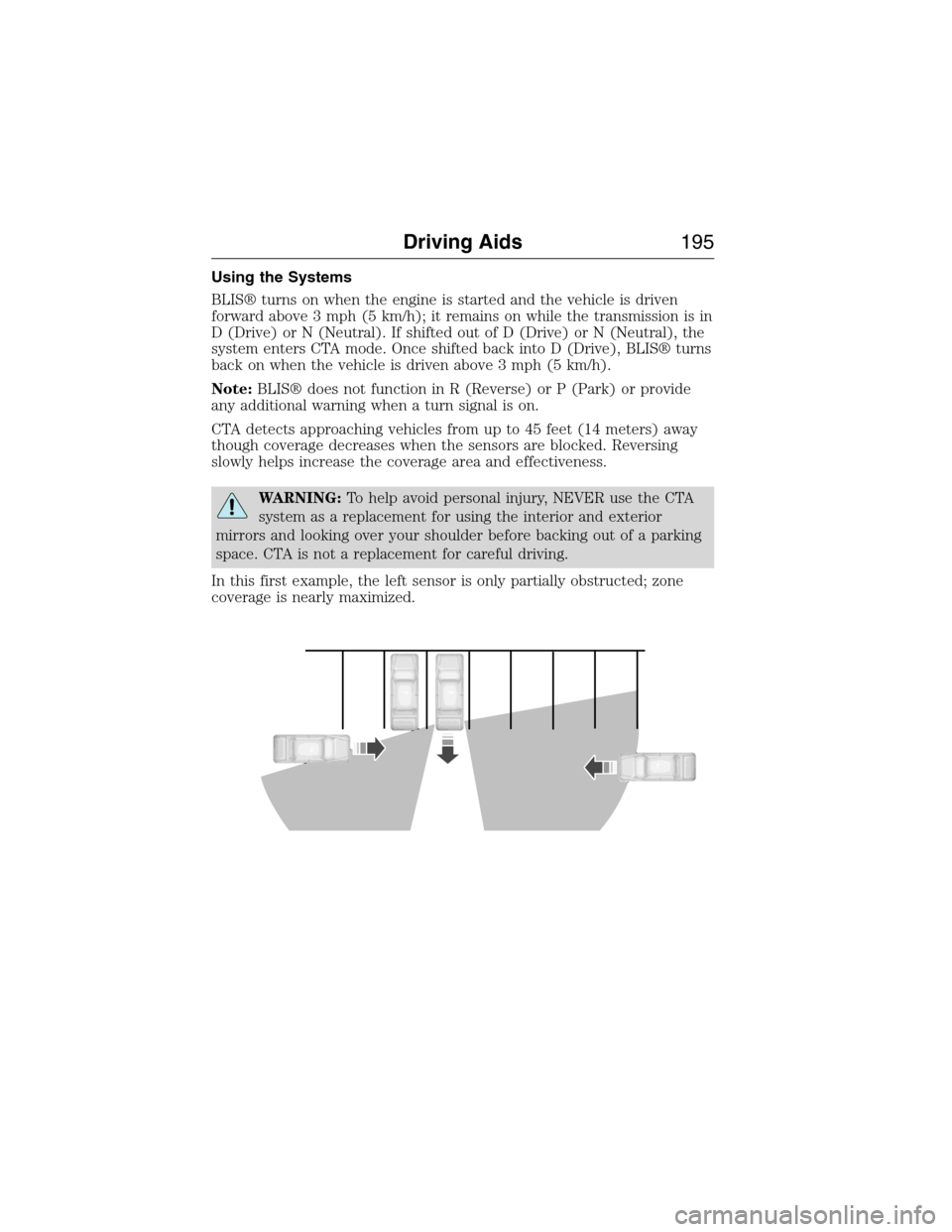
CTA detects approaching vehicles from up to 45 feet (14 meters) away
though coverage decreases when the sensors are blocked. Reversing
slowly helps increase the coverage area and effectiveness.
WARNING:To help avoid personal injury, NEVER use the CTA
system as a replacement for using the interior and exterior
mirrors and looking over your shoulder before backing out of a parking
space. CTA is not a replacement for careful driving.
In this first example, the left sensor is only partially obstructed; zone
coverage is nearly maximized.
Driving Aids195
2014 MKX(mkx)
Owners Guide gf, 1st Printing, June 2014
USA(fus)
Page 211 of 453
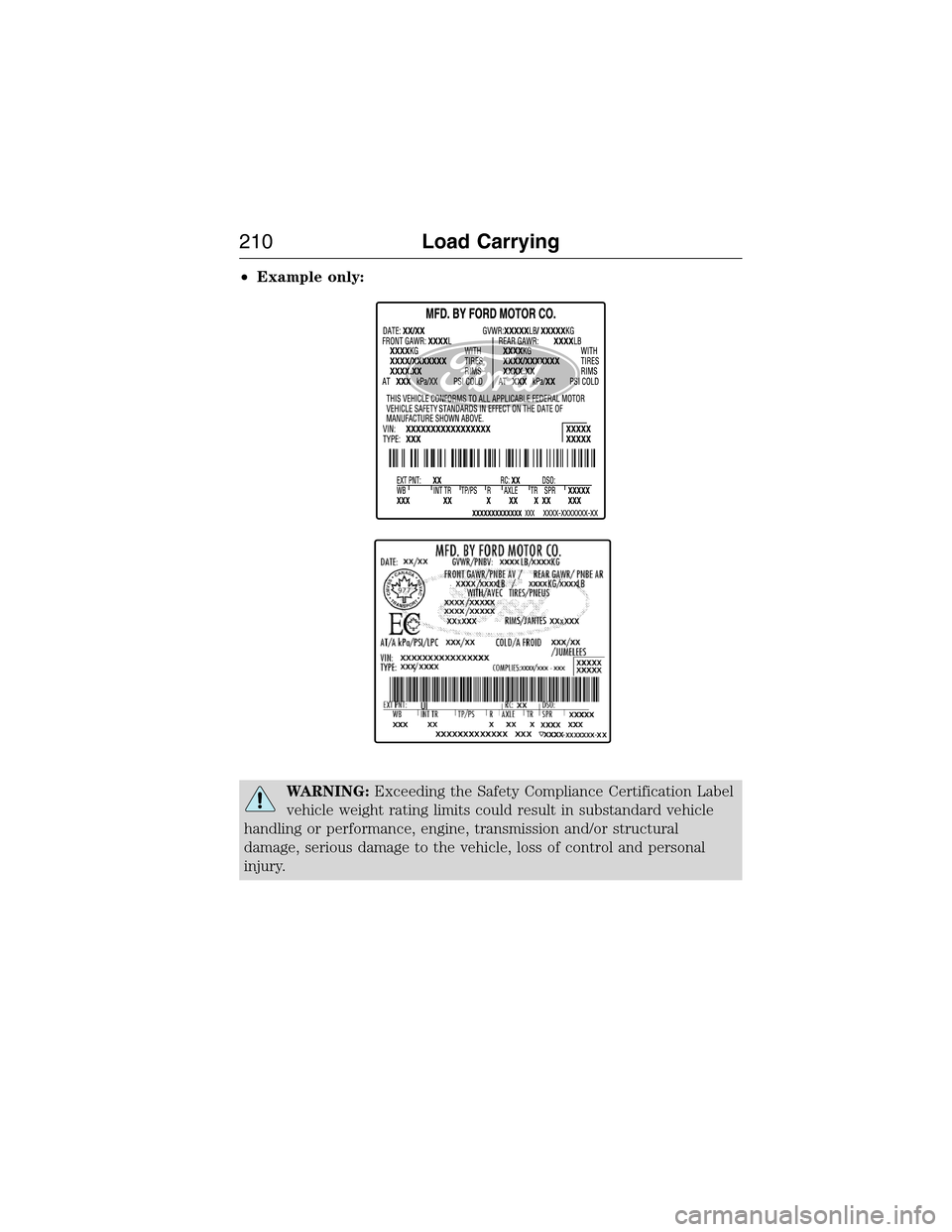
•Example only:
WARNING:Exceeding the Safety Compliance Certification Label
vehicle weight rating limits could result in substandard vehicle
handling or performance, engine, transmission and/or structural
damage, serious damage to the vehicle, loss of control and personal
injury.
210Load Carrying
2014 MKX(mkx)
Owners Guide gf, 1st Printing, June 2014
USA(fus)
Page 215 of 453
TOWING A TRAILER
WARNING:Do not exceed the GVWR or the GAWR specified on
the certification label.
WARNING:Towing trailers beyond the maximum recommended
gross trailer weight exceeds the limit of your vehicle and could
result in engine damage, transmission damage, structural damage, loss
of vehicle control, vehicle rollover and personal injury.
Note:For information on electrical items such as fuses or relays, see the
Fuseschapter.
The load capacity of your vehicle is designated by weight not volume.
You may not necessarily be able to use all available space when loading
your vehicle or trailer.
Towing a trailer places extra load on the engine, transmission, axle,
brakes, tires, and suspension. Inspect these components before, during
and after towing.
Load Placement
To help minimize how trailer movement affects your vehicle when
driving:
•Load the heaviest items closest to the trailer floor.
•Load the heaviest items centered between the left and right side
trailer tires.
•Load the heaviest items above the trailer axles or just slightly forward
toward the trailer tongue. Do not allow the final trailer tongue weight
to go above or below 10–15% of the loaded trailer weight.
•Select a tow bar with the correct rise or drop. When both the loaded
vehicle and trailer are connected, the trailer frame should be level, or
slightly angled down toward your vehicle, when viewed from the side.
When driving with a trailer or payload, a slight takeoff vibration or
shudder may be present due to the increased payload weight. You can
find more information about proper trailer loading and setting your
vehicle up for towing underLoad limitin theLoad Carryingchapter.
You can also find information in theRV and Trailer Towing Guide
available at your authorized dealer, or online at
http://www.fleet.ford.com/towing-guides.
214Towing
2014 MKX(mkx)
Owners Guide gf, 1st Printing, June 2014
USA(fus)