ignition LINCOLN MKX 2015 Repair Manual
[x] Cancel search | Manufacturer: LINCOLN, Model Year: 2015, Model line: MKX, Model: LINCOLN MKX 2015Pages: 453, PDF Size: 4.04 MB
Page 278 of 453
•Spray Motorcraft Engine Shampoo and Degreaser on all parts that
require cleaning and pressure rinse clean. In Canada, use Motorcraft
Engine Shampoo.
•Never wash or rinse the engine while it is hot or running; water in the
running engine may cause internal damage.
•Never wash or rinse any ignition coil, spark plug wire or spark plug
well, or the area in and around these locations.
•Cover the battery, power distribution box, and air filter assembly to
prevent water damage when cleaning the engine.
CLEANING THE WINDOWS AND WIPER BLADES
The windows and wiper blades should be cleaned regularly. If the wipers
do not wipe properly, substances on the vehicle’s glass or the wiper
blades may cause squeaking or chatter noise from the blades, and
streaking and smearing of the windshield. To clean these items, follow
these tips:
•The windows may be cleaned with a non-abrasive cleaner such as
Motorcraft® Ultra-Clear Spray Glass Cleaner (U.S.) or Motorcraft
Premium Glass Cleaner (Canada).
•The wiper blades can be cleaned with isopropyl (rubbing) alcohol or
Motorcraft Premium Windshield Washer Concentrates in the U.S., or
Motorcraft Premium Quality Windshield Washer Fluid in Canada.
Replace your wiper blades when they appear worn or do not function
properly.
•Do not use abrasive materials, as they may cause scratches.
•Do not use fuel, kerosene, or paint thinner to clean any parts.
If you cannot remove those streaks after cleaning with the glass cleaner
or if the wipers chatter and move in a jerky motion, clean the outer
surface of the windshield and the wiper blades using a sponge or soft
cloth with a neutral detergent or mild-abrasive cleaning solution. After
cleaning, rinse the windshield and wiper blades with clean water. The
windshield is clean if beads do not form when you rinse the windshield
with water.
Note:Do not use sharp objects, such as a razor blade, to clean the
inside of the rear window or to remove decals, as it may cause damage
to the rear window defroster’s heated grid lines.
Vehicle Care277
2014 MKX(mkx)
Owners Guide gf, 1st Printing, June 2014
USA(fus)
Page 316 of 453
ENGINE SPECIFICATIONS
Engine 3.7L V6 engine
Cubic inches 227
Required fuel Minimum 87 octane
Firing order 1–4–2–5–3–6
Ignition system Coil on plug
Compression ratio 10.5:1
Spark plug gap 0.049–0.053 inch (1.25–1.35 mm)
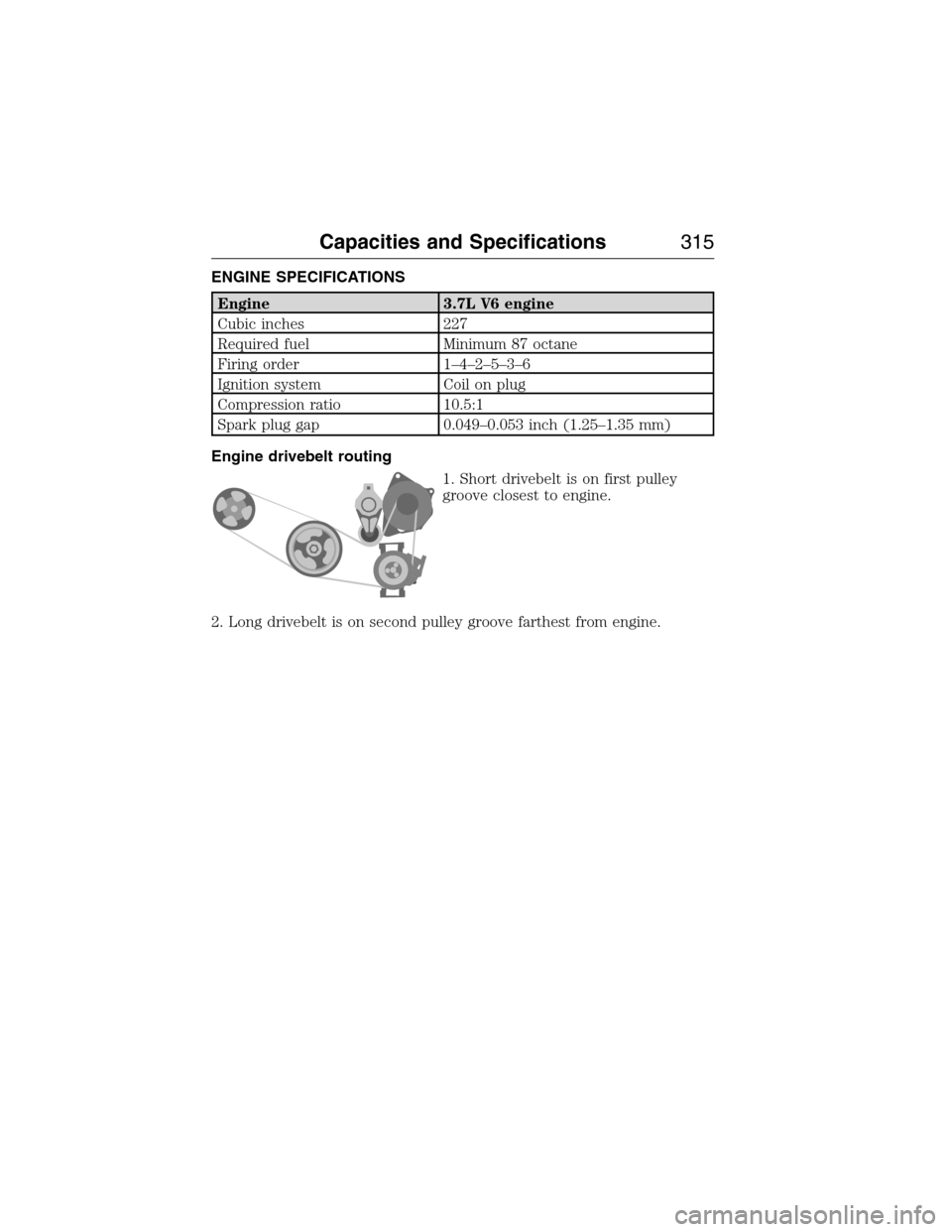
Engine drivebelt routing
1. Short drivebelt is on first pulley
groove closest to engine.
2. Long drivebelt is on second pulley groove farthest from engine.
Capacities and Specifications315
2014 MKX(mkx)
Owners Guide gf, 1st Printing, June 2014
USA(fus)
Page 334 of 453
This system uses a four-corner strategy to provide quick access several
vehicle features and settings. The touchscreen provides easy interaction
with your cellular phone, multimedia, climate control and navigation
system. The corners display any active modes within those menus, such
as phone status or the climate temperature.
Note:Some features are not available while your vehicle is moving.
Note:Your system is equipped with a feature that allows you to access
and control audio features for 30 minutes after you switch the ignition
off (and no doors open).
PHONE
Press to select any of the following:
•Making Calls
•Quick Dial
•Phonebook
•Call History
•Text Messaging
•Settings
NAVIGATION
Press to select any of the following:
•My Home
•Favorites
•Previous Destinations
•Point of Interest
•Emergency
•Street Address
•Intersection
•City Center
•Map
•Edit Route
•Cancel Route
CLIMATE
Press to select any of the following:
•Driver Settings
•Recirculated Air
•Auto
•Dual
•Passenger Settings
•A/C
•Defrost
MyLincoln Touch™333
2014 MKX(mkx)
Owners Guide gf, 1st Printing, June 2014
USA(fus)
Page 357 of 453
Sirius troubleshooting tips
Radio display Condition Possible action
Acquiring... Radio requires more
than two seconds to
produce audio for the
selected channel.No action required. This
message should
disappear shortly.
Sat Fault/SIRIUS
system failure.There is an internal
module or system
failure present.If this message does not
clear shortly, or with an
ignition key cycle, your
receiver may have a fault.
See your authorized
dealer for service.
Invalid Channel. The channel is no
longer available.Tune to another channel
or choose another preset.
Unsubscribed Channel. Your subscription does
not include this
channel.Contact Sirius at
1–888–539–7474 to
subscribe to the channel,
or tune to another
channel.
No Signal. The signal is lost from
the Sirius satellite or
Sirius tower to your
vehicle antenna.The signal is blocked.
When you move into an
open area, the signal
should return.
Updating. Update of channel
programming in
progress.No action required. The
process may take up to
three minutes.
Call SIRIUS
1–888–539–7474.Your satellite service is
no longer available.Contact Sirius at
1-888-539-7474 to resolve
subscription issues.
None Found. Check
Channel Guide.All the channels in the
selected channels are
either skipped or
locked.Use the channel guide to
turn off theLockor
Skipfunction on that
station.
Subscription Updated. Sirius has updated the
channels available for
your vehicle.No action required.
356MyLincoln Touch™
2014 MKX(mkx)
Owners Guide gf, 1st Printing, June 2014
USA(fus)
Page 367 of 453
Pairing Your Phone for the First Time
WARNING:Driving while distracted can result in loss of vehicle
control, crash and injury. We strongly recommend that you use
extreme caution when using any device that may take your focus off
the road. Your primary responsibility is the safe operation of your
vehicle. We recommend against the use of any hand-held device while
driving and encourage the use of voice-operated systems when possible.
Make sure you are aware of all applicable local laws that may affect the
use of electronic devices while driving.
The first thing you must do to use the phone features of SYNC is to pair
your Bluetooth-enabled cellular phone with SYNC. This allows you to use
your phone in a hands-free manner.
Note:Put the transmission in positionP.Turn on your vehicle ignition
and the radio.
1. TouchAdd Phonein the upper left corner of the touchscreen.Find
SYNCappears on the screen and instructs you to begin the pairing
process from your device.
2. Make sure that Bluetooth is set toOnand that your cellular phone is
in the proper mode. See your phone’s manual if necessary.
•SelectSYNC,and a six-digit PIN appears on your device.
3. If you are prompted to enter a PIN on your device, it does not
support Secure Simple Pairing. To pair, enter the PIN displayed on
the touchscreen. Skip the next step.
4. When prompted on your phone’s display, confirm that the PIN
provided by SYNC matches the PIN displayed on your cellular phone.
5. The display indicates when the pairing is successful.
SYNC may prompt you with more phone options. For more information on
your phone’s capability, see your phone’s manual and visit the website.
Pairing Subsequent Phones
Note:Put the transmission in positionP.Turn on your vehicle ignition
and the radio.
1. Press thePhonecorner of the touchscreen >Settings>BT
Devices>Add Device.
2. Make sure that Bluetooth is set toOnand that your cellular phone is
in the proper mode. See your phone’s manual if necessary.
•SelectSYNC,and a six-digit PIN appears on your device.
3. If you are prompted to enter a PIN on your device, it does not
support Secure Simple Pairing. To pair, enter the PIN displayed on
the touchscreen. Skip the next step.
366MyLincoln Touch™
2014 MKX(mkx)
Owners Guide gf, 1st Printing, June 2014
USA(fus)
Page 390 of 453
Media Player
Press the Settings icon >Settings>Media Player,then select
from the following:
Media player
AutoplayWhen this feature is on, the system
automatically switches to the media source
upon initial connection. This allows you to
listen to music during the indexing process.
When this feature is off, the system does not
automatically switch to the inserted media
source.
Bluetooth DevicesSelect to connect, disconnect, add or delete a
device. You can also set a device as your
favorite so that the system automatically
attempts to connect to that device at every
ignition cycle.
Gracenote Database
InfoThis allows you to view the version level of
the Gracenote Database.
Gracenote
ManagementWith this feature on, the Gracenote Database
supplies metadata information for your music
files. This overrides information from your
device. This feature defaults to off.
Cover Art PriorityWith this feature on, the Gracenote Database
supplied cover art for your music files. This
overrides any art from your device. This
feature defaults to Media Player.
MyLincoln Touch™389
2014 MKX(mkx)
Owners Guide gf, 1st Printing, June 2014
USA(fus)
Page 449 of 453
Emergency brake
(see Parking brake) ..................173
Emission control system ..........156
End user license agreement ....411
Engine ........................................315
cleaning ...................................276
coolant .....................................255
fail-safe cooling .......................257
idle speed control ...................262
lubrication specifications .......316
refill capacities ........................316
service points ..........................254
Engine block heater .................148
Engine oil
checking and adding ..............254
dipstick ....................................254
filter, specifications ................320
refill capacities ........................316
specifications ..........................316
Event data recording ..................12
Exhaust fumes ..........................147
F
Fail safe cooling ........................257
Fleet MyKey programming ........62
Floor mats .................................225
Fluid capacities .........................316
Four-Wheel Drive vehicles
driving off road .......................166
Fuel
cap ...........................................154
capacity ...................................316
choosing the right fuel ...........151
filler funnel .............................152
filling your vehicle with fuel ..154
filter, specifications ................261
fuel pump shut-off ..................229octane rating ...................152, 315
quality ......................................151
running out of fuel .................152
safety information relating to
automotive fuels .....................150
Fuses ..........................242–243, 247
G
Garage door opener ..................137
Gas cap (see Fuel cap) ............154
Gauges .......................................100
H
Hazard flashers .........................229
HD Radio™ ...............................347
Headlamps
aiming ......................................267
bulb specifications ..................273
flash to pass ..............................86
high beam .................................86
replacing bulbs .......................269
Head restraints .........................127
Heated steering wheel ..............396
Heating ......................................121
Help ............................................395
Hill start assist ..........................174
Homelink wireless control
system ........................................137
Hood ..........................................252
How to use voice commands ...341
I
Ignition .......................................315
Illuminated visor mirror .......97–98
448Index
2014 MKX(mkx)
Owners Guide gf, 1st Printing, June 2014
USA(fus)