information system LINCOLN MKX 2016 Owners Manual
[x] Cancel search | Manufacturer: LINCOLN, Model Year: 2016, Model line: MKX, Model: LINCOLN MKX 2016Pages: 563, PDF Size: 4.96 MB
Page 469 of 563
Menu Item
You can also select:
Help
911 Assist
To make sure that 911 Assist works properly:
• SYNC must be powered and working
properly at the time of the incident and
throughout feature activation and use.
• The 911 Assist feature must be set on
prior to the incident.
• You must pair and connect a
Bluetooth-enabled and compatible phone
to SYNC.
• A connected Bluetooth-enabled phone
must have the ability to make and
maintain an outgoing call at the time of
the incident. •
A connected Bluetooth-enabled phone
must have adequate network coverage,
battery power and signal strength.
• The vehicle must have battery power and
be located in the United States, Canada
or in a territory in which 911 is the
emergency number.
In the Event of a Crash
Not all crashes deploy an airbag or activate
the fuel pump shut-off (which would trigger
911 Assist); however, SYNC tries to contact
emergency services if 911 Assist triggers. If
a connected phone sustains damage or loses
connection to SYNC, SYNC searches for, and
tries to connect to, any available previously
paired phone and tries to make the call to
911. Before making the call:
•
SYNC provides a short window of time
(approximately 10 seconds) to cancel the
call. If you fail to cancel the call, SYNC
attempts to dial 911.
• SYNC says the following, or a similar
message: "SYNC will attempt to call 911,
to cancel the call, press Cancel on your
screen or press and hold the phone
button on your steering wheel."
If you do not cancel the call, and SYNC
makes a successful call, a pre-recorded
message plays for the 911 operator, and then
the occupant(s) in your vehicle is able to talk
with the operator. Be prepared to provide
your name, phone number and location
immediately, because not all 911 systems are
capable of receiving this information
electronically.
466
MKX (CD9) Canada/United States of America, enUSA, ASO/OGC Review MyLincoln Touch™
Page 470 of 563
911 Assist May Not Work If:
•
Your cellular phone or 911 Assist
hardware sustains damage in a crash.
• The vehicle's battery or the SYNC system
has no power.
• The phones(s) previously paired or
connected to the system are thrown from
the vehicle.
911 Assist Privacy Notice
When you turn on 911 Assist, it may disclose
to emergency services that your vehicle has
been in a crash involving the deployment of
an airbag or activation of the fuel pump
shut-off. Certain versions or updates to 911
Assist may also be capable of electronically
or verbally disclosing to 911 operators your
vehicle location or other details about your
vehicle or crash to assist 911 operators to
provide the most appropriate emergency
services. If you do not want to disclose this
information, do not turn the feature on. Vehicle Health Report WARNING
Always follow scheduled maintenance
instructions, regularly inspect your
vehicle, and seek repair for any damage or
problem you suspect. Vehicle Health Report
supplements, but cannot replace, normal
maintenance and vehicle inspection. Vehicle
Health Report only monitors certain systems
electronically monitored by your vehicle and
will not monitor or report the status of any
other system, (such as brake lining wear).
Failure to perform scheduled maintenance
and regularly inspect your vehicle may result
in vehicle damage and serious injury. Note:
This feature is only available in the
United States.
Note: Your Vehicle Health Report feature
requires activation prior to use. Visit
www.SYNCMyRide.com to register. There is
no fee or subscription associated with
Vehicle Health Report, but you must register
to use this feature. Note:
This feature may not function properly
if you have enabled caller ID blocking on
your cellular phone. Before running a report,
review the Vehicle Health Report Privacy
Notice.
Note: In order to allow a break-in period for
your vehicle, you may not be able to create
a Vehicle Health Report until your vehicle
odometer has reached 200 miles.
Note: Cellular phone and SMS charges may
apply when making a report.
Register for Vehicle Health Report and set
your report preferences at
www.SYNCMyRide.com. After registering,
you can request a Vehicle Health Report
(inside your vehicle). Return to your account
at www.SYNCMyRide.com to view your
report. You can also choose for SYNC to
remind you automatically to run reports at
specific mileage intervals. Cellular phone
airtime usage may apply when reporting.
467
MKX (CD9) Canada/United States of America, enUSA, ASO/OGC Review MyLincoln Touch™
Page 471 of 563
The system allows you to check your
vehicle
’s overall health in the form of a
diagnostic report card. The Vehicle Health
Report contains valuable information, for
example:
• Vehicle diagnostic information.
• Scheduled maintenance.
• Open recalls and Field Service Actions.
• Items noted during vehicle inspections
by your authorized dealer that still need
servicing.
Making a Report If you want to run a report by using the
touchscreen, select:
Menu Item
Apps
Vehicle Health Report You can also run a vehicle health
report by voice command.
Press the voice button and when prompted
say: Voice command
Vehicle Health Report
Vehicle Health Report Privacy Notice
When you create a Vehicle Health Report,
Ford Motor Company may collect your
cellular phone number (to process your
report request) and diagnostic information
about your vehicle. Certain versions or
updates to Vehicle Health Report may also
collect more vehicle information. Ford may use your vehicle information it collects for
any purpose. If you do not want to disclose
your cellular phone number or vehicle
information, do not run the feature or set up
your Vehicle Health Report profile at
www.SYNCMyRide.com. See
www.SYNCMyRide.com (Vehicle Health
Report Terms and Conditions, and Privacy
Statement) for more information.
468
MKX (CD9) Canada/United States of America, enUSA, ASO/OGC Review MyLincoln Touch™E142608 E142599
Page 476 of 563
Voice commands
Climate On
Climate Off Adjust the temperature to between 15.0 - 30.0°C or 59 - 86°F.
Set temperature
NAVIGATION
Note: The navigation SD card must be in the
SD card slot to operate the navigation
system. If you need a replacement SD card,
see an authorized dealer.
Note: The SD card slot is spring-loaded. To
remove the SD card, just push the card in
and release it. Do not attempt to pull the
card out to remove it; this could cause
damage.
Your navigation system is comprised of two
main features, destination mode and map
mode. Destination Mode
To set a destination press the green corner
of your touchscreen, then the press: Menu Item
Dest.
Choose any of the following:
My Home
Favorites
Previous Destinations
Point of Interest
Emergency
Street Address Menu Item
Intersection
City Center
Map
Edit Route
Cancel Route
To set your destination, enter the necessary
information into the highlighted text fields (in
any order).
473
MKX (CD9) Canada/United States of America, enUSA, ASO/OGC Review MyLincoln Touch™
Page 479 of 563
To expand these listings, press the + in front
of the listing.
The system also allows you to sort
alphabetically, by distance or by cityseekr
listings (if available).
cityseekr
Note:
cityseekr point of interest (POI)
information is limited to approximately 912
cities (881 in the United States, 20 in Canada
and 11 in Mexico). cityseekr, when available, is a service that
provides more information about certain
points of interest such as restaurants, hotels
and attractions. When you have selected a point of interest,
the location and information appear, such as
address and phone number. If cityseekr lists
the point of interest, more information is
available, such as a brief description,
check-in and checkout times or restaurant
hours.
For a longer review, a list of services and
facilities, the average room, meal price or
the website press:
Menu Item
More Information
This screen displays the point of interest icon
such as: Hotel
Coffeehouse Food & Drink
Nightlife
Attraction
This icon appears when your
selection exists in multiple
categories within the system.
When you are viewing more information
for hotels, cityseekr also tells you if the
hotel has certain services and facilities
using icons, such as:
• Restaurant
• Business center
• Handicap facilities
• Laundry
• Refrigerator
476
MKX (CD9) Canada/United States of America, enUSA, ASO/OGC Review MyLincoln Touch™E142634 E143884 E142636 E142637 E142638 E142639 E142640
Page 480 of 563
•
24 hour room service
• Fitness center
• Internet access
• Pool
• Wi-FI
For restaurants, cityseekr can provide
information such as star rating, average cost,
review, handicap access, hours of operation,
and website address. For hotels, cityseekr can provide information
such as star rating, price category, review,
check-in and checkout times, hotel service
icons and website address.
Setting Your Navigation Preferences Select settings for the system to
take into account when planning
your route.
To access the settings options, press Menu Item
Settings
Navigation
Then select any of the following:
Map Preferences Second Level Messages, Actions and Descriptions
Menu Item
Map Preferences
Then select any of the following: Display your vehicle’s previously traveled route with white dots. You can switch this feature:
Breadcrumbs
Off
On
Have the system display your turn list
Turn List Format
477
MKX (CD9) Canada/United States of America, enUSA, ASO/OGC Review MyLincoln Touch™E142607
Page 482 of 563
Second Level Messages, Actions and Descriptions
Menu Item
Select a level of cost for the calculated Eco Route. The higher the setting, the longer the time allotment is for
the route.
Eco Time Penalty
When activated, you can to choose to have the system avoid motorways, to\
ll roads, ferries and car trains when
planning your route.
Avoid
Have the system use high-occupancy vehicle lanes, if available, when planning your route.
Use HOV Lanes
Navigation Preferences Second Level Messages, Actions and Descriptions
Menu Item
Navigation Preferences
Then select any of the following: Select the type of prompts the system uses.
Guidance Prompts
Voice and Tones
Tones Only
Have the system automatically fill in the state and province based on th\
e information already
entered into the system. You can switch this feature:
Auto - Fill State/Province
Off
On
479
MKX (CD9) Canada/United States of America, enUSA, ASO/OGC Review MyLincoln Touch™
Page 489 of 563
One-shot Destination Street Address
To set a destination with voice commands,
you can say:
Action and Descrip-
tion
Voice Command
The system asks you
to say the full
address. The system
displays an example
on-screen.
Find an Address You can then speak the address naturally,
such as "One two three four Main Street,
Anytown".
MYLINCOLN TOUCH™
TROUBLESHOOTING
Your SYNC system is easy to use. However,
should questions arise, see the tables below. Use the website at any time to check your
phone's compatibility, register your account
and set preferences as well as access a
customer representative via an online chat
(during certain hours). Visit
www.SYNCMyRide.com,
www.SYNCMyRide.ca or
www.syncmaroute.ca for more information. Phone issues
Possible solution(s)
Possible cause(s)
Issue
Review your phone's manual about audio
adjustments.
The audio control settings on your phone may
be affecting SYNC performance.
There is excessive background noise during
a phone call.
Try turning off the device, resetting the device,
removing the device's battery, then trying
again.
This may be a possible phone malfunction.
During a call, I can hear the other person but
they cannot hear me.
Go to the website to review your phone's
compatibility.
This is a phone-dependent feature.
This may be a possible phone malfunction.
SYNC is not able to download my phonebook.
486
MKX (CD9) Canada/United States of America, enUSA, ASO/OGC Review MyLincoln Touch™
Page 492 of 563
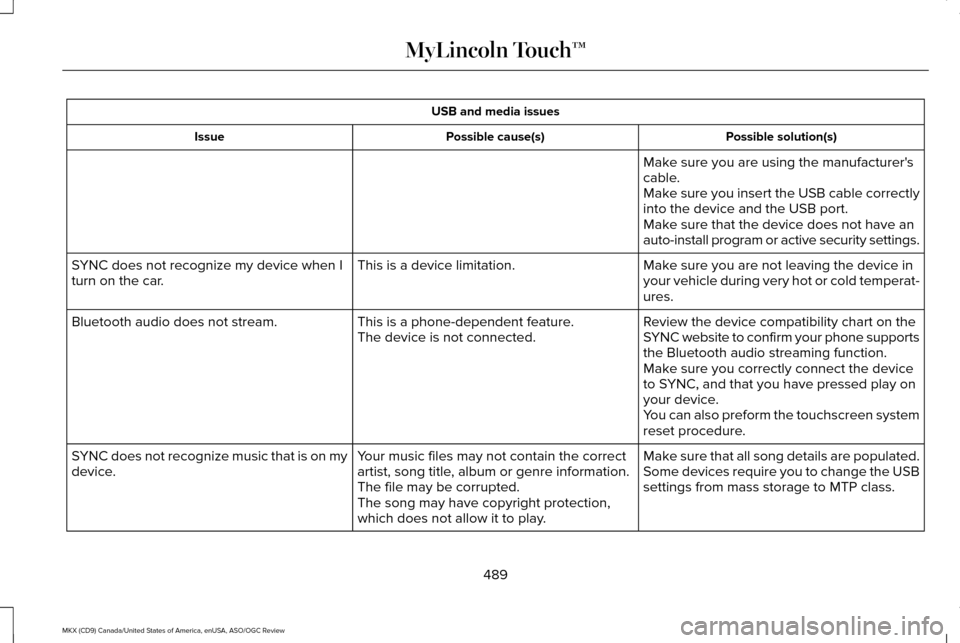
USB and media issues
Possible solution(s)
Possible cause(s)
Issue
Make sure you are using the manufacturer's
cable.
Make sure you insert the USB cable correctly
into the device and the USB port.
Make sure that the device does not have an
auto-install program or active security settings.
Make sure you are not leaving the device in
your vehicle during very hot or cold temperat-
ures.
This is a device limitation.
SYNC does not recognize my device when I
turn on the car.
Review the device compatibility chart on the
SYNC website to confirm your phone supports
the Bluetooth audio streaming function.
This is a phone-dependent feature.
The device is not connected.
Bluetooth audio does not stream.
Make sure you correctly connect the device
to SYNC, and that you have pressed play on
your device.
You can also preform the touchscreen system
reset procedure.
Make sure that all song details are populated.
Your music files may not contain the correct
artist, song title, album or genre information.
SYNC does not recognize music that is on my
device.
Some devices require you to change the USB
settings from mass storage to MTP class.
The file may be corrupted.
The song may have copyright protection,
which does not allow it to play.
489
MKX (CD9) Canada/United States of America, enUSA, ASO/OGC Review MyLincoln Touch™
Page 493 of 563
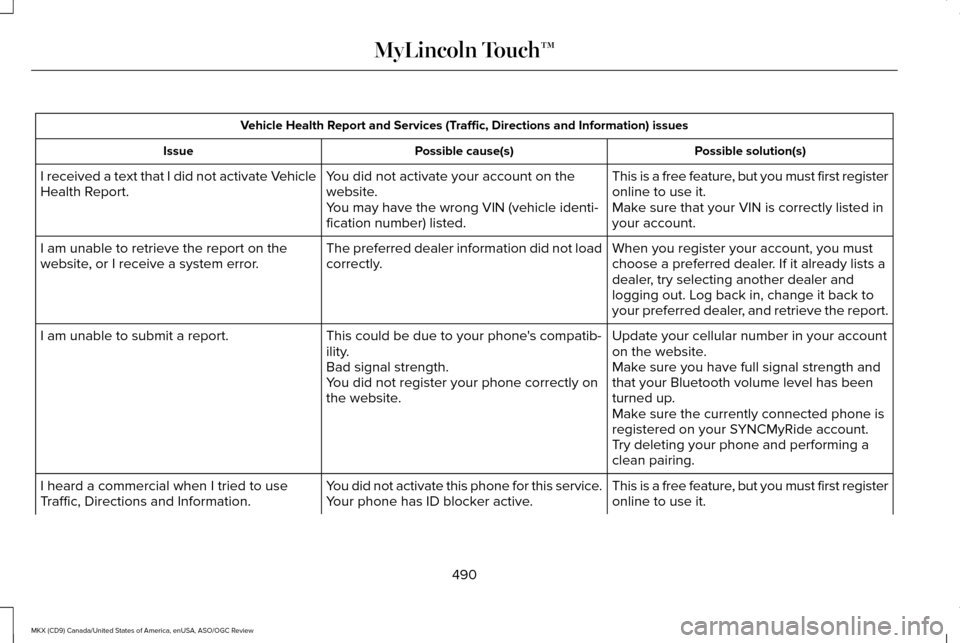
Vehicle Health Report and Services (Traffic, Directions and Information) issues
Possible solution(s)
Possible cause(s)
Issue
This is a free feature, but you must first register
online to use it.
You did not activate your account on the
website.
I received a text that I did not activate Vehicle
Health Report.
Make sure that your VIN is correctly listed in
your account.
You may have the wrong VIN (vehicle identi-
fication number) listed.
When you register your account, you must
choose a preferred dealer. If it already lists a
dealer, try selecting another dealer and
logging out. Log back in, change it back to
your preferred dealer, and retrieve the report.
The preferred dealer information did not load
correctly.
I am unable to retrieve the report on the
website, or I receive a system error.
Update your cellular number in your account
on the website.
This could be due to your phone's compatib-
ility.
I am unable to submit a report.
Make sure you have full signal strength and
that your Bluetooth volume level has been
turned up.
Bad signal strength.
You did not register your phone correctly on
the website.
Make sure the currently connected phone is
registered on your SYNCMyRide account.
Try deleting your phone and performing a
clean pairing.
This is a free feature, but you must first register
online to use it.
You did not activate this phone for this service.
Your phone has ID blocker active.
I heard a commercial when I tried to use
Traffic, Directions and Information.
490
MKX (CD9) Canada/United States of America, enUSA, ASO/OGC Review MyLincoln Touch™