warning LINCOLN MKX 2016 Owners Manual
[x] Cancel search | Manufacturer: LINCOLN, Model Year: 2016, Model line: MKX, Model: LINCOLN MKX 2016Pages: 563, PDF Size: 4.96 MB
Page 371 of 563

TECHNICAL SPECIFICATIONS
Wheel Lug Nut Torque Specifications
WARNING
When a wheel is installed, always remove any corrosion, dirt or foreign \
materials present on the mounting surfaces of the wheel or the
surface of the wheel hub, brake drum or brake disc that contacts the wheel. Make sure that any fasteners that attach the rotor to the
hub are secured so they do not interfere with the mounting surfaces of t\
he wheel. Installing wheels without correct metal-to-metal contact at
the wheel mounting surfaces can cause the wheel nuts to loosen and the w\
heel to come off while your vehicle is in motion, resulting in loss
of control. lb.ft (Nm)*
Bolt size
162 lb.ft (220 Nm)
M14 x 1.5
*Torque specifications are for nut and bolt threads free of dirt and rust.\
Use only Ford recommended replacement fasteners.
Retighten the lug nuts to the specified torque within 100 miles (160 kil\
ometers) after any wheel disturbance (such as tire rotation, changing \
a
flat tire, wheel removal).
368
MKX (CD9) Canada/United States of America, enUSA, ASO/OGC Review Wheels and Tires
Page 379 of 563

CAPACITIES AND SPECIFICATIONS - 2.7L ECOBOOST™
Capacities
WARNING
The air conditioning refrigerant system contains refrigerant R-134a unde\
r high pressure. Only qualified personnel should service the air
conditioning refrigerant system. Opening the air conditioning refrigeran\
t system can cause personal injury.
Capacity
Item
6.0 qt (5.7 L)
Engine oil
10.6 qt (10 L)
Engine coolant
Between MIN/MAX on brake fluid reservoir
Brake fluid
2.4 pt (1.15L)
Rear differential fluid (All Wheel Drive)
11.8 fl oz (0.35 L)
Power Transfer Unit (PTU) fluid (All Wheel Drive)
11.0 qt (10.4 L)*
Automatic transmission fluid
Fill as required
Windshield washer fluid
18.4 gal (69.5 L)
Fuel tank (Front Wheel Drive)
18.5 gal (70 L)
Fuel tank (All Wheel Drive)
376
MKX (CD9) Canada/United States of America, enUSA, ASO/OGC Review Capacities and Specifications
Page 384 of 563
We recommend Motorcraft motor oil for your
vehicle. If Motorcraft oil is not available, use
motor oils of the recommended viscosity
grade that meet API SN requirements and
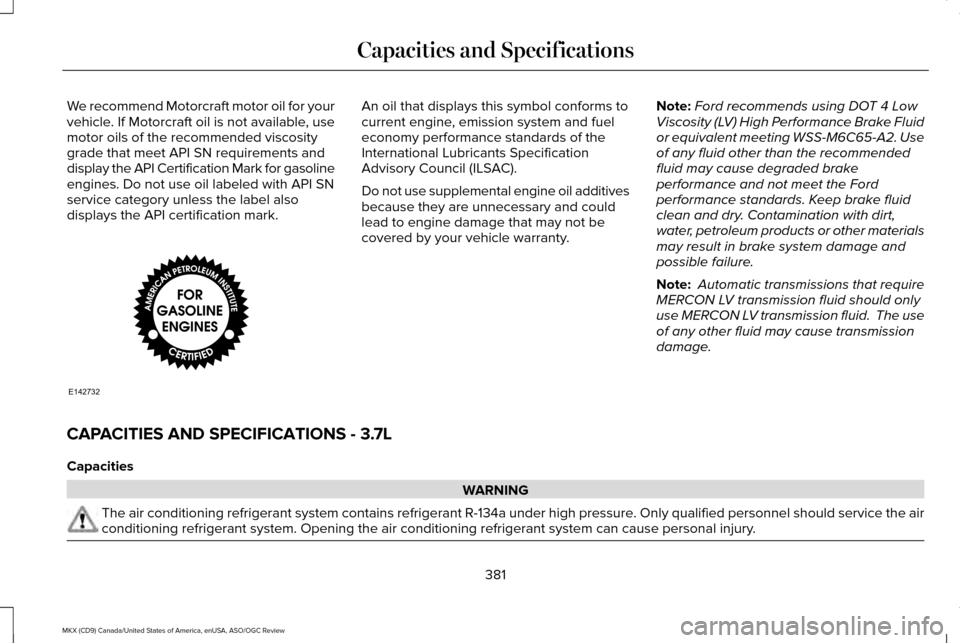
display the API Certification Mark for gasoline
engines. Do not use oil labeled with API SN
service category unless the label also
displays the API certification mark. An oil that displays this symbol conforms to
current engine, emission system and fuel
economy performance standards of the
International Lubricants Specification
Advisory Council (ILSAC).
Do not use supplemental engine oil additives
because they are unnecessary and could
lead to engine damage that may not be
covered by your vehicle warranty.
Note:
Ford recommends using DOT 4 Low
Viscosity (LV) High Performance Brake Fluid
or equivalent meeting WSS-M6C65-A2. Use
of any fluid other than the recommended
fluid may cause degraded brake
performance and not meet the Ford
performance standards. Keep brake fluid
clean and dry. Contamination with dirt,
water, petroleum products or other materials
may result in brake system damage and
possible failure.
Note: Automatic transmissions that require
MERCON LV transmission fluid should only
use MERCON LV transmission fluid. The use
of any other fluid may cause transmission
damage.
CAPACITIES AND SPECIFICATIONS - 3.7L
Capacities WARNING
The air conditioning refrigerant system contains refrigerant R-134a unde\
r high pressure. Only qualified personnel should service the air
conditioning refrigerant system. Opening the air conditioning refrigeran\
t system can cause personal injury.
381
MKX (CD9) Canada/United States of America, enUSA, ASO/OGC Review Capacities and SpecificationsE142732
Page 392 of 563
Do not expose discs to direct sunlight or heat
sources for extended periods.
MP3 Track and Folder Structure
Audio systems capable of recognizing and
playing MP3 individual tracks and folder
structures work as follows:
•
There are two different modes for MP3
disc playback: MP3 track mode (system
default) and MP3 folder mode.
• MP3 track mode ignores any folder
structure on the MP3 disc. The player
numbers each MP3 track on the disc
(noted by the .mp3 file extension) from
T001 to a maximum of T255. The
maximum number of playable MP3 files
may be less depending on the structure
of the CD and exact model of radio
present. •
MP3 folder mode represents a folder
structure consisting of one level of
folders. The CD player numbers all MP3
tracks on the disc (noted by the .mp3 file
extension) and all folders containing MP3
files, from F001 (folder) T001 (track) to
F253 T255.
• Creating discs with only one level of
folders helps with navigation through the
disc files.
If you are burning your own MP3 discs, it is
important to understand how the system
reads the structures you create. While
various files may be present, (files with
extensions other than mp3), only files with
the .mp3 extension are played; other files
are ignored by the system. This enables you
to use the same MP3 disc for a variety of
tasks on your work computer, home
computer and your in-vehicle system.
In track mode, the system displays and plays
the structure as if it were only one level deep
(all .mp3 files play, regardless of being in a
specific folder). In folder mode, the system
only plays the .mp3 files in the current folder. AUDIO UNIT - VEHICLES WITH:
PREMIUM AM/FM/CD WARNING
Driving while distracted can result in
loss of vehicle control, crash and injury.
We strongly recommend that you use
extreme caution when using any device that
may take your focus off the road. Your
primary responsibility is the safe operation
of your vehicle. We recommend against the
use of any hand-held device while driving
and encourage the use of voice-operated
systems when possible. Make sure you are
aware of all applicable local laws that may
affect the use of electronic devices while
driving. Note:
The MyLincoln Touch system controls
most of the audio features. See
Entertainment (page 422).
389
MKX (CD9) Canada/United States of America, enUSA, ASO/OGC Review Audio System
Page 395 of 563
GENERAL INFORMATION WARNING
Driving while distracted can result in
loss of vehicle control, crash and injury.
We strongly recommend that you use
extreme caution when using any device that
may take your focus off the road. Your
primary responsibility is the safe operation
of your vehicle. We recommend against the
use of any hand-held device while driving
and encourage the use of voice-operated
systems when possible. Make sure you are
aware of all applicable local laws that may
affect the use of electronic devices while
driving. 392
MKX (CD9) Canada/United States of America, enUSA, ASO/OGC Review MyLincoln Touch™
Page 401 of 563
Safety Information
WARNING
Driving while distracted can result in
loss of vehicle control, crash and injury.
We strongly recommend that you use
extreme caution when using any device that
may take your focus off the road. Your
primary responsibility is the safe operation
of your vehicle. We recommend against the
use of any hand-held device while driving
and encourage the use of voice-operated
systems when possible. Make sure you are
aware of all applicable local laws that may
affect the use of electronic devices while
driving. •
Do not attempt to service or repair the
system. Have your vehicle checked by
an authorized dealer.
• Do not operate media devices if the
power cables are broken or damaged.
• Make sure the power cables do not
interfere with the safe operation of your
vehicle's controls or affect your safe
driving abilities.
• Some SYNC functions are
speed-dependent. Their use is limited to
when your vehicle is traveling at speeds
below 3 mph (5 km/h).
Make sure that you review your device's
manual before using it with SYNC. Speed-restricted Features
Some features of this system are restricted
from use unless your vehicle is stationary.
•
Screens crowded with information, for
example:
•Point of Interest reviews and ratings
• SIRIUS Travel Link sports scores
• Movie times
• Ski conditions.
• Any action that requires keyboard use,
for example: entering a navigation
destination or editing information.
• All lists are limited, for example: phone
contacts.
See the following chart for more specific
examples. Speed-restricted Features
Pairing a cell phone
Cell phone
Adding or editing phonebook contacts
Phone contacts and recent phone call entries
398
MKX (CD9) Canada/United States of America, enUSA, ASO/OGC Review MyLincoln Touch™
Page 418 of 563
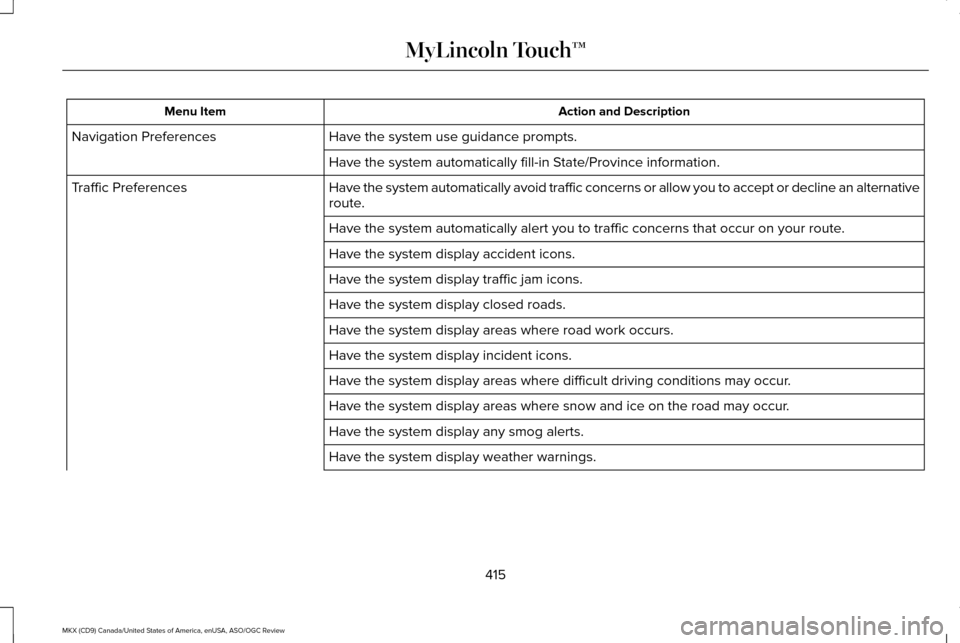
Action and Description
Menu Item
Have the system use guidance prompts.
Navigation Preferences
Have the system automatically fill-in State/Province information.
Have the system automatically avoid traffic concerns or allow you to acc\
ept or decline an alternative
route.
Traffic Preferences
Have the system automatically alert you to traffic concerns that occur o\
n your route.
Have the system display accident icons.
Have the system display traffic jam icons.
Have the system display closed roads.
Have the system display areas where road work occurs.
Have the system display incident icons.
Have the system display areas where difficult driving conditions may occ\
ur.
Have the system display areas where snow and ice on the road may occur.
Have the system display any smog alerts.
Have the system display weather warnings.
415
MKX (CD9) Canada/United States of America, enUSA, ASO/OGC Review MyLincoln Touch™
Page 420 of 563
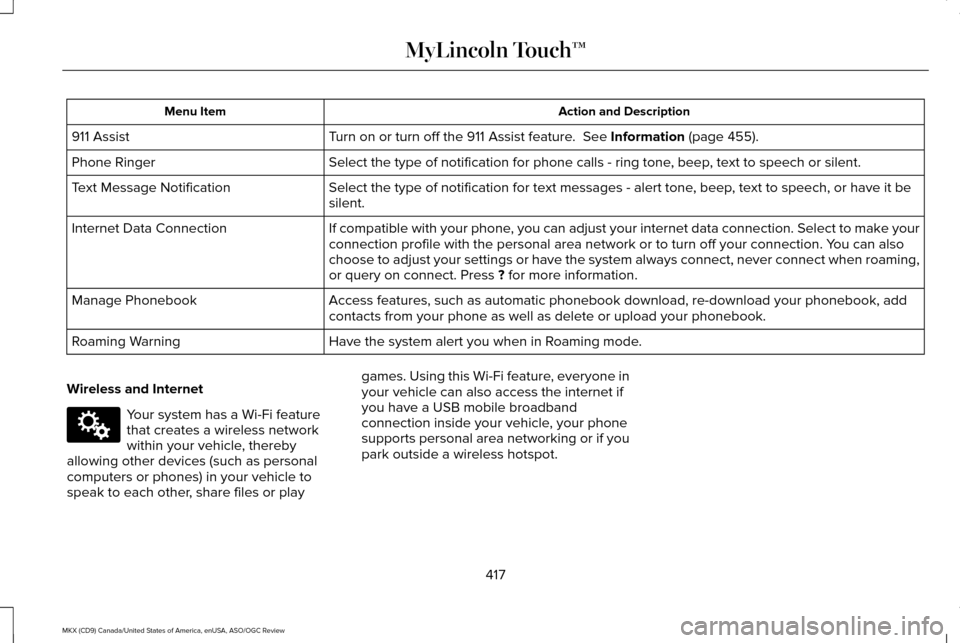
Action and Description
Menu Item
Turn on or turn off the 911 Assist feature. See Information (page 455).
911 Assist
Select the type of notification for phone calls - ring tone, beep, text to speech or silent.
Phone Ringer
Select the type of notification for text messages - alert tone, beep, text to speech, or have it be
silent.
Text Message Notification
If compatible with your phone, you can adjust your internet data connection. Select to make your
connection profile with the personal area network or to turn off your co\
nnection. You can also
choose to adjust your settings or have the system always connect, never \
connect when roaming,
or query on connect. Press
? for more information.
Internet Data Connection
Access features, such as automatic phonebook download, re-download your \
phonebook, add
contacts from your phone as well as delete or upload your phonebook.
Manage Phonebook
Have the system alert you when in Roaming mode.
Roaming Warning
Wireless and Internet Your system has a Wi-Fi feature
that creates a wireless network
within your vehicle, thereby
allowing other devices (such as personal
computers or phones) in your vehicle to
speak to each other, share files or play games. Using this Wi-Fi feature, everyone in
your vehicle can also access the internet if
you have a USB mobile broadband
connection inside your vehicle, your phone
supports personal area networking or if you
park outside a wireless hotspot.
417
MKX (CD9) Canada/United States of America, enUSA, ASO/OGC Review MyLincoln Touch™E142607
Page 449 of 563
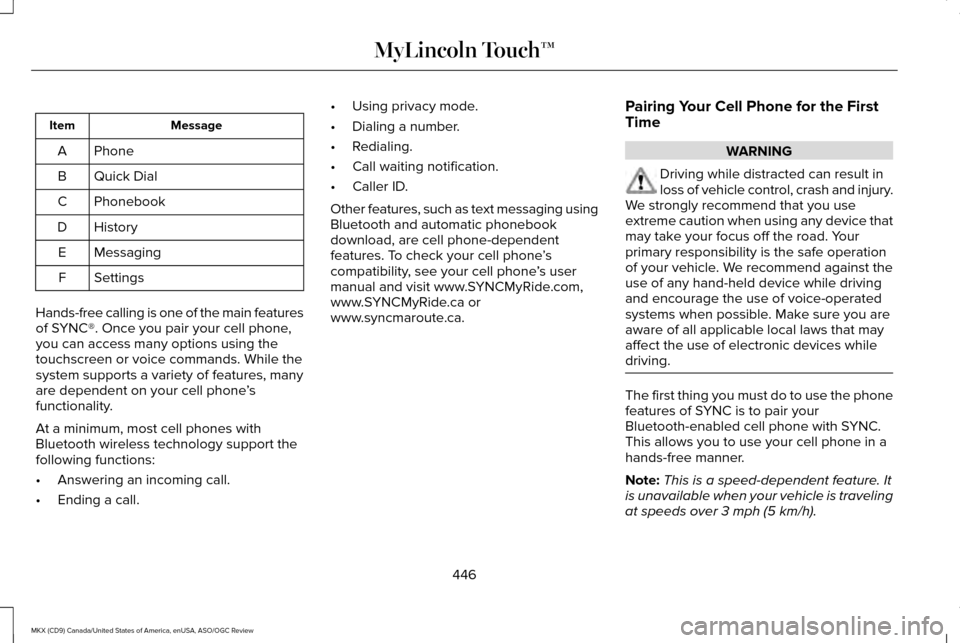
Message
Item
Phone
A
Quick Dial
B
Phonebook
C
History
D
Messaging
E
Settings
F
Hands-free calling is one of the main features
of SYNC®. Once you pair your cell phone,
you can access many options using the
touchscreen or voice commands. While the
system supports a variety of features, many
are dependent on your cell phone ’s
functionality.
At a minimum, most cell phones with
Bluetooth wireless technology support the
following functions:
• Answering an incoming call.
• Ending a call. •
Using privacy mode.
• Dialing a number.
• Redialing.
• Call waiting notification.
• Caller ID.
Other features, such as text messaging using
Bluetooth and automatic phonebook
download, are cell phone-dependent
features. To check your cell phone ’s
compatibility, see your cell phone ’s user
manual and visit www.SYNCMyRide.com,
www.SYNCMyRide.ca or
www.syncmaroute.ca. Pairing Your Cell Phone for the First
Time WARNING
Driving while distracted can result in
loss of vehicle control, crash and injury.
We strongly recommend that you use
extreme caution when using any device that
may take your focus off the road. Your
primary responsibility is the safe operation
of your vehicle. We recommend against the
use of any hand-held device while driving
and encourage the use of voice-operated
systems when possible. Make sure you are
aware of all applicable local laws that may
affect the use of electronic devices while
driving. The first thing you must do to use the phone
features of SYNC is to pair your
Bluetooth-enabled cell phone with SYNC.
This allows you to use your cell phone in a
hands-free manner.
Note:
This is a speed-dependent feature. It
is unavailable when your vehicle is traveling
at speeds over 3 mph (5 km/h).
446
MKX (CD9) Canada/United States of America, enUSA, ASO/OGC Review MyLincoln Touch™
Page 457 of 563

Action and Description
Message
Select the ring tone you want to hear when you receive a call. Choose fr\
om possible system ring
tones, your currently paired cell phone ’s ring tone, a beep, text-to-speech or a silent notification.
Phone Ringer
Select a text message notification, if supported by your cell phone. Choose from possible system
alert tones, text-to-speech or silent.
Text Message Notification
If your cell phone is compatible, use this screen to adjust your internet data connection. Select to
make your connection profile with the personal area network or to turn off \
your connection. You
can also choose to adjust your settings or have the system always connec\
t, never connect when
roaming or query on connect. Press ? for more information.
Internet Data Connection
To access features such as automatic phonebook download, re-download your\
phonebook, add
contacts from your cell phone as well as delete or upload your phonebook\
.
Manage Phonebook
To have the system alert you when your cell phone is in roaming mode.
Roaming Warning
Phone Voice Commands 454
MKX (CD9) Canada/United States of America, enUSA, ASO/OGC Review MyLincoln Touch™E142599