Sound LINCOLN MKX 2016 User Guide
[x] Cancel search | Manufacturer: LINCOLN, Model Year: 2016, Model line: MKX, Model: LINCOLN MKX 2016Pages: 563, PDF Size: 4.96 MB
Page 85 of 563
The direction indicators will flash and the
horn will sound if unauthorized entry is
attempted while the alarm is armed.
Take all remote controls to an authorized
dealer if there is any potential alarm problem
with your vehicle.
Arming the Alarm
The alarm is ready to arm when there is not
a key in your vehicle. Electronically lock your
vehicle to arm the alarm.
Disarming the Alarm
Disarm the alarm by any of the following
actions:
•
Unlock the doors or luggage
compartment with the remote control or
keyless entry keypad.
• Switch your vehicle on or start your
vehicle.
• Use a key in the driver door to unlock
your vehicle, then switch your vehicle on
within 12 seconds. Note:
Pressing the panic button on the
remote control will stop the horn and signal
indicators, but will not disarm the system.
82
MKX (CD9) Canada/United States of America, enUSA, ASO/OGC Review Security
Page 114 of 563
Engine Oil
If it illuminates with the engine
running or when you are driving,
this indicates a malfunction. Stop
your vehicle as soon as it is safe to do so
and switch the engine off. Check the engine
oil level. See Engine Oil Check (page 308).
Note: Do not resume your journey if it
illuminates despite the level being correct.
Have the system checked by an authorized
dealer immediately.
Fasten Safety Belt It illuminates and a chime sounds
to remind you to fasten your safety
belt. See Safety Belt Minder
(page 40).
Front Airbag If it fails to illuminate when you
start your vehicle, continues to
flash or remains on, it indicates a
malfunction. Have the system checked by
an authorized dealer. Heads Up Display
(If Equipped) A red beam of lights illuminates on
the windshield in certain instances
when using adaptive cruise control
and/or the collision warning system. It also
illuminates momentarily when you start your
vehicle to make sure the display works.
High Beam It illuminates when you switch the
high beam headlamps on. It flashes
when you use the headlamp
flasher.
Hood Ajar Displays when the ignition is on
and the hood is not completely
closed.
Liftgate Ajar Illuminates when the liftgate is not
completely closed.Low Beam Malfunction Warning It will illuminate when there is a
malfunction with the low beam
headlamp bulb.
Low Fuel Level It illuminates when the fuel level is
low or the fuel tank is nearly
empty. Refuel as soon as possible.
Low Tire Pressure Warning It illuminates when your tire
pressure is low. If the lamp remains
on with the engine running or
when driving, check your tire pressure as
soon as possible.
It also illuminates momentarily when you
switch the ignition on to confirm the lamp is
functional. If it does not illuminate when you
switch the ignition on, or begins to flash at
any time, have the system checked by an
authorized dealer.
111
MKX (CD9) Canada/United States of America, enUSA, ASO/OGC Review Instrument Cluster E156133 E159324 E162453 E181350
Page 116 of 563
Stability Control Off
It illuminates when you switch the
system off. It goes out when you
switch the system back on or when
you switch the ignition off.
AUDIBLE WARNINGS AND
INDICATORS
Keyless Warning Alert
The horn will sound twice when you exit your
vehicle with the intelligent access key and
your vehicle is in RUN, indicating your vehicle
is still on.
Headlamps On Warning Chime
Sounds when you remove the key from the
ignition and open the driver's door and you
have left the headlamps or parking lamps
on. Parking Brake On Warning Chime
Sounds when you have left the parking brake
on and drive your vehicle. If the warning
chime remains on after you have released
the parking brake, have the system checked
by your authorized dealer immediately.
113
MKX (CD9) Canada/United States of America, enUSA, ASO/OGC Review Instrument Cluster
Page 156 of 563
1. With the ignition on, move the memory
positions to the desired positions.
2. Press and hold the desired preset button
for about five seconds. A tone will sound
after about two seconds. Continue
holding until a second tone is heard.
3. Within three seconds, press the lock button on the remote control you are
linking.
To unlink a remote control, follow the same
procedure – except in step 3, press the
unlock button on the remote control.
Note: If more than one linked remote control
or intelligent access key is in range, the
memory function moves to the settings of
the first key to initiate a memory recall.
Easy Entry and Exit Feature
If you enable the easy entry and exit feature,
it automatically moves the driver seat
position rearward up to two inches (five
centimeters) when you switch the ignition
off.
The driver seat will return to its previous
position when you switch the ignition on. You can enable or disable this feature in the
information display. See Information
Displays (page 114).
REAR SEATS
Adjusting the Rear Seats WARNING
To prevent possible damage to the
seat or safety belts, make sure that the
safety belts are not buckled when folding
the seatback. Folding the Seatback
With the seat empty, pull the lever up to fold
the seatback forward.
Unfolding the Seatback
Rotate the seatback upward until the
seatback latches in the upright position. The
seatback will click when it is locked into
position.
Reclining the Seatback
With the seat occupied, pull the lever up to
recline the seatback.
Easy Fold™ Folding Seat
WARNING
Make sure that the seat is unoccupied
when folding it down. Folding the seat
while occupied could result in damage to the
seat or injury. Note:
The power feature is operational when
the vehicle is in park (P) and the liftgate has
been open for less than 10 minutes.
153
MKX (CD9) Canada/United States of America, enUSA, ASO/OGC Review SeatsE186789
Page 176 of 563
SAFETY PRECAUTIONS
WARNINGS
Do not overfill the fuel tank. The
pressure in an overfilled tank may
cause leakage and lead to fuel spray and
fire. The fuel system may be under
pressure. If you hear a hissing sound
near the fuel filler door (Easy Fuel capless
fuel system), do not refuel until the sound
stops. Otherwise, fuel may spray out, which
could cause serious personal injury. Automotive fuels can cause serious
injury or death if misused or
mishandled. Flow of fuel through a fuel pump nozzle
can produce static electricity. This can
cause a fire if you are filling an ungrounded
fuel container. Fuel ethanol and gasoline may contain
benzene, which is a cancer-causing
agent. WARNINGS
When refueling always shut the engine
off and never allow sparks or open
flames near the filler neck. Never smoke or
use a cell phone while refueling. Fuel vapor
is extremely hazardous under certain
conditions. Avoid inhaling excess fumes. Observe the following guidelines when
handling automotive fuel:
•
Extinguish all smoking materials and any
open flames before refueling your
vehicle.
• Always turn off the vehicle before
refueling.
• Automotive fuels can be harmful or fatal
if swallowed. Fuel such as gasoline is
highly toxic and if swallowed can cause
death or permanent injury. If fuel is
swallowed, call a physician immediately,
even if no symptoms are immediately
apparent. The toxic effects of fuel may
not be visible for hours. •
Avoid inhaling fuel vapors. Inhaling too
much fuel vapor of any kind can lead to
eye and respiratory tract irritation. In
severe cases, excessive or prolonged
breathing of fuel vapor can cause serious
illness and permanent injury.
• Avoid getting fuel liquid in your eyes. If
fuel is splashed in the eyes, remove
contact lenses (if worn), flush with water
for 15 minutes and seek medical
attention. Failure to seek proper medical
attention could lead to permanent injury.
173
MKX (CD9) Canada/United States of America, enUSA, ASO/OGC Review Fuel and Refueling
Page 180 of 563
Easy Fuel™ Capless Fuel System
WARNING
The fuel system may be under
pressure. If you hear a hissing sound
near the fuel filler door, do not refuel until
the sound stops. Otherwise, fuel may spray
out, which could cause serious personal
injury. When fueling your vehicle:
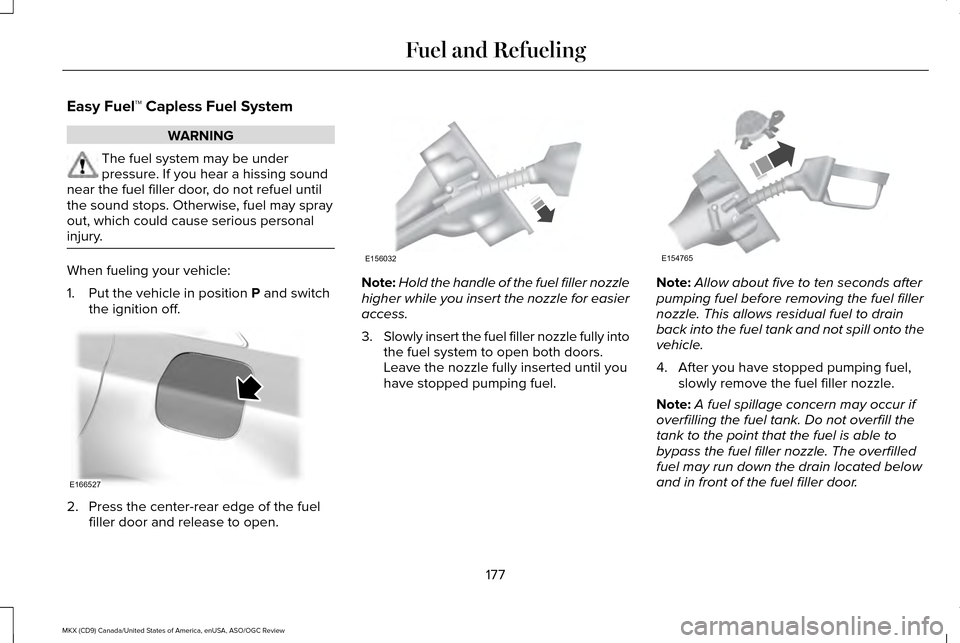
1. Put the vehicle in position P and switch
the ignition off. 2. Press the center-rear edge of the fuel
filler door and release to open. Note:
Hold the handle of the fuel filler nozzle
higher while you insert the nozzle for easier
access.
3. Slowly insert the fuel filler nozzle fully into
the fuel system to open both doors.
Leave the nozzle fully inserted until you
have stopped pumping fuel. Note:
Allow about five to ten seconds after
pumping fuel before removing the fuel filler
nozzle. This allows residual fuel to drain
back into the fuel tank and not spill onto the
vehicle.
4. After you have stopped pumping fuel, slowly remove the fuel filler nozzle.
Note: A fuel spillage concern may occur if
overfilling the fuel tank. Do not overfill the
tank to the point that the fuel is able to
bypass the fuel filler nozzle. The overfilled
fuel may run down the drain located below
and in front of the fuel filler door.
177
MKX (CD9) Canada/United States of America, enUSA, ASO/OGC Review Fuel and RefuelingE166527 E156032 E154765
Page 186 of 563
Note:
To put your vehicle in gear with the
door open, perform steps 1-4. See the
Automatic Return to Park section in this
chapter for more information on this feature.
Park (P)
With the transmission in park (P), your vehicle
locks the transmission and prevents the
wheels from turning. Always come to a
complete stop before putting your vehicle
into and out of park (P). An audible chime
sounds once you select park (P).
When the ignition is turned off, the vehicle
will automatically shift into park (P). If the
ignition is turned off while the vehicle is
moving, it will first shift into neutral (N) until
a slow enough speed is reached. The vehicle
will then shift into park (P) automatically.
Automatic Return to Park
Note: This feature will not operate when your
vehicle is in Stay in Neutral mode or neutral
tow.
Your vehicle has a safety feature that will
automatically shift your vehicle into park (P)
when any of the following conditions occur: •
You turn the ignition off
• You open the driver's door with your
safety belt unlatched
• Your safety belt is unlatched while the
driver's door is open
If you turn the ignition off while your vehicle
is moving, your vehicle will first shift into
neutral (N) until it slows down enough to shift
into park (P) automatically.
Note: If you have waited an extended period
of time (2-15 minutes) before starting your
vehicle, unlatching your safety belt will cause
this feature to activate, even with the driver's
door closed.
Note: This feature may not work properly if
the door ajar switch is malfunctioning. If your
door ajar indicator does not illuminate when
you open the driver’ s door or the indicator
illuminates with the driver’ s door closed, see
your authorized dealer. Reverse (R)
With the transmission in reverse (R), your
vehicle will move backward. Always come
to a complete stop before shifting into and
out of reverse (R).
Neutral (N)
With the transmission in neutral (N), you can
start your vehicle and it is free to roll. Hold
the brake pedal down while in this position.
Stay in Neutral mode
Stay in Neutral mode allows your vehicle to
stay in neutral (N) when you exit the vehicle.
Your vehicle must be stationary to enter this
mode.
To enter Stay in Neutral mode:
1. Press the neutral (N) button on your
shifter assembly.
2. A message will appear in your information display screen prompting you
to press the neutral (N) button again to
enter Stay in Neutral mode.
3. Press the neutral (N) button again to enter Stay in Neutral mode.
183
MKX (CD9) Canada/United States of America, enUSA, ASO/OGC Review Transmission
Page 197 of 563
GENERAL INFORMATION
Note:
Occasional brake noise is normal. If a
metal-to-metal, continuous grinding or
continuous squeal sound is present, the
brake linings may be worn-out. Have the
system checked by an authorized dealer. If
your vehicle has continuous vibration or
shudder in the steering wheel while braking,
have it checked by an authorized dealer.
Note: Brake dust may accumulate on the
wheels, even under normal driving
conditions. Some dust is inevitable as the
brakes wear and does not contribute to
brake noise. See Cleaning the Alloy Wheels
(page 331).
Note: Depending on applicable laws and
regulations in the country for which your
vehicle was originally built, your brake lamps
may flash during heavy braking. Following
this, your hazard lights may also flash when
your vehicle comes to a stop. See
Warning Lamps and
Indicators (page 109). Wet brakes result in reduced braking
efficiency. Gently press the brake pedal a
few times when driving from a car wash or
standing water to dry the brakes.
Brake Over Accelerator
In the event the accelerator pedal becomes
stuck or entrapped, apply steady and firm
pressure to the brake pedal to slow the
vehicle and reduce engine power. If you
experience this condition, apply the brakes
and bring your vehicle to a safe stop. Move
the transmission to park (P), switch the
engine off and apply the parking brake.
Inspect the accelerator pedal for any
interference. If none are found and the
condition persists, have your vehicle towed
to the nearest authorized dealer.
Brake Assist
Brake assist detects when you brake rapidly
by measuring the rate at which you press the
brake pedal. It provides maximum braking
efficiency as long as you press the pedal,
and can reduce stopping distances in critical
situations. Anti-lock Brake System
This system helps you maintain steering
control during emergency stops by keeping
the brakes from locking. This lamp momentarily illuminates
when you turn the ignition on. If
the light does not illuminate during
start up, remains on or flashes, the system
may be disabled. Have the system checked
by an authorized dealer. If the anti-lock brake
system is disabled, normal braking is still
effective. If the brake warning lamp
illuminates when you release the
parking brake, have the system
checked by an authorized dealer.
HINTS ON DRIVING WITH ANTI-
LOCK BRAKES
Note: When the system is operating, the
brake pedal will pulse and may travel further.
Maintain pressure on the brake pedal. You
may also hear a noise from the system. This
is normal.
194
MKX (CD9) Canada/United States of America, enUSA, ASO/OGC Review BrakesE144522 E144522
Page 199 of 563
The brake system warning lamp flashes for
approximately 2 seconds then stays
illuminated to confirm that the electric
parking brake has been applied. See
Information Displays (page 114).
Apply the electric parking brake when the
vehicle is moving WARNINGS
Applying the electric parking brake
while moving will result in the
engagement of the anti-lock braking system.
Do not use the electric parking brake system
when the vehicle is moving unless the normal
brake system is unable to stop the vehicle. With the exception of emergency
conditions (for example, the brake
pedal is broken or is blocked), do not apply
the electric parking brake while the vehicle
is moving. On bends, or poor road surfaces
or weather conditions, emergency braking
can cause the vehicle to skid out of control
or off the road. If you apply the electric parking brake when
your vehicle is moving, the brake system
warning lamp will illuminate and a warning
chime will sound. See Information Displays
(page 114).
If your vehicle speed is above
4 mph
(6 km/h), the braking force is applied as long
as the switch is pulled. Releasing or pressing
the switch or pressing the accelerator pedal
will stop the braking force.
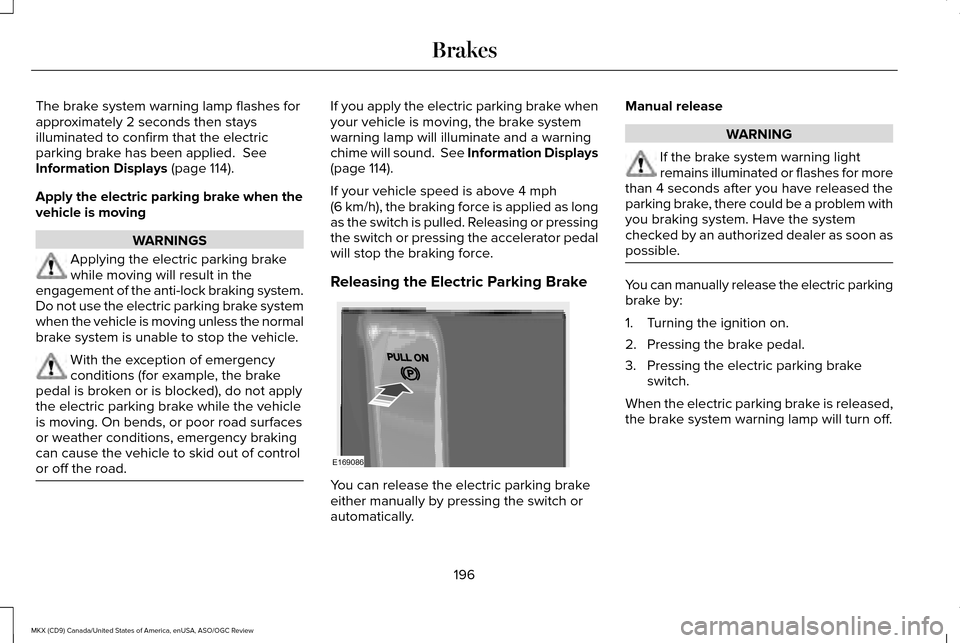
Releasing the Electric Parking Brake You can release the electric parking brake
either manually by pressing the switch or
automatically.Manual release WARNING
If the brake system warning light
remains illuminated or flashes for more
than 4 seconds after you have released the
parking brake, there could be a problem with
you braking system. Have the system
checked by an authorized dealer as soon as
possible. You can manually release the electric parking
brake by:
1. Turning the ignition on.
2. Pressing the brake pedal.
3. Pressing the electric parking brake
switch.
When the electric parking brake is released,
the brake system warning lamp will turn off.
196
MKX (CD9) Canada/United States of America, enUSA, ASO/OGC Review BrakesE169086
Page 209 of 563
REAR PARKING AID
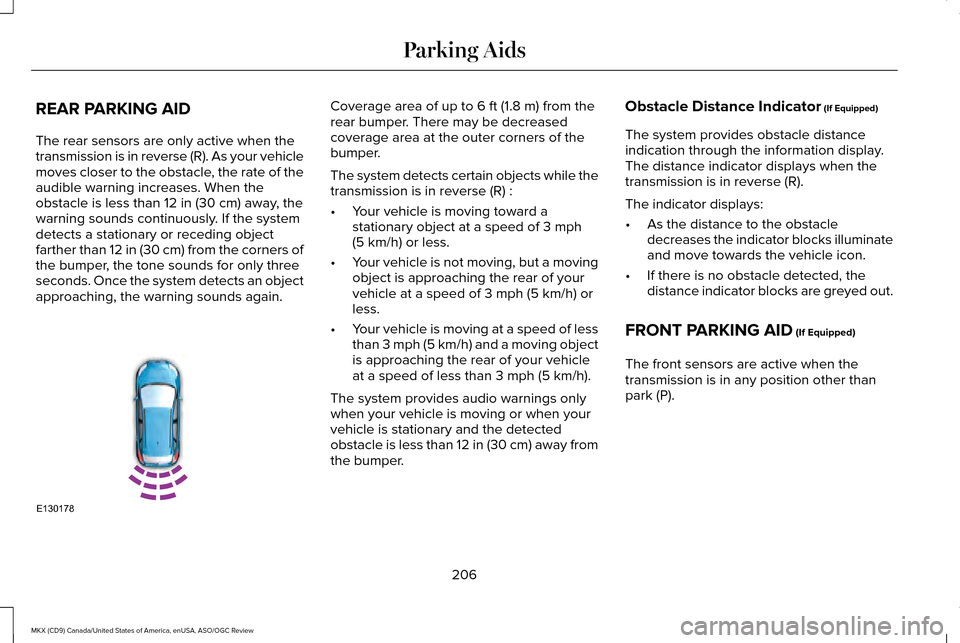
The rear sensors are only active when the
transmission is in reverse (R). As your vehicle
moves closer to the obstacle, the rate of the
audible warning increases. When the
obstacle is less than 12 in (30 cm) away, the
warning sounds continuously. If the system
detects a stationary or receding object
farther than
12 in (30 cm) from the corners of
the bumper, the tone sounds for only three
seconds. Once the system detects an object
approaching, the warning sounds again. Coverage area of up to
6 ft (1.8 m) from the
rear bumper. There may be decreased
coverage area at the outer corners of the
bumper.
The system detects certain objects while the
transmission is in reverse (R) :
• Your vehicle is moving toward a
stationary object at a speed of
3 mph
(5 km/h) or less.
• Your vehicle is not moving, but a moving
object is approaching the rear of your
vehicle at a speed of
3 mph (5 km/h) or
less.
• Your vehicle is moving at a speed of less
than 3 mph (5 km/h) and a moving object
is approaching the rear of your vehicle
at a speed of less than
3 mph (5 km/h).
The system provides audio warnings only
when your vehicle is moving or when your
vehicle is stationary and the detected
obstacle is less than 12 in (30 cm) away from
the bumper. Obstacle Distance Indicator
(If Equipped)
The system provides obstacle distance
indication through the information display.
The distance indicator displays when the
transmission is in reverse (R).
The indicator displays:
• As the distance to the obstacle
decreases the indicator blocks illuminate
and move towards the vehicle icon.
• If there is no obstacle detected, the
distance indicator blocks are greyed out.
FRONT PARKING AID
(If Equipped)
The front sensors are active when the
transmission is in any position other than
park (P).
206
MKX (CD9) Canada/United States of America, enUSA, ASO/OGC Review Parking AidsE130178