console LINCOLN MKX 2016 User Guide
[x] Cancel search | Manufacturer: LINCOLN, Model Year: 2016, Model line: MKX, Model: LINCOLN MKX 2016Pages: 563, PDF Size: 4.96 MB
Page 172 of 563
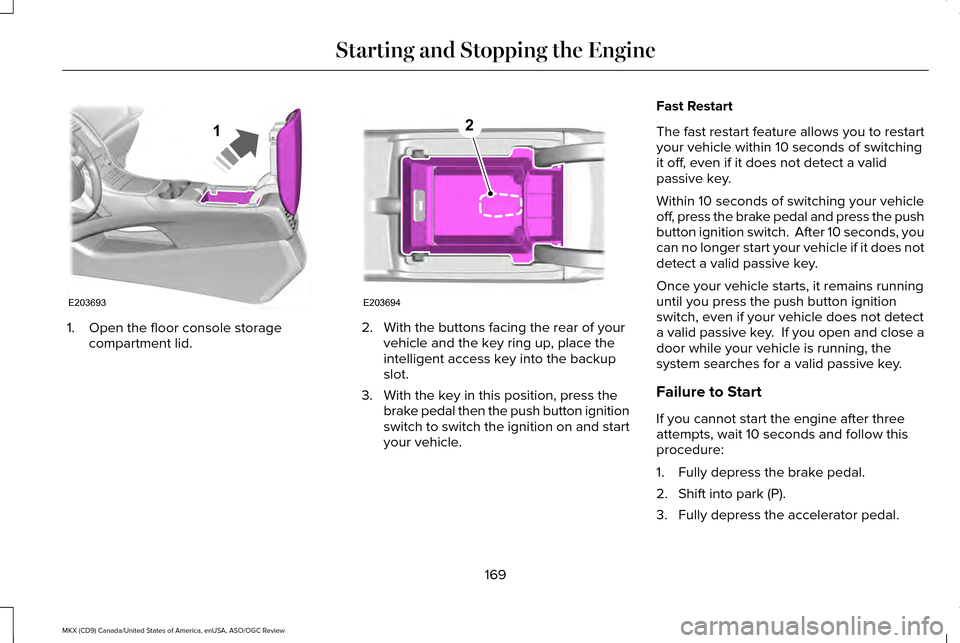
1. Open the floor console storage
compartment lid. 2. With the buttons facing the rear of your
vehicle and the key ring up, place the
intelligent access key into the backup
slot.
3. With the key in this position, press the brake pedal then the push button ignition
switch to switch the ignition on and start
your vehicle. Fast Restart
The fast restart feature allows you to restart
your vehicle within 10 seconds of switching
it off, even if it does not detect a valid
passive key.
Within 10 seconds of switching your vehicle
off, press the brake pedal and press the push
button ignition switch. After 10 seconds, you
can no longer start your vehicle if it does not
detect a valid passive key.
Once your vehicle starts, it remains running
until you press the push button ignition
switch, even if your vehicle does not detect
a valid passive key. If you open and close a
door while your vehicle is running, the
system searches for a valid passive key.
Failure to Start
If you cannot start the engine after three
attempts, wait 10 seconds and follow this
procedure:
1. Fully depress the brake pedal.
2. Shift into park (P).
3. Fully depress the accelerator pedal.
169
MKX (CD9) Canada/United States of America, enUSA, ASO/OGC Review Starting and Stopping the EngineE203693
1 E203694
2
Page 189 of 563
WARNINGS
When doing this procedure, you will
be taking the vehicle out of park which
means the vehicle can roll freely. To avoid
unwanted vehicle movement, always fully
set the parking brake prior to doing this
procedure. Use wheel chocks if appropriate. If the parking brake is fully released,
but the brake warning lamp remains
illuminated, the brakes may not be working
properly. See your authorized dealer. Note:
See your authorized dealer as soon
as possible if this procedure is used.
Note: For some markets this feature is
disabled.
Note: This feature will only function if your
12-volt battery has power.
Use the brake-shift interlock override to
move your transmission from the park
position in the event of an electrical
malfunction or if your vehicle has a dead
battery. 1. Apply the parking brake and turn your
ignition off before performing this
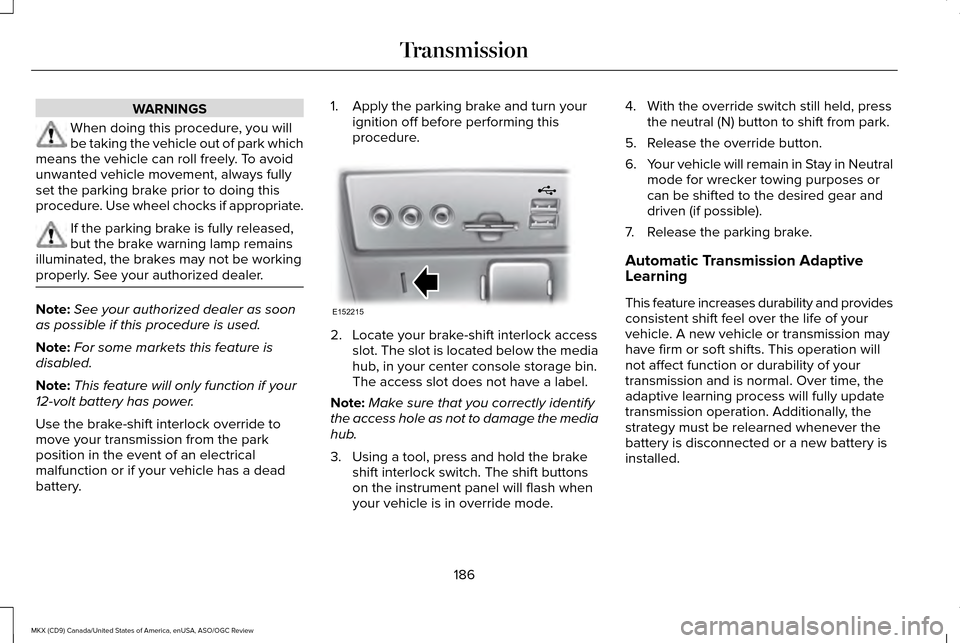
procedure. 2. Locate your brake-shift interlock access
slot. The slot is located below the media
hub, in your center console storage bin.
The access slot does not have a label.
Note: Make sure that you correctly identify
the access hole as not to damage the media
hub.
3. Using a tool, press and hold the brake shift interlock switch. The shift buttons
on the instrument panel will flash when
your vehicle is in override mode. 4. With the override switch still held, press
the neutral (N) button to shift from park.
5. Release the override button.
6. Your vehicle will remain in Stay in Neutral
mode for wrecker towing purposes or
can be shifted to the desired gear and
driven (if possible).
7. Release the parking brake.
Automatic Transmission Adaptive
Learning
This feature increases durability and provides
consistent shift feel over the life of your
vehicle. A new vehicle or transmission may
have firm or soft shifts. This operation will
not affect function or durability of your
transmission and is normal. Over time, the
adaptive learning process will fully update
transmission operation. Additionally, the
strategy must be relearned whenever the
battery is disconnected or a new battery is
installed.
186
MKX (CD9) Canada/United States of America, enUSA, ASO/OGC Review TransmissionE152215
Page 205 of 563
PRINCIPLE OF OPERATION
WARNINGS
Vehicle modifications involving braking
system, aftermarket roof racks,
suspension, steering system, tire
construction and wheel and tire size may
change the handling characteristics of your
vehicle and may adversely affect the
performance of the electronic stability control
system. In addition, installing any stereo
loudspeakers may interfere with and
adversely affect the electronic stability
control system. Install any aftermarket stereo
loudspeaker as far as possible from the front
center console, the tunnel, and the front
seats in order to minimize the risk of
interfering with the electronic stability control
sensors. Reducing the effectiveness of the
electronic stability control system could lead
to an increased risk of loss of vehicle control,
vehicle rollover, personal injury and death. WARNINGS
Remember that even advanced
technology cannot defy the laws of
physics. It’ s always possible to lose control
of a vehicle due to inappropriate driver input
for the conditions. Aggressive driving on any
road condition can cause you to lose control
of your vehicle increasing the risk of personal
injury or property damage. Activation of the
electronic stability control system is an
indication that at least some of the tires have
exceeded their ability to grip the road; this
could reduce the operator’ s ability to control
the vehicle potentially resulting in a loss of
vehicle control, vehicle rollover, personal
injury and death. If your electronic stability
control system activates, SLOW DOWN. The system automatically turns on each time
you switch the ignition on.
If a driving condition activates either the
stability control or the traction control system
you may experience the following conditions:
•
The stability and traction control light
flashes.
• Your vehicle slows down. •
Reduced engine power.
• A vibration in the brake pedal.
• The brake pedal is stiffer than usual.
• If the driving condition is severe and your
foot is not on the brake, the brake pedal
may move as the systems applies higher
brake forces.
The stability control system has several
features built into it to help you maintain
control of your vehicle:
Electronic Stability Control
The system enhances your vehicle ’s ability
to prevent skids or lateral slides by applying
brakes to one or more of the wheels
individually and, if necessary, reducing
engine power.
Roll Stability Control
The system enhances your vehicle ’s ability
to prevent rollovers by detecting your
vehicle ’s roll motion and the rate at which it
changes by applying the brakes to one or
more wheels individually.
202
MKX (CD9) Canada/United States of America, enUSA, ASO/OGC Review Stability Control
Page 213 of 563
Note:
The Blind Spot Information System
does not detect traffic alongside or behind
your vehicle during a park assist maneuver.
The system may not correctly operate in any
of the following conditions:
• You use a spare tire or a tire significantly
worn more than the other tires.
• You use a unauthorized tire size.
• You try to park on a tight curve.
• Something passes between the front
bumper and the parking space (a
pedestrian or cyclist).
• The edge of the neighboring parked
vehicle is high off the ground (for
example, a bus, tow truck or flatbed
truck).
• The weather conditions are poor (heavy
rain, snow, fog, etc). Note:
Keep the sensors, located on the
bumper or fascia, free from snow, ice and
large accumulations of dirt. Covered sensors
can affect the system's accuracy. Do not
clean the sensors with sharp objects.
Note: The sensors may not detect objects
with surfaces that absorb ultrasonic waves
or cause ultrasonic interference (motorcycle
exhaust, truck air brakes or horns).
Do not use the system if:
• You have attached a foreign object (bike
rack or trailer) to the front or rear of your
vehicle or close to the sensors.
• You have attached an overhanging
object (surfboard) to the roof. •
A foreign object damages or obstructs
the front or rear bumper or side sensors.
• The correct tire size is not in use on your
vehicle (for example, a mini-spare tire).
Using Active Park Assist - Parallel Parking Press the button located on the
center console near the gearshift
lever or the right side of the center
stack once.
When driving at a speed less than 22 mph
(35 km/h) the system automatically scans
both sides of your vehicle for an available
parking space. The system displays a
message and a corresponding graphic to
indicate it is searching for a parking space.
Use the direction indicator to select
searching either to the left-hand side or
right-hand side of your vehicle.
210
MKX (CD9) Canada/United States of America, enUSA, ASO/OGC Review Parking AidsE146186
Page 215 of 563
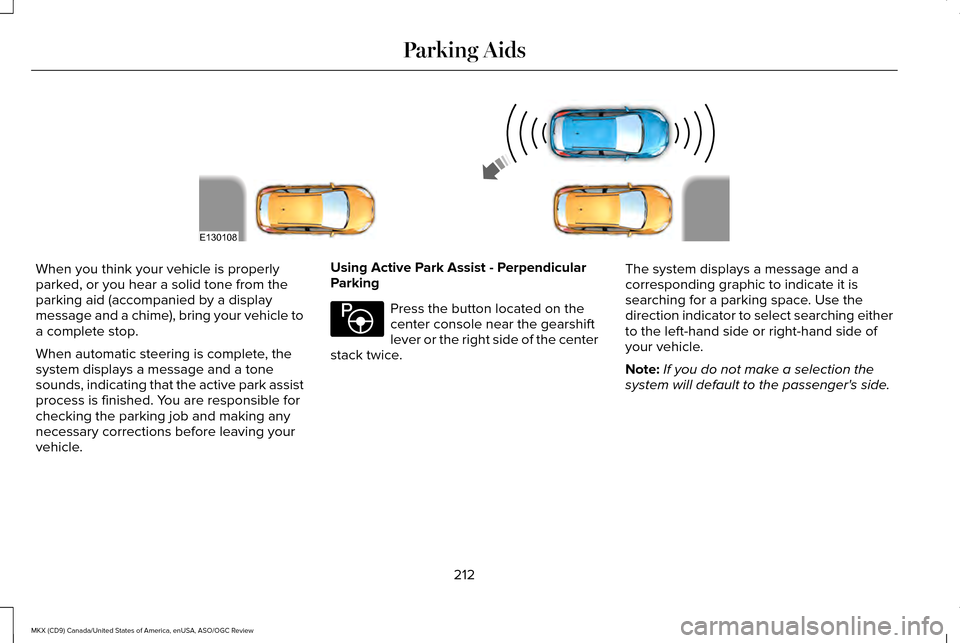
When you think your vehicle is properly
parked, or you hear a solid tone from the
parking aid (accompanied by a display
message and a chime), bring your vehicle to
a complete stop.
When automatic steering is complete, the
system displays a message and a tone
sounds, indicating that the active park assist
process is finished. You are responsible for
checking the parking job and making any
necessary corrections before leaving your
vehicle.
Using Active Park Assist - Perpendicular
Parking Press the button located on the
center console near the gearshift
lever or the right side of the center
stack twice. The system displays a message and a
corresponding graphic to indicate it is
searching for a parking space. Use the
direction indicator to select searching either
to the left-hand side or right-hand side of
your vehicle.
Note:
If you do not make a selection the
system will default to the passenger's side.
212
MKX (CD9) Canada/United States of America, enUSA, ASO/OGC Review Parking AidsE130108 E146186
Page 289 of 563
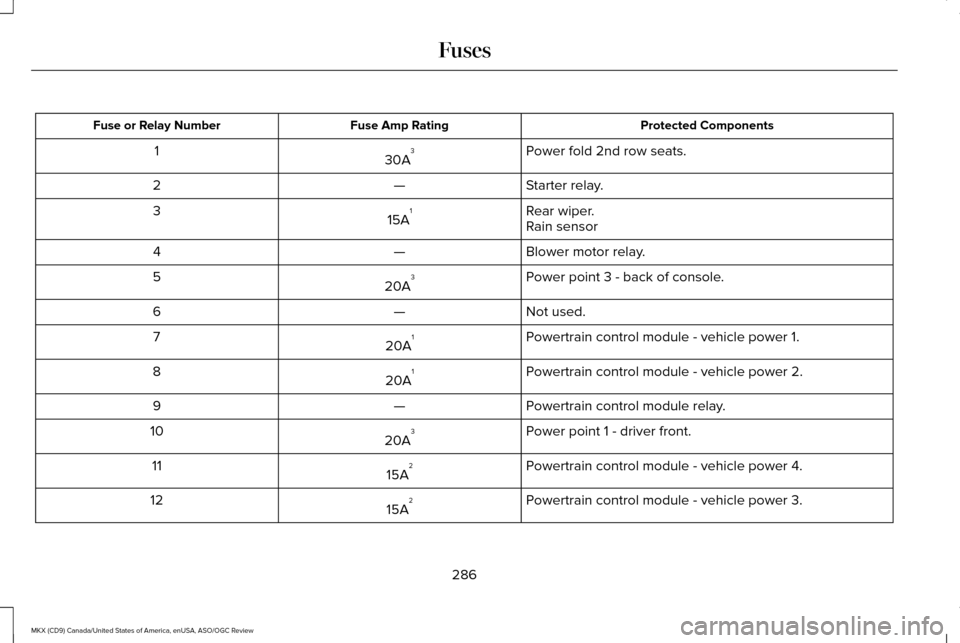
Protected Components
Fuse Amp Rating
Fuse or Relay Number
Power fold 2nd row seats.
30A 3
1
Starter relay.
—
2
Rear wiper.
15A 1
3
Rain sensor
Blower motor relay.
—
4
Power point 3 - back of console.
20A 3
5
Not used.
—
6
Powertrain control module - vehicle power 1.
20A 1
7
Powertrain control module - vehicle power 2.
20A 1
8
Powertrain control module relay.
—
9
Power point 1 - driver front.
20A 3
10
Powertrain control module - vehicle power 4.
15A 2
11
Powertrain control module - vehicle power 3.
15A 2
12
286
MKX (CD9) Canada/United States of America, enUSA, ASO/OGC Review Fuses
Page 290 of 563
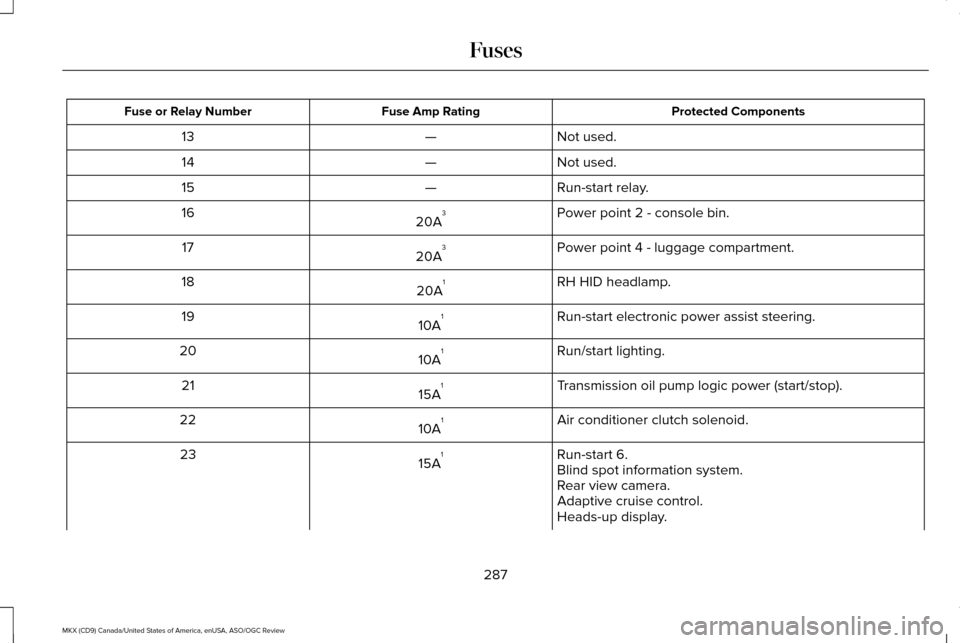
Protected Components
Fuse Amp Rating
Fuse or Relay Number
Not used.
—
13
Not used.
—
14
Run-start relay.
—
15
Power point 2 - console bin.
20A 3
16
Power point 4 - luggage compartment.
20A 3
17
RH HID headlamp.
20A 1
18
Run-start electronic power assist steering.
10A 1
19
Run/start lighting.
10A 1
20
Transmission oil pump logic power (start/stop).
15A 1
21
Air conditioner clutch solenoid.
10A 1
22
Run-start 6.
15A 1
23
Blind spot information system.
Rear view camera.
Adaptive cruise control.
Heads-up display.
287
MKX (CD9) Canada/United States of America, enUSA, ASO/OGC Review Fuses
Page 394 of 563

TUNE: Turn the control to search manually through the radio frequency band. The\
system stops at the first station it finds in that
direction. In SIRIUS mode, the system selects the previous or next channel. If you select a speci\
fic category (Jazz, Rock, News, etc.),
turn the TUNE control to find the previous or next channel in the select\
ed category.
C
Seek/Fast Forward/Reverse:
Press the control to go to the previous or next track or available radi\
o station. Press and hold to either
reverse or fast forward through the current track or to quickly reverse \
or advance through the radio bands in individual increments.
D
Volume:
Turn the control to adjust the volume level on your system.
E
Power:
Press the control to switch the audio system on and off.
F
MEDIA HUB
The media hub is located in the center
console or in front of the gear shift. USB Port
A
SD card slot
B
391
MKX (CD9) Canada/United States of America, enUSA, ASO/OGC Review Audio SystemE194341
Page 410 of 563
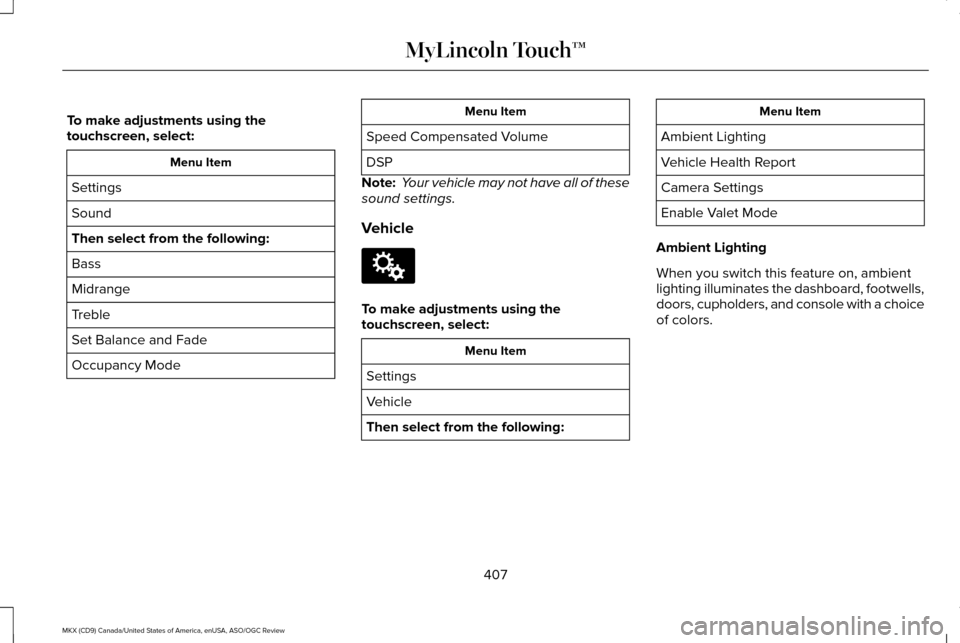
To make adjustments using the
touchscreen, select:
Menu Item
Settings
Sound
Then select from the following:
Bass
Midrange
Treble
Set Balance and Fade
Occupancy Mode Menu Item
Speed Compensated Volume
DSP
Note: Your vehicle may not have all of these
sound settings.
Vehicle To make adjustments using the
touchscreen, select:
Menu Item
Settings
Vehicle
Then select from the following: Menu Item
Ambient Lighting
Vehicle Health Report
Camera Settings
Enable Valet Mode
Ambient Lighting
When you switch this feature on, ambient
lighting illuminates the dashboard, footwells,
doors, cupholders, and console with a choice
of colors.
407
MKX (CD9) Canada/United States of America, enUSA, ASO/OGC Review MyLincoln Touch™E142607
Page 443 of 563
If you are not listening to a CD, press the
voice button and, after the tone, say:
Voice command
CD Player
When listening to a CD you can say many
commands. Following are a few examples
of what you can say. Voice command
Play
Pause
Next Track
Previous Track
Help
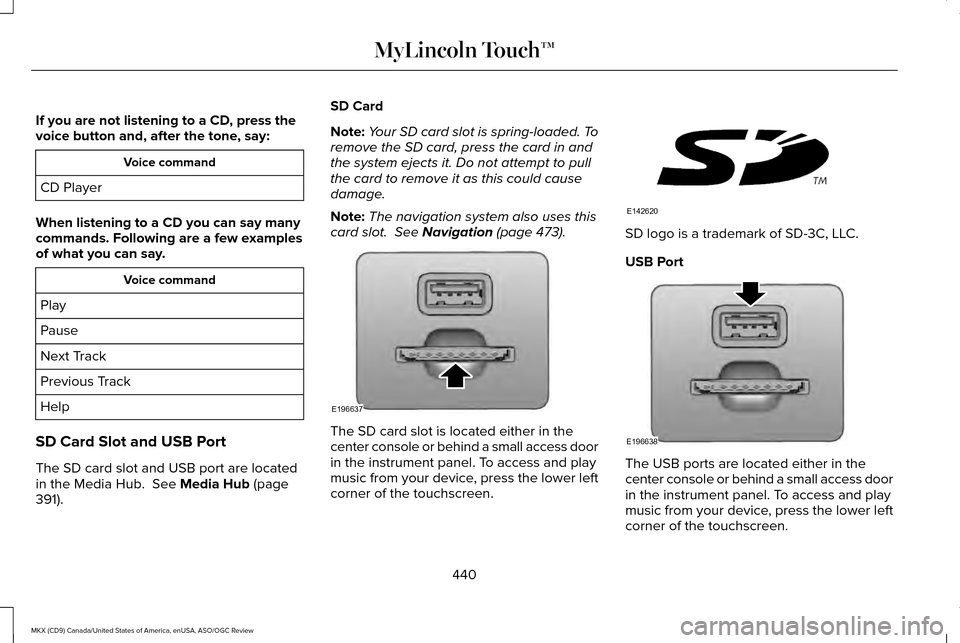
SD Card Slot and USB Port
The SD card slot and USB port are located
in the Media Hub. See Media Hub (page
391). SD Card
Note:
Your SD card slot is spring-loaded. To
remove the SD card, press the card in and
the system ejects it. Do not attempt to pull
the card to remove it as this could cause
damage.
Note: The navigation system also uses this
card slot.
See Navigation (page 473). The SD card slot is located either in the
center console or behind a small access door
in the instrument panel. To access and play
music from your device, press the lower left
corner of the touchscreen. SD logo is a trademark of SD-3C, LLC.
USB Port
The USB ports are located either in the
center console or behind a small access door
in the instrument panel. To access and play
music from your device, press the lower left
corner of the touchscreen.
440
MKX (CD9) Canada/United States of America, enUSA, ASO/OGC Review MyLincoln Touch™E196637 E142620 E196638