cruise control LINCOLN MKX 2016 User Guide
[x] Cancel search | Manufacturer: LINCOLN, Model Year: 2016, Model line: MKX, Model: LINCOLN MKX 2016Pages: 563, PDF Size: 4.96 MB
Page 182 of 563
Calculating Fuel Economy
Do not measure fuel economy during the
first 1000 miles (1600 kilometers) of driving
(this is your engine
’s break-in period); a more
accurate measurement is obtained after
2000 miles - 3000 miles (3200 kilometers -
4800 kilometers). Also, fuel expense,
frequency of fill ups or fuel gauge readings
are not accurate ways to measure fuel
economy.
1. Fill the fuel tank completely and record the initial odometer reading.
2. Each time you fill the tank, record the amount of fuel added.
3. After at least 3 to 5 tank fill ups, fill the fuel tank and record the current
odometer reading.
4. Subtract your initial odometer reading from the current odometer reading.
5. Calculate fuel economy by dividing miles
traveled by gallons used (For Metric:
Multiply liters used by 100, then divide
by kilometers traveled). Keep a record for at least 1 month and record
the type of driving (city or highway). This
provides an accurate estimate of the
vehicle
’s fuel economy under current driving
conditions. Additionally, keeping records
during summer and winter show how
temperature impacts fuel economy. In
general, lower temperatures mean lower fuel
economy.
Conditions
• Heavily loading a vehicle or towing a
trailer may reduce fuel economy at any
speed.
• Carrying unnecessary weight may reduce
fuel economy (approximately 1 mpg [0.4
km/L] is lost for every 400 pounds [180
kilograms] of weight carried).
• Adding certain accessories to your
vehicle (for example bug deflectors,
rollbars/light bars, running boards, ski
racks) may reduce fuel economy.
• Using fuel blended with alcohol may
lower fuel economy. •
Fuel economy may decrease with lower
temperatures during the first 8–10 miles
(12–16 kilometers) of driving.
• Driving on flat terrain offers improved fuel
economy as compared to driving on hilly
terrain.
• Transmissions give their best fuel
economy when operated in the top cruise
gear and with steady pressure on the gas
pedal.
• Close windows for high speed driving.
EMISSION CONTROL SYSTEM WARNINGS
Do not park, idle, or drive your vehicle
in dry grass or other dry ground cover.
The emission system heats up the engine
compartment and exhaust system, which can
start a fire. Exhaust leaks may result in entry of
harmful and potentially lethal fumes
into the passenger compartment. If you smell
exhaust fumes inside your vehicle, have your
dealer inspect your vehicle immediately. Do
not drive if you smell exhaust fumes. 179
MKX (CD9) Canada/United States of America, enUSA, ASO/OGC Review Fuel and Refueling
Page 226 of 563
PRINCIPLE OF OPERATION
Cruise control lets you maintain a set speed
without keeping your foot on the accelerator
pedal. You can use cruise control when your
vehicle speed is greater than 20 mph
(30 km/h).
USING CRUISE CONTROL WARNINGS
Do not use cruise control on winding
roads, in heavy traffic or when the road
surface is slippery. This could result in loss
of vehicle control, serious injury or death. When you are going downhill, your
vehicle speed may increase above the
set speed. The system will not apply the
brakes but a warning displays. Failure to
follow this warning could result in serious
personal injury or death. To help the system to maintain the set speed
when going downhill, downshift to a lower
gear. Note:
Cruise control will disengage if the
vehicle speed decreases more than 10 mph
(16 km/h)
below the set speed while driving
uphill. The cruise controls are on the steering
wheel.
Switching Cruise Control On
Press and release
ON.
The indicator appears in the
instrument cluster.
Setting the Cruise Speed
1. Drive to desired speed. 2. Press and release
SET+.
3. Take your foot off the accelerator pedal.
The indicator changes color in the instrument
cluster.
Changing the Set Speed
Note: If you accelerate by pressing the
accelerator pedal, the set speed will not
change. When you release the accelerator
pedal, your vehicle returns to the speed that
you previously set.
• Press and release SET+ or SET-. When
you select km/h as the display
measurement in the information display,
the set speed changes in approximately
2 km/h increments. When you select mph
as the display measurement in the
information display, the set speed
changes in approximately 1 mph
increments.
• Press the accelerator or brake pedal until
you reach the desired speed. Press and
release
SET+.
• Press and hold
SET+ or SET-. Release
the control when you reach the desired
speed.
223
MKX (CD9) Canada/United States of America, enUSA, ASO/OGC Review Cruise ControlE145976 E71340
Page 227 of 563
Canceling the Set Speed
Press and release CNCL or tap the brake
pedal. The set speed does not erase.
Resuming the Set Speed
Press and release
RES.
Switching Cruise Control Off
Press and release
OFF when the system is
in stand by mode or switch the ignition off.
Note: You erase the set speed when you
switch the system off.
USING ADAPTIVE CRUISE
CONTROL
(If Equipped) WARNINGS
Always pay close attention to changing
road conditions, especially when using
adaptive cruise control. Adaptive cruise
control cannot replace attentive driving.
Failing to follow any of the warnings below
or failing to pay attention to the road may
result in a crash, serious injury or death. WARNINGS
Adaptive cruise control is not a crash
warning or avoidance system.
Adaptive cruise control does not detect
stationary or slow moving vehicles
below 6 mph (10 km/h). Adaptive cruise control does not detect
pedestrians or objects in the roadway.
Adaptive cruise control does not detect
oncoming vehicles in the same lane.
Do not use the adaptive cruise control
when entering or leaving a highway, in
heavy traffic or on roads that are winding,
slippery or unpaved. Do not use in poor visibility, specifically
fog, rain, spray or snow.
Note:
It is your responsibility to stay alert,
drive safely and be in control of the vehicle
at all times.
The system adjusts your speed to maintain
a proper distance between you and the
vehicle in front of you in the same lane. You
can select from one of four gap settings. The controls for using your cruise control are
located on the steering wheel.
Switching the System On
Press and release
ON.
The information display shows the
grey indicator light.
224
MKX (CD9) Canada/United States of America, enUSA, ASO/OGC Review Cruise ControlE195438 E144529 E164805
Page 228 of 563
The current gap setting and SET also display.
Setting a Speed
1. Accelerate to the desired speed.
2. Press and release SET+. The vehicle
speed is stored in the memory.
3. The information display shows a green indicator light, current gap setting and
desired set speed.
4. Take your foot off the accelerator pedal. 5. A lead vehicle graphic illuminates when
the system detects a vehicle in front of
you.
Note: When adaptive cruise control is active,
the speedometer may vary slightly from the
set speed displayed in the information
display. Following a Vehicle WARNINGS
When following a vehicle in front of
you, your vehicle does not decelerate
automatically to a stop, nor does your vehicle
always decelerate quickly enough to avoid
a crash without driver intervention. Always
apply the brakes when necessary. Failing to
do so may result in a crash, serious injury or
death. Adaptive cruise control only warns of
radar-sensor-detected vehicles. In
some cases there may be no warning or a
delayed warning. You should always apply
the brakes when necessary. Failing to do so
may result in a crash, serious injury or death. Note:
The brakes may emit a sound when
the adaptive cruise control system is active.
When a vehicle ahead of you enters the
same lane or a slower vehicle is ahead in the
same lane, the vehicle speed adjusts to
maintain a preset gap distance. The distance
setting is adjustable.
The lead vehicle graphic illuminates. When you are following a vehicle and you
switch on your left directional indicator,
adaptive cruise control may provide a small
temporary acceleration to help you pass.
The vehicle maintains a constant distance
between the vehicle ahead until:
•
The vehicle in front of you accelerates to
a speed above the set speed.
• The vehicle in front of you moves out of
your lane or out of view.
• The vehicle speed falls below 12 mph (20
km/h).
• A new gap distance is set.
The vehicle applies brakes to slow the
vehicle to maintain a safe distance from the
vehicle in front. The maximum braking which
the system can apply is limited. You can
override the system by applying the brakes.
If the system predicts that its maximum
braking level is insufficient, an audible
warning sounds while the system continues
to brake. The red warning bar appears on
the windshield. You should take immediate
action.
225
MKX (CD9) Canada/United States of America, enUSA, ASO/OGC Review Cruise ControlE164805
Page 229 of 563
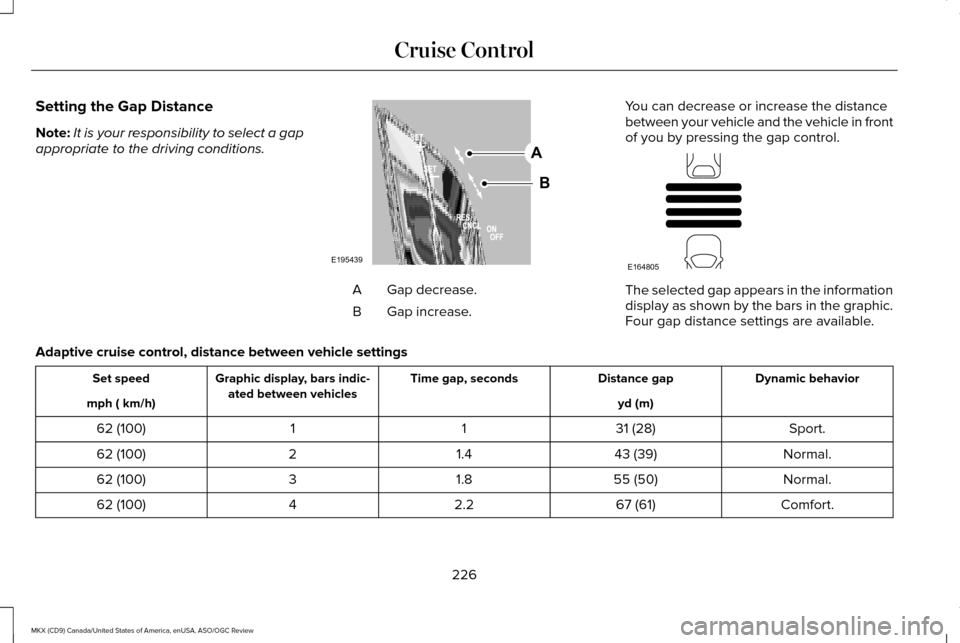
Setting the Gap Distance
Note:
It is your responsibility to select a gap
appropriate to the driving conditions. Gap decrease.
A
Gap increase.
B You can decrease or increase the distance
between your vehicle and the vehicle in front
of you by pressing the gap control. The selected gap appears in the information
display as shown by the bars in the graphic.
Four gap distance settings are available.
Adaptive cruise control, distance between vehicle settings Dynamic behavior
Distance gap
Time gap, seconds
Graphic display, bars indic-
ated between vehicles
Set speed
yd (m)
mph ( km/h)
Sport.
31 (28)
1
1
62 (100)
Normal.
43 (39)
1.4
2
62 (100)
Normal.
55 (50)
1.8
3
62 (100)
Comfort.
67 (61)
2.2
4
62 (100)
226
MKX (CD9) Canada/United States of America, enUSA, ASO/OGC Review Cruise ControlE195439
A
B E164805
Page 230 of 563
Each time you start the vehicle, the system
selects the last chosen gap for the current
driver.
Disengaging the System
Press the brake pedal or press and release
CNCL. The last set speed displays in grey
but does not erase.
Overriding the System WARNING
Whenever the driver presses the
accelerator pedal and overrides the
system, the system does not automatically
apply the brakes to maintain the set distance
from any vehicle ahead. Press the accelerator pedal to override the
set speed and gap distance.
When you override the system,
the green indicator light
illuminates and the lead vehicle
graphic does not show in the information
display. The system resumes operation when you
release the accelerator pedal. The vehicle
speed decreases to the set speed, or a
slower speed if following a slower vehicle.
Changing the Set Speed
•
Accelerate or brake to the desired speed,
then press and release
SET+.
• Press and hold
SET+ or SET- until the
desired set speed shows on the
information display. The vehicle speed
gradually changes to the selected speed.
• Press and release SET+ or SET-. The set
speed changes in approximately 1 mph
(2 km/h) increments.
The system may apply the brakes to slow
the vehicle to the new set speed. The set
speed displays continuously in the
information display when the system is
active.
Resuming the Set Speed
Note: Only use resume if you are aware of
the set speed and intend to return to it. Press and release
RES. The vehicle returns
to the previously set speed. The set speed
displays continuously in the information
display while the system is active.
Low Speed Automatic Cancellation
The system does not function at speeds
below 12 mph (20 km/h). An audible alarm
sounds and the automatic braking releases
if your vehicle drops below this speed.
Hilly Condition Usage
Note: An audible alarm sounds and the
system shuts down if it is applying brakes
for an extended period of time. This allows
the brakes to cool. The system functions
normally again when the brakes cool.
Select a lower gear during prolonged
downhill driving on steep slopes, such as
mountainous areas, when the system is
active. In such situations, the system needs
additional engine braking to reduce the load
on the vehicle ’s regular brake system to
prevent the brakes from overheating.
227
MKX (CD9) Canada/United States of America, enUSA, ASO/OGC Review Cruise ControlE144529
Page 231 of 563
Switching the System Off
Press and release OFF when the system is
in stand by mode or switch the ignition off.
Note: The set speed memory erases when
you switch off the system.
Detection Issues WARNING
On rare occasions, detection issues
can occur due to the road
infrastructures, for example bridges, tunnels
and safety barriers. In these cases, the
system may brake late or unexpectedly. At
all times, you are responsible for controlling
your vehicle, supervising the system and
intervening, if required. The radar sensor has a limited field of vision.
It may not detect vehicles at all or detect a
vehicle later than expected in some
situations. The lead vehicle graphic does not
illuminate if the system does not detect a
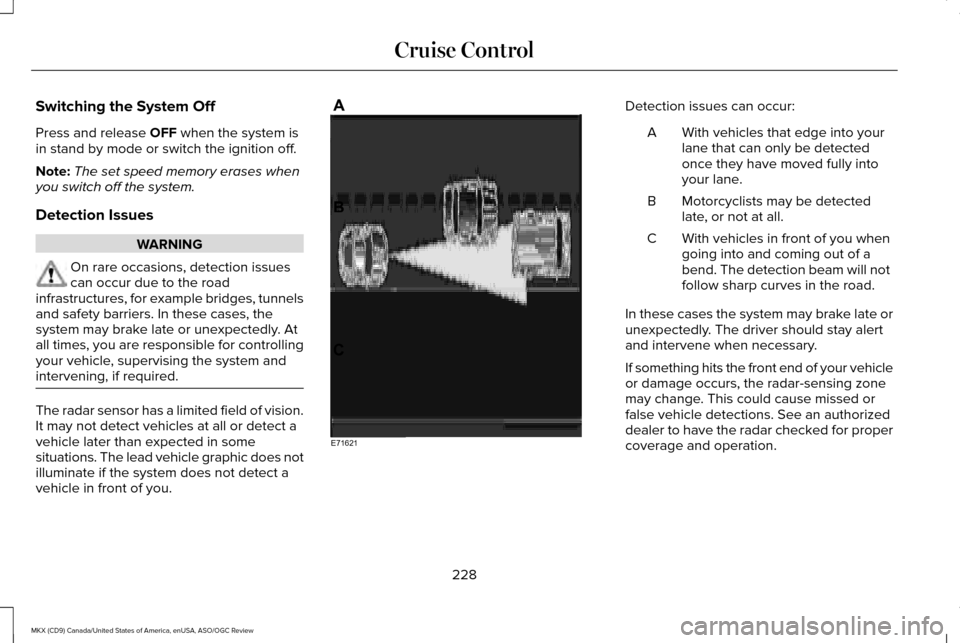
vehicle in front of you. Detection issues can occur:
With vehicles that edge into your
lane that can only be detected
once they have moved fully into
your lane.
A
Motorcyclists may be detected
late, or not at all.
B
With vehicles in front of you when
going into and coming out of a
bend. The detection beam will not
follow sharp curves in the road.
C
In these cases the system may brake late or
unexpectedly. The driver should stay alert
and intervene when necessary.
If something hits the front end of your vehicle
or damage occurs, the radar-sensing zone
may change. This could cause missed or
false vehicle detections. See an authorized
dealer to have the radar checked for proper
coverage and operation.
228
MKX (CD9) Canada/United States of America, enUSA, ASO/OGC Review Cruise ControlE71621
Page 232 of 563
System Not Available
Conditions that can cause the system to
deactivate or prevent the system from
activating when requested include:
•
A blocked sensor.
• High brake temperature.
• A failure in the system or a related
system. Blocked Sensor WARNINGS
Do not use the system when towing a
trailer with brake controls. Aftermarket
trailer brakes do not function properly when
you switch the system on because the
brakes are electronically controlled. Failing
to do so may result in loss of vehicle control,
which could result in serious injury. The
system does operate with non-electronic
trailer brake controllers, such as over-run or
surge brakes. Do not use tire sizes other than those
recommended because this can affect
the normal operation of the system. Failing
to do so may result in a loss of vehicle
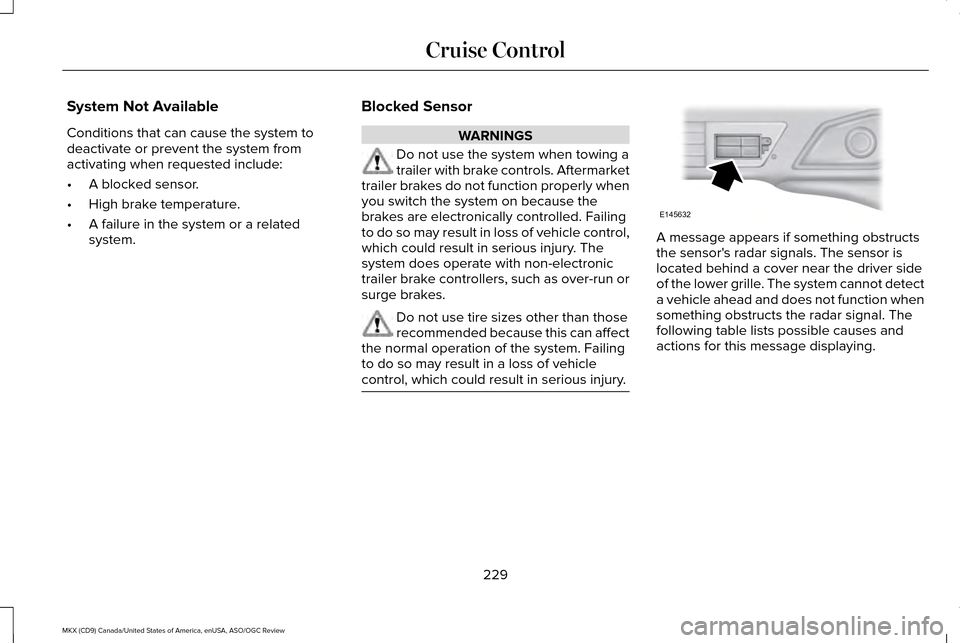
control, which could result in serious injury. A message appears if something obstructs
the sensor's radar signals. The sensor is
located behind a cover near the driver side
of the lower grille. The system cannot detect
a vehicle ahead and does not function when
something obstructs the radar signal. The
following table lists possible causes and
actions for this message displaying.
229
MKX (CD9) Canada/United States of America, enUSA, ASO/OGC Review Cruise ControlE145632
Page 233 of 563
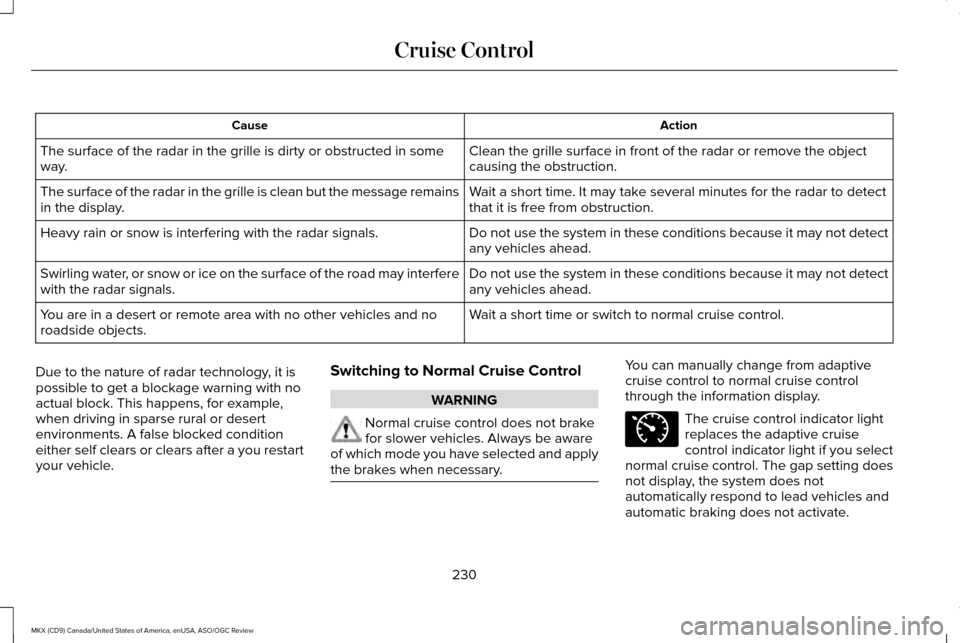
Action
Cause
Clean the grille surface in front of the radar or remove the object
causing the obstruction.
The surface of the radar in the grille is dirty or obstructed in some
way.
Wait a short time. It may take several minutes for the radar to detect
that it is free from obstruction.
The surface of the radar in the grille is clean but the message remains
in the display.
Do not use the system in these conditions because it may not detect
any vehicles ahead.
Heavy rain or snow is interfering with the radar signals.
Do not use the system in these conditions because it may not detect
any vehicles ahead.
Swirling water, or snow or ice on the surface of the road may interfere
with the radar signals.
Wait a short time or switch to normal cruise control.
You are in a desert or remote area with no other vehicles and no
roadside objects.
Due to the nature of radar technology, it is
possible to get a blockage warning with no
actual block. This happens, for example,
when driving in sparse rural or desert
environments. A false blocked condition
either self clears or clears after a you restart
your vehicle. Switching to Normal Cruise Control WARNING
Normal cruise control does not brake
for slower vehicles. Always be aware
of which mode you have selected and apply
the brakes when necessary. You can manually change from adaptive
cruise control to normal cruise control
through the information display.
The cruise control indicator light
replaces the adaptive cruise
control indicator light if you select
normal cruise control. The gap setting does
not display, the system does not
automatically respond to lead vehicles and
automatic braking does not activate.
230
MKX (CD9) Canada/United States of America, enUSA, ASO/OGC Review Cruise ControlE71340
Page 290 of 563
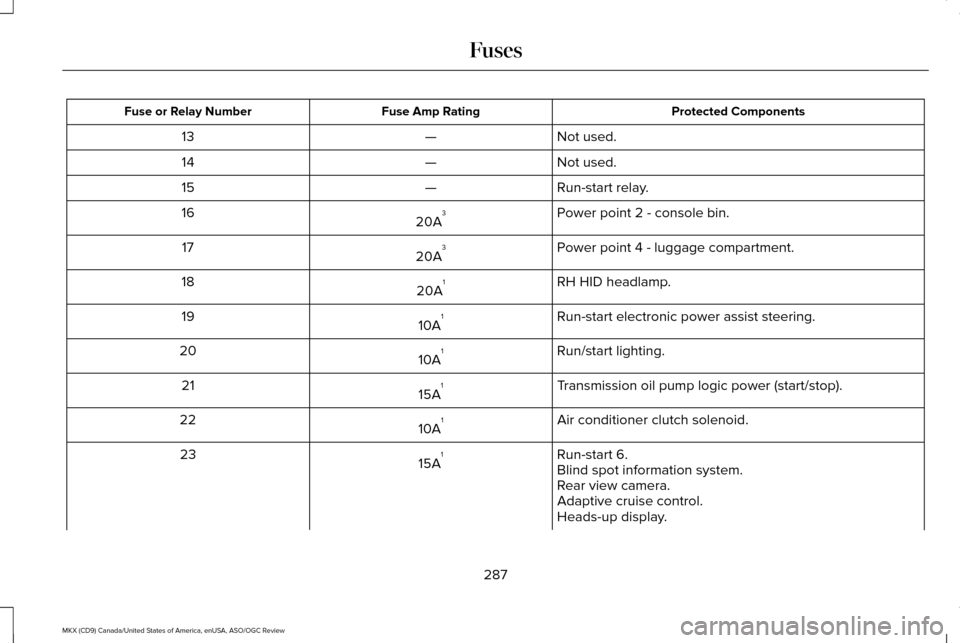
Protected Components
Fuse Amp Rating
Fuse or Relay Number
Not used.
—
13
Not used.
—
14
Run-start relay.
—
15
Power point 2 - console bin.
20A 3
16
Power point 4 - luggage compartment.
20A 3
17
RH HID headlamp.
20A 1
18
Run-start electronic power assist steering.
10A 1
19
Run/start lighting.
10A 1
20
Transmission oil pump logic power (start/stop).
15A 1
21
Air conditioner clutch solenoid.
10A 1
22
Run-start 6.
15A 1
23
Blind spot information system.
Rear view camera.
Adaptive cruise control.
Heads-up display.
287
MKX (CD9) Canada/United States of America, enUSA, ASO/OGC Review Fuses