fog LINCOLN MKX 2016 User Guide
[x] Cancel search | Manufacturer: LINCOLN, Model Year: 2016, Model line: MKX, Model: LINCOLN MKX 2016Pages: 563, PDF Size: 4.96 MB
Page 246 of 563
Extreme continuous steering may increase
the effort required for you to steer your
vehicle. This increased effort prevents
overheating and permanent damage to the
steering system. You do not lose the ability
to steer your vehicle manually. Typical
steering and driving maneuvers allow the
system to cool and return to normal
operation.
Steering Tips
If the steering wanders or pulls, check for:
•
Correct tire pressures.
• Uneven tire wear.
• Loose or worn suspension components.
• Loose or worn steering components.
• Improper vehicle alignment.
Note: A high crown in the road or high
crosswinds may also make the steering
seem to wander or pull. Adaptive Learning
The electronic power steering system
adaptive learning helps correct road
irregularities and improves overall handling
and steering feel. It communicates with the
brake system to help operate advanced
stability control and accident avoidance
systems. Additionally, whenever the battery
is disconnected or a new battery installed,
you must drive your vehicle a short distance
before the system relearns the strategy and
reactivates all systems.
PRE-COLLISION ASSIST
WARNINGS
You are responsible for controlling your
vehicle at all times. The system does
not relieve you of your responsibility to drive
with due care and attention. Failure to take
care may result in the loss of control of your
vehicle, serious personal injury or death. WARNINGS
To achieve full system performance
you must break in the braking system.
See General Information (page 194). Failure
to take care may result in the loss of control
of your vehicle, serious personal injury or
death. The system does not react to cyclists,
animals, pedestrians at night, or
vehicles that are driving in a different
direction. Failure to take care may result in
the loss of control of your vehicle, serious
personal injury or death. The system does not operate during
harsh acceleration or steering. Failure
to take care may lead to a crash or personal
injury. The system may or may not operate or
may operate with reduced function
during cold or severe weather conditions.
Snow, ice, rain, spray and fog can influence
the system. Keep the front camera and radar
free of snow and ice. Failure to take care
may result in the loss of control of your
vehicle, serious personal injury or death.
243
MKX (CD9) Canada/United States of America, enUSA, ASO/OGC Review Driving Aids
Page 248 of 563
Note:
If you perceive Pre-Collision Assist
alerts as being too frequent or disturbing,
then you can reduce the alert sensitivity,
though the manufacturer recommends using
the highest sensitivity setting where possible.
Setting lower sensitivity would lead to fewer
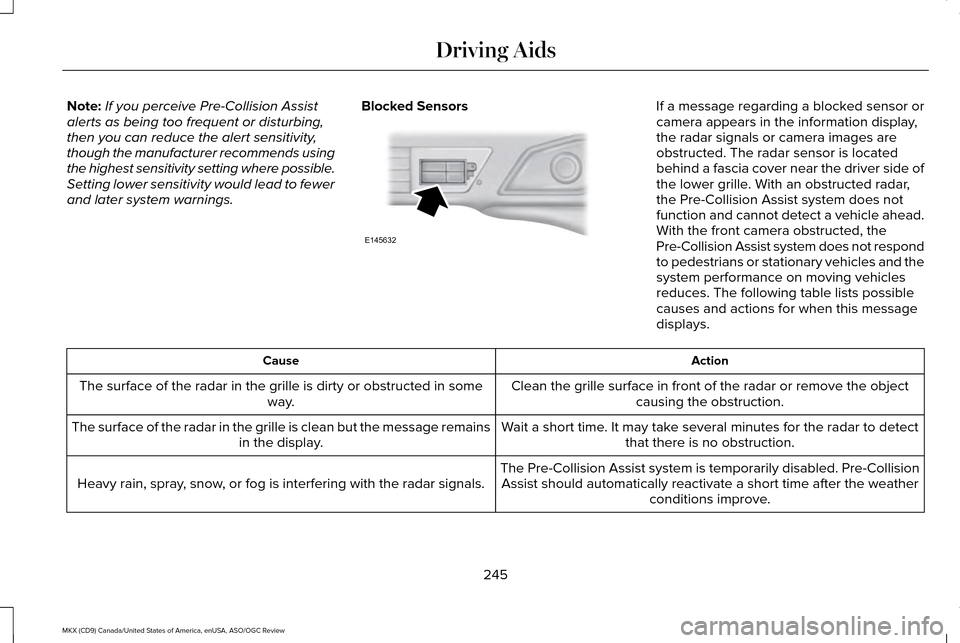
and later system warnings. Blocked Sensors If a message regarding a blocked sensor or
camera appears in the information display,
the radar signals or camera images are
obstructed. The radar sensor is located
behind a fascia cover near the driver side of
the lower grille. With an obstructed radar,
the Pre-Collision Assist system does not
function and cannot detect a vehicle ahead.
With the front camera obstructed, the
Pre-Collision Assist system does not respond
to pedestrians or stationary vehicles and the
system performance on moving vehicles
reduces. The following table lists possible
causes and actions for when this message
displays.
Action
Cause
Clean the grille surface in front of the radar or remove the objectcausing the obstruction.
The surface of the radar in the grille is dirty or obstructed in some
way.
Wait a short time. It may take several minutes for the radar to detectthat there is no obstruction.
The surface of the radar in the grille is clean but the message remains
in the display.
The Pre-Collision Assist system is temporarily disabled. Pre-CollisionAssist should automatically reactivate a short time after the weather conditions improve.
Heavy rain, spray, snow, or fog is interfering with the radar signals.
245
MKX (CD9) Canada/United States of America, enUSA, ASO/OGC Review Driving AidsE145632
Page 474 of 563

Note: The passenger side temperature and the Dual indicator automatically turn on when the passenger is adjusting their t\
emperature
control.
Fan speed:
Touch + or - to increase or decrease the volume of air circulated in your vehicle.
C
Note:
When the system is controlling the fan speed automatically, all the fan speed indicators turn off.
Recirculated air:
Touch the button to switch between outside air and recirculated air. When you select recirculated air, the air
currently in the passenger compartment recirculates. This may reduce the\
time needed to cool the interior (when used with A/C)
and may reduce unwanted odors from entering your vehicle.
D
Note:
Recirculated air may turn off automatically (or be prevented from turnin\
g on) in all airflow modes except Max A/C to reduce
risk of fogging. Recirculated air may also turn on and off automatically in Panel or Panel and Floor airflow modes during hot weather
in order to improve cooling efficiency.
Max A/C:
Touch the button to maximize cooling. Recirculated air flows through the instrument panel vents, air conditioni\
ng
automatically turns on, and the fan automatically adjusts to the highest\
speed.
E
A/C:
Touch the button to switch air conditioning compressor on or off. Use air conditioning with recirculated air to improve cooling
performance and efficiency.
F
Note:
In certain conditions (such as when using Max Defrost), the air condi\
tioning compressor may continue to operate even after
you switch off the air conditioning with the A/C button.
Auto:
Touch the button to switch on automatic operation. Select the desired tem\
perature using the temperature control. The system
adjusts fan speed, air distribution, air conditioning operation, and sel\
ects outside air or recirculated air to heat or cool the vehicle
in order to maintain the desired temperature. You can also use the
Auto button to switch off dual zone operation by touching and
holding the button for more than two seconds.
G
Heated rear window:
Turns the heated rear window on and off. See Heated Windows and Mirrors (page 143).
H
471
MKX (CD9) Canada/United States of America, enUSA, ASO/OGC Review MyLincoln Touch™
Page 475 of 563

Max Defrost: Touch the button to maximize defrosting. Outside air flows through the wi\
ndshield vents, fan automatically adjusts to
the highest speed and the temperature dial returns to the full heat posi\
tion. You can use this setting to defog or clear a thin covering
of ice from the windshield. The heated rear window also automatically tu\
rns on when you select Max Defrost.
I
Air distribution control:
Touch these buttons to switch airflow from the windshield, instrument pan\
el, or footwell vents on or off.
The system can distribute air through any combination of these vents.
J
Note:
To prevent window fogging, you cannot select recirculated air when MAX De\
frost is on.
Driver settings:
K
Touch the
+ or – to increase or decrease the air temperature on the driver side of the v\
ehicle.
Touch the heated seat icon to switch the heated seat off and on (if equi\
pped).
Touch the climate-controlled seat icon to switch the climate-controlled s\
eat off and on (if equipped).
Touch
MyTemp to select your preset temperature setpoint. Touch and hold MyTemp to save a new preset temperature setpoint.
Touch the heated steering wheel icon to switch the heated steering wheel \
on and off (if equipped).
Note: If your vehicle is equipped with a
wood-trimmed steering wheel, it does not
heat between the 10 o'clock and 2 o'clock
positions. Climate Control Voice Commands Press the voice button on the
steering wheel controls. When
prompted, say any of the following
or a similar command:
472
MKX (CD9) Canada/United States of America, enUSA, ASO/OGC Review MyLincoln Touch™E142599
Page 556 of 563
G
Garage Door Opener
See: Universal Garage Door Opener.............158
Gauges.............................................................107 Engine Coolant Temperature Gauge.............109
Fuel Gauge...........................................................108
Information Display.............................................108
General Information on Radio Frequencies..................................................55
Intelligent Access.................................................55
General Maintenance Information...........499 Multi-Point Inspection.......................................502
Owner Checks and Services............................
501
Protecting Your Investment.............................499
Why Maintain Your Vehicle?............................499
Why Maintain Your Vehicle at Your Dealership?......................................................499
Getting Assistance Outside the U.S. and Canada.........................................................280
Getting the Services You Need
.................277
Away From Home...............................................277
Global Opening and Closing
.......................101
Closing the Windows..........................................101
Opening the Windows........................................101
Glove Box
........................................................165
Manual Entry.........................................................165 H
Hazard Warning Flashers...........................273
Headlamp Exit Delay.....................................94
Head Restraints
.............................................145
Front seat manual head restraints..................146
Rear seat center head restraint.......................147
Rear seat outboard head restraints................147
Heated Seats..................................................154 Front Seats............................................................154
Rear Seats.............................................................155
Heated Steering Wheel................................86
Heated Windows and Mirrors....................143 Heated Exterior Mirror.......................................143
Heated Rear Window.........................................143
Heating See: Climate Control..........................................140
Hints on Controlling the Interior Climate..........................................................142
Cooling the Interior Quickly..............................
143
General Hints........................................................142
Heating the Interior Quickly.............................
142
Recommended Settings for Cooling .............143
Recommended Settings for Heating..............142
Side Window Defogging in Cold Weather.............................................................143
Hints on Driving With Anti-Lock Brakes............................................................194 Hood Lock
See: Opening and Closing the Hood............302
I
In California (U.S. Only)...............................278
Information Display Control
.........................85
Cluster Display Control Features.....................85
Information Displays
......................................114
General Information.............................................114
Information.....................................................455 911 Assist...............................................................464
Alerts......................................................................464
Calendar...............................................................464
Sirius Travel Link.................................................462
SYNC Services (If Equipped, United States
Only)..................................................................456
Vehicle Health Report.......................................467
553
MKX (CD9) Canada/United States of America, enUSA, ASO/OGC Review Index