information display controls LINCOLN MKX 2016 User Guide
[x] Cancel search | Manufacturer: LINCOLN, Model Year: 2016, Model line: MKX, Model: LINCOLN MKX 2016Pages: 563, PDF Size: 4.96 MB
Page 125 of 563
.
Adaptive Cruise Malfunction
Displayed wh")
Adaptive Cruise Control
Action
Message
Displayed when a radar malfunction is preventing the ACC from engaging. \
See Using Adaptive Cruise Control (page 224).
Adaptive Cruise Malfunction
Displayed when conditions exist such that the adaptive cruise cannot fun\
ction properly.
See
Using Adaptive Cruise Control (page 224).
Adaptive Cruise Not Available
Displayed when the radar is blocked because of poor radar visibility due to bad weather or ice/
mud/water in front of radar. Driver can typically clean the sensor to resolve. See Using AdaptiveCruise Control
(page 224).
Adaptive Cruise Not Available Sensor
Blocked See Manual
Displayed when the automatic braking has been disabled.
Normal Cruise Active Automatic Braking
Turned Off
Displayed when a radar malfunction is preventing the ACC from engaging.
Front Sensor Not Aligned
Displayed when the adaptive cruise has reinstated controls to the driver\
.
Adaptive Cruise - Driver Resume Control
Displays when the vehicle speed is too slow to activate the adaptive cru\
ise.
Adaptive Cruise Speed Too Low to
Activate
Displays when the adaptive cruise is automatically adjusting the gap dis\
tance and the driverneeds to shift the transmission into a lower gear.
Adaptive Cruise Shift Down
122
MKX (CD9) Canada/United States of America, enUSA, ASO/OGC Review Information Displays
Page 147 of 563
Note:
Make sure you have a cabin air filter
installed at all times. This prevents foreign
objects from entering the system. Running
the system without a filter in place could
result in degradation or damage to the
system.
Replace the filter at regular intervals. See
Scheduled Maintenance (page 499).
For additional cabin air filter information, or
to replace the filter, see an authorized dealer.
REMOTE START
The remote start feature allows you to
pre-condition the interior of your vehicle. The
climate control system works to achieve
comfort according to your pre-selected
settings.
Note: You cannot adjust the system during
remote start operation. You cannot switch
on the displays or indicators during remote
start. Switch the ignition on to return the system
to its pre-selected settings. You can now
make adjustments normally, but you need to
switch certain vehicle-dependent features
back on, such as:
•
Heated seats.
• Cooled seats.
• Heated steering wheel.
• Heated mirrors.
• Heated rear window.
You can adjust the default remote start
settings using the information display
controls.
See Information Displays (page
114).
Automatic Settings
In hot weather, the system is set to 72°F
(22°C). The cooled seats are set to high (if
available, and selected to AUTO in the
information display).
In moderate weather, the system either heats
or cools (based on pre-selected settings).
The rear defroster, heated mirrors and
heated seats do not automatically switch on. In cold weather, the system is set to 72°F
(22°C). The heated seats are set to high (if
available, and selected to AUTO in the
information display). The rear defroster and
heated mirrors automatically switch on.
144
MKX (CD9) Canada/United States of America, enUSA, ASO/OGC Review Climate Control
Page 203 of 563
PRINCIPLE OF OPERATION
The traction control system helps avoid drive
wheel spin and loss of traction.
If your vehicle begins to slide, the system
applies the brakes to individual wheels and,
when needed, reduces engine power at the
same time. If the wheels spin when
accelerating on slippery or loose surfaces,
the system reduces engine power in order
to increase traction.
USING TRACTION CONTROL WARNING
The stability and traction control light
illuminates steadily if a failure is
detected in the system. Verify that the
traction control system was not manually
disabled using the information display
controls or the switch. If the stability control
and traction control light is still illuminating
steadily, have the system serviced by an
authorized dealer immediately. Operating
your vehicle with the traction control disabled
could lead to an increased risk of loss of
vehicle control, vehicle rollover, personal
injury and death. The system automatically turns on each time
you switch the ignition on.
If your vehicle is stuck in mud or snow,
switching traction control off may be
beneficial as this allows the wheels to spin.
Note:
When you switch traction control off,
stability control remains fully active. Switching the System Off
When you switch the system off or on, a
message appears in the information display
showing system status.
You can switch the system off by either using
the information display controls or the switch.
Using the Information Display Controls
You can switch this feature off or on in the
information display. See General Information
(page 114).
Using a Switch
(If Equipped)
The switch for the stability control system
and traction control system is located on the
instrument panel.
Use the switch to turn the system off or on.
System Indicator Lights and Messages The stability and traction control
light temporarily illuminates on
engine start-up and flashes when
a driving condition activates either of the
systems.
200
MKX (CD9) Canada/United States of America, enUSA, ASO/OGC Review Traction ControlE138639
Page 226 of 563
PRINCIPLE OF OPERATION
Cruise control lets you maintain a set speed
without keeping your foot on the accelerator
pedal. You can use cruise control when your
vehicle speed is greater than 20 mph
(30 km/h).
USING CRUISE CONTROL WARNINGS
Do not use cruise control on winding
roads, in heavy traffic or when the road
surface is slippery. This could result in loss
of vehicle control, serious injury or death. When you are going downhill, your
vehicle speed may increase above the
set speed. The system will not apply the
brakes but a warning displays. Failure to
follow this warning could result in serious
personal injury or death. To help the system to maintain the set speed
when going downhill, downshift to a lower
gear. Note:
Cruise control will disengage if the
vehicle speed decreases more than 10 mph
(16 km/h)
below the set speed while driving
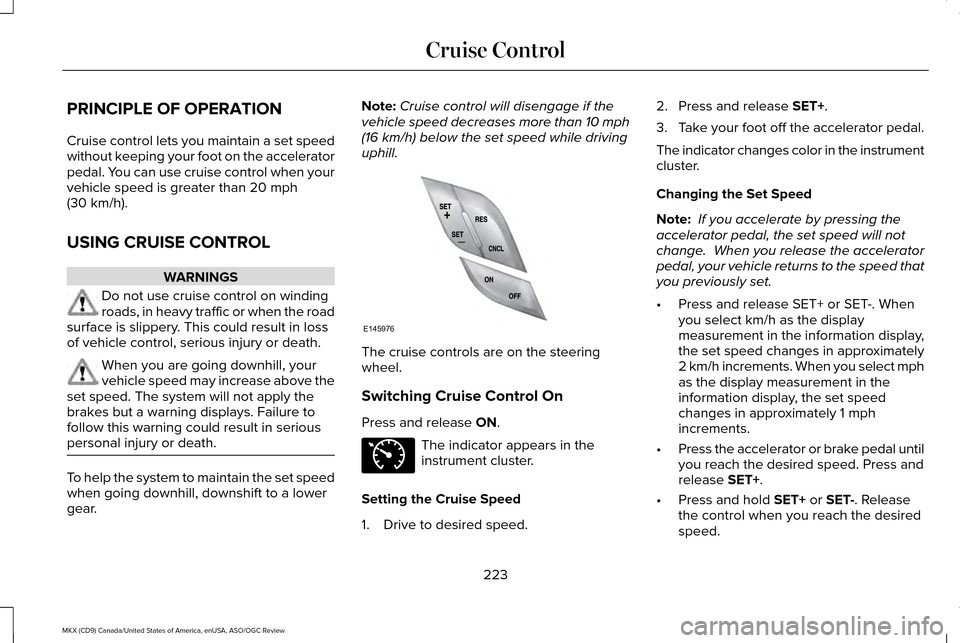
uphill. The cruise controls are on the steering
wheel.
Switching Cruise Control On
Press and release
ON.
The indicator appears in the
instrument cluster.
Setting the Cruise Speed
1. Drive to desired speed. 2. Press and release
SET+.
3. Take your foot off the accelerator pedal.
The indicator changes color in the instrument
cluster.
Changing the Set Speed
Note: If you accelerate by pressing the
accelerator pedal, the set speed will not
change. When you release the accelerator
pedal, your vehicle returns to the speed that
you previously set.
• Press and release SET+ or SET-. When
you select km/h as the display
measurement in the information display,
the set speed changes in approximately
2 km/h increments. When you select mph
as the display measurement in the
information display, the set speed
changes in approximately 1 mph
increments.
• Press the accelerator or brake pedal until
you reach the desired speed. Press and
release
SET+.
• Press and hold
SET+ or SET-. Release
the control when you reach the desired
speed.
223
MKX (CD9) Canada/United States of America, enUSA, ASO/OGC Review Cruise ControlE145976 E71340
Page 227 of 563
Canceling the Set Speed
Press and release CNCL or tap the brake
pedal. The set speed does not erase.
Resuming the Set Speed
Press and release
RES.
Switching Cruise Control Off
Press and release
OFF when the system is
in stand by mode or switch the ignition off.
Note: You erase the set speed when you
switch the system off.
USING ADAPTIVE CRUISE
CONTROL
(If Equipped) WARNINGS
Always pay close attention to changing
road conditions, especially when using
adaptive cruise control. Adaptive cruise
control cannot replace attentive driving.
Failing to follow any of the warnings below
or failing to pay attention to the road may
result in a crash, serious injury or death. WARNINGS
Adaptive cruise control is not a crash
warning or avoidance system.
Adaptive cruise control does not detect
stationary or slow moving vehicles
below 6 mph (10 km/h). Adaptive cruise control does not detect
pedestrians or objects in the roadway.
Adaptive cruise control does not detect
oncoming vehicles in the same lane.
Do not use the adaptive cruise control
when entering or leaving a highway, in
heavy traffic or on roads that are winding,
slippery or unpaved. Do not use in poor visibility, specifically
fog, rain, spray or snow.
Note:
It is your responsibility to stay alert,
drive safely and be in control of the vehicle
at all times.
The system adjusts your speed to maintain
a proper distance between you and the
vehicle in front of you in the same lane. You
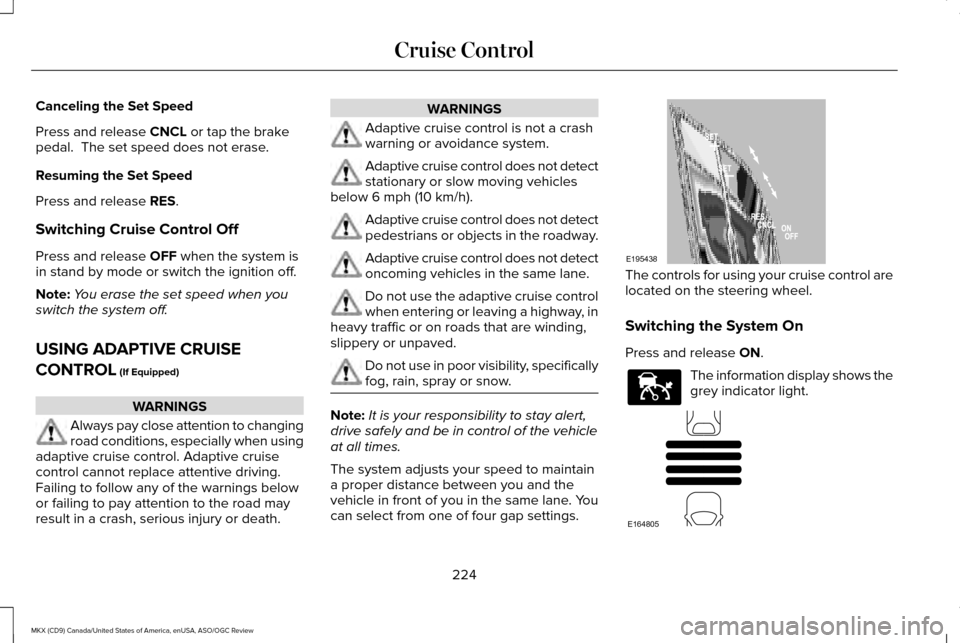
can select from one of four gap settings. The controls for using your cruise control are
located on the steering wheel.
Switching the System On
Press and release
ON.
The information display shows the
grey indicator light.
224
MKX (CD9) Canada/United States of America, enUSA, ASO/OGC Review Cruise ControlE195438 E144529 E164805
Page 312 of 563
3.
Remove the engine oil filler cap and use
a funnel to pour the engine oil into the
opening.
4. Wipe off any spilled oil.
5. Replace the filler cap. Turn it until you feel a strong resistance.
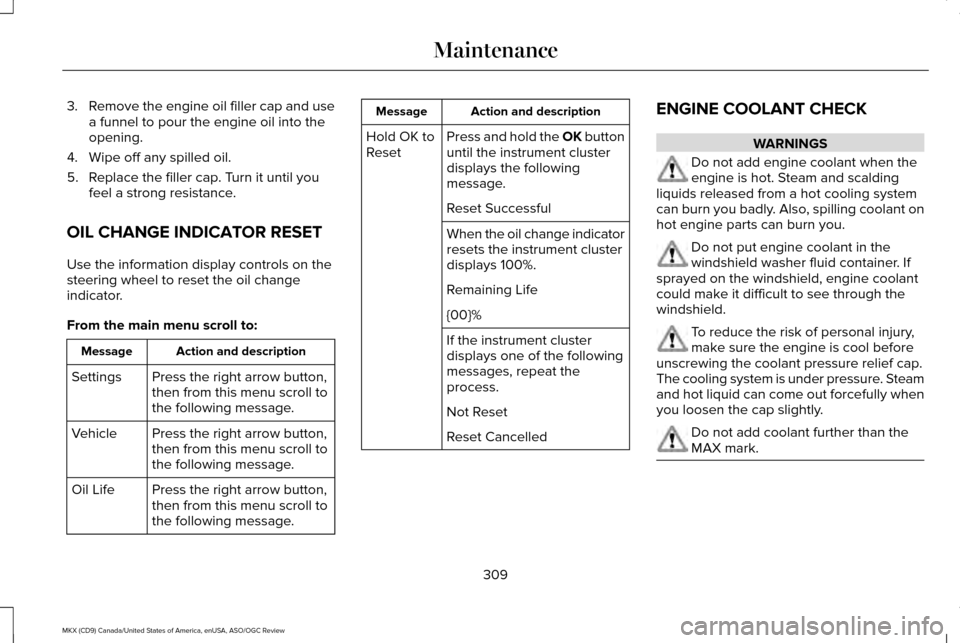
OIL CHANGE INDICATOR RESET
Use the information display controls on the
steering wheel to reset the oil change
indicator.
From the main menu scroll to: Action and description
Message
Press the right arrow button,
then from this menu scroll to
the following message.
Settings
Press the right arrow button,
then from this menu scroll to
the following message.
Vehicle
Press the right arrow button,
then from this menu scroll to
the following message.
Oil Life Action and description
Message
Press and hold the OK button
until the instrument cluster
displays the following
message.
Hold OK to
Reset
Reset Successful
When the oil change indicator
resets the instrument cluster
displays 100%.
Remaining Life
{00}%
If the instrument cluster
displays one of the following
messages, repeat the
process.
Not Reset
Reset Cancelled ENGINE COOLANT CHECK WARNINGS
Do not add engine coolant when the
engine is hot. Steam and scalding
liquids released from a hot cooling system
can burn you badly. Also, spilling coolant on
hot engine parts can burn you. Do not put engine coolant in the
windshield washer fluid container. If
sprayed on the windshield, engine coolant
could make it difficult to see through the
windshield. To reduce the risk of personal injury,
make sure the engine is cool before
unscrewing the coolant pressure relief cap.
The cooling system is under pressure. Steam
and hot liquid can come out forcefully when
you loosen the cap slightly. Do not add coolant further than the
MAX mark.
309
MKX (CD9) Canada/United States of America, enUSA, ASO/OGC Review Maintenance
Page 467 of 563
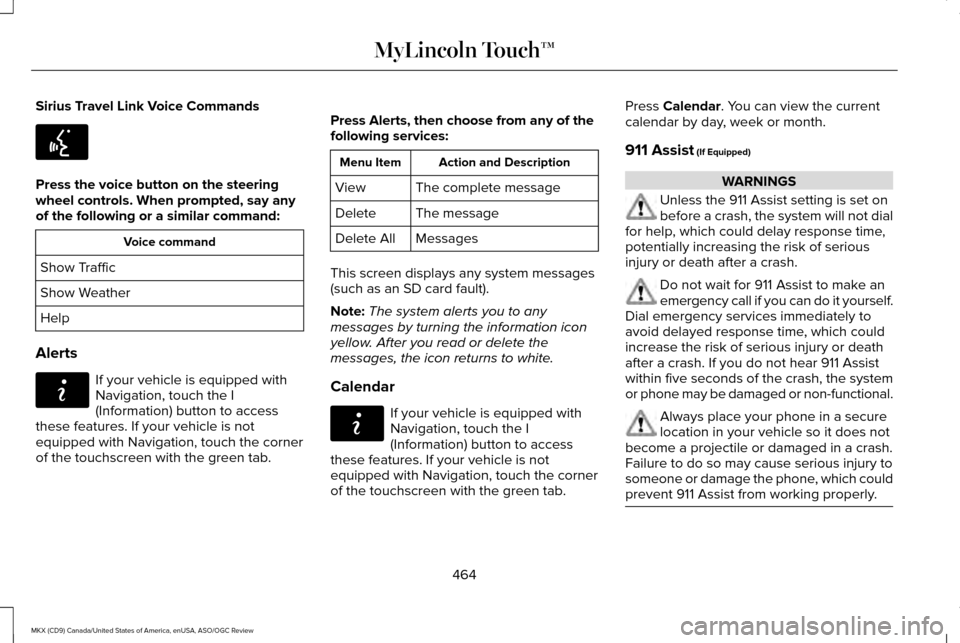
Sirius Travel Link Voice Commands
Press the voice button on the steering
wheel controls. When prompted, say any
of the following or a similar command:
Voice command
Show Traffic
Show Weather
Help
Alerts If your vehicle is equipped with
Navigation, touch the I
(Information) button to access
these features. If your vehicle is not
equipped with Navigation, touch the corner
of the touchscreen with the green tab. Press Alerts, then choose from any of the
following services: Action and Description
Menu Item
The complete message
View
The message
Delete
Messages
Delete All
This screen displays any system messages
(such as an SD card fault).
Note: The system alerts you to any
messages by turning the information icon
yellow. After you read or delete the
messages, the icon returns to white.
Calendar If your vehicle is equipped with
Navigation, touch the I
(Information) button to access
these features. If your vehicle is not
equipped with Navigation, touch the corner
of the touchscreen with the green tab. Press Calendar. You can view the current
calendar by day, week or month.
911 Assist
(If Equipped) WARNINGS
Unless the 911 Assist setting is set on
before a crash, the system will not dial
for help, which could delay response time,
potentially increasing the risk of serious
injury or death after a crash. Do not wait for 911 Assist to make an
emergency call if you can do it yourself.
Dial emergency services immediately to
avoid delayed response time, which could
increase the risk of serious injury or death
after a crash. If you do not hear 911 Assist
within five seconds of the crash, the system
or phone may be damaged or non-functional. Always place your phone in a secure
location in your vehicle so it does not
become a projectile or damaged in a crash.
Failure to do so may cause serious injury to
someone or damage the phone, which could
prevent 911 Assist from working properly. 464
MKX (CD9) Canada/United States of America, enUSA, ASO/OGC Review MyLincoln Touch™E142599 E142608 E142608
Page 562 of 563
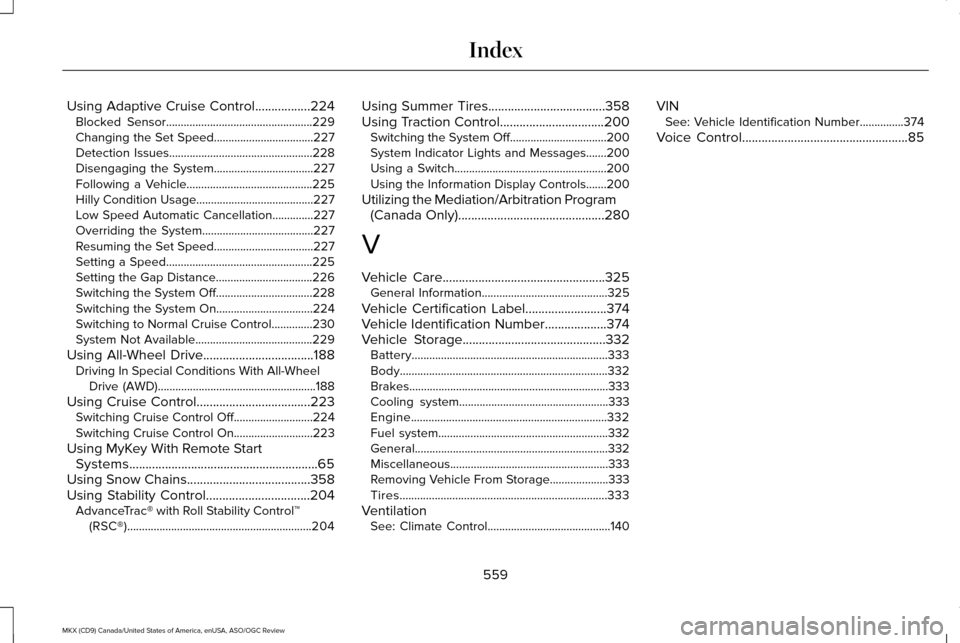
Using Adaptive Cruise Control.................224
Blocked Sensor..................................................229
Changing the Set Speed..................................227
Detection Issues.................................................228
Disengaging the System..................................227
Following a Vehicle...........................................225
Hilly Condition Usage........................................227
Low Speed Automatic Cancellation..............
227
Overriding the System......................................227
Resuming the Set Speed..................................227
Setting a Speed..................................................225
Setting the Gap Distance.................................226
Switching the System Off.................................228
Switching the System On.................................
224
Switching to Normal Cruise Control..............230
System Not Available........................................229
Using All-Wheel Drive..................................188 Driving In Special Conditions With All-Wheel
Drive (AWD)......................................................188
Using Cruise Control...................................223 Switching Cruise Control Off...........................
224
Switching Cruise Control On...........................223
Using MyKey With Remote Start Systems..........................................................65
Using Snow Chains......................................358
Using Stability Control................................204 AdvanceTrac® with Roll Stability Control™
(RSC®)...............................................................204 Using Summer Tires
....................................358
Using Traction Control................................200 Switching the System Off.................................200
System Indicator Lights and Messages.......200
Using a Switch....................................................200
Using the Information Display Controls.......200
Utilizing the Mediation/Arbitration Program (Canada Only).............................................280
V
Vehicle Care
..................................................325
General Information...........................................325
Vehicle Certification Label.........................374
Vehicle Identification Number
...................374
Vehicle Storage............................................332
Battery...................................................................333
Body.......................................................................332
Brakes....................................................................333
Cooling system...................................................333
Engine...................................................................332
Fuel system..........................................................332
General..................................................................332
Miscellaneous......................................................333
Removing Vehicle From Storage....................
333
Tires.......................................................................333
Ventilation See: Climate Control..........................................140 VIN
See: Vehicle Identification Number...............374
Voice Control
...................................................85
559
MKX (CD9) Canada/United States of America, enUSA, ASO/OGC Review Index