Camera LINCOLN MKX 2016 Owner's Manual
[x] Cancel search | Manufacturer: LINCOLN, Model Year: 2016, Model line: MKX, Model: LINCOLN MKX 2016Pages: 563, PDF Size: 4.96 MB
Page 290 of 563
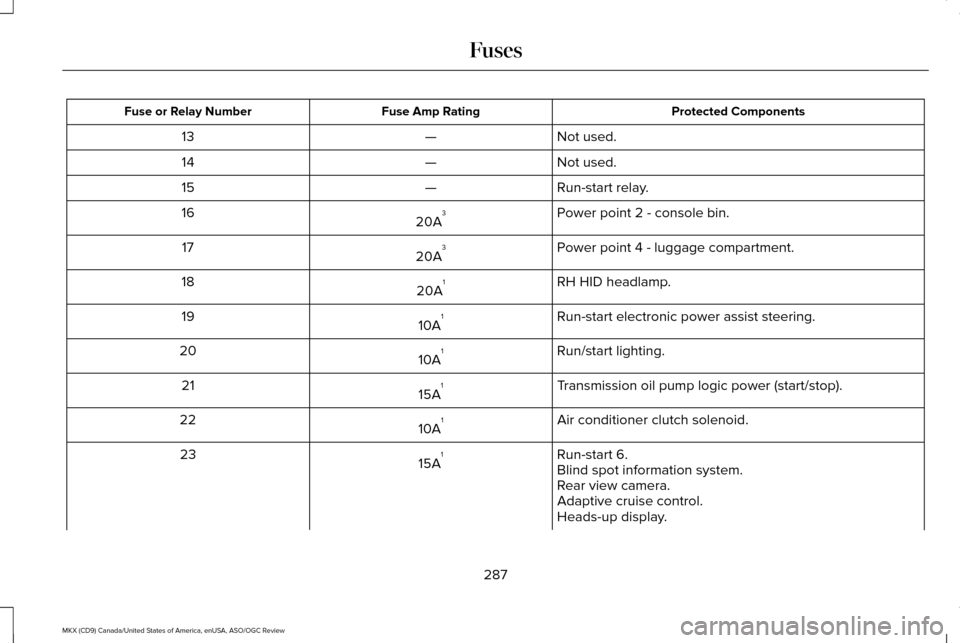
Protected Components
Fuse Amp Rating
Fuse or Relay Number
Not used.
—
13
Not used.
—
14
Run-start relay.
—
15
Power point 2 - console bin.
20A 3
16
Power point 4 - luggage compartment.
20A 3
17
RH HID headlamp.
20A 1
18
Run-start electronic power assist steering.
10A 1
19
Run/start lighting.
10A 1
20
Transmission oil pump logic power (start/stop).
15A 1
21
Air conditioner clutch solenoid.
10A 1
22
Run-start 6.
15A 1
23
Blind spot information system.
Rear view camera.
Adaptive cruise control.
Heads-up display.
287
MKX (CD9) Canada/United States of America, enUSA, ASO/OGC Review Fuses
Page 291 of 563
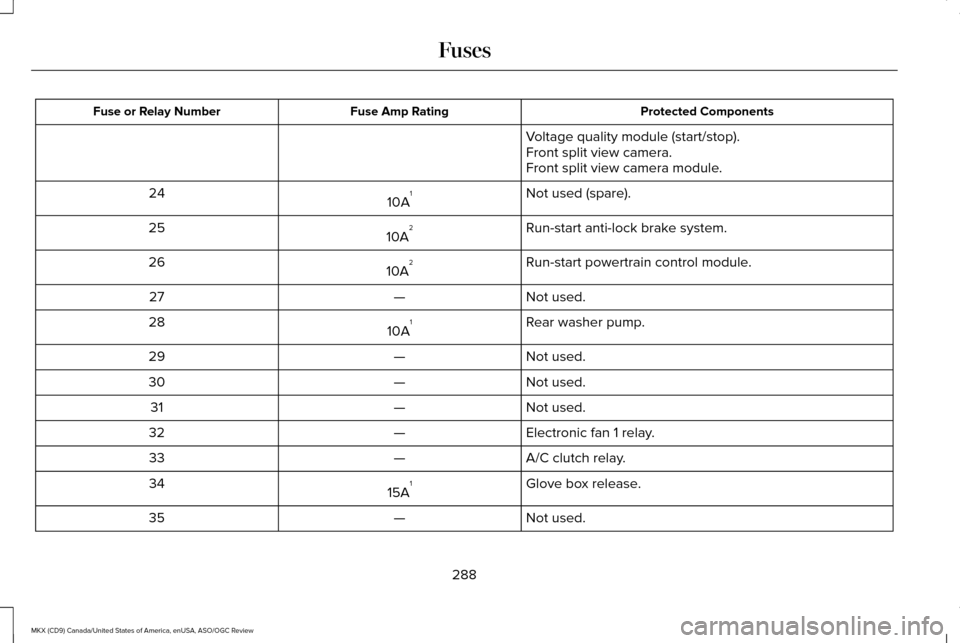
Protected Components
Fuse Amp Rating
Fuse or Relay Number
Voltage quality module (start/stop).
Front split view camera.
Front split view camera module.
Not used (spare).
10A 1
24
Run-start anti-lock brake system.
10A 2
25
Run-start powertrain control module.
10A 2
26
Not used.
—
27
Rear washer pump.
10A 1
28
Not used.
—
29
Not used.
—
30
Not used.
—
31
Electronic fan 1 relay.
—
32
A/C clutch relay.
—
33
Glove box release.
15A 1
34
Not used.
—
35
288
MKX (CD9) Canada/United States of America, enUSA, ASO/OGC Review Fuses
Page 300 of 563
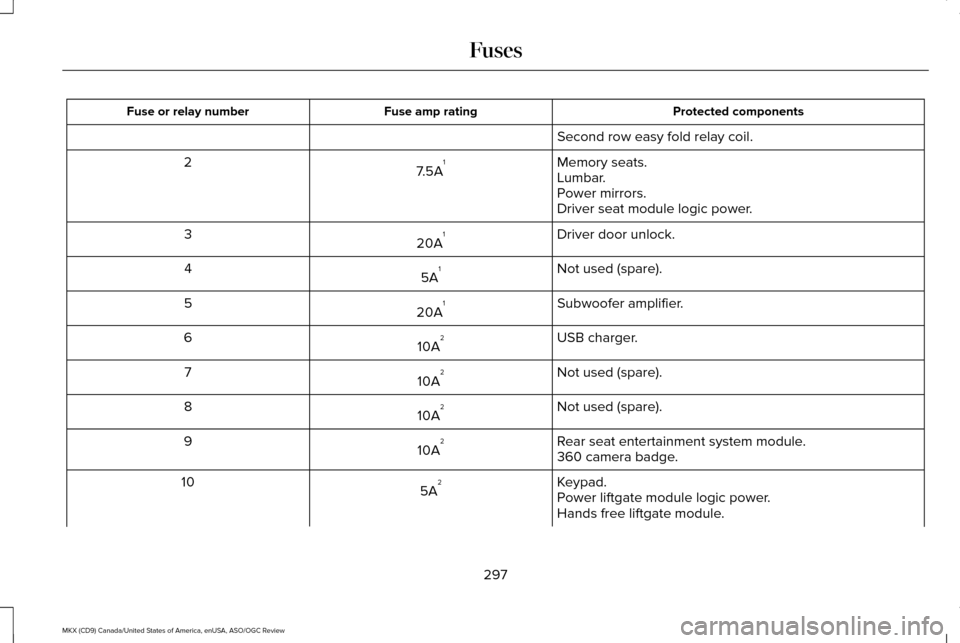
Protected components
Fuse amp rating
Fuse or relay number
Second row easy fold relay coil.
Memory seats.
7.5A 1
2
Lumbar.
Power mirrors.
Driver seat module logic power.
Driver door unlock.
20A 1
3
Not used (spare).
5A 1
4
Subwoofer amplifier.
20A 1
5
USB charger.
10A 2
6
Not used (spare).
10A 2
7
Not used (spare).
10A 2
8
Rear seat entertainment system module.
10A 2
9
360 camera badge.
Keypad.
5A 2
10
Power liftgate module logic power.
Hands free liftgate module.
297
MKX (CD9) Canada/United States of America, enUSA, ASO/OGC Review Fuses
Page 302 of 563
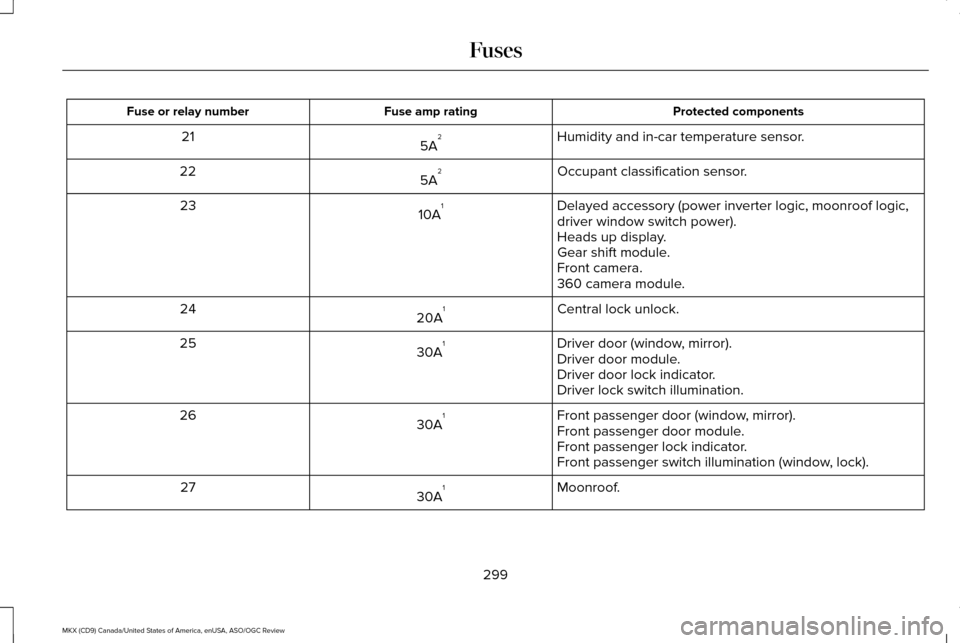
Protected components
Fuse amp rating
Fuse or relay number
Humidity and in-car temperature sensor.
5A 2
21
Occupant classification sensor.
5A 2
22
Delayed accessory (power inverter logic, moonroof logic,
driver window switch power).
10A 1
23
Heads up display.
Gear shift module.
Front camera.
360 camera module.
Central lock unlock.
20A 1
24
Driver door (window, mirror).
30A 1
25
Driver door module.
Driver door lock indicator.
Driver lock switch illumination.
Front passenger door (window, mirror).
30A 1
26
Front passenger door module.
Front passenger lock indicator.
Front passenger switch illumination (window, lock).
Moonroof.
30A 1
27
299
MKX (CD9) Canada/United States of America, enUSA, ASO/OGC Review Fuses
Page 402 of 563

Speed-restricted Features
Enabling Valet Mode
System Functionality
Editing settings while the rear view camera or active park assist are ac\
tive
Editing wireless settings
Wi-Fi and Wireless
Editing the list of wireless networks
Adding or editing wallpaper
Photos and Graphics
Composing text messages
Text Messages
Viewing received text messages
Editing preset text messages
Using the keyboard to enter a destination
Navigation
Demo navigation route
Adding or editing Address Book or Avoid Area entries
399
MKX (CD9) Canada/United States of America, enUSA, ASO/OGC Review MyLincoln Touch™
Page 409 of 563
To make adjustments using the voice
button, press the button and when
prompted, say:
Voice command
Display Settings Uploading Photos for Your Home Screen
Wallpaper
Note:
You cannot load photos directly from
your camera. You must access the photos
either from your USB mass storage device
or from an SD card. Note:
Photographs with extremely large
dimensions (such as 2048 x 1536) may not
be compatible and appear as a blank (black)
image on the display.
The system allows you to upload and view
up to 32 photos. To access, press:
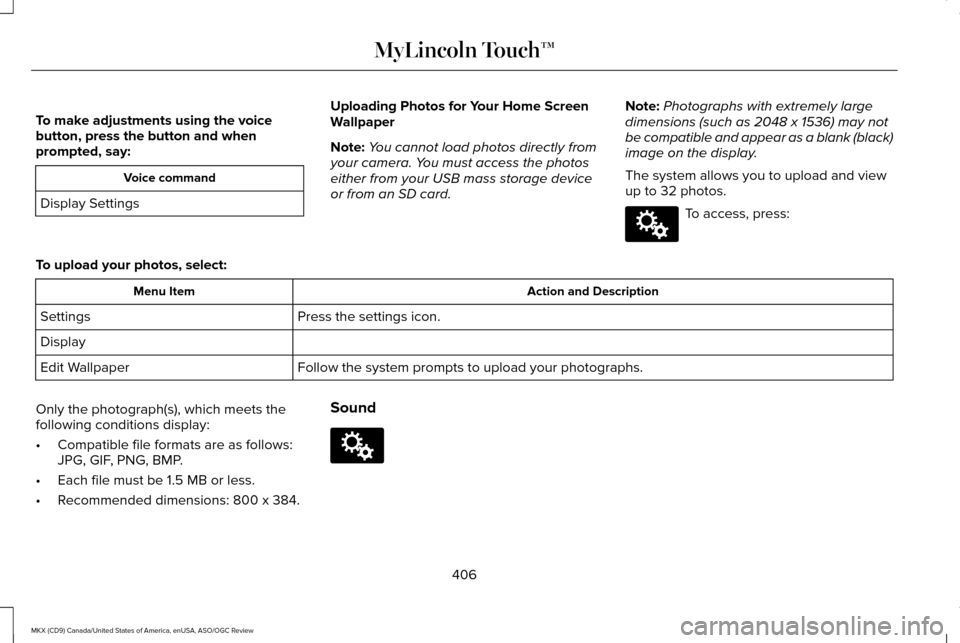
To upload your photos, select: Action and Description
Menu Item
Press the settings icon.
Settings
Display
Follow the system prompts to upload your photographs.
Edit Wallpaper
Only the photograph(s), which meets the
following conditions display:
• Compatible file formats are as follows:
JPG, GIF, PNG, BMP.
• Each file must be 1.5 MB or less.
• Recommended dimensions: 800 x 384. Sound
406
MKX (CD9) Canada/United States of America, enUSA, ASO/OGC Review MyLincoln Touch™E142607 E142607
Page 410 of 563
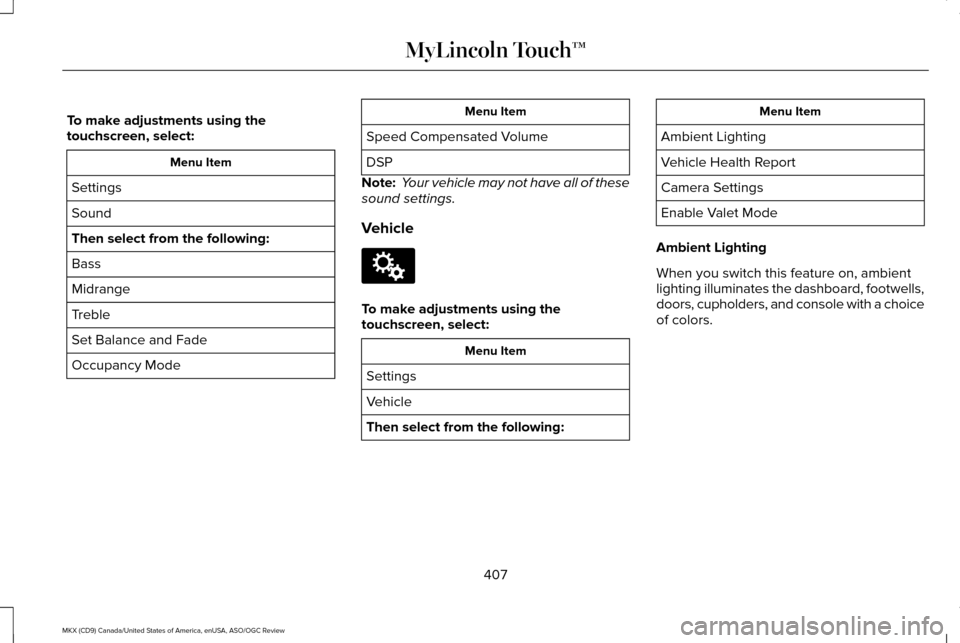
To make adjustments using the
touchscreen, select:
Menu Item
Settings
Sound
Then select from the following:
Bass
Midrange
Treble
Set Balance and Fade
Occupancy Mode Menu Item
Speed Compensated Volume
DSP
Note: Your vehicle may not have all of these
sound settings.
Vehicle To make adjustments using the
touchscreen, select:
Menu Item
Settings
Vehicle
Then select from the following: Menu Item
Ambient Lighting
Vehicle Health Report
Camera Settings
Enable Valet Mode
Ambient Lighting
When you switch this feature on, ambient
lighting illuminates the dashboard, footwells,
doors, cupholders, and console with a choice
of colors.
407
MKX (CD9) Canada/United States of America, enUSA, ASO/OGC Review MyLincoln Touch™E142607
Page 412 of 563
Action and Description
Menu Item
Mileage Interval (Miles) To run the vehicle health report immediately.
Run Vehicle Health Report Now
You can find more information on Vehicle Health Report in this chapter.
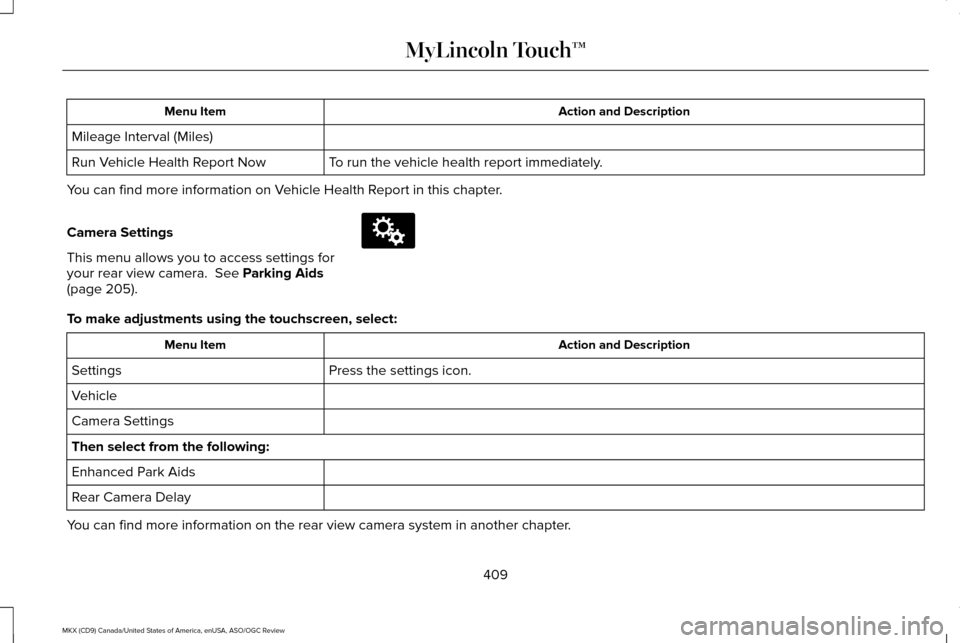
Camera Settings
This menu allows you to access settings for
your rear view camera. See Parking Aids
(page 205). To make adjustments using the touchscreen, select:
Action and Description
Menu Item
Press the settings icon.
Settings
Vehicle
Camera Settings
Then select from the following:
Enhanced Park Aids
Rear Camera Delay
You can find more information on the rear view camera system in another c\
hapter.
409
MKX (CD9) Canada/United States of America, enUSA, ASO/OGC Review MyLincoln Touch™E142607
Page 552 of 563
3
360 Degree Parking Aid Camera............220
Camera Views.....................................................220
Front Camera.......................................................221
Side Camera........................................................222
A
A/C See: Climate Control..........................................140
About This Manual............................................7
Protecting the Environment..................................7
ABS See: Brakes...........................................................194
ABS driving hints See: Hints on Driving With Anti-Lock
Brakes................................................................194
Accessories...................................................494 Exterior Style........................................................494
Interior Style.........................................................494
Lifestyle.................................................................494
Peace of Mind.....................................................494
Accessories See: Replacement Parts Recommendation.....12
ACC See: Using Adaptive Cruise Control.............224 Active Park Assist........................................209
Deactivating the Active Park Assist
Feature..............................................................215
Parallel Parking, Perpendicular Parking, Park Out Assist........................................................209
Troubleshooting the System............................215
Adaptive Headlamps
.....................................96
Adjusting the Headlamps............................319 Vertical Aim Adjustment....................................319
Adjusting the Steering Wheel - Vehicles With: Manual Adjustable Steering
Column............................................................83
Adjusting the Steering Wheel - Vehicles With: Power Adjustable Steering
Column............................................................83
Easy Entry and Exit Feature...............................84
End of Travel Position..........................................84
Memory Feature....................................................84
AFS See: Adaptive Headlamps..................................
96
Airbag Disposal
...............................................54
Air Conditioning See: Climate Control..........................................140
Alarm See: Anti-Theft Alarm............................................81
All-Wheel Drive
..............................................188
Ambient Lighting............................................99 Anti-Theft Alarm
...............................................81
Arming the Alarm..................................................82
Disarming the Alarm............................................82
Appendices...................................................522
Audible Warnings and Indicators...............113 Headlamps On Warning Chime........................113
Keyless Warning Alert.........................................113
Parking Brake On Warning Chime
...................113
Audio Control
...................................................84
Seek, Next or Previous........................................84
Audio System
................................................388
General Information...........................................388
Audio Unit - Vehicles With: Premium AM/ FM/CD..........................................................389
Auto Hold
........................................................197
Using Auto Hold..................................................198
Autolamps........................................................92 Windshield Wiper Activated Headlamps........93
Automatic Climate Control.........................140
Automatic High Beam Control....................95 Activating the System..........................................95
Manually Overriding the System......................
96
549
MKX (CD9) Canada/United States of America, enUSA, ASO/OGC Review Index
Page 559 of 563
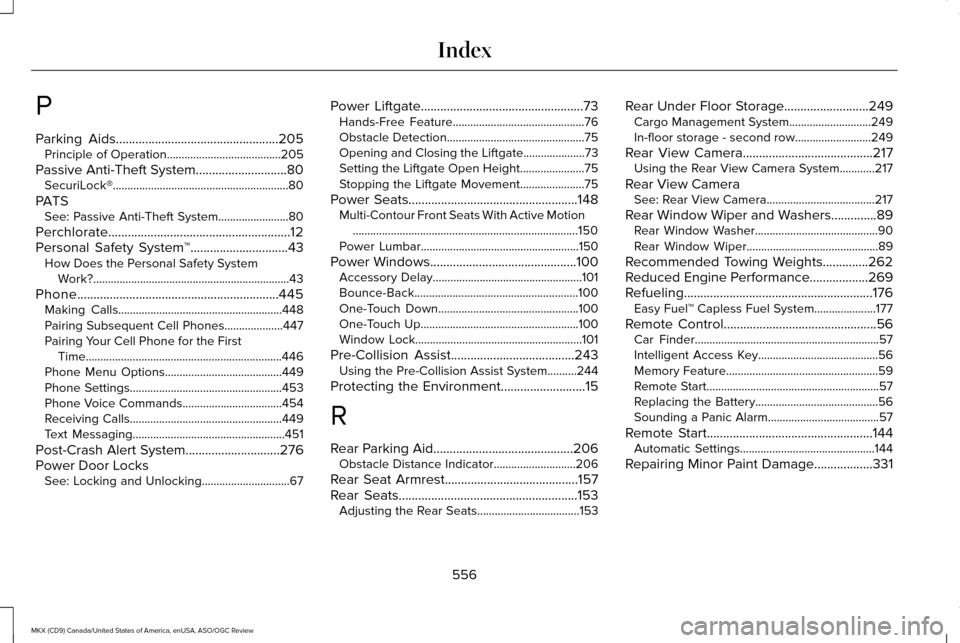
P
Parking Aids..................................................205
Principle of Operation.......................................205
Passive Anti-Theft System............................80 SecuriLock®............................................................80
PATS See: Passive Anti-Theft System........................80
Perchlorate........................................................12
Personal Safety System ™
..............................43
How Does the Personal Safety System
Work?...................................................................43
Phone..............................................................445 Making Calls........................................................448
Pairing Subsequent Cell Phones....................447
Pairing Your Cell Phone for the First
Time...................................................................446
Phone Menu Options........................................449
Phone Settings....................................................453
Phone Voice Commands..................................454
Receiving Calls....................................................449
Text Messaging....................................................451
Post-Crash Alert System
.............................276
Power Door Locks See: Locking and Unlocking..............................67 Power Liftgate
..................................................73
Hands-Free Feature.............................................76
Obstacle Detection...............................................75
Opening and Closing the Liftgate.....................73
Setting the Liftgate Open Height......................75
Stopping the Liftgate Movement......................
75
Power Seats....................................................148 Multi-Contour Front Seats With Active Motion
........................................................................\
.....150
Power Lumbar......................................................150
Power Windows.............................................100 Accessory Delay...................................................101
Bounce-Back........................................................100
One-Touch Down................................................100
One-Touch Up......................................................100
Window Lock.........................................................101
Pre-Collision Assist......................................243 Using the Pre-Collision Assist System..........244
Protecting the Environment
..........................15
R
Rear Parking Aid...........................................206 Obstacle Distance Indicator............................
206
Rear Seat Armrest.........................................157
Rear Seats
.......................................................153
Adjusting the Rear Seats...................................153 Rear Under Floor Storage..........................249
Cargo Management System............................249
In-floor storage - second row..........................
249
Rear View Camera
........................................217
Using the Rear View Camera System............217
Rear View Camera See: Rear View Camera.....................................217
Rear Window Wiper and Washers..............89 Rear Window Washer..........................................90
Rear Window Wiper.............................................89
Recommended Towing Weights..............262
Reduced Engine Performance..................269
Refueling..........................................................176 Easy Fuel™ Capless Fuel System.....................
177
Remote Control...............................................56 Car Finder...............................................................57
Intelligent Access Key.........................................56
Memory Feature....................................................59
Remote Start...........................................................57
Replacing the Battery..........................................56
Sounding a Panic Alarm......................................57
Remote Start...................................................144 Automatic Settings..............................................144
Repairing Minor Paint Damage
..................331
556
MKX (CD9) Canada/United States of America, enUSA, ASO/OGC Review Index