ECU LINCOLN MKX 2016 Owner's Manual
[x] Cancel search | Manufacturer: LINCOLN, Model Year: 2016, Model line: MKX, Model: LINCOLN MKX 2016Pages: 563, PDF Size: 4.96 MB
Page 155 of 563
WARNINGS
Do not use the memory function when
your vehicle is moving.
This feature automatically recalls the position
of the following:
•
Driver seat.
• Power mirrors.
• Power adjustable foot pedals.
• Optional power steering column.
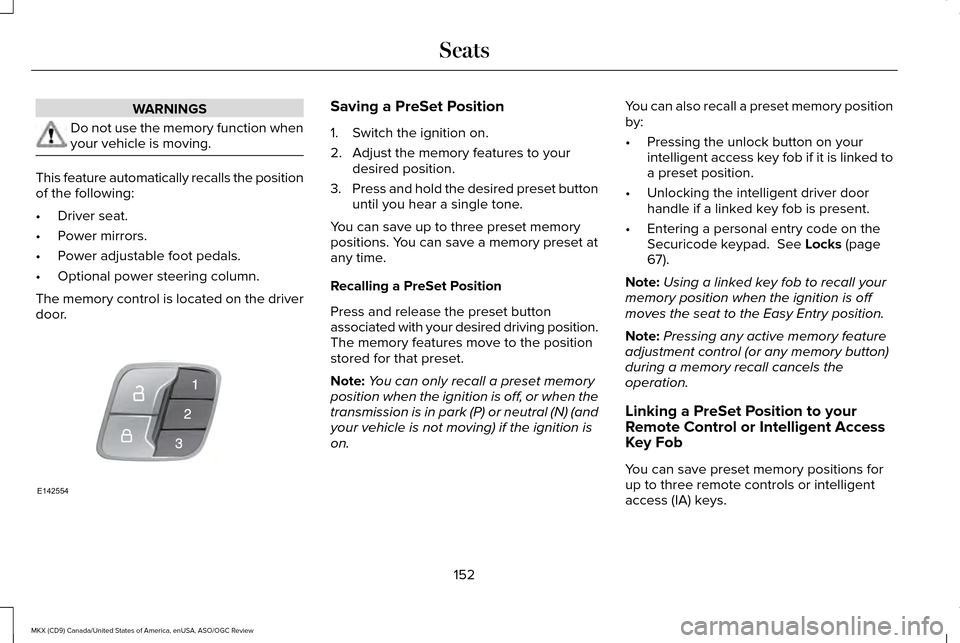
The memory control is located on the driver
door. Saving a PreSet Position
1. Switch the ignition on.
2. Adjust the memory features to your
desired position.
3. Press and hold the desired preset button
until you hear a single tone.
You can save up to three preset memory
positions. You can save a memory preset at
any time.
Recalling a PreSet Position
Press and release the preset button
associated with your desired driving position.
The memory features move to the position
stored for that preset.
Note: You can only recall a preset memory
position when the ignition is off, or when the
transmission is in park (P) or neutral (N) (and
your vehicle is not moving) if the ignition is
on. You can also recall a preset memory position
by:
•
Pressing the unlock button on your
intelligent access key fob if it is linked to
a preset position.
• Unlocking the intelligent driver door
handle if a linked key fob is present.
• Entering a personal entry code on the
Securicode keypad. See Locks (page
67).
Note: Using a linked key fob to recall your
memory position when the ignition is off
moves the seat to the Easy Entry position.
Note: Pressing any active memory feature
adjustment control (or any memory button)
during a memory recall cancels the
operation.
Linking a PreSet Position to your
Remote Control or Intelligent Access
Key Fob
You can save preset memory positions for
up to three remote controls or intelligent
access (IA) keys.
152
MKX (CD9) Canada/United States of America, enUSA, ASO/OGC Review SeatsE142554
Page 161 of 563
HomeLink Wireless Control System
WARNINGS
Make sure that the garage door and
security device are free from
obstruction when you are programming. Do
not program the system with the vehicle in
the garage. Do not use the system with any garage
door opener that does not have the
safety stop and reverse feature as required
by U.S. Federal Safety Standards (this
includes any garage door opener
manufactured before April 1, 1982). A garage
door opener which cannot detect an object,
signaling the door to stop and reverse, does
not meet current federal safety standards.
Using a garage door opener without these
features increases the risk of serious injury
or death. Note:
Make sure you keep the original
remote control transmitter for use in other
vehicles as well as for future system
programming. Note:
We recommend that upon the sale or
lease termination of your vehicle, you erase
the programmed function buttons for security
reasons. See Erasing the Function Button
Codes.
Note: You can program a maximum of three
devices. To change or replace any of the
three devices after it has been initially
programmed, you must first erase the current
settings. See
Erasing the Function Button
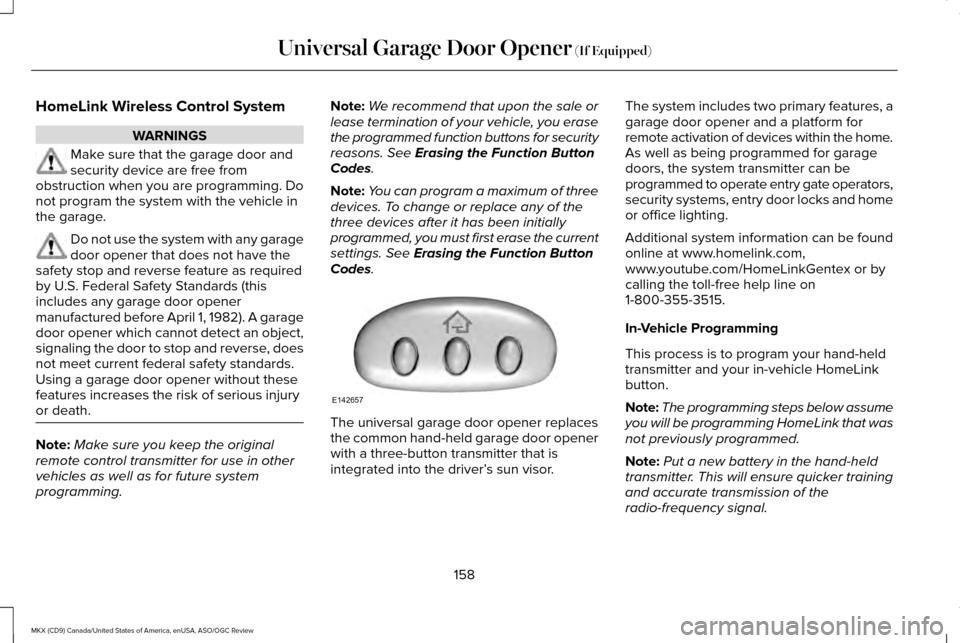
Codes. The universal garage door opener replaces
the common hand-held garage door opener
with a three-button transmitter that is
integrated into the driver’
s sun visor.The system includes two primary features, a
garage door opener and a platform for
remote activation of devices within the home.
As well as being programmed for garage
doors, the system transmitter can be
programmed to operate entry gate operators,
security systems, entry door locks and home
or office lighting.
Additional system information can be found
online at www.homelink.com,
www.youtube.com/HomeLinkGentex or by
calling the toll-free help line on
1-800-355-3515.
In-Vehicle Programming
This process is to program your hand-held
transmitter and your in-vehicle HomeLink
button.
Note:
The programming steps below assume
you will be programming HomeLink that was
not previously programmed.
Note: Put a new battery in the hand-held
transmitter. This will ensure quicker training
and accurate transmission of the
radio-frequency signal.
158
MKX (CD9) Canada/United States of America, enUSA, ASO/OGC Review Universal Garage Door Opener
(If Equipped)E142657
Page 200 of 563
Automatic release - drive away release
Your vehicle will automatically release the
parking brake if all of the following conditions
exist:
•
The driver door is closed.
• The accelerator pedal is pressed.
• There are no faults detected in the
parking brake system.
Note: If the electric parking brake warning
lamp stays illuminated, the electric parking
brake will not automatically release. You
must release the electric parking brake using
the electric parking brake switch while your
foot is on the brake and the ignition is on.
The brake system warning lamp will go off
to confirm that the electric parking brake has
been released.
Note: The electric parking brake drive away
release makes starting on a hill easier. This
feature will release the parking brake
automatically when the vehicle has sufficient
torque force to move up the hill. To assure
drive away release when starting uphill,
press the accelerator pedal quickly. Driving with a Trailer
Depending on the slope and the weight of
the trailer, your vehicle and trailer may roll
backwards slightly when you start on a slope.
To prevent this from happening, do the
following:
1. Pull the switch up and hold it in this
position.
2. Accelerate your vehicle, then release the
switch when you notice that the engine
has developed sufficient driving force.
Battery With No Charge WARNING
You will not be able to apply or release
the electric parking brake if the battery
is low or has no charge. If the battery is low or has no charge, use
jumper cables and a booster battery.AUTO HOLD WARNINGS
The system does not replace the
parking brake. When you leave your
vehicle, always apply the parking brake.
Failure to leave your vehicle securely parked
may lead to a crash or injury. See Electric
Parking Brake (page 195). You must remain in your vehicle when
the system turns on. You are
responsible at all times for controlling your
vehicle, supervising the system and
intervening, if required. Failure to take care
may result in the loss of control of your
vehicle, serious personal injury or death. The system will turn off if a malfunction
is apparent. Failure to take care may
result in the loss of control of your vehicle,
serious personal injury or death. 197
MKX (CD9) Canada/United States of America, enUSA, ASO/OGC Review Brakes
Page 218 of 563
Note:
If the clearance in front of your vehicle
allows easy departure, the Park Out Assist
feature might not be available.
Note: You are responsible for controlling
your vehicle and making sure the path is
clear prior to pulling into traffic.
Note: This system is not intended to assist
in exiting perpendicular parking spaces,
damages to your vehicle may occur.
Note: If your vehicle speed exceeds 6 mph
(9 km/h) or the maneuver is interrupted
(driver input), the system switches off and
you need to take full control of your vehicle. Deactivating the Active Park Assist
Feature
Manually deactivate the system by:
•
Pressing the active park assist button
twice.
• Grabbing the steering wheel during an
active maneuver.
• Driving above approximately
22 mph
(35 km/h) for 30 seconds during an active
park search.
• Driving above
6 mph (9 km/h) during
automatic steering.
• Switching off the traction control system. Certain vehicle conditions can also
deactivate the system, such as:
•
Traction control has activated.
• There is an anti-lock brake system
activation or failure.
If a problem occurs with the system, a
warning message displays accompanied by
a tone. Occasional system messages may
occur in normal operation. For recurring or
frequent system faults, contact an authorized
dealer to have your vehicle serviced.
Troubleshooting the System The system does not look for a space
The traction control system may be off.
The transmission is in reverse ( R). Your vehicle must be moving forward to be able to detect a parking space.
215
MKX (CD9) Canada/United States of America, enUSA, ASO/OGC Review Parking Aids
Page 253 of 563
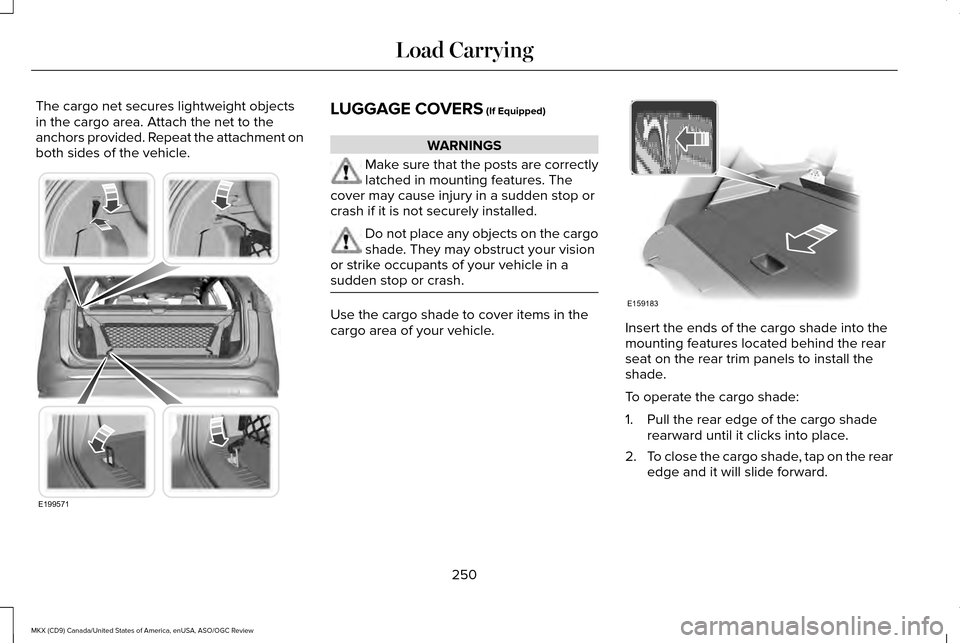
The cargo net secures lightweight objects
in the cargo area. Attach the net to the
anchors provided. Repeat the attachment on
both sides of the vehicle.
LUGGAGE COVERS (If Equipped)
WARNINGS
Make sure that the posts are correctly
latched in mounting features. The
cover may cause injury in a sudden stop or
crash if it is not securely installed. Do not place any objects on the cargo
shade. They may obstruct your vision
or strike occupants of your vehicle in a
sudden stop or crash. Use the cargo shade to cover items in the
cargo area of your vehicle.
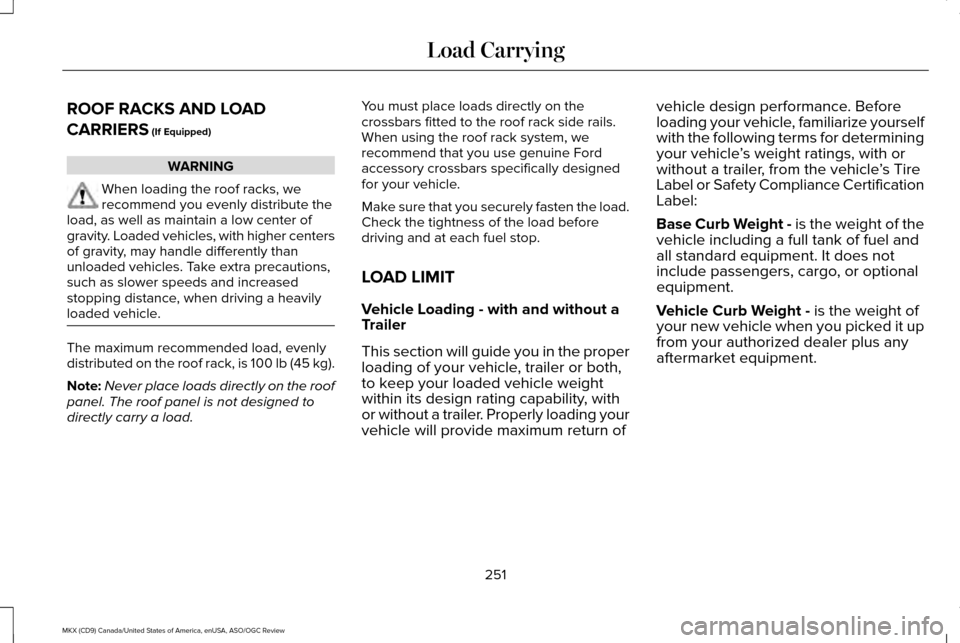
Insert the ends of the cargo shade into the
mounting features located behind the rear
seat on the rear trim panels to install the
shade.
To operate the cargo shade:
1. Pull the rear edge of the cargo shade
rearward until it clicks into place.
2. To close the cargo shade, tap on the rear
edge and it will slide forward.
250
MKX (CD9) Canada/United States of America, enUSA, ASO/OGC Review Load CarryingE199571 E159183
Page 254 of 563
ROOF RACKS AND LOAD
CARRIERS (If Equipped)
WARNING
When loading the roof racks, we
recommend you evenly distribute the
load, as well as maintain a low center of
gravity. Loaded vehicles, with higher centers
of gravity, may handle differently than
unloaded vehicles. Take extra precautions,
such as slower speeds and increased
stopping distance, when driving a heavily
loaded vehicle. The maximum recommended load, evenly
distributed on the roof rack, is 100 lb (45 kg).
Note:
Never place loads directly on the roof
panel. The roof panel is not designed to
directly carry a load. You must place loads directly on the
crossbars fitted to the roof rack side rails.
When using the roof rack system, we
recommend that you use genuine Ford
accessory crossbars specifically designed
for your vehicle.
Make sure that you securely fasten the load.
Check the tightness of the load before
driving and at each fuel stop.
LOAD LIMIT
Vehicle Loading - with and without a
Trailer
This section will guide you in the proper
loading of your vehicle, trailer or both,
to keep your loaded vehicle weight
within its design rating capability, with
or without a trailer. Properly loading your
vehicle will provide maximum return ofvehicle design performance. Before
loading your vehicle, familiarize yourself
with the following terms for determining
your vehicle
’s weight ratings, with or
without a trailer, from the vehicle ’s Tire
Label or Safety Compliance Certification
Label:
Base Curb Weight - is the weight of the
vehicle including a full tank of fuel and
all standard equipment. It does not
include passengers, cargo, or optional
equipment.
Vehicle Curb Weight -
is the weight of
your new vehicle when you picked it up
from your authorized dealer plus any
aftermarket equipment.
251
MKX (CD9) Canada/United States of America, enUSA, ASO/OGC Review Load Carrying
Page 274 of 563
FLOOR MATS
WARNINGS
Always use floor mats that are
designed to fit the foot well of your
vehicle. Only use floor mats that leave the
pedal area unobstructed. Only use floor mats
that are firmly secured to retention posts so
that they cannot slip out of position and
interfere with the pedals or impair safe
operation of your vehicle in other ways. Pedals that cannot move freely can
cause loss of vehicle control and
increase the risk of serious personal injury. Always make sure that the floor mats
are properly attached to the retention
posts in the carpet that are supplied with
your vehicle. Floor mats must be properly
secured to both retention posts to make sure
mats do not shift out of position. Never place floor mats or any other
covering in the vehicle foot well that
cannot be properly secured to prevent them
from moving and interfering with the pedals
or the ability to control the vehicle. WARNINGS
Never place floor mats or any other
covering on top of already installed
floor mats. Floor mats should always rest on
top of vehicle carpeting surface and not
another floor mat or other covering.
Additional floor mats or any other covering
will reduce the pedal clearance and
potentially interfere with pedal operation. Check attachment of floor mats on a
regular basis. Always properly reinstall
and secure floor mats that have been
removed for cleaning or replacement. Always make sure that objects cannot
fall into the driver foot well while the
vehicle is moving. Objects that are loose can
become trapped under the pedals causing
a loss of vehicle control. Failure to properly follow floor mat
installation or attachment instructions
can potentially cause interference with pedal
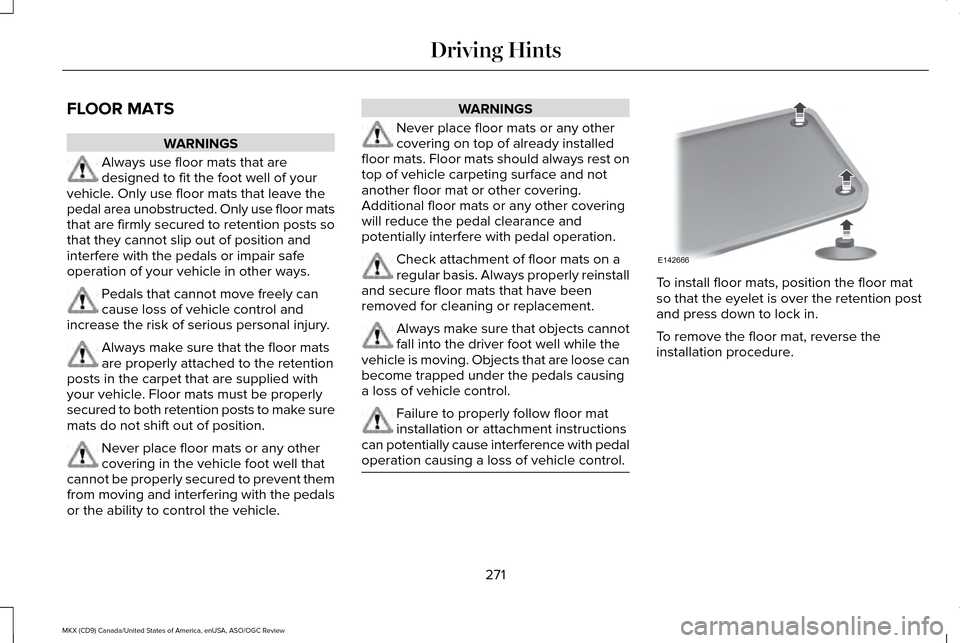
operation causing a loss of vehicle control. To install floor mats, position the floor mat
so that the eyelet is over the retention post
and press down to lock in.
To remove the floor mat, reverse the
installation procedure.
271
MKX (CD9) Canada/United States of America, enUSA, ASO/OGC Review Driving HintsE142666
Page 282 of 563
2. Four or more repair attempts are made
on the same nonconformity (a defect or
condition that substantially impairs the
use, value or safety of the vehicle) OR
3. The vehicle is out of service for repair of
nonconformities for a total of more than
30 calendar days (not necessarily all at
one time).
In the case of 1 or 2 above, the consumer
must also notify the manufacturer of the need
for the repair of the nonconformity at the
following address:
Ford Motor Company
16800 Executive Plaza Drive
Mail Drop 3NE-B
Dearborn, MI 48126
You are required to submit your warranty
dispute to BBB AUTO LINE before asserting
in court any rights or remedies conferred by
California Civil Code Section 1793.22(b). You
are also required to use BBB AUTO LINE
before exercising rights or seeking remedies
created by the Federal Magnuson-Moss Warranty Act, 15 U.S.C. sec. 2301 et seq. If
you choose to seek redress by pursuing
rights and remedies not created by California
Civil Code Section 1793.22(b) or the
Magnuson-Moss Warranty Act, resort to BBB
AUTO LINE is not required by those statutes.
THE BETTER BUSINESS BUREAU
(BBB) AUTO LINE PROGRAM (U.S.
ONLY)
Your satisfaction is important to Ford Motor
Company and to your dealer. If a warranty
concern has not been resolved using the
three-step procedure outlined earlier in this
chapter in the Getting the Services you need
section, you may be eligible to participate in
the BBB AUTO LINE program.
The BBB AUTO LINE program consists of
two parts – mediation and arbitration. During
mediation, a representative of the BBB will
contact both you and Ford Motor Company
to explore options for settlement of the claim.
If an agreement is not reached during
mediation or you do not want to participate
in mediation, and if your claim is eligible, youmay participate in the arbitration process. An
arbitration hearing will be scheduled so that
you can present your case in an informal
setting before an impartial person. The
arbitrator will consider the testimony
provided and make a decision after the
hearing.
Disputes submitted to the BBB AUTO LINE
program are usually decided within forty days
after you file your claim with the BBB. You
are not bound by the decision, and may
reject the decision and proceed to court
where all findings of the BBB Auto Line
dispute, and decision, are admissible in the
court action. Should you choose to accept
the BBB AUTO LINE decision, Ford is then
bound by the decision, and must comply with
the decision within 30 days of receipt of your
acceptance letter.
BBB AUTO LINE Application: Using the
information provided below, please call or
write to request a program application. You
will be asked for your name and address,
general information about your new vehicle,
information about your warranty concerns,
and any steps you have already taken to try
279
MKX (CD9) Canada/United States of America, enUSA, ASO/OGC Review Customer Assistance
Page 310 of 563
Engine oil dipstick. See Engine Oil Dipstick (page 307).
C.
Brake fluid reservoir.
See Brake Fluid Check (page 315).
D.
Battery.
See Changing the 12V Battery (page 316).
E.
Power distribution box.
See Fuses (page 284).
F.
Air filter assembly.
See Changing the Engine Air Filter (page 324).
G.
Automatic transmission dipstick (under air filter assembly).
See Automatic Transmission Fluid Check (page 313).
H.
Windshield washer fluid reservoir.
See Washer Fluid Check (page 315).
I.
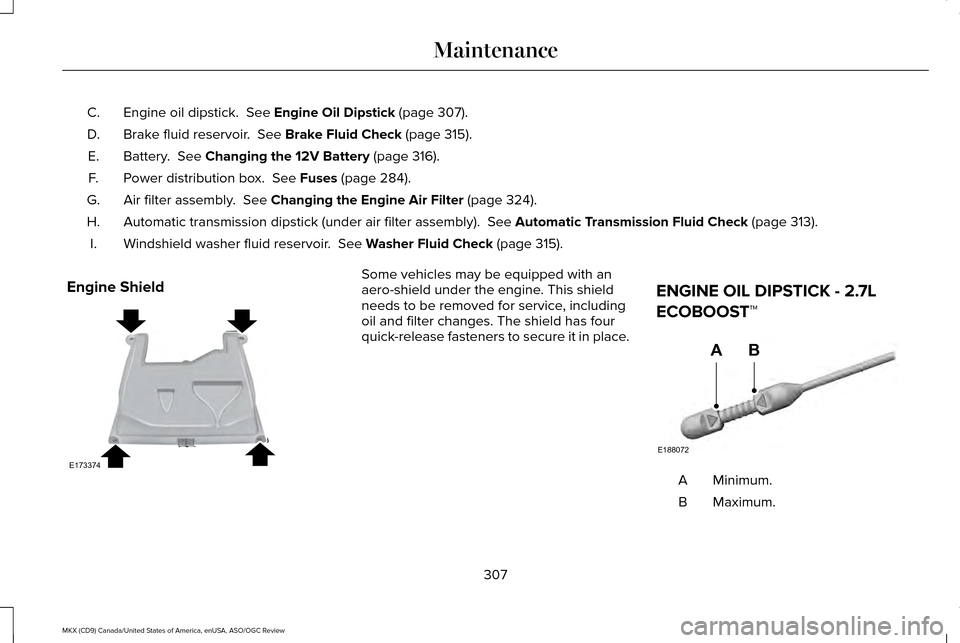
Engine Shield Some vehicles may be equipped with an
aero-shield under the engine. This shield
needs to be removed for service, including
oil and filter changes. The shield has four
quick-release fasteners to secure it in place.
ENGINE OIL DIPSTICK - 2.7L
ECOBOOST™ Minimum.
A
Maximum.
B
307
MKX (CD9) Canada/United States of America, enUSA, ASO/OGC Review MaintenanceE173374 E188072
AB
Page 317 of 563
High Fluid Level
If the fluid level is above the maximum range
(above point A) fluid may need to be
removed. High fluid levels may be caused
by a overheating condition. If you have
operated your vehicle at high speeds, towing
a trailer or in city traffic during hot weather,
allow your vehicle to cool for a minimum of
30 minutes before rechecking the level.
Note:
An overfill conition can damage the
transmission.
Adding Transmission Fluid *
1. Rotate the automatic transmission fluid cap in a counterclockwise direction. *
2. Remove the cap and dipstick and wipe it with a clean, lint-free cloth.
3. Add fluid that meets the Ford specifications. See Capacities and
Specifications (page 376). Pour the fluid
directly into the automatic transmission
fluid cap and dipstick hole.
4. Replace the cap and dipstick and remove
it again to check the fluid level. 5.
Make sure that the fluid level is between
the MIN and the MAX marks.
6. Replace the automatic transmission fluid
cap and dipstick. Turn it clockwise until
you feel a strong resistance.
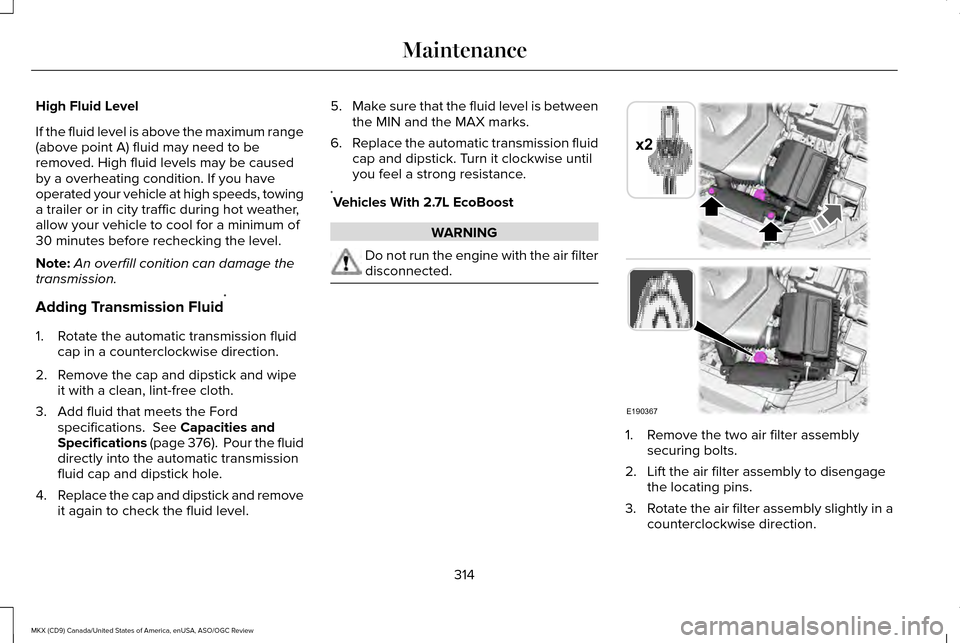
* Vehicles With 2.7L EcoBoost WARNING
Do not run the engine with the air filter
disconnected.
1. Remove the two air filter assembly
securing bolts.
2. Lift the air filter assembly to disengage the locating pins.
3. Rotate the air filter assembly slightly in a
counterclockwise direction.
314
MKX (CD9) Canada/United States of America, enUSA, ASO/OGC Review MaintenanceE190367
x2