flash drive LINCOLN MKX 2016 Owner's Manual
[x] Cancel search | Manufacturer: LINCOLN, Model Year: 2016, Model line: MKX, Model: LINCOLN MKX 2016Pages: 563, PDF Size: 4.96 MB
Page 365 of 563
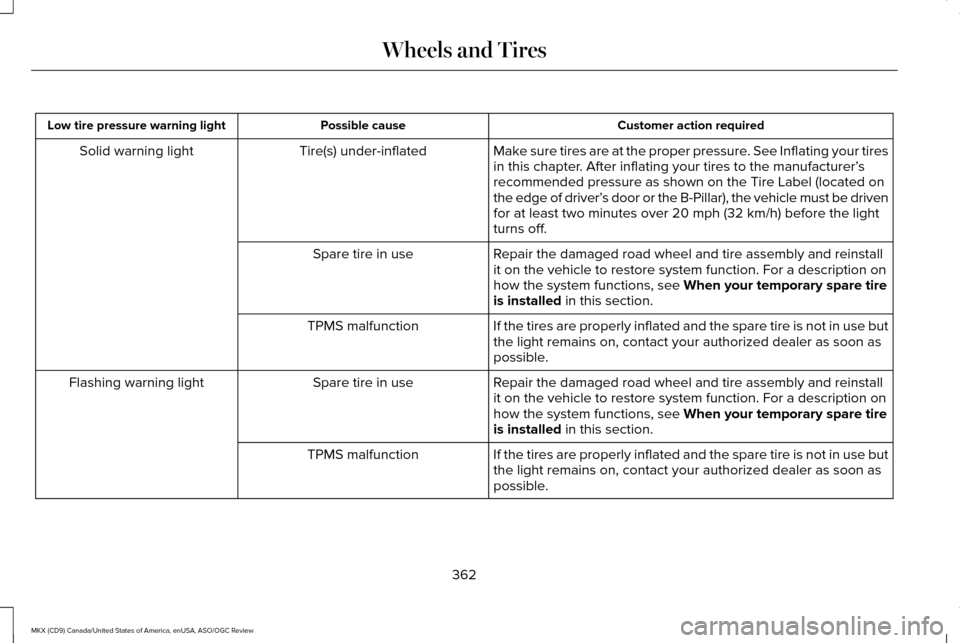
Customer action required
Possible cause
Low tire pressure warning light
Make sure tires are at the proper pressure. See Inflating your tires
in this chapter. After inflating your tires to the manufacturer’s
recommended pressure as shown on the Tire Label (located on
the edge of driver’ s door or the B-Pillar), the vehicle must be driven
for at least two minutes over 20 mph (32 km/h) before the light
turns off.
Tire(s) under-inflated
Solid warning light
Repair the damaged road wheel and tire assembly and reinstall
it on the vehicle to restore system function. For a description on
how the system functions, see When your temporary spare tire
is installed in this section.
Spare tire in use
If the tires are properly inflated and the spare tire is not in use but
the light remains on, contact your authorized dealer as soon as
possible.
TPMS malfunction
Repair the damaged road wheel and tire assembly and reinstall
it on the vehicle to restore system function. For a description on
how the system functions, see
When your temporary spare tire
is installed in this section.
Spare tire in use
Flashing warning light
If the tires are properly inflated and the spare tire is not in use but
the light remains on, contact your authorized dealer as soon as
possible.
TPMS malfunction
362
MKX (CD9) Canada/United States of America, enUSA, ASO/OGC Review Wheels and Tires
Page 368 of 563
•
Wet weather driving capability.
• All-wheel driving capability.
When driving with the full-size dissimilar
spare wheel and tire assembly additional
caution should be given to:
• Towing a trailer.
• Driving vehicles equipped with a camper
body.
• Driving vehicles with a load on the cargo
rack.
Drive cautiously when using a full-size
dissimilar spare wheel and tire assembly and
seek service as soon as possible.
Tire Change Procedure (If Equipped) WARNINGS
When one of the front wheels is off the
ground, the transmission alone will not
prevent the vehicle from moving or slipping
off the jack, even if the transmission is in park
(P). WARNINGS
To help prevent your vehicle from
moving when you change a tire, be
sure to place the transmission in park (P), set
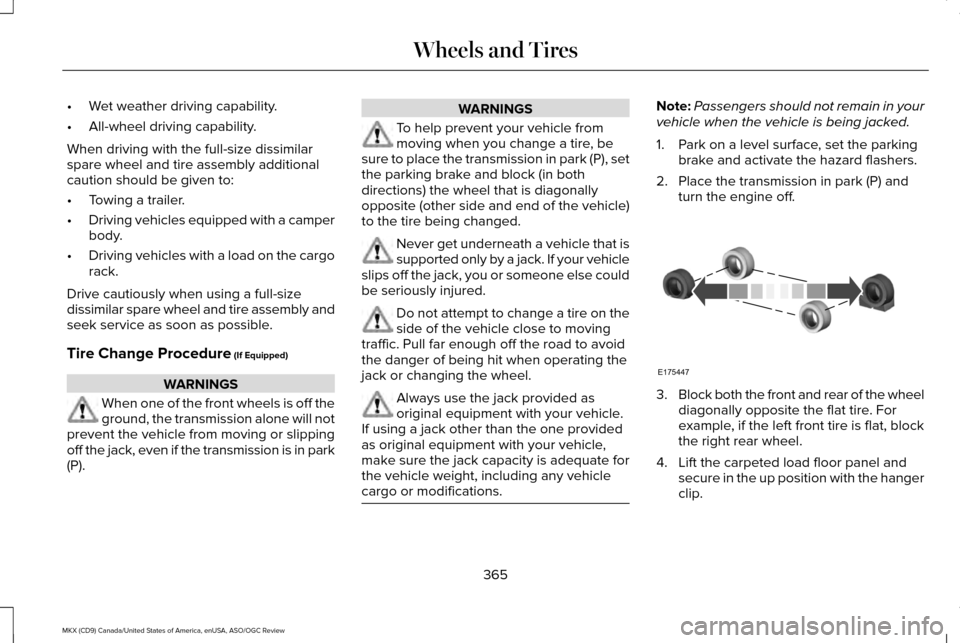
the parking brake and block (in both
directions) the wheel that is diagonally
opposite (other side and end of the vehicle)
to the tire being changed. Never get underneath a vehicle that is
supported only by a jack. If your vehicle
slips off the jack, you or someone else could
be seriously injured. Do not attempt to change a tire on the
side of the vehicle close to moving
traffic. Pull far enough off the road to avoid
the danger of being hit when operating the
jack or changing the wheel. Always use the jack provided as
original equipment with your vehicle.
If using a jack other than the one provided
as original equipment with your vehicle,
make sure the jack capacity is adequate for
the vehicle weight, including any vehicle
cargo or modifications. Note:
Passengers should not remain in your
vehicle when the vehicle is being jacked.
1. Park on a level surface, set the parking brake and activate the hazard flashers.
2. Place the transmission in park (P) and turn the engine off. 3.
Block both the front and rear of the wheel
diagonally opposite the flat tire. For
example, if the left front tire is flat, block
the right rear wheel.
4. Lift the carpeted load floor panel and secure in the up position with the hanger
clip.
365
MKX (CD9) Canada/United States of America, enUSA, ASO/OGC Review Wheels and TiresE175447
Page 444 of 563
This feature allows you to plug in media
playing devices, memory sticks, flash drives
or thumb drives, and charge devices if they
support this feature.
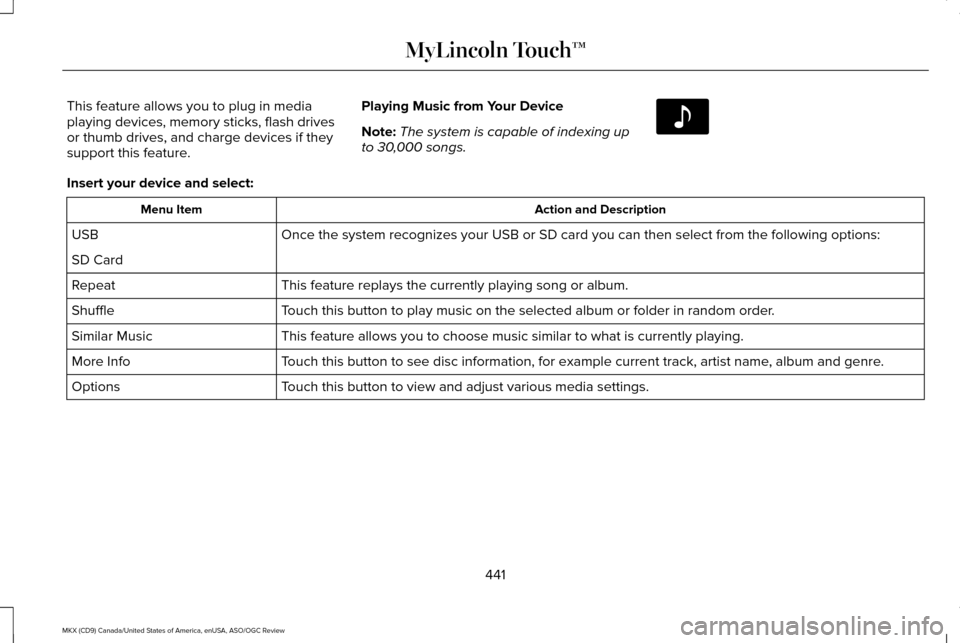
Playing Music from Your Device
Note:
The system is capable of indexing up
to 30,000 songs. Insert your device and select:
Action and Description
Menu Item
Once the system recognizes your USB or SD card you can then select from \
the following options:
USB
SD Card
This feature replays the currently playing song or album.
Repeat
Touch this button to play music on the selected album or folder in random\
order.
Shuffle
This feature allows you to choose music similar to what is currently pla\
ying.
Similar Music
Touch this button to see disc information, for example current track, art\
ist name, album and genre.
More Info
Touch this button to view and adjust various media settings.
Options
441
MKX (CD9) Canada/United States of America, enUSA, ASO/OGC Review MyLincoln Touch™E142611
Page 557 of 563
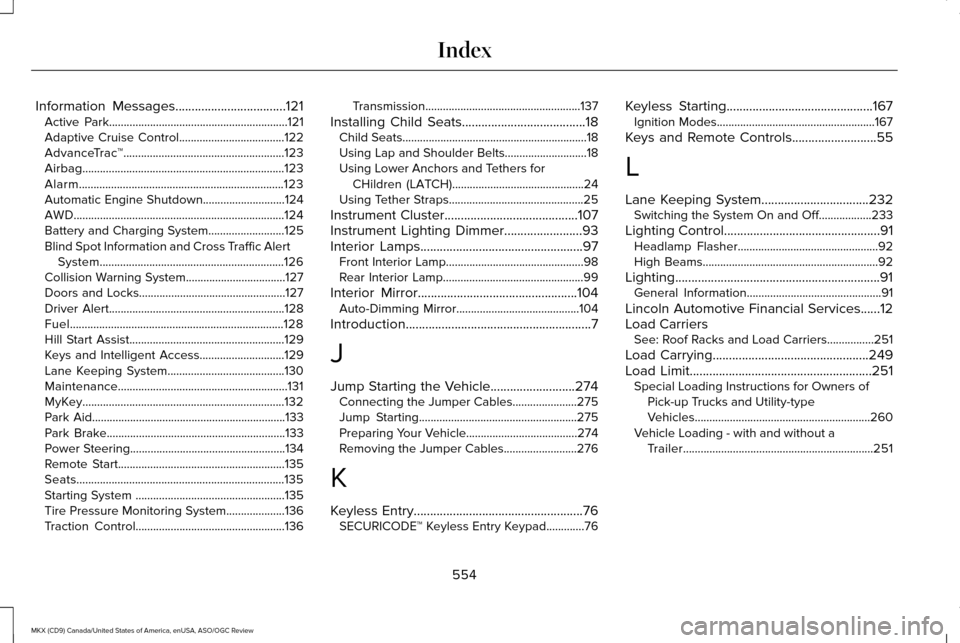
Information Messages..................................121
Active Park.............................................................121
Adaptive Cruise Control....................................122
AdvanceTrac ™.......................................................123
Airbag.....................................................................123
Alarm......................................................................123
Automatic Engine Shutdown............................124
AWD........................................................................\
124
Battery and Charging System..........................125
Blind Spot Information and Cross Traffic Alert System...............................................................126
Collision Warning System..................................127
Doors and Locks..................................................127
Driver Alert............................................................128
Fuel........................................................................\
.128
Hill Start Assist.....................................................129
Keys and Intelligent Access.............................129
Lane Keeping System........................................130
Maintenance..........................................................131
MyKey.....................................................................132
Park Aid..................................................................133
Park Brake.............................................................133
Power Steering.....................................................134
Remote Start.........................................................135
Seats.......................................................................135
Starting System ...................................................135
Tire Pressure Monitoring System....................136
Traction Control...................................................136 Transmission.....................................................137
Installing Child Seats......................................18 Child Seats...............................................................18
Using Lap and Shoulder Belts............................18
Using Lower Anchors and Tethers for
CHildren (LATCH).............................................24
Using Tether Straps..............................................25
Instrument Cluster.........................................107
Instrument Lighting Dimmer........................93
Interior Lamps..................................................97 Front Interior Lamp...............................................98
Rear Interior Lamp................................................99
Interior Mirror
.................................................104
Auto-Dimming Mirror..........................................104
Introduction
.........................................................7
J
Jump Starting the Vehicle..........................274 Connecting the Jumper Cables......................275
Jump Starting......................................................275
Preparing Your Vehicle......................................274
Removing the Jumper Cables.........................276
K
Keyless Entry
....................................................76
SECURICODE™ Keyless Entry Keypad.............76 Keyless Starting.............................................167
Ignition Modes......................................................167
Keys and Remote Controls..........................55
L
Lane Keeping System
.................................232
Switching the System On and Off..................233
Lighting Control
................................................91
Headlamp Flasher................................................92
High Beams............................................................92
Lighting...............................................................91 General Information..............................................91
Lincoln Automotive Financial Services......12
Load Carriers See: Roof Racks and Load Carriers................251
Load Carrying
................................................249
Load Limit........................................................251 Special Loading Instructions for Owners of
Pick-up Trucks and Utility-type
Vehicles............................................................260
Vehicle Loading - with and without a Trailer
.................................................................251
554
MKX (CD9) Canada/United States of America, enUSA, ASO/OGC Review Index