Transmission LINCOLN MKX 2016 Service Manual
[x] Cancel search | Manufacturer: LINCOLN, Model Year: 2016, Model line: MKX, Model: LINCOLN MKX 2016Pages: 563, PDF Size: 4.96 MB
Page 220 of 563
The system does not position the vehicle where I want in the space
A parked vehicle has a high attachment (salt sprayer, snowplow or moving truck bed).
The parking space length or position of parked objects changed after your vehicle passed.
The temperature around your vehicle changes quickly (driving from a hea\
ted garage into the cold, or after leaving a car wash).
REAR VIEW CAMERA WARNINGS
The rear view camera system is a
reverse aid supplement device that still
requires the driver to use it in conjunction
with the interior and exterior mirrors for
maximum coverage. Objects that are close to either corner
of the bumper or under the bumper,
might not be seen on the screen due to the
limited coverage of the camera system. Back up as slow as possible since
higher speeds might limit your reaction
time to stop your vehicle. WARNINGS
Use caution when using the rear video
camera and the luggage compartment
door is ajar. If the luggage compartment door
is ajar, the camera will be out of position and
the video image may be incorrect. All
guidelines disappear when the luggage
compartment door is ajar. Use caution when turning camera
features on or off. Make sure your
vehicle is not moving. The rear view camera system provides a
video image of the area behind your vehicle.
During operation, lines appear in the display
which represent your vehicle
’s path and
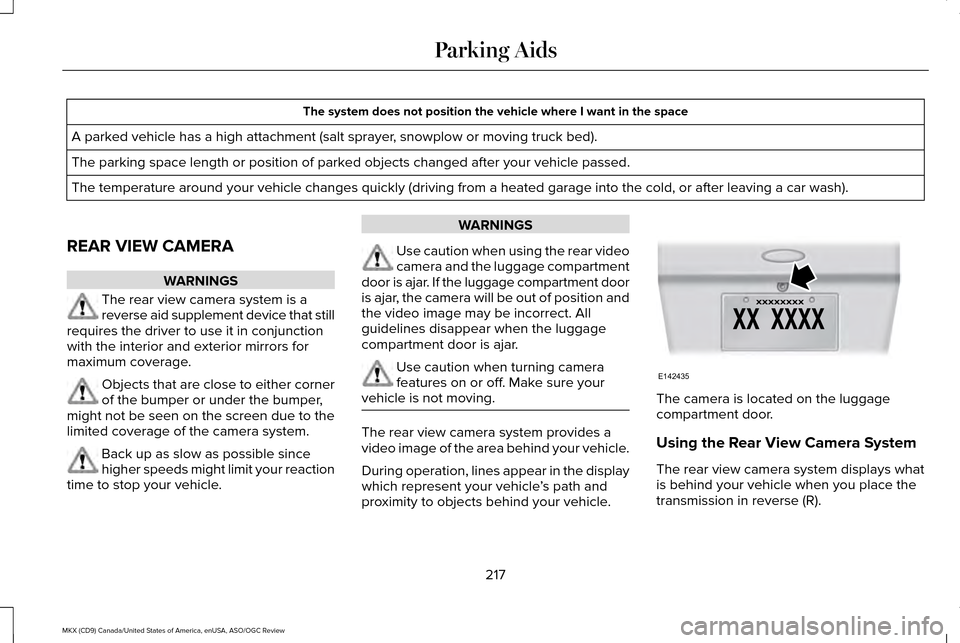
proximity to objects behind your vehicle. The camera is located on the luggage
compartment door.
Using the Rear View Camera System
The rear view camera system displays what
is behind your vehicle when you place the
transmission in reverse (R).
217
MKX (CD9) Canada/United States of America, enUSA, ASO/OGC Review Parking AidsE142435
Page 221 of 563
Note:
The reverse sensing system is not
effective at speeds above 3 mph (5 km/h)
and may not detect certain angular or
moving objects.
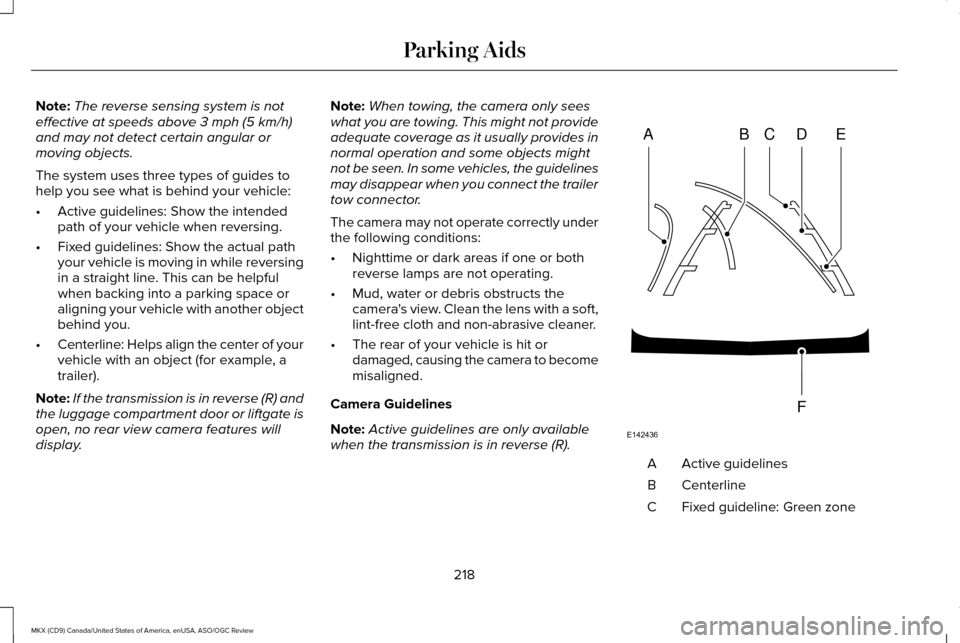
The system uses three types of guides to
help you see what is behind your vehicle:
• Active guidelines: Show the intended
path of your vehicle when reversing.
• Fixed guidelines: Show the actual path
your vehicle is moving in while reversing
in a straight line. This can be helpful
when backing into a parking space or
aligning your vehicle with another object
behind you.
• Centerline: Helps align the center of your
vehicle with an object (for example, a
trailer).
Note: If the transmission is in reverse (R) and
the luggage compartment door or liftgate is
open, no rear view camera features will
display. Note:
When towing, the camera only sees
what you are towing. This might not provide
adequate coverage as it usually provides in
normal operation and some objects might
not be seen. In some vehicles, the guidelines
may disappear when you connect the trailer
tow connector.
The camera may not operate correctly under
the following conditions:
• Nighttime or dark areas if one or both
reverse lamps are not operating.
• Mud, water or debris obstructs the
camera's view. Clean the lens with a soft,
lint-free cloth and non-abrasive cleaner.
• The rear of your vehicle is hit or
damaged, causing the camera to become
misaligned.
Camera Guidelines
Note: Active guidelines are only available
when the transmission is in reverse (R). Active guidelines
A
Centerline
B
Fixed guideline: Green zone
C
218
MKX (CD9) Canada/United States of America, enUSA, ASO/OGC Review Parking AidsABCD
F
E
E142436
Page 222 of 563
Fixed guideline: Yellow zone
D
Fixed guideline: Red zone
E
Rear bumper
F
Active guidelines are only shown with fixed
guidelines. To use active guidelines, turn the
steering wheel to point the guidelines toward
an intended path. If you change the steering
wheel position while reversing, your vehicle
might deviate from the original intended
path.
The fixed and active guidelines fade in and
out depending on the steering wheel
position. The active guidelines do not display
when the steering wheel position is straight.
Always use caution while reversing. Objects
in the red zone are closest to your vehicle
and objects in the green zone are farther
away. Objects are getting closer to your
vehicle as they move from the green zone
to the yellow or red zones. Use the side view
mirrors and rear view mirror to get better
coverage on both sides and rear of the
vehicle. Manual Zoom WARNING
When manual zoom is on, the full area
behind your vehicle may not show. Be
aware of your surroundings when using the
manual zoom feature. Note:
Manual zoom is only available when
the transmission is in reverse (R).
Note: When you enable manual zoom, only
the centerline is shown.
Selectable settings for this feature are Zoom
in (+) and Zoom out (-). Press the symbol in
the camera screen to change the view. The
default setting is Zoom OFF.
This allows you to get a closer view of an
object behind your vehicle. The zoomed
image keeps the bumper in the image to
provide a reference. The zoom is only active
while the transmission is in reverse (R). Camera System Settings
To access any of the rear view camera
system settings, make the following
selections in the multifunctional display when
the transmission is not in reverse (R): Main Menu
SettingsVehicle
Camera Settings
Enhanced Park Aids or Park Pilot
Selectable settings for this feature are ON
and OFF.
The system uses red, yellow and green
highlights that appear on top of the video
image when any of the sensing systems
detect an object.
Rear Camera Delay
Selectable settings for this feature are ON
and OFF.
219
MKX (CD9) Canada/United States of America, enUSA, ASO/OGC Review Parking Aids
Page 223 of 563
The default setting for the rear camera delay
is OFF.
When shifting the transmission out of reverse
(R) and into any gear other than park (P), the
camera image remains in the display until:
•
Your vehicle speed sufficiently increases.
• You shift your vehicle into park (P).
360 DEGREE PARKING AID
CAMERA (If Equipped) WARNINGS
The 360 degree camera system is a
supplement system that still requires
the driver to use it in conjunction with looking
out the windows, and checking the interior
and exterior mirrors for maximum coverage. You may not see objects that are close
to either corner of the bumper or under
the bumper due to the limited coverage of
the camera system. Use caution when turning camera
features ON or OFF while out of park
(P). Make sure your vehicle is not moving. WARNINGS
Failure to take care may result in the
loss of control of your vehicle, serious
personal injury or death. The 360 degree camera system consists of
front, side and rear cameras. The system:
•
Allows you to see what is directly in front
or behind your vehicle.
• Provides cross traffic view in front and
behind your vehicle.
• Allows you to see a top-down view of the
area outside your vehicle, including the
blind spots.
• Provides visibility around your vehicle to
you in parking maneuvers such as:
•Centering in a parking space.
• Obstacles near vehicle.
• Parallel parking. The 360 degree camera system
button is located on the instrument
panel and allows you to toggle
through different camera views. The front and rear cameras have multiple
screens which consist of: Normal view with
360, Normal view, and split view. When in
park (P), neutral (N) or drive (D), only the front
images will be displayed when the button is
pressed. When in reverse (R), only the rear
images will be displayed when the button is
pressed.
Note:
The 360 degree camera system will
turn OFF when your vehicle is in motion at
low speed, except when in reverse (R).
Camera Views
The small vehicle icon displayed on the top
left corner of the image illustrates the camera
view being displayed. Camera views are laid
out in the order the screens will appear once
the button is pressed.
Note: The front video image will be disabled
when your vehicle is in motion at low speed,
except when in reverse (R).
220
MKX (CD9) Canada/United States of America, enUSA, ASO/OGC Review Parking AidsE205884
Page 225 of 563
The front video camera, located behind the
star emblem on the grille, provides a video
image of the area in front of your vehicle. It
adds assistance to the driver while driving
forward at low speeds. To use the front video
camera system, place the transmission in any
gear except reverse (R). An image will display
once the camera enable button is pressed.
The area displayed on the screen may vary
according to your vehicle's orientation and/or
road condition.
Note:
Keep the star emblem free from snow,
ice and large accumulations of dirt. If
something is blocking the star emblem from
moving, the camera will not deploy.
Side Camera
The side view camera, located in the outside
mirror, provides a video image of the area
on the sides of your vehicle as part of the
front 360 + normal view and rear 360 +
normal view. It aids you while parking your
vehicle either forward or backwards. Note:
Use caution when using the 360 view
while any of the doors are ajar. If a door is
ajar, the camera will be out of position and
the video image may be incorrect.
222
MKX (CD9) Canada/United States of America, enUSA, ASO/OGC Review Parking Aids
Page 240 of 563
BLIND SPOT INFORMATION
SYSTEM
Blind Spot Information System (BLIS™)
with Cross Traffic Alert (If Equipped)
WARNING
To help avoid injuries, NEVER use the
Blind Spot Information System as a
replacement for using the interior and
exterior mirrors and looking over your
shoulder before changing lanes. The Blind
Spot Information System is not a replacement
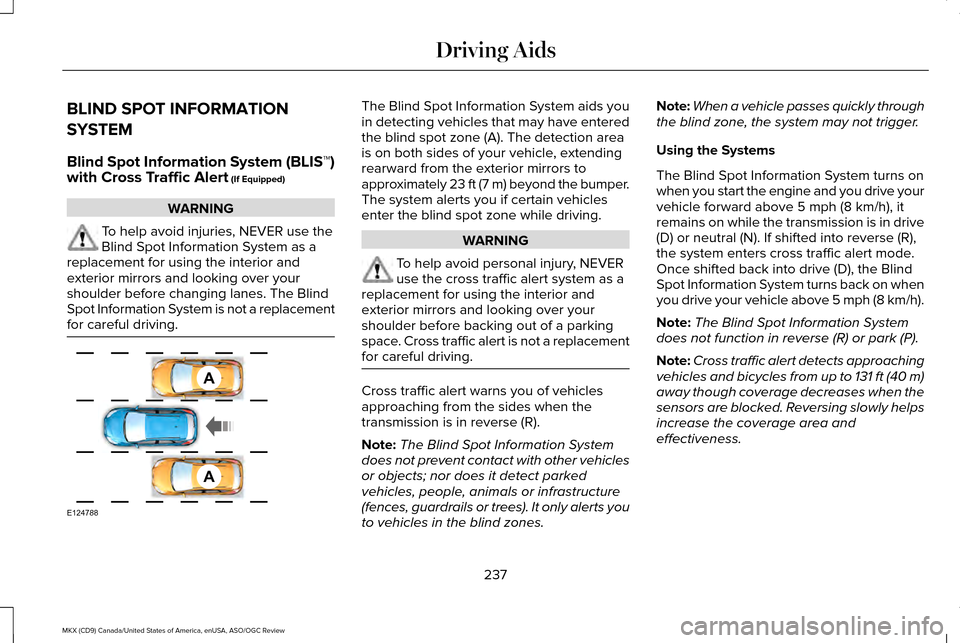
for careful driving. The Blind Spot Information System aids you
in detecting vehicles that may have entered
the blind spot zone (A). The detection area
is on both sides of your vehicle, extending
rearward from the exterior mirrors to
approximately 23 ft (7 m) beyond the bumper.
The system alerts you if certain vehicles
enter the blind spot zone while driving.
WARNING
To help avoid personal injury, NEVER
use the cross traffic alert system as a
replacement for using the interior and
exterior mirrors and looking over your
shoulder before backing out of a parking
space. Cross traffic alert is not a replacement
for careful driving. Cross traffic alert warns you of vehicles
approaching from the sides when the
transmission is in reverse (R).
Note:
The Blind Spot Information System
does not prevent contact with other vehicles
or objects; nor does it detect parked
vehicles, people, animals or infrastructure
(fences, guardrails or trees). It only alerts you
to vehicles in the blind zones. Note:
When a vehicle passes quickly through
the blind zone, the system may not trigger.
Using the Systems
The Blind Spot Information System turns on
when you start the engine and you drive your
vehicle forward above
5 mph (8 km/h), it
remains on while the transmission is in drive
(D) or neutral (N). If shifted into reverse (R),
the system enters cross traffic alert mode.
Once shifted back into drive (D), the Blind
Spot Information System turns back on when
you drive your vehicle above 5 mph (8 km/h).
Note: The Blind Spot Information System
does not function in reverse (R) or park (P).
Note: Cross traffic alert detects approaching
vehicles and bicycles from up to 131 ft (40 m)
away though coverage decreases when the
sensors are blocked. Reversing slowly helps
increase the coverage area and
effectiveness.
237
MKX (CD9) Canada/United States of America, enUSA, ASO/OGC Review Driving AidsA
A
E124788
Page 241 of 563
Note:
For manual transmission vehicles, the
cross traffic alert will be active only if the
transmission is in reverse (R). If your vehicle
is rolling backward and the transmission is
not in reverse (R) then cross traffic alert will
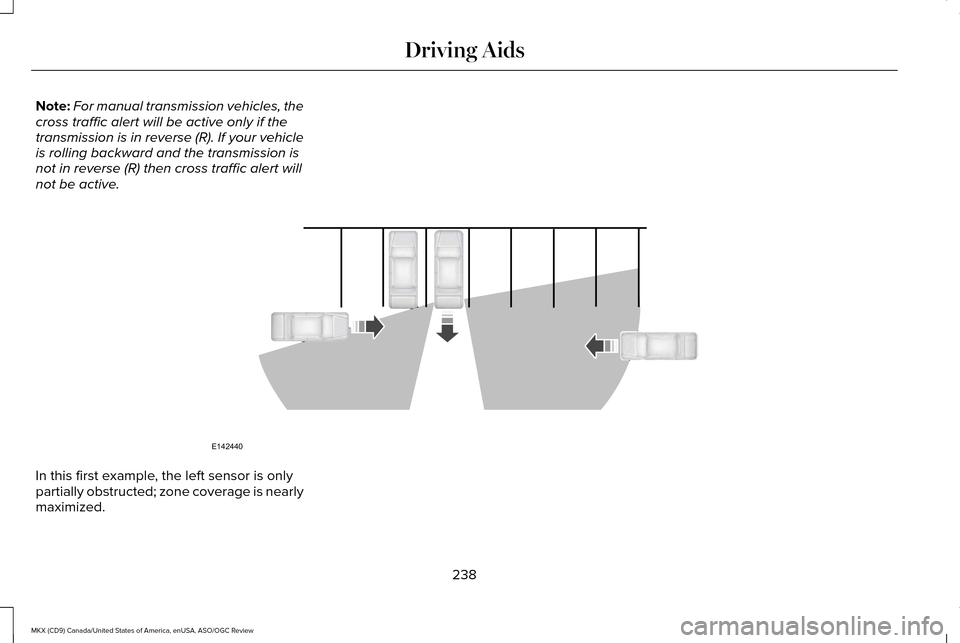
not be active. In this first example, the left sensor is only
partially obstructed; zone coverage is nearly
maximized.
238
MKX (CD9) Canada/United States of America, enUSA, ASO/OGC Review Driving AidsE142440
Page 260 of 563
WARNING
Exceeding the Safety Compliance
Certification Label vehicle weight
rating limits could result in substandard
vehicle handling or performance, engine,
transmission and/or structural damage,
serious damage to the vehicle, loss of
control and personal injury. 257
MKX (CD9) Canada/United States of America, enUSA, ASO/OGC Review Load CarryingE142524
Page 264 of 563
TOWING A TRAILER
WARNINGS
Do not exceed the GVWR or the
GAWR specified on the certification
label. Towing trailers beyond the
maximum recommended gross
trailer weight exceeds the limit of your
vehicle and could result in engine
damage, transmission damage,
structural damage, loss of vehicle
control, vehicle rollover and personal
injury. Note:
Your vehicle may have electrical
items, such as fuses or relays, related
to towing. See Fuses (page 284). Your vehicle's load capacity designation
is by weight, not by volume, so you
cannot necessarily use all available
space when loading a vehicle.
Towing a trailer places an extra load on
your vehicle's engine, transmission, axle,
brakes, tires and suspension. Inspect
these components periodically during,
and after, any towing operation.
Load Placement
To help minimize how trailer movement
affects your vehicle when driving:
•
Load the heaviest items closest to
the trailer floor.
• Load the heaviest items centered
between the left and right side trailer
tires. •
Load the heaviest items above the
trailer axles or just slightly forward
toward the trailer tongue. Do not
allow the final trailer tongue weight
to go above or below 10-15% of the
loaded trailer weight.
• Select a tow bar with the correct rise
or drop. When both the loaded
vehicle and trailer are connected, the
trailer frame should be level, or
slightly angled down toward your
vehicle, when viewed from the side.
When driving with a trailer or payload, a
slight takeoff vibration or shudder may
be present due to the increased payload
weight. Additional information regarding
proper trailer loading and setting your
vehicle up for towing is located in the
Load Carrying chapter. See Load Limit
(page 251).
You can also find information in the
RV
& Trailer Towing Guide available at your
authorized dealer, or online.
261
MKX (CD9) Canada/United States of America, enUSA, ASO/OGC Review Towing
Page 268 of 563
Before Towing a Trailer
Practice turning, stopping and backing up to
get the feel of your vehicle-trailer
combination before starting on a trip. When
turning, make wider turns so the trailer
wheels clear curbs and other obstacles.
When Towing a Trailer
•
Do not drive faster than 70 mph (113
km/h) during the first 500 miles (800
kilometers).
• Do not make full-throttle starts.
• Check your hitch, electrical connections
and trailer wheel lug nuts thoroughly after
you have traveled 50 miles (80
kilometers).
• When stopped in congested or heavy
traffic during hot weather, place the
gearshift in position P to aid engine and
transmission cooling and to help A/C
performance.
• Turn off the speed control with heavy
loads or in hilly terrain. The speed control
may turn off automatically when you are
towing on long, steep grades. •
Shift to a lower gear when driving down
a long or steep hill. Do not apply the
brakes continuously, as they may
overheat and become less effective.
• If your transmission is equipped with a
Grade Assist or Tow/Haul feature, use
this feature when towing. This provides
engine braking and helps eliminate
excessive transmission shifting for
optimum fuel economy and transmission
cooling.
• Allow more distance for stopping with a
trailer attached. Anticipate stops and
brake gradually.
• Avoid parking on a grade. However, if
you must park on a grade:
1. Turn the steering wheel to point your vehicle tires away from traffic flow.
2. Set your vehicle parking brake.
3. Place the automatic transmission in position
P.
4. Place wheel chocks in front and back of the trailer wheels. (Chocks not included
with vehicle.) Launching or Retrieving a Boat or
Personal Watercraft (PWC)
Note:
Disconnect the wiring to the trailer
before
backing the trailer into the water.
Note: Reconnect the wiring to the trailer
after
removing the trailer from the water.
When backing down a ramp during boat
launching or retrieval:
• Do not allow the static water level to rise
above the bottom edge of the rear
bumper.
• Do not allow waves to break higher than
6 inches (15 centimeters) above the
bottom edge of the rear bumper.
Exceeding these limits may allow water to
enter vehicle components:
• Causing internal damage to the
components.
• Affecting driveability, emissions, and
reliability.
265
MKX (CD9) Canada/United States of America, enUSA, ASO/OGC Review Towing