ESP LINCOLN MKX 2016 Workshop Manual
[x] Cancel search | Manufacturer: LINCOLN, Model Year: 2016, Model line: MKX, Model: LINCOLN MKX 2016Pages: 563, PDF Size: 4.96 MB
Page 397 of 563
Note:
You can access the entertainment
features for 30 minutes after you switch the
ignition off, and no doors are opened.
PHONE
Press to select any of the following: Menu Item
Phone
Quick Dial
Phonebook
History
Messaging
Settings NAVIGATION
Press to select any of the following: Menu Item
My Home
Favorites
Previous Destinations
Point of Interest
Emergency
Street Address
Intersection
City Center
Map
Edit Route
Cancel Route
CLIMATE
Press the corresponding icons to control the
following options: •
Driver Settings
• Recirculated Air
• Auto
• Dual
• Passenger Settings
• A/C
• Defrost
SETTINGS Press to select any of the following:
Menu Item
Clock
Display
Sound
Vehicle
Settings
Help
394
MKX (CD9) Canada/United States of America, enUSA, ASO/OGC Review MyLincoln Touch™E142607
Page 401 of 563
Safety Information
WARNING
Driving while distracted can result in
loss of vehicle control, crash and injury.
We strongly recommend that you use
extreme caution when using any device that
may take your focus off the road. Your
primary responsibility is the safe operation
of your vehicle. We recommend against the
use of any hand-held device while driving
and encourage the use of voice-operated
systems when possible. Make sure you are
aware of all applicable local laws that may
affect the use of electronic devices while
driving. •
Do not attempt to service or repair the
system. Have your vehicle checked by
an authorized dealer.
• Do not operate media devices if the
power cables are broken or damaged.
• Make sure the power cables do not
interfere with the safe operation of your
vehicle's controls or affect your safe
driving abilities.
• Some SYNC functions are
speed-dependent. Their use is limited to
when your vehicle is traveling at speeds
below 3 mph (5 km/h).
Make sure that you review your device's
manual before using it with SYNC. Speed-restricted Features
Some features of this system are restricted
from use unless your vehicle is stationary.
•
Screens crowded with information, for
example:
•Point of Interest reviews and ratings
• SIRIUS Travel Link sports scores
• Movie times
• Ski conditions.
• Any action that requires keyboard use,
for example: entering a navigation
destination or editing information.
• All lists are limited, for example: phone
contacts.
See the following chart for more specific
examples. Speed-restricted Features
Pairing a cell phone
Cell phone
Adding or editing phonebook contacts
Phone contacts and recent phone call entries
398
MKX (CD9) Canada/United States of America, enUSA, ASO/OGC Review MyLincoln Touch™
Page 403 of 563
Privacy Information
When you connect a cell phone to SYNC,
the system creates a profile within your
vehicle that links to that cell phone. This
profile helps in offering you more cellular
features and operating more efficiently.
Among other things, this profile may contain
data about your cell phone book, text
messages (read and unread), and call history,
including history of calls when your cell
phone was not connected to the system. In
addition, if you connect a media device, the
system creates and retains an index of
supported media content. The system also
records a short development log of
approximately 10 minutes of all recent system
activity. The log profile and other system data
may be used to improve the system and help
diagnose any problems that may occur.
The cellular profile, media device index, and
development log remain in your vehicle
unless you delete them, and are generally
accessible only in your vehicle when your
cell phone or media player is connected. If
you no longer plan to use the system or your
vehicle, we recommend you carry out a
Master Reset to erase all stored information.
System data cannot be accessed without
special equipment and access to your
vehicle's SYNC module. Ford Motor
Company and Ford of Canada do not access
the system data for any purpose other than
as described without consent, a court order,
or where required by law enforcement, other
government authorities, or other third parties
acting with lawful authority. Other parties
may seek to access the information
independently of Ford Motor Company and
Ford of Canada. For further privacy
information, see the sections on 911 Assist®,
Vehicle Health Report, and Traffic, Directions
and Information.
Using Voice Commands
This system helps you control many features
using voice commands. This allows you to
keep your hands on the wheel and focus on
what is in front of you. The system provides
feedback through audible tones, prompts,
questions and spoken confirmations
depending on the situation and the chosen
level of interaction (voice settings).
The system also asks short questions
(confirmation prompts) when it is not sure of
your request or when there are multiple
possible responses to your request.
When using voice commands, words and
icons may appear in the lower left status bar
indicating the status of the voice command
session (such as Listening, Success, Failed,
Paused or Try Again).
How to Use Voice Commands
The following are some of the
voice commands that you can say
at any time during a voice
command session.
400
MKX (CD9) Canada/United States of America, enUSA, ASO/OGC Review MyLincoln Touch™E142599
Page 432 of 563

HD Radio Reception and Station Troubleshooting
Potential reception issues
If you are listening to a multicast station and you are on the fringe of\
the reception area, the station may
mute due to weak signal strength.
Reception area
If you are listening to HD1, the system switches back to the analog broa\
dcast until the digital broadcast
is available again. However, if you are listening to any of the possible HD2-HD7 multicast channels\
, the
station mutes and stays muted unless it is able to connect to the digita\
l signal again.
When the system first receives a station (aside from HD2-HD7 multicast \
stations), it first plays the station
in the analog version. Once the receiver verifies the station is an HD R\
adio station, it shifts to the digital
version. Depending on the station quality, you may hear a slight sound change when the station changes
from analog to digital. Blending is the shift from analog to digital sou\
nd or digital back to analog sound.
Station blending
In order to provide the best possible
experience, use the contact form to report
any station issues found while listening to a
station broadcasting with HD Radio
technology. Independent entities own and
operate each station. These stations are
responsible for ensuring all audio streams
and data fields are accurate.
429
MKX (CD9) Canada/United States of America, enUSA, ASO/OGC Review MyLincoln Touch™
Page 434 of 563
HD Radio Technology manufactured under
license from iBiquity Digital Corp. U.S. and
foreign patents. HD Radio and the HD and
HD Radio logos are proprietary trademarks
of iBiquity Digital Corp. Ford Motor Company
and iBiquity Digital Corp. are not responsible
for the content sent using HD Radio
technology. Content may be changed, added
or deleted at any time at the station owner's
discretion.Radio Voice CommandsPress the voice button and when prompted say:
Action and Description
Voice command
Radio
Then you can say a command similar to the following: Say a frequency or preset.
FM
Off
Help
SIRIUS® Satellite Radio (If Activated) 431
MKX (CD9) Canada/United States of America, enUSA, ASO/OGC Review MyLincoln Touch™E142599 E142611
Page 436 of 563

Action and Description
Menu Item
Touch this button to hear a brief sampling of channels.
Scan
Touch this button to view a list of all available stations. Scroll to see\
more categories. Touch the station
you want to listen to.
Browse
Note: SIRIUS does not support the Alert feature on all channels. Ford Motor Co\
mpany shall not be responsible for Alert feature variation.
Browsing Controls Action and Description
Message
Touch this button if you want to skip this channel.
Skip
Touch this button if you do not want anyone to listen to this channel.
Lock
Touch this button to see song titles being played on other stations.
Title
Touch this button to see artists being played on other stations.
Artist
Touch this button to see a list of all the channel names.
Channel
Options
Touch this button to view and adjust various
media settings.
433
MKX (CD9) Canada/United States of America, enUSA, ASO/OGC Review MyLincoln Touch™
Page 438 of 563
SIRIUS Satellite Radio Information
Note:
SIRIUS reserves the unrestricted right
to change, rearrange, add or delete
programming including canceling, moving
or adding particular channels, and its prices,
at any time, with or without notice to you.
Ford Motor Company shall not be
responsible for any such programming
changes. SIRIUS satellite radio is a subscription-based
satellite radio service that broadcasts a
variety of music, sports, news, weather, traffic
and entertainment programming. Your
factory-installed SIRIUS satellite radio system
includes hardware and a limited subscription
term that begins on the date of sale or lease
of your vehicle. See an authorized dealer for
availability.
For more information on extended
subscription terms (a service fee is required),
the online media player and a list of SIRIUS
satellite radio channels, and other features,
please visit www.siriusxm.com in the United
States, www.sirius.ca in Canada, or call
SIRIUS at 1-888-539-7474.
Note:
This receiver includes the eCos
real-time operating system. eCos is
published under the eCos License.
Satellite Radio Electronic Serial Number
(ESN)
You need your ESN to activate, modify or
track your satellite radio account. The ESN
is on the System Information Screen (SR
ESN:XXXXXXXXXXXX).
To access your ESN, touch the bottom left
corner of the touchscreen, then select: Menu Item
SIRIUS
Options
435
MKX (CD9) Canada/United States of America, enUSA, ASO/OGC Review MyLincoln Touch™E142593
Page 449 of 563
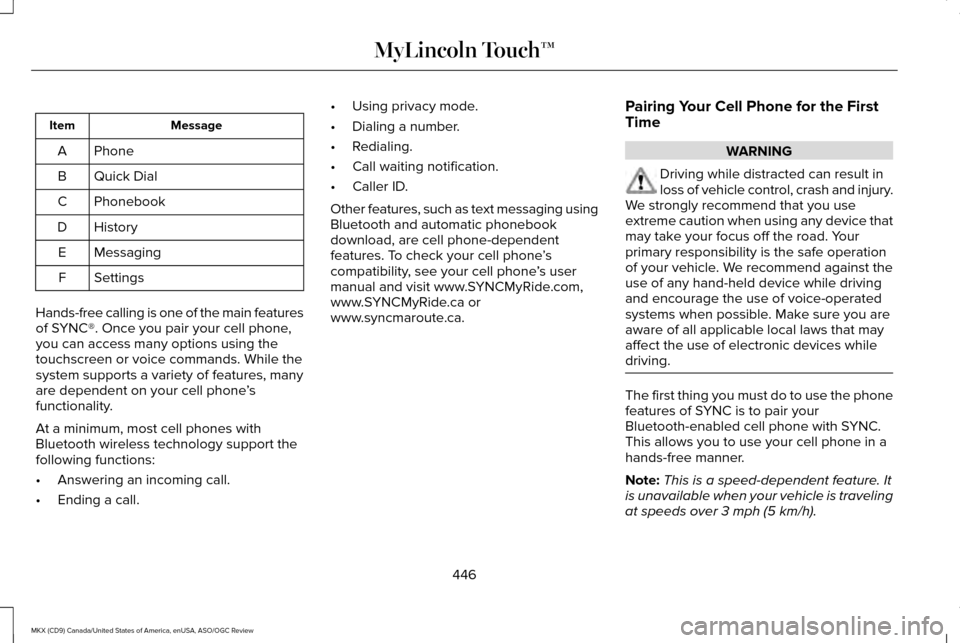
Message
Item
Phone
A
Quick Dial
B
Phonebook
C
History
D
Messaging
E
Settings
F
Hands-free calling is one of the main features
of SYNC®. Once you pair your cell phone,
you can access many options using the
touchscreen or voice commands. While the
system supports a variety of features, many
are dependent on your cell phone ’s
functionality.
At a minimum, most cell phones with
Bluetooth wireless technology support the
following functions:
• Answering an incoming call.
• Ending a call. •
Using privacy mode.
• Dialing a number.
• Redialing.
• Call waiting notification.
• Caller ID.
Other features, such as text messaging using
Bluetooth and automatic phonebook
download, are cell phone-dependent
features. To check your cell phone ’s
compatibility, see your cell phone ’s user
manual and visit www.SYNCMyRide.com,
www.SYNCMyRide.ca or
www.syncmaroute.ca. Pairing Your Cell Phone for the First
Time WARNING
Driving while distracted can result in
loss of vehicle control, crash and injury.
We strongly recommend that you use
extreme caution when using any device that
may take your focus off the road. Your
primary responsibility is the safe operation
of your vehicle. We recommend against the
use of any hand-held device while driving
and encourage the use of voice-operated
systems when possible. Make sure you are
aware of all applicable local laws that may
affect the use of electronic devices while
driving. The first thing you must do to use the phone
features of SYNC is to pair your
Bluetooth-enabled cell phone with SYNC.
This allows you to use your cell phone in a
hands-free manner.
Note:
This is a speed-dependent feature. It
is unavailable when your vehicle is traveling
at speeds over 3 mph (5 km/h).
446
MKX (CD9) Canada/United States of America, enUSA, ASO/OGC Review MyLincoln Touch™
Page 459 of 563
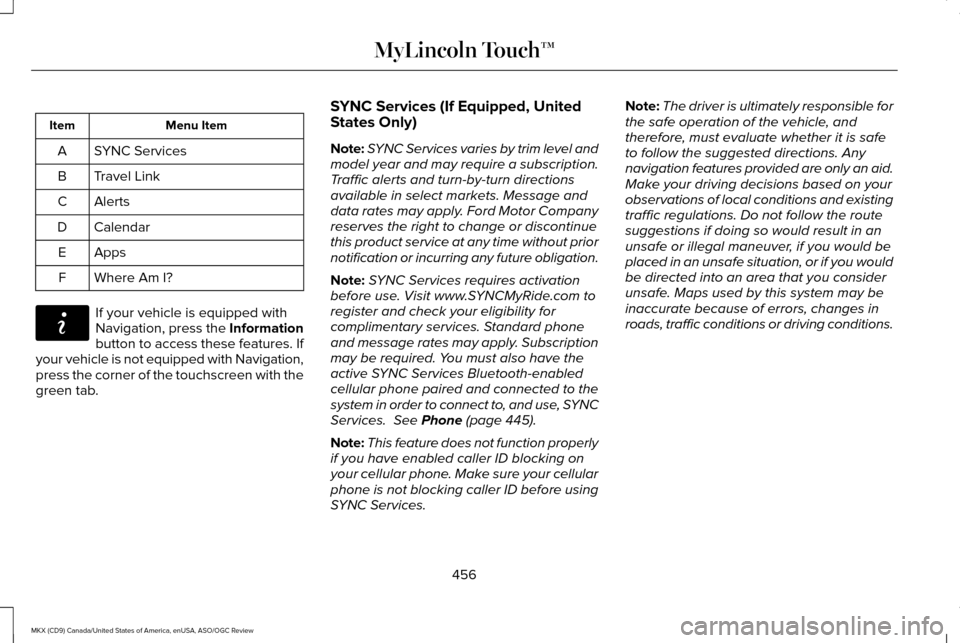
Menu Item
Item
SYNC Services
A
Travel Link
B
Alerts
C
Calendar
D
AppsE
Where Am I?
F If your vehicle is equipped with
Navigation, press the Information
button to access these features. If
your vehicle is not equipped with Navigation,
press the corner of the touchscreen with the
green tab. SYNC Services (If Equipped, United
States Only)
Note:
SYNC Services varies by trim level and
model year and may require a subscription.
Traffic alerts and turn-by-turn directions
available in select markets. Message and
data rates may apply. Ford Motor Company
reserves the right to change or discontinue
this product service at any time without prior
notification or incurring any future obligation.
Note: SYNC Services requires activation
before use. Visit www.SYNCMyRide.com to
register and check your eligibility for
complimentary services. Standard phone
and message rates may apply. Subscription
may be required. You must also have the
active SYNC Services Bluetooth-enabled
cellular phone paired and connected to the
system in order to connect to, and use, SYNC
Services. See Phone (page 445).
Note: This feature does not function properly
if you have enabled caller ID blocking on
your cellular phone. Make sure your cellular
phone is not blocking caller ID before using
SYNC Services. Note:
The driver is ultimately responsible for
the safe operation of the vehicle, and
therefore, must evaluate whether it is safe
to follow the suggested directions. Any
navigation features provided are only an aid.
Make your driving decisions based on your
observations of local conditions and existing
traffic regulations. Do not follow the route
suggestions if doing so would result in an
unsafe or illegal maneuver, if you would be
placed in an unsafe situation, or if you would
be directed into an area that you consider
unsafe. Maps used by this system may be
inaccurate because of errors, changes in
roads, traffic conditions or driving conditions.
456
MKX (CD9) Canada/United States of America, enUSA, ASO/OGC Review MyLincoln Touch™E142608
Page 465 of 563
Sirius Travel Link (If Equipped)
WARNING
Driving while distracted can result in
loss of vehicle control, crash and injury.
We strongly recommend that you use
extreme caution when using any device that
may take your focus off the road. Your
primary responsibility is the safe operation
of your vehicle. We recommend against the
use of any handheld device while driving and
encourage the use of voice-operated
systems when possible. Make sure you are
aware of all applicable local laws that may
affect the use of electronic devices while
driving. Note:
In order to use Sirius Travel Link, your
vehicle must be equipped with navigation
and your navigation SD card must be in the
SD card slot.
Note: A paid subscription is required to
access and use these features. Go to
www.siriusxm.com/travellink for more
information.
Note: Visit www.siriusxm.com/traffic and click
on Coverage map and details for a complete
listing of all traffic areas covered by Sirius
Travel Link.
Note: Neither Sirius nor Ford is responsible
for any errors or inaccuracies in the Sirius
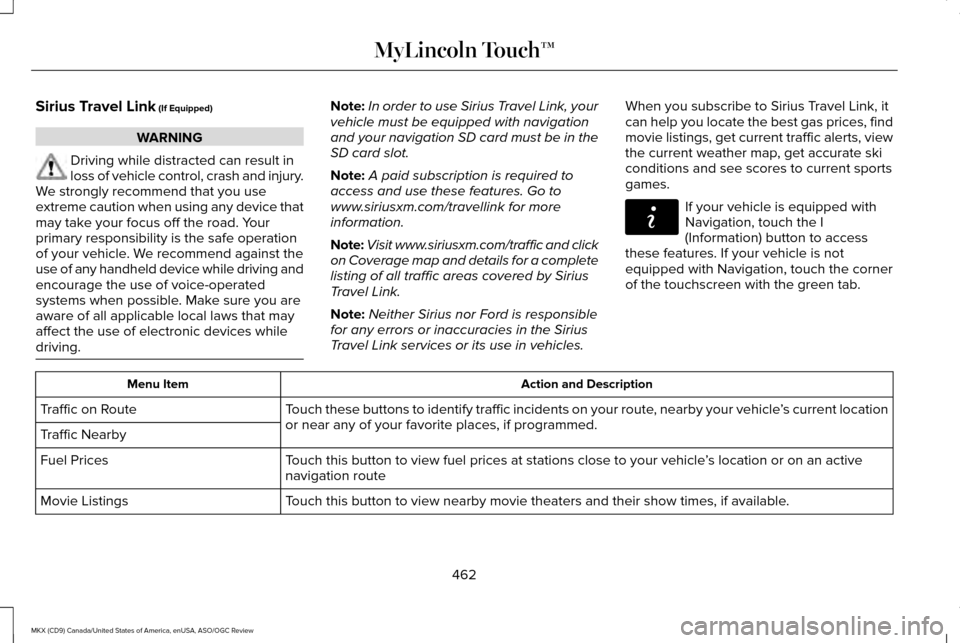
Travel Link services or its use in vehicles. When you subscribe to Sirius Travel Link, it
can help you locate the best gas prices, find
movie listings, get current traffic alerts, view
the current weather map, get accurate ski
conditions and see scores to current sports
games. If your vehicle is equipped with
Navigation, touch the I
(Information) button to access
these features. If your vehicle is not
equipped with Navigation, touch the corner
of the touchscreen with the green tab. Action and Description
Menu Item
Touch these buttons to identify traffic incidents on your route, nearby your vehicle ’s current location
or near any of your favorite places, if programmed.
Traffic on Route
Traffic Nearby
Touch this button to view fuel prices at stations close to your vehicle ’s location or on an active
navigation route
Fuel Prices
Touch this button to view nearby movie theaters and their show times, if \
available.
Movie Listings
462
MKX (CD9) Canada/United States of America, enUSA, ASO/OGC Review MyLincoln Touch™E142608