lower LINCOLN MKX 2016 Workshop Manual
[x] Cancel search | Manufacturer: LINCOLN, Model Year: 2016, Model line: MKX, Model: LINCOLN MKX 2016Pages: 563, PDF Size: 4.96 MB
Page 448 of 563
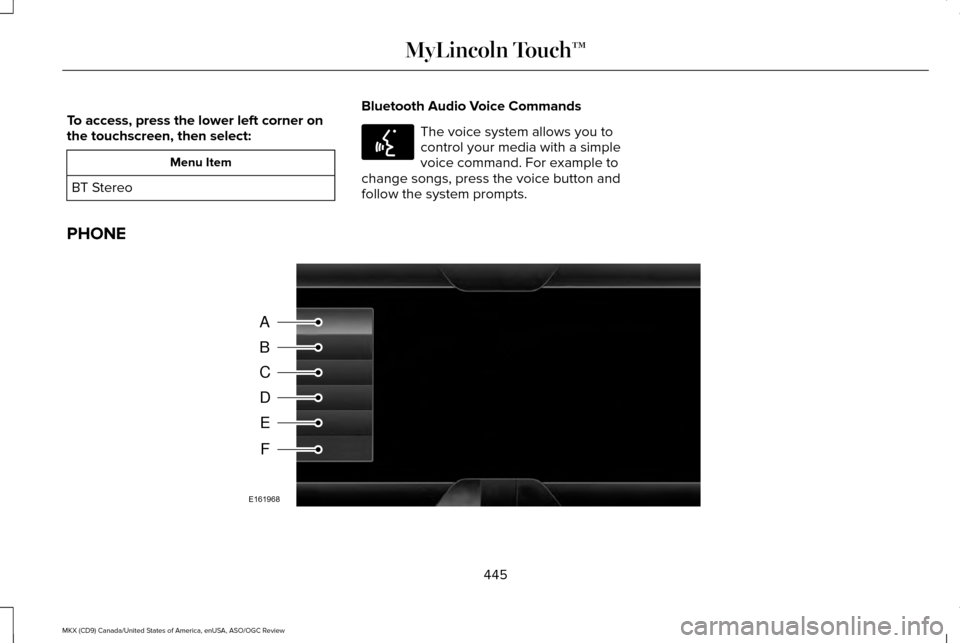
To access, press the lower left corner on
the touchscreen, then select:
Menu Item
BT Stereo Bluetooth Audio Voice Commands The voice system allows you to
control your media with a simple
voice command. For example to
change songs, press the voice button and
follow the system prompts.
PHONE 445
MKX (CD9) Canada/United States of America, enUSA, ASO/OGC Review MyLincoln Touch™E142599 A
B
C
D
E
F
E161968
Page 472 of 563
Where Am I?
For information about your current location,
select:
Action and Descrip-
tion
Menu Item
View your vehicle's
current location, if
your vehicle is
equipped with
navigation. If your
vehicle is not
equipped with
Where Am I? Action and Descrip-
tion
Menu Item
navigation, nothing
displays.
CLIMATE
Touch the lower right corner on the
touchscreen to access your climate control
features. Depending on your vehicle line and
option package, your climate screen may
look different from this screen. Note:
You can switch temperature units
between Fahrenheit and Celsius. See
Settings (page 403).
469
MKX (CD9) Canada/United States of America, enUSA, ASO/OGC Review MyLincoln Touch™
Page 486 of 563
Auto Zoom
Press the green bar to access map mode,
then select the + or - zoom button to bring
up the zoom level and Auto buttons on the
touchscreen. When you press
Auto, Auto
Zoom turns on and Auto displays in the
bottom left corner of the screen in the map
scale. The map zoom level then synchronizes
with vehicle speed. The slower your vehicle
is traveling, the farther the map zooms in;
the faster your vehicle is traveling, the farther
the map zooms out. To switch off the feature,
just press the
+ or - button again.
In 3D mode, rotate the map view by swiping
your finger across the shaded bar with the
arrows.
The ETA box under the zoom buttons
appears when a route is active and displays
the distance and time to your destination. If
the button is pressed, a pop up appears with
the destination listed (and waypoint if
applicable) along with mileage and time to
destination. You may also select to have
either the estimated time to reach your
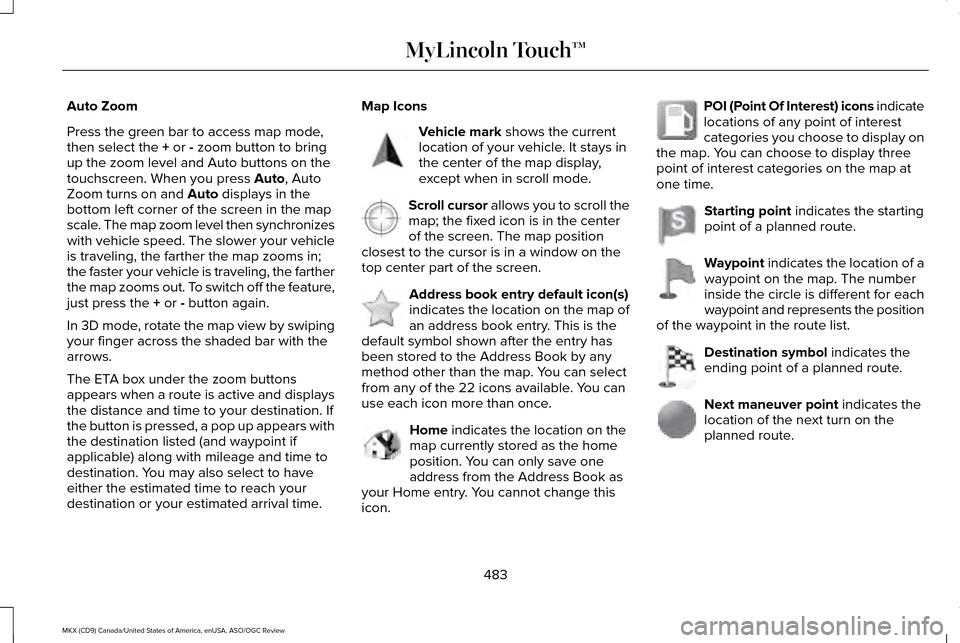
destination or your estimated arrival time. Map Icons Vehicle mark
shows the current
location of your vehicle. It stays in
the center of the map display,
except when in scroll mode. Scroll cursor
allows you to scroll the
map; the fixed icon is in the center
of the screen. The map position
closest to the cursor is in a window on the
top center part of the screen. Address book entry default icon(s)
indicates the location on the map of
an address book entry. This is the
default symbol shown after the entry has
been stored to the Address Book by any
method other than the map. You can select
from any of the 22 icons available. You can
use each icon more than once. Home
indicates the location on the
map currently stored as the home
position. You can only save one
address from the Address Book as
your Home entry. You cannot change this
icon. POI (Point Of Interest) icons indicate
locations of any point of interest
categories you choose to display on
the map. You can choose to display three
point of interest categories on the map at
one time. Starting point
indicates the starting
point of a planned route. Waypoint
indicates the location of a
waypoint on the map. The number
inside the circle is different for each
waypoint and represents the position
of the waypoint in the route list. Destination symbol
indicates the
ending point of a planned route. Next maneuver point
indicates the
location of the next turn on the
planned route.
483
MKX (CD9) Canada/United States of America, enUSA, ASO/OGC Review MyLincoln Touch™E142646 E142647 E142648 E142649 E142650 E142651 E142652 E142653 E142654
Page 557 of 563
Information Messages..................................121
Active Park.............................................................121
Adaptive Cruise Control....................................122
AdvanceTrac ™.......................................................123
Airbag.....................................................................123
Alarm......................................................................123
Automatic Engine Shutdown............................124
AWD........................................................................\
124
Battery and Charging System..........................125
Blind Spot Information and Cross Traffic Alert System...............................................................126
Collision Warning System..................................127
Doors and Locks..................................................127
Driver Alert............................................................128
Fuel........................................................................\
.128
Hill Start Assist.....................................................129
Keys and Intelligent Access.............................129
Lane Keeping System........................................130
Maintenance..........................................................131
MyKey.....................................................................132
Park Aid..................................................................133
Park Brake.............................................................133
Power Steering.....................................................134
Remote Start.........................................................135
Seats.......................................................................135
Starting System ...................................................135
Tire Pressure Monitoring System....................136
Traction Control...................................................136 Transmission.....................................................137
Installing Child Seats......................................18 Child Seats...............................................................18
Using Lap and Shoulder Belts............................18
Using Lower Anchors and Tethers for
CHildren (LATCH).............................................24
Using Tether Straps..............................................25
Instrument Cluster.........................................107
Instrument Lighting Dimmer........................93
Interior Lamps..................................................97 Front Interior Lamp...............................................98
Rear Interior Lamp................................................99
Interior Mirror
.................................................104
Auto-Dimming Mirror..........................................104
Introduction
.........................................................7
J
Jump Starting the Vehicle..........................274 Connecting the Jumper Cables......................275
Jump Starting......................................................275
Preparing Your Vehicle......................................274
Removing the Jumper Cables.........................276
K
Keyless Entry
....................................................76
SECURICODE™ Keyless Entry Keypad.............76 Keyless Starting.............................................167
Ignition Modes......................................................167
Keys and Remote Controls..........................55
L
Lane Keeping System
.................................232
Switching the System On and Off..................233
Lighting Control
................................................91
Headlamp Flasher................................................92
High Beams............................................................92
Lighting...............................................................91 General Information..............................................91
Lincoln Automotive Financial Services......12
Load Carriers See: Roof Racks and Load Carriers................251
Load Carrying
................................................249
Load Limit........................................................251 Special Loading Instructions for Owners of
Pick-up Trucks and Utility-type
Vehicles............................................................260
Vehicle Loading - with and without a Trailer
.................................................................251
554
MKX (CD9) Canada/United States of America, enUSA, ASO/OGC Review Index