service LINCOLN MKX 2016 Repair Manual
[x] Cancel search | Manufacturer: LINCOLN, Model Year: 2016, Model line: MKX, Model: LINCOLN MKX 2016Pages: 563, PDF Size: 4.96 MB
Page 368 of 563
•
Wet weather driving capability.
• All-wheel driving capability.
When driving with the full-size dissimilar
spare wheel and tire assembly additional
caution should be given to:
• Towing a trailer.
• Driving vehicles equipped with a camper
body.
• Driving vehicles with a load on the cargo
rack.
Drive cautiously when using a full-size
dissimilar spare wheel and tire assembly and
seek service as soon as possible.
Tire Change Procedure (If Equipped) WARNINGS
When one of the front wheels is off the
ground, the transmission alone will not
prevent the vehicle from moving or slipping
off the jack, even if the transmission is in park
(P). WARNINGS
To help prevent your vehicle from
moving when you change a tire, be
sure to place the transmission in park (P), set
the parking brake and block (in both
directions) the wheel that is diagonally
opposite (other side and end of the vehicle)
to the tire being changed. Never get underneath a vehicle that is
supported only by a jack. If your vehicle
slips off the jack, you or someone else could
be seriously injured. Do not attempt to change a tire on the
side of the vehicle close to moving
traffic. Pull far enough off the road to avoid
the danger of being hit when operating the
jack or changing the wheel. Always use the jack provided as
original equipment with your vehicle.
If using a jack other than the one provided
as original equipment with your vehicle,
make sure the jack capacity is adequate for
the vehicle weight, including any vehicle
cargo or modifications. Note:
Passengers should not remain in your
vehicle when the vehicle is being jacked.
1. Park on a level surface, set the parking brake and activate the hazard flashers.
2. Place the transmission in park (P) and turn the engine off. 3.
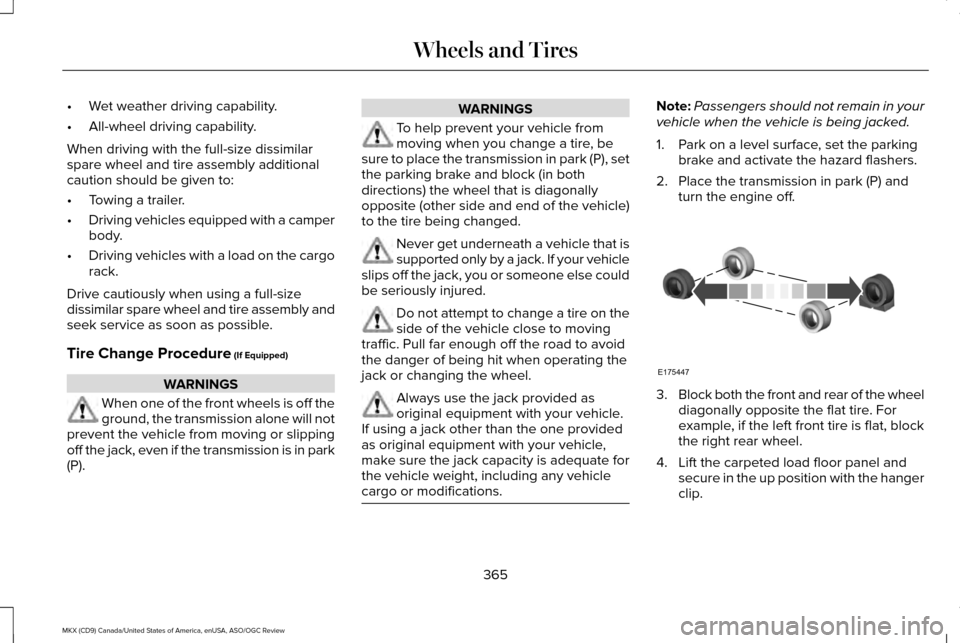
Block both the front and rear of the wheel
diagonally opposite the flat tire. For
example, if the left front tire is flat, block
the right rear wheel.
4. Lift the carpeted load floor panel and secure in the up position with the hanger
clip.
365
MKX (CD9) Canada/United States of America, enUSA, ASO/OGC Review Wheels and TiresE175447
Page 379 of 563

CAPACITIES AND SPECIFICATIONS - 2.7L ECOBOOST™
Capacities
WARNING
The air conditioning refrigerant system contains refrigerant R-134a unde\
r high pressure. Only qualified personnel should service the air
conditioning refrigerant system. Opening the air conditioning refrigeran\
t system can cause personal injury.
Capacity
Item
6.0 qt (5.7 L)
Engine oil
10.6 qt (10 L)
Engine coolant
Between MIN/MAX on brake fluid reservoir
Brake fluid
2.4 pt (1.15L)
Rear differential fluid (All Wheel Drive)
11.8 fl oz (0.35 L)
Power Transfer Unit (PTU) fluid (All Wheel Drive)
11.0 qt (10.4 L)*
Automatic transmission fluid
Fill as required
Windshield washer fluid
18.4 gal (69.5 L)
Fuel tank (Front Wheel Drive)
18.5 gal (70 L)
Fuel tank (All Wheel Drive)
376
MKX (CD9) Canada/United States of America, enUSA, ASO/OGC Review Capacities and Specifications
Page 384 of 563
We recommend Motorcraft motor oil for your
vehicle. If Motorcraft oil is not available, use
motor oils of the recommended viscosity
grade that meet API SN requirements and
display the API Certification Mark for gasoline
engines. Do not use oil labeled with API SN
service category unless the label also
displays the API certification mark. An oil that displays this symbol conforms to
current engine, emission system and fuel
economy performance standards of the
International Lubricants Specification
Advisory Council (ILSAC).
Do not use supplemental engine oil additives
because they are unnecessary and could
lead to engine damage that may not be
covered by your vehicle warranty.
Note:
Ford recommends using DOT 4 Low
Viscosity (LV) High Performance Brake Fluid
or equivalent meeting WSS-M6C65-A2. Use
of any fluid other than the recommended
fluid may cause degraded brake
performance and not meet the Ford
performance standards. Keep brake fluid
clean and dry. Contamination with dirt,
water, petroleum products or other materials
may result in brake system damage and
possible failure.
Note: Automatic transmissions that require
MERCON LV transmission fluid should only
use MERCON LV transmission fluid. The use
of any other fluid may cause transmission
damage.
CAPACITIES AND SPECIFICATIONS - 3.7L
Capacities WARNING
The air conditioning refrigerant system contains refrigerant R-134a unde\
r high pressure. Only qualified personnel should service the air
conditioning refrigerant system. Opening the air conditioning refrigeran\
t system can cause personal injury.
381
MKX (CD9) Canada/United States of America, enUSA, ASO/OGC Review Capacities and SpecificationsE142732
Page 389 of 563
Specification
Name
--
Lock cylinders (U.S.):
Penetrating and Lock Lubricant
XL-1
--
Lock cylinders (Canada):
Penetrating Fluid
CXC-51-A
--
Lock cylinders (Mexico):
Penetrating and Lock Lubricant
MXL-1
If you use oil and fluids that do not meet the
defined specification and viscosity grade,
this may lead to:
• Component damage which is not
covered by the vehicle warranty.
• Longer engine cranking periods.
• Increased emission levels.
• Reduced engine performance.
• Reduced fuel economy.
• Degraded brake performance. We recommend Motorcraft motor oil for your
vehicle. If Motorcraft oil is not available, use
motor oils of the recommended viscosity
grade that meet API SN requirements and
display the API Certification Mark for gasoline
engines. Do not use oil labeled with API SN
service category unless the label also
displays the API certification mark.
386
MKX (CD9) Canada/United States of America, enUSA, ASO/OGC Review Capacities and SpecificationsE142732
Page 398 of 563
HOME
Press to access the home screen.
Note: Depending on your vehicle ’s option
package and software, the screens may vary
in appearance from the descriptions in this
section. The features may also be limited
depending on the market. Check with an
authorized dealer for availability.
INFORMATION Press to select any of the following:
Menu Item
Services
Travel Link
Alerts
Calendar
Apps
Where Am I? ENTERTAINMENT
Press to select any of the following: Menu Item
AM
FM
SIRIUS
CD
USB
BT Stereo
SD Card
Using the Audio Controls
Depending on your vehicle, it may also have the following controls: Action and Description
Controls
Switch the media features on or off.
Power
Adjust the volume of playing media.
Volume
Use as you normally would in media modes.
Tune
395
MKX (CD9) Canada/United States of America, enUSA, ASO/OGC Review MyLincoln Touch™E142613 E142608
Page 401 of 563
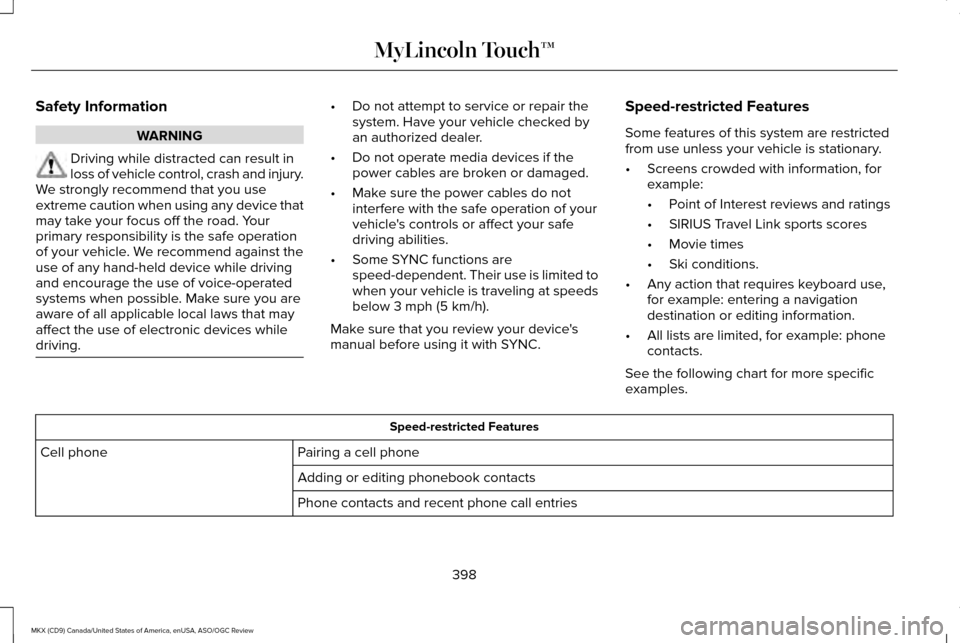
Safety Information
WARNING
Driving while distracted can result in
loss of vehicle control, crash and injury.
We strongly recommend that you use
extreme caution when using any device that
may take your focus off the road. Your
primary responsibility is the safe operation
of your vehicle. We recommend against the
use of any hand-held device while driving
and encourage the use of voice-operated
systems when possible. Make sure you are
aware of all applicable local laws that may
affect the use of electronic devices while
driving. •
Do not attempt to service or repair the
system. Have your vehicle checked by
an authorized dealer.
• Do not operate media devices if the
power cables are broken or damaged.
• Make sure the power cables do not
interfere with the safe operation of your
vehicle's controls or affect your safe
driving abilities.
• Some SYNC functions are
speed-dependent. Their use is limited to
when your vehicle is traveling at speeds
below 3 mph (5 km/h).
Make sure that you review your device's
manual before using it with SYNC. Speed-restricted Features
Some features of this system are restricted
from use unless your vehicle is stationary.
•
Screens crowded with information, for
example:
•Point of Interest reviews and ratings
• SIRIUS Travel Link sports scores
• Movie times
• Ski conditions.
• Any action that requires keyboard use,
for example: entering a navigation
destination or editing information.
• All lists are limited, for example: phone
contacts.
See the following chart for more specific
examples. Speed-restricted Features
Pairing a cell phone
Cell phone
Adding or editing phonebook contacts
Phone contacts and recent phone call entries
398
MKX (CD9) Canada/United States of America, enUSA, ASO/OGC Review MyLincoln Touch™
Page 433 of 563
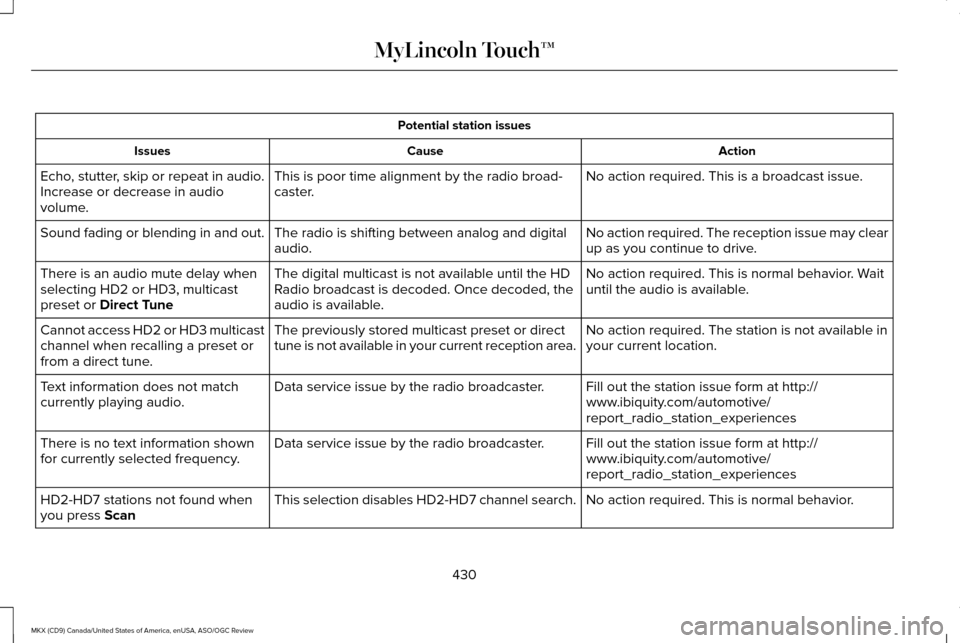
Potential station issues
Action
Cause
Issues
No action required. This is a broadcast issue.
This is poor time alignment by the radio broad-
caster.
Echo, stutter, skip or repeat in audio.
Increase or decrease in audio
volume.
No action required. The reception issue may clear
up as you continue to drive.
The radio is shifting between analog and digital
audio.
Sound fading or blending in and out.
No action required. This is normal behavior. Wait
until the audio is available.
The digital multicast is not available until the HD
Radio broadcast is decoded. Once decoded, the
audio is available.
There is an audio mute delay when
selecting HD2 or HD3, multicast
preset or Direct Tune
No action required. The station is not available in
your current location.
The previously stored multicast preset or direct
tune is not available in your current reception area.
Cannot access HD2 or HD3 multicast
channel when recalling a preset or
from a direct tune.
Fill out the station issue form at http://
www.ibiquity.com/automotive/
report_radio_station_experiences
Data service issue by the radio broadcaster.
Text information does not match
currently playing audio.
Fill out the station issue form at http://
www.ibiquity.com/automotive/
report_radio_station_experiences
Data service issue by the radio broadcaster.
There is no text information shown
for currently selected frequency.
No action required. This is normal behavior.
This selection disables HD2-HD7 channel search.
HD2-HD7 stations not found when
you press
Scan
430
MKX (CD9) Canada/United States of America, enUSA, ASO/OGC Review MyLincoln Touch™
Page 438 of 563
SIRIUS Satellite Radio Information
Note:
SIRIUS reserves the unrestricted right
to change, rearrange, add or delete
programming including canceling, moving
or adding particular channels, and its prices,
at any time, with or without notice to you.
Ford Motor Company shall not be
responsible for any such programming
changes. SIRIUS satellite radio is a subscription-based
satellite radio service that broadcasts a
variety of music, sports, news, weather, traffic
and entertainment programming. Your
factory-installed SIRIUS satellite radio system
includes hardware and a limited subscription
term that begins on the date of sale or lease
of your vehicle. See an authorized dealer for
availability.
For more information on extended
subscription terms (a service fee is required),
the online media player and a list of SIRIUS
satellite radio channels, and other features,
please visit www.siriusxm.com in the United
States, www.sirius.ca in Canada, or call
SIRIUS at 1-888-539-7474.
Note:
This receiver includes the eCos
real-time operating system. eCos is
published under the eCos License.
Satellite Radio Electronic Serial Number
(ESN)
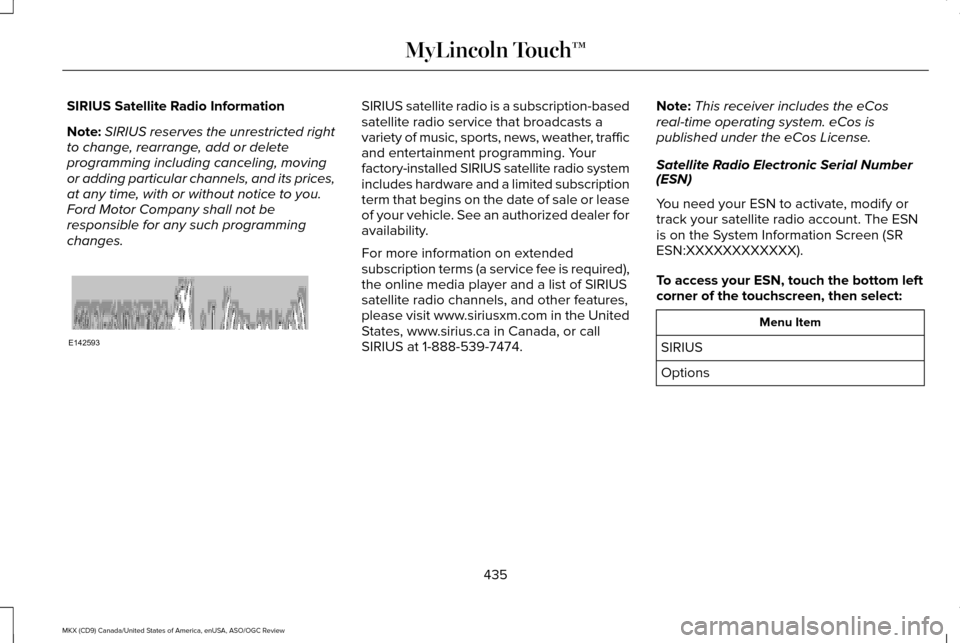
You need your ESN to activate, modify or
track your satellite radio account. The ESN
is on the System Information Screen (SR
ESN:XXXXXXXXXXXX).
To access your ESN, touch the bottom left
corner of the touchscreen, then select: Menu Item
SIRIUS
Options
435
MKX (CD9) Canada/United States of America, enUSA, ASO/OGC Review MyLincoln Touch™E142593
Page 439 of 563
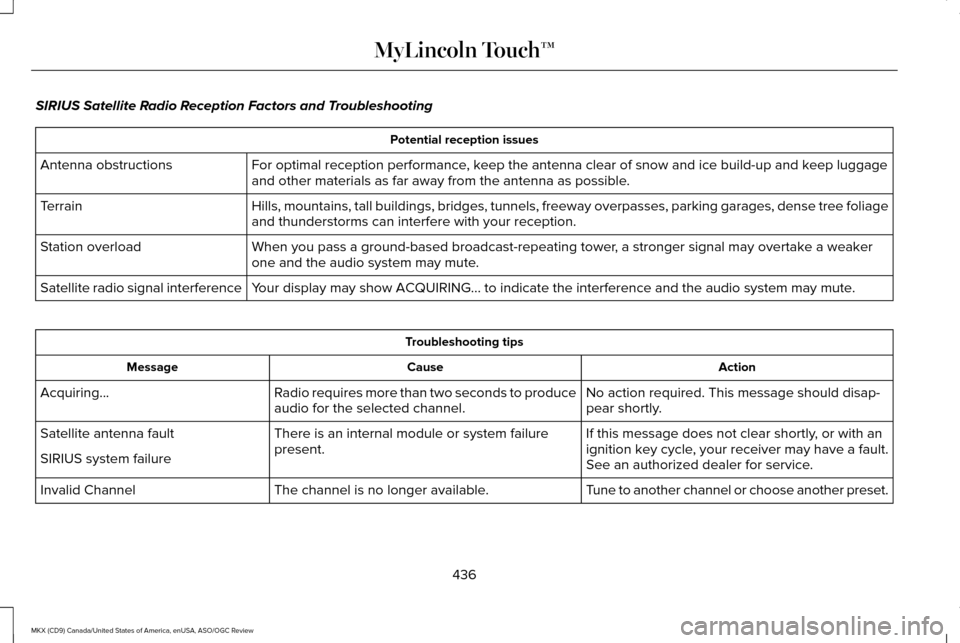
SIRIUS Satellite Radio Reception Factors and Troubleshooting
Potential reception issues
For optimal reception performance, keep the antenna clear of snow and ice build-up and keep luggage
and other materials as far away from the antenna as possible.
Antenna obstructions
Hills, mountains, tall buildings, bridges, tunnels, freeway overpasses, \
parking garages, dense tree foliage
and thunderstorms can interfere with your reception.
Terrain
When you pass a ground-based broadcast-repeating tower, a stronger signal may overtake a weaker
one and the audio system may mute.
Station overload
Your display may show ACQUIRING... to indicate the interference and the a\
udio system may mute.
Satellite radio signal interference Troubleshooting tips
Action
Cause
Message
No action required. This message should disap-
pear shortly.
Radio requires more than two seconds to produce
audio for the selected channel.
Acquiring…
If this message does not clear shortly, or with an
ignition key cycle, your receiver may have a fault.
See an authorized dealer for service.
There is an internal module or system failure
present.
Satellite antenna fault
SIRIUS system failure
Tune to another channel or choose another preset.
The channel is no longer available.
Invalid Channel
436
MKX (CD9) Canada/United States of America, enUSA, ASO/OGC Review MyLincoln Touch™
Page 440 of 563
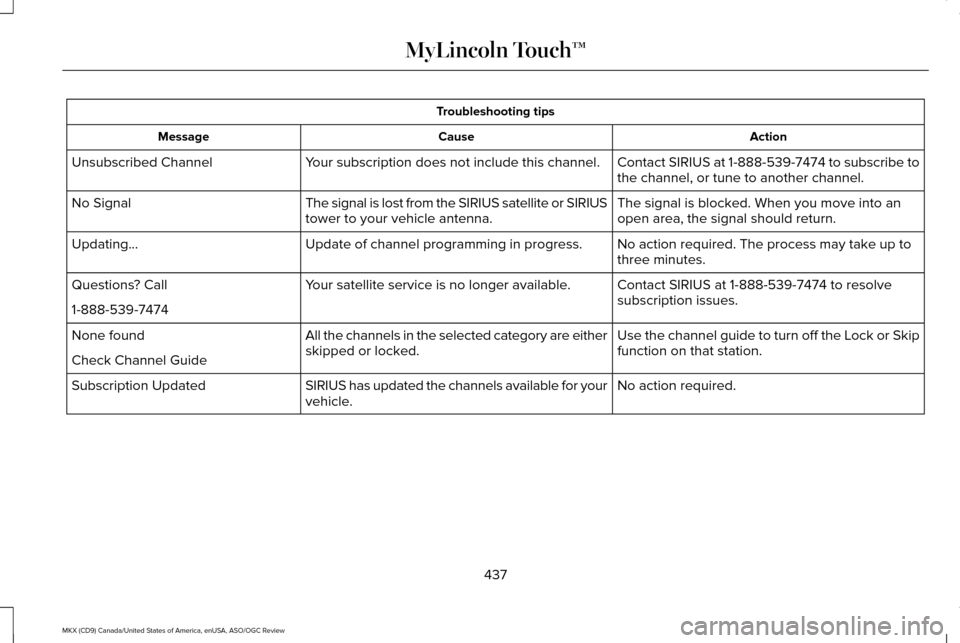
Troubleshooting tips
Action
Cause
Message
Contact SIRIUS at 1-888-539-7474 to subscribe to
the channel, or tune to another channel.
Your subscription does not include this channel.
Unsubscribed Channel
The signal is blocked. When you move into an
open area, the signal should return.
The signal is lost from the SIRIUS satellite or SIRIUS
tower to your vehicle antenna.
No Signal
No action required. The process may take up to
three minutes.
Update of channel programming in progress.
Updating…
Contact SIRIUS at 1-888-539-7474 to resolve
subscription issues.
Your satellite service is no longer available.
Questions? Call
1-888-539-7474
Use the channel guide to turn off the Lock or Skip
function on that station.
All the channels in the selected category are either
skipped or locked.
None found
Check Channel Guide
No action required.
SIRIUS has updated the channels available for your
vehicle.
Subscription Updated
437
MKX (CD9) Canada/United States of America, enUSA, ASO/OGC Review MyLincoln Touch™