Settings LINCOLN MKX 2016 Manual PDF
[x] Cancel search | Manufacturer: LINCOLN, Model Year: 2016, Model line: MKX, Model: LINCOLN MKX 2016Pages: 563, PDF Size: 4.96 MB
Page 457 of 563

Action and Description
Message
Select the ring tone you want to hear when you receive a call. Choose fr\
om possible system ring
tones, your currently paired cell phone ’s ring tone, a beep, text-to-speech or a silent notification.
Phone Ringer
Select a text message notification, if supported by your cell phone. Choose from possible system
alert tones, text-to-speech or silent.
Text Message Notification
If your cell phone is compatible, use this screen to adjust your internet data connection. Select to
make your connection profile with the personal area network or to turn off \
your connection. You
can also choose to adjust your settings or have the system always connec\
t, never connect when
roaming or query on connect. Press ? for more information.
Internet Data Connection
To access features such as automatic phonebook download, re-download your\
phonebook, add
contacts from your cell phone as well as delete or upload your phonebook\
.
Manage Phonebook
To have the system alert you when your cell phone is in roaming mode.
Roaming Warning
Phone Voice Commands 454
MKX (CD9) Canada/United States of America, enUSA, ASO/OGC Review MyLincoln Touch™E142599
Page 468 of 563
Note:
The SYNC 911 Assist feature must be
set on prior to the incident.
Note: Before setting this feature on, make
sure that you read the 911 Assist Privacy
Notice later in this section for important
information.
Note: If any user turns 911 Assist on or off,
that setting applies for all paired phones. If
911 Assist is turned off, either a voice
message plays or a display message (or
icon) comes on (or both) when your vehicle
is started after a previously paired phone
connects.
Note: Every phone operates differently.
While SYNC 911 Assist works with most
cellular phones, some may have trouble
using this feature.
If a crash deploys an airbag, excluding knee
airbags and rear inflatable safety belts where
fitted or activates the fuel pump shut-off, your
SYNC-equipped vehicle may be able to
contact emergency services by dialing 911
through a paired and connected
Bluetooth-enabled phone. For more
information about the 911 Assist feature visit: Website
visit www.SYNCMyRide.com www.SYNCMyRide.cawww.syncmaroute.ca
See Supplementary Restraints System
(page 44). Important information regarding
airbag deployment is in this chapter.
See
Roadside Emergencies (page 272).
Important information regarding the fuel
pump shut-off is in this chapter.
Setting 911 Assist On If your vehicle is equipped with Navigation,
touch the I (Information) button to access
these features. If your vehicle is not
equipped with Navigation, touch the corner
of the touchscreen with the green tab. Then
select:
Menu Item
Apps
911 Assist
On You can also access 911 Assist by pressing
the Setting icon and then selecting:
Menu Item
Settings
Phone
911 Assist
465
MKX (CD9) Canada/United States of America, enUSA, ASO/OGC Review MyLincoln Touch™E142608 E142607
Page 472 of 563
Where Am I?
For information about your current location,
select:
Action and Descrip-
tion
Menu Item
View your vehicle's
current location, if
your vehicle is
equipped with
navigation. If your
vehicle is not
equipped with
Where Am I? Action and Descrip-
tion
Menu Item
navigation, nothing
displays.
CLIMATE
Touch the lower right corner on the
touchscreen to access your climate control
features. Depending on your vehicle line and
option package, your climate screen may
look different from this screen. Note:
You can switch temperature units
between Fahrenheit and Celsius. See
Settings (page 403).
469
MKX (CD9) Canada/United States of America, enUSA, ASO/OGC Review MyLincoln Touch™
Page 473 of 563

Power: Touch the button to switch the system on and off. Switching off the climate control system prevents outside air from enteri\
ng
the vehicle.
A
Passenger settings:
B
Touch the
+ or – to increase or decrease the air temperature on the passenger side of th\
e vehicle.
Touch the heated seat icon to switch the heated seat off and on (if equi\
pped).
Touch the climate-controlled seat icon to switch the climate-controlled s\
eat off and on (if equipped).
Touch
Dual to switch separate passenger side temperature controls off and on. When\
you switch off Dual, the passenger side
temperature changes to match the driver side temperature.
470
MKX (CD9) Canada/United States of America, enUSA, ASO/OGC Review MyLincoln Touch™E171848
K
Page 475 of 563

Max Defrost: Touch the button to maximize defrosting. Outside air flows through the wi\
ndshield vents, fan automatically adjusts to
the highest speed and the temperature dial returns to the full heat posi\
tion. You can use this setting to defog or clear a thin covering
of ice from the windshield. The heated rear window also automatically tu\
rns on when you select Max Defrost.
I
Air distribution control:
Touch these buttons to switch airflow from the windshield, instrument pan\
el, or footwell vents on or off.
The system can distribute air through any combination of these vents.
J
Note:
To prevent window fogging, you cannot select recirculated air when MAX De\
frost is on.
Driver settings:
K
Touch the
+ or – to increase or decrease the air temperature on the driver side of the v\
ehicle.
Touch the heated seat icon to switch the heated seat off and on (if equi\
pped).
Touch the climate-controlled seat icon to switch the climate-controlled s\
eat off and on (if equipped).
Touch
MyTemp to select your preset temperature setpoint. Touch and hold MyTemp to save a new preset temperature setpoint.
Touch the heated steering wheel icon to switch the heated steering wheel \
on and off (if equipped).
Note: If your vehicle is equipped with a
wood-trimmed steering wheel, it does not
heat between the 10 o'clock and 2 o'clock
positions. Climate Control Voice Commands Press the voice button on the
steering wheel controls. When
prompted, say any of the following
or a similar command:
472
MKX (CD9) Canada/United States of America, enUSA, ASO/OGC Review MyLincoln Touch™E142599
Page 480 of 563
•
24 hour room service
• Fitness center
• Internet access
• Pool
• Wi-FI
For restaurants, cityseekr can provide
information such as star rating, average cost,
review, handicap access, hours of operation,
and website address. For hotels, cityseekr can provide information
such as star rating, price category, review,
check-in and checkout times, hotel service
icons and website address.
Setting Your Navigation Preferences Select settings for the system to
take into account when planning
your route.
To access the settings options, press Menu Item
Settings
Navigation
Then select any of the following:
Map Preferences Second Level Messages, Actions and Descriptions
Menu Item
Map Preferences
Then select any of the following: Display your vehicle’s previously traveled route with white dots. You can switch this feature:
Breadcrumbs
Off
On
Have the system display your turn list
Turn List Format
477
MKX (CD9) Canada/United States of America, enUSA, ASO/OGC Review MyLincoln Touch™E142607
Page 485 of 563
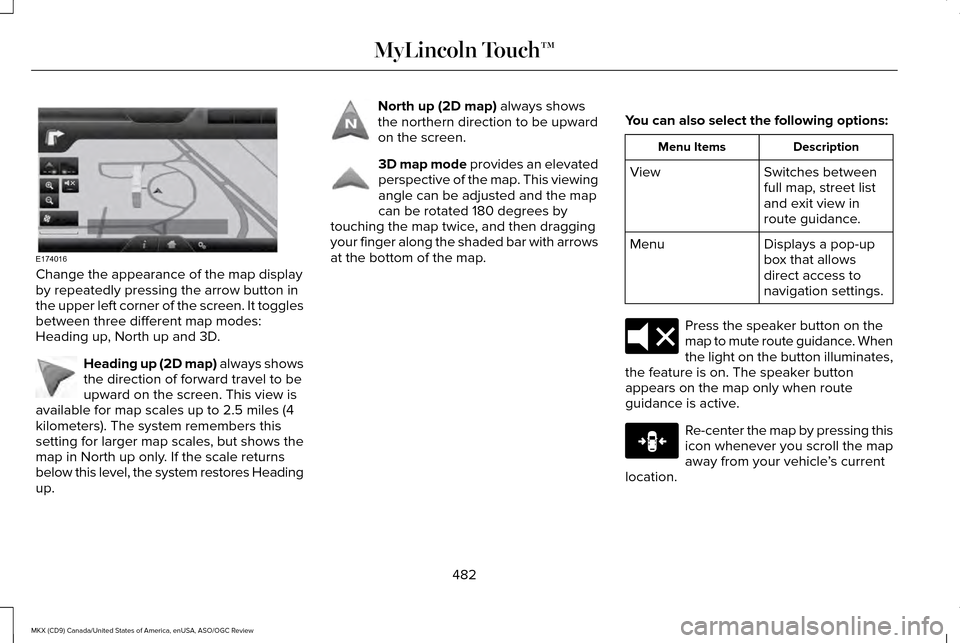
Change the appearance of the map display
by repeatedly pressing the arrow button in
the upper left corner of the screen. It toggles
between three different map modes:
Heading up, North up and 3D.
Heading up (2D map) always shows
the direction of forward travel to be
upward on the screen. This view is
available for map scales up to 2.5 miles (4
kilometers). The system remembers this
setting for larger map scales, but shows the
map in North up only. If the scale returns
below this level, the system restores Heading
up. North up (2D map) always shows
the northern direction to be upward
on the screen. 3D map mode
provides an elevated
perspective of the map. This viewing
angle can be adjusted and the map
can be rotated 180 degrees by
touching the map twice, and then dragging
your finger along the shaded bar with arrows
at the bottom of the map. You can also select the following options: Description
Menu Items
Switches between
full map, street list
and exit view in
route guidance.
View
Displays a pop-up
box that allows
direct access to
navigation settings.
Menu Press the speaker button on the
map to mute route guidance. When
the light on the button illuminates,
the feature is on. The speaker button
appears on the map only when route
guidance is active. Re-center the map by pressing this
icon whenever you scroll the map
away from your vehicle
’s current
location.
482
MKX (CD9) Canada/United States of America, enUSA, ASO/OGC Review MyLincoln Touch™E174016 E142642 E142643 E142644 E174017 E146188
Page 489 of 563
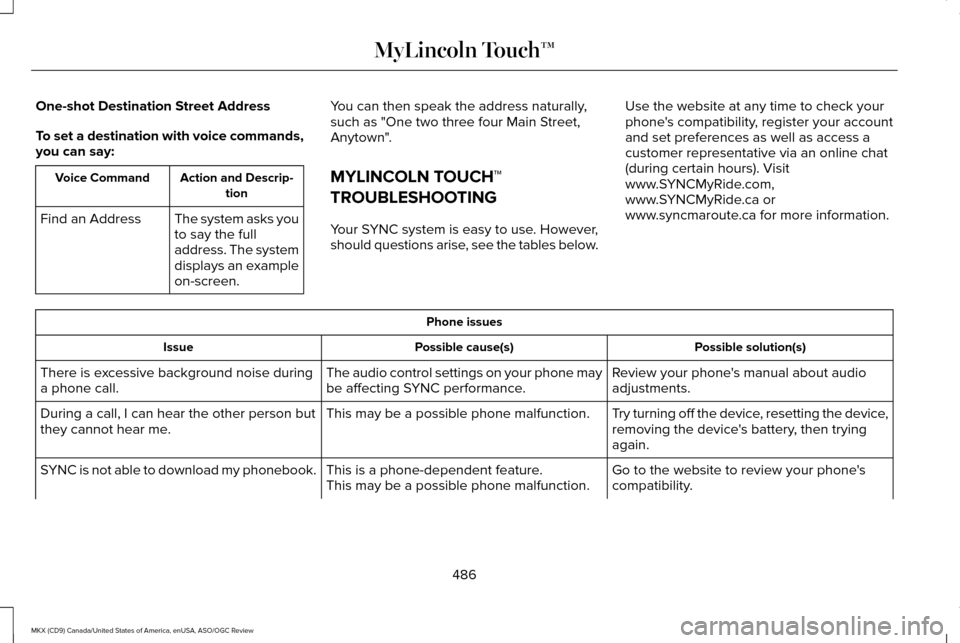
One-shot Destination Street Address
To set a destination with voice commands,
you can say:
Action and Descrip-
tion
Voice Command
The system asks you
to say the full
address. The system
displays an example
on-screen.
Find an Address You can then speak the address naturally,
such as "One two three four Main Street,
Anytown".
MYLINCOLN TOUCH™
TROUBLESHOOTING
Your SYNC system is easy to use. However,
should questions arise, see the tables below. Use the website at any time to check your
phone's compatibility, register your account
and set preferences as well as access a
customer representative via an online chat
(during certain hours). Visit
www.SYNCMyRide.com,
www.SYNCMyRide.ca or
www.syncmaroute.ca for more information. Phone issues
Possible solution(s)
Possible cause(s)
Issue
Review your phone's manual about audio
adjustments.
The audio control settings on your phone may
be affecting SYNC performance.
There is excessive background noise during
a phone call.
Try turning off the device, resetting the device,
removing the device's battery, then trying
again.
This may be a possible phone malfunction.
During a call, I can hear the other person but
they cannot hear me.
Go to the website to review your phone's
compatibility.
This is a phone-dependent feature.
This may be a possible phone malfunction.
SYNC is not able to download my phonebook.
486
MKX (CD9) Canada/United States of America, enUSA, ASO/OGC Review MyLincoln Touch™
Page 491 of 563
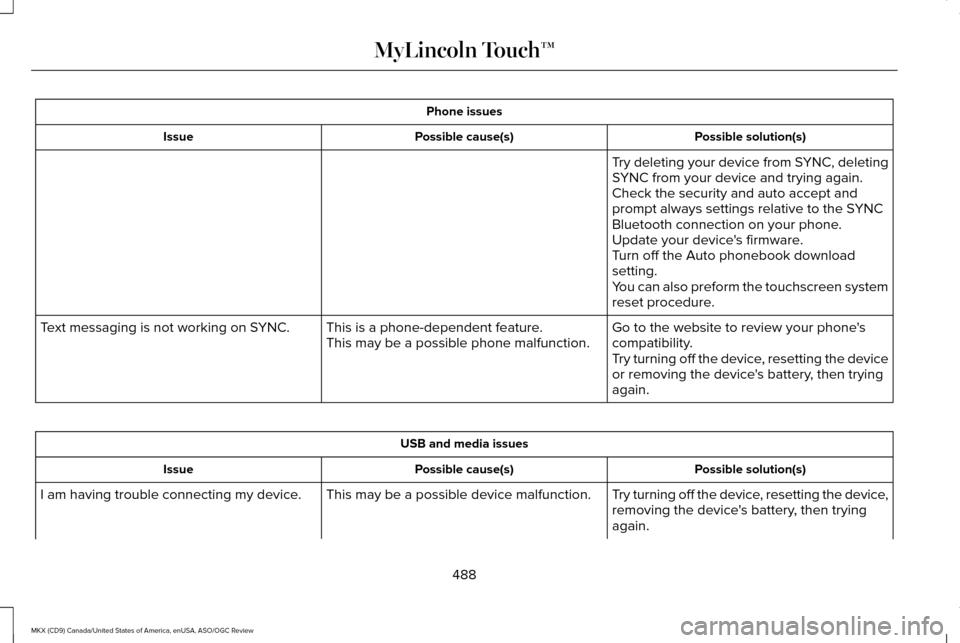
Phone issues
Possible solution(s)
Possible cause(s)
Issue
Try deleting your device from SYNC, deleting
SYNC from your device and trying again.
Check the security and auto accept and
prompt always settings relative to the SYNC
Bluetooth connection on your phone.
Update your device's firmware.
Turn off the Auto phonebook download
setting.
You can also preform the touchscreen system
reset procedure.
Go to the website to review your phone's
compatibility.
This is a phone-dependent feature.
This may be a possible phone malfunction.
Text messaging is not working on SYNC.
Try turning off the device, resetting the device
or removing the device's battery, then trying
again.USB and media issues
Possible solution(s)
Possible cause(s)
Issue
Try turning off the device, resetting the device,
removing the device's battery, then trying
again.
This may be a possible device malfunction.
I am having trouble connecting my device.
488
MKX (CD9) Canada/United States of America, enUSA, ASO/OGC Review MyLincoln Touch™
Page 492 of 563
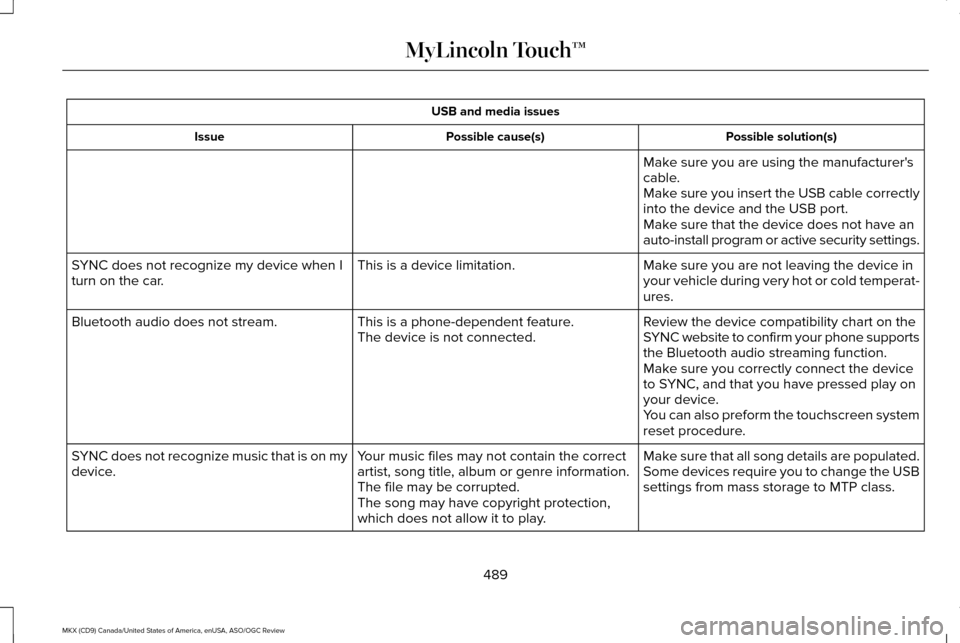
USB and media issues
Possible solution(s)
Possible cause(s)
Issue
Make sure you are using the manufacturer's
cable.
Make sure you insert the USB cable correctly
into the device and the USB port.
Make sure that the device does not have an
auto-install program or active security settings.
Make sure you are not leaving the device in
your vehicle during very hot or cold temperat-
ures.
This is a device limitation.
SYNC does not recognize my device when I
turn on the car.
Review the device compatibility chart on the
SYNC website to confirm your phone supports
the Bluetooth audio streaming function.
This is a phone-dependent feature.
The device is not connected.
Bluetooth audio does not stream.
Make sure you correctly connect the device
to SYNC, and that you have pressed play on
your device.
You can also preform the touchscreen system
reset procedure.
Make sure that all song details are populated.
Your music files may not contain the correct
artist, song title, album or genre information.
SYNC does not recognize music that is on my
device.
Some devices require you to change the USB
settings from mass storage to MTP class.
The file may be corrupted.
The song may have copyright protection,
which does not allow it to play.
489
MKX (CD9) Canada/United States of America, enUSA, ASO/OGC Review MyLincoln Touch™