Rtm LINCOLN MKX 2016 Owners Manual
[x] Cancel search | Manufacturer: LINCOLN, Model Year: 2016, Model line: MKX, Model: LINCOLN MKX 2016Pages: 563, PDF Size: 4.96 MB
Page 6 of 563
Heated Seats..................................................154
Climate Controlled Seats............................155
Rear Seat Armrest.........................................157
Universal Garage Door Opener
Universal Garage Door Opener................158
Auxiliary Power Points
Auxiliary Power Points.................................163
Storage Compartments
Glove Box
........................................................165
Center Console
.............................................165
Overhead Console.......................................166
Starting and Stopping the Engine
General Information
......................................167
Keyless Starting.............................................167
Starting a Gasoline Engine.........................168
Engine Block Heater
......................................171 Fuel and Refueling
Safety Precautions........................................173
Fuel Quality
.....................................................174
Fuel Filler Funnel Location..........................175
Running Out of Fuel
......................................175
Refueling..........................................................176
Fuel Consumption
.........................................178
Emission Control System.............................179
Transmission
Automatic Transmission
..............................182
All-Wheel Drive
Using All-Wheel Drive..................................188
Brakes
General Information
......................................194
Hints on Driving With Anti-Lock Brakes..........................................................194
Electric Parking Brake..................................195
Auto Hold
........................................................197 Traction Control
Principle of Operation.................................200
Using Traction Control................................200
Stability Control
Principle of Operation.................................202
Using Stability Control................................204
Parking Aids
Principle of Operation.................................205
Rear Parking Aid...........................................206
Front Parking Aid
.........................................206
Side Sensing System...................................207
Active Park Assist........................................209
Rear View Camera
........................................217
360 Degree Parking Aid Camera............220
Cruise Control
Principle of Operation.................................223
Using Cruise Control...................................223
Using Adaptive Cruise Control
.................224
3
MKX (CD9) Canada/United States of America, enUSA, ASO/OGC Review Table of Contents
Page 11 of 563
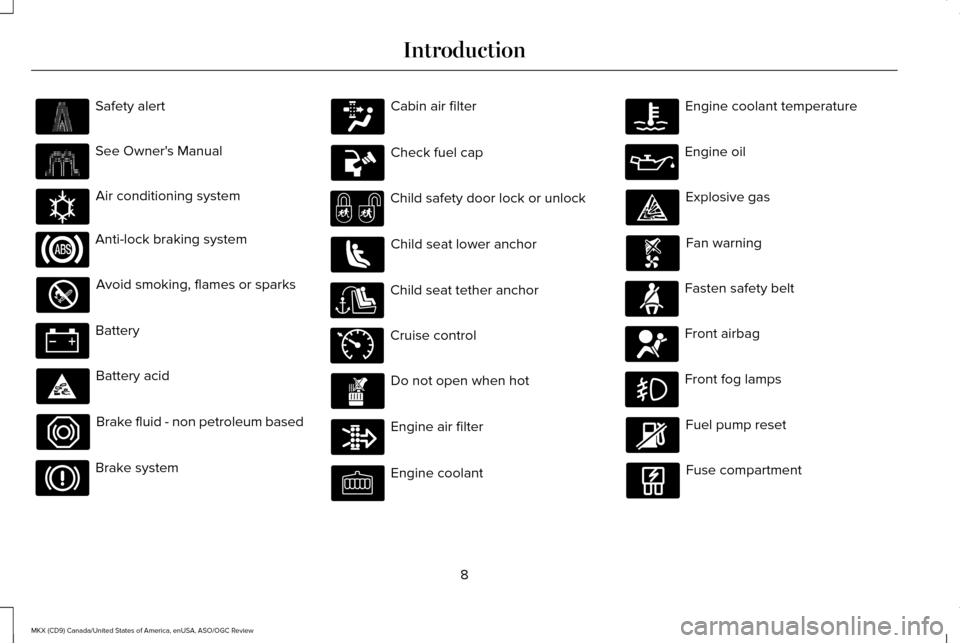
Safety alert
See Owner's Manual
Air conditioning system
Anti-lock braking system
Avoid smoking, flames or sparks
Battery
Battery acid
Brake fluid - non petroleum based
Brake system Cabin air filter
Check fuel cap
Child safety door lock or unlock
Child seat lower anchor
Child seat tether anchor
Cruise control
Do not open when hot
Engine air filter
Engine coolant Engine coolant temperature
Engine oil
Explosive gas
Fan warning
Fasten safety belt
Front airbag
Front fog lamps
Fuel pump reset
Fuse compartment
8
MKX (CD9) Canada/United States of America, enUSA, ASO/OGC Review Introduction E162384 E71340
Page 12 of 563
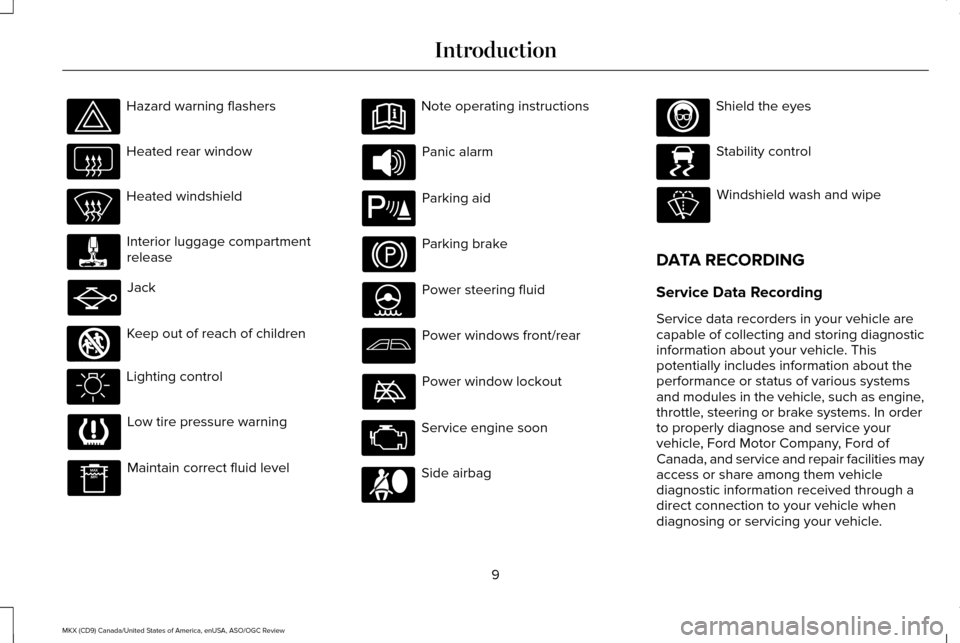
Hazard warning flashers
Heated rear window
Heated windshield
Interior luggage compartment
release
Jack
Keep out of reach of children
Lighting control
Low tire pressure warning
Maintain correct fluid level Note operating instructions
Panic alarm
Parking aid
Parking brake
Power steering fluid
Power windows front/rear
Power window lockout
Service engine soon
Side airbag Shield the eyes
Stability control
Windshield wash and wipe
DATA RECORDING
Service Data Recording
Service data recorders in your vehicle are
capable of collecting and storing diagnostic
information about your vehicle. This
potentially includes information about the
performance or status of various systems
and modules in the vehicle, such as engine,
throttle, steering or brake systems. In order
to properly diagnose and service your
vehicle, Ford Motor Company, Ford of
Canada, and service and repair facilities may
access or share among them vehicle
diagnostic information received through a
direct connection to your vehicle when
diagnosing or servicing your vehicle.
9
MKX (CD9) Canada/United States of America, enUSA, ASO/OGC Review Introduction E161353 E139213 E167012 E138639
Page 58 of 563
GENERAL INFORMATION ON
RADIO FREQUENCIES
This device complies with Part 15 of the FCC
Rules and with Industry Canada
license-exempt RSS standard(s). Operation
is subject to the following two conditions: (1)
This device may not cause harmful
interference, and (2) This device must accept
any interference received, including
interference that may cause undesired
operation.
Note:
Changes or modifications not
expressively approved by the party
responsible for compliance could void the
user's authority to operate the equipment.
The term IC before the radio certification
number only signifies that Industry Canada
technical specifications were met.
The typical operating range for your
transmitter is approximately
33 ft (10 m).
Vehicles with the remote start feature will
have a greater range. One of the following could cause a decrease
in operating range:
•
Weather conditions.
• Nearby radio towers.
• Structures around the vehicle.
• Other vehicles parked next to your
vehicle.
The radio frequency used by your remote
control can also be used by other radio
transmitters, for example amateur radios,
medical equipment, wireless headphones,
wireless remote controls, cell phones, battery
chargers and alarm systems. If the
frequencies are jammed, you will not be able
to use your remote control. You can lock and
unlock the doors with the key.
Note: Make sure to lock your vehicle before
leaving it unattended.
Note: If you are in range, the remote control
will operate if you press any button
unintentionally. Intelligent Access
(If Equipped)
The system uses a radio frequency signal to
communicate with your vehicle and authorize
your vehicle to unlock when one of the
following conditions are met:
• You activate the front exterior door
handle switch.
• You press the luggage compartment
button.
• You press a button on the transmitter.
If excessive radio frequency interference is
present in the area or if the transmitter
battery is low, you may need to mechanically
unlock your door. You can use the
mechanical key blade in your intelligent
access key to open the driver door in this
situation.
See Remote Control (page 56).
55
MKX (CD9) Canada/United States of America, enUSA, ASO/OGC Review Keys and Remote Controls
Page 73 of 563
Smart Unlocks for Intelligent Access
Keys
This helps to prevent you from locking your
key inside the passenger compartment or
rear cargo area.
When you electronically lock your vehicle
with any door open, transmission in park (P)
and the ignition off, the system searches for
an intelligent access key inside your vehicle
after you close the last door. If the system
finds a key, all of the doors immediately
unlock and the horn sounds twice, indicating
that a key is inside.
You can override the smart unlock feature
and intentionally lock the intelligent access
key inside your vehicle. To do this, lock your
vehicle after you have closed all the doors
by:
•
Using the keyless entry keypad.
• Pressing the lock button on another
intelligent access key.
• Touching the locking area on the handle
with another intelligent access key in
your hand. When you open one of the front doors and
lock your vehicle using the power door lock
control, all doors will lock then unlock if:
•
The ignition is on.
• The ignition is off and the transmission
is not in park (P).
Auto Relock
If you press the unlock button on the remote
control and do not open a door within 45
seconds, your vehicle locks and the alarm
arms. You can switch this feature on or off
in the information display. See Information
Displays (page 114).
Autolock
Autolock locks all the doors when:
• All doors are closed.
• The ignition is on.
• You shift into any gear putting your
vehicle in motion.
• Your vehicle's speed is greater than
12 mph (20 km/h)
. Autolock repeats when:
•
You open then close any door while the
ignition is on and your vehicle's speed is
less than
9 mph (15 km/h).
• Your vehicle's speed is greater than
12 mph (20 km/h)
.
Enabling or Disabling
To enable or disable the autolock feature,
contact an authorized dealer.
Autounlock
Autounlock unlocks all the doors when:
• The ignition is on, all the doors are closed
and your vehicle's speed is greater than
12 mph (20 km/h)
.
• You stop your vehicle and switch the
ignition off or to accessory.
• You open the driver door within 10
minutes of switching the ignition off or to
accessory.
Note: The doors do not autounlock if you
electronically lock your vehicle after you
switch the ignition off and before you open
the driver door.
70
MKX (CD9) Canada/United States of America, enUSA, ASO/OGC Review Locks
Page 81 of 563
Locking and Unlocking the Doors
Locking All Doors
Press and hold 7·8 and 9·0 simultaneously
with the driver door closed. You do not need
to enter the keypad code first.
Unlocking the Driver Door
Enter the factory-set or your personal
five-digit code. You must press each number
within five seconds of each other. The
interior lamps illuminate.
Note: All doors unlock if you switch on the
all-door unlocking mode.
See Locking and
Unlocking (page 67).
Unlocking All Doors
Enter the factory-set or your personal
five-digit code, then press
3·4 within five
seconds.
To Release the Liftgate
Enter the factory-set or your personal
five-digit code, then press
5·6 within five
seconds. Displaying the Factory-Set Code
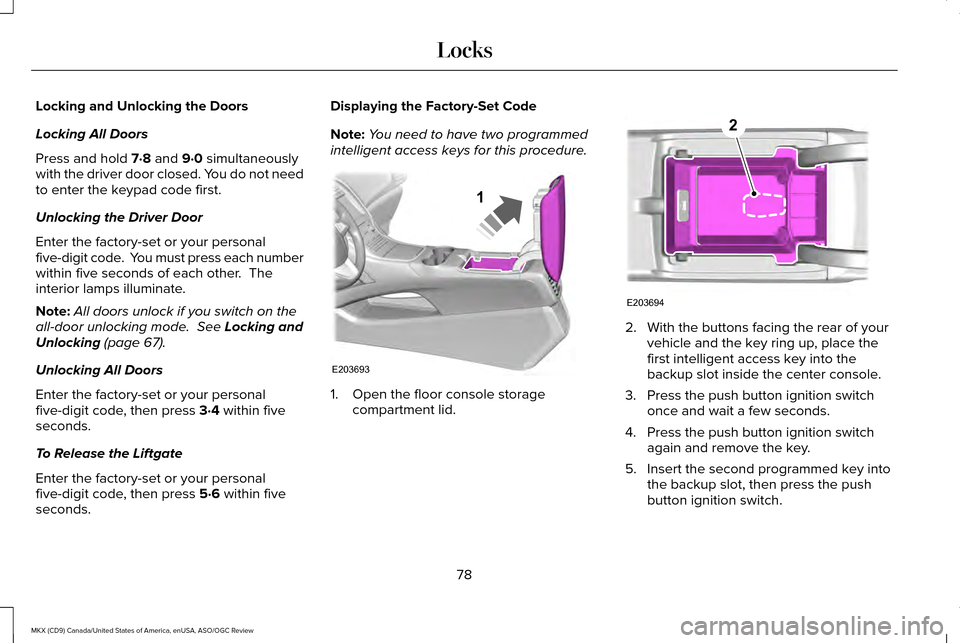
Note:
You need to have two programmed
intelligent access keys for this procedure. 1. Open the floor console storage
compartment lid. 2. With the buttons facing the rear of your
vehicle and the key ring up, place the
first intelligent access key into the
backup slot inside the center console.
3. Press the push button ignition switch once and wait a few seconds.
4. Press the push button ignition switch again and remove the key.
5. Insert the second programmed key into the backup slot, then press the push
button ignition switch.
78
MKX (CD9) Canada/United States of America, enUSA, ASO/OGC Review LocksE203693
1 E203694
2
Page 84 of 563
Make sure that the ignition is switched off
before beginning this procedure. Make sure
that you close all the doors before beginning
and that they remain closed throughout the
procedure. Carry out all steps within 30
seconds of starting the sequence. Stop and
wait for at least one minute before starting
again if you carry out any steps out of
sequence.
Read and understand the entire procedure
before you begin.
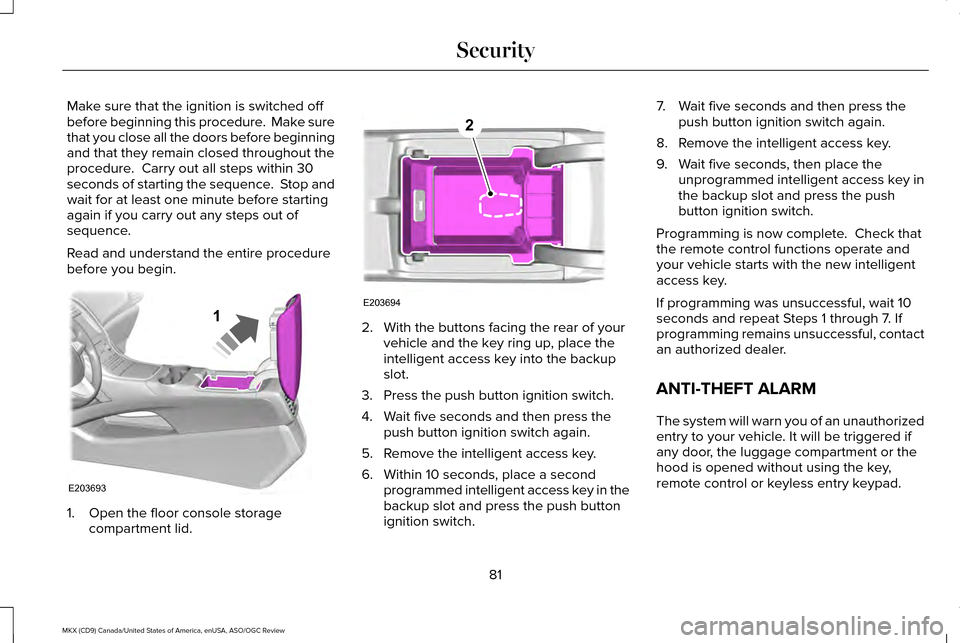
1. Open the floor console storage
compartment lid. 2. With the buttons facing the rear of your
vehicle and the key ring up, place the
intelligent access key into the backup
slot.
3. Press the push button ignition switch.
4. Wait five seconds and then press the push button ignition switch again.
5. Remove the intelligent access key.
6. Within 10 seconds, place a second programmed intelligent access key in the
backup slot and press the push button
ignition switch. 7. Wait five seconds and then press the
push button ignition switch again.
8. Remove the intelligent access key.
9. Wait five seconds, then place the unprogrammed intelligent access key in
the backup slot and press the push
button ignition switch.
Programming is now complete. Check that
the remote control functions operate and
your vehicle starts with the new intelligent
access key.
If programming was unsuccessful, wait 10
seconds and repeat Steps 1 through 7. If
programming remains unsuccessful, contact
an authorized dealer.
ANTI-THEFT ALARM
The system will warn you of an unauthorized
entry to your vehicle. It will be triggered if
any door, the luggage compartment or the
hood is opened without using the key,
remote control or keyless entry keypad.
81
MKX (CD9) Canada/United States of America, enUSA, ASO/OGC Review SecurityE203693
1 E203694
2
Page 85 of 563
The direction indicators will flash and the
horn will sound if unauthorized entry is
attempted while the alarm is armed.
Take all remote controls to an authorized
dealer if there is any potential alarm problem
with your vehicle.
Arming the Alarm
The alarm is ready to arm when there is not
a key in your vehicle. Electronically lock your
vehicle to arm the alarm.
Disarming the Alarm
Disarm the alarm by any of the following
actions:
•
Unlock the doors or luggage
compartment with the remote control or
keyless entry keypad.
• Switch your vehicle on or start your
vehicle.
• Use a key in the driver door to unlock
your vehicle, then switch your vehicle on
within 12 seconds. Note:
Pressing the panic button on the
remote control will stop the horn and signal
indicators, but will not disarm the system.
82
MKX (CD9) Canada/United States of America, enUSA, ASO/OGC Review Security
Page 144 of 563
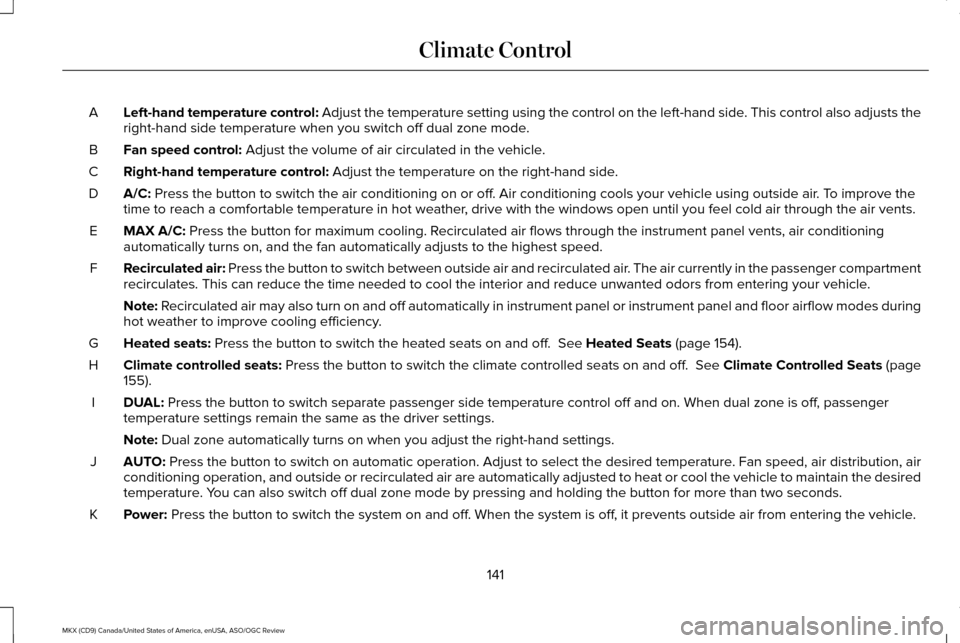
Left-hand temperature control: Adjust the temperature setting using the control on the left-hand side. This control also adjusts the
right-hand side temperature when you switch off dual zone mode.
A
Fan speed control: Adjust the volume of air circulated in the vehicle.
B
Right-hand temperature control:
Adjust the temperature on the right-hand side.
C
A/C:
Press the button to switch the air conditioning on or off. Air conditioning cools your vehicle using outside air. To improve the
time to reach a comfortable temperature in hot weather, drive with the windows open until you feel cold air through the air ve\
nts.
D
MAX A/C:
Press the button for maximum cooling. Recirculated air flows through the instrument panel vents, air conditioni\
ng
automatically turns on, and the fan automatically adjusts to the highest\
speed.
E
Recirculated air: Press the button to switch between outside air and recirculated air. The air currently in the passenger compartment
recirculates. This can reduce the time needed to cool the interior and r\
educe unwanted odors from entering your vehicle.
F
Note:
Recirculated air may also turn on and off automatically in instrument pan\
el or instrument panel and floor airflow modes during
hot weather to improve cooling efficiency.
Heated seats:
Press the button to switch the heated seats on and off. See Heated Seats (page 154).
G
Climate controlled seats:
Press the button to switch the climate controlled seats on and off. See Climate Controlled Seats (page
155).
H
DUAL:
Press the button to switch separate passenger side temperature control \
off and on. When dual zone is off, passenger
temperature settings remain the same as the driver settings.
I
Note:
Dual zone automatically turns on when you adjust the right-hand setting\
s.
AUTO:
Press the button to switch on automatic operation. Adjust to select the\
desired temperature. Fan speed, air distribution, air
conditioning operation, and outside or recirculated air are automaticall\
y adjusted to heat or cool the vehicle to maintain the desired
temperature. You can also switch off dual zone mode by pressing and holding the button\
for more than two seconds.
J
Power:
Press the button to switch the system on and off. When the system is off, it prevents outside air from entering the vehicle.
K
141
MKX (CD9) Canada/United States of America, enUSA, ASO/OGC Review Climate Control
Page 146 of 563
Cooling the Interior Quickly
1. Select the MAX A/C function.
Recommended Settings for Cooling
1. Select the
AUTO function.
2. Adjust the temperature function to the desired setting. Use 72°F (22°C) as a
starting point, then adjust the setting as
necessary.
Side Window Defogging in Cold
Weather
1. Press the defrost button.
2. Adjust the temperature control to the desired setting. Use 72°F (22°C) as a
starting point, then adjust the setting as
necessary. HEATED WINDOWS AND MIRRORS
(If Equipped)
Heated Rear Window
Note:
Make sure the engine is running
before operating the heated windows. Press the button to clear the
heated rear window of thin ice and
fog. The heated rear window will
automatically turn off after a short period of
time. Start the engine before you switch the
heated rear window on.
Note: Do not use razor blades or other sharp
objects to clean or remove decals from the
inside of the heated rear window. The
vehicle warranty does not cover damage
caused to the heated rear window grid lines.
Heated Exterior Mirror
When you switch the heated rear window
on, the heated exterior mirrors will
automatically turn on. Note:
Do not remove ice from the mirrors
with a scraper or adjust the mirror glass
when it is frozen in place.
Note: Do not clean the mirror housing or
glass with harsh abrasives, fuel or other
petroleum-based cleaning products.
CABIN AIR FILTER
Your vehicle is equipped with a cabin air
filter, which gives you and your passengers
the following benefits:
• It improves your driving comfort by
reducing particle concentration.
• It improves the interior compartment
cleanliness.
• It protects the climate control
components from particle deposits.
You can locate the cabin air filter behind the
glove box.
143
MKX (CD9) Canada/United States of America, enUSA, ASO/OGC Review Climate ControlE184884