page 91 LINCOLN MKX 2017 Owners Manual
[x] Cancel search | Manufacturer: LINCOLN, Model Year: 2017, Model line: MKX, Model: LINCOLN MKX 2017Pages: 587, PDF Size: 5.4 MB
Page 333 of 587
CHANGING THE ENGINE AIR
FILTER
WARNING
To reduce the risk of vehicle damage
and/or personal burn injuries do not
start your engine with the air cleaner
removed and do not remove it while the
engine is running. When changing the air filter element, use
only the air filter element listed. See
Capacities and Specifications (page 379).
For EcoBoost equipped vehicles: When
servicing the air cleaner, it is important that
no foreign material enter the air induction
system. The engine and turbocharger are
susceptible to damage from even small
particles.
Change the air filter element at the proper
interval. See Scheduled Maintenance (page
510
). Note:
Failure to use the correct air filter
element may result in severe engine
damage. The customer warranty may be
void for any damage to the engine if the
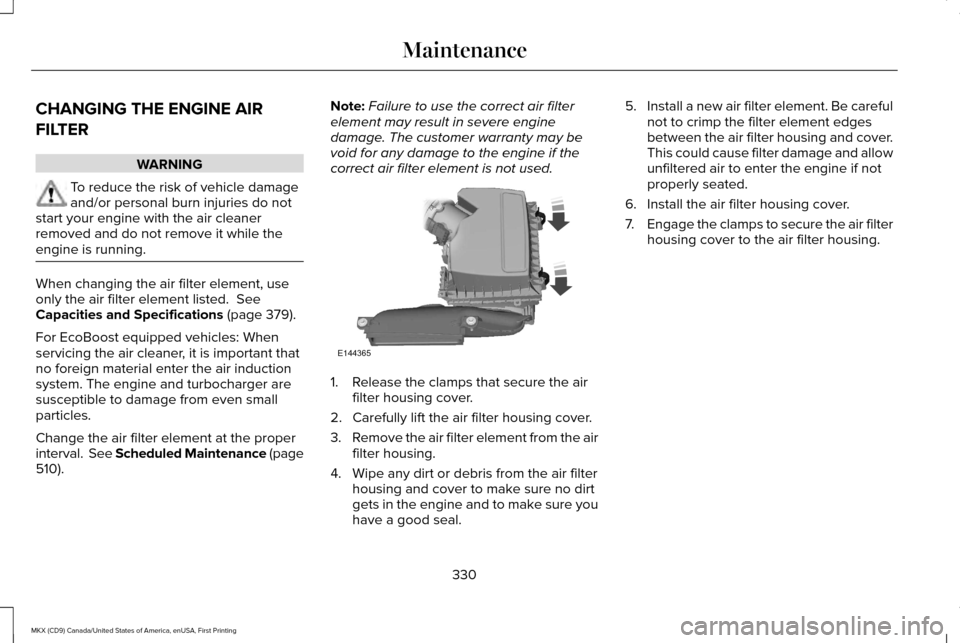
correct air filter element is not used. 1. Release the clamps that secure the air
filter housing cover.
2. Carefully lift the air filter housing cover.
3. Remove the air filter element from the air
filter housing.
4. Wipe any dirt or debris from the air filter housing and cover to make sure no dirt
gets in the engine and to make sure you
have a good seal. 5.
Install a new air filter element. Be careful
not to crimp the filter element edges
between the air filter housing and cover.
This could cause filter damage and allow
unfiltered air to enter the engine if not
properly seated.
6. Install the air filter housing cover.
7. Engage the clamps to secure the air filter
housing cover to the air filter housing.
330
MKX (CD9) Canada/United States of America, enUSA, First Printing MaintenanceE144365
Page 337 of 587
When washing:
•
Take care when using a power washer
to clean the engine. The high-pressure
fluid could penetrate the sealed parts
and cause damage.
• Do not spray a hot engine with cold water
to avoid cracking the engine block or
other engine components.
• Spray Motorcraft Engine Shampoo and
Degreaser on all parts that require
cleaning and pressure rinse clean. In
Canada, use Motorcraft Engine Shampoo.
• Never wash or rinse the engine while it
is hot or running; water in the running
engine may cause internal damage.
• Never wash or rinse any ignition coil,
spark plug wire or spark plug well, or the
area in and around these locations.
• Cover the battery, power distribution box,
and air filter assembly to prevent water
damage when cleaning the engine. CLEANING THE WINDOWS AND
WIPER BLADES
Car wash chemicals and environmental
fallout can result in windshield and wiper
blade contamination. Dirty windshield and
wipers will result in poor windshield wiper
operation. Keep the windshield and wiper
blades clean to maintain windshield wiper
performance.
To clean the windshield and wiper blades:
•
Clean the windshield with a non-abrasive
glass cleaner. When cleaning the interior
of the windshield, avoid getting any glass
cleaner on the instrument panel or door
panels. Wipe any glass cleaner off these
surfaces immediately.
• For windshields contaminated with tree
sap, chemicals, wax or bugs, clean the
entire windshield using steel wool (no
greater than 0000 grade) in a circular
motion and rinse with water.
• Clean the wiper blades with isopropyl
rubbing alcohol or windshield washer
concentrate. Note:
Do not use razor blades or other
sharp objects to clean or remove decals from
the inside of the heated rear window. The
vehicle warranty does not cover damage
caused to the heated rear window grid lines.
CLEANING THE INTERIOR WARNINGS
Do not use cleaning solvents, bleach
or dye on the vehicle
’s safety belts, as
these actions may weaken the belt webbing. On vehicles equipped with
seat-mounted airbags, do not use
chemical solvents or strong detergents. Such
products could contaminate the side airbag
system and affect performance of the side
airbag in a collision. Note:
Follow the same procedure for
cleaning leather seats when cleaning leather
interior. See Cleaning Leather Seats (page
337).
334
MKX (CD9) Canada/United States of America, enUSA, First Printing Vehicle Care
Page 339 of 587
Cleaning Procedure
Type of Stain
Use lukewarm water and rinse by dabbing with clean water.
Indelible pencil, cocoa, chocolate, pastry with cream or chocolate, ice
cream or mustard.
Use lemon juice, wipe with lukewarm water and rinse by dabbing with
clean water.
Vinegar, hair gel, tomato sauce or coffee with sugar.
Use ethyl alcohol, then dab with water.
Dye transfer and all other stains.
CLEANING THE INSTRUMENT
PANEL AND INSTRUMENT
CLUSTER LENS WARNING
Do not use chemical solvents or strong
detergents when cleaning the steering
wheel or instrument panel to avoid
contamination of the airbag system. Note:
Follow the same procedure as
cleaning leather seats for cleaning leather
instrument panels and leather interior trim
surfaces. See Cleaning Leather Seats (page
337). Clean the instrument panel and cluster lens
with a clean, damp and soft cloth, then use
a clean, dry and soft cloth to dry these areas.
•
Avoid cleaners or polishes that increase
the gloss of the upper portion of the
instrument panel. The dull finish in this
area helps protect you from undesirable
windshield reflection.
• Do not use any household cleaning
products or glass cleaners as these may
damage the finish of the instrument
panel, interior trim and cluster lens. •
Wash or wipe your hands clean if you
have been in contact with certain
products such as insect repellent and
suntan lotion to avoid possible damage
to the interior painted surfaces.
• Do not allow air fresheners and hand
sanitizers to spill onto interior surfaces.
If a spill occurs, wipe off immediately.
Your warranty may not cover these
damages.
If a staining liquid like coffee or juice has
been spilled on the instrument panel or on
interior trim surfaces:
1. Wipe up spilled liquid using a clean, soft
cloth as quickly as possible.
336
MKX (CD9) Canada/United States of America, enUSA, First Printing Vehicle Care
Page 354 of 587
Important Information About Sport
Tires and Wheels
Vehicles equipped with the optional
265/40R21 tires are designed to
enhance performance. To continue
providing this performance, extra care
must be taken when operating and
maintaining your vehicle.
These low-profile high-performance tires
are designed to optimize the driving
dynamics you expect in a sport vehicle
in both dry and wet conditions. These
tires are not optimized for off-road or
winter (snow or cold weather)
performance; and their ride, noise, and
wear characteristics are different than
non-performance tires. With low-profile
tires, you may notice an increase in road
noise and faster wear, depending on
road conditions and driving habits. Also,
because of their lower profile, the tires
are more susceptible to road damage
from potholes, rough or unpaved roads,
car wash rails, and curb contact than
standard tires and wheels.
Note:
Your vehicle ’s warranty does not
cover these types of damages. Extra
caution should be taken when operating
on rough roads to avoid impacts that
could cause wheel and tire damage.
The optional 265/40R21 tires were
designed for track use and may exhibit
significantly reduced tread life and
increased tire noise compared to the
standard equipment tires under normal
driving conditions. Increasing the front
camber settings beyond the factory
settings may further accelerate tread
wear and induce tire noise.
Note: Do not use tire chains on your
vehicle ’s optional 265/40R21 tires and
wheels. The use of any type of tire chain
on these tires may damage your vehicle.
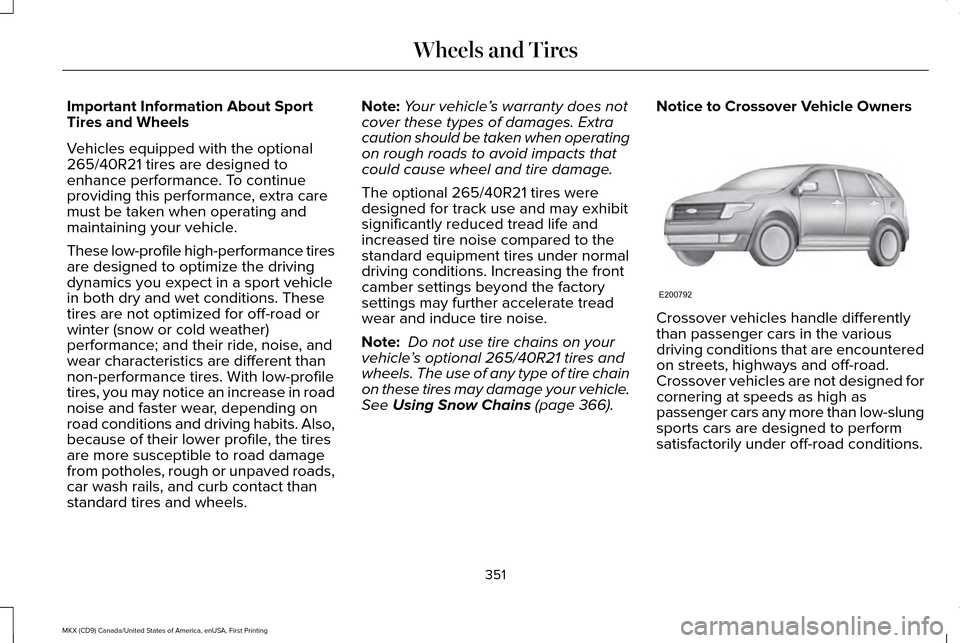
See Using Snow Chains (page 366). Notice to Crossover Vehicle Owners
Crossover vehicles handle differently
than passenger cars in the various
driving conditions that are encountered
on streets, highways and off-road.
Crossover vehicles are not designed for
cornering at speeds as high as
passenger cars any more than low-slung
sports cars are designed to perform
satisfactorily under off-road conditions.
351
MKX (CD9) Canada/United States of America, enUSA, First Printing Wheels and TiresE200792
Page 375 of 587
Have a flat serviced by an authorized dealer
in order to prevent damage to the tire
pressure monitoring system sensors. See
Tire Pressure Monitoring System (page 367).
Replace the spare tire with a road tire as
soon as possible. During repairing or
replacing of the flat tire, have an authorized
dealer inspect the tire pressure monitoring
system sensor for damage.
Dissimilar Spare Wheel and Tire
Assembly Information WARNING
Failure to follow these guidelines could
result in an increased risk of loss of
vehicle control, injury or death. If you have a dissimilar spare wheel and tire,
then it is intended for temporary use only.
This means that if you need to use it, you
should replace it as soon as possible with a
road wheel and tire assembly that is the
same size and type as the road tires and
wheels that were originally provided by Ford.
If the dissimilar spare tire or wheel is
damaged, it should be replaced rather than
repaired.
A dissimilar spare wheel and tire assembly
is defined as a spare wheel and tire assembly
that is different in brand, size or appearance
from the road tires and wheels and can be
one of three types:
1.
T-type mini-spare: This spare tire begins
with the letter T for tire size and may have
Temporary Use Only molded in the sidewall.
2.
Full-size dissimilar spare with label on
wheel: This spare tire has a label on the
wheel that states: THIS WHEEL AND TIRE
ASSEMBLY FOR TEMPORARY USE ONLY.
When driving with one of the dissimilar spare
tires listed above, do not: •
Exceed
50 mph (80 km/h).
• Load the vehicle beyond maximum
vehicle load rating listed on the Safety
Compliance Label.
• Tow a trailer.
• Use snow chains on the end of the
vehicle with the dissimilar spare tire.
• Use more than one dissimilar spare tire
at a time.
• Use commercial car washing equipment.
• Try to repair the dissimilar spare tire.
Use of one of the dissimilar spare tires listed
above at any one wheel location can lead to
impairment of the following:
• Handling, stability and braking
performance.
• Comfort and noise.
• Ground clearance and parking at curbs.
• Winter weather driving capability.
• Wet weather driving capability.
• All-wheel driving capability (if applicable).
3.
Full-size dissimilar spare without label
on wheel
372
MKX (CD9) Canada/United States of America, enUSA, First Printing Wheels and Tires
Page 378 of 587
11.
Replace the flat tire with the spare tire,
making sure the valve stem is facing
outward. Reinstall the lug nuts until the
wheel is snug against the hub. Do not
fully tighten the lug nuts until the wheel
has been lowered.
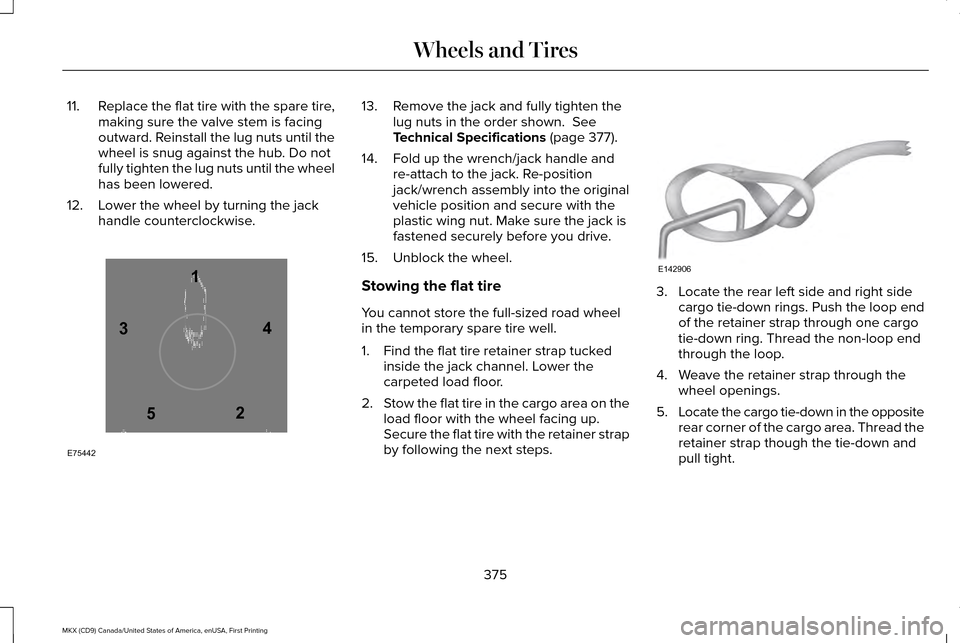
12. Lower the wheel by turning the jack handle counterclockwise. 13. Remove the jack and fully tighten the
lug nuts in the order shown. See
Technical Specifications (page 377).
14. Fold up the wrench/jack handle and re-attach to the jack. Re-position
jack/wrench assembly into the original
vehicle position and secure with the
plastic wing nut. Make sure the jack is
fastened securely before you drive.
15. Unblock the wheel.
Stowing the flat tire
You cannot store the full-sized road wheel
in the temporary spare tire well.
1. Find the flat tire retainer strap tucked inside the jack channel. Lower the
carpeted load floor.
2. Stow the flat tire in the cargo area on the
load floor with the wheel facing up.
Secure the flat tire with the retainer strap
by following the next steps. 3. Locate the rear left side and right side
cargo tie-down rings. Push the loop end
of the retainer strap through one cargo
tie-down ring. Thread the non-loop end
through the loop.
4. Weave the retainer strap through the wheel openings.
5. Locate the cargo tie-down in the opposite
rear corner of the cargo area. Thread the
retainer strap though the tie-down and
pull tight.
375
MKX (CD9) Canada/United States of America, enUSA, First Printing Wheels and Tires12
3
4
5
E75442 E142906
Page 384 of 587
MOTORCRAFT PARTS - 2.7L ECOBOOST™
2.7L EcoBoost
Component
FA-1912
Air filter element
FL-2062
Oil filter
BXT-94RH7-730
Battery (without start/stop)
BAGM-94RH7-800
Battery (with start/stop)
SP-542
Spark plugs
FG-1083
Fuel filter
FP-71
Cabin air filter
WW-2350 (driver side)
Windshield wiper blade
WW-1750 (passenger side)WW-1106 (rear window)
We recommend Motorcraft® replacement parts available at an authorized \
dealer or at fordparts.com for scheduled maintenance. These parts
meet or exceed specifications and are engineered for your vehicle. Use of other parts may impact vehicle performance, emissions and
durability. Your warranty may be void for any damage related to use of other parts.
If a Motorcraft® oil filter is not available, use an oil filter that meets industry performance specification SAE/USCAR-36.
For spark plug replacement, contact an authorized dealer. Replace the spark plugs at the appropriate intervals. See Scheduled Maintenance
(page 510).
381
MKX (CD9) Canada/United States of America, enUSA, First Printing Capacities and Specifications
Page 385 of 587
MOTORCRAFT PARTS - 3.7L
3.7L V6 TiVCT
Component
FA-1912
Air filter element
FL-500-S
Oil filter
BAGM-94RH7-800
Battery
SP-520
Spark plugs
FP-71
Cabin air filter
WW-2350 (driver side)
Windshield wiper blade
WW-1750 (passenger side)WW-1106 (rear window)
We recommend Motorcraft® replacement parts available at your Ford deal\
er or at fordparts.com for scheduled maintenance. These parts
meet or exceed Ford Motor Company’ s specifications and are engineered for your vehicle. Use of other parts may impact vehicle performance,
emissions and durability. Your warranty may be void for any damage related to use of other parts.
If a Motorcraft® oil filter is not available, use an oil filter that meets industry performance specification SAE/USCAR-36.
For spark plug replacement, contact an authorized dealer. Replace the spark plugs at the appropriate intervals. See Scheduled Maintenance
(page 510).
382
MKX (CD9) Canada/United States of America, enUSA, First Printing Capacities and Specifications
Page 408 of 587

Action and Description
Menu Item
Item
This bar displays icons and messages pertaining to current system activi\
ties including climate
settings, voice commands and phone functions such as text messages.
Status Bar
A
This button is available on the main screens. Pressing it takes you to the home screen view.
Home
B
This shows the current time. You can set the clock manually or have it controlled by the vehicle's
GPS location. See Settings (page 472).
Clock
C
This displays the current outside temperature.
Outside Temperature
D
You can touch any of the buttons on this bar to select a feature.
Feature Bar
E
The touchscreen allows you quick access to
all of your comfort, navigation,
communication and entertainment options.
Using the status and feature bar you can
quickly select the feature you want to use. Note:
Your system is equipped with a feature
that allows you to access and control audio
features for 10 minutes after you switch the
ignition off (and no doors open). The Status Bar
Additional icons also display in the status bar
depending on market, vehicle options and
current operation. If a feature is not active,
the icon does not display. Certain icons may
move to the left or right depending on what
options are active.
405
MKX (CD9) Canada/United States of America, enUSA, First Printing SYNC™ 3
Page 412 of 587

Functions
Feature Bar Item
Allows you to see your vehicle's location on a virtual road map, get
driving directions to your destination and find points of interest along\
your route.
Navigation
(If equipped)
Connect and control SYNC 3 compatible apps running on your iphone
or android device. Also, access built-in additional features such as
SiriusXM Traffic and Travel Link (if equipped).
Apps
If your vehicle is a hybrid, plug-in hybrid, or electric this is also wh\
ere
your settings and power information is located.
You can customize your system with various settings for the touch-
screen display, feature preferences, and how you want to interact
with your vehicle.
Settings
Cleaning the Touchscreen
You can remove fingerprints with a dry,
clean, soft cloth.
If dirt or fingerprints are still on the screen,
apply a small amount of alcohol to the cloth
and try to clean it again.
Note: Do not use detergent or any type of
solvent to clean the touchscreen. Note:
Do not pour or spray alcohol onto the
touchscreen.
Using Voice Recognition
Using voice commands allows you to keep
your hands on the wheel and focus on what
is in front of you. The system provides
feedback through audible tones, prompts,
questions and spoken confirmations
depending on the situation and the chosen
level of interaction (voice settings). The system also asks short questions
(confirmation prompts) when it is not sure of
your request or when there are multiple
possible responses to your request.
When using voice commands, words and
icons may appear in the status bar indicating
the status of the voice command session.
See Using Voice Recognition (page 422).
409
MKX (CD9) Canada/United States of America, enUSA, First Printing SYNC™ 3