CONSOLE LINCOLN MKX 2017 User Guide
[x] Cancel search | Manufacturer: LINCOLN, Model Year: 2017, Model line: MKX, Model: LINCOLN MKX 2017Pages: 587, PDF Size: 5.4 MB
Page 169 of 587
Rear auxiliary power point cover.
D
Auxiliary power point or cigar
lighter.
E
Auxiliary power point (110V, 230V
or USB).
F
Rear climate controls.
G
USB port.
H
Cup holders or cup holders with
cover.
I
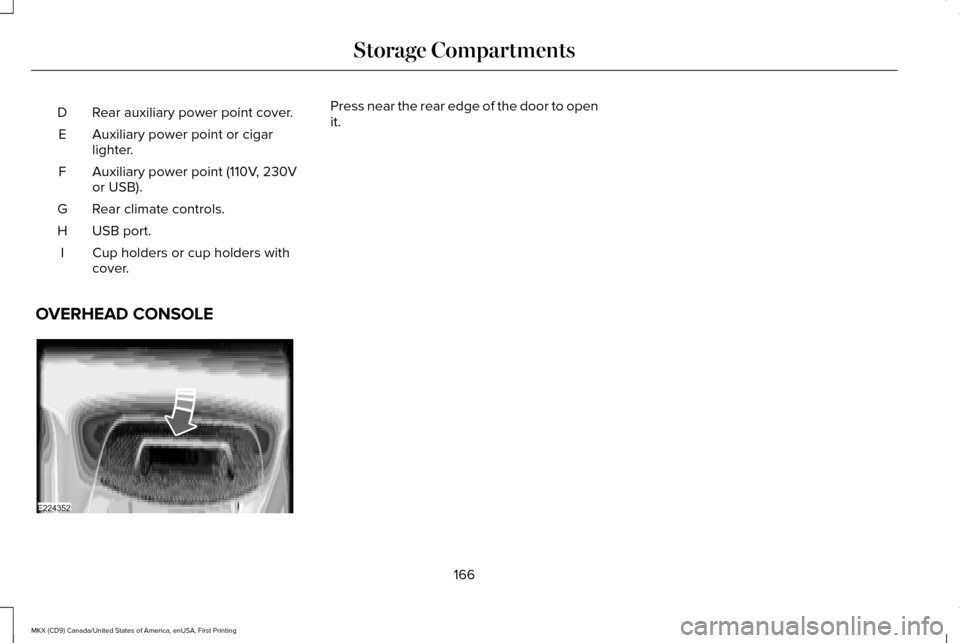
OVERHEAD CONSOLE Press near the rear edge of the door to open
it.
166
MKX (CD9) Canada/United States of America, enUSA, First Printing Storage CompartmentsE224352
Page 172 of 587
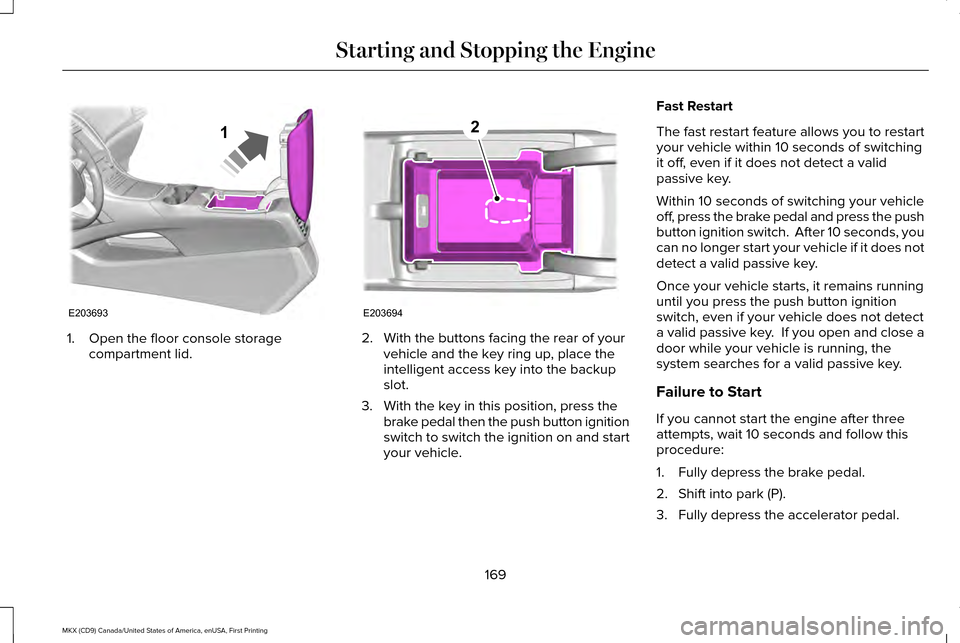
1. Open the floor console storage
compartment lid. 2. With the buttons facing the rear of your
vehicle and the key ring up, place the
intelligent access key into the backup
slot.
3. With the key in this position, press the brake pedal then the push button ignition
switch to switch the ignition on and start
your vehicle. Fast Restart
The fast restart feature allows you to restart
your vehicle within 10 seconds of switching
it off, even if it does not detect a valid
passive key.
Within 10 seconds of switching your vehicle
off, press the brake pedal and press the push
button ignition switch. After 10 seconds, you
can no longer start your vehicle if it does not
detect a valid passive key.
Once your vehicle starts, it remains running
until you press the push button ignition
switch, even if your vehicle does not detect
a valid passive key. If you open and close a
door while your vehicle is running, the
system searches for a valid passive key.
Failure to Start
If you cannot start the engine after three
attempts, wait 10 seconds and follow this
procedure:
1. Fully depress the brake pedal.
2. Shift into park (P).
3. Fully depress the accelerator pedal.
169
MKX (CD9) Canada/United States of America, enUSA, First Printing Starting and Stopping the EngineE203693
1 E203694
2
Page 190 of 587
The transmission will automatically upshift if
your engine speed is too high or downshift
if your engine speed is too low.
Note:
The system will stay in manual control
until you make another shift button selection.
For example, drive (D).
Brake-Shift Interlock Override WARNINGS
Do not drive your vehicle until you
verify that the brake lamps are working. WARNINGS
When doing this procedure, you will
be taking the vehicle out of park which
means the vehicle can roll freely. To avoid
unwanted vehicle movement, always fully
set the parking brake prior to doing this
procedure. Use wheel chocks if appropriate. If the parking brake is fully released,
but the brake warning lamp remains
illuminated, the brakes may not be working
properly. See your authorized dealer. Note:
See your authorized dealer as soon
as possible if this procedure is used.
Note: For some markets this feature is
disabled.
Note: This feature will only function if your
12-volt battery has power.
Use the brake-shift interlock override to
move your transmission from the park
position in the event of an electrical
malfunction or if your vehicle has a dead
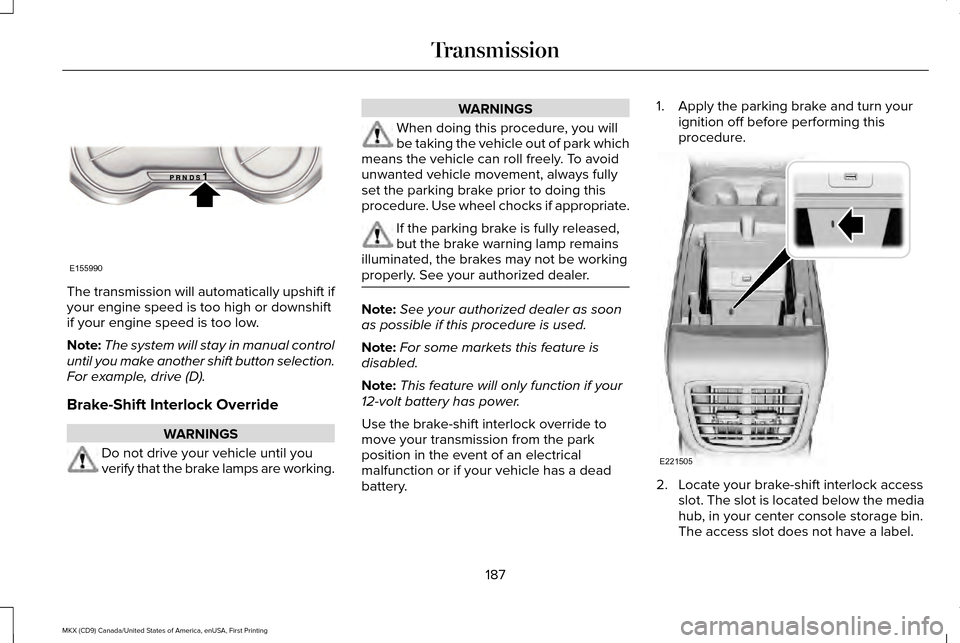
battery. 1. Apply the parking brake and turn your
ignition off before performing this
procedure. 2. Locate your brake-shift interlock access
slot. The slot is located below the media
hub, in your center console storage bin.
The access slot does not have a label.
187
MKX (CD9) Canada/United States of America, enUSA, First Printing TransmissionE155990 E221505
Page 207 of 587
PRINCIPLE OF OPERATION
WARNINGS
Vehicle modifications involving braking
system, aftermarket roof racks,
suspension, steering system, tire
construction and wheel and tire size may
change the handling characteristics of your
vehicle and may adversely affect the
performance of the electronic stability control
system. In addition, installing any stereo
loudspeakers may interfere with and
adversely affect the electronic stability
control system. Install any aftermarket stereo
loudspeaker as far as possible from the front
center console, the tunnel, and the front
seats in order to minimize the risk of
interfering with the electronic stability control
sensors. Reducing the effectiveness of the
electronic stability control system could lead
to an increased risk of loss of vehicle control,
vehicle rollover, personal injury and death. WARNINGS
Remember that even advanced
technology cannot defy the laws of
physics. It’ s always possible to lose control
of a vehicle due to inappropriate driver input
for the conditions. Aggressive driving on any
road condition can cause you to lose control
of your vehicle increasing the risk of personal
injury or property damage. Activation of the
electronic stability control system is an
indication that at least some of the tires have
exceeded their ability to grip the road; this
could reduce the operator’ s ability to control
the vehicle potentially resulting in a loss of
vehicle control, vehicle rollover, personal
injury and death. If your electronic stability
control system activates, SLOW DOWN. The system automatically turns on each time
you switch the ignition on.
If a fault occurs in either the stability control
or the traction control system, you may
experience the following conditions:•
The stability and traction control light
illuminates steadily.
• The stability control and traction control
systems do not enhance your vehicle's
ability to maintain traction of the wheels.
If a driving condition activates either the
stability control or the traction control system
you may experience the following conditions:
• The stability and traction control light
flashes.
• Your vehicle slows down.
• Reduced engine power.
• A vibration in the brake pedal.
• The brake pedal is stiffer than usual.
• If the driving condition is severe and your
foot is not on the brake, the brake pedal
may move as the system applies higher
brake force.
The stability control system has several
features built into it to help you maintain
control of your vehicle:
204
MKX (CD9) Canada/United States of America, enUSA, First Printing Stability Control
Page 291 of 587
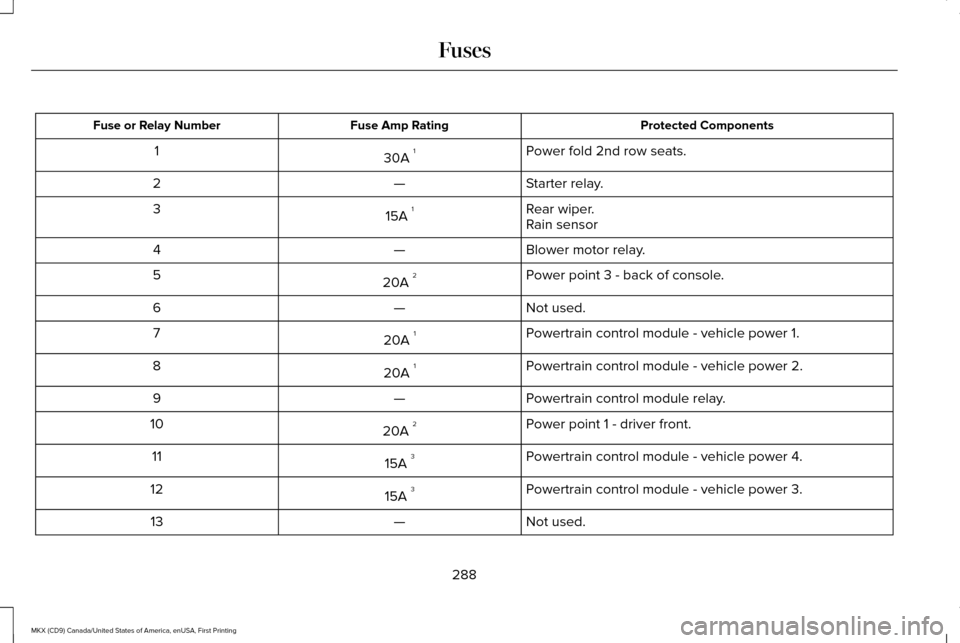
Protected Components
Fuse Amp Rating
Fuse or Relay Number
Power fold 2nd row seats.
30A 1
1
Starter relay.
—
2
Rear wiper.
15A 1
3
Rain sensor
Blower motor relay.
—
4
Power point 3 - back of console.
20A 2
5
Not used.
—
6
Powertrain control module - vehicle power 1.
20A 1
7
Powertrain control module - vehicle power 2.
20A 1
8
Powertrain control module relay.
—
9
Power point 1 - driver front.
20A 2
10
Powertrain control module - vehicle power 4.
15A 3
11
Powertrain control module - vehicle power 3.
15A 3
12
Not used.
—
13
288
MKX (CD9) Canada/United States of America, enUSA, First Printing Fuses
Page 292 of 587
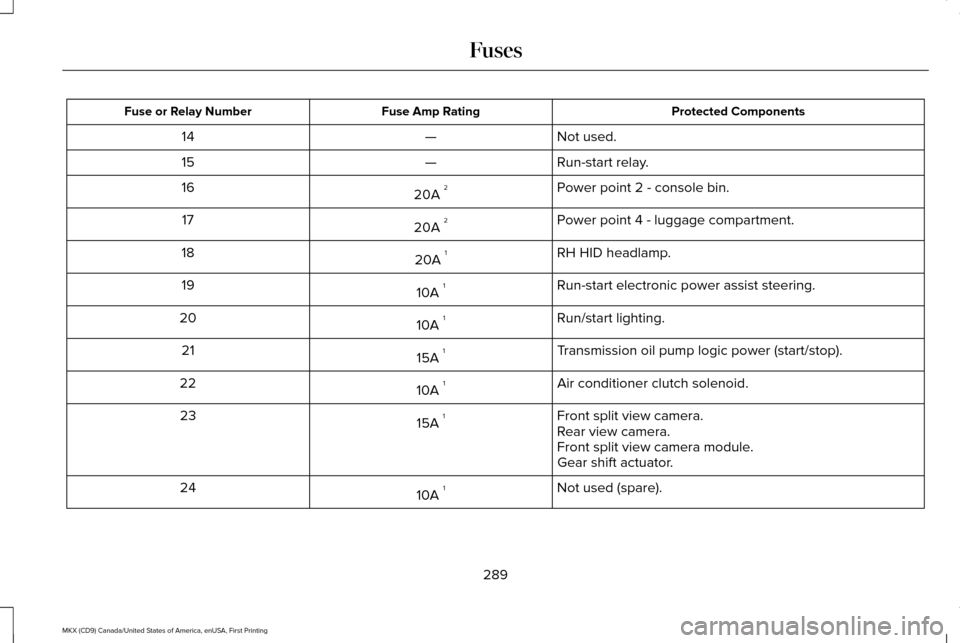
Protected Components
Fuse Amp Rating
Fuse or Relay Number
Not used.
—
14
Run-start relay.
—
15
Power point 2 - console bin.
20A 2
16
Power point 4 - luggage compartment.
20A 2
17
RH HID headlamp.
20A 1
18
Run-start electronic power assist steering.
10A 1
19
Run/start lighting.
10A 1
20
Transmission oil pump logic power (start/stop).
15A 1
21
Air conditioner clutch solenoid.
10A 1
22
Front split view camera.
15A 1
23
Rear view camera.
Front split view camera module.
Gear shift actuator.
Not used (spare).
10A 1
24
289
MKX (CD9) Canada/United States of America, enUSA, First Printing Fuses
Page 405 of 587

CD slot: Insert a CD.
A
Eject:
Press to eject a CD.
B
TUNE:
Turn to search manually through the radio frequency band. The system stop\
s at the first station it finds in that direction. In
SIRIUS mode, the system selects the previous or next channel. If you select a speci\
fic category (Jazz, Rock, News, etc.), turn to find
the previous or next channel in the selected category.
C
Seek, Fast Forward and Reverse:
In radio mode, select a frequency band and press either button. The system stops at t\
he first
station it finds in that direction. In CD mode, press to select the next or previous track. Press and hold to move qui\
ckly forward or
backward through the current track.
D
VOL and Power:
Press to switch the system on and off. Turn to adjust the volume.
E
MEDIA HUB
You can locate the media hub inside the
center console or on the instrument panel. See your SYNC information.
402
MKX (CD9) Canada/United States of America, enUSA, First Printing Audio SystemE211463
Page 449 of 587
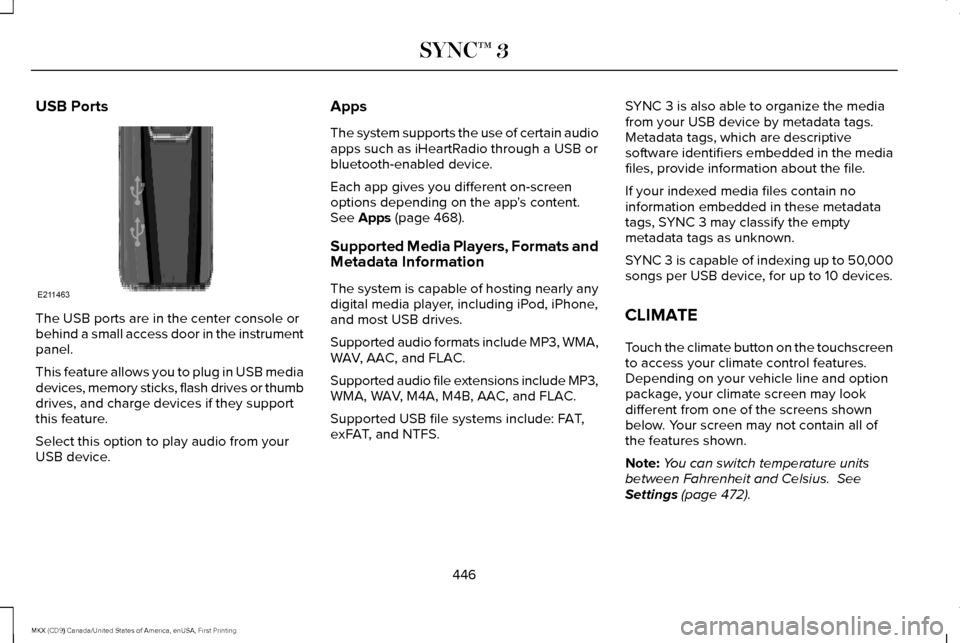
USB Ports
The USB ports are in the center console or
behind a small access door in the instrument
panel.
This feature allows you to plug in USB media
devices, memory sticks, flash drives or thumb
drives, and charge devices if they support
this feature.
Select this option to play audio from your
USB device. Apps
The system supports the use of certain audio
apps such as iHeartRadio through a USB or
bluetooth-enabled device.
Each app gives you different on-screen
options depending on the app's content.
See Apps (page 468).
Supported Media Players, Formats and
Metadata Information
The system is capable of hosting nearly any
digital media player, including iPod, iPhone,
and most USB drives.
Supported audio formats include MP3, WMA,
WAV, AAC, and FLAC.
Supported audio file extensions include MP3,
WMA, WAV, M4A, M4B, AAC, and FLAC.
Supported USB file systems include: FAT,
exFAT, and NTFS. SYNC 3 is also able to organize the media
from your USB device by metadata tags.
Metadata tags, which are descriptive
software identifiers embedded in the media
files, provide information about the file.
If your indexed media files contain no
information embedded in these metadata
tags, SYNC 3 may classify the empty
metadata tags as unknown.
SYNC 3 is capable of indexing up to 50,000
songs per USB device, for up to 10 devices.
CLIMATE
Touch the climate button on the touchscreen
to access your climate control features.
Depending on your vehicle line and option
package, your climate screen may look
different from one of the screens shown
below. Your screen may not contain all of
the features shown.
Note:
You can switch temperature units
between Fahrenheit and Celsius.
See
Settings (page 472).
446
MKX (CD9) Canada/United States of America, enUSA, First Printing SYNC™ 3E211463
Page 577 of 587
Brake-Shift Interlock Override..........................187
If Your Vehicle Gets Stuck In Mud or
Snow..................................................................188
Push Button Shift Transmission.......................183
SelectShift Automatic ™ Transmission.............185
Automatic Transmission Fluid Check - 2.7L EcoBoost™/3.7L............................................319
Adding Transmission Fluid .............................320
Checking the Transmission Fluid Level ........319
Autowipers.......................................................89 Autowipers Settings.............................................89
Auxiliary Power Points.................................163 110 Volt AC Power Point.....................................163
12 Volt DC Power Point......................................163
Locations...............................................................163
AWD See: All-Wheel Drive...........................................189
B
Battery See: Changing the 12V Battery.......................322
Blind Spot Information System.................240 Switching the System Off and On..................242
System Errors......................................................242
Using the System...............................................240
Body Styling Kits...........................................340 Bonnet Lock
See: Opening and Closing the Hood............306
Booster Seats
..................................................28
Types of Booster Seats.......................................29
Brake Fluid Check
.........................................321
Brakes..............................................................195 General Information............................................195
Breaking-In.....................................................268
Bulb Specification Chart.............................327
C
Cabin Air Filter...............................................144
California Proposition 65
...............................12
Capacities and Specifications - 2.7L EcoBoost™....................................................385
Alternative Engine Oil for Extremely Cold Climates...........................................................390
Specifications......................................................386
Capacities and Specifications - 3.7L........392 Alternative Engine Oil for Extremely Cold
Climates............................................................397
Specifications......................................................393
Capacities and Specifications...................379
Cargo Nets
.....................................................254
Car Wash See: Cleaning the Exterior...............................332
Center Console
.............................................165 Changing a Bulb
...........................................326
Headlamp.............................................................327
LED Lamps...........................................................327
Changing a Fuse..........................................303 Fuses.....................................................................303
Changing a Road Wheel..............................371 Dissimilar Spare Wheel and Tire Assembly
Information.......................................................372
Stowing the flat tire ...........................................375
Tire Change Procedure.....................................373
Changing the 12V Battery..........................322
Changing the Engine Air Filter.................330
Changing the Wiper Blades......................324 Changing the Rear Window Wiper
Blade.................................................................324
Changing the Windshield Wiper Blades......324
Checking MyKey System Status
.................65
Checking the Wiper Blades.......................324
Child Restraint and Seatbelt Maintenance..................................................42
Child Restraint Positioning
............................31
Child Safety.......................................................17
General Information...............................................17
Child Safety Locks..........................................32 Left-Hand Side.......................................................33
Right-Hand Side....................................................33
Cleaning Leather Seats...............................337
574
MKX (CD9) Canada/United States of America, enUSA, First Printing Index
Page 582 of 587
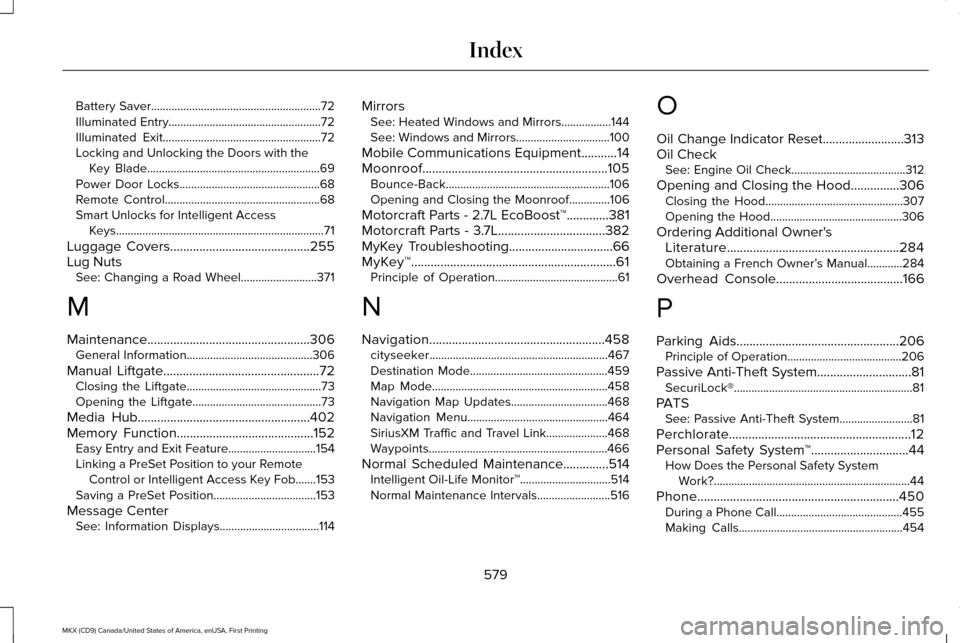
Battery Saver..........................................................72
Illuminated Entry....................................................72
Illuminated Exit......................................................72
Locking and Unlocking the Doors with the
Key Blade...........................................................69
Power Door Locks................................................68
Remote Control.....................................................68
Smart Unlocks for Intelligent Access Keys.......................................................................71
Luggage Covers...........................................255
Lug Nuts See: Changing a Road Wheel..........................371
M
Maintenance..................................................306 General Information...........................................306
Manual Liftgate
................................................72
Closing the Liftgate..............................................73
Opening the Liftgate............................................73
Media Hub
.....................................................402
Memory Function..........................................152 Easy Entry and Exit Feature..............................154
Linking a PreSet Position to your Remote
Control or Intelligent Access Key Fob.......153
Saving a PreSet Position...................................153
Message Center See: Information Displays..................................114 Mirrors
See: Heated Windows and Mirrors.................144
See: Windows and Mirrors................................100
Mobile Communications Equipment
...........14
Moonroof.........................................................105 Bounce-Back........................................................106
Opening and Closing the Moonroof..............106
Motorcraft Parts - 2.7L EcoBoost™
.............381
Motorcraft Parts - 3.7L.................................382
MyKey Troubleshooting
................................66
MyKey™...............................................................61 Principle of Operation..........................................61
N
Navigation......................................................458 cityseeker.............................................................467
Destination Mode...............................................459
Map Mode............................................................458
Navigation Map Updates.................................468
Navigation Menu................................................464
SiriusXM Traffic and Travel Link.....................468
Waypoints.............................................................466
Normal Scheduled Maintenance
..............514
Intelligent Oil-Life Monitor™...............................514
Normal Maintenance Intervals.........................516 O
Oil Change Indicator Reset.........................313
Oil Check
See: Engine Oil Check.......................................312
Opening and Closing the Hood...............306 Closing the Hood...............................................307
Opening the Hood.............................................306
Ordering Additional Owner's Literature
.....................................................284
Obtaining a French Owner’ s Manual............284
Overhead Console.......................................166
P
Parking Aids
..................................................206
Principle of Operation.......................................206
Passive Anti-Theft System.............................81 SecuriLock®.............................................................81
PATS See: Passive Anti-Theft System.........................
81
Perchlorate........................................................12
Personal Safety System ™
..............................44
How Does the Personal Safety System
Work?...................................................................44
Phone..............................................................450 During a Phone Call...........................................455
Making Calls........................................................454
579
MKX (CD9) Canada/United States of America, enUSA, First Printing Index