Key entry LINCOLN MKX 2017 User Guide
[x] Cancel search | Manufacturer: LINCOLN, Model Year: 2017, Model line: MKX, Model: LINCOLN MKX 2017Pages: 587, PDF Size: 5.4 MB
Page 157 of 587
1. With the ignition on, move the memory
positions to the desired positions.
2. Press and hold the desired preset button
for about five seconds. A tone sounds
after about two seconds. Continue
holding until you hear a second tone.
3. Within three seconds, press the lock button on the remote control you are
linking.
To unlink a remote control, follow the same
procedure – except in step 3, press the
unlock button on the remote control.
Note: If more than one linked remote control
or intelligent access key is in range, the
memory function moves to the settings of
the first key to initiate a memory recall.
Easy Entry and Exit Feature
If you enable the easy entry and exit feature,
it automatically moves the driver seat
position rearward up to 2 in (5 cm) when you
switch the ignition off.
The driver seat will return to its previous
position when you switch the ignition on. You can enable or disable this feature in the
information display.
See Information
Displays (page 114).
REAR SEATS
Adjusting the Rear Seats WARNING
To prevent possible damage to the
seat or safety belts, make sure that the
safety belts are not buckled when folding
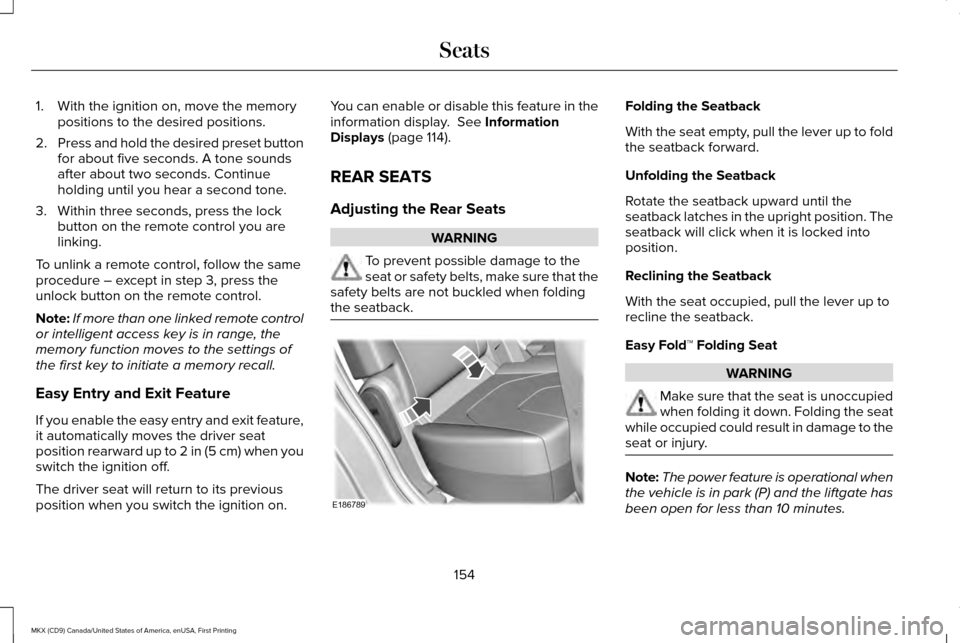
the seatback. Folding the Seatback
With the seat empty, pull the lever up to fold
the seatback forward.
Unfolding the Seatback
Rotate the seatback upward until the
seatback latches in the upright position. The
seatback will click when it is locked into
position.
Reclining the Seatback
With the seat occupied, pull the lever up to
recline the seatback.
Easy Fold™ Folding Seat
WARNING
Make sure that the seat is unoccupied
when folding it down. Folding the seat
while occupied could result in damage to the
seat or injury. Note:
The power feature is operational when
the vehicle is in park (P) and the liftgate has
been open for less than 10 minutes.
154
MKX (CD9) Canada/United States of America, enUSA, First Printing SeatsE186789
Page 170 of 587
GENERAL INFORMATION
WARNINGS
Extended idling at high engine speeds
can produce very high temperatures
in the engine and exhaust system, creating
the risk of fire or other damage. Do not park, idle or drive your vehicle
on dry grass or other dry ground cover.
The emission system heats up the engine
compartment and exhaust system, creating
the risk of fire. Do not start the engine in a closed
garage or in other enclosed areas.
Exhaust fumes can be toxic. Always open
the garage door before you start the engine. Exhaust leaks may result in entry of
harmful and potentially lethal fumes
into the passenger compartment. If you smell
exhaust fumes inside your vehicle, have your
vehicle inspected immediately. Do not drive
if you smell exhaust fumes. If you disconnect the battery, your vehicle
may exhibit some unusual driving
characteristics for approximately 5 mi (8 km)
after you reconnect it. This is because the
engine management system must realign
itself with the engine. You can disregard any
unusual driving characteristics during this
period.
The powertrain control system meets all
Canadian interference-causing equipment
standard requirements regulating the
impulse electrical field or radio noise.
When you start the engine, avoid pressing
the accelerator pedal before and during
operation. Only use the accelerator pedal
when you have difficulty starting the engine.
KEYLESS STARTING
Note:
The keyless starting system may not
function if the key is close to metal objects
or electronic devices such as cellular
phones.
Note: A valid key must be located inside
your vehicle to switch the ignition on and
start the engine. Ignition Modes
The keyless starting system has three
modes:
Off: Turns the ignition off.
• Without applying the brake pedal, press
and release the button once when the
ignition is in the on mode, or when the
engine is running but the vehicle is not
moving.
On:
All electrical circuits are operational and
the warning lamps and indicators illuminate.
• Without applying the brake pedal, press
and release the button once.
167
MKX (CD9) Canada/United States of America, enUSA, First Printing Starting and Stopping the EngineE191075
Page 456 of 587

Action and Description
Menu Item
Item
You can place a call by selecting an entry from this list.
You can also sort the calls by selecting the drop down menu at the top of\
the screen. You can choose: Missed
Outgoing
Incoming
All
All of your contacts from your phone display in alphabetical order.
Contacts
B
Selecting this button allows you to choose a
specific letter to view.
A-Z Jump
Displays the name of your phone and takes you to the phone settings options.
Phone Settings
C
From this menu, you can pair subsequent devices, set ring tones and aler\
ts. See Settings (page 472).
Displays all recent text messages.
Text Messages
D
Use this keypad to dial in a phone number.
Phone Keypad
E
Use the backspace button to delete numbers.
Press this button to begin a call.
Call
Touch this button to send all calls directly to your voicemail. New text \
message notifications are not
displayed on the screen and all ringtones and alerts are set to silent.
Do Not Disturb
F
Users with phones having voice services may
see a button to access the feature. For
example, iPhone users see a Siri button. A
press and hold of the voice button on the
steering wheel also accesses this feature. 453
MKX (CD9) Canada/United States of America, enUSA, First Printing SYNC™ 3
Page 458 of 587
To call a number in your contacts, select:
Action and Description
Menu Item
You can then select the
name of the contact you
want to call. Any numbers
stored for that contact
display along with any
stored contact photos. You
can then select the number
that you want to call. The
system begins the call.
Contacts
To call a number from your recent calls,
select: Action and Description
Menu Item
You can then select an entry
that you want to call. The
system begins the call.
Recent Call
List
To call a number that is not stored in your
phone, select: Action and Description
Menu Item Action and Description
Menu Item
Select the digits of the
number you wish to call.
Phone
Keypad
The system begins the call.
Call
Pressing the backspace button deletes the
last digit you typed.
Receiving Calls
During an incoming call, an audible tone
sounds. Caller information appears in the
display if it is available.
To accept the call, select: Menu Item
Accept
Note: You can also accept the call by
pressing the phone button on the steering
wheel. To reject the call, select: Menu Item
Reject
Note: You can also reject the call by
pressing the phone button on the steering
wheel.
Ignore the call by doing nothing. SYNC 3
logs it as a missed call.
During a Phone Call
During a phone call, the contacts name and
number display on the screen along with the
call duration.
The phone status items are also visible:
• Signal Strength.
• Battery.
• 911 Assist (United States and Canada
Only). See Settings (page 472).
You can select any of the following during
an active phone call:
455
MKX (CD9) Canada/United States of America, enUSA, First Printing SYNC™ 3
Page 576 of 587
3
360 Degree Camera....................................221
Camera Views......................................................221
Front Camera......................................................222
Side Camera........................................................223
A
A/C See: Climate Control............................................141
About This Manual............................................7
ABS See: Brakes...........................................................195
ABS driving hints See: Hints on Driving With Anti-Lock
Brakes................................................................195
Accessories...................................................505 Exterior Style.......................................................505
Interior Style........................................................505
Lifestyle.................................................................505
Peace of Mind.....................................................505
Accessories See: Replacement Parts Recommendation.....13
ACC See: Using Adaptive Cruise Control.............225 Active Park Assist
..........................................210
Deactivating the Active Park Assist
Feature..............................................................216
Parallel Parking, Perpendicular Parking, Parallel Park Out Assist.................................210
Troubleshooting the System............................216
Adaptive Headlamps
.....................................96
Adjusting the Headlamps..........................325 Vertical Aim Adjustment...................................325
Adjusting the Steering Wheel - Vehicles With: Manual Adjustable Steering
Column............................................................84
Adjusting the Steering Wheel - Vehicles With: Power Adjustable Steering
Column............................................................84
Easy Entry and Exit Feature...............................85
End of Travel Position..........................................85
Memory Feature....................................................85
AFS See: Adaptive Headlamps..................................
96
Airbag Disposal
...............................................55
Air Conditioning See: Climate Control............................................141
Air Filter See: Changing the Engine Air Filter..............330
Alarm See: Anti-Theft Alarm...........................................83
All-Wheel Drive..............................................189 Ambient Lighting............................................99
Anti-Theft Alarm
..............................................83
Arming the Alarm..................................................83
Disarming the Alarm............................................83
Appendices....................................................542
Apps .................................................................
468
........................................................................\
.........468
SiriusXM Traffic and Travel Link......................470
Audible Warnings and Indicators...............113 Headlamps On Warning Chime........................113
Keyless Warning Alert.........................................113
Parking Brake On Warning Chime
...................113
Audio Control
..................................................85
Seek, Next or Previous........................................86
Audio System................................................399 General Information...........................................399
Audio Unit
......................................................400
Auto Hold........................................................199 Using Auto Hold..................................................201
Autolamps........................................................92 Windshield Wiper Activated Headlamps........93
Automatic Climate Control...........................141
Automatic High Beam Control....................95 Activating the System..........................................95
Manually Overriding the System......................
96
Automatic Transmission..............................183 Automatic Transmission Adaptive
Learning............................................................188
573
MKX (CD9) Canada/United States of America, enUSA, First Printing Index
Page 581 of 587
Alarm......................................................................124
Automatic Engine Shutdown............................124
AWD........................................................................\
125
Battery and Charging System..........................126
Blind Spot Information and Cross Traffic Alert System...............................................................127
Collision Warning System.................................128
Doors and Locks..................................................128
Driver Alert............................................................129
Fuel........................................................................\
.129
Hill Start Assist.....................................................130
Keys and Intelligent Access.............................130
Lane Keeping System.........................................131
Maintenance.........................................................132
MyKey.....................................................................133
Park Aid..................................................................134
Park Brake.............................................................134
Power Steering....................................................135
Remote Start.........................................................136
Seats.......................................................................136
Starting System ...................................................136
Tire Pressure Monitoring System....................
137
Traction Control....................................................137
Transmission.........................................................138
Installing Child Restraints
..............................19
Child Seats..............................................................19
Using Lap and Shoulder Belts............................19 Using Lower Anchors and Tethers for
CHildren (LATCH).............................................25
Using Tether Straps..............................................27
Instrument Cluster.........................................107
Instrument Lighting Dimmer........................93
Interior Lamps
..................................................98
Front Interior Lamp...............................................98
Rear Interior Lamp................................................99
Interior Mirror
.................................................104
Auto-Dimming Mirror..........................................104
Introduction
.........................................................7
J
Jump Starting the Vehicle..........................273 Connecting the Jumper Cables......................
274
Jump Starting......................................................275
Preparing Your Vehicle......................................274
Removing the Jumper Cables.........................
275
K
Keyless Entry
....................................................77
SECURICODE™ Keyless Entry Keypad.............77
Keyless Starting.............................................167 Ignition Modes......................................................167
Keys and Remote Controls..........................56 L
Lane Keeping System.................................235
Switching the System On and Off..................235
Lighting Control
................................................91
Headlamp Flasher................................................92
High Beams............................................................92
Lighting...............................................................91 General Information..............................................91
Lincoln Automotive Financial Services......12
Lincoln Protect..............................................507 Lincoln Protect (CANADA ONLY)...................508
Lincoln Protect Extended Service Plans (U.S.
Only)..................................................................507
Load Carriers See: Roof Racks and Load Carriers...............
256
Load Carrying
................................................254
Load Limit.......................................................256
Special Loading Instructions for Owners of
Pick-up Trucks and Utility-type
Vehicles............................................................260
Vehicle Loading - with and without a Trailer................................................................256
Locking and Unlocking
.................................68
Activating Intelligent Access..............................70
Autolock...................................................................71
Auto Relock.............................................................71
Autounlock...............................................................71
578
MKX (CD9) Canada/United States of America, enUSA, First Printing Index
Page 582 of 587
Battery Saver..........................................................72
Illuminated Entry....................................................72
Illuminated Exit......................................................72
Locking and Unlocking the Doors with the
Key Blade...........................................................69
Power Door Locks................................................68
Remote Control.....................................................68
Smart Unlocks for Intelligent Access Keys.......................................................................71
Luggage Covers...........................................255
Lug Nuts See: Changing a Road Wheel..........................371
M
Maintenance..................................................306 General Information...........................................306
Manual Liftgate
................................................72
Closing the Liftgate..............................................73
Opening the Liftgate............................................73
Media Hub
.....................................................402
Memory Function..........................................152 Easy Entry and Exit Feature..............................154
Linking a PreSet Position to your Remote
Control or Intelligent Access Key Fob.......153
Saving a PreSet Position...................................153
Message Center See: Information Displays..................................114 Mirrors
See: Heated Windows and Mirrors.................144
See: Windows and Mirrors................................100
Mobile Communications Equipment
...........14
Moonroof.........................................................105 Bounce-Back........................................................106
Opening and Closing the Moonroof..............106
Motorcraft Parts - 2.7L EcoBoost™
.............381
Motorcraft Parts - 3.7L.................................382
MyKey Troubleshooting
................................66
MyKey™...............................................................61 Principle of Operation..........................................61
N
Navigation......................................................458 cityseeker.............................................................467
Destination Mode...............................................459
Map Mode............................................................458
Navigation Map Updates.................................468
Navigation Menu................................................464
SiriusXM Traffic and Travel Link.....................468
Waypoints.............................................................466
Normal Scheduled Maintenance
..............514
Intelligent Oil-Life Monitor™...............................514
Normal Maintenance Intervals.........................516 O
Oil Change Indicator Reset.........................313
Oil Check
See: Engine Oil Check.......................................312
Opening and Closing the Hood...............306 Closing the Hood...............................................307
Opening the Hood.............................................306
Ordering Additional Owner's Literature
.....................................................284
Obtaining a French Owner’ s Manual............284
Overhead Console.......................................166
P
Parking Aids
..................................................206
Principle of Operation.......................................206
Passive Anti-Theft System.............................81 SecuriLock®.............................................................81
PATS See: Passive Anti-Theft System.........................
81
Perchlorate........................................................12
Personal Safety System ™
..............................44
How Does the Personal Safety System
Work?...................................................................44
Phone..............................................................450 During a Phone Call...........................................455
Making Calls........................................................454
579
MKX (CD9) Canada/United States of America, enUSA, First Printing Index