hazard LINCOLN MKX 2017 User Guide
[x] Cancel search | Manufacturer: LINCOLN, Model Year: 2017, Model line: MKX, Model: LINCOLN MKX 2017Pages: 587, PDF Size: 5.4 MB
Page 275 of 587
If you need to arrange roadside assistance
for yourself, Lincoln Motor Company will
reimburse a reasonable amount for towing
to the nearest Lincoln dealership within
100 mi (160 km). To obtain reimbursement
information, United States clients, call
1-800-521-4140. Customers need to submit
their original receipts.
Vehicles Sold in Canada: Getting
Roadside Assistance
To fully assist you should you have a vehicle
concern, Lincoln Motor Company offers a
complimentary roadside assistance program.
This program is eligible within Canada or the
continental United States.
This program is separate from the New
Vehicle Limited Warranty, beginning from
the original warranty start date and lasts the
life of the vehicle for the original owner.
Subsequent owners receive coverage that
is concurrent with the 6 years or
70,000 mi
(110,000 km) (whichever occurs first)
powertrain warranty coverage period. If you purchased your vehicle in Canada and
require roadside assistance, please call
1-800-387-9333.
Vehicles Sold in Canada: Using
Roadside Assistance
Complete the roadside assistance
identification card and place it in your wallet
for quick reference.
In Canada, this card is found in the Warranty
Guide in the glove compartment of your
vehicle.
Vehicles Sold in Canada: Roadside
Assistance Program Coverage
The service is available 24 hours a day,
seven days a week.
Canadian roadside coverage and benefits
may differ from the U.S. coverage.
For complete program coverage details
review your warranty guide, contact your
dealer, call us in Canada at 1-800-387-9333,
or visit our website at
www.lincolncanada.com.HAZARD WARNING FLASHERS
Note:
If used when the vehicle is not running,
the battery will lose charge. There may be
insufficient power to restart your vehicle. The hazard warning button is
located on the instrument panel.
Use it when your vehicle is
creating a safety hazard for other motorists.
• Press the button to turn on the hazard
warning function, and the front and rear
direction indicators will flash.
• Press the button again to turn them off.
FUEL SHUTOFF WARNING
Failure to inspect and, if necessary,
repair fuel leaks after a collision may
increase the risk of fire and serious injury.
Ford Motor Company recommends that the
fuel system be inspected by an authorized
dealer after any collision. 272
MKX (CD9) Canada/United States of America, enUSA, First Printing Roadside Emergencies
Page 279 of 587
The horn and indicators will turn off when:
•
You press the hazard control button.
• You press the panic button on the remote
entry transmitter (if equipped).
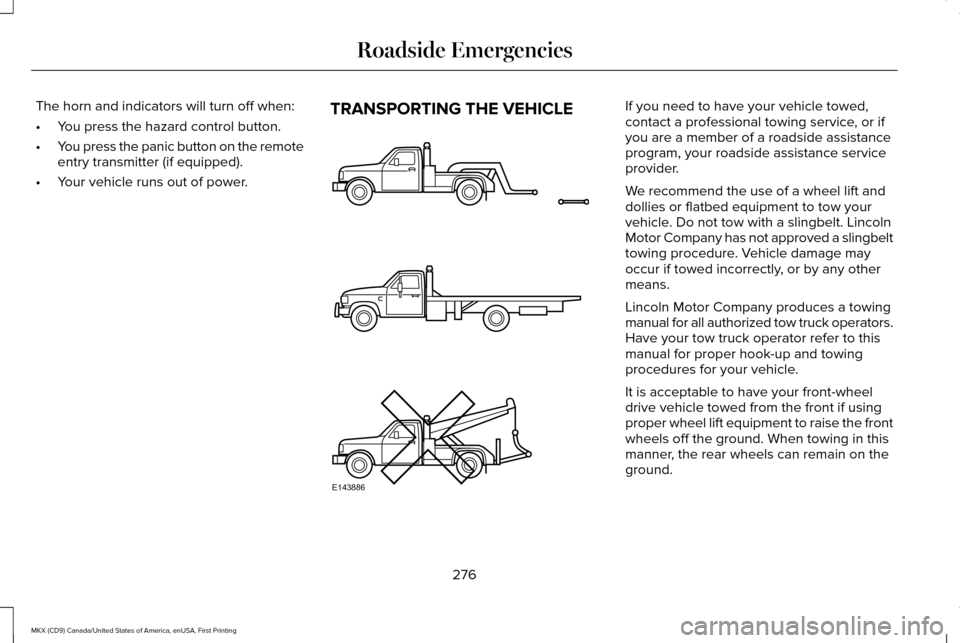
• Your vehicle runs out of power. TRANSPORTING THE VEHICLE If you need to have your vehicle towed,
contact a professional towing service, or if
you are a member of a roadside assistance
program, your roadside assistance service
provider.
We recommend the use of a wheel lift and
dollies or flatbed equipment to tow your
vehicle. Do not tow with a slingbelt. Lincoln
Motor Company has not approved a slingbelt
towing procedure. Vehicle damage may
occur if towed incorrectly, or by any other
means.
Lincoln Motor Company produces a towing
manual for all authorized tow truck operators.
Have your tow truck operator refer to this
manual for proper hook-up and towing
procedures for your vehicle.
It is acceptable to have your front-wheel
drive vehicle towed from the front if using
proper wheel lift equipment to raise the front
wheels off the ground. When towing in this
manner, the rear wheels can remain on the
ground.
276
MKX (CD9) Canada/United States of America, enUSA, First Printing Roadside EmergenciesE143886
Page 347 of 587
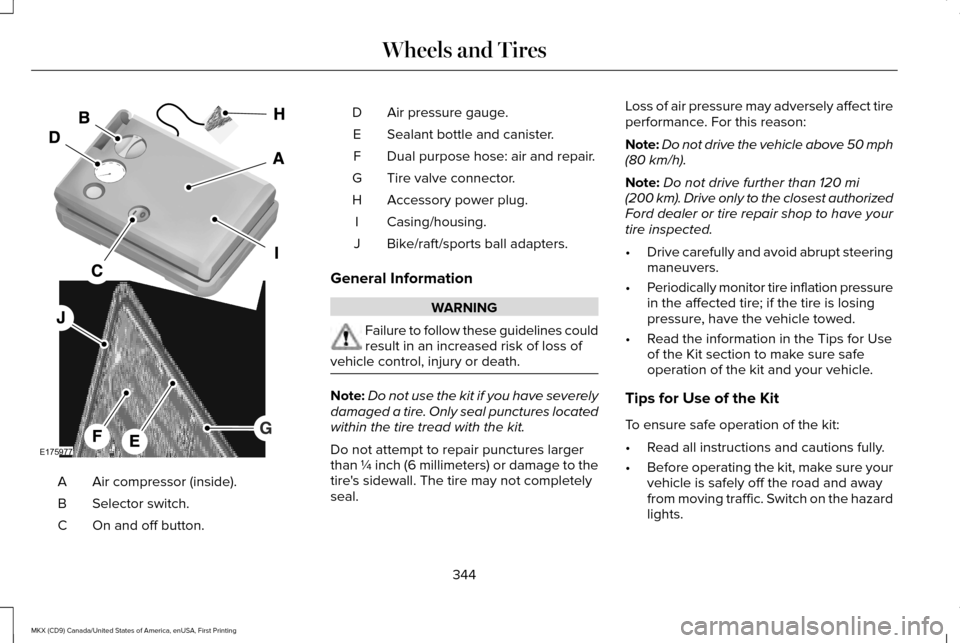
Air compressor (inside).
A
Selector switch.
B
On and off button.
C Air pressure gauge.
D
Sealant bottle and canister.
E
Dual purpose hose: air and repair.
F
Tire valve connector.
G
Accessory power plug.
H
Casing/housing.
I
Bike/raft/sports ball adapters.
J
General Information WARNING
Failure to follow these guidelines could
result in an increased risk of loss of
vehicle control, injury or death. Note:
Do not use the kit if you have severely
damaged a tire. Only seal punctures located
within the tire tread with the kit.
Do not attempt to repair punctures larger
than ¼ inch (6 millimeters) or damage to the
tire's sidewall. The tire may not completely
seal. Loss of air pressure may adversely affect tire
performance. For this reason:
Note:
Do not drive the vehicle above 50 mph
(80 km/h).
Note: Do not drive further than
120 mi
(200 km). Drive only to the closest authorized
Ford dealer or tire repair shop to have your
tire inspected.
• Drive carefully and avoid abrupt steering
maneuvers.
• Periodically monitor tire inflation pressure
in the affected tire; if the tire is losing
pressure, have the vehicle towed.
• Read the information in the Tips for Use
of the Kit section to make sure safe
operation of the kit and your vehicle.
Tips for Use of the Kit
To ensure safe operation of the kit:
• Read all instructions and cautions fully.
• Before operating the kit, make sure your
vehicle is safely off the road and away
from moving traffic. Switch on the hazard
lights.
344
MKX (CD9) Canada/United States of America, enUSA, First Printing Wheels and TiresE175977
Page 349 of 587
WARNINGS
Do not run the engine during kit
operation unless the vehicle is
outdoors or in a well-ventilated area. Preparation: Park the vehicle in a safe, level
and secure area, away from moving traffic.
Switch the hazard lights on. Apply the
parking brake and switch the engine off.
Inspect the flat tire for visible damage.
Sealant compound contains latex. Use
appropriate precautions to avoid any allergic
reactions.
Do not remove any foreign object that has
pierced the tire. If a puncture is located in
the tire sidewall, stop and call roadside
assistance.
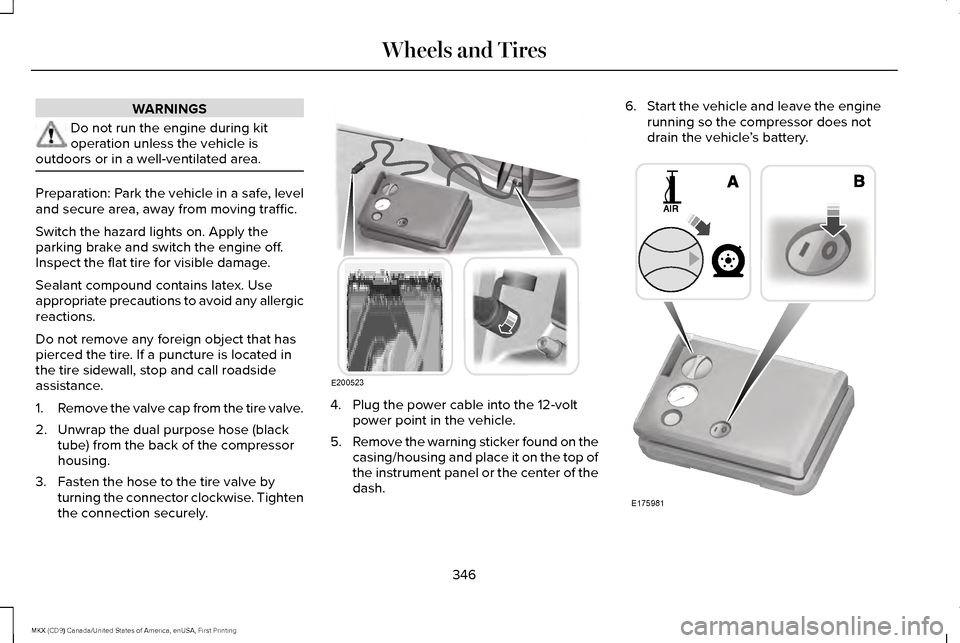
1.
Remove the valve cap from the tire valve.
2. Unwrap the dual purpose hose (black tube) from the back of the compressor
housing.
3. Fasten the hose to the tire valve by turning the connector clockwise. Tighten
the connection securely. 4. Plug the power cable into the 12-volt
power point in the vehicle.
5. Remove the warning sticker found on the
casing/housing and place it on the top of
the instrument panel or the center of the
dash. 6. Start the vehicle and leave the engine
running so the compressor does not
drain the vehicle ’s battery. 346
MKX (CD9) Canada/United States of America, enUSA, First Printing Wheels and TiresE200523 E175981
Page 367 of 587
WARNINGS
Do not spin the wheels at over
34 mph (55 km/h). The tires may
fail and injure a passenger or bystander. Driving habits have a great deal to do
with your tire mileage and safety.
*Observe posted speed limits
*Avoid fast starts, stops and turns
*Avoid potholes and objects on the road
*Do not run over curbs or hit the tire
against a curb when parking
Highway Hazards
No matter how carefully you drive
there
’s always the possibility that you
may eventually have a flat tire on the
highway. Drive slowly to the closest safe
area out of traffic. This may further
damage the flat tire, but your safety is
more important. If you feel a sudden vibration or ride
disturbance while driving, or you suspect
your tire or vehicle has been damaged,
immediately reduce your speed. Drive
with caution until you can safely pull off
the road. Stop and inspect the tires for
damage. If you cannot detect a cause,
have the vehicle towed to the nearest
repair facility or tire dealer to have the
vehicle inspected.
Tire and Wheel Alignment
A bad jolt from hitting a curb or pothole
can cause the front end of your vehicle
to become misaligned or cause damage
to your tires. If your vehicle seems to
pull to one side when you’re driving, the
wheels may be out of alignment. Have
an authorized dealer check the wheel
alignment periodically.
Wheel misalignment in the front or the
rear can cause uneven and rapid
treadwear of your tires and should be
corrected by an authorized dealer.
Front-wheel drive vehicles and those
with an independent rear suspension
may require alignment of all four wheels.The tires should also be balanced
periodically. An unbalanced tire and
wheel assembly may result in irregular
tire wear.
Tire Rotation
Note:
If your tires show uneven wear
ask an authorized dealer to check for
and correct any wheel misalignment,
tire imbalance or mechanical problem
involved before tire rotation.
Note: Your vehicle may be equipped
with a dissimilar spare wheel and tire
assembly. A dissimilar spare wheel and
tire assembly is defined as a spare
wheel and tire assembly that is different
in brand, size or appearance from the
road tires and wheels. If you have a
dissimilar spare wheel and tire assembly
it is intended for temporary use only and
should not be used in a tire rotation.
Note: After having your tires rotated,
inflation pressure must be checked and
adjusted to the vehicle requirements.
364
MKX (CD9) Canada/United States of America, enUSA, First Printing Wheels and Tires
Page 377 of 587
Note:
Passengers should not remain in your
vehicle when the vehicle is being jacked.
1. Park on a level surface, set the parking brake and activate the hazard flashers.
2. Place the transmission in park (P) and turn the engine off. 3.
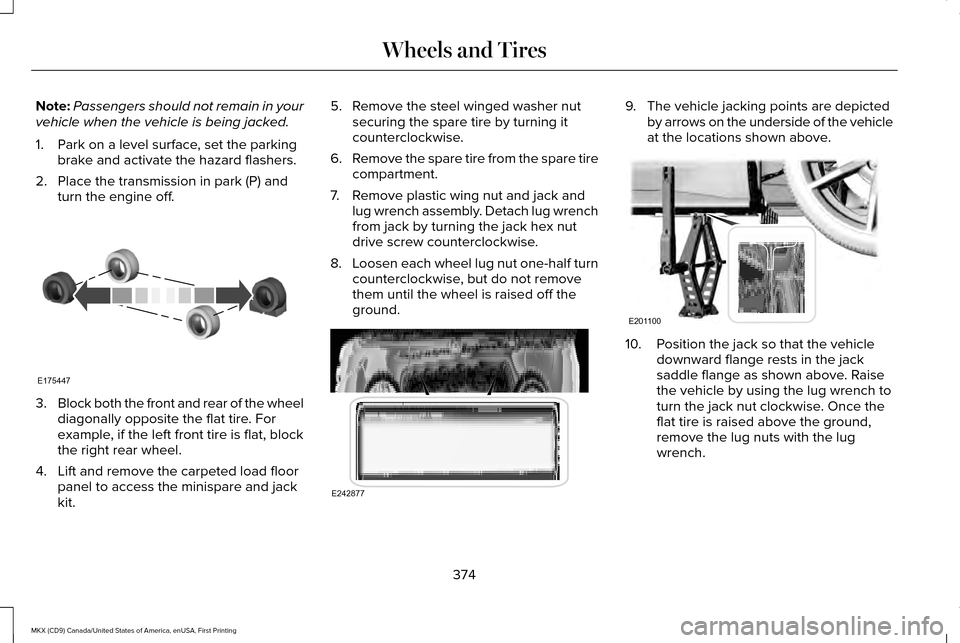
Block both the front and rear of the wheel
diagonally opposite the flat tire. For
example, if the left front tire is flat, block
the right rear wheel.
4. Lift and remove the carpeted load floor panel to access the minispare and jack
kit. 5. Remove the steel winged washer nut
securing the spare tire by turning it
counterclockwise.
6. Remove the spare tire from the spare tire
compartment.
7. Remove plastic wing nut and jack and lug wrench assembly. Detach lug wrench
from jack by turning the jack hex nut
drive screw counterclockwise.
8. Loosen each wheel lug nut one-half turn
counterclockwise, but do not remove
them until the wheel is raised off the
ground. 9. The vehicle jacking points are depicted
by arrows on the underside of the vehicle
at the locations shown above. 10. Position the jack so that the vehicle
downward flange rests in the jack
saddle flange as shown above. Raise
the vehicle by using the lug wrench to
turn the jack nut clockwise. Once the
flat tire is raised above the ground,
remove the lug nuts with the lug
wrench.
374
MKX (CD9) Canada/United States of America, enUSA, First Printing Wheels and TiresE175447 E242877 E201100
Page 516 of 587
Check every six months
Safety belts and seat latches for wear and function.
Safety warning lamps (brake, ABS, airbag and safety belt) for operation.
Washer spray and wiper operation. Clean or replace blades as necessary.
Multi-Point Inspection
In order to keep your vehicle running right,
it is important to have the systems on your
vehicle checked regularly. This can help
identify potential issues and prevent major
problems. We recommend having the
following multi-point inspection performed
at every scheduled maintenance interval to
help make sure your vehicle keeps running
great. Multi-Point inspection
Hazard warning system operation
Accessory drive belt(s)
Horn operation
Battery performance
Radiator, cooler, heater and air conditioning hoses
Engine air filter
Suspension components for leaks or damage
Exhaust system
513
MKX (CD9) Canada/United States of America, enUSA, First Printing Scheduled Maintenance
Page 550 of 587
•
Navigation Features: Any navigation
features included in the system are
intended to provide turn by turn
instructions to get you to a desired
destination. Please make certain all
persons using this system carefully read
and follow instructions and safety
information fully.
• Distraction Hazard:
Any navigation
features may require manual (non-verbal)
setup. Attempting to perform such set-up
or insert data while driving can distract
your attention and could cause an
accident or other serious injury. Stop the
vehicle in a safe and legal manner before
attempting these operations.
• Let Your Judgment Prevail:
Any
navigation features are provided only as
an aid. Make your driving decisions
based on your observations of local
conditions and existing traffic regulations.
Any such feature is not a substitute for
your personal judgment. Any route
suggestions made by this system should
never replace any local traffic regulations
or your personal judgment or knowledge
of safe driving practices. •
Route Safety:
Do not follow the route
suggestions if doing so would result in
an unsafe or illegal maneuver, if you
would be placed in an unsafe situation,
or if you would be directed into an area
that you consider unsafe. The driver is
ultimately responsible for the safe
operation of the vehicle and therefore,
must evaluate whether it is safe to follow
the suggested directions.
• Potential Map Inaccuracy:
Maps used
by this system may be inaccurate
because of changes in roads, traffic
controls or driving conditions. Always use
good judgment and common sense when
following the suggested routes.
• Emergency Services:
Do not rely on any
navigation features included in the
system to route you to emergency
services. Ask local authorities or an
emergency services operator for these
locations. Not all emergency services
such as police, fire stations, hospitals and
clinics are likely to be contained in the
map database for such navigation
features.
547
MKX (CD9) Canada/United States of America, enUSA, First Printing Appendices
Page 556 of 587
(b) use your own personal judgment while
driving. If you feel that a route suggested by
the TeleNav Software instructs you to
perform an unsafe or illegal maneuver,
places you in an unsafe situation, or directs
you into an area that you consider to be
unsafe, do not follow such instructions;
(c) do not input destinations, or otherwise
manipulate the TeleNav Software, unless
your vehicle is stationary and parked;
(d) do not use the TeleNav Software for any
illegal, unauthorized, unintended, unsafe,
hazardous, or unlawful purposes, or in any
manner inconsistent with this Agreement;
(e) arrange all GPS and wireless devices and
cables necessary for use of the TeleNav
Software in a secure manner in your vehicle
so that they will not interfere with your
driving and will not prevent the operation of
any safety device (such as an airbag).
You agree to indemnify and hold TeleNav
harmless against all claims resulting from any
dangerous or otherwise inappropriate use
of the TeleNav Software in any moving
vehicle, including as a result of your failure
to comply with the directions above.
2. Account Information
You agree: (a) when registering the TeleNav
Software, to provide TeleNav with true,
accurate, current, and complete information
about yourself, and (b) to inform TeleNav
promptly of any changes to such information,
and to keep it true, accurate, current and
complete.
3. Software License
•
Subject to your compliance with the
terms of this Agreement, TeleNav hereby
grants to you a personal, non-exclusive,
non-transferable license (except as
expressly permitted below in connection
with your permanent transfer of the
TeleNav Software license), without the
right to sublicense, to use the TeleNav
Software (in object code form only) in
order to access and use the TeleNav
Software. This license shall terminate
upon any termination or expiration of this
Agreement. You agree that you will use
the TeleNav Software only for your
personal business or leisure purposes,
and not to provide commercial navigation
services to other parties. 3.1 License Limitations
•
(a) reverse engineer, decompile,
disassemble, translate, modify, alter or
otherwise change the TeleNav Software
or any part thereof; (b) attempt to derive
the source code, audio library or
structure of the TeleNav Software without
the prior express written consent of
TeleNav;
(c) remove from the TeleNav
Software, or alter, any of TeleNav's or its
suppliers' trademarks, trade names,
logos, patent or copyright notices, or
other notices or markings;
(d) distribute,
sublicense or otherwise transfer the
TeleNav Software to others, except as
part of your permanent transfer of the
TeleNav Software; or (e) use the TeleNav
Software in any manner that
I. infringes the intellectual property or
proprietary rights, rights of publicity or
privacy or other rights of any party,
ii. violates any law, statute, ordinance or
regulation, including but not limited to laws
and regulations related to spamming, privacy,
consumer and child protection, obscenity or
defamation, or
553
MKX (CD9) Canada/United States of America, enUSA, First Printing Appendices
Page 580 of 587
Fuses...............................................................286
Fuse Specification Chart............................286
Passenger Compartment Fuse Panel...........297
Power Distribution Box.....................................286
G
Garage Door Opener See: Universal Garage Door Opener.............
158
Gauges.............................................................107 Engine Coolant Temperature Gauge.............109
Fuel Gauge...........................................................108
Information Display.............................................108
General Information on Radio Frequencies..................................................56
Intelligent Access.................................................56
General Maintenance Information............510 Multi-Point Inspection.........................................513
Owner Checks and Services............................512
Protecting Your Investment..............................510
Why Maintain Your Vehicle?.............................
510
Why Maintain Your Vehicle at Your Dealership?......................................................510
Getting Assistance Outside the U.S. and Canada.........................................................282
Getting the Services You Need................278 Away From Home...............................................278 Global Opening and Closing
.......................101
Closing the Windows..........................................101
Opening the Windows........................................101
Glove Box
........................................................165
Manual Entry.........................................................165
H
Hazard Warning Flashers
...........................272
Headlamp Adjusting See: Adjusting the Headlamps.......................325
Headlamp Exit Delay.....................................94
Head Restraints
.............................................146
Front seat manual head restraints..................147
Rear seat center head restraint.......................148
Rear seat outboard head restraints................148
Heated Seats
..................................................155
Front Seats............................................................155
Rear Seats.............................................................156
Heated Steering Wheel
.................................87
Heated Windows and Mirrors....................144 Heated Exterior Mirrors.....................................144
Heated Rear Window.........................................144
Heated Wiper Park..............................................144
Heating See: Climate Control............................................141
Hill Start Assist...............................................198 Switching the System On and Off...................
199 Using Hill Start Assist.........................................199
Hints on Controlling the Interior Climate..........................................................143
Cooling the Interior Quickly..............................144
General Hints........................................................143
Heating the Interior Quickly..............................143
Recommended Settings for Cooling .............144
Recommended Settings for Heating..............143
Side Window Defogging in Cold Weather.............................................................144
Hints on Driving With Anti-Lock Brakes...........................................................195
Home Screen.................................................421
Hood Lock See: Opening and Closing the Hood............306
I
In California (U.S. Only)...............................279
Information Display Control.........................87
Information Displays
......................................114
General Information.............................................114
Information Messages..................................121 Active Park.............................................................121
Adaptive Cruise Control....................................122
Adaptive Steering................................................123
AdvanceTrac ™.......................................................123
Airbag.....................................................................124
577
MKX (CD9) Canada/United States of America, enUSA, First Printing Index