air condition LINCOLN MKX 2018 User Guide
[x] Cancel search | Manufacturer: LINCOLN, Model Year: 2018, Model line: MKX, Model: LINCOLN MKX 2018Pages: 603, PDF Size: 4.94 MB
Page 149 of 603
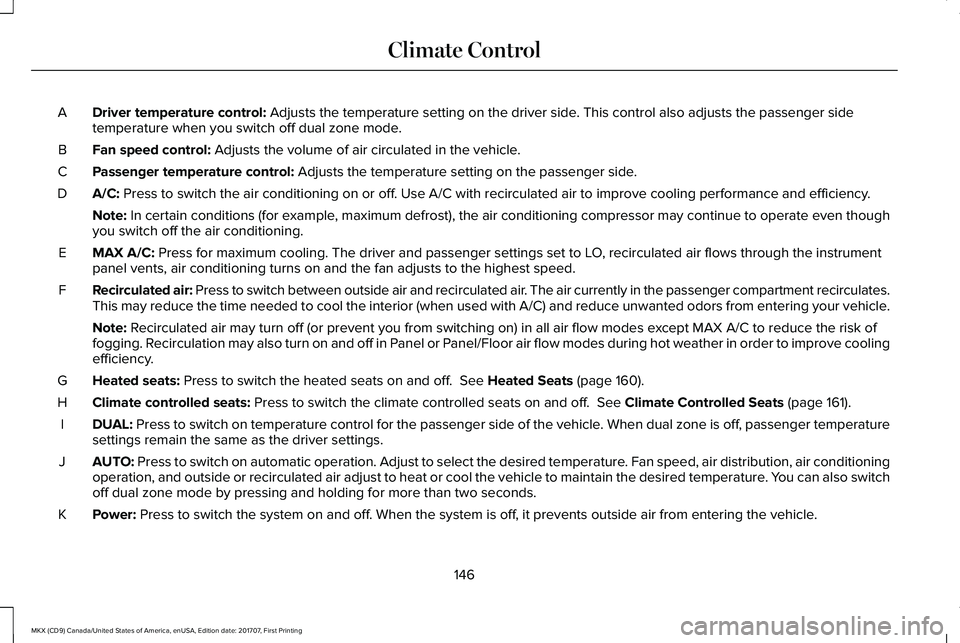
Driver temperature control: Adjusts the temperature setting on the driver side. This control also adjusts the passenger sidetemperature when you switch off dual zone mode.A
Fan speed control: Adjusts the volume of air circulated in the vehicle.B
Passenger temperature control: Adjusts the temperature setting on the passenger side.C
A/C: Press to switch the air conditioning on or off. Use A/C with recirculated air to improve cooling performance and efficiency.D
Note: In certain conditions (for example, maximum defrost), the air conditioning compressor may continue to operate even thoughyou switch off the air conditioning.
MAX A/C: Press for maximum cooling. The driver and passenger settings set to LO, recirculated air flows through the instrumentpanel vents, air conditioning turns on and the fan adjusts to the highest speed.E
Recirculated air: Press to switch between outside air and recirculated air. The air currently in the passenger compartment recirculates.This may reduce the time needed to cool the interior (when used with A/C) and reduce unwanted odors from entering your vehicle.F
Note: Recirculated air may turn off (or prevent you from switching on) in all air flow modes except MAX A/C to reduce the risk offogging. Recirculation may also turn on and off in Panel or Panel/Floor air flow modes during hot weather in order to improve coolingefficiency.
Heated seats: Press to switch the heated seats on and off. See Heated Seats (page 160).G
Climate controlled seats: Press to switch the climate controlled seats on and off. See Climate Controlled Seats (page 161).H
DUAL: Press to switch on temperature control for the passenger side of the vehicle. When dual zone is off, passenger temperaturesettings remain the same as the driver settings.I
AUTO: Press to switch on automatic operation. Adjust to select the desired temperature. Fan speed, air distribution, air conditioningoperation, and outside or recirculated air adjust to heat or cool the vehicle to maintain the desired temperature. You can also switchoff dual zone mode by pressing and holding for more than two seconds.
J
Power: Press to switch the system on and off. When the system is off, it prevents outside air from entering the vehicle.K
146
MKX (CD9) Canada/United States of America, enUSA, Edition date: 201707, First Printing
Climate Control
Page 181 of 603
Your vehicle is designed to operate onregular unleaded gasoline with a minimumpump (R+M)/2 octane rating of 87.
Some fuel stations, particularly those in highaltitude areas, offer fuels posted as regularunleaded gasoline with an octane ratingbelow 87. We do not recommend these fuels.
For best overall vehicle and engineperformance, premium fuel with an octanerating of 91 or higher is recommended. Theperformance gained by using premium fuelis most noticeable in hot weather as well asother conditions, for example when towinga trailer. See Towing (page 264).
Do not use any fuel other than thoserecommended because they could lead toengine damage that will not be covered bythe vehicle Warranty.
Note:Use of any fuel other than thoserecommended can impair the emissioncontrol system and cause a loss of vehicleperformance.
Do not use:
•Diesel fuel.
•Fuels containing kerosene or paraffin.
•Fuel containing more than 15% ethanolor E85 fuel.
•Fuels containing methanol.
•Fuels containing metallic-based additives,including manganese-based compounds.
•Fuels containing the octane boosteradditive, methylcyclopentadienylmanganese tricarbonyl (MMT).
•Leaded fuel (using leaded fuel isprohibited by law).
The use of fuels with metallic compoundssuch as methylcyclopentadienyl manganesetricarbonyl (commonly known as MMT), whichis a manganese-based fuel additive, willimpair engine performance and affect theemission control system.
Do not be concerned if the enginesometimes knocks lightly. However, if theengine knocks heavily while using fuel withthe recommended octane rating, contact anauthorized dealer to prevent any enginedamage.
FUEL FILLER FUNNEL LOCATION
The fuel filler funnel is in the spare wheelstorage tray.
RUNNING OUT OF FUEL
Running out of fuel can cause damage notcovered by the vehicle Warranty.
If your vehicle runs out of fuel:
•Add a minimum of 1.3 gal (5 L) of fuel torestart the engine.
•You may need to switch the ignition fromoff to on several times after refueling toallow the fuel system to pump the fuelfrom the tank to the engine. Whenrestarting, cranking time takes a fewseconds longer than normal.
Note:If your vehicle is on a steep slope,more fuel may be required.
178
MKX (CD9) Canada/United States of America, enUSA, Edition date: 201707, First Printing
Fuel and Refueling
Page 188 of 603
•An open or pinched sensor hose.
•Incorrect engine oil level.
•Incorrect fuel for climatic conditions.
•Incorrect engine oil viscosity for climacticconditions.
Note:Some vehicles have a lifetime fuel filterthat is integrated with the fuel tank. Regularmaintenance or replacement is not needed.
Note:If these checks do not help you correctthe concern, have your vehicle checked assoon as possible.
Noise Emissions Warranty, ProhibitedTampering Acts and Maintenance
On January 1, 1978, Federal regulationbecame effective governing the noiseemission on trucks over 10,000 lb (4,536 kg)Gross Vehicle Weight Rating (GVWR). Thepreceding statements concerning prohibitedtampering acts and maintenance, and thenoise warranty found in the Warranty Guide,are applicable to complete chassis cabs over10,000 lb (4,536 kg) GVWR.
CATALYTIC CONVERTER
WARNINGS
Do not park, idle or drive your vehicleon dry grass or other dry ground cover.The emission system heats up the enginecompartment and exhaust system, creatingthe risk of fire.
The normal operating temperature ofthe exhaust system is very high. Neverwork around or attempt to repair any part ofthe exhaust system until it has cooled. Usespecial care when working around thecatalytic converter. The catalytic converterheats up to a very high temperature afteronly a short period of engine operation andstays hot after the engine is switched off.
Exhaust leaks may result in entry ofharmful and potentially lethal fumesinto the passenger compartment. If you smellexhaust fumes inside your vehicle, have yourvehicle inspected immediately. Do not driveif you smell exhaust fumes.
Your vehicle has various emission controlcomponents and a catalytic converter thatenables it to comply with applicable exhaustemission standards.
To make sure that the catalytic converter andother emission control components continueto work properly:
•Do not crank the engine for more than10 seconds at a time.
•Do not run the engine with a spark pluglead disconnected.
•Do not push-start or tow-start yourvehicle. Use booster cables. See JumpStarting the Vehicle (page 276).
•Use only the specified fuel listed.
•Do not switch the ignition off when yourvehicle is moving.
•Avoid running out of fuel.
•Have the items listed in scheduledmaintenance information performedaccording to the specified schedule.
Note:Resulting component damage maynot be covered by the vehicle Warranty.
185
MKX (CD9) Canada/United States of America, enUSA, Edition date: 201707, First Printing
Engine Emission Control
Page 196 of 603
USING ALL-WHEEL DRIVE
All-wheel drive uses all four wheels to powerthe vehicle. This increases traction, enablingyou to drive over terrain and road conditionsthat a conventional two-wheel drive vehiclecannot. The AWD system is active all the timeand requires no input from the operator.
Note:Your AWD vehicle is not intended foroff-road use. The AWD feature gives yourvehicle some limited off-road capabilities inwhich driving surfaces are relatively level,obstruction-free and otherwise similar tonormal on-road driving conditions. Operatingyour vehicle under other than thoseconditions could subject the vehicle toexcessive stress which might result indamage which is not covered under yourwarranty.
Note:A warning message will be displayedin the information display when an AWDsystem fault is present See InformationMessages (page 125). An AWD system faultwill cause the AWD system to default tofront-wheel drive only mode. When thiswarning message is displayed, have yourvehicle serviced at an authorized dealer
Note:A warning message will be displayedin the information display if the AWD systemhas overheated See Information Messages(page 125). This condition may occur if thevehicle was operated in extreme conditionswith excessive wheel slip, such as deepsand. To resume normal AWD function assoon as possible, stop the vehicle in a safelocation and stop the engine for at least 10minutes. After the engine has been restartedand the AWD system has adequately cooled,the warning message will turn off and normalAWD function will return.
Do not use a spare tire of a different sizeother than the tire provided. If the mini-sparetire is installed, the AWD system may disableautomatically and enter front-wheel driveonly mode to protect driveline components.This condition will be indicated by a warningin the information display See InformationMessages (page 125). If there is a warningmessage in the information display fromusing the spare tire, this indicator should turnoff after reinstalling the repaired or replacednormal road tire and cycling the ignition offand on. It is recommended to reinstall the
repaired or replaced road tire as soon aspossible. Major dissimilar tire sizes betweenthe front and rear axles could cause the AWDsystem to stop functioning and default tofront-wheel drive or damage the AWDsystem.
Driving In Special Conditions With All-Wheel Drive (AWD)
AWD vehicles are equipped for driving onsand, snow, mud and rough roads and haveoperating characteristics that are somewhatdifferent from conventional vehicles, both onand off the highway.
Under severe operating conditions, the A/Cmay cycle on and off to protect overheatingof the engine.
Basic operating principles in specialconditions
•Drive slower in strong crosswinds whichcan affect the normal steeringcharacteristics of your vehicle.
•Be extremely careful when driving onpavement made slippery by loose sand,water, gravel, snow or ice.
193
MKX (CD9) Canada/United States of America, enUSA, Edition date: 201707, First Printing
All-Wheel Drive (If Equipped)
Page 218 of 603
Parallel Park Out Assist automatically steersyour vehicle out of a parallel parking space(hands-free) while you control theaccelerator, gearshift and brakes. The systemvisually and audibly guides you to entertraffic.
The system may not correctly operate in anyof the following conditions:
•You use a spare tire or a tire significantlyworn more than the other tires.
•One or more tires are improperly inflated.
•You try to park on a tight curve.
•Something passes between the frontbumper and the parking space. Forexample, a pedestrian or cyclist.
•The edge of the neighboring parkedvehicle is high off the ground. Forexample, a bus, tow truck or flatbedtruck.
•The weather conditions are poor. Forexample, during heavy rain, snow or fog.
Note: Keep the sensors on the bumper orfascia free from snow, ice and largeaccumulations of dirt. Covered sensors canaffect the system's accuracy. Do not cleanthe sensors with sharp objects.
Note:The sensors may not detect objectswith surfaces that absorb ultrasonic wavesor cause ultrasonic interference. Forexample, motorcycle exhaust, truck airbrakes or horns.
Note:Following a change in tire size, thesystem must recalibrate and operation maybe impaired for a short time.
Do not use the system if:
•You have attached a foreign object closeto the sensors on the front or rear of yourvehicle. For example, a bike rack ortrailer.
•You attach an overhanging object to theroof. For example, a surfboard.
•A foreign object damages or obstructsthe front or rear bumper or side sensors.
•The correct tire size is not in use on yourvehicle. For example, a mini-spare tire.
Using Active Park Assist - Parallel Parking
Press the Active Park Assist buttononce to search for a parallelparking space.
When driving at a speed less than 22 mph(35 km/h), the system automatically scansboth sides of your vehicle for an availableparking space. The system displays amessage and a corresponding graphic toindicate it is searching for a parking space.Use the direction indicator to selectsearching either to the left-hand side orright-hand side of your vehicle.
Note:If the direction indicators are not used,the system defaults to the passenger sideof your vehicle.
215
MKX (CD9) Canada/United States of America, enUSA, Edition date: 201707, First Printing
Parking AidsE146186
Page 252 of 603
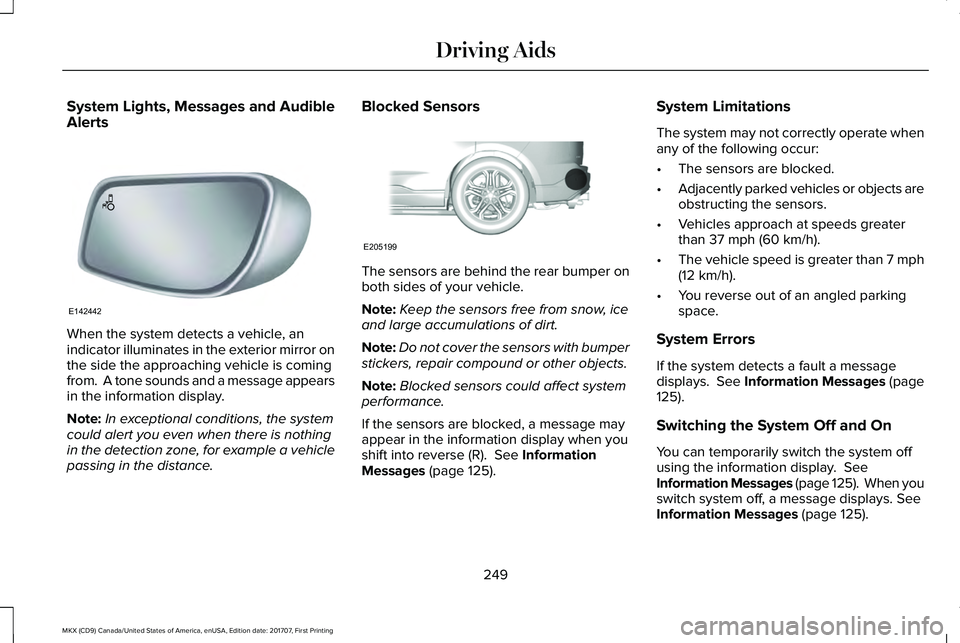
System Lights, Messages and AudibleAlerts
When the system detects a vehicle, anindicator illuminates in the exterior mirror onthe side the approaching vehicle is comingfrom. A tone sounds and a message appearsin the information display.
Note:In exceptional conditions, the systemcould alert you even when there is nothingin the detection zone, for example a vehiclepassing in the distance.
Blocked Sensors
The sensors are behind the rear bumper onboth sides of your vehicle.
Note:Keep the sensors free from snow, iceand large accumulations of dirt.
Note:Do not cover the sensors with bumperstickers, repair compound or other objects.
Note:Blocked sensors could affect systemperformance.
If the sensors are blocked, a message mayappear in the information display when youshift into reverse (R). See InformationMessages (page 125).
System Limitations
The system may not correctly operate whenany of the following occur:
•The sensors are blocked.
•Adjacently parked vehicles or objects areobstructing the sensors.
•Vehicles approach at speeds greaterthan 37 mph (60 km/h).
•The vehicle speed is greater than 7 mph(12 km/h).
•You reverse out of an angled parkingspace.
System Errors
If the system detects a fault a messagedisplays. See Information Messages (page125).
Switching the System Off and On
You can temporarily switch the system offusing the information display. SeeInformation Messages (page 125). When youswitch system off, a message displays. SeeInformation Messages (page 125).
249
MKX (CD9) Canada/United States of America, enUSA, Edition date: 201707, First Printing
Driving AidsE142442 E205199
Page 257 of 603
ActionCause
Clean the grille surface in front of the radar or remove the objectcausing the obstruction.The surface of the radar in the grille is dirty or obstructed in someway.
Wait a short time. It may take several minutes for the radar to detectthat there is no obstruction.The surface of the radar in the grille is clean but the message remainsin the display.
The Pre-Collision Assist system is temporarily disabled. Pre-CollisionAssist should automatically reactivate a short time after the weatherconditions improve.Heavy rain, spray, snow, or fog is interfering with the radar signals.
The Pre-Collision Assist system is temporarily disabled. Pre-CollisionAssist should automatically reactivate a short time after the weatherconditions improve.
Swirling water, or snow or ice on the surface of the road may interferewith the radar signals.
Contact an authorized dealer to have the radar checked for propercoverage and operation.Radar is out of alignment due to a front end impact.
Clean the outside of the windshield in front of the camera.The windshield in front of the camera is dirty or obstructed in someway.
Wait a short time. It may take several minutes for the camera to detectthat there is no obstruction.The windshield in front of the camera is clean but the message remainsin the display.
Note:Proper system operation requires aclear view of the road by the camera. Haveany windshield damage in the area of thecamera's field of view repaired.
254
MKX (CD9) Canada/United States of America, enUSA, Edition date: 201707, First Printing
Driving Aids
Page 272 of 603
Replace the rear axle lubricant anytime yousubmerge the rear axle in water. Water maycontaminate the rear axle lubricant, which isnot a normal maintenance inspection itemunless there is a possibility of a leak or otheraxle repair is required.
TOWING THE VEHICLE ON FOUR
WHEELS
Emergency Towing
You can flat-tow (all wheels on the ground,regardless of the powertrain/transmissionconfiguration) your disabled vehicle (withoutaccess to wheel dollies, car-hauling trailer,or flatbed transport vehicle) under thefollowing conditions:
•Your vehicle is facing forward so you towit in a forward direction.
•You place the transmission in position N.If you cannot place the transmission inposition N, you may need to override it.See Transmission (page 188).
•Maximum speed is 35 mph (56 km/h).
•Maximum distance is 50 miles (80kilometers).
Recreational Towing
Note: Put your climate control system inrecirculated air mode to prevent exhaustfumes from entering the vehicle. SeeClimate Control (page 145).
Follow these guidelines if you have a needfor recreational (RV) towing. An example ofrecreational towing would be towing yourvehicle behind a motorhome. Theseguidelines are to make sure you do notdamage the transmission during towing.
You can tow your vehicle with all four wheelson the ground using the Neutral Tow feature,or with all four wheels off the ground usinga vehicle transport trailer. If you are using avehicle transport trailer, follow the instructionspecified by the equipment provider.
Neutral Tow
If you tow your vehicle with all four wheelson the ground:
•Tow only in the forward direction.
•Release the parking brake.
Enter Neutral Tow mode by doing thefollowing:
1. Put the ignition in accessory mode bypressing the engine START buttonwithout pressing the brake pedal.
2. Select Neutral Tow under the VehicleSettings menu in the information display.See General Information (page 118).
3.Press and hold the OK button to start theneutral tow process.
4. Press the brake pedal and select N onthe push-button transmission.
5. Turn the ignition off by pressing theengine START button without pressingthe brake pedal.
269
MKX (CD9) Canada/United States of America, enUSA, Edition date: 201707, First Printing
Towing
Page 274 of 603
BREAKING-IN
You need to break in new tires forapproximately 300 mi (480 km). During thistime, your vehicle may exhibit some unusualdriving characteristics.
Avoid driving too fast during the first 1,000 mi(1,600 km). Vary your speed frequently andchange up through the gears early. Do notlabor the engine.
Do not tow during the first 1,000 mi(1,600 km).
REDUCED ENGINE PERFORMANCE
WARNING
If you continue to drive your vehiclewhen the engine is overheating, theengine could stop without warning. Failureto follow this instruction could result in theloss of control of your vehicle.
If the engine coolant temperature gaugeneedle moves to the upper limit position, theengine is overheating. See Gauges (page111).
You must only drive your vehicle for a shortdistance if the engine overheats. Thedistance you can travel depends on ambienttemperature, vehicle load and terrain. Theengine continues to operate with limitedpower for a short period of time.
If the engine temperature continues to rise,the fuel supply to the engine reduces. Theair conditioning switches off and the enginecooling fan operates continually.
1. Gradually reduce your speed and stopyour vehicle as soon as it is safe to doso.
2. Immediately switch the engine off toprevent severe engine damage.
3. Wait for the engine to cool down.
4. Check the coolant level. See EngineCoolant Check (page 316).
5. Have your vehicle checked as soon aspossible.
ECONOMICAL DRIVING
Fuel economy is affected by several thingssuch as how you drive, the conditions youdrive under and how you maintain yourvehicle.
There are some things to keep in mind thatmay improve your fuel economy:
•Accelerate and slow down in a smooth,moderate fashion.
•Drive at steady speeds.
•Anticipate stops; slowing down mayeliminate the need to stop.
•Combine errands and minimizestop-and-go driving (When runningerrands, go to the furthest destinationfirst and then work your way back home).
•Close the windows for high-speeddriving.
•Drive at reasonable speeds.
•Keep the tires properly inflated and useonly the recommended size.
•Use the recommended engine oil.
•Perform all regularly scheduledmaintenance.
271
MKX (CD9) Canada/United States of America, enUSA, Edition date: 201707, First Printing
Driving Hints
Page 275 of 603
There are also some things you may want toavoid doing because they reduce your fueleconomy:
•Avoid sudden or hard accelerations.
•Avoid revving the engine before turningoff the car.
•Avoid long idle periods.
•Do not warm up your vehicle on coldmornings.
•Reduce the use of air conditioning andheat.
•Avoid using speed control in hilly terrain.
•Do not rest your foot on the brake pedalwhile driving.
•Avoid carrying unnecessary weight.
•Avoid adding particular accessories toyour vehicle (e.g. bug deflectors,rollbars/light bars, running boards, skiracks).
•Avoid driving with the wheels out ofalignment.
DRIVING THROUGH WATER
WARNING
Do not drive through flowing or deepwater as you may lose control of yourvehicle.
Note:Driving through standing water cancause vehicle damage.
Note:Engine damage can occur if waterenters the air filter.
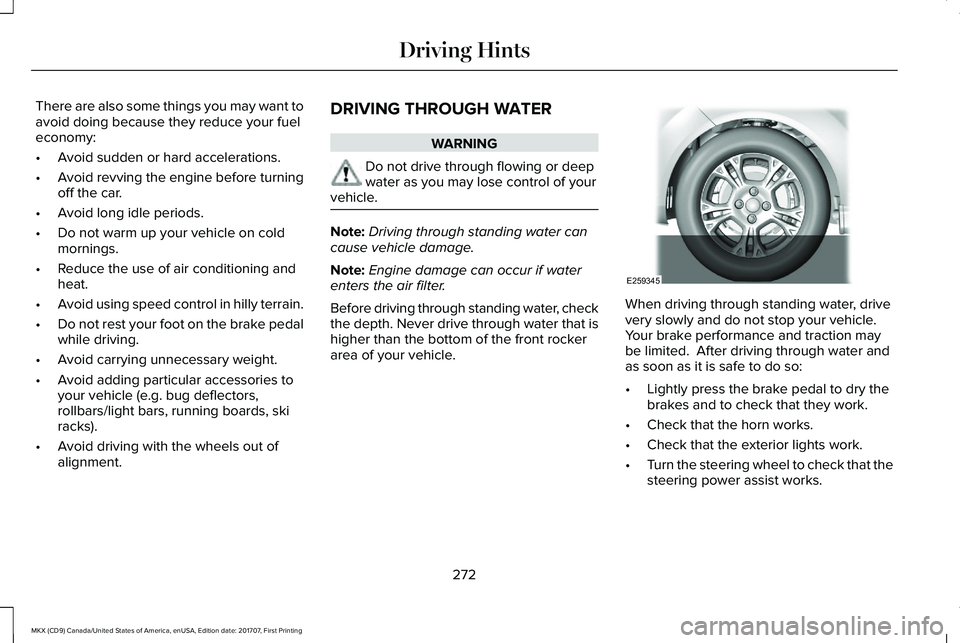
Before driving through standing water, checkthe depth. Never drive through water that ishigher than the bottom of the front rockerarea of your vehicle.
When driving through standing water, drivevery slowly and do not stop your vehicle. Your brake performance and traction maybe limited. After driving through water andas soon as it is safe to do so:
•Lightly press the brake pedal to dry thebrakes and to check that they work.
•Check that the horn works.
•Check that the exterior lights work.
•Turn the steering wheel to check that thesteering power assist works.
272
MKX (CD9) Canada/United States of America, enUSA, Edition date: 201707, First Printing
Driving HintsE259345