climate settings LINCOLN MKX 2018 User Guide
[x] Cancel search | Manufacturer: LINCOLN, Model Year: 2018, Model line: MKX, Model: LINCOLN MKX 2018Pages: 603, PDF Size: 4.94 MB
Page 420 of 603
•DISP: Switch the display on or off. Youcan also touch the screen to switch thedisplay back on.
•Temperature, fan and climate controlbuttons: Control the temperature, fanspeed or settings of the climate controlsystem. See Climate Control (page 145).
911 Assist
WARNINGS
Unless the 911 Assist setting is set onbefore a crash, the system will not dialfor help which could delay response time,potentially increasing the risk of seriousinjury or death after a crash.
Do not wait for 911 Assist to make anemergency call if you can do it yourself.Dial emergency services immediately toavoid delayed response time which couldincrease the risk of serious injury or deathafter a crash. If you do not hear 911 Assistwithin five seconds of the crash, the systemor phone may be damaged or non-functional.
WARNINGS
Always place your phone in a securelocation in your vehicle so it does notbecome a projectile or get damaged in acrash. Failure to do so may cause seriousinjury to someone or damage the phonewhich could prevent 911 Assist from workingproperly.
Note:The SYNC 911 Assist feature must beset on before the incident.
Note:The SYNC 911 Assist feature onlyoperates in the U.S., Canada or in a territoryin which 911 is the emergency number.
Note:Before setting this feature on, makesure that you read the 911 Assist PrivacyNotice later in this section for importantinformation.
Note:If any user sets 911 Assist to on or off,that setting applies for all paired phones. If911 Assist is switched off and the phone isconnected to SYNC, an icon displays on thestatus bar.
Note:Every phone operates differently.While SYNC 911 Assist works with mostcellular phones, some may have troubleusing this feature.
If a crash deploys an airbag (excluding kneeairbags and rear inflatable safety belts [ifequipped]) or activates the fuel pumpshut-off, your SYNC-equipped vehicle maybe able to contact emergency services bydialing 911 through a paired and connectedBluetooth-enabled phone. You can learnmore about the 911 Assist feature, by visiting:
Website
www.owner.lincoln.comwww.syncmyride.cawww.syncmaroute.ca
For important information about airbagdeployment and the fuel pump shut-offplease see the Supplementary Restrains andRoadside Emergencies sections of yourowner manual.
To switch 911 Assist on and off please viewthe settings information. See Settings (page475).
417
MKX (CD9) Canada/United States of America, enUSA, Edition date: 201707, First Printing
SYNC™ 3
Page 428 of 603
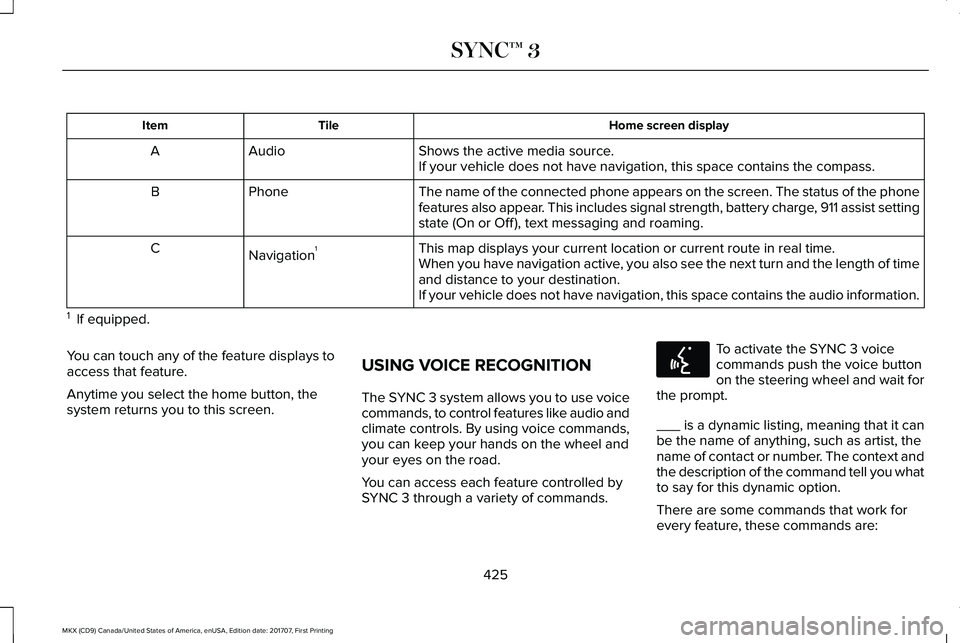
Home screen displayTileItem
Shows the active media source.AudioAIf your vehicle does not have navigation, this space contains the compass.
The name of the connected phone appears on the screen. The status of the phonefeatures also appear. This includes signal strength, battery charge, 911 assist settingstate (On or Off ), text messaging and roaming.
PhoneB
This map displays your current location or current route in real time.Navigation1CWhen you have navigation active, you also see the next turn and the length of timeand distance to your destination.If your vehicle does not have navigation, this space contains the audio information.
1 If equipped.
You can touch any of the feature displays toaccess that feature.
Anytime you select the home button, thesystem returns you to this screen.
USING VOICE RECOGNITION
The SYNC 3 system allows you to use voicecommands, to control features like audio andclimate controls. By using voice commands,you can keep your hands on the wheel andyour eyes on the road.
You can access each feature controlled bySYNC 3 through a variety of commands.
To activate the SYNC 3 voicecommands push the voice buttonon the steering wheel and wait forthe prompt.
___ is a dynamic listing, meaning that it canbe the name of anything, such as artist, thename of contact or number. The context andthe description of the command tell you whatto say for this dynamic option.
There are some commands that work forevery feature, these commands are:
425
MKX (CD9) Canada/United States of America, enUSA, Edition date: 201707, First Printing
SYNC™ 3E142599
Page 438 of 603
DescriptionVoice command
The system does not confirm before placing a call.Phone Confirmation Off
The system displays a short list of available commands.Voice Command Lists On
The system does not display the list of commands.Voice Command Lists Off
You can use the volume control to adjust thevolume of the system voice prompts. Whileprompt is active, adjust the volume controlup or down to your desired setting.
Note:Depending on the current climatecontrol settings, the fan speed mayautomatically go down while issuing voicecommands or while making and receivingphone calls via SYNC to reduce the amountof background noise in the vehicle. The fanspeed will automatically return to normaloperation once the voice session ends. Fanspeed can also be adjusted normally duringa voice session, simply press fan buttons (orturn fan knob) to increase or decrease fanspeed to desired setting.
To disable this automatic fan speedreduction feature during voice sessions,press and hold the climate control AC andRecirculated air buttons simultaneously,release and then increase fan speed within2 seconds. To re-enable this feature, repeatthe above sequence.
435
MKX (CD9) Canada/United States of America, enUSA, Edition date: 201707, First Printing
SYNC™ 3
Page 452 of 603
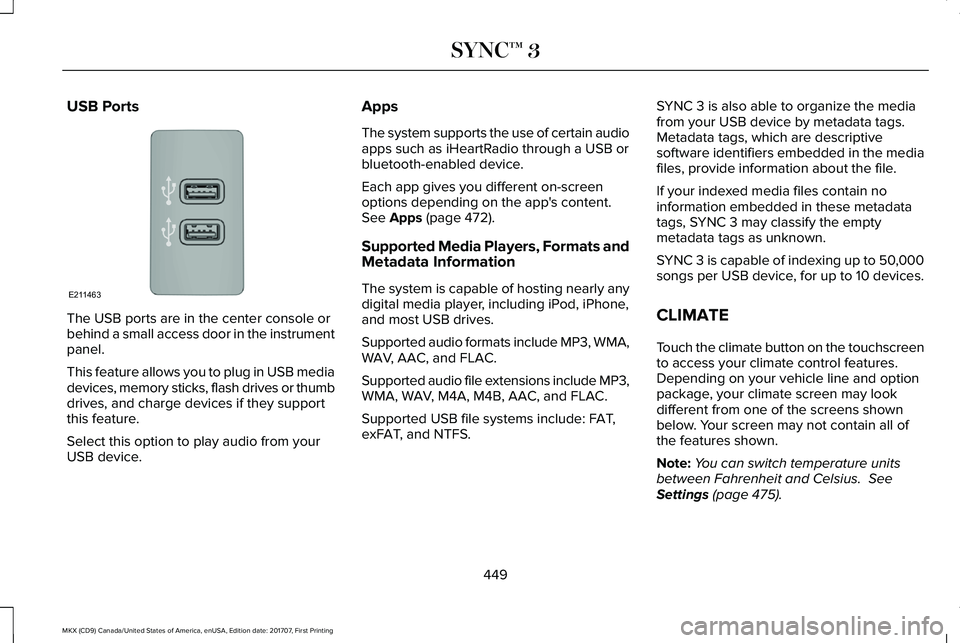
USB Ports
The USB ports are in the center console orbehind a small access door in the instrumentpanel.
This feature allows you to plug in USB mediadevices, memory sticks, flash drives or thumbdrives, and charge devices if they supportthis feature.
Select this option to play audio from yourUSB device.
Apps
The system supports the use of certain audioapps such as iHeartRadio through a USB orbluetooth-enabled device.
Each app gives you different on-screenoptions depending on the app's content.See Apps (page 472).
Supported Media Players, Formats andMetadata Information
The system is capable of hosting nearly anydigital media player, including iPod, iPhone,and most USB drives.
Supported audio formats include MP3, WMA,WAV, AAC, and FLAC.
Supported audio file extensions include MP3,WMA, WAV, M4A, M4B, AAC, and FLAC.
Supported USB file systems include: FAT,exFAT, and NTFS.
SYNC 3 is also able to organize the mediafrom your USB device by metadata tags.Metadata tags, which are descriptivesoftware identifiers embedded in the mediafiles, provide information about the file.
If your indexed media files contain noinformation embedded in these metadatatags, SYNC 3 may classify the emptymetadata tags as unknown.
SYNC 3 is capable of indexing up to 50,000songs per USB device, for up to 10 devices.
CLIMATE
Touch the climate button on the touchscreento access your climate control features.Depending on your vehicle line and optionpackage, your climate screen may lookdifferent from one of the screens shownbelow. Your screen may not contain all ofthe features shown.
Note:You can switch temperature unitsbetween Fahrenheit and Celsius. SeeSettings (page 475).
449
MKX (CD9) Canada/United States of America, enUSA, Edition date: 201707, First Printing
SYNC™ 3E211463
Page 593 of 603
Automatic Transmission..............................188Automatic Transmission AdaptiveLearning............................................................192Brake-Shift Interlock Override..........................191If Your Vehicle Gets Stuck In Mud orSnow..................................................................192Push Button Shift Transmission.......................188SelectShift Automatic™ Transmission.............190
Automatic Transmission Fluid Check - 2.7LEcoBoost™/3.7L............................................321Adding Transmission Fluid ..............................322Checking the Transmission Fluid Level ........321
Autowipers.......................................................94Autowipers Settings.............................................94
Auxiliary Power Points..................................167110 Volt AC Power Point.....................................16712 Volt DC Power Point......................................167Locations................................................................167
AWDSee: All-Wheel Drive...........................................193
B
BatterySee: Changing the 12V Battery.......................324
Blind Spot Information System.................244Switching the System Off and On..................245System Errors......................................................245
Using the Blind Spot InformationSystem..............................................................244
Body Styling Kits...........................................342Bonnet LockSee: Opening and Closing the Hood............308
Booster Seats..................................................30Types of Booster Seats........................................31
Brake Fluid Check........................................323Brakes..............................................................199General Information............................................199
Breaking-In......................................................271Bulb Specification Chart.............................329
C
Cabin Air Filter...............................................148California Proposition 65...............................12Capacities and Specifications - 2.7LEcoBoost™....................................................387Alternative Engine Oil for Extremely ColdClimates...........................................................392Specifications......................................................388
Capacities and Specifications - 3.7L........394Alternative Engine Oil for Extremely ColdClimates...........................................................399Specifications......................................................395
Capacities and Specifications....................381Cargo Nets.....................................................257
Car WashSee: Cleaning the Exterior...............................334
Catalytic Converter.......................................185On-Board Diagnostics (OBD-II)........................186Readiness for Inspection and Maintenance(I/M) Testing.......................................................187
Center Console.............................................169Changing a Bulb...........................................328Headlamp.............................................................329LED Lamps...........................................................329
Changing a Fuse..........................................305Fuses.....................................................................305
Changing a Road Wheel.............................373Dissimilar Spare Wheel and Tire AssemblyInformation.......................................................374Stowing the flat tire ...........................................377Tire Change Procedure....................................375
Changing the 12V Battery..........................324Changing the Engine Air Filter..................332Changing the Wiper Blades......................326Changing the Rear Window WiperBlade.................................................................326Changing the Windshield Wiper Blades......326
Checking MyKey System Status.................69Checking the Wiper Blades.......................326Child Restraint and SeatbeltMaintenance..................................................44Child Restraint Positioning...........................33
590
MKX (CD9) Canada/United States of America, enUSA, Edition date: 201707, First Printing
Index
Page 594 of 603
Child Safety.......................................................19General Information..............................................19
Child Safety Locks..........................................34Left-Hand Side.......................................................35Right-Hand Side....................................................35
Cleaning Leather Seats..............................339Cleaning Products........................................333Materials................................................................333
Cleaning the Engine....................................335Cleaning the Exterior...................................334Cleaning the Headlamps..................................334Exterior Chrome Parts.......................................334Exterior Plastic Parts..........................................335Stripes or Graphics............................................335Underbody...........................................................335Under Hood.........................................................335
Cleaning the Instrument Panel andInstrument Cluster Lens...........................338Cleaning the Interior....................................336Cleaning Black Label or PresidentialInterior...............................................................337
Cleaning the Wheels...................................339Cleaning the Windows and WiperBlades...........................................................336Clearing All MyKeys.......................................67Climate............................................................449Climate Control..............................................145
Climate Controlled Seats.............................161Cooled Seats........................................................162
Coolant CheckSee: Engine Coolant Check..............................316
Crash Sensors and Airbag Indicator..........55Creating a MyKey...........................................66Programming/Changing ConfigurableSettings...............................................................66
Cross Traffic Alert.........................................246Blocked Sensors................................................249Switching the System Off and On..................249System Errors......................................................249System Lights, Messages and AudibleAlerts.................................................................249System Limitations.............................................249Using the Cross Traffic Alert System.............246
Cruise Control.................................................92Principle of Operation.......................................229
Cruise controlSee: Using Cruise Control...............................229
Customer Assistance..................................280
D
Data Recording..................................................9Event Data Recording...........................................10Service Data Recording.........................................9
Daytime Running Lamps...............................98Type One - Conventional(Non-Configurable)..........................................99Type Two - Configurable....................................99
Direction Indicators.......................................101Doors and Locks.............................................72Drive Control.................................................255LINCOLN DRIVE CONTROL............................255
Driver Alert.....................................................237PRINCIPLE OF OPERATION.............................237USING DRIVER ALERT......................................237
Driver and Passenger Airbags....................48Children and Airbags...........................................49Proper Driver and Front Passenger SeatingAdjustment.........................................................49
Driver and Passenger Knee Airbags.........54Driving Aids....................................................237Driving Hints...................................................271Driving Through Water................................272DRLSee: Daytime Running Lamps...........................98
E
Economical Driving.......................................271Electric Parking Brake................................200Applying the Electric Parking Brake.............200Battery With No Charge...................................202
591
MKX (CD9) Canada/United States of America, enUSA, Edition date: 201707, First Printing
Index
Page 596 of 603
Fuel and Refueling........................................177Fuel Consumption.........................................182Calculating Fuel Economy................................182Filling the Fuel Tank............................................182
Fuel Filler Funnel Location..........................178Fuel Filter........................................................324Fuel Quality.....................................................177Choosing the Right Fuel....................................177
Fuel Shutoff....................................................275Fuses...............................................................288Fuse Specification Chart............................288Passenger Compartment Fuse Panel...........299Power Distribution Box.....................................288
G
Garage Door OpenerSee: Universal Garage Door Opener.............163
Gauges...............................................................111Engine Coolant Temperature Gauge..............113Fuel Gauge............................................................112Information Display..............................................112
GearboxSee: Transmission...............................................188
General Information on RadioFrequencies..................................................58Intelligent Access.................................................58
General Maintenance Information............517Multi-Point Inspection.......................................520Owner Checks and Services............................518Protecting Your Investment...............................517Why Maintain Your Vehicle?..............................517Why Maintain Your Vehicle at YourDealership?.......................................................517
Getting Assistance Outside the U.S. andCanada.........................................................284Getting the Services You Need................280Away From Home..............................................280
Global Opening and Closing......................105Closing the Windows.........................................105Opening the Windows.......................................105
Glove Box........................................................169Manual Entry.........................................................169
H
Hazard Flashers............................................275Headlamp AdjustingSee: Adjusting the Headlamps.......................327
Headlamp Exit Delay.....................................98Head Restraints.............................................150Front Seat Manual Head Restraints.................151Rear Seat Center Head Restraint....................152Rear Seat Outermost Head Restraints...........152
Heated Seats.................................................160Front Seats............................................................160Rear Seats..............................................................161
Heated Steering Wheel................................92Heated Windows and Mirrors....................148Heated Exterior Mirrors.....................................148Heated Rear Window.........................................148Windshield Wiper De-icer.................................148
HeatingSee: Climate Control..........................................145
Hill Start Assist..............................................203Switching the System On and Off..................203Using Hill Start Assist........................................203
Hints on Controlling the InteriorClimate...........................................................147Defogging the Side Windows in ColdWeather.............................................................148General Hints........................................................147Quickly Cooling the Interior..............................147Quickly Heating the Interior..............................147Recommended Settings for Cooling..............148Recommended Settings for Heating..............147
Hints on Driving With Anti-LockBrakes..........................................................200Home Screen................................................424Hood LockSee: Opening and Closing the Hood............308
593
MKX (CD9) Canada/United States of America, enUSA, Edition date: 201707, First Printing
Index
Page 602 of 603
Universal Garage Door Opener................163HomeLink Wireless Control System...............163
USB Port.........................................................404Using Adaptive Cruise Control.................230Automatic Cancellation.....................................233Blocked Sensor...................................................235Canceling the Set Speed.................................233Changing the Set Speed..................................233Detection Issues.................................................234Following a Vehicle.............................................231Hilly Condition Usage.......................................233Overriding the Set Speed................................232Resuming the Set Speed..................................233Setting the Adaptive Cruise Speed................231Setting the Gap Distance.................................232Switching Adaptive Cruise Control Off.........233Switching Adaptive Cruise Control On.........230Switching to Normal Cruise Control..............236System Not Available........................................235
Using All-Wheel Drive..................................193Driving In Special Conditions With All-WheelDrive (AWD)......................................................193
Using Cruise Control...................................229Switching Cruise Control Off...........................230Switching Cruise Control On...........................229
Using MyKey With Remote StartSystems..........................................................70Using Snow Chains......................................368
Using Stability Control................................209Using Summer Tires....................................367Using Traction Control................................206Switching the System Off.................................206System Indicator Lights and Messages.......206Using a Switch....................................................206Using the Information Display Controls.......206
Using Voice Recognition............................425Audio Voice Commands...................................427Climate Voice Commands................................428Mobile App Voice Commands........................433Navigation Voice Commands...........................431Phone Voice Commands..................................428SiriusXM Traffic and Travel Link VoiceCommands.......................................................433Voice Settings Commands...............................434
Utilizing the Mediation/Arbitration Program(Canada Only).............................................283
V
Vehicle Care..................................................333General Information...........................................333
Vehicle Certification Label.........................385Vehicle Identification Number..................385Vehicle Storage............................................340Battery....................................................................341Body.......................................................................340
Brakes.....................................................................341Cooling system....................................................341Engine.....................................................................341Fuel system...........................................................341General.................................................................340Miscellaneous.......................................................341Removing Vehicle From Storage.....................341Tires........................................................................341
VentilationSee: Climate Control..........................................145
VINSee: Vehicle Identification Number...............385
Voice Control....................................................91
W
Warning Lamps and Indicators...................113Adaptive Cruise Control Indicator....................113Adaptive Steering.................................................113Airbag Warning Lamp..........................................114Anti-Lock Brake System Warning Lamp.........114Auto Hold Active..................................................114Auto Hold Unavailable........................................114Automatic High Beam Control..........................114Battery.....................................................................114Blind Spot Information System Indicator........114Brake System Warning Lamp............................114Cruise Control Indicator......................................114
599
MKX (CD9) Canada/United States of America, enUSA, Edition date: 201707, First Printing
Index