automatic transmission LINCOLN MKX 2018 Owner's Manual
[x] Cancel search | Manufacturer: LINCOLN, Model Year: 2018, Model line: MKX, Model: LINCOLN MKX 2018Pages: 603, PDF Size: 4.94 MB
Page 213 of 603
PRINCIPLE OF OPERATION
WARNINGS
To help avoid personal injury, alwaysuse caution when in reverse (R) andwhen using the sensing system.
The system may not detect objectswith surfaces that absorb reflection.Always drive with due care and attention.Failure to take care may result in a crash.
Traffic control systems, inclementweather, air brakes, external motorsand fans may affect the correct operation ofthe sensing system.This may cause reducedperformance or false alerts.
The system may not detect small ormoving objects, particularly those closeto the ground.
Note:If your vehicle is equipped withMyKey™, the sensing system cannot beturned off when a MyKey™ is present. SeePrinciple of Operation (page 65).
Note:Keep the sensors, located on thebumper or fascia, free from snow, ice andlarge accumulations of dirt. If the sensorsare covered, the system’s accuracy can beaffected. Do not clean the sensors with sharpobjects.
Note:If your vehicle sustains damage to thebumper or fascia, leaving it misaligned orbent, the sensing zone may be alteredcausing inaccurate measurement ofobstacles or false alerts.
Note:Certain add-on devices installedaround the bumper or fascia may createfalse alerts. For example, large trailerhitches, bike or surfboard racks, license platebrackets, bumper covers or any other devicethat may block the normal detection zoneof the system. Remove the add-on device toprevent false alerts.
Note:When a trailer is connected to yourvehicle, the rear parking aid may detect thetrailer and therefore provide an alert. Disablethe rear parking aid when a trailer isconnected to prevent the alert.
The sensing system warns the driver ofobstacles within a certain range of yourvehicle. The system turns on automaticallywhenever you switch the ignition on.
The system can be switched off through theinformation display menu or from the pop-upmessage that appears once you shift thetransmission into reverse (R). See GeneralInformation (page 118).
If a fault is present in the system, a warningmessage appears in the information display.See Information Messages (page 125).
REAR PARKING AID
The rear sensors are only active when thetransmission is in reverse (R). As your vehiclemoves closer to the obstacle, the rate of theaudible warning increases. When theobstacle is less than 12 in (30 cm) away, thewarning sounds continuously. If the systemdetects a stationary or receding objectfarther than 12 in (30 cm) from the corners ofthe bumper, the tone sounds for only threeseconds. Once the system detects an objectapproaching, the warning sounds again.
210
MKX (CD9) Canada/United States of America, enUSA, Edition date: 201707, First Printing
Parking Aids
Page 217 of 603
If the transmission is in neutral (N), the sidesensing system provides visual distanceindication only when your vehicle is movingbelow a speed of 5 mph (8 km/h) and thereis a front or rear parking aid obstacledetected, and the side obstacle is within24 in (60 cm) from the side of your vehicle.When you stop your vehicle the visualdistance indication stops after four seconds.
If the side sensing system is not available,the side distance indicator blocks do notappear.
The side sensing system is not availableunder the following condition:
•If you switch the traction control systemoff.
The side sensing system may not beavailable until you have driven approximatelythe length of your vehicle in order for thesystem to reinitialize if:
•You switch the ignition on, off and backon.
•Your vehicle remains stationary for overtwo minutes.
•The anti-lock brake system is activated.
•The traction control system is activated.
•When the steering wheel angleinformation is not available, the sidesensing system is not available. Thevehicle must be driven at least 492 ft(150 m) above 19 mph (30 km/h) torecover the steering wheel angleinformation.
ACTIVE PARK ASSIST (If Equipped)
Parallel Parking, PerpendicularParking, Parallel Park Out Assist
WARNINGS
You must remain in your vehicle whenthe system turns on. At all times, youare responsible for controlling your vehicle,supervising the system and intervening, ifrequired. Failure to take care may result inthe loss of control of your vehicle, seriouspersonal injury or death.
The sensors may not detect objects inheavy rain or other conditions thatcause interference.
WARNINGS
Active park assist does not apply thebrakes under any circumstances.
The system is designed to aid thedriver. It is not intended to replace yourattention and judgment. You are stillresponsible to drive with due care andattention.
Note:The Blind Spot Information Systemdoes not detect traffic alongside or behindyour vehicle during an Active Park Assistmaneuver.
The system detects an available parallel orperpendicular parking space andautomatically steers your vehicle into thespace (hands-free) while you control theaccelerator, gearshift and brakes. The systemvisually and audibly guides you to park yourvehicle.
If you are uncomfortable with the proximityto any vehicle or object, you may choose tooverride the system by grabbing the steeringwheel or by pressing the button.
214
MKX (CD9) Canada/United States of America, enUSA, Edition date: 201707, First Printing
Parking Aids
Page 219 of 603
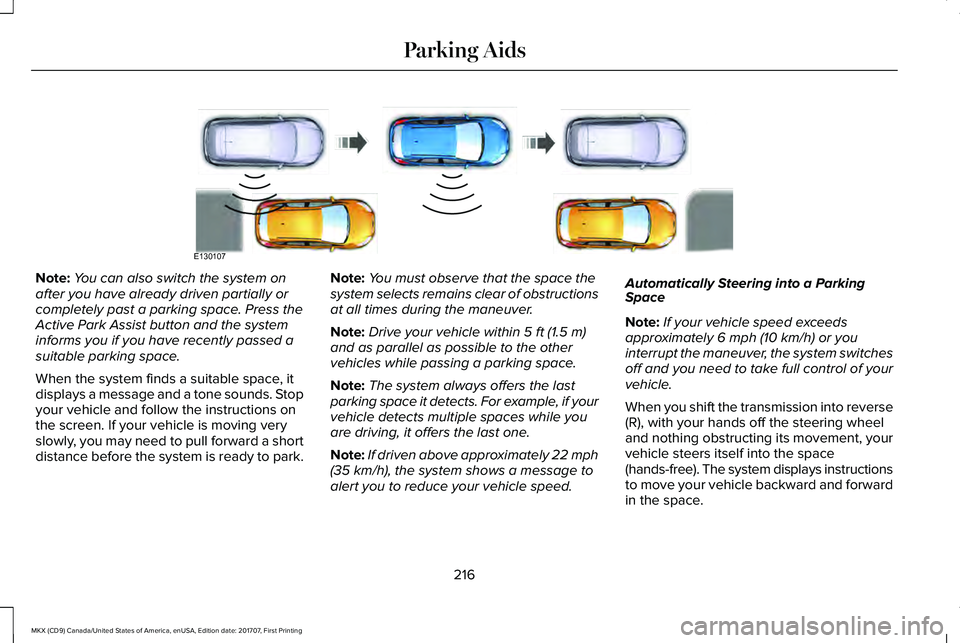
Note:You can also switch the system onafter you have already driven partially orcompletely past a parking space. Press theActive Park Assist button and the systeminforms you if you have recently passed asuitable parking space.
When the system finds a suitable space, itdisplays a message and a tone sounds. Stopyour vehicle and follow the instructions onthe screen. If your vehicle is moving veryslowly, you may need to pull forward a shortdistance before the system is ready to park.
Note:You must observe that the space thesystem selects remains clear of obstructionsat all times during the maneuver.
Note:Drive your vehicle within 5 ft (1.5 m)and as parallel as possible to the othervehicles while passing a parking space.
Note:The system always offers the lastparking space it detects. For example, if yourvehicle detects multiple spaces while youare driving, it offers the last one.
Note:If driven above approximately 22 mph(35 km/h), the system shows a message toalert you to reduce your vehicle speed.
Automatically Steering into a ParkingSpace
Note:If your vehicle speed exceedsapproximately 6 mph (10 km/h) or youinterrupt the maneuver, the system switchesoff and you need to take full control of yourvehicle.
When you shift the transmission into reverse(R), with your hands off the steering wheeland nothing obstructing its movement, yourvehicle steers itself into the space(hands-free). The system displays instructionsto move your vehicle backward and forwardin the space.
216
MKX (CD9) Canada/United States of America, enUSA, Edition date: 201707, First Printing
Parking AidsE130107
Page 228 of 603
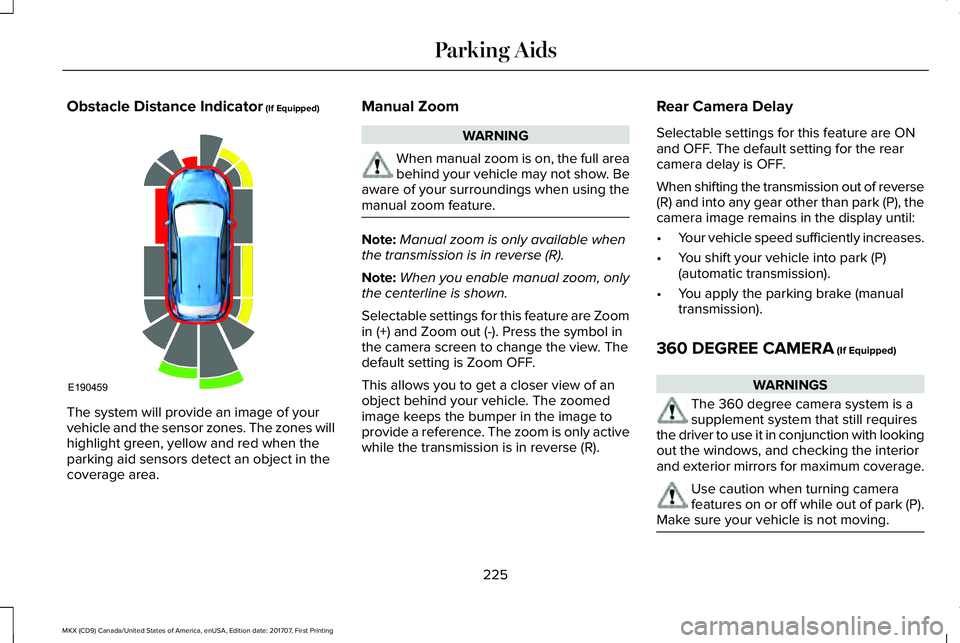
Obstacle Distance Indicator (If Equipped)
The system will provide an image of yourvehicle and the sensor zones. The zones willhighlight green, yellow and red when theparking aid sensors detect an object in thecoverage area.
Manual Zoom
WARNING
When manual zoom is on, the full areabehind your vehicle may not show. Beaware of your surroundings when using themanual zoom feature.
Note:Manual zoom is only available whenthe transmission is in reverse (R).
Note:When you enable manual zoom, onlythe centerline is shown.
Selectable settings for this feature are Zoomin (+) and Zoom out (-). Press the symbol inthe camera screen to change the view. Thedefault setting is Zoom OFF.
This allows you to get a closer view of anobject behind your vehicle. The zoomedimage keeps the bumper in the image toprovide a reference. The zoom is only activewhile the transmission is in reverse (R).
Rear Camera Delay
Selectable settings for this feature are ONand OFF. The default setting for the rearcamera delay is OFF.
When shifting the transmission out of reverse(R) and into any gear other than park (P), thecamera image remains in the display until:
•Your vehicle speed sufficiently increases.
•You shift your vehicle into park (P)(automatic transmission).
•You apply the parking brake (manualtransmission).
360 DEGREE CAMERA (If Equipped)
WARNINGS
The 360 degree camera system is asupplement system that still requiresthe driver to use it in conjunction with lookingout the windows, and checking the interiorand exterior mirrors for maximum coverage.
Use caution when turning camerafeatures on or off while out of park (P).Make sure your vehicle is not moving.
225
MKX (CD9) Canada/United States of America, enUSA, Edition date: 201707, First Printing
Parking AidsE190459
Page 247 of 603
BLIND SPOT INFORMATION
SYSTEM
WARNINGS
Do not use the blind spot informationsystem as a replacement for using theinterior and exterior mirrors or looking overyour shoulder before changing lanes. Theblind spot information system is not areplacement for careful driving.
The system may not operate properlyduring severe weather conditions, forexample snow, ice, heavy rain and spray.Always drive with due care and attention.Failure to take care may result in a crash.
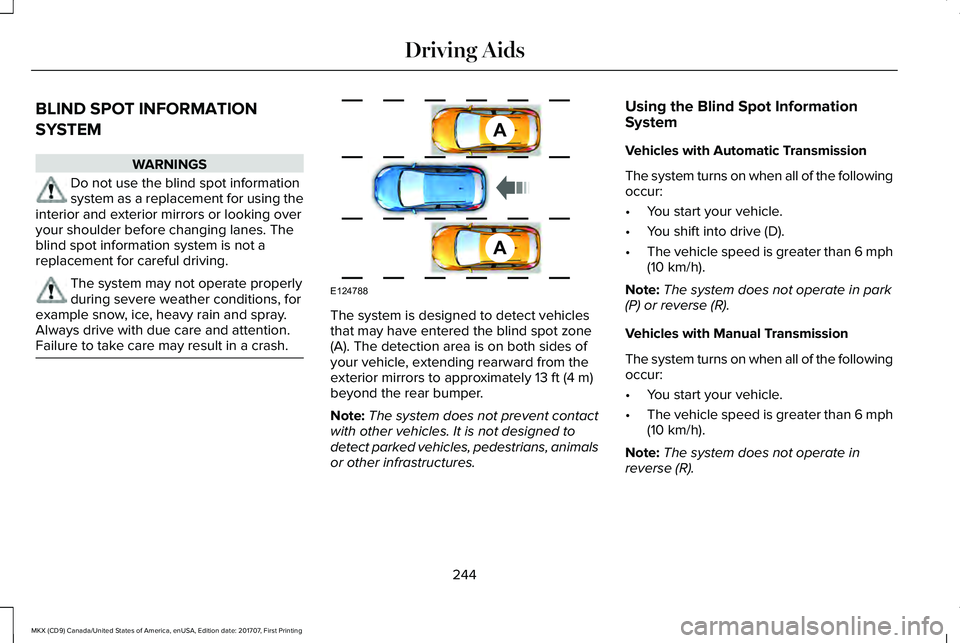
The system is designed to detect vehiclesthat may have entered the blind spot zone(A). The detection area is on both sides ofyour vehicle, extending rearward from theexterior mirrors to approximately 13 ft (4 m)beyond the rear bumper.
Note:The system does not prevent contactwith other vehicles. It is not designed todetect parked vehicles, pedestrians, animalsor other infrastructures.
Using the Blind Spot InformationSystem
Vehicles with Automatic Transmission
The system turns on when all of the followingoccur:
•You start your vehicle.
•You shift into drive (D).
•The vehicle speed is greater than 6 mph(10 km/h).
Note:The system does not operate in park(P) or reverse (R).
Vehicles with Manual Transmission
The system turns on when all of the followingoccur:
•You start your vehicle.
•The vehicle speed is greater than 6 mph(10 km/h).
Note:The system does not operate inreverse (R).
244
MKX (CD9) Canada/United States of America, enUSA, Edition date: 201707, First Printing
Driving AidsA
A
E124788
Page 271 of 603
Trailer lamps are required on most towedvehicles. Make sure all running lights, brakelights, turn signals and hazard lights areworking.
Before Towing a Trailer
Practice turning, stopping and backing up toget the feel of your vehicle-trailercombination before starting on a trip. Whenturning, make wider turns so the trailerwheels clear curbs and other obstacles.
When Towing a Trailer
•Do not drive faster than 70 mph(113 km/h) during the first 500 mi(800 km).
•Do not make full-throttle starts.
•Check your hitch, electrical connectionsand trailer wheel lug nuts thoroughly afteryou have traveled 50 miles (80kilometers).
•When stopped in congested or heavytraffic during hot weather, place thegearshift in position P to aid engine andtransmission cooling and to help A/Cperformance.
•Turn off the speed control with heavyloads or in hilly terrain. The speed controlmay turn off automatically when you aretowing on long, steep grades.
•Shift to a lower gear when driving downa long or steep hill. Do not apply thebrakes continuously, as they mayoverheat and become less effective.
•If your transmission is equipped with aGrade Assist or Tow/Haul feature, usethis feature when towing. This providesengine braking and helps eliminateexcessive transmission shifting foroptimum fuel economy and transmissioncooling.
•Allow more distance for stopping with atrailer attached. Anticipate stops andbrake gradually.
•Avoid parking on a grade. However, ifyou must park on a grade:
1. Turn the steering wheel to point yourvehicle tires away from traffic flow.
2. Set your vehicle parking brake.
3. Place the automatic transmission inposition P.
4. Place wheel chocks in front and back ofthe trailer wheels. (Chocks not includedwith vehicle.)
Launching or Retrieving a Boat orPersonal Watercraft (PWC)
Note:Disconnect the wiring to the trailerbefore backing the trailer into the water.
Note:Reconnect the wiring to the trailerafter removing the trailer from the water.
When backing down a ramp during boatlaunching or retrieval:
•Do not allow the static water level to riseabove the bottom edge of the rearbumper.
•Do not allow waves to break higher than6 in (15 cm) above the bottom edge ofthe rear bumper.
Exceeding these limits may allow water toenter vehicle components:
•Causing internal damage to thecomponents.
•Affecting driveability, emissions, andreliability.
268
MKX (CD9) Canada/United States of America, enUSA, Edition date: 201707, First Printing
Towing
Page 279 of 603
Note: When you try to restart your vehicleafter a fuel shutoff, the vehicle makes surethat various systems are safe to restart. Once the vehicle determines the systemsare safe, then the vehicle allows you torestart.
Note: In the event that your vehicle doesnot restart after your third attempt, contacta qualified technician.
The fuel pump shutoff stops the flow of fuelto the engine in the event of a moderate tosevere crash. Not every impact causes ashutoff.
Should your vehicle shut off after a crash,you may restart your vehicle.
1. Press START/STOP to switch off yourvehicle.
2.Press the brake pedal and START/STOPto switch on your vehicle.
3. Remove your foot from the brake pedaland press START/STOP to switch offyour vehicle.
4. You can attempt to start the vehicle bypressing the brake pedal andSTART/STOP, or press START/STOPwithout pressing the brake pedal.
JUMP STARTING THE VEHICLE
WARNINGS
Batteries normally produce explosivegases which can cause personal injury.Therefore, do not allow flames, sparks orlighted substances to come near the battery.When working near the battery, always shieldyour face and protect your eyes. Alwaysprovide correct ventilation.
WARNINGS
Keep batteries out of reach of children.Batteries contain sulfuric acid. Avoidcontact with skin, eyes or clothing. Shieldyour eyes when working near the battery toprotect against possible splashing of acidsolution. In case of acid contact with skin oreyes, flush immediately with water for aminimum of 15 minutes and get promptmedical attention. If acid is swallowed, call aphysician immediately.
Use only adequately sized cables withinsulated clamps.
Preparing Your Vehicle
Do not attempt to push-start your automatictransmission vehicle.
Note:Attempting to push-start a vehicle withan automatic transmission may causetransmission damage.
Note:Use only a 12-volt supply to start yourvehicle.
Note:Do not disconnect the battery of thedisabled vehicle as this could damage thevehicle electrical system.
276
MKX (CD9) Canada/United States of America, enUSA, Edition date: 201707, First Printing
Roadside Emergencies
Page 314 of 603
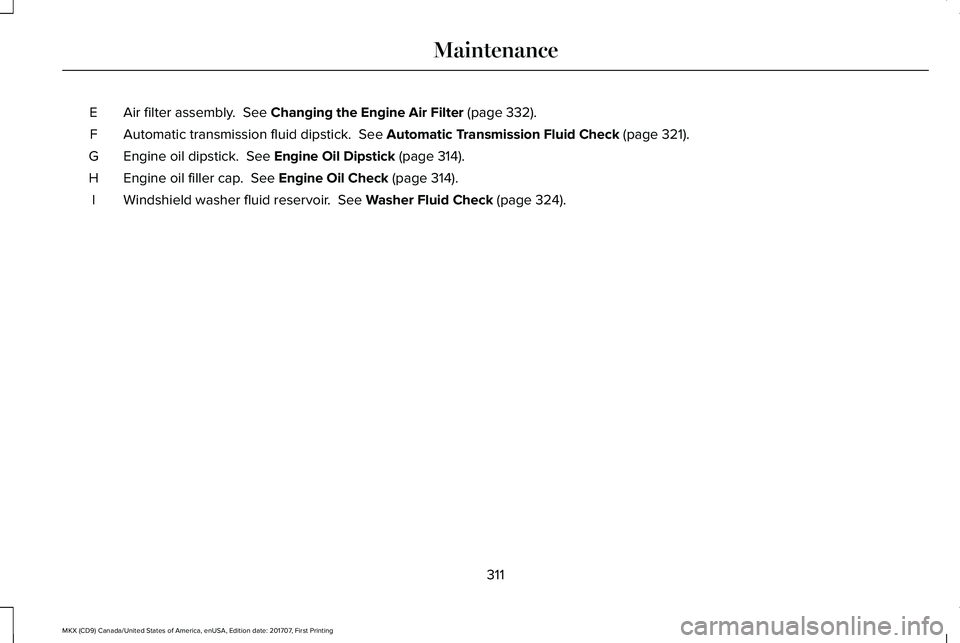
Air filter assembly. See Changing the Engine Air Filter (page 332).E
Automatic transmission fluid dipstick. See Automatic Transmission Fluid Check (page 321).F
Engine oil dipstick. See Engine Oil Dipstick (page 314).G
Engine oil filler cap. See Engine Oil Check (page 314).H
Windshield washer fluid reservoir. See Washer Fluid Check (page 324).I
311
MKX (CD9) Canada/United States of America, enUSA, Edition date: 201707, First Printing
Maintenance
Page 316 of 603
Brake fluid reservoir. See Brake Fluid Check (page 323).D.
Battery. See Changing the 12V Battery (page 324).E.
Engine compartment fuse box. See Fuses (page 288).F.
Air filter assembly. See Changing the Engine Air Filter (page 332).G.
Automatic transmission dipstick. See Automatic Transmission Fluid Check (page 321).H.
Washer fluid reservoir. See Washer Fluid Check (page 324).I.
313
MKX (CD9) Canada/United States of America, enUSA, Edition date: 201707, First Printing
Maintenance
Page 324 of 603
2. Leave the engine running until thecoolant temperature gauge needlereturns to the normal position. Afterseveral minutes, if the temperature doesnot drop, follow the remaining steps.
3. Switch the engine off and wait for it tocool. Check the coolant level.
4. If the coolant level is at or below theminimum mark, add prediluted coolantimmediately.
5. If the coolant level is normal, restart theengine and continue.
AUTOMATIC TRANSMISSION
FLUID CHECK - 2.7L ECOBOOST™/
3.7L
WARNING
Do not use supplemental transmissionfluid additives, treatments or cleaningagents. The use of these materials may affecttransmission operation and result in damageto internal transmission components.
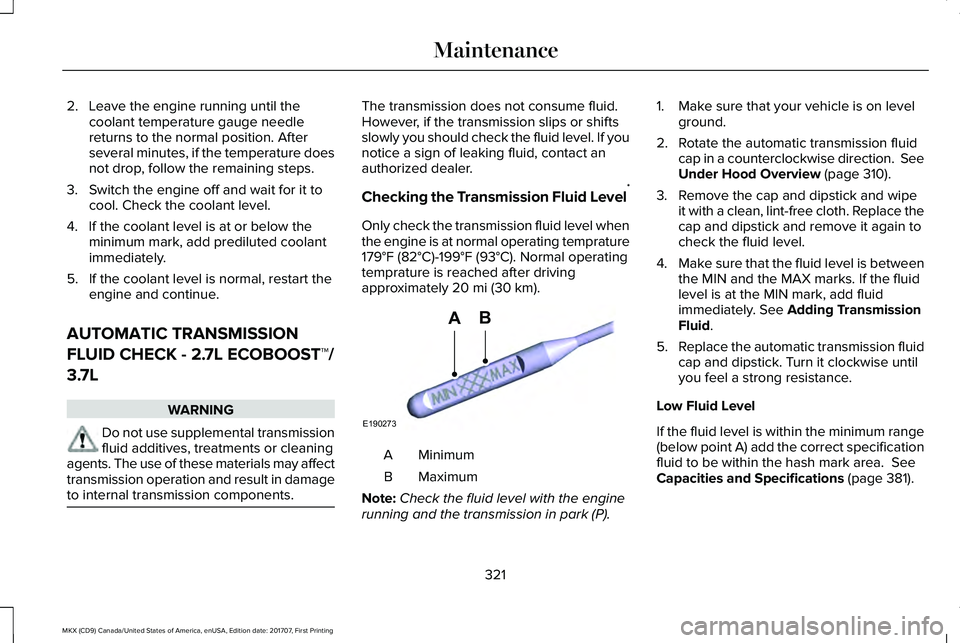
The transmission does not consume fluid.However, if the transmission slips or shiftsslowly you should check the fluid level. If younotice a sign of leaking fluid, contact anauthorized dealer.
Checking the Transmission Fluid Level*
Only check the transmission fluid level whenthe engine is at normal operating temprature179°F (82°C)-199°F (93°C). Normal operatingtemprature is reached after drivingapproximately 20 mi (30 km).
MinimumA
MaximumB
Note:Check the fluid level with the enginerunning and the transmission in park (P).
1. Make sure that your vehicle is on levelground.
2. Rotate the automatic transmission fluidcap in a counterclockwise direction. SeeUnder Hood Overview (page 310).
3. Remove the cap and dipstick and wipeit with a clean, lint-free cloth. Replace thecap and dipstick and remove it again tocheck the fluid level.
4.Make sure that the fluid level is betweenthe MIN and the MAX marks. If the fluidlevel is at the MIN mark, add fluidimmediately. See Adding TransmissionFluid.
5.Replace the automatic transmission fluidcap and dipstick. Turn it clockwise untilyou feel a strong resistance.
Low Fluid Level
If the fluid level is within the minimum range(below point A) add the correct specificationfluid to be within the hash mark area. SeeCapacities and Specifications (page 381).
321
MKX (CD9) Canada/United States of America, enUSA, Edition date: 201707, First Printing
MaintenanceE190273
AB