instrument cluster LINCOLN MKX 2018 Owner's Manual
[x] Cancel search | Manufacturer: LINCOLN, Model Year: 2018, Model line: MKX, Model: LINCOLN MKX 2018Pages: 603, PDF Size: 4.94 MB
Page 273 of 603
If the process is completes successfully:
•the N on the push-button transmissionblinks slowly
•Neutral Tow Engaged turn ignition offfor towing appears in the informationdisplay.
Note:If the parking brake is applied, NeutralTow remove park brake for towing appearsin the information display.
Note:Do not exceed 65 mph (105 km/h).
Note:Start the engine and allow it to run forfive minutes at the beginning of each dayand every six hours (or fewer). Shut theengine off and verify that Neutral towengaged appears in the display beforecontinuing to tow.
Exit Neutral Tow mode, make sure theignition is on (engine can be on or off ), pressthe brake pedal and select P on thepush-button transmission.
If the process is completed successfully,Neutral Tow disengaged appears in theinformation display and both the instrumentcluster and push-button transmission displayP.
270
MKX (CD9) Canada/United States of America, enUSA, Edition date: 201707, First Printing
Towing
Page 319 of 603
From the main menu scroll to:
Action and descriptionMessage
Press the right arrow button,then from this menu scroll tothe following message.
Settings
Press the right arrow button,then from this menu scroll tothe following message.
Vehicle
Press the right arrow button,then from this menu scroll tothe following message.
Oil Life
Press and hold the OK buttonuntil the instrument clusterdisplays the followingmessage.
Hold OK toReset
Reset Successful
When the oil change indicatorresets the instrument clusterdisplays 100%.
Remaining Life
{00}%
Action and descriptionMessage
If the instrument clusterdisplays one of the followingmessages, repeat theprocess.
Not Reset
Reset Cancelled
ENGINE COOLANT CHECK
WARNINGS
Never remove the coolant reservoircap when the engine is running or hot.
Do not put coolant in the windshieldwasher reservoir. If sprayed on thewindshield, coolant could make it difficult tosee through the windshield.
To reduce the risk of personal injury,make sure the engine is cool beforeunscrewing the coolant pressure relief cap.The cooling system is under pressure. Steamand hot liquid can come out forcefully whenyou loosen the cap slightly.
WARNINGS
Do not add coolant further than theMAX mark.
When the engine is cold, check theconcentration and level of the coolant at theintervals listed in the scheduled maintenanceinformation. See Scheduled Maintenance(page 517).
Note:Make sure that the coolant level isbetween the MIN and MAX marks on thecoolant reservoir.
Note: Coolant expands when it is hot. Thelevel may extend beyond the MAX mark.
Maintain coolant concentration within 48%to 50%, which equates to a freeze pointbetween -29°F (-34°C) and -35°F (-37°C).Coolant concentration should be checkedusing a refractometer. We do not recommendthe use of hydrometers or coolant test stripsfor measuring coolant concentration.
316
MKX (CD9) Canada/United States of America, enUSA, Edition date: 201707, First Printing
Maintenance
Page 341 of 603
Cleaning ProcedureType of Stain
Use lukewarm water and rinse by dabbing with clean water.Indelible pencil, cocoa, chocolate, pastry with cream or chocolate, icecream or mustard.
Use lemon juice, wipe with lukewarm water and rinse by dabbing withclean water.Vinegar, hair gel, tomato sauce or coffee with sugar.
Use ethyl alcohol, then dab with water.Dye transfer and all other stains.
CLEANING THE INSTRUMENT
PANEL AND INSTRUMENT
CLUSTER LENS
WARNING
Do not use chemical solvents or strongdetergents when cleaning the steeringwheel or instrument panel to avoidcontamination of the airbag system.
Note:Follow the same procedure ascleaning leather seats for cleaning leatherinstrument panels and leather interior trimsurfaces. See Cleaning Leather Seats (page339).
Clean the instrument panel and cluster lenswith a clean, damp and soft cloth, then usea clean, dry and soft cloth to dry these areas.
•Avoid cleaners or polishes that increasethe gloss of the upper portion of theinstrument panel. The dull finish in thisarea helps protect you from undesirablewindshield reflection.
•Do not use any household cleaningproducts or glass cleaners as these maydamage the finish of the instrumentpanel, interior trim and cluster lens.
•Wash or wipe your hands clean if youhave been in contact with certainproducts such as insect repellent andsuntan lotion to avoid possible damageto the interior painted surfaces.
•Do not allow air fresheners and handsanitizers to spill onto interior surfaces.If a spill occurs, wipe off immediately.Your warranty may not cover thesedamages.
If a staining liquid like coffee or juice hasbeen spilled on the instrument panel or oninterior trim surfaces:
1.Wipe up spilled liquid using a clean, softcloth as quickly as possible.
338
MKX (CD9) Canada/United States of America, enUSA, Edition date: 201707, First Printing
Vehicle Care
Page 513 of 603
General
Possible solutionPossible causeIssue
SYNC 3 only supports four languages in a single module for textdisplay, voice control and voice prompts. The country where youbought your vehicle dictates the four languages based on the mostpopular languages spoken. If the selected language is not available,SYNC 3 remains in the current active language.SYNC 3 does not support the currentlyselected language for the instrumentcluster and information and entertainmentdisplay.
The language selected forthe instrument cluster andinformation and entertain-ment display does notmatch the SYNC 3language (phone, USB,Bluetooth audio, voicecontrol and voice prompts).
SYNC 3 offers several new voice control features for a wide range oflanguages. Dialing a contact name directly from the phonebookwithout pre-recording (for example, “call John Smith”) or selecting atrack, artist, album, genre or playlist directly from your media player(for example, "play artist Madonna").
SYNC 3 System Reset
The system has a System Reset feature that can be performed if the function of a SYNC 3 feature is lost. This reset is intended to restorefunctionality and will not erase any information previously stored in the system (such as paired devices, phonebook, call history, textmessages, or user settings). To perform a System Reset, press and hold the Seek Up (>>|) button while pressing and holding the RadioPower button. After approximately 5 seconds the screen will go black. Allow 1-2 minutes for the system reset to complete. You may thenresume using the SYNC 3 system.
510
MKX (CD9) Canada/United States of America, enUSA, Edition date: 201707, First Printing
SYNC™ 3
Page 594 of 603
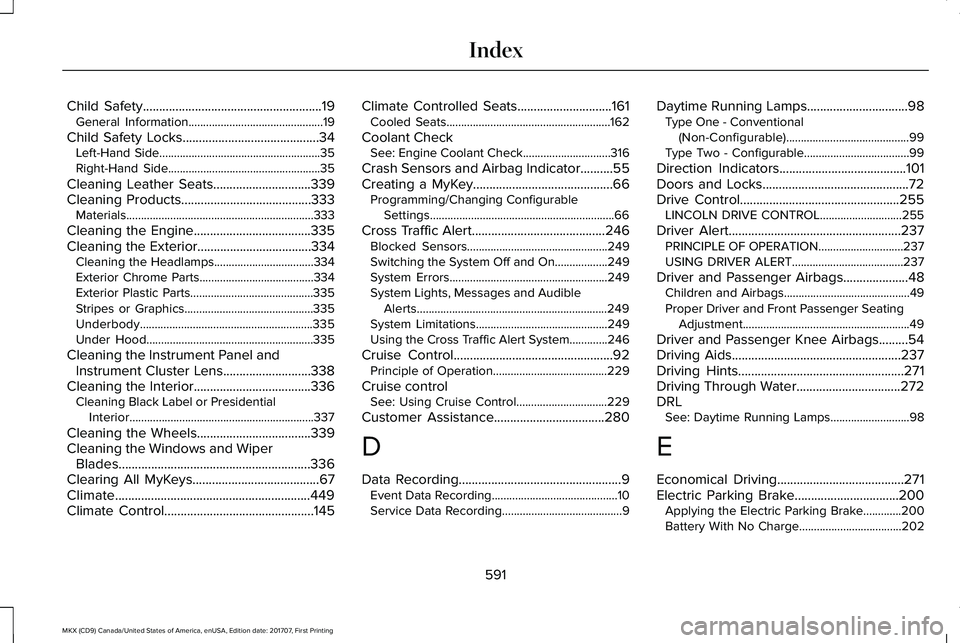
Child Safety.......................................................19General Information..............................................19
Child Safety Locks..........................................34Left-Hand Side.......................................................35Right-Hand Side....................................................35
Cleaning Leather Seats..............................339Cleaning Products........................................333Materials................................................................333
Cleaning the Engine....................................335Cleaning the Exterior...................................334Cleaning the Headlamps..................................334Exterior Chrome Parts.......................................334Exterior Plastic Parts..........................................335Stripes or Graphics............................................335Underbody...........................................................335Under Hood.........................................................335
Cleaning the Instrument Panel andInstrument Cluster Lens...........................338Cleaning the Interior....................................336Cleaning Black Label or PresidentialInterior...............................................................337
Cleaning the Wheels...................................339Cleaning the Windows and WiperBlades...........................................................336Clearing All MyKeys.......................................67Climate............................................................449Climate Control..............................................145
Climate Controlled Seats.............................161Cooled Seats........................................................162
Coolant CheckSee: Engine Coolant Check..............................316
Crash Sensors and Airbag Indicator..........55Creating a MyKey...........................................66Programming/Changing ConfigurableSettings...............................................................66
Cross Traffic Alert.........................................246Blocked Sensors................................................249Switching the System Off and On..................249System Errors......................................................249System Lights, Messages and AudibleAlerts.................................................................249System Limitations.............................................249Using the Cross Traffic Alert System.............246
Cruise Control.................................................92Principle of Operation.......................................229
Cruise controlSee: Using Cruise Control...............................229
Customer Assistance..................................280
D
Data Recording..................................................9Event Data Recording...........................................10Service Data Recording.........................................9
Daytime Running Lamps...............................98Type One - Conventional(Non-Configurable)..........................................99Type Two - Configurable....................................99
Direction Indicators.......................................101Doors and Locks.............................................72Drive Control.................................................255LINCOLN DRIVE CONTROL............................255
Driver Alert.....................................................237PRINCIPLE OF OPERATION.............................237USING DRIVER ALERT......................................237
Driver and Passenger Airbags....................48Children and Airbags...........................................49Proper Driver and Front Passenger SeatingAdjustment.........................................................49
Driver and Passenger Knee Airbags.........54Driving Aids....................................................237Driving Hints...................................................271Driving Through Water................................272DRLSee: Daytime Running Lamps...........................98
E
Economical Driving.......................................271Electric Parking Brake................................200Applying the Electric Parking Brake.............200Battery With No Charge...................................202
591
MKX (CD9) Canada/United States of America, enUSA, Edition date: 201707, First Printing
Index
Page 597 of 603
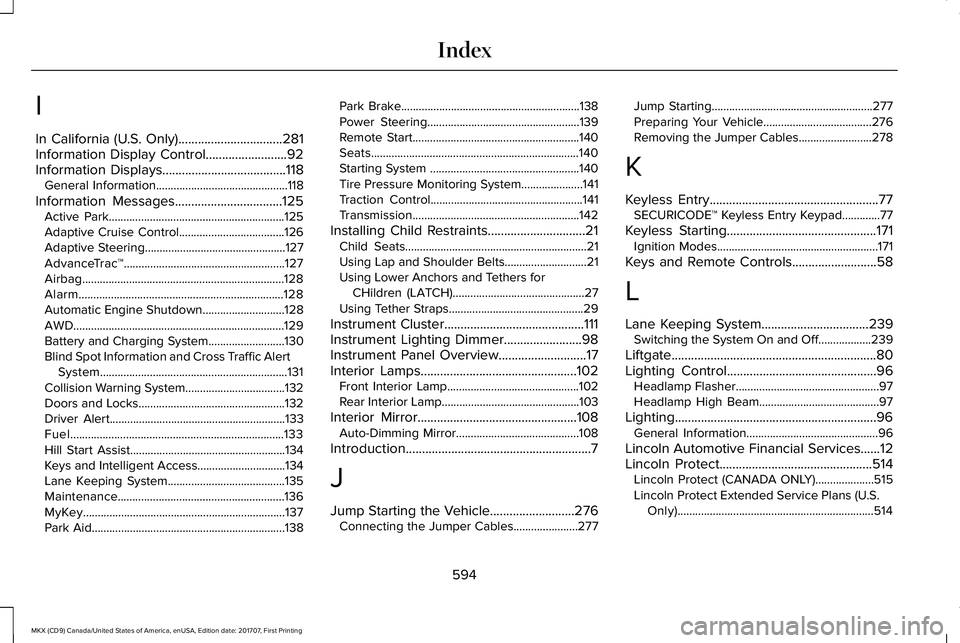
I
In California (U.S. Only)................................281Information Display Control.........................92Information Displays......................................118General Information.............................................118
Information Messages.................................125Active Park............................................................125Adaptive Cruise Control....................................126Adaptive Steering................................................127AdvanceTrac™.......................................................127Airbag.....................................................................128Alarm......................................................................128Automatic Engine Shutdown............................128AWD........................................................................129Battery and Charging System..........................130Blind Spot Information and Cross Traffic AlertSystem................................................................131Collision Warning System..................................132Doors and Locks..................................................132Driver Alert............................................................133Fuel.........................................................................133Hill Start Assist.....................................................134Keys and Intelligent Access..............................134Lane Keeping System........................................135Maintenance.........................................................136MyKey.....................................................................137Park Aid..................................................................138
Park Brake.............................................................138Power Steering....................................................139Remote Start.........................................................140Seats.......................................................................140Starting System ...................................................140Tire Pressure Monitoring System.....................141Traction Control....................................................141Transmission.........................................................142
Installing Child Restraints..............................21Child Seats..............................................................21Using Lap and Shoulder Belts............................21Using Lower Anchors and Tethers forCHildren (LATCH).............................................27Using Tether Straps..............................................29
Instrument Cluster...........................................111Instrument Lighting Dimmer........................98Instrument Panel Overview...........................17Interior Lamps................................................102Front Interior Lamp.............................................102Rear Interior Lamp...............................................103
Interior Mirror.................................................108Auto-Dimming Mirror..........................................108
Introduction.........................................................7
J
Jump Starting the Vehicle..........................276Connecting the Jumper Cables......................277
Jump Starting.......................................................277Preparing Your Vehicle.....................................276Removing the Jumper Cables.........................278
K
Keyless Entry....................................................77SECURICODE™ Keyless Entry Keypad.............77
Keyless Starting..............................................171Ignition Modes.......................................................171
Keys and Remote Controls..........................58
L
Lane Keeping System.................................239Switching the System On and Off..................239
Liftgate...............................................................80Lighting Control..............................................96Headlamp Flasher.................................................97Headlamp High Beam.........................................97
Lighting..............................................................96General Information.............................................96
Lincoln Automotive Financial Services......12Lincoln Protect...............................................514Lincoln Protect (CANADA ONLY)....................515Lincoln Protect Extended Service Plans (U.S.Only)...................................................................514
594
MKX (CD9) Canada/United States of America, enUSA, Edition date: 201707, First Printing
Index