transmission LINCOLN MKX 2018 Service Manual
[x] Cancel search | Manufacturer: LINCOLN, Model Year: 2018, Model line: MKX, Model: LINCOLN MKX 2018Pages: 603, PDF Size: 4.94 MB
Page 226 of 603
REAR VIEW CAMERA
WARNINGS
The rear view camera system is areverse aid supplement device that stillrequires the driver to use it in conjunctionwith the interior and exterior mirrors formaximum coverage.
Objects that are close to either cornerof the bumper or under the bumper,might not be seen on the screen due to thelimited coverage of the camera system.
Reverse your vehicle as slow aspossible, higher speeds may limit yourreaction time to stop your vehicle.
Use caution when the rear cargo dooris ajar. If the rear cargo door is ajar, thecamera will be out of position and the videoimage may be incorrect. All guidelinesdisappear when the rear cargo door is ajar.Some vehicles may not come equipped withguidelines.
WARNINGS
Use caution when turning camerafeatures on or off when thetransmission is not in park (P). Make sureyour vehicle is not moving.
The rear view camera system provides avideo image of the area behind your vehicle.
During operation, lines appear in the displaywhich represent your vehicle’s path andproximity to objects behind your vehicle.
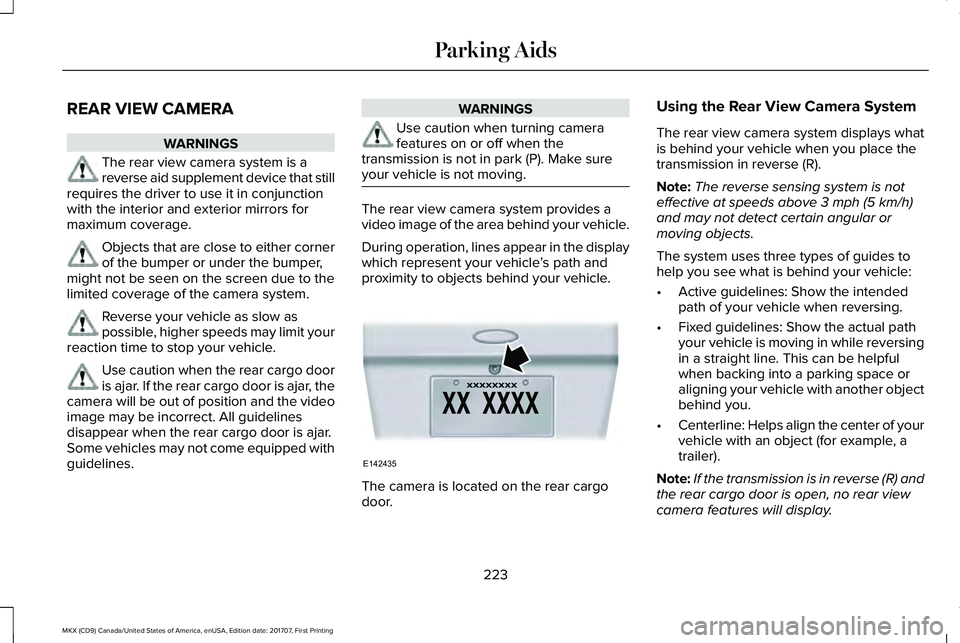
The camera is located on the rear cargodoor.
Using the Rear View Camera System
The rear view camera system displays whatis behind your vehicle when you place thetransmission in reverse (R).
Note:The reverse sensing system is noteffective at speeds above 3 mph (5 km/h)and may not detect certain angular ormoving objects.
The system uses three types of guides tohelp you see what is behind your vehicle:
•Active guidelines: Show the intendedpath of your vehicle when reversing.
•Fixed guidelines: Show the actual pathyour vehicle is moving in while reversingin a straight line. This can be helpfulwhen backing into a parking space oraligning your vehicle with another objectbehind you.
•Centerline: Helps align the center of yourvehicle with an object (for example, atrailer).
Note:If the transmission is in reverse (R) andthe rear cargo door is open, no rear viewcamera features will display.
223
MKX (CD9) Canada/United States of America, enUSA, Edition date: 201707, First Printing
Parking AidsE142435
Page 227 of 603
Note:When towing, the camera only seeswhat you are towing. This might not provideadequate coverage as it usually provides innormal operation and some objects mightnot be seen. In some vehicles, the guidelinesmay disappear when you connect the trailertow connector.
The camera may not operate correctly underthe following conditions:
•Nighttime or dark areas if one or bothreverse lamps are not operating.
•Mud, water or debris obstructs thecamera's view. Clean the lens with a soft,lint-free cloth and non-abrasive cleaner.
•The rear of your vehicle is hit ordamaged, causing the camera to becomemisaligned.
Camera System Settings
You can access the rear view camera systemsettings through the display screen. SeeGeneral Information (page 118).
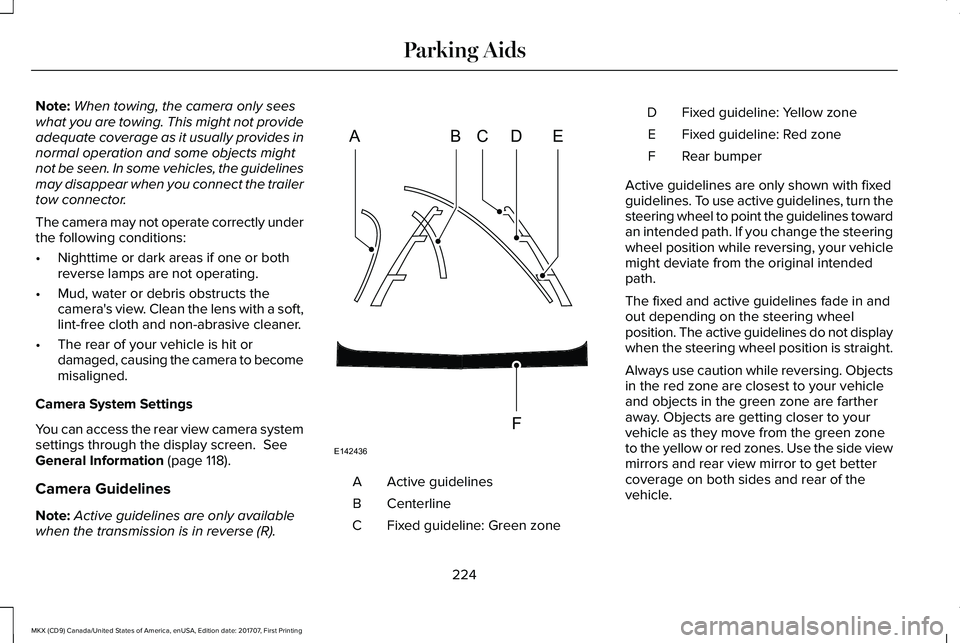
Camera Guidelines
Note:Active guidelines are only availablewhen the transmission is in reverse (R).
Active guidelinesA
CenterlineB
Fixed guideline: Green zoneC
Fixed guideline: Yellow zoneD
Fixed guideline: Red zoneE
Rear bumperF
Active guidelines are only shown with fixedguidelines. To use active guidelines, turn thesteering wheel to point the guidelines towardan intended path. If you change the steeringwheel position while reversing, your vehiclemight deviate from the original intendedpath.
The fixed and active guidelines fade in andout depending on the steering wheelposition. The active guidelines do not displaywhen the steering wheel position is straight.
Always use caution while reversing. Objectsin the red zone are closest to your vehicleand objects in the green zone are fartheraway. Objects are getting closer to yourvehicle as they move from the green zoneto the yellow or red zones. Use the side viewmirrors and rear view mirror to get bettercoverage on both sides and rear of thevehicle.
224
MKX (CD9) Canada/United States of America, enUSA, Edition date: 201707, First Printing
Parking AidsABCD
F
E
E142436
Page 228 of 603
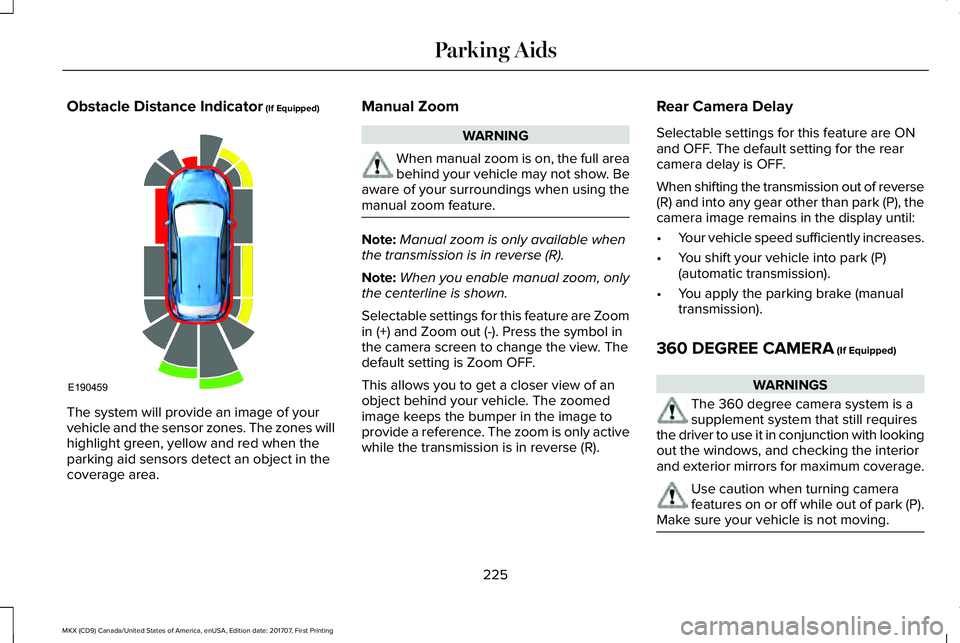
Obstacle Distance Indicator (If Equipped)
The system will provide an image of yourvehicle and the sensor zones. The zones willhighlight green, yellow and red when theparking aid sensors detect an object in thecoverage area.
Manual Zoom
WARNING
When manual zoom is on, the full areabehind your vehicle may not show. Beaware of your surroundings when using themanual zoom feature.
Note:Manual zoom is only available whenthe transmission is in reverse (R).
Note:When you enable manual zoom, onlythe centerline is shown.
Selectable settings for this feature are Zoomin (+) and Zoom out (-). Press the symbol inthe camera screen to change the view. Thedefault setting is Zoom OFF.
This allows you to get a closer view of anobject behind your vehicle. The zoomedimage keeps the bumper in the image toprovide a reference. The zoom is only activewhile the transmission is in reverse (R).
Rear Camera Delay
Selectable settings for this feature are ONand OFF. The default setting for the rearcamera delay is OFF.
When shifting the transmission out of reverse(R) and into any gear other than park (P), thecamera image remains in the display until:
•Your vehicle speed sufficiently increases.
•You shift your vehicle into park (P)(automatic transmission).
•You apply the parking brake (manualtransmission).
360 DEGREE CAMERA (If Equipped)
WARNINGS
The 360 degree camera system is asupplement system that still requiresthe driver to use it in conjunction with lookingout the windows, and checking the interiorand exterior mirrors for maximum coverage.
Use caution when turning camerafeatures on or off while out of park (P).Make sure your vehicle is not moving.
225
MKX (CD9) Canada/United States of America, enUSA, Edition date: 201707, First Printing
Parking AidsE190459
Page 230 of 603
•Rear Normal View: Provides an imageof what is directly behind your vehicle.Access this view by pressing the camerabutton from the Rear 360 + Normalscreen.
•Rear Split View: Provides an extendedview of what is behind your vehicle.Access this view by pressing the camerabutton from the Rear Normal Viewscreen.
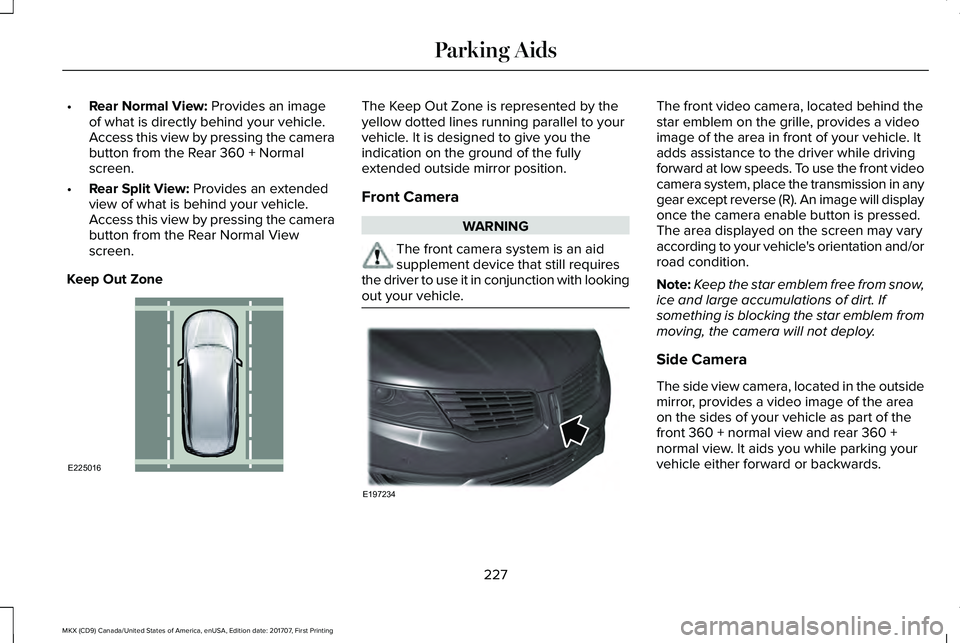
Keep Out Zone
The Keep Out Zone is represented by theyellow dotted lines running parallel to yourvehicle. It is designed to give you theindication on the ground of the fullyextended outside mirror position.
Front Camera
WARNING
The front camera system is an aidsupplement device that still requiresthe driver to use it in conjunction with lookingout your vehicle.
The front video camera, located behind thestar emblem on the grille, provides a videoimage of the area in front of your vehicle. Itadds assistance to the driver while drivingforward at low speeds. To use the front videocamera system, place the transmission in anygear except reverse (R). An image will displayonce the camera enable button is pressed.The area displayed on the screen may varyaccording to your vehicle's orientation and/orroad condition.
Note:Keep the star emblem free from snow,ice and large accumulations of dirt. Ifsomething is blocking the star emblem frommoving, the camera will not deploy.
Side Camera
The side view camera, located in the outsidemirror, provides a video image of the areaon the sides of your vehicle as part of thefront 360 + normal view and rear 360 +normal view. It aids you while parking yourvehicle either forward or backwards.
227
MKX (CD9) Canada/United States of America, enUSA, Edition date: 201707, First Printing
Parking AidsE225016 E197234
Page 247 of 603
BLIND SPOT INFORMATION
SYSTEM
WARNINGS
Do not use the blind spot informationsystem as a replacement for using theinterior and exterior mirrors or looking overyour shoulder before changing lanes. Theblind spot information system is not areplacement for careful driving.
The system may not operate properlyduring severe weather conditions, forexample snow, ice, heavy rain and spray.Always drive with due care and attention.Failure to take care may result in a crash.
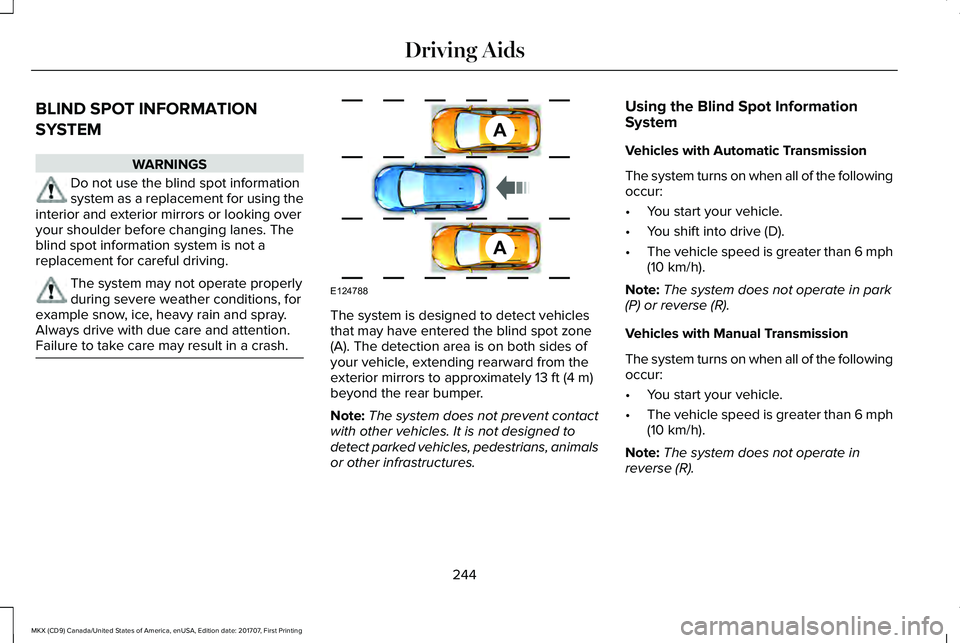
The system is designed to detect vehiclesthat may have entered the blind spot zone(A). The detection area is on both sides ofyour vehicle, extending rearward from theexterior mirrors to approximately 13 ft (4 m)beyond the rear bumper.
Note:The system does not prevent contactwith other vehicles. It is not designed todetect parked vehicles, pedestrians, animalsor other infrastructures.
Using the Blind Spot InformationSystem
Vehicles with Automatic Transmission
The system turns on when all of the followingoccur:
•You start your vehicle.
•You shift into drive (D).
•The vehicle speed is greater than 6 mph(10 km/h).
Note:The system does not operate in park(P) or reverse (R).
Vehicles with Manual Transmission
The system turns on when all of the followingoccur:
•You start your vehicle.
•The vehicle speed is greater than 6 mph(10 km/h).
Note:The system does not operate inreverse (R).
244
MKX (CD9) Canada/United States of America, enUSA, Edition date: 201707, First Printing
Driving AidsA
A
E124788
Page 264 of 603
GAWR (Gross Axle Weight Rating)
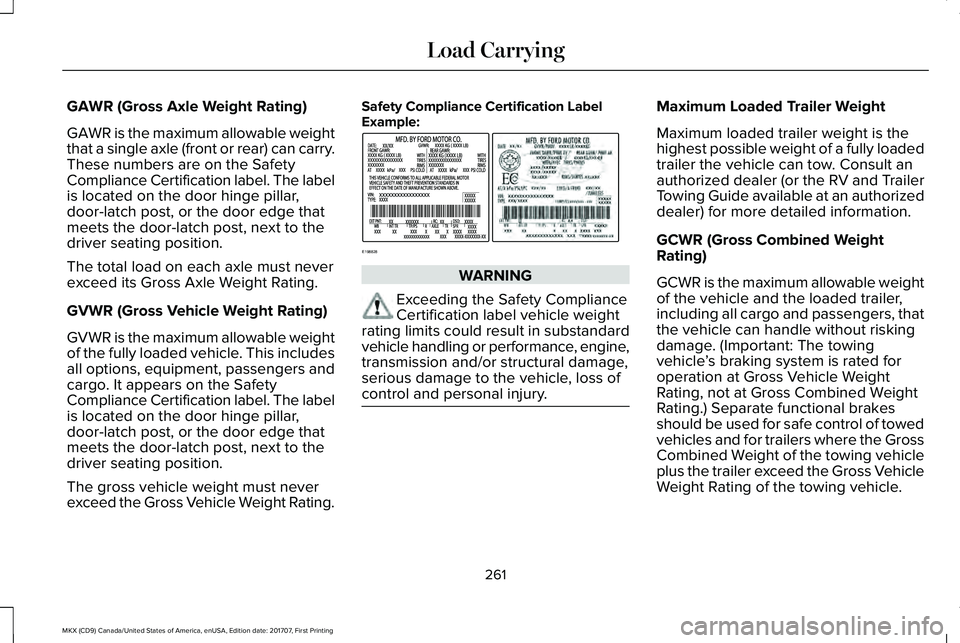
GAWR is the maximum allowable weightthat a single axle (front or rear) can carry.These numbers are on the SafetyCompliance Certification label. The labelis located on the door hinge pillar,door-latch post, or the door edge thatmeets the door-latch post, next to thedriver seating position.
The total load on each axle must neverexceed its Gross Axle Weight Rating.
GVWR (Gross Vehicle Weight Rating)
GVWR is the maximum allowable weightof the fully loaded vehicle. This includesall options, equipment, passengers andcargo. It appears on the SafetyCompliance Certification label. The labelis located on the door hinge pillar,door-latch post, or the door edge thatmeets the door-latch post, next to thedriver seating position.
The gross vehicle weight must neverexceed the Gross Vehicle Weight Rating.
Safety Compliance Certification LabelExample:
WARNING
Exceeding the Safety ComplianceCertification label vehicle weightrating limits could result in substandardvehicle handling or performance, engine,transmission and/or structural damage,serious damage to the vehicle, loss ofcontrol and personal injury.
Maximum Loaded Trailer Weight
Maximum loaded trailer weight is thehighest possible weight of a fully loadedtrailer the vehicle can tow. Consult anauthorized dealer (or the RV and TrailerTowing Guide available at an authorizeddealer) for more detailed information.
GCWR (Gross Combined WeightRating)
GCWR is the maximum allowable weightof the vehicle and the loaded trailer,including all cargo and passengers, thatthe vehicle can handle without riskingdamage. (Important: The towingvehicle’s braking system is rated foroperation at Gross Vehicle WeightRating, not at Gross Combined WeightRating.) Separate functional brakesshould be used for safe control of towedvehicles and for trailers where the GrossCombined Weight of the towing vehicleplus the trailer exceed the Gross VehicleWeight Rating of the towing vehicle.
261
MKX (CD9) Canada/United States of America, enUSA, Edition date: 201707, First Printing
Load CarryingE198828
Page 267 of 603
TOWING A TRAILER
WARNINGS
Do not exceed the GVWR or theGAWR specified on the certificationlabel.
Towing trailers beyond themaximum recommended grosstrailer weight exceeds the limit of yourvehicle and could result in enginedamage, transmission damage,structural damage, loss of vehiclecontrol, vehicle rollover and personalinjury.
Note:Your vehicle may have electricalitems, such as fuses or relays, related
to towing. See Fuses (page 288).
Your vehicle's load capacity designationis by weight, not by volume, so youcannot necessarily use all availablespace when loading a vehicle or trailer.
Towing a trailer places an extra load onyour vehicle's engine, transmission, axle,brakes, tires and suspension. Inspectthese components periodically during,and after, any towing operation.
Load Placement
To help minimize how trailer movementaffects your vehicle when driving:
•Load the heaviest items closest tothe trailer floor.
•Load the heaviest items centeredbetween the left and right side trailertires.
•Load the heaviest items above thetrailer axles or just slightly forwardtoward the trailer tongue. Do notallow the final trailer tongue weightto go above or below 10-15% of theloaded trailer weight.
•Select a ball mount with the correctrise or drop. When both the loadedvehicle and trailer are connected, thetrailer frame should be level, orslightly angled down toward yourvehicle, when viewed from the side.
When driving with a trailer or payload, aslight takeoff vibration or shudder maybe present due to the increased payloadweight. Additional information regardingproper trailer loading and setting yourvehicle up for towing is located in theLoad Carrying chapter. See Load Limit(page 259).
You can also find information in the RV& Trailer Towing Guide available at yourauthorized dealer, or online.
264
MKX (CD9) Canada/United States of America, enUSA, Edition date: 201707, First Printing
Towing
Page 271 of 603
Trailer lamps are required on most towedvehicles. Make sure all running lights, brakelights, turn signals and hazard lights areworking.
Before Towing a Trailer
Practice turning, stopping and backing up toget the feel of your vehicle-trailercombination before starting on a trip. Whenturning, make wider turns so the trailerwheels clear curbs and other obstacles.
When Towing a Trailer
•Do not drive faster than 70 mph(113 km/h) during the first 500 mi(800 km).
•Do not make full-throttle starts.
•Check your hitch, electrical connectionsand trailer wheel lug nuts thoroughly afteryou have traveled 50 miles (80kilometers).
•When stopped in congested or heavytraffic during hot weather, place thegearshift in position P to aid engine andtransmission cooling and to help A/Cperformance.
•Turn off the speed control with heavyloads or in hilly terrain. The speed controlmay turn off automatically when you aretowing on long, steep grades.
•Shift to a lower gear when driving downa long or steep hill. Do not apply thebrakes continuously, as they mayoverheat and become less effective.
•If your transmission is equipped with aGrade Assist or Tow/Haul feature, usethis feature when towing. This providesengine braking and helps eliminateexcessive transmission shifting foroptimum fuel economy and transmissioncooling.
•Allow more distance for stopping with atrailer attached. Anticipate stops andbrake gradually.
•Avoid parking on a grade. However, ifyou must park on a grade:
1. Turn the steering wheel to point yourvehicle tires away from traffic flow.
2. Set your vehicle parking brake.
3. Place the automatic transmission inposition P.
4. Place wheel chocks in front and back ofthe trailer wheels. (Chocks not includedwith vehicle.)
Launching or Retrieving a Boat orPersonal Watercraft (PWC)
Note:Disconnect the wiring to the trailerbefore backing the trailer into the water.
Note:Reconnect the wiring to the trailerafter removing the trailer from the water.
When backing down a ramp during boatlaunching or retrieval:
•Do not allow the static water level to riseabove the bottom edge of the rearbumper.
•Do not allow waves to break higher than6 in (15 cm) above the bottom edge ofthe rear bumper.
Exceeding these limits may allow water toenter vehicle components:
•Causing internal damage to thecomponents.
•Affecting driveability, emissions, andreliability.
268
MKX (CD9) Canada/United States of America, enUSA, Edition date: 201707, First Printing
Towing
Page 272 of 603
Replace the rear axle lubricant anytime yousubmerge the rear axle in water. Water maycontaminate the rear axle lubricant, which isnot a normal maintenance inspection itemunless there is a possibility of a leak or otheraxle repair is required.
TOWING THE VEHICLE ON FOUR
WHEELS
Emergency Towing
You can flat-tow (all wheels on the ground,regardless of the powertrain/transmissionconfiguration) your disabled vehicle (withoutaccess to wheel dollies, car-hauling trailer,or flatbed transport vehicle) under thefollowing conditions:
•Your vehicle is facing forward so you towit in a forward direction.
•You place the transmission in position N.If you cannot place the transmission inposition N, you may need to override it.See Transmission (page 188).
•Maximum speed is 35 mph (56 km/h).
•Maximum distance is 50 miles (80kilometers).
Recreational Towing
Note: Put your climate control system inrecirculated air mode to prevent exhaustfumes from entering the vehicle. SeeClimate Control (page 145).
Follow these guidelines if you have a needfor recreational (RV) towing. An example ofrecreational towing would be towing yourvehicle behind a motorhome. Theseguidelines are to make sure you do notdamage the transmission during towing.
You can tow your vehicle with all four wheelson the ground using the Neutral Tow feature,or with all four wheels off the ground usinga vehicle transport trailer. If you are using avehicle transport trailer, follow the instructionspecified by the equipment provider.
Neutral Tow
If you tow your vehicle with all four wheelson the ground:
•Tow only in the forward direction.
•Release the parking brake.
Enter Neutral Tow mode by doing thefollowing:
1. Put the ignition in accessory mode bypressing the engine START buttonwithout pressing the brake pedal.
2. Select Neutral Tow under the VehicleSettings menu in the information display.See General Information (page 118).
3.Press and hold the OK button to start theneutral tow process.
4. Press the brake pedal and select N onthe push-button transmission.
5. Turn the ignition off by pressing theengine START button without pressingthe brake pedal.
269
MKX (CD9) Canada/United States of America, enUSA, Edition date: 201707, First Printing
Towing
Page 273 of 603
If the process is completes successfully:
•the N on the push-button transmissionblinks slowly
•Neutral Tow Engaged turn ignition offfor towing appears in the informationdisplay.
Note:If the parking brake is applied, NeutralTow remove park brake for towing appearsin the information display.
Note:Do not exceed 65 mph (105 km/h).
Note:Start the engine and allow it to run forfive minutes at the beginning of each dayand every six hours (or fewer). Shut theengine off and verify that Neutral towengaged appears in the display beforecontinuing to tow.
Exit Neutral Tow mode, make sure theignition is on (engine can be on or off ), pressthe brake pedal and select P on thepush-button transmission.
If the process is completed successfully,Neutral Tow disengaged appears in theinformation display and both the instrumentcluster and push-button transmission displayP.
270
MKX (CD9) Canada/United States of America, enUSA, Edition date: 201707, First Printing
Towing