fuel LINCOLN MKX 2018 Repair Manual
[x] Cancel search | Manufacturer: LINCOLN, Model Year: 2018, Model line: MKX, Model: LINCOLN MKX 2018Pages: 603, PDF Size: 4.94 MB
Page 437 of 603
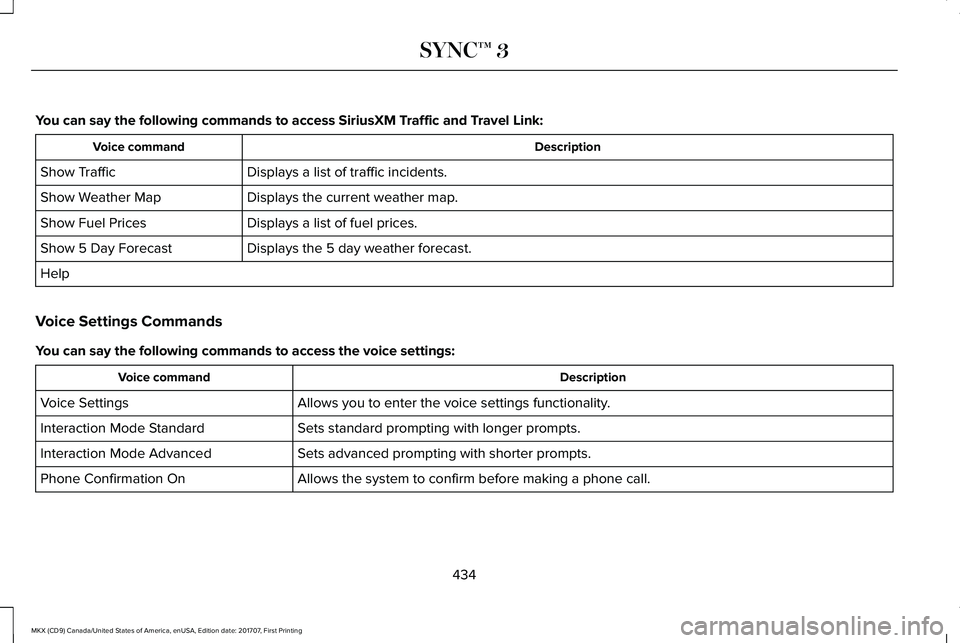
You can say the following commands to access SiriusXM Traffic and Travel Link:
DescriptionVoice command
Displays a list of traffic incidents.Show Traffic
Displays the current weather map.Show Weather Map
Displays a list of fuel prices.Show Fuel Prices
Displays the 5 day weather forecast.Show 5 Day Forecast
Help
Voice Settings Commands
You can say the following commands to access the voice settings:
DescriptionVoice command
Allows you to enter the voice settings functionality.Voice Settings
Sets standard prompting with longer prompts.Interaction Mode Standard
Sets advanced prompting with shorter prompts.Interaction Mode Advanced
Allows the system to confirm before making a phone call.Phone Confirmation On
434
MKX (CD9) Canada/United States of America, enUSA, Edition date: 201707, First Printing
SYNC™ 3
Page 465 of 603
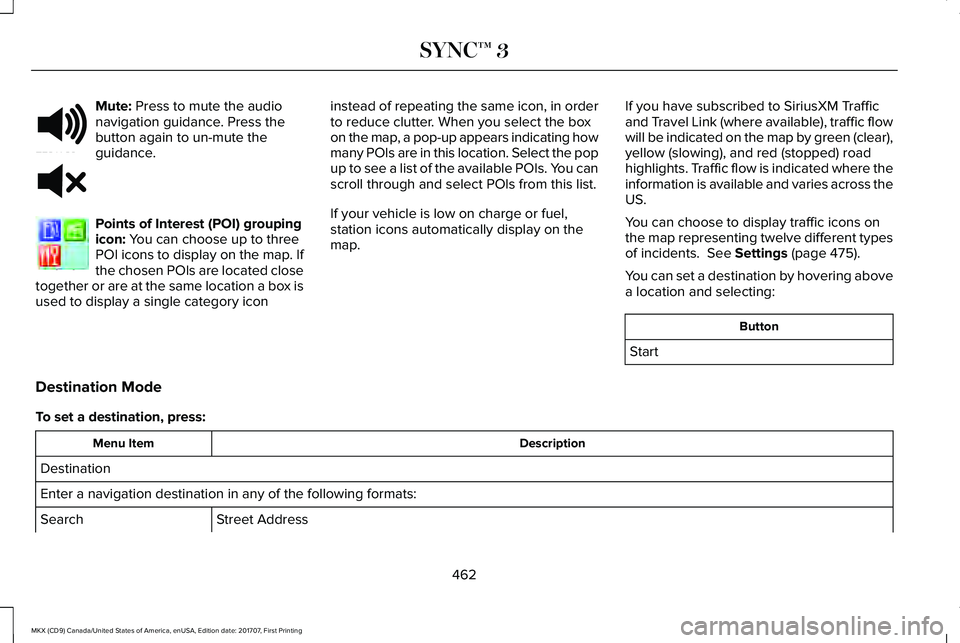
Mute: Press to mute the audionavigation guidance. Press thebutton again to un-mute theguidance.
Points of Interest (POI) groupingicon: You can choose up to threePOI icons to display on the map. Ifthe chosen POIs are located closetogether or are at the same location a box isused to display a single category icon
instead of repeating the same icon, in orderto reduce clutter. When you select the boxon the map, a pop-up appears indicating howmany POIs are in this location. Select the popup to see a list of the available POIs. You canscroll through and select POIs from this list.
If your vehicle is low on charge or fuel,station icons automatically display on themap.
If you have subscribed to SiriusXM Trafficand Travel Link (where available), traffic flowwill be indicated on the map by green (clear),yellow (slowing), and red (stopped) roadhighlights. Traffic flow is indicated where theinformation is available and varies across theUS.
You can choose to display traffic icons onthe map representing twelve different typesof incidents. See Settings (page 475).
You can set a destination by hovering abovea location and selecting:
Button
Start
Destination Mode
To set a destination, press:
DescriptionMenu Item
Destination
Enter a navigation destination in any of the following formats:
Street AddressSearch
462
MKX (CD9) Canada/United States of America, enUSA, Edition date: 201707, First Printing
SYNC™ 3E251780 E251779 E207754
Page 468 of 603
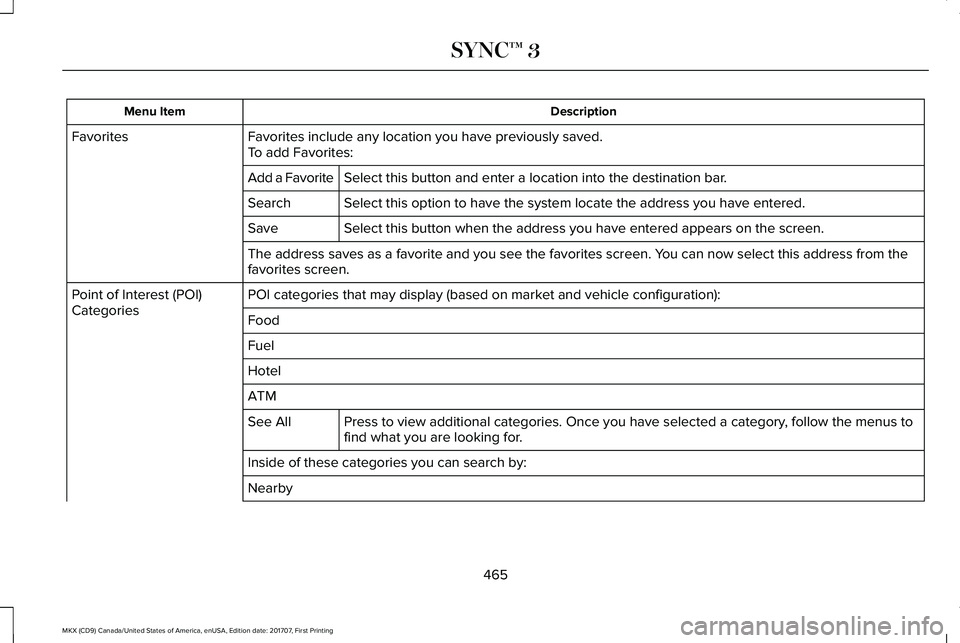
DescriptionMenu Item
Favorites include any location you have previously saved.FavoritesTo add Favorites:
Select this button and enter a location into the destination bar.Add a Favorite
Select this option to have the system locate the address you have entered.Search
Select this button when the address you have entered appears on the screen.Save
The address saves as a favorite and you see the favorites screen. You can now select this address from thefavorites screen.
POI categories that may display (based on market and vehicle configuration):Point of Interest (POI)CategoriesFood
Fuel
Hotel
ATM
Press to view additional categories. Once you have selected a category, follow the menus tofind what you are looking for.See All
Inside of these categories you can search by:
Nearby
465
MKX (CD9) Canada/United States of America, enUSA, Edition date: 201707, First Printing
SYNC™ 3
Page 469 of 603
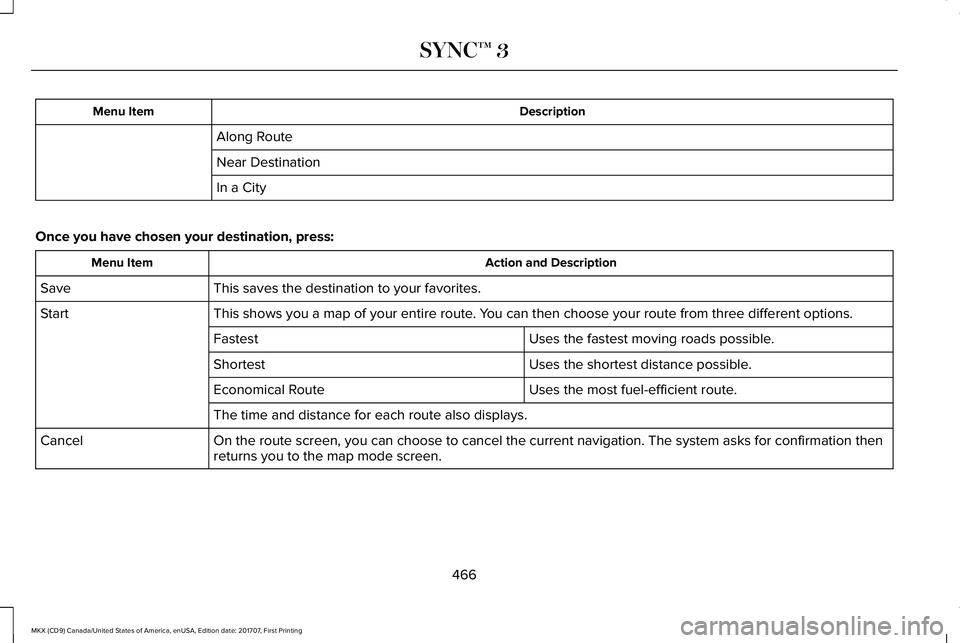
DescriptionMenu Item
Along Route
Near Destination
In a City
Once you have chosen your destination, press:
Action and DescriptionMenu Item
This saves the destination to your favorites.Save
This shows you a map of your entire route. You can then choose your route from three different options.Start
Uses the fastest moving roads possible.Fastest
Uses the shortest distance possible.Shortest
Uses the most fuel-efficient route.Economical Route
The time and distance for each route also displays.
On the route screen, you can choose to cancel the current navigation. The system asks for confirmation thenreturns you to the map mode screen.Cancel
466
MKX (CD9) Canada/United States of America, enUSA, Edition date: 201707, First Printing
SYNC™ 3
Page 471 of 603
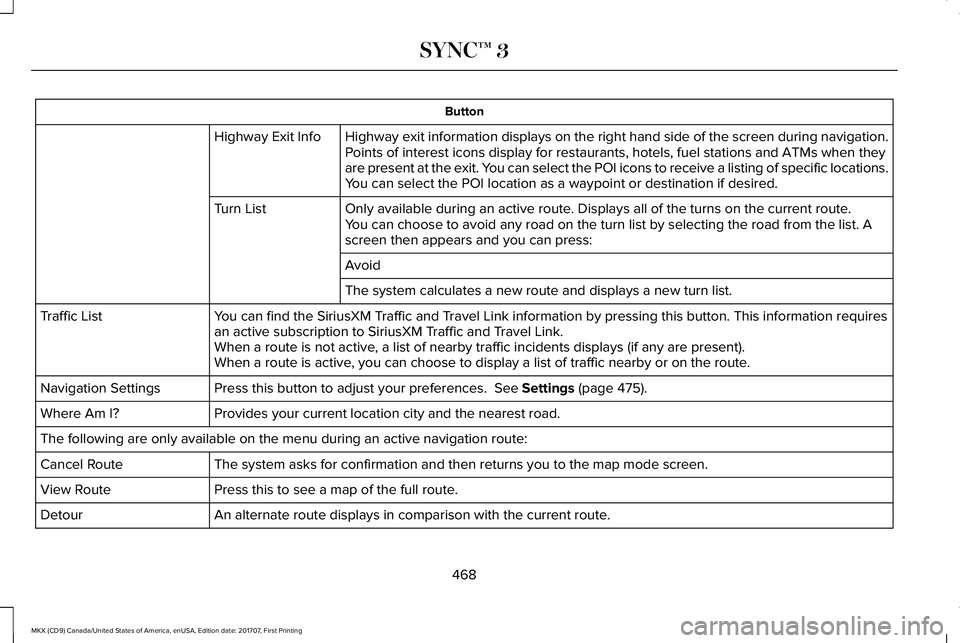
Button
Highway exit information displays on the right hand side of the screen during navigation.Highway Exit InfoPoints of interest icons display for restaurants, hotels, fuel stations and ATMs when theyare present at the exit. You can select the POI icons to receive a listing of specific locations.You can select the POI location as a waypoint or destination if desired.
Only available during an active route. Displays all of the turns on the current route.Turn ListYou can choose to avoid any road on the turn list by selecting the road from the list. Ascreen then appears and you can press:
Avoid
The system calculates a new route and displays a new turn list.
You can find the SiriusXM Traffic and Travel Link information by pressing this button. This information requiresan active subscription to SiriusXM Traffic and Travel Link.Traffic List
When a route is not active, a list of nearby traffic incidents displays (if any are present).When a route is active, you can choose to display a list of traffic nearby or on the route.
Press this button to adjust your preferences. See Settings (page 475).Navigation Settings
Provides your current location city and the nearest road.Where Am I?
The following are only available on the menu during an active navigation route:
The system asks for confirmation and then returns you to the map mode screen.Cancel Route
Press this to see a map of the full route.View Route
An alternate route displays in comparison with the current route.Detour
468
MKX (CD9) Canada/United States of America, enUSA, Edition date: 201707, First Printing
SYNC™ 3
Page 477 of 603
SiriusXM Traffic and Travel Link (If
Equipped)
WARNING
Driving while distracted can result inloss of vehicle control, crash and injury.We strongly recommend that you useextreme caution when using any device thatmay take your focus off the road. Yourprimary responsibility is the safe operationof your vehicle. We recommend against theuse of any hand-held device while drivingand encourage the use of voice-operatedsystems when possible. Make sure you areaware of all applicable local laws that mayaffect the use of electronic devices whiledriving.
Note:SiriusXM Traffic and Travel Link maynot be available in all markets.
Note:In order to use SiriusXM Traffic andTravel Link, your vehicle must havenavigation.
Note:A paid subscription is required toaccess and use these features. Go towww.siriusxm.com/travellink for moreinformation.
Note:Visit www.siriusxm.com/traffic and clickon Coverage map and details for a completelisting of all traffic areas covered by SiriusXMTraffic and Travel Link.
Note:Neither Sirius nor Ford is responsiblefor any errors or inaccuracies in the SiriusXMTraffic and Travel Link services or its use invehicles.
When you subscribe to SiriusXM Traffic andTravel Link, it can help you locate the bestgas prices, find movie listings, get currenttraffic alerts, view the current weather map,get accurate ski conditions and see scoresto current sports games.
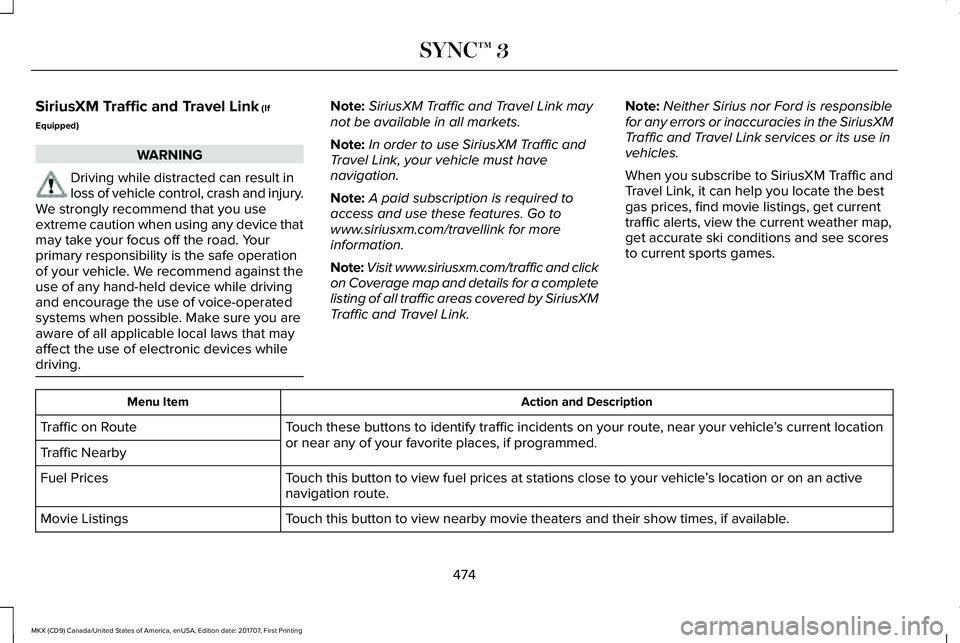
Action and DescriptionMenu Item
Touch these buttons to identify traffic incidents on your route, near your vehicle’s current locationor near any of your favorite places, if programmed.Traffic on Route
Traffic Nearby
Touch this button to view fuel prices at stations close to your vehicle’s location or on an activenavigation route.Fuel Prices
Touch this button to view nearby movie theaters and their show times, if available.Movie Listings
474
MKX (CD9) Canada/United States of America, enUSA, Edition date: 201707, First Printing
SYNC™ 3
Page 517 of 603
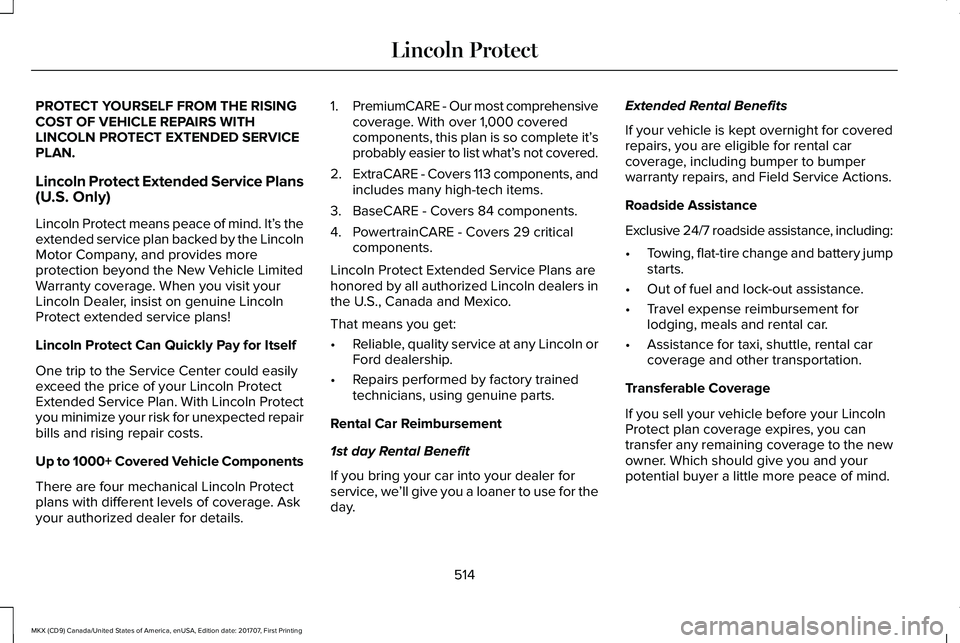
PROTECT YOURSELF FROM THE RISINGCOST OF VEHICLE REPAIRS WITHLINCOLN PROTECT EXTENDED SERVICEPLAN.
Lincoln Protect Extended Service Plans(U.S. Only)
Lincoln Protect means peace of mind. It’s theextended service plan backed by the LincolnMotor Company, and provides moreprotection beyond the New Vehicle LimitedWarranty coverage. When you visit yourLincoln Dealer, insist on genuine LincolnProtect extended service plans!
Lincoln Protect Can Quickly Pay for Itself
One trip to the Service Center could easilyexceed the price of your Lincoln ProtectExtended Service Plan. With Lincoln Protectyou minimize your risk for unexpected repairbills and rising repair costs.
Up to 1000+ Covered Vehicle Components
There are four mechanical Lincoln Protectplans with different levels of coverage. Askyour authorized dealer for details.
1.PremiumCARE - Our most comprehensivecoverage. With over 1,000 coveredcomponents, this plan is so complete it’sprobably easier to list what’s not covered.
2.ExtraCARE - Covers 113 components, andincludes many high-tech items.
3. BaseCARE - Covers 84 components.
4. PowertrainCARE - Covers 29 criticalcomponents.
Lincoln Protect Extended Service Plans arehonored by all authorized Lincoln dealers inthe U.S., Canada and Mexico.
That means you get:
•Reliable, quality service at any Lincoln orFord dealership.
•Repairs performed by factory trainedtechnicians, using genuine parts.
Rental Car Reimbursement
1st day Rental Benefit
If you bring your car into your dealer forservice, we’ll give you a loaner to use for theday.
Extended Rental Benefits
If your vehicle is kept overnight for coveredrepairs, you are eligible for rental carcoverage, including bumper to bumperwarranty repairs, and Field Service Actions.
Roadside Assistance
Exclusive 24/7 roadside assistance, including:
•Towing, flat-tire change and battery jumpstarts.
•Out of fuel and lock-out assistance.
•Travel expense reimbursement forlodging, meals and rental car.
•Assistance for taxi, shuttle, rental carcoverage and other transportation.
Transferable Coverage
If you sell your vehicle before your LincolnProtect plan coverage expires, you cantransfer any remaining coverage to the newowner. Which should give you and yourpotential buyer a little more peace of mind.
514
MKX (CD9) Canada/United States of America, enUSA, Edition date: 201707, First Printing
Lincoln Protect
Page 531 of 603
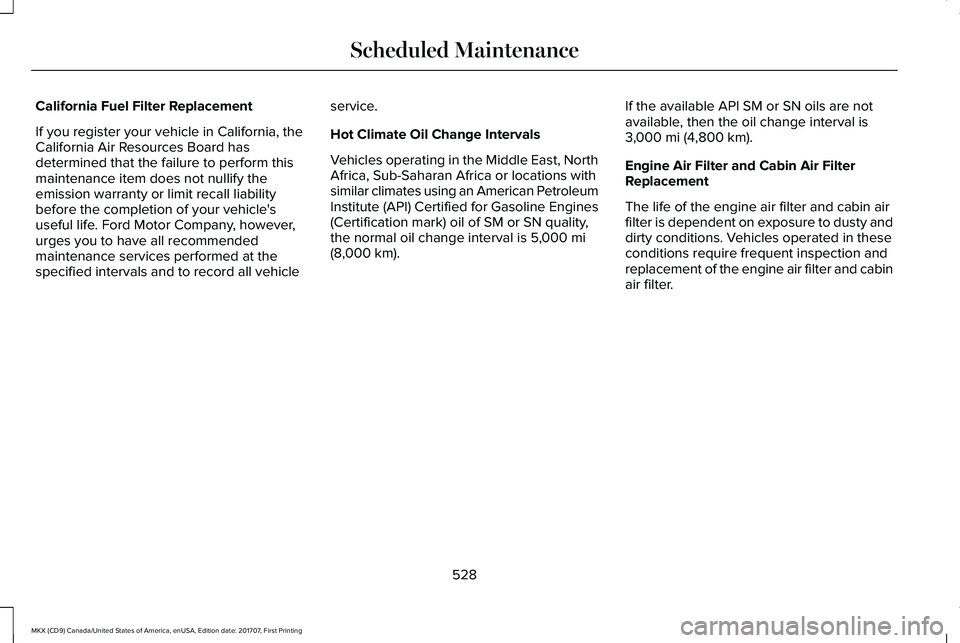
California Fuel Filter Replacement
If you register your vehicle in California, theCalifornia Air Resources Board hasdetermined that the failure to perform thismaintenance item does not nullify theemission warranty or limit recall liabilitybefore the completion of your vehicle'suseful life. Ford Motor Company, however,urges you to have all recommendedmaintenance services performed at thespecified intervals and to record all vehicle
service.
Hot Climate Oil Change Intervals
Vehicles operating in the Middle East, NorthAfrica, Sub-Saharan Africa or locations withsimilar climates using an American PetroleumInstitute (API) Certified for Gasoline Engines(Certification mark) oil of SM or SN quality,the normal oil change interval is 5,000 mi(8,000 km).
If the available API SM or SN oils are notavailable, then the oil change interval is3,000 mi (4,800 km).
Engine Air Filter and Cabin Air FilterReplacement
The life of the engine air filter and cabin airfilter is dependent on exposure to dusty anddirty conditions. Vehicles operated in theseconditions require frequent inspection andreplacement of the engine air filter and cabinair filter.
528
MKX (CD9) Canada/United States of America, enUSA, Edition date: 201707, First Printing
Scheduled Maintenance
Page 552 of 603
ELECTROMAGNETIC
COMPATIBILITY
WARNINGS
Do not place objects or mountequipment on or near the airbag cover,on the side of the seatbacks (of the frontseats), or in front seat areas that may comeinto contact with a deploying airbag. Failureto follow these instructions may increase therisk of personal injury in the event of a crash.
WARNINGS
Do not fasten antenna cables tooriginal vehicle wiring, fuel pipes andbrake pipes.
Keep antenna and power cables atleast 4 in (10 cm) from any electronicmodules and airbags.
Note:We test and certify your vehicle tomeet electromagnetic compatibilitylegislation (UNECE Regulation 10 or otherapplicable local requirements). It is yourresponsibility to make sure that anyequipment an authorized dealer installs onyour vehicle complies with applicable locallegislation and other requirements.
Note:Any radio frequency transmitterequipment in your vehicle (such as cellulartelephones and amateur radio transmitters)must keep to the parameters in the followingtable. We do not provide special provisionsor conditions for installations or use.
549
MKX (CD9) Canada/United States of America, enUSA, Edition date: 201707, First Printing
Appendices
Page 596 of 603
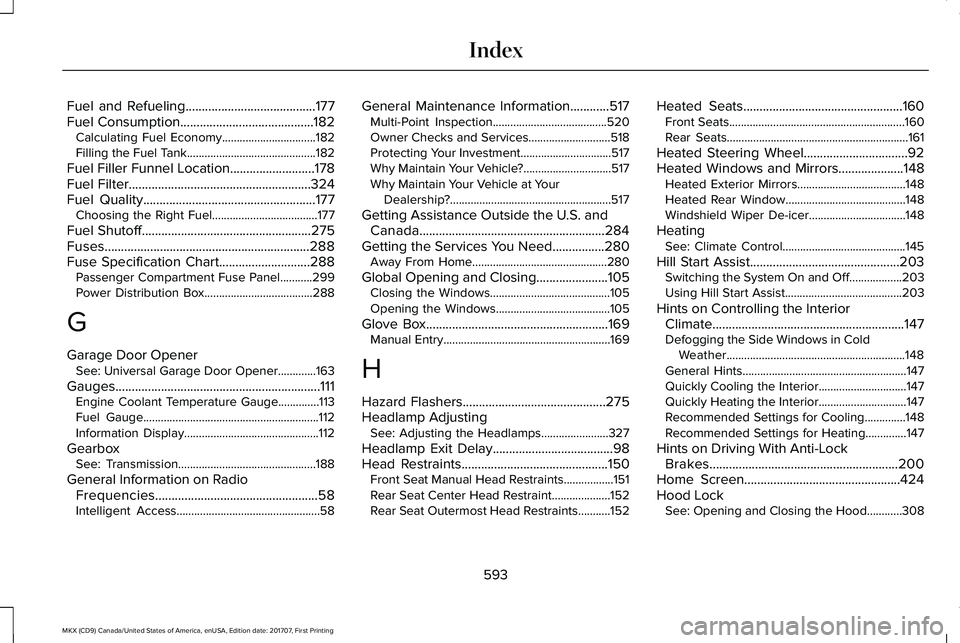
Fuel and Refueling........................................177Fuel Consumption.........................................182Calculating Fuel Economy................................182Filling the Fuel Tank............................................182
Fuel Filler Funnel Location..........................178Fuel Filter........................................................324Fuel Quality.....................................................177Choosing the Right Fuel....................................177
Fuel Shutoff....................................................275Fuses...............................................................288Fuse Specification Chart............................288Passenger Compartment Fuse Panel...........299Power Distribution Box.....................................288
G
Garage Door OpenerSee: Universal Garage Door Opener.............163
Gauges...............................................................111Engine Coolant Temperature Gauge..............113Fuel Gauge............................................................112Information Display..............................................112
GearboxSee: Transmission...............................................188
General Information on RadioFrequencies..................................................58Intelligent Access.................................................58
General Maintenance Information............517Multi-Point Inspection.......................................520Owner Checks and Services............................518Protecting Your Investment...............................517Why Maintain Your Vehicle?..............................517Why Maintain Your Vehicle at YourDealership?.......................................................517
Getting Assistance Outside the U.S. andCanada.........................................................284Getting the Services You Need................280Away From Home..............................................280
Global Opening and Closing......................105Closing the Windows.........................................105Opening the Windows.......................................105
Glove Box........................................................169Manual Entry.........................................................169
H
Hazard Flashers............................................275Headlamp AdjustingSee: Adjusting the Headlamps.......................327
Headlamp Exit Delay.....................................98Head Restraints.............................................150Front Seat Manual Head Restraints.................151Rear Seat Center Head Restraint....................152Rear Seat Outermost Head Restraints...........152
Heated Seats.................................................160Front Seats............................................................160Rear Seats..............................................................161
Heated Steering Wheel................................92Heated Windows and Mirrors....................148Heated Exterior Mirrors.....................................148Heated Rear Window.........................................148Windshield Wiper De-icer.................................148
HeatingSee: Climate Control..........................................145
Hill Start Assist..............................................203Switching the System On and Off..................203Using Hill Start Assist........................................203
Hints on Controlling the InteriorClimate...........................................................147Defogging the Side Windows in ColdWeather.............................................................148General Hints........................................................147Quickly Cooling the Interior..............................147Quickly Heating the Interior..............................147Recommended Settings for Cooling..............148Recommended Settings for Heating..............147
Hints on Driving With Anti-LockBrakes..........................................................200Home Screen................................................424Hood LockSee: Opening and Closing the Hood............308
593
MKX (CD9) Canada/United States of America, enUSA, Edition date: 201707, First Printing
Index