driver LINCOLN MKZ 2010 Owners Manual
[x] Cancel search | Manufacturer: LINCOLN, Model Year: 2010, Model line: MKZ, Model: LINCOLN MKZ 2010Pages: 318, PDF Size: 2.22 MB
Page 215 of 318
REVERSE SENSING SYSTEM (IF EQUIPPED)
The Reverse Sensing System (RSS) sounds a tone to warn the driver of
obstacles near the rear bumper when the R (Reverse) is selected and the
vehicle is moving at speeds less than 3 mph (5 km/h). The system is not
effective at speeds above 3 mph (5 km/h) and may not detect certain
angular or moving objects.
WARNING:To help avoid personal injury, please read and
understand the limitations of the reverse sensing system as
contained in this section. Reverse sensing is only an aid for some
(generally large and fixed) objects when moving in reverse on a flat
surface at “parking speeds”. Inclement weather may also affect the
function of the RSS; this may include reduced performance or a false
activation.
WARNING:To help avoid personal injury, always use caution
when in R (Reverse) and when using the RSS.
WARNING:This system is not designed to prevent contact with
small or moving objects. The system is designed to provide a
warning to assist the driver in detecting large stationary objects to
avoid damaging the vehicle. The system may not detect smaller
objects, particularly those close to the ground.
WARNING:Certain add-on devices such as large trailer hitches,
bike or surfboard racks and any device that may block the
normal detection zone of the RSS system may create false beeps.
2010 MKZ(378)
Owners Guide, 1st Printing
USA(fus)
Driving
215
Page 216 of 318
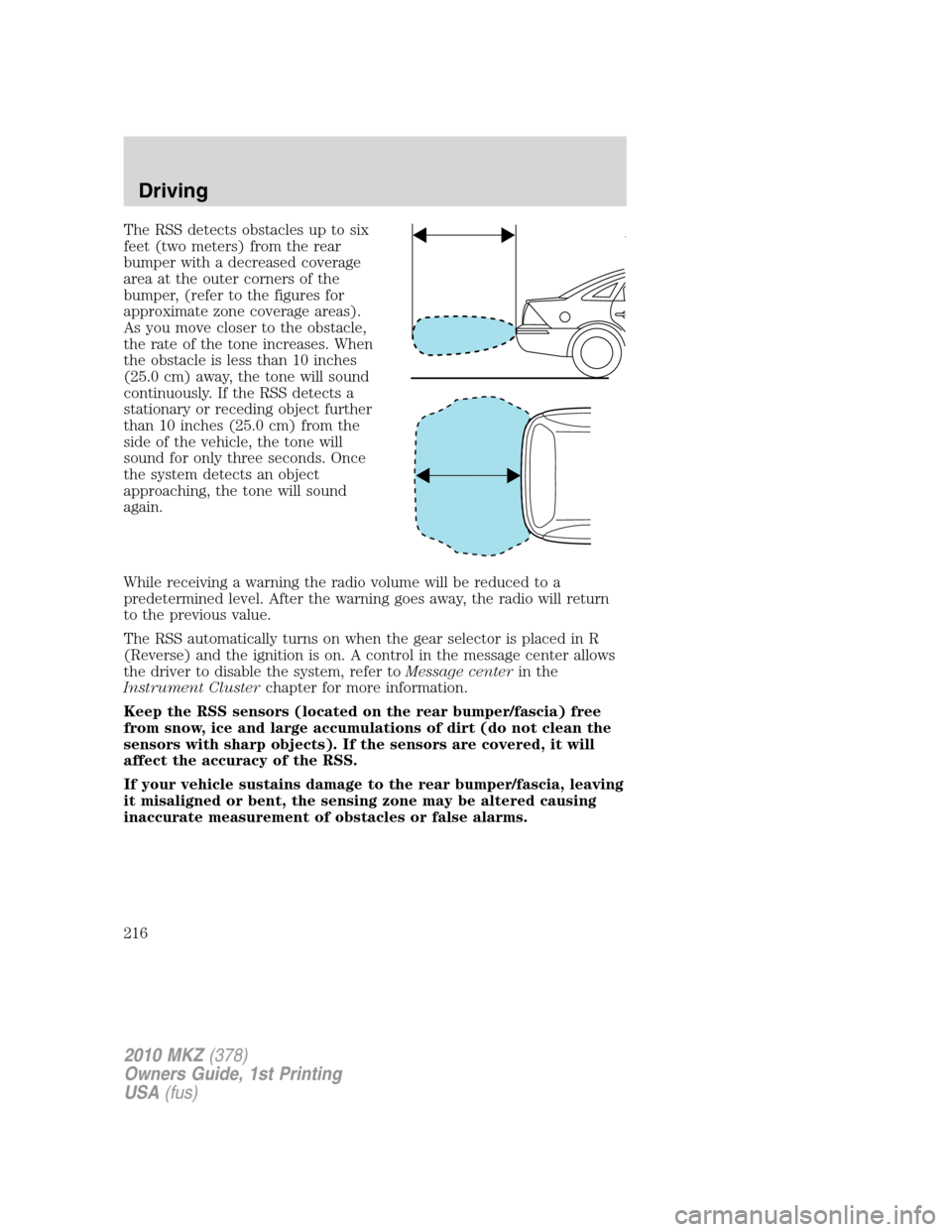
The RSS detects obstacles up to six
feet (two meters) from the rear
bumper with a decreased coverage
area at the outer corners of the
bumper, (refer to the figures for
approximate zone coverage areas).
As you move closer to the obstacle,
the rate of the tone increases. When
the obstacle is less than 10 inches
(25.0 cm) away, the tone will sound
continuously. If the RSS detects a
stationary or receding object further
than 10 inches (25.0 cm) from the
side of the vehicle, the tone will
sound for only three seconds. Once
the system detects an object
approaching, the tone will sound
again.
While receiving a warning the radio volume will be reduced to a
predetermined level. After the warning goes away, the radio will return
to the previous value.
The RSS automatically turns on when the gear selector is placed in R
(Reverse) and the ignition is on. A control in the message center allows
the driver to disable the system, refer toMessage centerin the
Instrument Clusterchapter for more information.
Keep the RSS sensors (located on the rear bumper/fascia) free
from snow, ice and large accumulations of dirt (do not clean the
sensors with sharp objects). If the sensors are covered, it will
affect the accuracy of the RSS.
If your vehicle sustains damage to the rear bumper/fascia, leaving
it misaligned or bent, the sensing zone may be altered causing
inaccurate measurement of obstacles or false alarms.
2010 MKZ(378)
Owners Guide, 1st Printing
USA(fus)
Driving
216
Page 217 of 318
REARVIEW CAMERA SYSTEM (IF EQUIPPED)
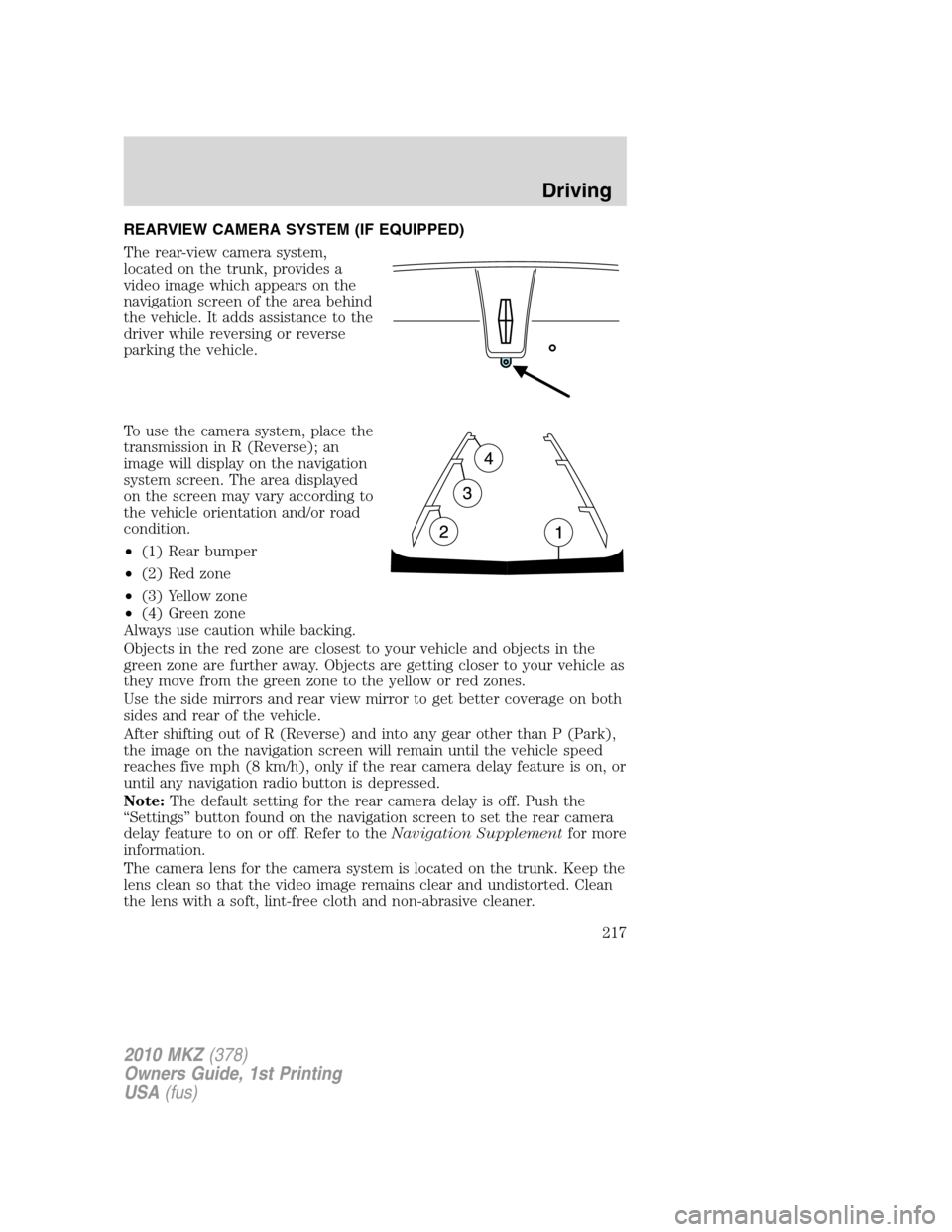
The rear-view camera system,
located on the trunk, provides a
video image which appears on the
navigation screen of the area behind
the vehicle. It adds assistance to the
driver while reversing or reverse
parking the vehicle.
To use the camera system, place the
transmission in R (Reverse); an
image will display on the navigation
system screen. The area displayed
on the screen may vary according to
the vehicle orientation and/or road
condition.
•(1) Rear bumper
•(2) Red zone
•(3) Yellow zone
•(4) Green zone
Always use caution while backing.
Objects in the red zone are closest to your vehicle and objects in the
green zone are further away. Objects are getting closer to your vehicle as
they move from the green zone to the yellow or red zones.
Use the side mirrors and rear view mirror to get better coverage on both
sides and rear of the vehicle.
After shifting out of R (Reverse) and into any gear other than P (Park),
the image on the navigation screen will remain until the vehicle speed
reaches five mph (8 km/h), only if the rear camera delay feature is on, or
until any navigation radio button is depressed.
Note:The default setting for the rear camera delay is off. Push the
“Settings” button found on the navigation screen to set the rear camera
delay feature to on or off. Refer to theNavigation Supplementfor more
information.
The camera lens for the camera system is located on the trunk. Keep the
lens clean so that the video image remains clear and undistorted. Clean
the lens with a soft, lint-free cloth and non-abrasive cleaner.
2010 MKZ(378)
Owners Guide, 1st Printing
USA(fus)
Driving
217
Page 218 of 318
Note:If the camera system image is not clear or seems distorted, it may
be covered with water droplets, snow, mud or any other substance. If
this occurs, clean the camera lens before using the camera system.
WARNING:The camera system is a reverse aid supplement
device that still requires the driver to use it in conjunction with
the rear view mirror and the side mirrors for maximum coverage.
WARNING:Objects that are close to either corner of the
bumper or under the bumper, might not be seen on the screen
due to the limited coverage of the camera system.
WARNING:Backup as slow as possible since higher speeds
might limit your reaction time to stop the vehicle.
WARNING:Do not use the camera system with the trunk open.
If the back end of the vehicle is hit or damaged, then check with your
authorized dealer to have your rear video system checked for proper
coverage and operation.
Night time and dark area use
At night time or in dark areas, the camera system relies on the reverse
lamp lighting to produce an image. Therefore it is necessary that both
reverse lamps are operating in order to get a clear image in the dark. If
either of the lamps are not operating, stop using the camera system, at
least in the dark, until the lamp(s) are replaced and functioning.
Servicing
•If the image comes on while the vehicle is not in R (Reverse), have
the system inspected by your authorized dealer.
•If the image is not clear, then check if there is anything covering the
lens such as dirt, mud, ice, snow, etc. If the image is still not clear
after cleaning, have your system inspected by your authorized dealer.
2010 MKZ(378)
Owners Guide, 1st Printing
USA(fus)
Driving
218
Page 219 of 318
BLIND SPOT INFORMATION SYSTEM™ (BLIS™) WITH CROSS
TRAFFIC ALERT (CTA) (IF EQUIPPED)
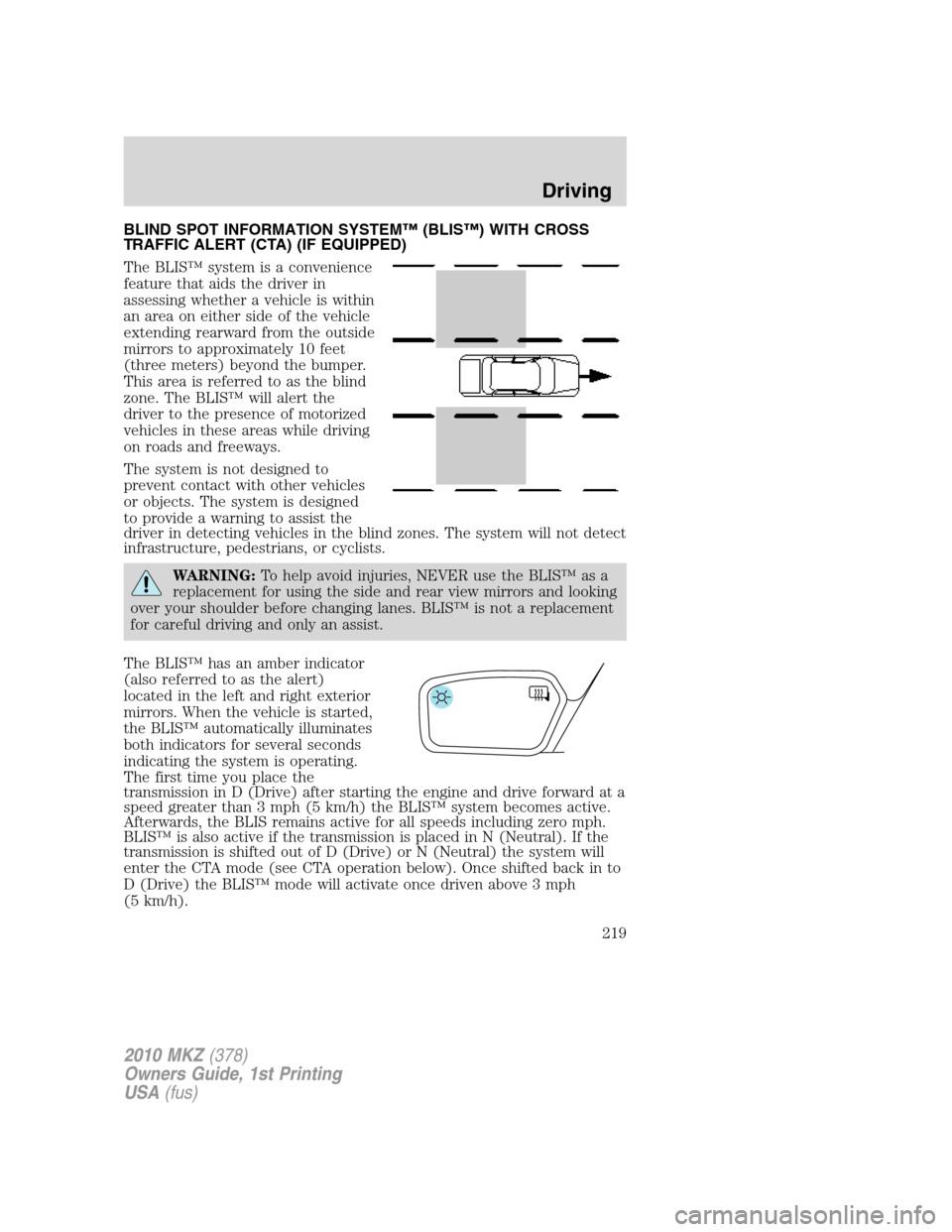
The BLIS™ system is a convenience
feature that aids the driver in
assessing whether a vehicle is within
an area on either side of the vehicle
extending rearward from the outside
mirrors to approximately 10 feet
(three meters) beyond the bumper.
This area is referred to as the blind
zone. The BLIS™ will alert the
driver to the presence of motorized
vehicles in these areas while driving
on roads and freeways.
The system is not designed to
prevent contact with other vehicles
or objects. The system is designed
to provide a warning to assist the
driver in detecting vehicles in the blind zones. The system will not detect
infrastructure, pedestrians, or cyclists.
WARNING:To help avoid injuries, NEVER use the BLIS™ as a
replacement for using the side and rear view mirrors and looking
over your shoulder before changing lanes. BLIS™ is not a replacement
for careful driving and only an assist.
The BLIS™ has an amber indicator
(also referred to as the alert)
located in the left and right exterior
mirrors. When the vehicle is started,
the BLIS™ automatically illuminates
both indicators for several seconds
indicating the system is operating.
The first time you place the
transmission in D (Drive) after starting the engine and drive forward at a
speed greater than 3 mph (5 km/h) the BLIS™ system becomes active.
Afterwards, the BLIS remains active for all speeds including zero mph.
BLIS™ is also active if the transmission is placed in N (Neutral). If the
transmission is shifted out of D (Drive) or N (Neutral) the system will
enter the CTA mode (see CTA operation below). Once shifted back in to
D (Drive) the BLIS™ mode will activate once driven above 3 mph
(5 km/h).
2010 MKZ(378)
Owners Guide, 1st Printing
USA(fus)
Driving
219
Page 221 of 318
Cross traffic alert (CTA) system operation
The cross traffic alert system warns
the driver of approaching vehicles
when R (Reverse) is selected and
the vehicle is backing out of a
front-in parking spot. It sounds a
series of tones and flashes the
BLIS™ indicator found on the
exterior mirror on the side of the
approaching vehicle. Additionally, the message center will display either,
VEHICLE COMING FROM RIGHT or VEHICLE COMING FROM LEFT to
warn the driver from which direction vehicles are approaching.
The system is not designed to prevent contact with other vehicles or
objects. The system is designed to provide a warning to assist the driver
in detecting vehicles in the blind zones. The system will not detect
infrastructure, pedestrians, or bicyclists.
WARNING:To help avoid personal injury, NEVER use the Cross
Traffic Alert system as a replacement for using the side and rear
view mirrors and looking over your shoulder before backing out of a
parking space. CTA is not a replacement for careful driving and only an
assist.
2010 MKZ(378)
Owners Guide, 1st Printing
USA(fus)
Driving
221
Page 224 of 318
BLIS™-CTA on/off and disable operation
The BLIS™ and/or the CTA can be turned off via the message center.
Turning the BLIS™ off does not turn off the CTA and visa versa. If either
the BLIS™ or CTA is turned off, the systems will automatically turn back
on at the next ignition key cycle. When either the BLIS™ or CTA is
turned off, the message center displays BLIND SPOT SYS OFF and/or
CTA SYSTEM OFF. When the BLIS™ or CTA system is off, the driver
will not receive alerts. Refer toMessage Centerin theInstrument
Clusterchapter.
The BLIS™-CTA can be disabled permanently even after an ignition key
cycle. This must be done by your dealership service technician.
Once either of the systems are disabled, enabling must also be performed
at the dealership. When disabled, the message center will display BLIND
SPOT DISABLED and/or CTA DISABLED.
BLIS™-CTA fault operation
If the BLIS™-CTA senses a fault on either the left or right sensor, the
BLIS™ alert indicator will go ON and remain ON and the message center
will display BLIND SPOT SYSTEM FAULT or CROSS TRAFFIC SYSTEM
FAULT. For faults that may cause the associated left or right alert
indicator not to illuminate, only the message center faults will occur.
Blocked sensor
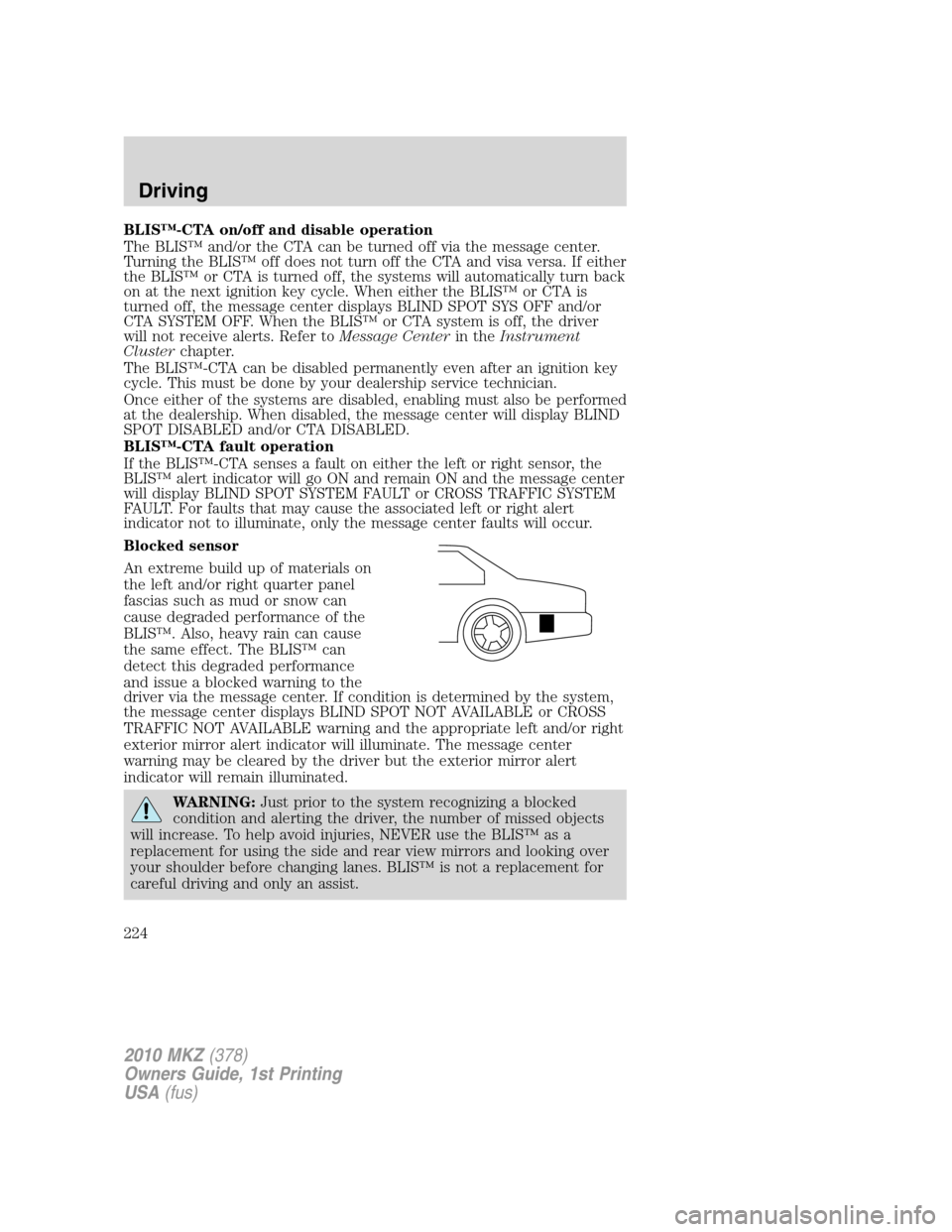
An extreme build up of materials on
the left and/or right quarter panel
fascias such as mud or snow can
cause degraded performance of the
BLIS™. Also, heavy rain can cause
the same effect. The BLIS™ can
detect this degraded performance
and issue a blocked warning to the
driver via the message center. If condition is determined by the system,
the message center displays BLIND SPOT NOT AVAILABLE or CROSS
TRAFFIC NOT AVAILABLE warning and the appropriate left and/or right
exterior mirror alert indicator will illuminate. The message center
warning may be cleared by the driver but the exterior mirror alert
indicator will remain illuminated.
WARNING:Just prior to the system recognizing a blocked
condition and alerting the driver, the number of missed objects
will increase. To help avoid injuries, NEVER use the BLIS™ as a
replacement for using the side and rear view mirrors and looking over
your shoulder before changing lanes. BLIS™ is not a replacement for
careful driving and only an assist.
2010 MKZ(378)
Owners Guide, 1st Printing
USA(fus)
Driving
224
Page 225 of 318
Once blockage is removed, the system will require some driving time and
detection of at least two vehicle object prior to realizing it is unblocked,
or the driver can cycle the ignition key. If blocked and the ignition key is
cycled, the system resets to unblocked. If however blockage is still
present after the key cycle, the system will sense again that it is blocked
after driving in traffic.
The following table lists possible causes and actions for this message
being displayed:
The surface of the left or right
radar is dirty or obstructed in
some wayClean the fascia area in front of
the radar, either left or right side,
or remove obstruction.
The surface of the left or right
radar is not dirty or obstructedDrive normally in traffic for a few
minutes to allow the radar to
detect that it is no longer blocked.
Note, the vehicle must be in D
(Drive) and a few vehicles must
pass so that the BLIS™ can clear a
blocked state.
Heavy rainfall or heavy snowfall is
interfering with the radar signalsNo action required by the driver.
The system will automatically go
unblocked once the
rainfall/snowfall rate decreases or
stops. Do not use BLIS™-CTA in
heavy rainfall or heavy snowfall.
Trailer tow false alerts
When towing a trailer the left and right sensor may detect the trailer
thus causing a false alert. It may be desirable to turn the BLIS™ system
off if the false alerts become annoying.
Day and night brightness
The BLIS™-CTA amber alert will automatically dim when the headlamp
switch is in PARK, ON, or AUTO ON and night time darkness has been
detected by the sun sensor.
2010 MKZ(378)
Owners Guide, 1st Printing
USA(fus)
Driving
225
Page 231 of 318
your vehicle is equipped with a four wheel anti-lock brake system (ABS),
do not “pump” the brakes. Refer to theBrakessection of this chapter
for additional information on the operation of the anti-lock brake system.
Maintenance and Modifications
The suspension and steering systems on your vehicle have been designed
and tested to provide predictable performance whether loaded or empty
and durable load carrying capability. For this reason, Ford Motor
Company strongly recommends that you do not make modifications such
as adding or removing parts (such as lift kits or stabilizer bars) or by
using replacement parts not equivalent to the original factory equipment.
Any modifications to a vehicle that raise the center of gravity can make
it more likely the vehicle will rollover as a result of a loss of control.
Ford Motor Company recommends that caution be used with any vehicle
equipped with a high load or device (such as ladder or luggage racks).
Failure to maintain your vehicle properly may void the warranty, increase
your repair cost, reduce vehicle performance and operational capabilities
and adversely affect driver and passenger safety. Frequent inspection of
vehicle chassis components is recommended if the vehicle is subjected to
heavy off-highway usage.
DRIVING THROUGH WATER
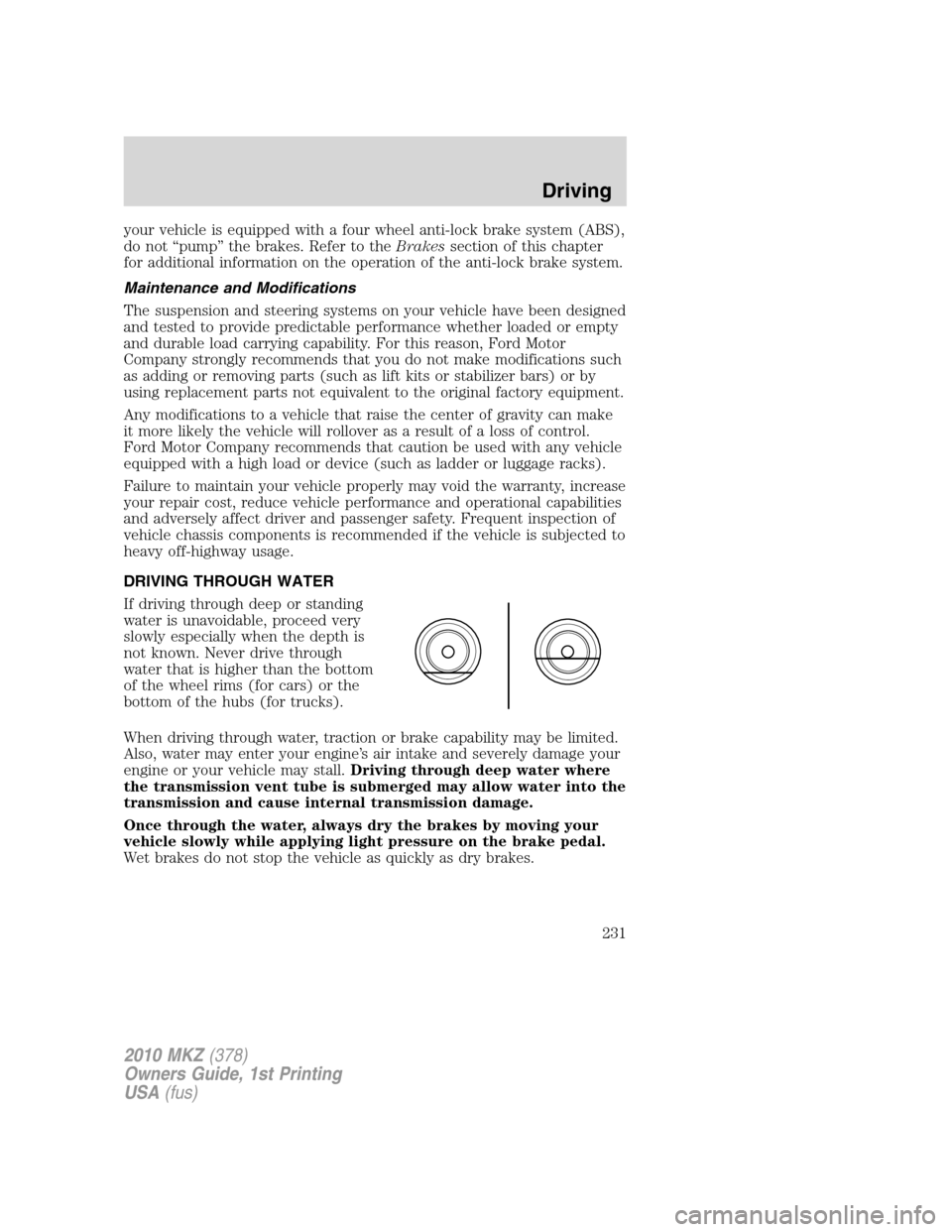
If driving through deep or standing
water is unavoidable, proceed very
slowly especially when the depth is
not known. Never drive through
water that is higher than the bottom
of the wheel rims (for cars) or the
bottom of the hubs (for trucks).
When driving through water, traction or brake capability may be limited.
Also, water may enter your engine’s air intake and severely damage your
engine or your vehicle may stall.Driving through deep water where
the transmission vent tube is submerged may allow water into the
transmission and cause internal transmission damage.
Once through the water, always dry the brakes by moving your
vehicle slowly while applying light pressure on the brake pedal.
Wet brakes do not stop the vehicle as quickly as dry brakes.
2010 MKZ(378)
Owners Guide, 1st Printing
USA(fus)
Driving
231
Page 236 of 318
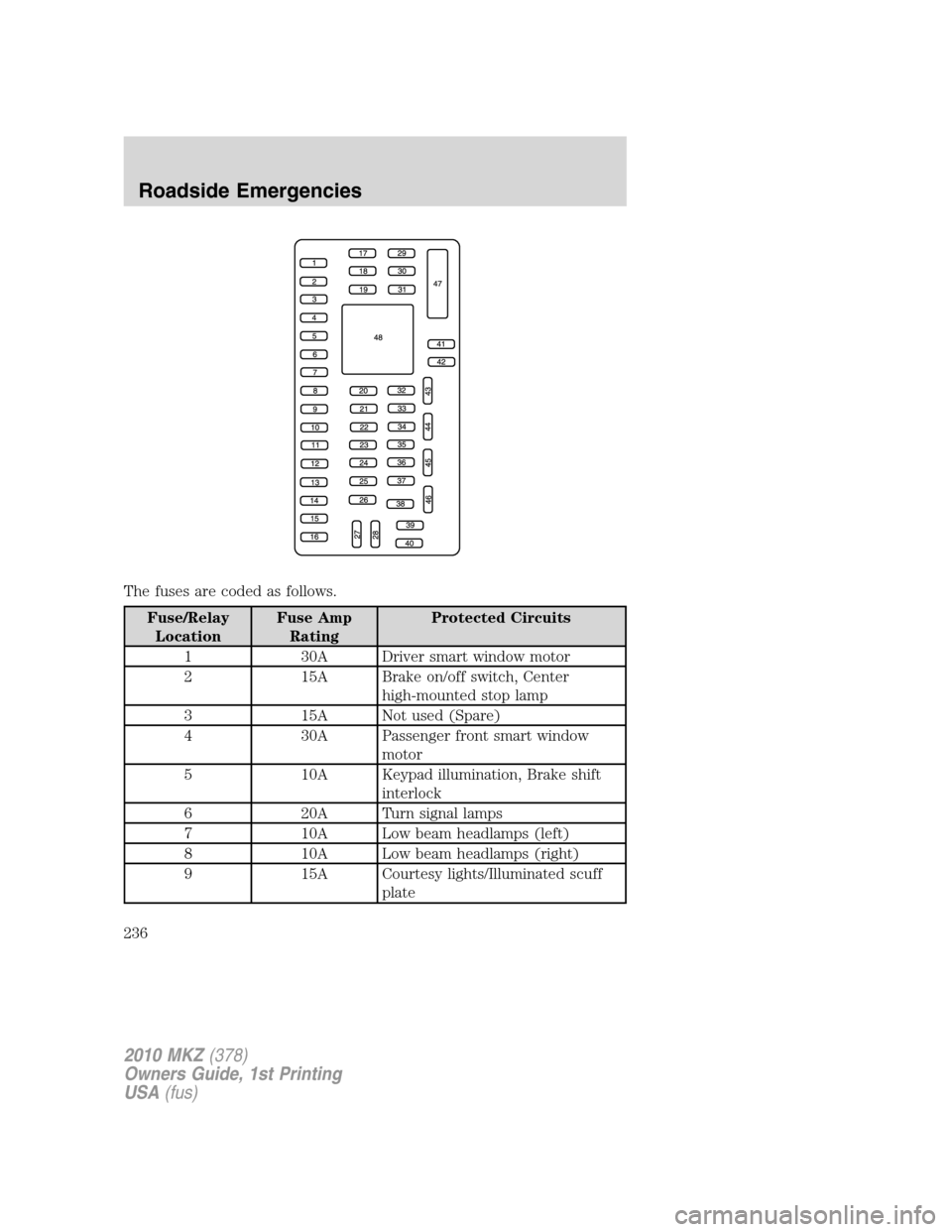
The fuses are coded as follows.
Fuse/Relay
LocationFuse Amp
RatingProtected Circuits
1 30A Driver smart window motor
2 15A Brake on/off switch, Center
high-mounted stop lamp
3 15A Not used (Spare)
4 30A Passenger front smart window
motor
5 10A Keypad illumination, Brake shift
interlock
6 20A Turn signal lamps
7 10A Low beam headlamps (left)
8 10A Low beam headlamps (right)
9 15A Courtesy lights/Illuminated scuff
plate
2010 MKZ(378)
Owners Guide, 1st Printing
USA(fus)
Roadside Emergencies
236