mirror LINCOLN MKZ 2010 User Guide
[x] Cancel search | Manufacturer: LINCOLN, Model Year: 2010, Model line: MKZ, Model: LINCOLN MKZ 2010Pages: 318, PDF Size: 2.22 MB
Page 102 of 318
•The battery saver will shut off the headlamps 10 minutes after the
ignition has been turned to the 1 (off) position.
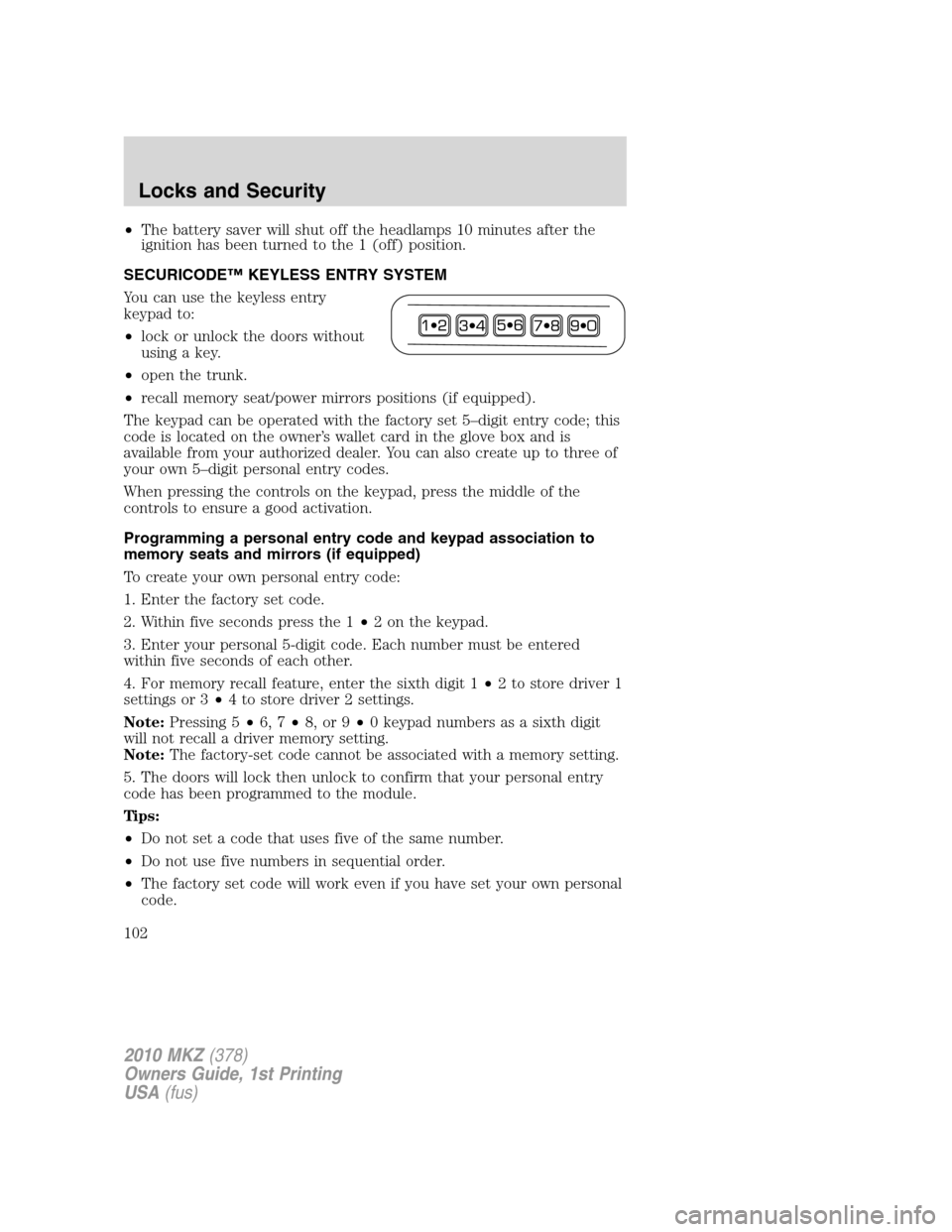
SECURICODE™ KEYLESS ENTRY SYSTEM
You can use the keyless entry
keypad to:
•lock or unlock the doors without
using a key.
•open the trunk.
•recall memory seat/power mirrors positions (if equipped).
The keypad can be operated with the factory set 5–digit entry code; this
code is located on the owner’s wallet card in the glove box and is
available from your authorized dealer. You can also create up to three of
your own 5–digit personal entry codes.
When pressing the controls on the keypad, press the middle of the
controls to ensure a good activation.
Programming a personal entry code and keypad association to
memory seats and mirrors (if equipped)
To create your own personal entry code:
1. Enter the factory set code.
2. Within five seconds press the 1•2 on the keypad.
3. Enter your personal 5-digit code. Each number must be entered
within five seconds of each other.
4. For memory recall feature, enter the sixth digit 1•2 to store driver 1
settings or 3•4 to store driver 2 settings.
Note:Pressing 5•6, 7•8, or 9•0 keypad numbers as a sixth digit
will not recall a driver memory setting.
Note:The factory-set code cannot be associated with a memory setting.
5. The doors will lock then unlock to confirm that your personal entry
code has been programmed to the module.
Tips:
•Do not set a code that uses five of the same number.
•Do not use five numbers in sequential order.
•The factory set code will work even if you have set your own personal
code.
2010 MKZ(378)
Owners Guide, 1st Printing
USA(fus)
Locks and Security
102
Page 114 of 318
Using the power lumbar support
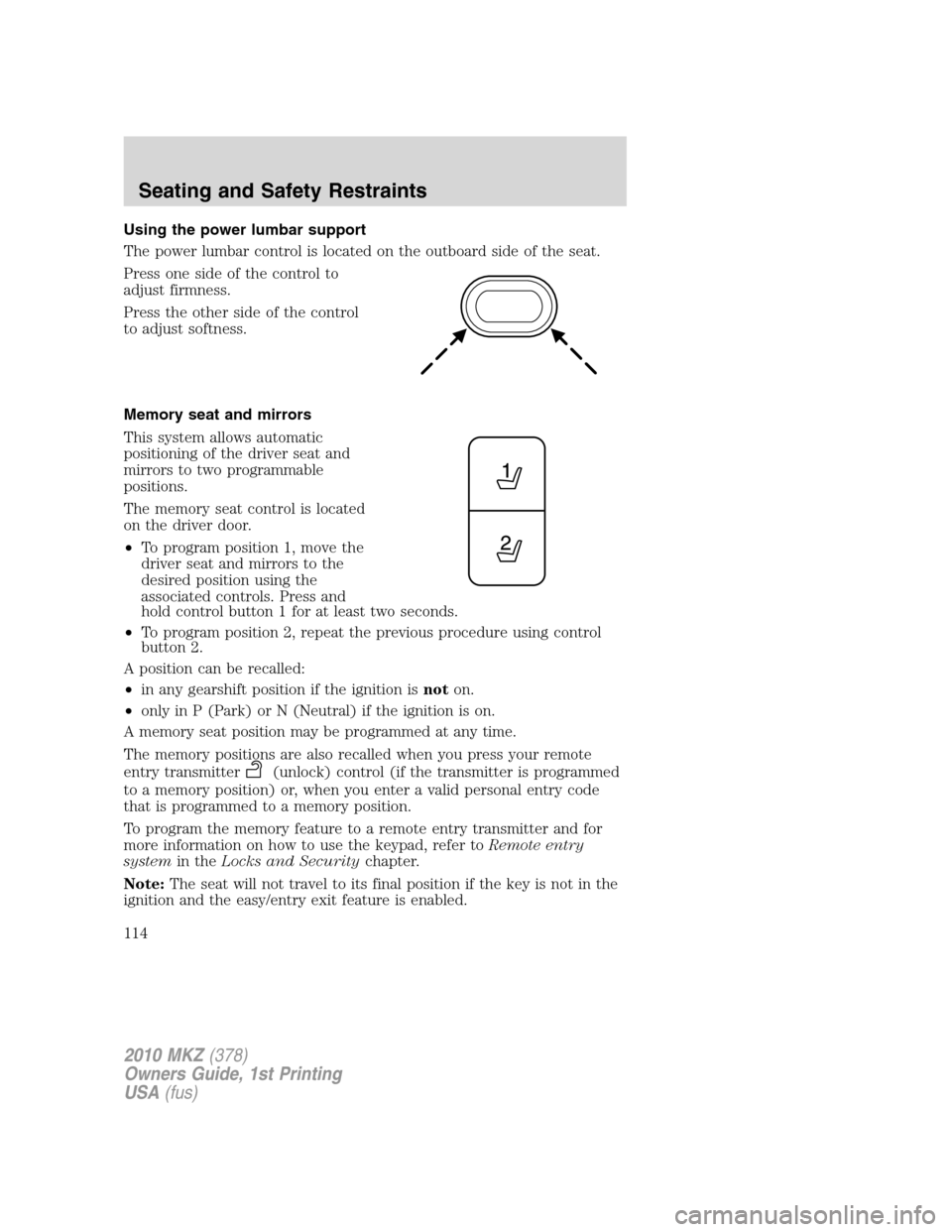
The power lumbar control is located on the outboard side of the seat.
Press one side of the control to
adjust firmness.
Press the other side of the control
to adjust softness.
Memory seat and mirrors
This system allows automatic
positioning of the driver seat and
mirrors to two programmable
positions.
The memory seat control is located
on the driver door.
•To program position 1, move the
driver seat and mirrors to the
desired position using the
associated controls. Press and
hold control button 1 for at least two seconds.
•To program position 2, repeat the previous procedure using control
button 2.
A position can be recalled:
•in any gearshift position if the ignition isnoton.
•only in P (Park) or N (Neutral) if the ignition is on.
A memory seat position may be programmed at any time.
The memory positions are also recalled when you press your remote
entry transmitter
(unlock) control (if the transmitter is programmed
to a memory position) or, when you enter a valid personal entry code
that is programmed to a memory position.
To program the memory feature to a remote entry transmitter and for
more information on how to use the keypad, refer toRemote entry
systemin theLocks and Securitychapter.
Note:The seat will not travel to its final position if the key is not in the
ignition and the easy/entry exit feature is enabled.
2010 MKZ(378)
Owners Guide, 1st Printing
USA(fus)
Seating and Safety Restraints
114
Page 217 of 318
REARVIEW CAMERA SYSTEM (IF EQUIPPED)
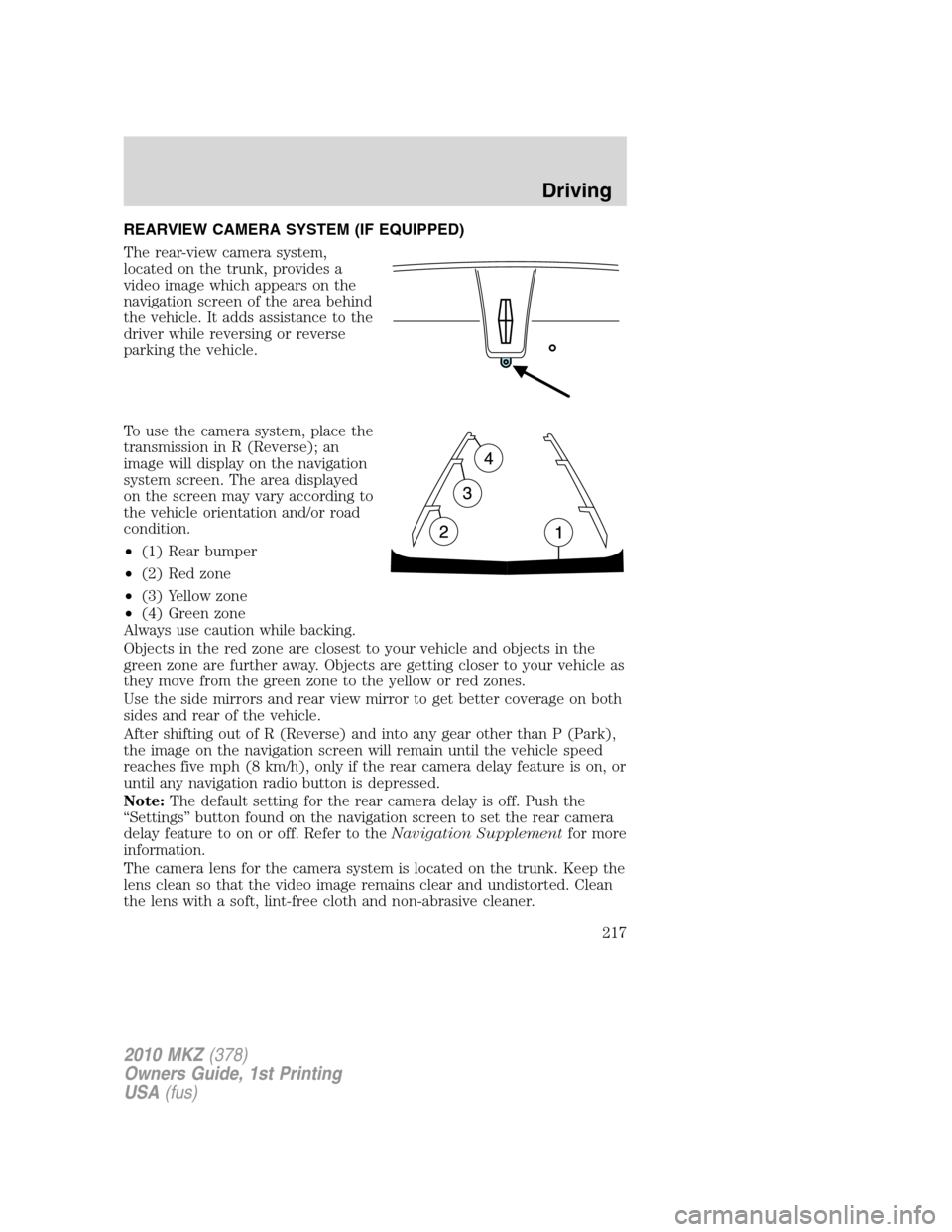
The rear-view camera system,
located on the trunk, provides a
video image which appears on the
navigation screen of the area behind
the vehicle. It adds assistance to the
driver while reversing or reverse
parking the vehicle.
To use the camera system, place the
transmission in R (Reverse); an
image will display on the navigation
system screen. The area displayed
on the screen may vary according to
the vehicle orientation and/or road
condition.
•(1) Rear bumper
•(2) Red zone
•(3) Yellow zone
•(4) Green zone
Always use caution while backing.
Objects in the red zone are closest to your vehicle and objects in the
green zone are further away. Objects are getting closer to your vehicle as
they move from the green zone to the yellow or red zones.
Use the side mirrors and rear view mirror to get better coverage on both
sides and rear of the vehicle.
After shifting out of R (Reverse) and into any gear other than P (Park),
the image on the navigation screen will remain until the vehicle speed
reaches five mph (8 km/h), only if the rear camera delay feature is on, or
until any navigation radio button is depressed.
Note:The default setting for the rear camera delay is off. Push the
“Settings” button found on the navigation screen to set the rear camera
delay feature to on or off. Refer to theNavigation Supplementfor more
information.
The camera lens for the camera system is located on the trunk. Keep the
lens clean so that the video image remains clear and undistorted. Clean
the lens with a soft, lint-free cloth and non-abrasive cleaner.
2010 MKZ(378)
Owners Guide, 1st Printing
USA(fus)
Driving
217
Page 218 of 318
Note:If the camera system image is not clear or seems distorted, it may
be covered with water droplets, snow, mud or any other substance. If
this occurs, clean the camera lens before using the camera system.
WARNING:The camera system is a reverse aid supplement
device that still requires the driver to use it in conjunction with
the rear view mirror and the side mirrors for maximum coverage.
WARNING:Objects that are close to either corner of the
bumper or under the bumper, might not be seen on the screen
due to the limited coverage of the camera system.
WARNING:Backup as slow as possible since higher speeds
might limit your reaction time to stop the vehicle.
WARNING:Do not use the camera system with the trunk open.
If the back end of the vehicle is hit or damaged, then check with your
authorized dealer to have your rear video system checked for proper
coverage and operation.
Night time and dark area use
At night time or in dark areas, the camera system relies on the reverse
lamp lighting to produce an image. Therefore it is necessary that both
reverse lamps are operating in order to get a clear image in the dark. If
either of the lamps are not operating, stop using the camera system, at
least in the dark, until the lamp(s) are replaced and functioning.
Servicing
•If the image comes on while the vehicle is not in R (Reverse), have
the system inspected by your authorized dealer.
•If the image is not clear, then check if there is anything covering the
lens such as dirt, mud, ice, snow, etc. If the image is still not clear
after cleaning, have your system inspected by your authorized dealer.
2010 MKZ(378)
Owners Guide, 1st Printing
USA(fus)
Driving
218
Page 219 of 318
BLIND SPOT INFORMATION SYSTEM™ (BLIS™) WITH CROSS
TRAFFIC ALERT (CTA) (IF EQUIPPED)
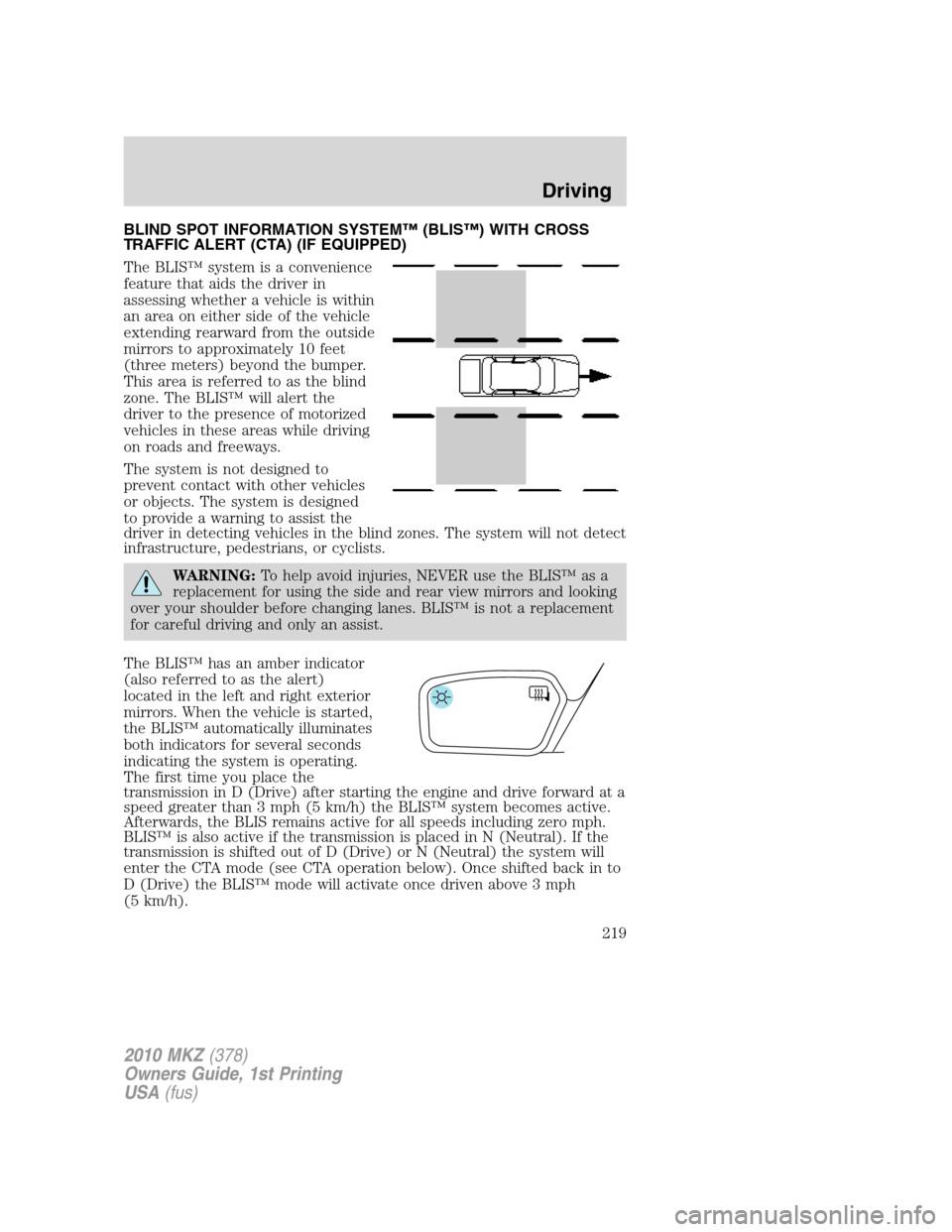
The BLIS™ system is a convenience
feature that aids the driver in
assessing whether a vehicle is within
an area on either side of the vehicle
extending rearward from the outside
mirrors to approximately 10 feet
(three meters) beyond the bumper.
This area is referred to as the blind
zone. The BLIS™ will alert the
driver to the presence of motorized
vehicles in these areas while driving
on roads and freeways.
The system is not designed to
prevent contact with other vehicles
or objects. The system is designed
to provide a warning to assist the
driver in detecting vehicles in the blind zones. The system will not detect
infrastructure, pedestrians, or cyclists.
WARNING:To help avoid injuries, NEVER use the BLIS™ as a
replacement for using the side and rear view mirrors and looking
over your shoulder before changing lanes. BLIS™ is not a replacement
for careful driving and only an assist.
The BLIS™ has an amber indicator
(also referred to as the alert)
located in the left and right exterior
mirrors. When the vehicle is started,
the BLIS™ automatically illuminates
both indicators for several seconds
indicating the system is operating.
The first time you place the
transmission in D (Drive) after starting the engine and drive forward at a
speed greater than 3 mph (5 km/h) the BLIS™ system becomes active.
Afterwards, the BLIS remains active for all speeds including zero mph.
BLIS™ is also active if the transmission is placed in N (Neutral). If the
transmission is shifted out of D (Drive) or N (Neutral) the system will
enter the CTA mode (see CTA operation below). Once shifted back in to
D (Drive) the BLIS™ mode will activate once driven above 3 mph
(5 km/h).
2010 MKZ(378)
Owners Guide, 1st Printing
USA(fus)
Driving
219
Page 221 of 318
Cross traffic alert (CTA) system operation
The cross traffic alert system warns
the driver of approaching vehicles
when R (Reverse) is selected and
the vehicle is backing out of a
front-in parking spot. It sounds a
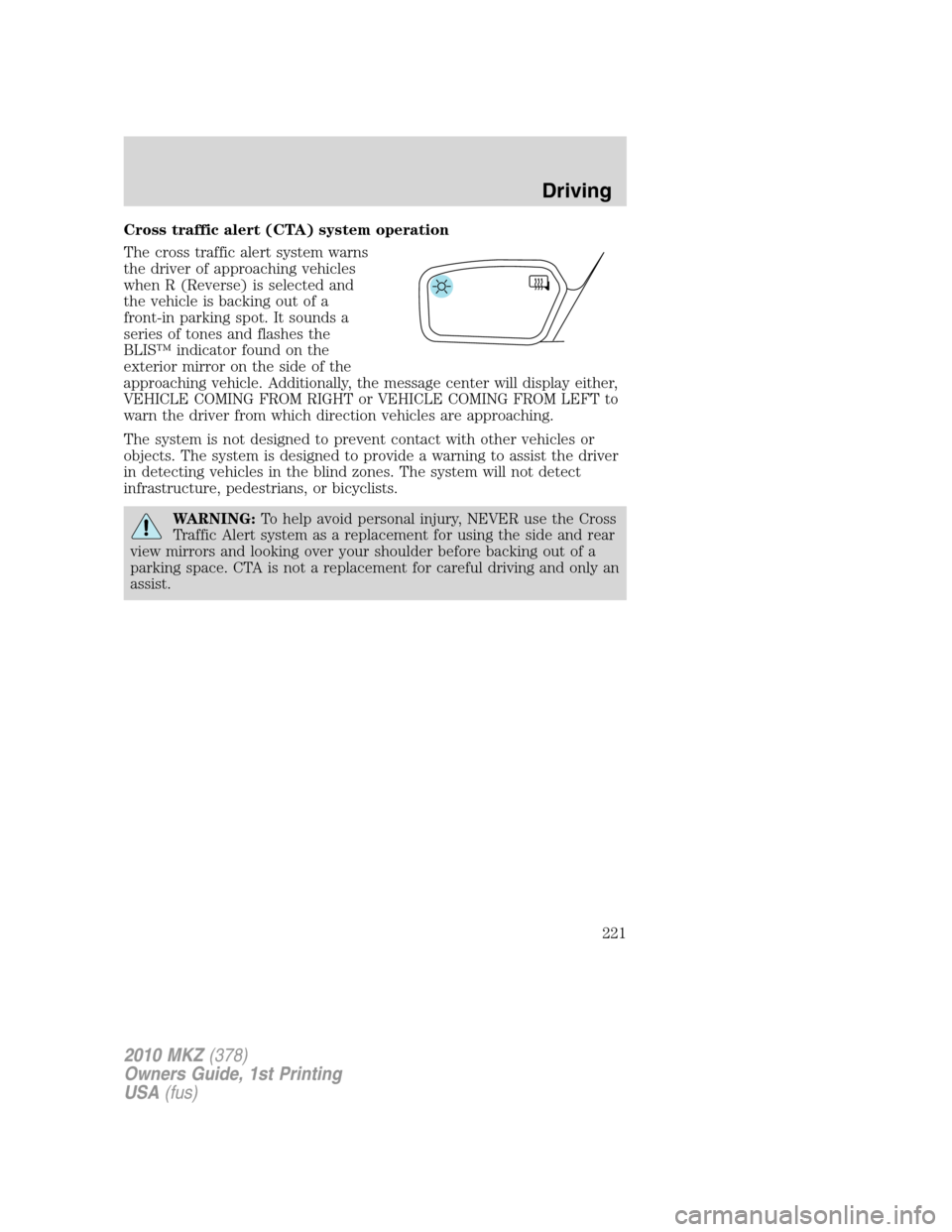
series of tones and flashes the
BLIS™ indicator found on the
exterior mirror on the side of the
approaching vehicle. Additionally, the message center will display either,
VEHICLE COMING FROM RIGHT or VEHICLE COMING FROM LEFT to
warn the driver from which direction vehicles are approaching.
The system is not designed to prevent contact with other vehicles or
objects. The system is designed to provide a warning to assist the driver
in detecting vehicles in the blind zones. The system will not detect
infrastructure, pedestrians, or bicyclists.
WARNING:To help avoid personal injury, NEVER use the Cross
Traffic Alert system as a replacement for using the side and rear
view mirrors and looking over your shoulder before backing out of a
parking space. CTA is not a replacement for careful driving and only an
assist.
2010 MKZ(378)
Owners Guide, 1st Printing
USA(fus)
Driving
221
Page 224 of 318
BLIS™-CTA on/off and disable operation
The BLIS™ and/or the CTA can be turned off via the message center.
Turning the BLIS™ off does not turn off the CTA and visa versa. If either
the BLIS™ or CTA is turned off, the systems will automatically turn back
on at the next ignition key cycle. When either the BLIS™ or CTA is
turned off, the message center displays BLIND SPOT SYS OFF and/or
CTA SYSTEM OFF. When the BLIS™ or CTA system is off, the driver
will not receive alerts. Refer toMessage Centerin theInstrument
Clusterchapter.
The BLIS™-CTA can be disabled permanently even after an ignition key
cycle. This must be done by your dealership service technician.
Once either of the systems are disabled, enabling must also be performed
at the dealership. When disabled, the message center will display BLIND
SPOT DISABLED and/or CTA DISABLED.
BLIS™-CTA fault operation
If the BLIS™-CTA senses a fault on either the left or right sensor, the
BLIS™ alert indicator will go ON and remain ON and the message center
will display BLIND SPOT SYSTEM FAULT or CROSS TRAFFIC SYSTEM
FAULT. For faults that may cause the associated left or right alert
indicator not to illuminate, only the message center faults will occur.
Blocked sensor
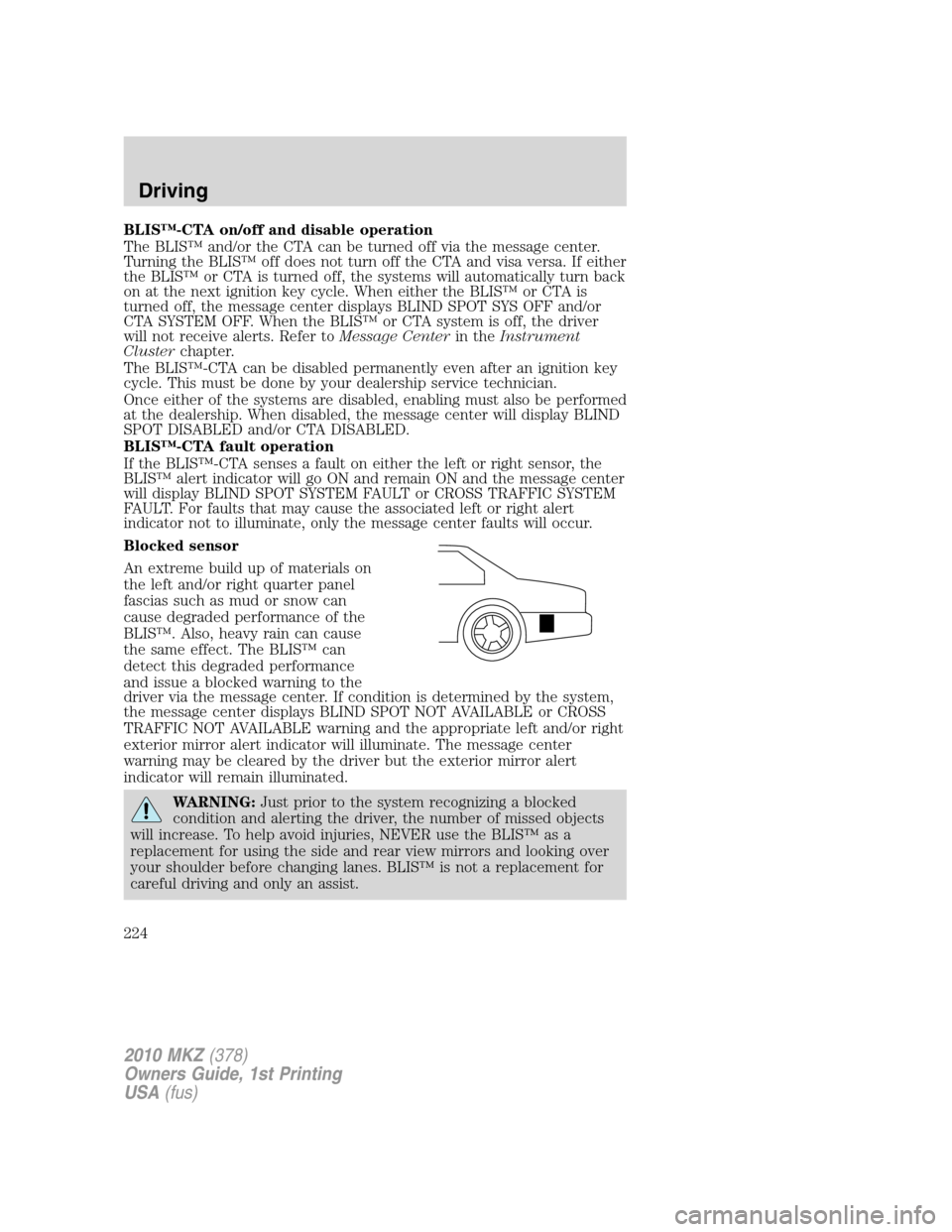
An extreme build up of materials on
the left and/or right quarter panel
fascias such as mud or snow can
cause degraded performance of the
BLIS™. Also, heavy rain can cause
the same effect. The BLIS™ can
detect this degraded performance
and issue a blocked warning to the
driver via the message center. If condition is determined by the system,
the message center displays BLIND SPOT NOT AVAILABLE or CROSS
TRAFFIC NOT AVAILABLE warning and the appropriate left and/or right
exterior mirror alert indicator will illuminate. The message center
warning may be cleared by the driver but the exterior mirror alert
indicator will remain illuminated.
WARNING:Just prior to the system recognizing a blocked
condition and alerting the driver, the number of missed objects
will increase. To help avoid injuries, NEVER use the BLIS™ as a
replacement for using the side and rear view mirrors and looking over
your shoulder before changing lanes. BLIS™ is not a replacement for
careful driving and only an assist.
2010 MKZ(378)
Owners Guide, 1st Printing
USA(fus)
Driving
224
Page 237 of 318
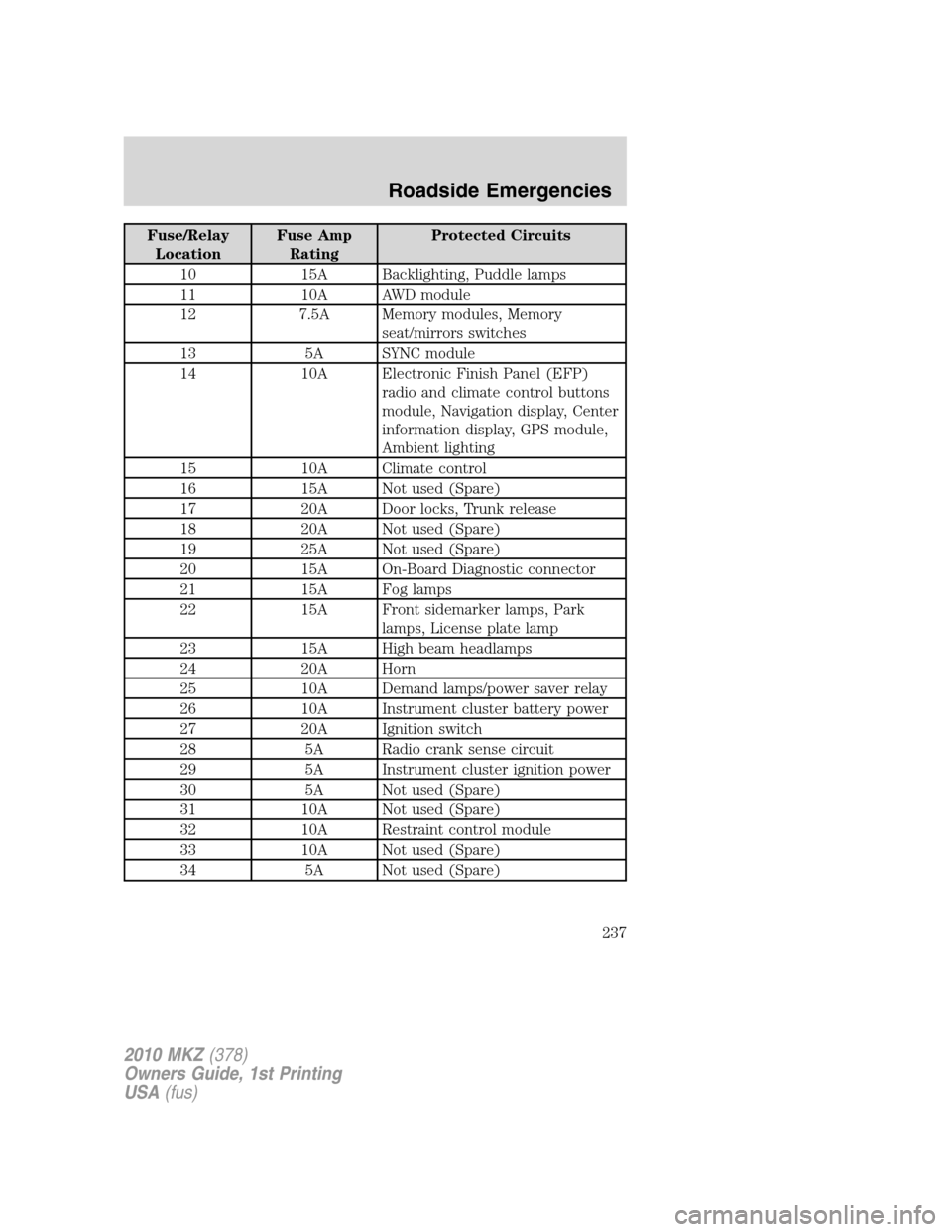
Fuse/Relay
LocationFuse Amp
RatingProtected Circuits
10 15A Backlighting, Puddle lamps
11 10A AWD module
12 7.5A Memory modules, Memory
seat/mirrors switches
13 5A SYNC module
14 10A Electronic Finish Panel (EFP)
radio and climate control buttons
module, Navigation display, Center
information display, GPS module,
Ambient lighting
15 10A Climate control
16 15A Not used (Spare)
17 20A Door locks, Trunk release
18 20A Not used (Spare)
19 25A Not used (Spare)
20 15A On-Board Diagnostic connector
21 15A Fog lamps
22 15A Front sidemarker lamps, Park
lamps, License plate lamp
23 15A High beam headlamps
24 20A Horn
25 10A Demand lamps/power saver relay
26 10A Instrument cluster battery power
27 20A Ignition switch
28 5A Radio crank sense circuit
29 5A Instrument cluster ignition power
30 5A Not used (Spare)
31 10A Not used (Spare)
32 10A Restraint control module
33 10A Not used (Spare)
34 5A Not used (Spare)
2010 MKZ(378)
Owners Guide, 1st Printing
USA(fus)
Roadside Emergencies
237
Page 238 of 318
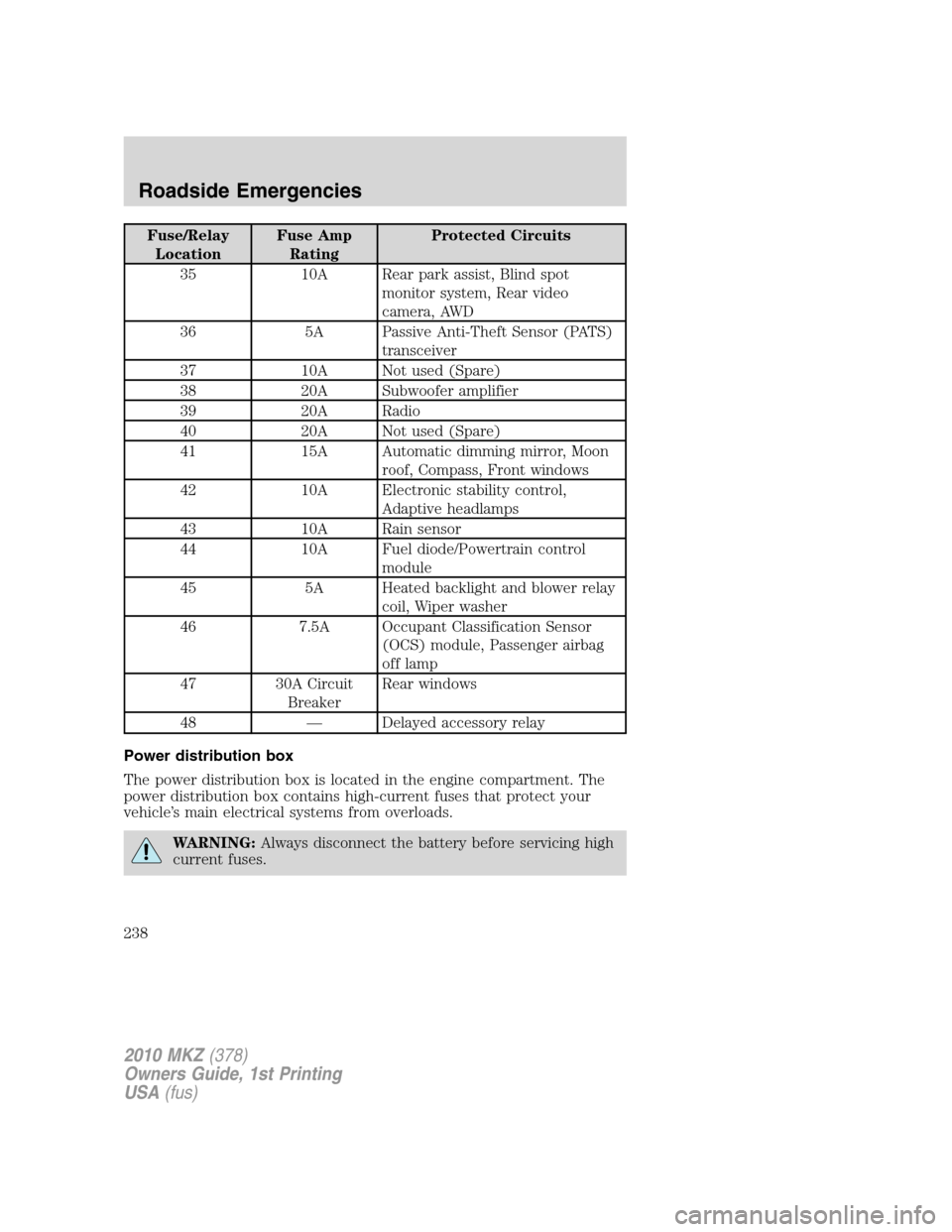
Fuse/Relay
LocationFuse Amp
RatingProtected Circuits
35 10A Rear park assist, Blind spot
monitor system, Rear video
camera, AWD
36 5A Passive Anti-Theft Sensor (PATS)
transceiver
37 10A Not used (Spare)
38 20A Subwoofer amplifier
39 20A Radio
40 20A Not used (Spare)
41 15A Automatic dimming mirror, Moon
roof, Compass, Front windows
42 10A Electronic stability control,
Adaptive headlamps
43 10A Rain sensor
44 10A Fuel diode/Powertrain control
module
45 5A Heated backlight and blower relay
coil, Wiper washer
46 7.5A Occupant Classification Sensor
(OCS) module, Passenger airbag
off lamp
47 30A Circuit
BreakerRear windows
48 — Delayed accessory relay
Power distribution box
The power distribution box is located in the engine compartment. The
power distribution box contains high-current fuses that protect your
vehicle’s main electrical systems from overloads.
WARNING:Always disconnect the battery before servicing high
current fuses.
2010 MKZ(378)
Owners Guide, 1st Printing
USA(fus)
Roadside Emergencies
238
Page 240 of 318
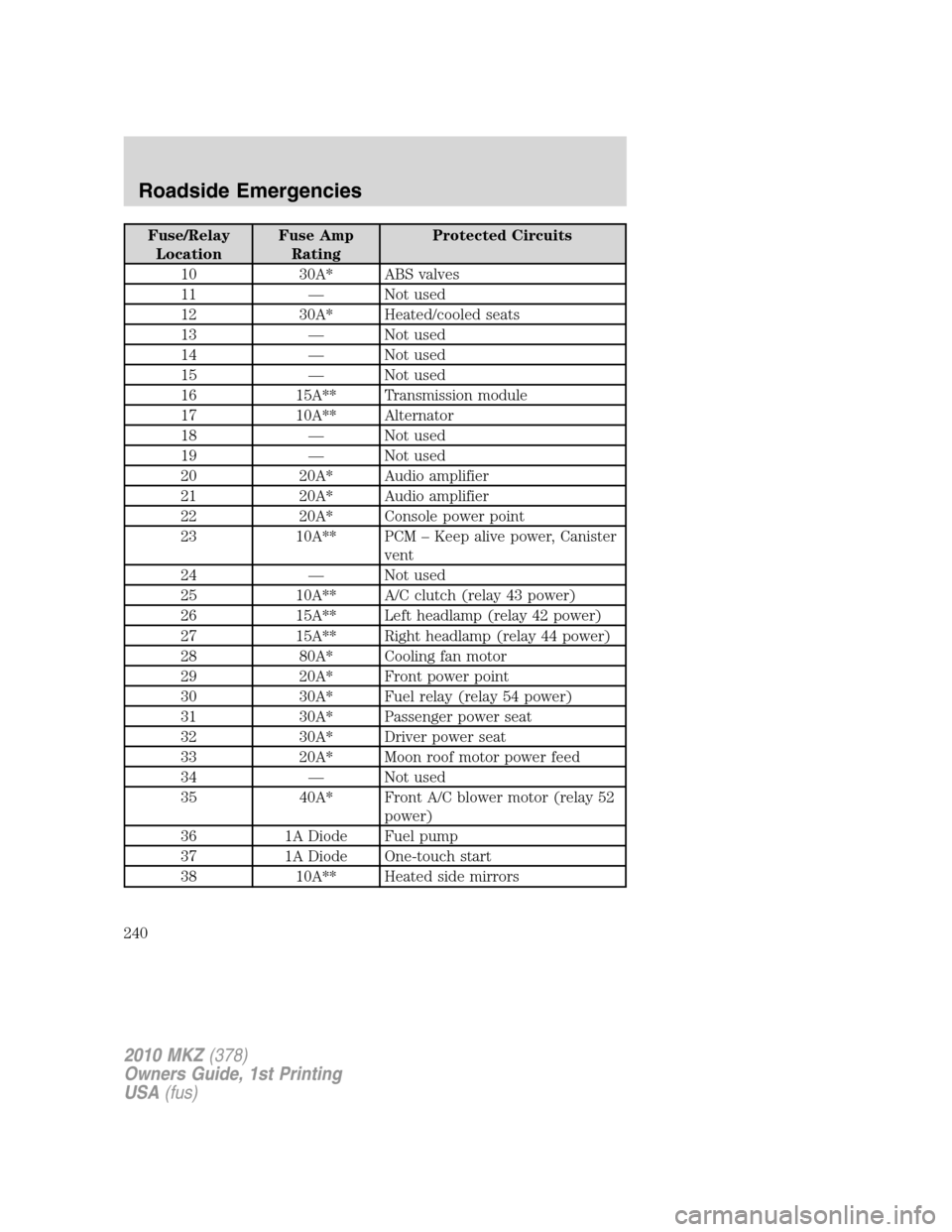
Fuse/Relay
LocationFuse Amp
RatingProtected Circuits
10 30A* ABS valves
11 — Not used
12 30A* Heated/cooled seats
13 — Not used
14 — Not used
15 — Not used
16 15A** Transmission module
17 10A** Alternator
18 — Not used
19 — Not used
20 20A* Audio amplifier
21 20A* Audio amplifier
22 20A* Console power point
23 10A** PCM – Keep alive power, Canister
vent
24 — Not used
25 10A** A/C clutch (relay 43 power)
26 15A** Left headlamp (relay 42 power)
27 15A** Right headlamp (relay 44 power)
28 80A* Cooling fan motor
29 20A* Front power point
30 30A* Fuel relay (relay 54 power)
31 30A* Passenger power seat
32 30A* Driver power seat
33 20A* Moon roof motor power feed
34 — Not used
35 40A* Front A/C blower motor (relay 52
power)
36 1A Diode Fuel pump
37 1A Diode One-touch start
38 10A** Heated side mirrors
2010 MKZ(378)
Owners Guide, 1st Printing
USA(fus)
Roadside Emergencies
240