Head rest LINCOLN MKZ 2015 User Guide
[x] Cancel search | Manufacturer: LINCOLN, Model Year: 2015, Model line: MKZ, Model: LINCOLN MKZ 2015Pages: 516, PDF Size: 4.48 MB
Page 141 of 516
WARNINGS
The adjustable head restraint is a
safety device. Whenever possible, it
should be installed and properly adjusted
when the seat is occupied. Failure to adjust
the head restraint properly could reduce its
effectiveness during certain impacts. Install the head restraint properly to
help minimize the risk of neck injury in
the event of a crash. Note:
Adjust the seatback to an upright
driving position before adjusting the head
restraint. Adjust the head restraint so that
the top of it is level with the top of your head
and as far forward as possible. Make sure
that you remain comfortable. If you are
extremely tall, adjust the head restraint to
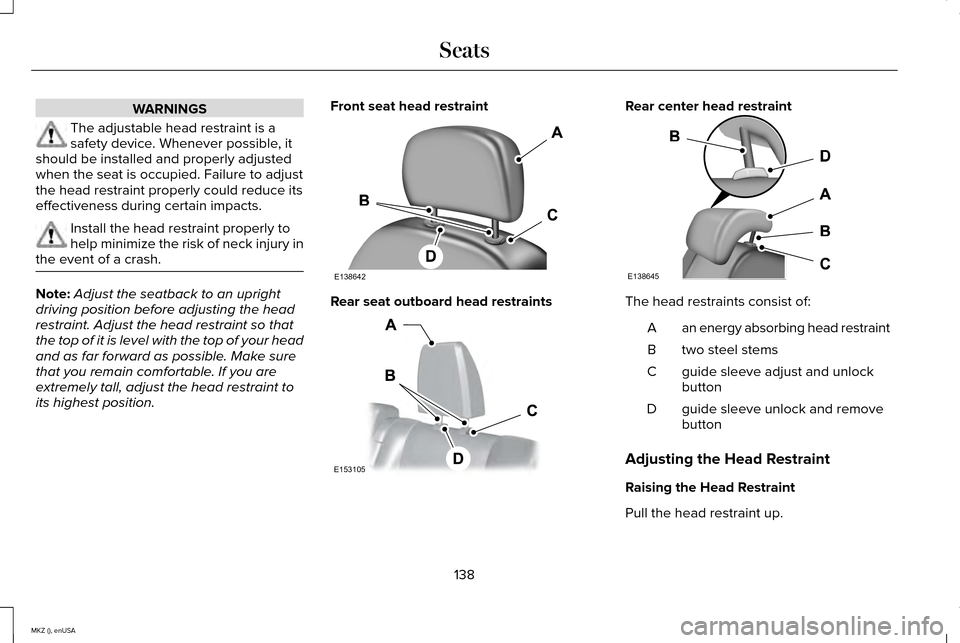
its highest position. Front seat head restraint Rear seat outboard head restraints Rear center head restraint
The head restraints consist of:
an energy absorbing head restraint
A
two steel stems
B
guide sleeve adjust and unlock
button
C
guide sleeve unlock and remove
button
D
Adjusting the Head Restraint
Raising the Head Restraint
Pull the head restraint up.
138
MKZ (), enUSA SeatsE138642 E153105 E138645
Page 142 of 516
Lowering the Head Restraint
1. Press and hold button C.
2. Push the head restraint down.
Removing the Head Restraint
1.
Pull the head restraint up until it reaches
its highest position.
2. Press and hold buttons C and D.
3. Pull the head restraint up.
Installing the Head Restraint
Align the steel stems into the guide sleeves
and push the head restraint down until it
locks. Tilting Head Restraints
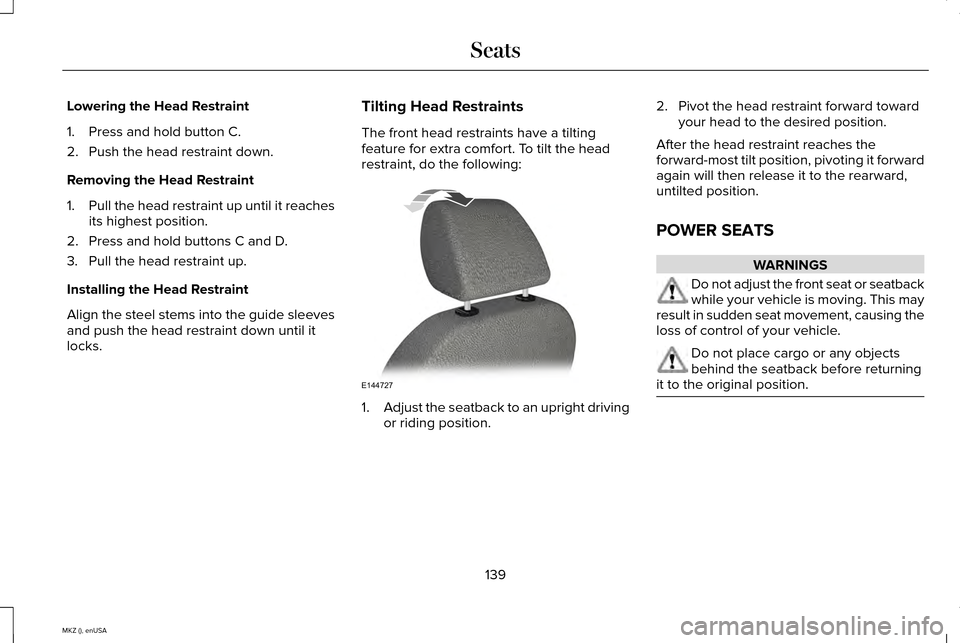
The front head restraints have a tilting
feature for extra comfort. To tilt the head
restraint, do the following:
1.
Adjust the seatback to an upright driving
or riding position. 2. Pivot the head restraint forward toward
your head to the desired position.
After the head restraint reaches the
forward-most tilt position, pivoting it forward
again will then release it to the rearward,
untilted position.
POWER SEATS WARNINGS
Do not adjust the front seat or seatback
while your vehicle is moving. This may
result in sudden seat movement, causing the
loss of control of your vehicle. Do not place cargo or any objects
behind the seatback before returning
it to the original position. 139
MKZ (), enUSA SeatsE144727
Page 160 of 516
The keyless starting system has three
modes:
•
Off: Turns the ignition off.
• Without applying the brake pedal,
press and release the button once
when the ignition is in the on mode,
or when the vehicle is running but is
not moving.
• On:
All electrical circuits are operational
and the warning lamps and indicators
illuminate.
• Without applying the brake pedal,
press and release the button once.
• Start:
Starts the vehicle. The engine may
not start when the vehicle starts.
• Press the brake pedal, and then press
the button until the vehicle starts. An
indicator light on the button
illuminates when then ignition is on
and when the vehicle starts. STARTING A GASOLINE ENGINE
When you start the engine, the idle speed
increases, this helps to warm up the engine.
If the engine idle speed does not slow down
automatically, have your vehicle checked by
an authorized dealer.
Before starting the engine, check the
following:
•
Make sure all occupants have fastened
their safety belts.
• Make sure the headlamps and electrical
accessories are off.
• Make sure the parking brake is on.
• Put the transmission in
P.
Note: Do not touch the accelerator pedal.
1. Fully press the brake pedal.
2. Press the button.
The system does not function if:
• The key frequencies are jammed.
• The key battery has no charge.
If you are unable to start the engine, do the
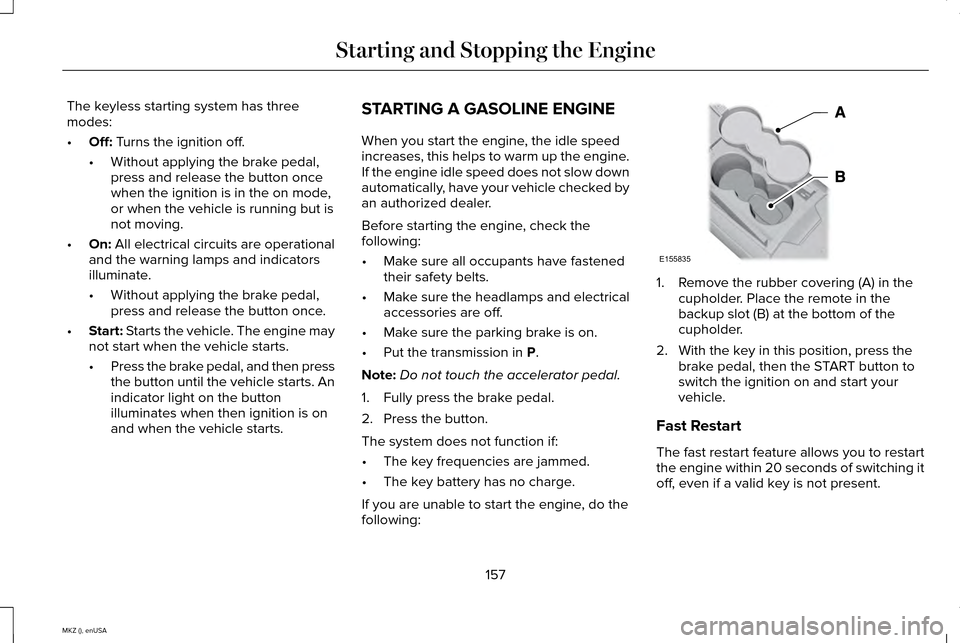
following: 1. Remove the rubber covering (A) in the
cupholder. Place the remote in the
backup slot (B) at the bottom of the
cupholder.
2. With the key in this position, press the brake pedal, then the START button to
switch the ignition on and start your
vehicle.
Fast Restart
The fast restart feature allows you to restart
the engine within 20 seconds of switching it
off, even if a valid key is not present.
157
MKZ (), enUSA Starting and Stopping the EngineE155835
Page 213 of 516
Action
Cause
Clean the grille surface in front of the radar or remove the objectcausing the obstruction.
The surface of the radar in the grille is dirty or obstructed in some
way.
Wait a short time. It may take several minutes for the radar to detectthat it is free from obstruction.
The surface of the radar in the grille is clean but the message remains
in the display.
Do not use the system in these conditions because it may not detectany vehicles ahead.
Heavy rain or snow is interfering with the radar signals.
Do not use the system in these conditions because it may not detectany vehicles ahead.
Swirling water, or snow or ice on the surface of the road may interfere
with the radar signals.
Wait a short time or switch to normal cruise control.
You are in a desert or remote area with no other vehicles and no
roadside objects.
Due to the nature of radar technology, it is
possible to get a blockage warning with no
actual block. This happens, for example,
when driving in sparse rural or desert
environments. A false blocked condition
either self clears or clears after a you restart
your vehicle. Switching to Normal Cruise Control WARNING
Normal cruise control does not brake
for slower vehicles. Always be aware
of which mode you have selected and apply
the brakes when necessary. You can manually change from adaptive
cruise control to normal cruise control
through the information display.
The cruise control indicator light
replaces the adaptive cruise
control indicator light if you select
normal cruise control. The gap setting does
not display, the system does not
automatically respond to lead vehicles and
automatic braking does not activate.
210
MKZ (), enUSA Cruise ControlE71340
Page 452 of 516
Other traffic alert features allows you to turn
on certain, or all, traffic icons on the map
such as road work, incident, accidents and
closed roads. Scroll down to view all the
different types of alerts. Switch these
features ON or OFF.
Avoid Areas
Choose areas which you want the system to
avoid when calculating a route for you.
Press
Add to program an entry. Once you
make a selection, the system tries to avoid
the area(s) if possible for all routes. To delete
a selection, choose the listing on the screen.
When the screen changes to
Avoid Areas
Edit, you can press Delete at the bottom
right of the screen.
Map Mode
Press the green bar in the upper right area
of the touchscreen to view map mode. Map
mode shows advanced viewing comprised
of both 2D city maps as well as 3D landmarks
(when available). 2D city maps show detailed outlines of
buildings, visible land use and land elements
and detailed railway infrastructure for the
most essential cities around the globe. These
maps also contain features, such as town
blocks, building footprints and railways.
3D landmarks appear as clear, visible objects
that are typically recognizable and have a
certain tourist value. The 3D landmarks
appear in 3D map mode only. Coverage
varies and improves with updated map
releases.
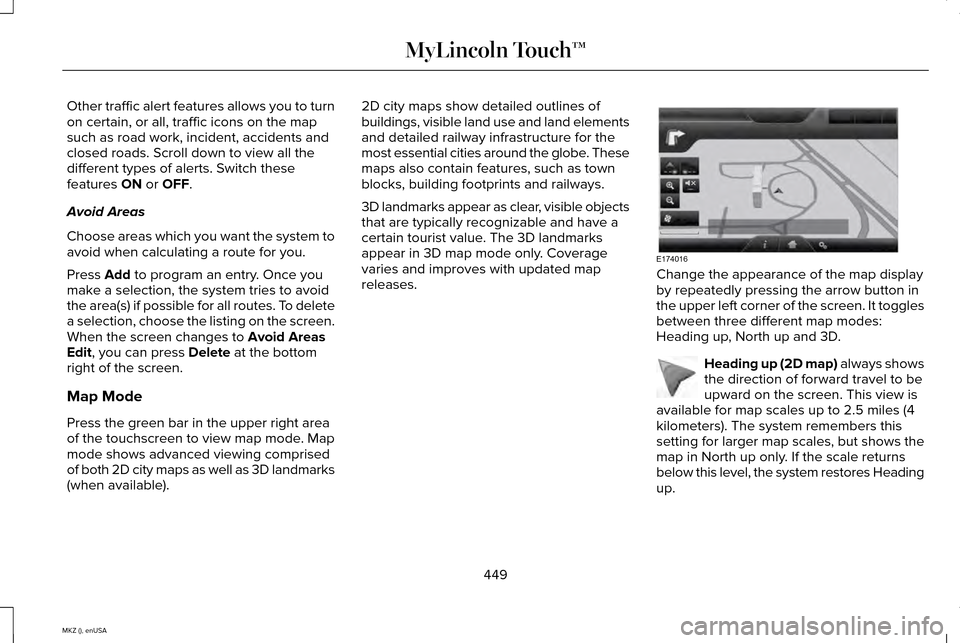
Change the appearance of the map display
by repeatedly pressing the arrow button in
the upper left corner of the screen. It toggles
between three different map modes:
Heading up, North up and 3D.
Heading up (2D map) always shows
the direction of forward travel to be
upward on the screen. This view is
available for map scales up to 2.5 miles (4
kilometers). The system remembers this
setting for larger map scales, but shows the
map in North up only. If the scale returns
below this level, the system restores Heading
up.
449
MKZ (), enUSA MyLincoln Touch™E174016 E142642
Page 456 of 516
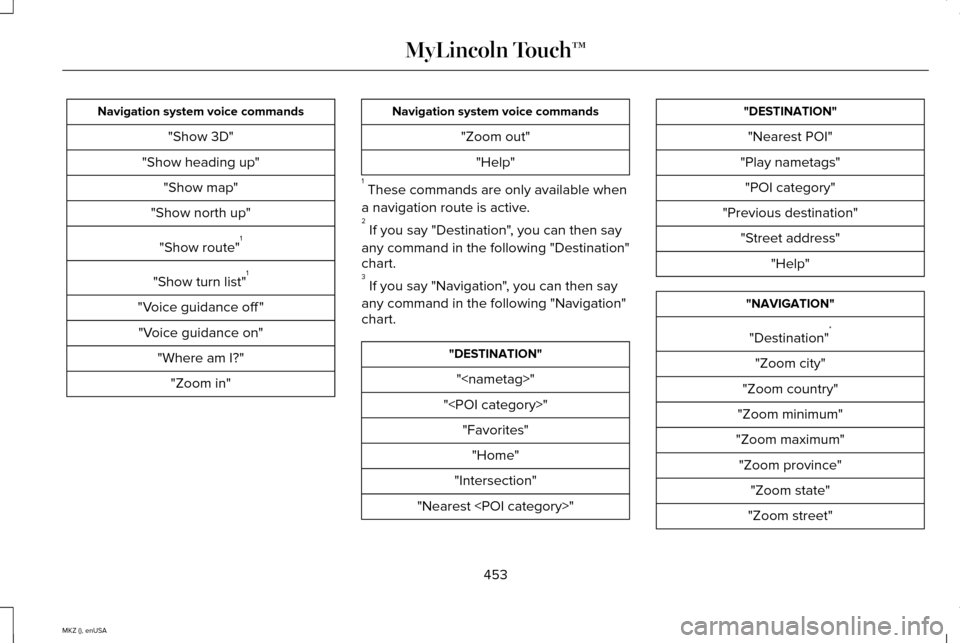
Navigation system voice commands
"Show 3D"
"Show heading up" "Show map"
"Show north up"
"Show route" 1
"Show turn list" 1
"Voice guidance off " "Voice guidance on" "Where am I?""Zoom in" Navigation system voice commands
"Zoom out""Help"
1 These commands are only available when
a navigation route is active.
2 If you say "Destination", you can then say
any command in the following "Destination"
chart.
3 If you say "Navigation", you can then say
any command in the following "Navigation"
chart. "DESTINATION"
"
"
"Intersection"
"Nearest
"Nearest POI"
"Play nametags" "POI category"
"Previous destination" "Street address" "Help" "NAVIGATION"
"Destination" *
"Zoom city"
"Zoom country"
"Zoom minimum"
"Zoom maximum" "Zoom province" "Zoom state"
"Zoom street"
453
MKZ (), enUSA MyLincoln Touch™
Page 508 of 516
H
Hazard Warning Flashers...........................248
Headlamp Exit Delay......................................87
Head Restraints..............................................137
Adjusting the Head Restraint...........................138
Tilting Head Restraints ......................................139
Heated Seats
..................................................144
Rear Heated Seats..............................................145
Heated Steering Wheel..................................81
Heated Windows and Mirrors....................135 Heated Exterior Mirror.......................................135
Heated Rear Window.........................................135
Heating See: Climate Control..........................................132
Hill Start Assist...............................................186 Using Hill Start Assist..........................................187
Hints on Controlling the Interior Climate..........................................................134
Cooling the Interior Quickly..............................
134
General Hints........................................................134
Heating the Interior Quickly..............................134
Recommended Settings for Cooling .............134
Recommended Settings for Heating..............134
Side Window Defogging in Cold Weather.............................................................134
Hints on Driving With Anti-Lock Brakes............................................................183 Hood Lock
See: Opening and Closing the Hood............279
I
In California (U.S. Only)...............................254
Information Display Control
.........................80
Cluster Display Control Features.....................80
Information Displays
.....................................107
General Information............................................107
Information.....................................................429 911 Assist...............................................................437
Alerts......................................................................436
Calendar...............................................................436
Sirius Travel Link.................................................434
SYNC Services (If Equipped, United States
Only)..................................................................430
Vehicle Health Report.......................................439
505
MKZ (), enUSA Index
Page 510 of 516
Locking and Unlocking.................................65
Activating Intelligent Access ............................66
Autolock Feature...................................................67
Auto Relock............................................................67
Battery Saver.........................................................68
Illuminated Entry...................................................68
Illuminated Exit......................................................68
Luggage Compartment.......................................68
Power Decklid (If Equipped)..............................69
Power Door Locks................................................65
Remote Control.....................................................65
Smart Unlocks .......................................................67
Locks..................................................................65
Lug Nuts See: Changing a Road Wheel.........................343
M
Maintenance..................................................278 General Information...........................................278
Media Hub
......................................................373
Memory Function..........................................142
Easy Entry and Exit Feature..............................143
Linking a PreSet Position to your Remote
Control or Intelligent Access Key Fob.......143
Saving a PreSet Position...................................142
Message Center See: Information Displays.................................107 Mirrors
See: Heated Windows and Mirrors.................135
See: Windows and Mirrors.................................93
Mobile Communications Equipment...........13
Moonroof..........................................................98 Bounce-Back..........................................................99
Opening and Closing the Moonroof................98
Retractable Panoramic Roof..............................99
Venting the Moonroof.........................................99
Motorcraft Parts............................................354
MyKey Troubleshooting
................................63
MyKey™..............................................................59 Principle of Operation.........................................59
MyLincoln Touch ™
.........................................374
General Information...........................................374
N
Navigation......................................................444 cityseekr...............................................................446
Map Mode............................................................449
Navigation Map Updates.................................452
Navigation Voice Commands..........................452
Point of Interest (POI) Categories...................446
Quick-touch Buttons...........................................451
Setting a Destination.........................................445
Setting Your Navigation Preferences............447 Normal Scheduled Maintenance.............482
Intelligent Oil-Life Monitor®.............................
482
Maintenance Intervals.......................................484
O
Oil Check See: Engine Oil Check......................................284
Opening and Closing the Hood
...............279
Ordering Additional Owner's Literature.....................................................258
Obtaining a French Owner’ s Manual............258
Overhead Console
.......................................155
P
Parking Aid
......................................................192
Front Sensing System........................................193
Rear Sensing System.........................................193
Parking Aids
....................................................192
Passive Anti-Theft System............................75 SecuriLock..............................................................75
PATS See: Passive Anti-Theft System........................75
Perchlorate........................................................12
Personal Safety System ™
..............................42
How Does the Personal Safety System
Work?...................................................................42
507
MKZ (), enUSA Index