traction control LINCOLN MKZ 2015 User Guide
[x] Cancel search | Manufacturer: LINCOLN, Model Year: 2015, Model line: MKZ, Model: LINCOLN MKZ 2015Pages: 516, PDF Size: 4.48 MB
Page 193 of 516
PRINCIPLE OF OPERATION
WARNINGS
Vehicle modifications involving braking
system, aftermarket roof racks,
suspension, steering system, tire
construction and wheel and tire size may
change the handling characteristics of the
vehicle and may adversely affect the
performance of the AdvanceTrac system. In
addition, installing any stereo loudspeakers
may interfere with and adversely affect the
AdvanceTrac system. Install any aftermarket
stereo loudspeaker as far as possible from
the front center console, the tunnel, and the
front seats in order to minimize the risk of
interfering with the AdvanceTrac sensors.
Reducing the effectiveness of the
AdvanceTrac system could lead to an
increased risk of loss of vehicle control,
vehicle rollover, personal injury and death. Remember that even advanced
technology cannot defy the laws of
physics. It’ s always possible to lose control
of a vehicle due to inappropriate driver input
for the conditions. Aggressive driving on any
road condition can cause you to lose control WARNINGS
of your vehicle increasing the risk of personal
injury or property damage. Activation of the
AdvanceTrac system is an indication that at
least some of the tires have exceeded their
ability to grip the road; this could reduce the
operator’ s ability to control the vehicle
potentially resulting in a loss of vehicle
control, vehicle rollover, personal injury and
death. If your AdvanceTrac system activates,
SLOW DOWN. The AdvanceTrac Control system helps you
keep control of your vehicle when on a
slippery surface. The electronic stability
control portion of the system helps avoid
skids and lateral slides. The traction control
system helps avoid drive wheel spin and loss
of traction. See Using Traction Control
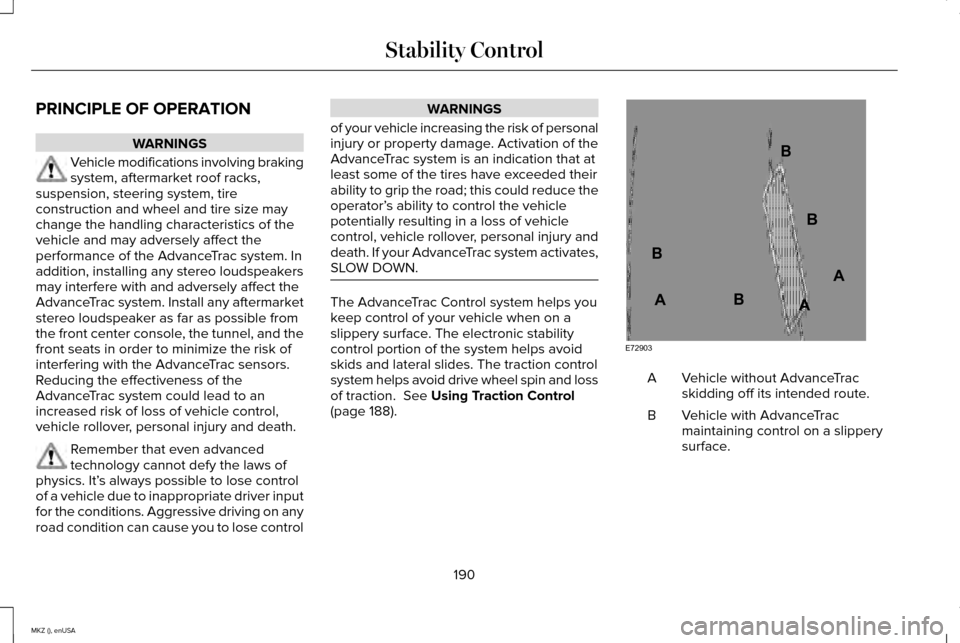
(page 188). Vehicle without AdvanceTrac
skidding off its intended route.
A
Vehicle with AdvanceTrac
maintaining control on a slippery
surface.
B
190
MKZ (), enUSA Stability ControlE72903A
AA
B
BB
B
Page 194 of 516
USING STABILITY CONTROL
AdvanceTrac®
The system automatically activates when you
start your vehicle. The AdvanceTrac system
cannot be completely turned off, but the
electronic stability control system is disabled
when the transmission selector lever is in
position R. You can turn off the traction
control portion of the system independently.
See
Using Traction Control (page 188).
191
MKZ (), enUSA Stability Control
Page 200 of 516
When you think your vehicle has enough
space in front and behind it, or you hear a
solid tone from the parking aid (accompanied
by a touch screen display message and a
tone), bring your vehicle to a complete stop.
When automatic steering is complete, the
touch screen displays a message and a tone
sounds, indicating that the active park assist
process is done. The driver is responsible
for checking the parking job and make any
necessary corrections before putting the
transmission in park (P).
Deactivating the Park Assist Feature
The system can be deactivated manually by:
•
Pressing the active park assist button.
• Grabbing the steering wheel.
• Driving above approximately 50 mph
(80 km/h) for 10 seconds during an active
park search.
• Driving above
6 mph (10 km/h) during
automatic steering.
• Switching off the traction control system. Certain vehicle conditions can also
deactivate the system, such as:
•
Traction control can activate on a slippery
or loose surface.
• An anti-lock brake system activation or
failure.
• If something touches the steering wheel.
If a problem occurs with the system, a
warning message displays and a tone
sounds. Occasional system messages may
occur in normal operation. For recurring or
frequent system faults, contact an authorized
dealer to have your vehicle serviced.
Troubleshooting the System The system does not look for a space
The traction control system may be off.
The transmission is in reverse (R), the vehicle must be moving forward\
to detect a parking space.
197
MKZ (), enUSA Parking Aids
Page 229 of 516
If the front end of the vehicle is hit or
damaged, the radar sensing zone may be
altered causing missed or false collision
warnings. See your authorized dealer to have
your collision warning radar checked for
proper coverage and operation.
DRIVE CONTROL
LINCOLN DRIVE CONTROL
Lincoln Drive Control delivers the Lincoln
driving experience through a suite of
sophisticated electronic vehicle systems.
These systems continuously monitor your
driving inputs and the road conditions to
optimize ride comfort, steering, handling,
powertrain response and sound. You can
preset your preferences for these systems
within the information display. Lincoln Drive
Control will respond to your preferences
based on what gear position you select. This
provides a single location to control multiple
systems performance settings.
Lincoln Drive Control consists of the
following systems:
•
Continuously controlled damping
dynamically adjusts the shock absorbers
stiffness in real time to match the road
surface and driver inputs. This system
continuously monitors your vehicle ’s
motion (roll, pitch, bounce), suspension
position, load, speed, road conditions,
and steering to adjust the suspension
damping for optimal vehicle control.
• Electronically power-assisted steering
adjusts steering effort and feel based on
your vehicle speed and your inputs.
• Active noise control utilizes your vehicle
electronics to enhance the acoustic
experience.
• Electronic stability control and traction
control maintain your vehicle control in
adverse conditions or high performance
driving.
• Electronic throttle control enhances the
powertrain response to your inputs.
Note: Active noise control is only available
with EcoBoost™ engines.
These systems have a range of modes which
you can choose from in order to customize
your ideal driving experience: •
Comfort – Provides a more relaxed
driving experience, maximizing comfort.
Your steering effort decreases and the
suspension movement is more fluid.
Comfort mode is ideal when you desire
enhanced traveling comfort.
• Normal – Delivers a balanced
combination of comfortable, controlled
ride and confident handling. This mode
provides an engaging drive experience
and a direct connection to the road
without sacrificing any of the composure
demanded from a luxury vehicle.
• Sport – Provides a sportier driving
experience. The suspension stiffens, with
an emphasis on handling and control.
The engine responds more directly to
your inputs and takes on a more powerful
tone. Sport mode is ideal for use during
more spirited driving.
Using Lincoln Drive Control
You can configure which of the Drive Control
modes are active when your vehicle is in
Drive (D) or in Sport (S). The configuration
remains active until modified from the main
menu on the information display.
226
MKZ (), enUSA Driving Aids
Page 248 of 516
Note:
Driving through standing water can
cause vehicle damage.
Note: Engine damage can occur if water
enters the air filter.
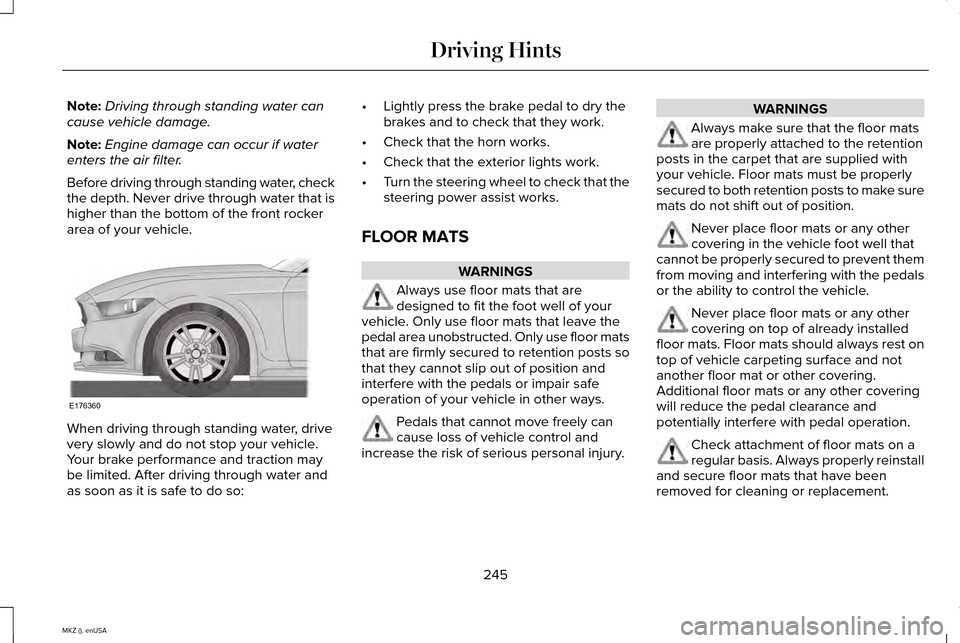
Before driving through standing water, check
the depth. Never drive through water that is
higher than the bottom of the front rocker
area of your vehicle. When driving through standing water, drive
very slowly and do not stop your vehicle.
Your brake performance and traction may
be limited. After driving through water and
as soon as it is safe to do so: •
Lightly press the brake pedal to dry the
brakes and to check that they work.
• Check that the horn works.
• Check that the exterior lights work.
• Turn the steering wheel to check that the
steering power assist works.
FLOOR MATS WARNINGS
Always use floor mats that are
designed to fit the foot well of your
vehicle. Only use floor mats that leave the
pedal area unobstructed. Only use floor mats
that are firmly secured to retention posts so
that they cannot slip out of position and
interfere with the pedals or impair safe
operation of your vehicle in other ways. Pedals that cannot move freely can
cause loss of vehicle control and
increase the risk of serious personal injury. WARNINGS
Always make sure that the floor mats
are properly attached to the retention
posts in the carpet that are supplied with
your vehicle. Floor mats must be properly
secured to both retention posts to make sure
mats do not shift out of position. Never place floor mats or any other
covering in the vehicle foot well that
cannot be properly secured to prevent them
from moving and interfering with the pedals
or the ability to control the vehicle. Never place floor mats or any other
covering on top of already installed
floor mats. Floor mats should always rest on
top of vehicle carpeting surface and not
another floor mat or other covering.
Additional floor mats or any other covering
will reduce the pedal clearance and
potentially interfere with pedal operation. Check attachment of floor mats on a
regular basis. Always properly reinstall
and secure floor mats that have been
removed for cleaning or replacement.
245
MKZ (), enUSA Driving HintsE176360
Page 328 of 516
Tire Quality Grades apply to new
pneumatic passenger car tires. The
Quality grades can be found where
applicable on the tire sidewall between
tread shoulder and maximum section
width. For example: Treadwear 200
Traction AA Temperature A.
These Tire Quality Grades are
determined by standards that the United
States Department of Transportation has
set.
Tire Quality Grades apply to new
pneumatic passenger car tires. They do
not apply to deep tread, winter-type
snow tires, space-saver or temporary
use spare tires, light truck or LT type
tires, tires with nominal rim diameters of
10 to 12 inches or limited production tires
as defined in Title 49 Code of Federal
Regulations Part 575.104 (c)(2).
U.S. Department of Transportation Tire
quality grades: The U.S. Department of
Transportation requires Ford Motor
Company to give you the following
information about tire grades exactly as
the government has written it. Treadwear
The treadwear grade is a comparative
rating based on the wear rate of the tire
when tested under controlled conditions
on a specified government test course.
For example, a tire graded 150 would
wear 1 ½ times as well on the
government course as a tire graded 100.
The relative performance of tires
depends upon the actual conditions of
their use, however, and may depart
significantly from the norm due to
variations in driving habits, service
practices, and differences in road
characteristics and climate.
Traction AA A B C
WARNING
The traction grade assigned to this
tire is based on straight-ahead
braking traction tests, and does not
include acceleration, cornering,
hydroplaning or peak traction
characteristics. The traction grades, from highest to
lowest are AA, A, B, and C. The grades
represent the tire
’s ability to stop on wet
pavement as measured under controlled
conditions on specified government test
surfaces of asphalt and concrete. A tire
marked C may have poor traction
performance.
Temperature A B C WARNING
The temperature grade for this tire
is established for a tire that is
properly inflated and not overloaded.
Excessive speed, underinflation, or
excessive loading, either separately or
in combination, can cause heat buildup
and possible tire failure. The temperature grades are A (the
highest), B and C, representing the tire
’s
resistance to the generation of heat and
its ability to dissipate heat when tested
under controlled conditions on a
specified indoor laboratory test wheel.
Sustained high temperature can cause
325
MKZ (), enUSA Wheels and Tires
Page 332 of 516
digits. For example, 2501 means the
25th week of 2001. The numbers in
between are identification codes used
for traceability. This information is used
to contact customers if a tire defect
requires a recall.
I. M+S or M/S: Mud and Snow, or
AT:
All Terrain, or
AS:
All Season.
J.
Tire Ply Composition and Material
Used: Indicates the number of plies or
the number of layers of rubber-coated
fabric in the tire tread and sidewall. Tire
manufacturers also must indicate the ply
materials in the tire and the sidewall,
which include steel, nylon, polyester,
and others. K.
Maximum Load: Indicates the
maximum load in kilograms and pounds
that can be carried by the tire. See the
Safety Compliance Certification Label
(affixed to either the door hinge pillar,
door-latch post, or the door edge that
meets the door-latch post, next to the
driver's seating position), for the correct
tire pressure for your vehicle.
L.
Treadwear, Traction and
Temperature Grades: •
Treadwear
The treadwear grade is
a comparative rating based on the
wear rate of the tire when tested
under controlled conditions on a
specified government test course.
For example, a tire graded 150 would
wear one and one-half times as well
on the government course as a tire
graded 100.
• Traction:
The traction grades, from
highest to lowest are AA, A, B, and
C. The grades represent the tire's
ability to stop on wet pavement as
measured under controlled
conditions on specified government
test surfaces of asphalt and concrete.
A tire marked C may have poor
traction performance.
• Temperature:
The temperature
grades are A (the highest), B and C,
representing the tire's resistance to
the generation of heat and its ability
to dissipate heat when tested under
controlled conditions on a specified
indoor laboratory test wheel.
329
MKZ (), enUSA Wheels and Tires
Page 341 of 516
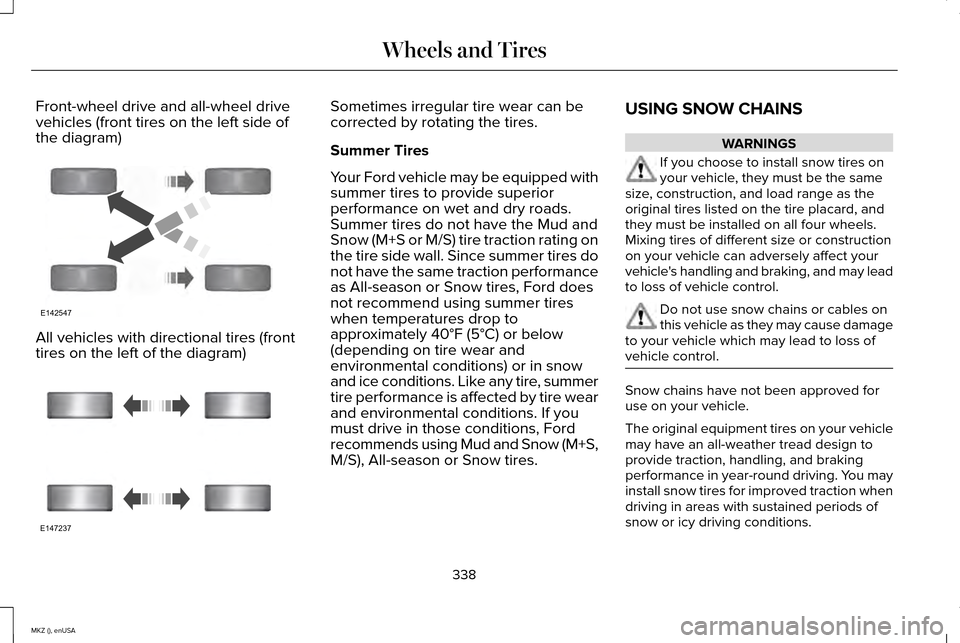
Front-wheel drive and all-wheel drive
vehicles (front tires on the left side of
the diagram)
All vehicles with directional tires (front
tires on the left of the diagram) Sometimes irregular tire wear can be
corrected by rotating the tires.
Summer Tires
Your Ford vehicle may be equipped with
summer tires to provide superior
performance on wet and dry roads.
Summer tires do not have the Mud and
Snow (M+S or M/S) tire traction rating on
the tire side wall. Since summer tires do
not have the same traction performance
as All-season or Snow tires, Ford does
not recommend using summer tires
when temperatures drop to
approximately 40°F (5°C) or below
(depending on tire wear and
environmental conditions) or in snow
and ice conditions. Like any tire, summer
tire performance is affected by tire wear
and environmental conditions. If you
must drive in those conditions, Ford
recommends using Mud and Snow (M+S,
M/S), All-season or Snow tires.
USING SNOW CHAINS WARNINGS
If you choose to install snow tires on
your vehicle, they must be the same
size, construction, and load range as the
original tires listed on the tire placard, and
they must be installed on all four wheels.
Mixing tires of different size or construction
on your vehicle can adversely affect your
vehicle's handling and braking, and may lead
to loss of vehicle control. Do not use snow chains or cables on
this vehicle as they may cause damage
to your vehicle which may lead to loss of
vehicle control. Snow chains have not been approved for
use on your vehicle.
The original equipment tires on your vehicle
may have an all-weather tread design to
provide traction, handling, and braking
performance in year-round driving. You may
install snow tires for improved traction when
driving in areas with sustained periods of
snow or icy driving conditions.
338
MKZ (), enUSA Wheels and TiresE142547 E147237
Page 467 of 516
Navigation Features: Any navigation
features included in the system are intended
to provide turn by turn instructions to get you
to a desired destination. Please make certain
all persons using this system carefully read
and follow instructions and safety information
fully.
Distraction Hazard: Any navigation features
may require manual (non-verbal) setup.
Attempting to perform such set-up or insert
data while driving can seriously distract your
attention and could cause an accident or
other serious consequences. Stop the
vehicle in a safe and legal manner before
attempting these operations.
Let Your Judgment Prevail:
Any navigation
features are provided only as an aid. Make
your driving decisions based on your
observations of local conditions and existing
traffic regulations. Any such feature is not a
substitute for your personal judgment. Any
route suggestions made by this system
should never replace any local traffic
regulations or your personal judgment or
knowledge of safe driving practices. Route Safety:
Do not follow the route
suggestions if doing so would result in an
unsafe or illegal maneuver, if you would be
placed in an unsafe situation, or if you would
be directed into an area that you consider
unsafe. The driver is ultimately responsible
for the safe operation of the vehicle and
therefore, must evaluate whether it is safe
to follow the suggested directions.
Potential Map Inaccuracy:
Maps used by
this system may be inaccurate because of
changes in roads, traffic controls or driving
conditions. Always use good judgment and
common sense when following the
suggested routes.
Emergency Services:
Do not rely on any
navigation features included in the system
to route you to emergency services. Ask
local authorities or an emergency services
operator for these locations. Not all
emergency services such as police, fire
stations, hospitals and clinics are likely to be
contained in the map database for such
navigation features. TeleNav Software End User License
Agreement
Please read these terms and conditions
carefully before you use the Telenav
Software. Your use of the Telenav Software
indicates that you accept these terms and
conditions. If you do not accept these terms
and conditions, do not break the seal of the
package, launch, or otherwise use the
Telenav Software.
These terms and conditions represent the
agreement (“
Agreement”) between you and
Telenav, Inc. (“Telenav”) with respect to the
Telenav Software (including upgrades,
modifications, or additions thereto)
(collectively “Telenav Software ”). All
references herein to “you” and “your” means
you, your employees, agents, and
contractors, and any other entity on whose
behalf you accept these terms and
conditions, all of whom shall also be bound
by this Agreement. Additionally, all of your
464
MKZ (), enUSA Appendices
Page 509 of 516
Information Messages...................................113
Active Park.............................................................113
Adaptive Cruise Control.....................................114
AdvanceTrac ™........................................................115
Airbag......................................................................115
Alarm.......................................................................115
Automatic Engine Shutdown.............................116
AWD........................................................................\
.116
Battery and Charging System...........................117
Blind Spot Information and Cross Traffic Alert System................................................................118
Doors and Locks...................................................118
Driver Alert.............................................................119
Fuel........................................................................\
..119
Hill Start Assist.....................................................120
Keys and Intelligent Access.............................120
Lane Keeping System.........................................121
Maintenance.........................................................122
MyKey.....................................................................123
Park Aid..................................................................124
Park Brake.............................................................124
Power Steering....................................................125
Pre-Collision Assist.............................................126
Remote Start.........................................................126
Seats.......................................................................127
Starting System ...................................................127
Tire Pressure Monitoring System....................128
Traction Control...................................................128 Transmission....................................................129
Installing Child Seats.......................................17 Child Seats...............................................................17
Using Lap and Shoulder Belts............................17
Using Lower Anchors and Tethers for CHildren (LATCH).............................................23
Using Tether Straps..............................................24
Instrument Cluster
........................................100
Instrument Lighting Dimmer........................86
Interior Lamps
..................................................90
Front Interior Lamp................................................91
Rear Interior Lamp.................................................91
Rear Interior Lamp (If Equipped).......................92
Interior Luggage Compartment Release...........................................................73
Interior Mirror...................................................96 Auto-Dimming Mirror............................................97
Introduction
.........................................................7
J
Jump Starting the Vehicle..........................249 Connecting the Jumper Cables.....................250
Jump Starting......................................................250
Preparing Your Vehicle.....................................249
Removing the Jumper Cables.........................251 K
Keyless Entry
....................................................70
SECURICODE™ KEYLESS ENTRY
KEYPAD...............................................................70
Keyless Starting.............................................156 Ignition Modes.....................................................156
Keys and Remote Controls...........................53
L
Lane Keeping System
..................................212
Switching the System On and Off...................212
Lighting Control
..............................................85
Headlamp Flasher................................................85
High Beams............................................................85
Lighting..............................................................85
Lincoln Automotive Financial Services......12
Load Carrying................................................228
Load Limit
.......................................................228
Vehicle Loading - with and without a
Trailer................................................................228
506
MKZ (), enUSA Index