instrument panel LINCOLN MKZ 2015 Owner's Manual
[x] Cancel search | Manufacturer: LINCOLN, Model Year: 2015, Model line: MKZ, Model: LINCOLN MKZ 2015Pages: 516, PDF Size: 4.48 MB
Page 310 of 516
•
Wash or wipe your hands clean if you
have been in contact with certain
products such as insect repellent and
suntan lotion to avoid possible damage
to the interior painted surfaces.
• Do not allow air fresheners and hand
sanitizers to spill onto interior surfaces.
If a spill occurs, wipe off immediately.
Your warranty may not cover these
damages.
If a staining liquid like coffee or juice has
been spilled on the instrument panel or on
interior trim surfaces:
1. Wipe up spilled liquid using a clean, soft
cloth as quickly as possible.
2. Use Motorcraft Premium Leather and Vinyl Cleaner or a commercially available
leather cleaning product for automotive
interiors. Test any cleaner or stain
remover on an inconspicuous area.
3. Alternatively, wipe the surface with a clean, soft cloth and a mild soap and
water solution. Dry the area with a clean,
soft cloth. 4.
If necessary, apply more soap and water
solution or cleaning product to a clean,
soft cloth and press it onto the soiled
area. Allow this to set at room
temperature for 30 minutes.
5. Remove the soaked cloth, then with a clean, damp cloth, use a rubbing motion
for 60 seconds on the soiled area.
6. Dry the area with a clean, soft cloth.
CLEANING LEATHER SEATS (If
Equipped)
Note: Follow the same procedure as
cleaning leather seats for cleaning leather
instrument panels and leather interior trim
surfaces.
For routine cleaning, wipe the surface with
a soft, damp cloth and a mild soap and water
solution. Dry the area with a clean, soft cloth.
For cleaning and removing spots and stains
such as dye transfer, use Motorcraft Premium
Leather and Vinyl Cleaner or a commercially
available leather cleaning product for
automotive interiors. Note:
Test any cleaner or stain remover on
an inconspicuous area.
You should:
• Remove dust and loose dirt with a
vacuum cleaner.
• Clean and treat spills and stains as soon
as possible.
Do not use the following products as these
may damage the leather:
• Oil and petroleum or silicone-based
leather conditioners.
• Household cleaners.
• Alcohol solutions.
• Solvents or cleaners intended specifically
for rubber, vinyl and plastics.
307
MKZ (), enUSA Vehicle Care
Page 316 of 516
What to do when a Tire Is Punctured
A tire puncture within the tire tread area can
be repaired in two stages with the kit.
•
In the first stage, the tire will be reinflated
with a sealing compound and air. After
the tire has been reinflated, you will need
to drive the vehicle a short distance 4 mi
(6 km) to distribute the sealant in the tire.
• In the second stage, you will need to
check the tire pressure and adjust, if
necessary, to the vehicle tire inflation
pressure.
First Stage: Reinflating the Tire with
Sealing Compound and Air WARNINGS
Do not stand directly over the kit while
inflating the tire. If you notice any
unusual bulges or deformations in the tire
sidewall during inflation, stop and call
roadside assistance. If the tire does not inflate to the
recommended tire pressure within 15
minutes, stop and call roadside assistance. Preparation: Park the vehicle in a safe, level
and secure area, away from moving traffic.
Turn the hazard lights on. Apply the parking
brake and turn the engine off. Inspect the
flat tire for visible damage.
Sealant compound contains latex. To avoid
any allergic reactions, use the non-latex
gloves located in the accessory box on the
underside of the kit housing.
Do not remove any foreign object that has
pierced the tire. If a puncture is located in
the tire sidewall, stop and call roadside
assistance.
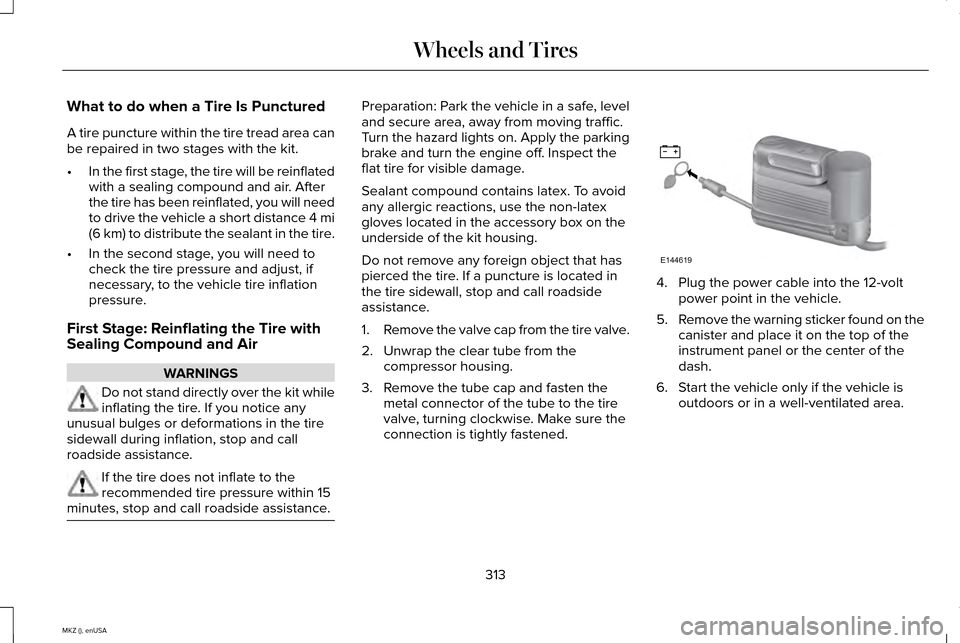
1.
Remove the valve cap from the tire valve.
2. Unwrap the clear tube from the compressor housing.
3. Remove the tube cap and fasten the metal connector of the tube to the tire
valve, turning clockwise. Make sure the
connection is tightly fastened. 4. Plug the power cable into the 12-volt
power point in the vehicle.
5. Remove the warning sticker found on the
canister and place it on the top of the
instrument panel or the center of the
dash.
6. Start the vehicle only if the vehicle is outdoors or in a well-ventilated area.
313
MKZ (), enUSA Wheels and TiresE144619
Page 323 of 516
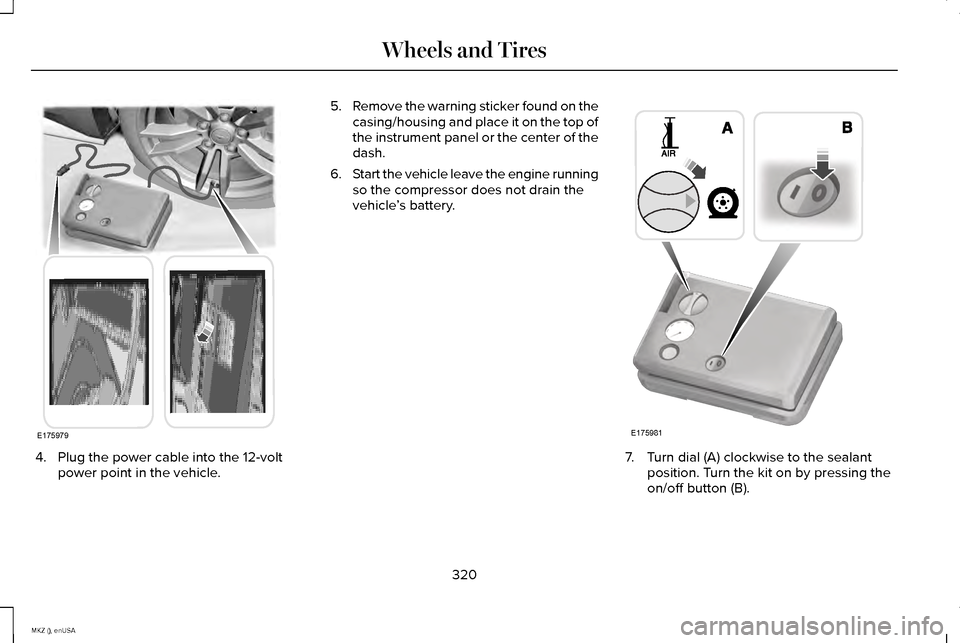
4. Plug the power cable into the 12-volt
power point in the vehicle. 5.
Remove the warning sticker found on the
casing/housing and place it on the top of
the instrument panel or the center of the
dash.
6. Start the vehicle leave the engine running
so the compressor does not drain the
vehicle ’s battery. 7. Turn dial (A) clockwise to the sealant
position. Turn the kit on by pressing the
on/off button (B).
320
MKZ (), enUSA Wheels and TiresE175979 E175981
Page 359 of 516
VEHICLE IDENTIFICATION
NUMBER
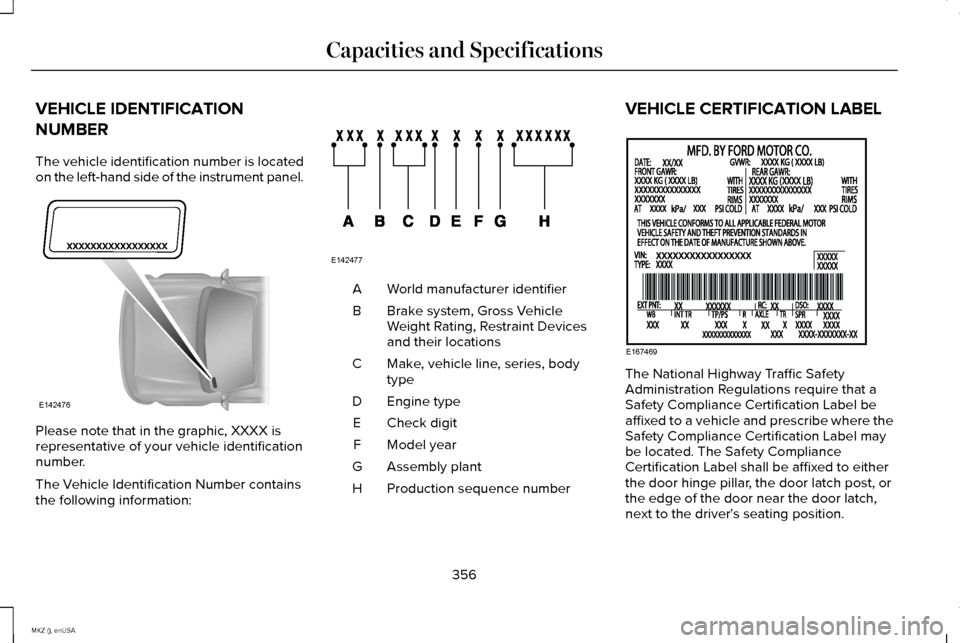
The vehicle identification number is located
on the left-hand side of the instrument panel.
Please note that in the graphic, XXXX is
representative of your vehicle identification
number.
The Vehicle Identification Number contains
the following information: World manufacturer identifier
A
Brake system, Gross Vehicle
Weight Rating, Restraint Devices
and their locations
B
Make, vehicle line, series, body
type
C
Engine type
D
Check digit
E
Model year
F
Assembly plant
G
Production sequence number
H VEHICLE CERTIFICATION LABEL
The National Highway Traffic Safety
Administration Regulations require that a
Safety Compliance Certification Label be
affixed to a vehicle and prescribe where the
Safety Compliance Certification Label may
be located. The Safety Compliance
Certification Label shall be affixed to either
the door hinge pillar, the door latch post, or
the edge of the door near the door latch,
next to the driver's seating position.
356
MKZ (), enUSA Capacities and SpecificationsE142476 E142477 E167469
Page 391 of 516
Under this menu, you can set your
clock, access and adjust the
display, sound and vehicle settings
as well as access settings for specific modes
or the help feature.
Clock
Note: You cannot manually set the date.
Your vehicle ’s GPS does this for you.
Note: If the battery has been disconnected,
your vehicle needs to acquire a GPS signal
to update the clock. Once your vehicle
acquires the signal, it may take a few
minutes for the update to display the correct
time. 1. Press the Settings icon > Clock.
2. Press
+ and - to adjust the time.
From this screen, you can also make other
adjustments such as 12-hour or 24-hour
mode, activate GPS time synchronization and
have the system automatically update new
time zones. You can also turn the outside air temperature
display off and on. It appears at the top
center of the touchscreen, next to the time
and date.
The system automatically saves any updates
you make to the settings.
Display
You can adjust the touchscreen display
through the touchscreen or by pressing the
voice button on your steering wheel controls
and when prompted, say, "Display settings".
Press the Settings icon >
Display,
to access and make adjustments
using the touchscreen.
• Brightness
allows you to make the
screen display brighter or dimmer.
• Auto DIM
, when set to On, lets you use
the Auto Dim Manual Offset feature.
When set to
Off, screen brightness does
not change. •
Mode
allows you to set the screen to a
certain brightness or have the system
automatically change based on the
outside light level, or turn the display off.
• If you select
AUTO or NIGHT, you
have the options of turning the
display's Auto Dim feature on or off
and changing the Auto Dim Manual
Offset feature.
• Auto Dim Manual Offset
allows you to
adjust screen dimming as the outside
lighting conditions change from day to
night. This feature also allows you to
adjust screen brightness using the
instrument panel dimming control.
• Edit Wallpaper
•You can have your touchscreen
display the default photo or upload
your own.
Uploading Photos for Your Home Screen
Wallpaper
Note: You cannot load photos directly from
your camera. You must access the photos
either from your USB mass storage device
or from an SD card.
388
MKZ (), enUSA MyLincoln Touch™E142607 E142607 E142607
Page 419 of 516
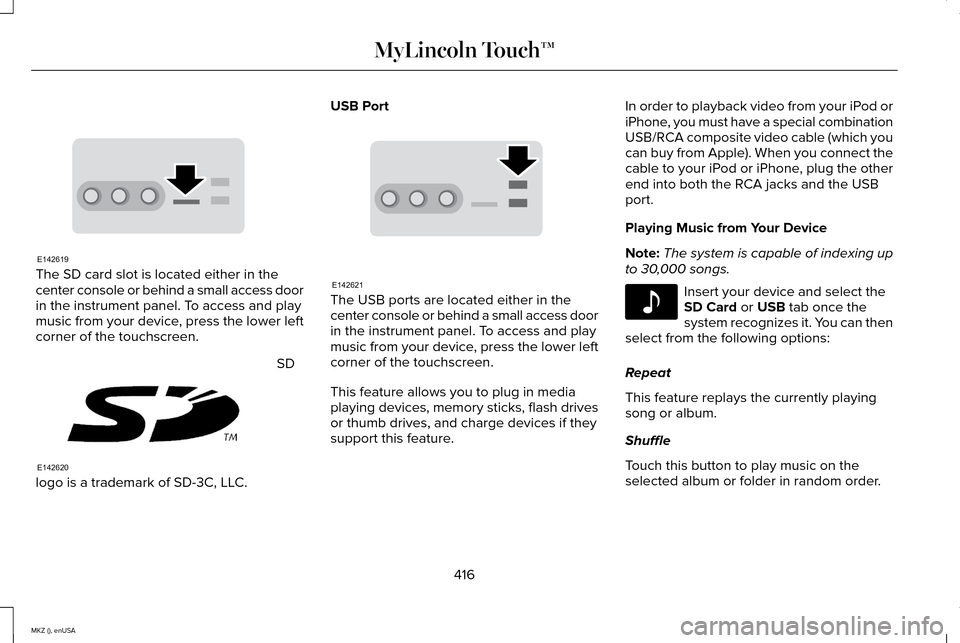
The SD card slot is located either in the
center console or behind a small access door
in the instrument panel. To access and play
music from your device, press the lower left
corner of the touchscreen.
SD
logo is a trademark of SD-3C, LLC. USB Port
The USB ports are located either in the
center console or behind a small access door
in the instrument panel. To access and play
music from your device, press the lower left
corner of the touchscreen.
This feature allows you to plug in media
playing devices, memory sticks, flash drives
or thumb drives, and charge devices if they
support this feature.In order to playback video from your iPod or
iPhone, you must have a special combination
USB/RCA composite video cable (which you
can buy from Apple). When you connect the
cable to your iPod or iPhone, plug the other
end into both the RCA jacks and the USB
port.
Playing Music from Your Device
Note:
The system is capable of indexing up
to 30,000 songs. Insert your device and select the
SD Card or USB tab once the
system recognizes it. You can then
select from the following options:
Repeat
This feature replays the currently playing
song or album.
Shuffle
Touch this button to play music on the
selected album or folder in random order.
416
MKZ (), enUSA MyLincoln Touch™E142619 E142620 E142621 E142611
Page 424 of 516
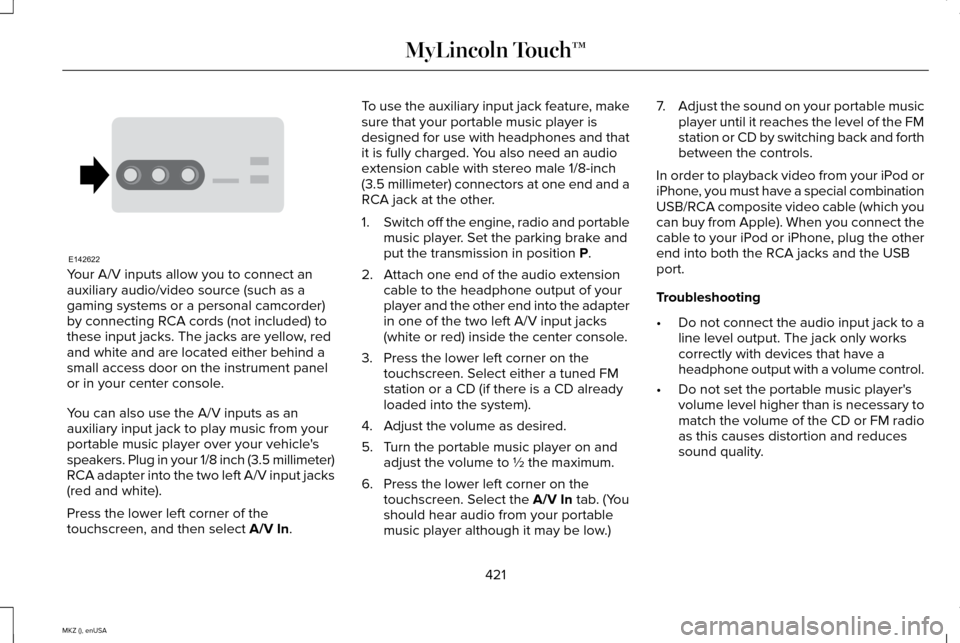
Your A/V inputs allow you to connect an
auxiliary audio/video source (such as a
gaming systems or a personal camcorder)
by connecting RCA cords (not included) to
these input jacks. The jacks are yellow, red
and white and are located either behind a
small access door on the instrument panel
or in your center console.
You can also use the A/V inputs as an
auxiliary input jack to play music from your
portable music player over your vehicle's
speakers. Plug in your 1/8 inch (3.5 millimeter)
RCA adapter into the two left A/V input jacks
(red and white).
Press the lower left corner of the
touchscreen, and then select A/V In. To use the auxiliary input jack feature, make
sure that your portable music player is
designed for use with headphones and that
it is fully charged. You also need an audio
extension cable with stereo male 1/8-inch
(3.5 millimeter) connectors at one end and a
RCA jack at the other.
1.
Switch off the engine, radio and portable
music player. Set the parking brake and
put the transmission in position
P.
2. Attach one end of the audio extension cable to the headphone output of your
player and the other end into the adapter
in one of the two left A/V input jacks
(white or red) inside the center console.
3. Press the lower left corner on the touchscreen. Select either a tuned FM
station or a CD (if there is a CD already
loaded into the system).
4. Adjust the volume as desired.
5. Turn the portable music player on and adjust the volume to ½ the maximum.
6. Press the lower left corner on the touchscreen. Select the
A/V In tab. (You
should hear audio from your portable
music player although it may be low.) 7.
Adjust the sound on your portable music
player until it reaches the level of the FM
station or CD by switching back and forth
between the controls.
In order to playback video from your iPod or
iPhone, you must have a special combination
USB/RCA composite video cable (which you
can buy from Apple). When you connect the
cable to your iPod or iPhone, plug the other
end into both the RCA jacks and the USB
port.
Troubleshooting
• Do not connect the audio input jack to a
line level output. The jack only works
correctly with devices that have a
headphone output with a volume control.
• Do not set the portable music player's
volume level higher than is necessary to
match the volume of the CD or FM radio
as this causes distortion and reduces
sound quality.
421
MKZ (), enUSA MyLincoln Touch™E142622
Page 445 of 516
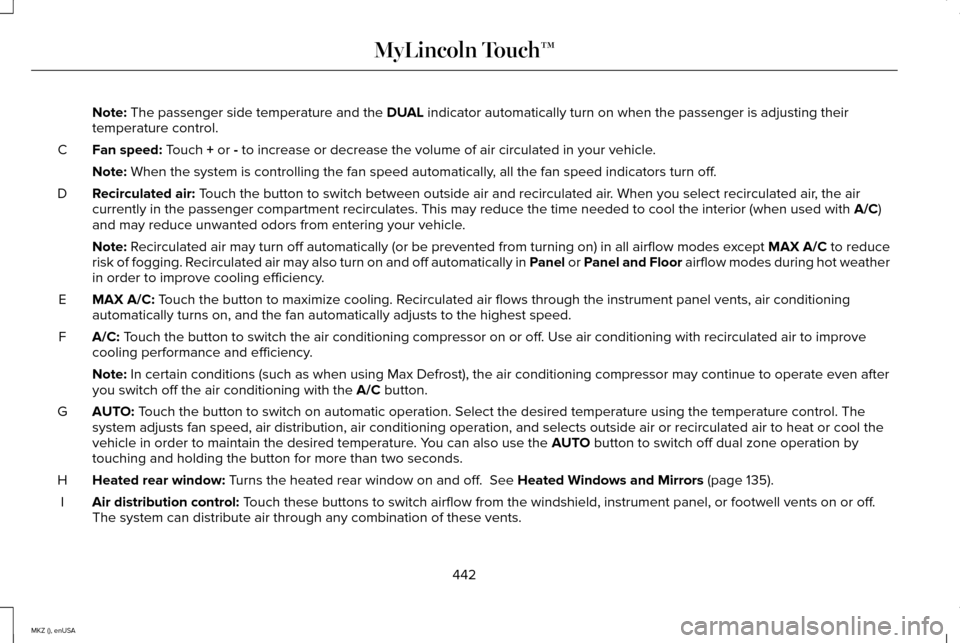
Note: The passenger side temperature and the DUAL indicator automatically turn on when the passenger is adjusting their
temperature control.
Fan speed:
Touch + or - to increase or decrease the volume of air circulated in your vehicle.
C
Note:
When the system is controlling the fan speed automatically, all the fan speed indicators turn off.
Recirculated air:
Touch the button to switch between outside air and recirculated air. When you select recirculated air, the air
currently in the passenger compartment recirculates. This may reduce the\
time needed to cool the interior (when used with A/C)
and may reduce unwanted odors from entering your vehicle.
D
Note:
Recirculated air may turn off automatically (or be prevented from turnin\
g on) in all airflow modes except MAX A/C to reduce
risk of fogging. Recirculated air may also turn on and off automatically in Panel or Panel and Floor airflow modes during hot weather
in order to improve cooling efficiency.
MAX A/C:
Touch the button to maximize cooling. Recirculated air flows through the instrument panel vents, air conditioni\
ng
automatically turns on, and the fan automatically adjusts to the highest\
speed.
E
A/C:
Touch the button to switch the air conditioning compressor on or off. Use air conditioning with recirculated air to improve
cooling performance and efficiency.
F
Note:
In certain conditions (such as when using Max Defrost), the air condi\
tioning compressor may continue to operate even after
you switch off the air conditioning with the A/C button.
AUTO:
Touch the button to switch on automatic operation. Select the desired tem\
perature using the temperature control. The
system adjusts fan speed, air distribution, air conditioning operation, \
and selects outside air or recirculated air to heat or cool the
vehicle in order to maintain the desired temperature. You can also use the
AUTO button to switch off dual zone operation by
touching and holding the button for more than two seconds.
G
Heated rear window:
Turns the heated rear window on and off. See Heated Windows and Mirrors (page 135).
H
Air distribution control:
Touch these buttons to switch airflow from the windshield, instrument pan\
el, or footwell vents on or off.
The system can distribute air through any combination of these vents.
I
442
MKZ (), enUSA MyLincoln Touch™
Page 505 of 516
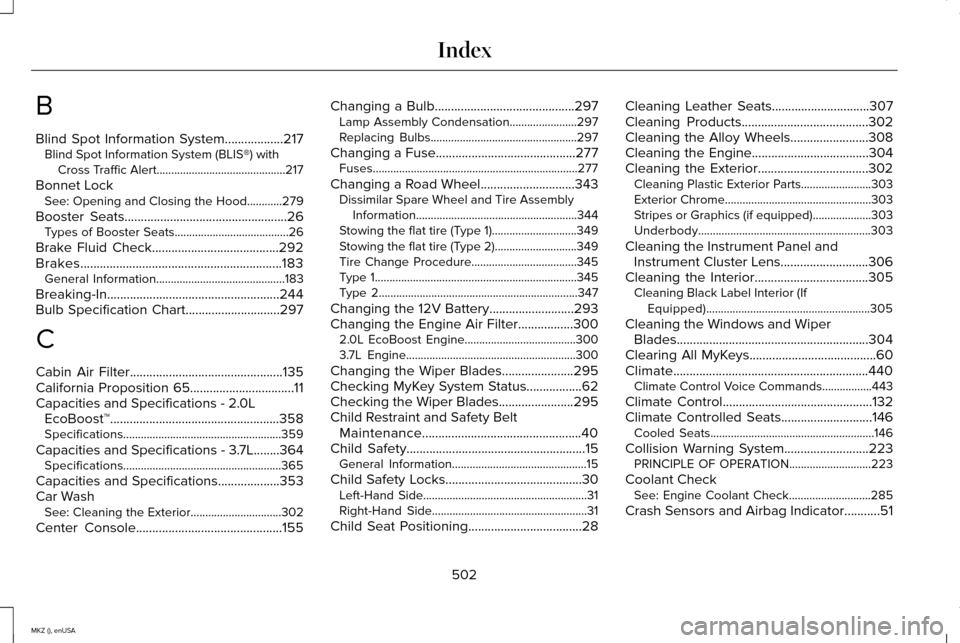
B
Blind Spot Information System..................217
Blind Spot Information System (BLIS®) with
Cross Traffic Alert............................................217
Bonnet Lock See: Opening and Closing the Hood............279
Booster Seats
..................................................26
Types of Booster Seats.......................................26
Brake Fluid Check.......................................292
Brakes..............................................................183 General Information............................................183
Breaking-In.....................................................244
Bulb Specification Chart.............................297
C
Cabin Air Filter...............................................135
California Proposition 65................................11
Capacities and Specifications - 2.0L EcoBoost™....................................................358
Specifications......................................................359
Capacities and Specifications - 3.7L........364 Specifications......................................................365
Capacities and Specifications...................353
Car Wash See: Cleaning the Exterior...............................302
Center Console.............................................155 Changing a Bulb
...........................................297
Lamp Assembly Condensation.......................297
Replacing Bulbs..................................................297
Changing a Fuse...........................................277 Fuses......................................................................277
Changing a Road Wheel.............................343 Dissimilar Spare Wheel and Tire Assembly
Information.......................................................344
Stowing the flat tire (Type 1).............................349
Stowing the flat tire (Type 2)............................349
Tire Change Procedure....................................345
Type 1.....................................................................345
Type 2....................................................................347
Changing the 12V Battery..........................293
Changing the Engine Air Filter
.................300
2.0L EcoBoost Engine......................................300
3.7L Engine..........................................................300
Changing the Wiper Blades......................295
Checking MyKey System Status.................62
Checking the Wiper Blades.......................295
Child Restraint and Safety Belt Maintenance.................................................40
Child Safety
.......................................................15
General Information..............................................15
Child Safety Locks..........................................30 Left-Hand Side........................................................31
Right-Hand Side.....................................................31
Child Seat Positioning...................................28 Cleaning Leather Seats
..............................307
Cleaning Products.......................................302
Cleaning the Alloy Wheels........................308
Cleaning the Engine
....................................304
Cleaning the Exterior..................................302 Cleaning Plastic Exterior Parts........................303
Exterior Chrome..................................................303
Stripes or Graphics (if equipped)....................303
Underbody...........................................................303
Cleaning the Instrument Panel and Instrument Cluster Lens...........................306
Cleaning the Interior...................................305 Cleaning Black Label Interior (If
Equipped)........................................................305
Cleaning the Windows and Wiper Blades...........................................................304
Clearing All MyKeys.......................................60
Climate............................................................440 Climate Control Voice Commands.................443
Climate Control
..............................................132
Climate Controlled Seats............................146
Cooled Seats........................................................146
Collision Warning System..........................223 PRINCIPLE OF OPERATION............................223
Coolant Check See: Engine Coolant Check............................285
Crash Sensors and Airbag Indicator...........51
502
MKZ (), enUSA Index