remote control LINCOLN MKZ 2015 Owner's Manual
[x] Cancel search | Manufacturer: LINCOLN, Model Year: 2015, Model line: MKZ, Model: LINCOLN MKZ 2015Pages: 516, PDF Size: 4.48 MB
Page 97 of 516
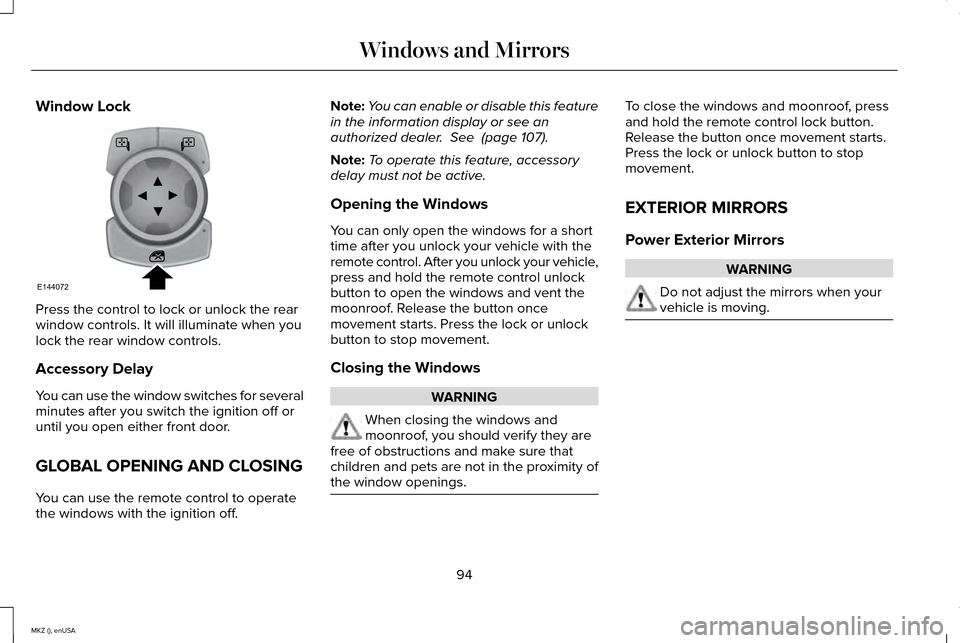
Window Lock
Press the control to lock or unlock the rear
window controls. It will illuminate when you
lock the rear window controls.
Accessory Delay
You can use the window switches for several
minutes after you switch the ignition off or
until you open either front door.
GLOBAL OPENING AND CLOSING
You can use the remote control to operate
the windows with the ignition off. Note:
You can enable or disable this feature
in the information display or see an
authorized dealer. See (page 107).
Note: To operate this feature, accessory
delay must not be active.
Opening the Windows
You can only open the windows for a short
time after you unlock your vehicle with the
remote control. After you unlock your vehicle,
press and hold the remote control unlock
button to open the windows and vent the
moonroof. Release the button once
movement starts. Press the lock or unlock
button to stop movement.
Closing the Windows WARNING
When closing the windows and
moonroof, you should verify they are
free of obstructions and make sure that
children and pets are not in the proximity of
the window openings. To close the windows and moonroof, press
and hold the remote control lock button.
Release the button once movement starts.
Press the lock or unlock button to stop
movement.
EXTERIOR MIRRORS
Power Exterior Mirrors
WARNING
Do not adjust the mirrors when your
vehicle is moving.
94
MKZ (), enUSA Windows and MirrorsE144072
Page 114 of 516
Settings
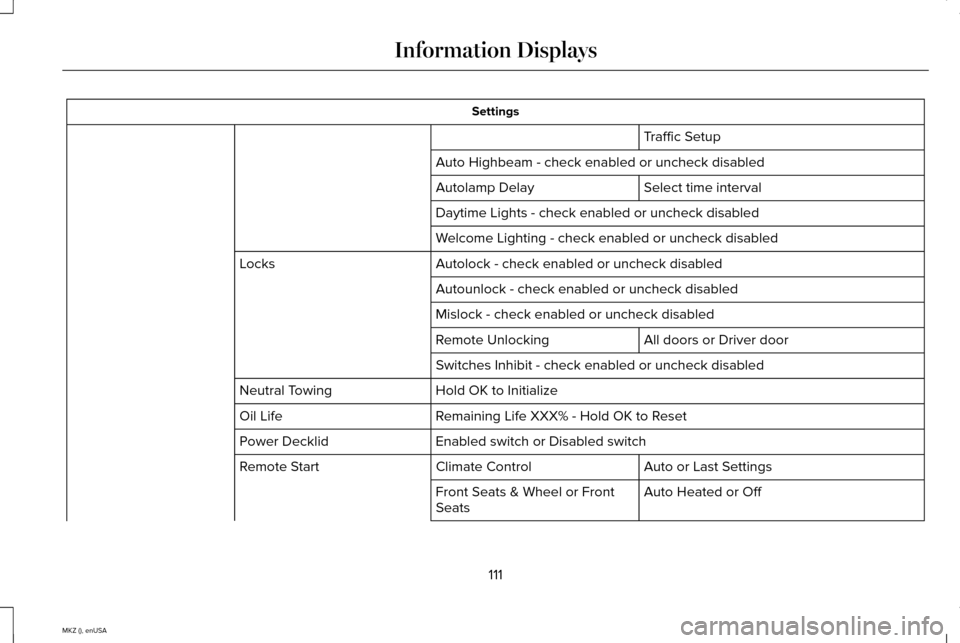
Traffic Setup
Auto Highbeam - check enabled or uncheck disabled Select time interval
Autolamp Delay
Daytime Lights - check enabled or uncheck disabled
Welcome Lighting - check enabled or uncheck disabled
Autolock - check enabled or uncheck disabled
Locks
Autounlock - check enabled or uncheck disabled
Mislock - check enabled or uncheck disabled All doors or Driver door
Remote Unlocking
Switches Inhibit - check enabled or uncheck disabled
Hold OK to Initialize
Neutral Towing
Remaining Life XXX% - Hold OK to Reset
Oil Life
Enabled switch or Disabled switch
Power Decklid
Auto or Last Settings
Climate Control
Remote Start
Auto Heated or Off
Front Seats & Wheel or Front
Seats
111
MKZ (), enUSA Information Displays
Page 115 of 516
Settings
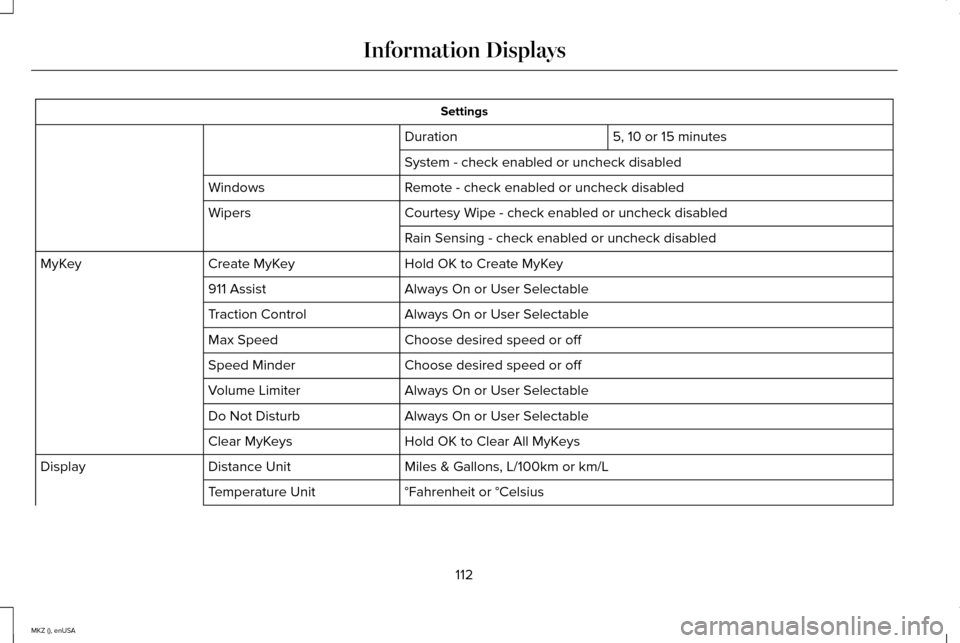
5, 10 or 15 minutes
Duration
System - check enabled or uncheck disabled
Remote - check enabled or uncheck disabled
Windows
Courtesy Wipe - check enabled or uncheck disabled
Wipers
Rain Sensing - check enabled or uncheck disabled
Hold OK to Create MyKey
Create MyKey
MyKey
Always On or User Selectable
911 Assist
Always On or User Selectable
Traction Control
Choose desired speed or off
Max Speed
Choose desired speed or off
Speed Minder
Always On or User Selectable
Volume Limiter
Always On or User Selectable
Do Not Disturb
Hold OK to Clear All MyKeys
Clear MyKeys
Miles & Gallons, L/100km or km/L
Distance Unit
Display
°Fahrenheit or °Celsius
Temperature Unit
112
MKZ (), enUSA Information Displays
Page 139 of 516
REMOTE START
The remote start feature allows you to
pre-condition the interior of your vehicle. The
climate control system works to achieve
comfort according to your previous settings.
Note:
You cannot adjust the system during
remote start operation.
Turn the ignition on to return the system to
its previous settings. You can now make
adjustments normally, but you need to turn
certain vehicle-dependent features back on,
such as:
• Heated seats.
• Cooled seats.
• Heated steering wheel.
• Heated mirrors.
• Heated rear window.
You can adjust the default remote start
settings using the information display
controls. See Information Displays (page
107). Automatic Settings
In hot weather, the system is set to 72°F
(22°C). The cooled seats are set to high (if
available, and selected to AUTO in the
information display).
In moderate weather, the system either heats
or cools (based on previous settings). The
rear defroster, heated mirrors and heated
seats do not automatically switch on.
In cold weather, the system is set to 72°F
(22°C). The heated seats are set to high (if
available, and selected to AUTO in the
information display). The rear defroster and
heated mirrors automatically switch on.
136
MKZ (), enUSA Climate Control
Page 146 of 516
Recalling a PreSet Position
Press and release the preset button
associated with your desired driving position.
The seat, mirrors and steering column will
move to the position stored for that preset.
Note:
A pre-set memory position can only
be recalled when the ignition is off, or when
the transmission is in park (P) or neutral (N)
if the ignition is on.
You can also recall a preset memory position
by:
• Pressing the unlock button on your
intelligent access key fob if it is linked to
a preset position.
• Unlocking the intelligent driver door
handle if a linked key fob is present.
• Entering a personal entry code on the
Securicode keypad. See Locks (page
65).
Note: Using a linked key fob to recall your
memory position when the ignition is off will
move the seat to the Easy Entry position.
Note: Pressing any seat or mirror adjustment
control (or any memory button) during a
memory recall cancels the operation. Seat recall movement will also stop if you
drive your vehicle.
Linking a PreSet Position to your
Remote Control or Intelligent Access
Key Fob
Your vehicle can save the preset memory
positions for up to three remote controls or
intelligent access (IA) keys.
1. With the ignition on, move the memory
positions to the desired positions.
2. Press and hold the desired preset button
for about five seconds. A tone will sound
after about two seconds. Continue
holding until a second tone is heard.
3. Within three seconds, press the lock button on the remote control you are
linking.
To unlink a remote control, follow the same
procedure – except in step 3, press the
unlock button on the remote control.
Note: If more than one linked remote control
or IA key is in range, the memory function
will move to the settings of the first key
stored. Easy Entry and Exit Feature
If you enable the easy entry and exit feature,
it automatically moves the driver seat
position rearward up to two inches (five
centimeters) when you switch the ignition
off.
The driver seat will return to the previous
position when you switch the ignition on.
You can enable or disable this feature in the
information display.
See Information
Displays (page 107).
REAR SEATS
Note: Your vehicle may have split seatbacks
that you must fold individually.
Note: Make sure the center safety belt is
unbuckled before folding the seatback.
To lower the seat back(s) from inside the
vehicle, do the following:
143
MKZ (), enUSA Seats
Page 151 of 516
HomeLink Wireless Control System (If
Equipped) WARNING
Do not use the system with any garage
door opener that does not have the
safety stop and reverse feature as required
by U.S. Federal Safety Standards (this
includes any garage door opener
manufactured before April 1, 1982). A garage
door opener which cannot detect an object,
signaling the door to stop and reverse, does
not meet current federal safety standards.
Using a garage door opener without these
features increases the risk of serious injury
or death. Note:
Make sure that the garage door and
security device are free from obstruction
when you are programming. Do not program
the system with the vehicle in the garage.
Note: Make sure you keep the original
remote control transmitter for use in other
vehicles as well as for future system
programming. Note:
We recommend that upon the sale or
lease termination of your vehicle, you erase
the programmed function buttons for security
reasons. See Erasing the function button
codes later in this section.
Note: You can program a maximum of three
devices. To change or replace any of the
three devices after it has been initially
programmed, you must first erase the current
settings. See Erasing the function button
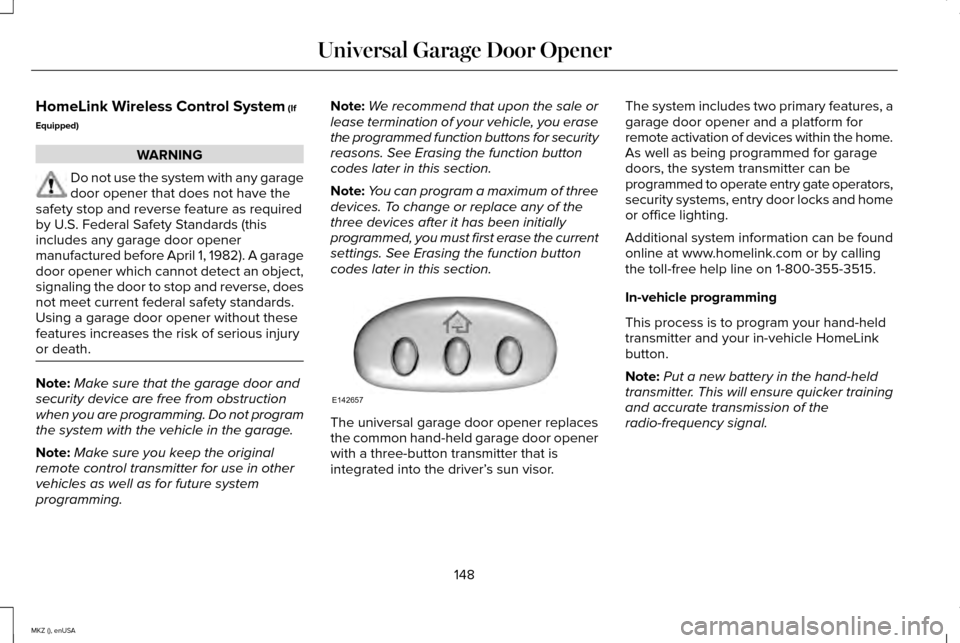
codes later in this section. The universal garage door opener replaces
the common hand-held garage door opener
with a three-button transmitter that is
integrated into the driver’
s sun visor.The system includes two primary features, a
garage door opener and a platform for
remote activation of devices within the home.
As well as being programmed for garage
doors, the system transmitter can be
programmed to operate entry gate operators,
security systems, entry door locks and home
or office lighting.
Additional system information can be found
online at www.homelink.com or by calling
the toll-free help line on 1-800-355-3515.
In-vehicle programming
This process is to program your hand-held
transmitter and your in-vehicle HomeLink
button.
Note:
Put a new battery in the hand-held
transmitter. This will ensure quicker training
and accurate transmission of the
radio-frequency signal.
148
MKZ (), enUSA Universal Garage Door OpenerE142657
Page 213 of 516
Action
Cause
Clean the grille surface in front of the radar or remove the objectcausing the obstruction.
The surface of the radar in the grille is dirty or obstructed in some
way.
Wait a short time. It may take several minutes for the radar to detectthat it is free from obstruction.
The surface of the radar in the grille is clean but the message remains
in the display.
Do not use the system in these conditions because it may not detectany vehicles ahead.
Heavy rain or snow is interfering with the radar signals.
Do not use the system in these conditions because it may not detectany vehicles ahead.
Swirling water, or snow or ice on the surface of the road may interfere
with the radar signals.
Wait a short time or switch to normal cruise control.
You are in a desert or remote area with no other vehicles and no
roadside objects.
Due to the nature of radar technology, it is
possible to get a blockage warning with no
actual block. This happens, for example,
when driving in sparse rural or desert
environments. A false blocked condition
either self clears or clears after a you restart
your vehicle. Switching to Normal Cruise Control WARNING
Normal cruise control does not brake
for slower vehicles. Always be aware
of which mode you have selected and apply
the brakes when necessary. You can manually change from adaptive
cruise control to normal cruise control
through the information display.
The cruise control indicator light
replaces the adaptive cruise
control indicator light if you select
normal cruise control. The gap setting does
not display, the system does not
automatically respond to lead vehicles and
automatic braking does not activate.
210
MKZ (), enUSA Cruise ControlE71340
Page 255 of 516
The horn and lamps will turn off when:
•
The hazard control button is pressed
• The panic button (if equipped) is pressed
on the remote entry transmitter
• Your vehicle runs out of power
Spinout Detection
If a spinout is detected, the vehicle comes
to a stop and the hazard warning flashers
come on. The message Spinout Detected
Hazards Activated will also appear on the
instrument cluster. The message may not
appear if your vehicle runs out of power.
Once the hazard warning flashers have been
activated, you can turn them off by:
• Pressing the hazard warning flasher
button
• Pressing the remote control unlock
button
• Pressing the remote control panic button
• Cycling the ignition on and off twice
252
MKZ (), enUSA Roadside Emergencies
Page 509 of 516
Information Messages...................................113
Active Park.............................................................113
Adaptive Cruise Control.....................................114
AdvanceTrac ™........................................................115
Airbag......................................................................115
Alarm.......................................................................115
Automatic Engine Shutdown.............................116
AWD........................................................................\
.116
Battery and Charging System...........................117
Blind Spot Information and Cross Traffic Alert System................................................................118
Doors and Locks...................................................118
Driver Alert.............................................................119
Fuel........................................................................\
..119
Hill Start Assist.....................................................120
Keys and Intelligent Access.............................120
Lane Keeping System.........................................121
Maintenance.........................................................122
MyKey.....................................................................123
Park Aid..................................................................124
Park Brake.............................................................124
Power Steering....................................................125
Pre-Collision Assist.............................................126
Remote Start.........................................................126
Seats.......................................................................127
Starting System ...................................................127
Tire Pressure Monitoring System....................128
Traction Control...................................................128 Transmission....................................................129
Installing Child Seats.......................................17 Child Seats...............................................................17
Using Lap and Shoulder Belts............................17
Using Lower Anchors and Tethers for CHildren (LATCH).............................................23
Using Tether Straps..............................................24
Instrument Cluster
........................................100
Instrument Lighting Dimmer........................86
Interior Lamps
..................................................90
Front Interior Lamp................................................91
Rear Interior Lamp.................................................91
Rear Interior Lamp (If Equipped).......................92
Interior Luggage Compartment Release...........................................................73
Interior Mirror...................................................96 Auto-Dimming Mirror............................................97
Introduction
.........................................................7
J
Jump Starting the Vehicle..........................249 Connecting the Jumper Cables.....................250
Jump Starting......................................................250
Preparing Your Vehicle.....................................249
Removing the Jumper Cables.........................251 K
Keyless Entry
....................................................70
SECURICODE™ KEYLESS ENTRY
KEYPAD...............................................................70
Keyless Starting.............................................156 Ignition Modes.....................................................156
Keys and Remote Controls...........................53
L
Lane Keeping System
..................................212
Switching the System On and Off...................212
Lighting Control
..............................................85
Headlamp Flasher................................................85
High Beams............................................................85
Lighting..............................................................85
Lincoln Automotive Financial Services......12
Load Carrying................................................228
Load Limit
.......................................................228
Vehicle Loading - with and without a
Trailer................................................................228
506
MKZ (), enUSA Index
Page 510 of 516
Locking and Unlocking.................................65
Activating Intelligent Access ............................66
Autolock Feature...................................................67
Auto Relock............................................................67
Battery Saver.........................................................68
Illuminated Entry...................................................68
Illuminated Exit......................................................68
Luggage Compartment.......................................68
Power Decklid (If Equipped)..............................69
Power Door Locks................................................65
Remote Control.....................................................65
Smart Unlocks .......................................................67
Locks..................................................................65
Lug Nuts See: Changing a Road Wheel.........................343
M
Maintenance..................................................278 General Information...........................................278
Media Hub
......................................................373
Memory Function..........................................142
Easy Entry and Exit Feature..............................143
Linking a PreSet Position to your Remote
Control or Intelligent Access Key Fob.......143
Saving a PreSet Position...................................142
Message Center See: Information Displays.................................107 Mirrors
See: Heated Windows and Mirrors.................135
See: Windows and Mirrors.................................93
Mobile Communications Equipment...........13
Moonroof..........................................................98 Bounce-Back..........................................................99
Opening and Closing the Moonroof................98
Retractable Panoramic Roof..............................99
Venting the Moonroof.........................................99
Motorcraft Parts............................................354
MyKey Troubleshooting
................................63
MyKey™..............................................................59 Principle of Operation.........................................59
MyLincoln Touch ™
.........................................374
General Information...........................................374
N
Navigation......................................................444 cityseekr...............................................................446
Map Mode............................................................449
Navigation Map Updates.................................452
Navigation Voice Commands..........................452
Point of Interest (POI) Categories...................446
Quick-touch Buttons...........................................451
Setting a Destination.........................................445
Setting Your Navigation Preferences............447 Normal Scheduled Maintenance.............482
Intelligent Oil-Life Monitor®.............................
482
Maintenance Intervals.......................................484
O
Oil Check See: Engine Oil Check......................................284
Opening and Closing the Hood
...............279
Ordering Additional Owner's Literature.....................................................258
Obtaining a French Owner’ s Manual............258
Overhead Console
.......................................155
P
Parking Aid
......................................................192
Front Sensing System........................................193
Rear Sensing System.........................................193
Parking Aids
....................................................192
Passive Anti-Theft System............................75 SecuriLock..............................................................75
PATS See: Passive Anti-Theft System........................75
Perchlorate........................................................12
Personal Safety System ™
..............................42
How Does the Personal Safety System
Work?...................................................................42
507
MKZ (), enUSA Index