reset LINCOLN MKZ 2015 Owner's Manual
[x] Cancel search | Manufacturer: LINCOLN, Model Year: 2015, Model line: MKZ, Model: LINCOLN MKZ 2015Pages: 516, PDF Size: 4.48 MB
Page 290 of 516
4. If necessary, add enough prediluted
engine coolant to bring the coolant level
to the proper level.
Recycled Engine Coolant
Ford Motor Company does not recommend
the use of recycled engine coolant since a
Ford-approved recycling process is not yet
available.
Used engine coolant should be disposed of
in an appropriate manner. Follow your
community’ s regulations and standards for
recycling and disposing of automotive fluids.
Severe Climates
If you drive in extremely cold climates:
• It may be necessary to have a Ford
authorized dealer increase the coolant
concentration above 50%.
• A coolant concentration of 60% will
provide improved freeze point protection.
Engine coolant concentrations above
60% will decrease the overheat
protection characteristics of the engine
coolant and may cause engine damage. If you drive in extremely hot climates:
•
It may be necessary to have a Ford
authorized dealer decrease the coolant
concentration to 40%.
• A coolant concentration of 40% will
provide improved overheat protection.
Engine coolant concentrations below
40% will decrease the corrosion/freeze
protection characteristics of the engine
coolant and may cause engine damage.
Vehicles driven year-round in non-extreme
climates should use prediluted engine
coolant for optimum cooling system and
engine protection.
What You Should Know About Fail-Safe
Cooling
If the engine coolant supply is depleted, this
feature allows the vehicle to be driven
temporarily before incremental component
damage is incurred. The fail-safe distance
depends on outside temperatures, vehicle
load and terrain. How Fail-Safe Cooling Works
If the engine begins to overheat, the engine
coolant temperature gauge will move to the
red (hot) area and: A high engine temperature
message will appear in the
information display.
The service engine soon indicator
will light.
If the engine reaches a preset
over-temperature condition, the engine will
automatically switch to alternating cylinder
operation. Each disabled cylinder acts as an
air pump and cools the engine.
When this occurs, your vehicle will still
operate. However:
• The engine power will be limited.
• The air conditioning system will be
disabled.
Continued operation will increase the engine
temperature and the engine will completely
shut down, causing steering and braking
effort to increase.
287
MKZ (), enUSA Maintenance
Page 297 of 516
When a low voltage battery replacement is
necessary, see an authorized dealer to
replace the low voltage battery with a Ford
recommended replacement low voltage
battery that matches the electrical
requirements of the vehicle
To ensure proper operation of the battery
management system (BMS), do not allow a
technician to connect any electrical device
ground connection directly to the low voltage
battery negative post. A connection at the
low voltage battery negative post can cause
inaccurate measurements of the battery
condition and potential incorrect system
operation.
Note:
If a person adds electrical or electronic
accessories or components to the vehicle,
the accessories or components may
adversely affect the low voltage battery
performance and durability and may also
affect the performance of other electrical
systems in the vehicle.
For longer, trouble-free operation, keep the
top of the battery clean and dry. Also, make
certain the battery cables are always tightly
fastened to the battery terminals. If you see any corrosion on the battery or
terminals, remove the cables from the
terminals and clean with a wire brush. You
can neutralize the acid with a solution of
baking soda and water.
When a battery replacement is required, the
battery should only be replaced with a Ford
recommended replacement battery that
matches the electrical requirements of the
vehicle.
Because your vehicle
’s engine is
electronically-controlled by a computer,
some engine control settings are maintained
by power from the low voltage battery. Some
engine computer settings, like the idle trim
and fuel trim strategy, optimize the
driveability and performance of the engine.
Some other computer settings, like the clock
and radio station presets, are also maintained
in memory by power from the low voltage
battery. When a technician disconnects and
connects the low voltage battery, these
settings are erased. Note:
Until you switch the ignition to the on
position, you will receive a message in your
information display stating that your vehicle
is not in park.
Complete the following procedure in order
to restore the settings:
1. With the vehicle at a complete stop, set the parking brake.
2. Shift the transmission into P.
3. Turn off all accessories.
4. Step on the brake pedal and start the vehicle.
5. Run the engine until it reaches normal operating temperature. While the engine
is warming up, complete the following:
Reset the clock. See Audio System
(page 370). Reset the power windows
bounce-back feature. See Windows and
Mirrors (page 93). Reset the radio station
presets.
See Audio System (page 370).
6. Allow the engine to idle for at least one minute. If the engine turns off, step on
the accelerator to start the engine.
294
MKZ (), enUSA Maintenance
Page 298 of 516
7. While the engine is running, step on the
brake pedal and shift the transmission to
N.
8. Allow the engine to run for at least one minute by pressing on the accelerator
pedal.
9. Drive your vehicle at least 10 miles (16 kilometers) to completely relearn the idle
and fuel trim strategy.
Note: Certain features may not operate if
the Battery Monitor System is not reset with
a scan tool following a jump start or battery
replacement. Normal electrical accessory
operation should resume after your vehicle
is left undisturbed for 8 hours.
Note: If you do not allow the engine to
relearn the idle and fuel trim strategy, the
idle quality of your vehicle may be adversely
affected until the engine computer
eventually relearns the idle trim and fuel trim
strategy. Note:
Always dispose of automotive
batteries in a responsible manner. Follow
your local authorized standards for disposal.
Call your local authorized recycling center
to find out more about recycling automotive
batteries.
Note: It is recommended that the negative
battery cable terminal be disconnected from
the battery if you plan to store your vehicle
for an extended period of time.
CHECKING THE WIPER BLADES Run the tip of your fingers over the edge of
the blade to check for roughness.
Clean the wiper blades with washer fluid or
water applied with a soft sponge or cloth.CHANGING THE WIPER BLADES
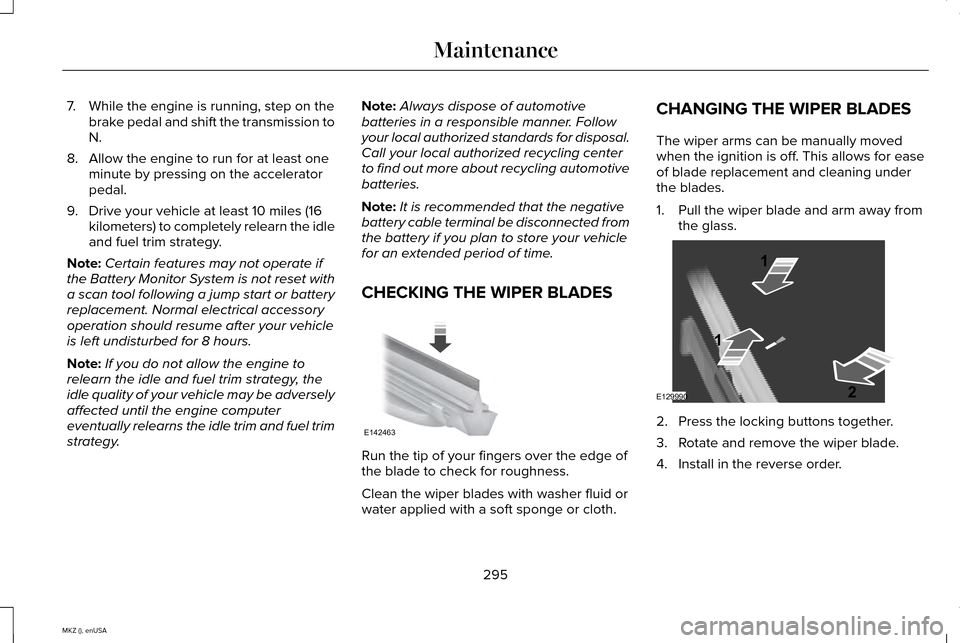
The wiper arms can be manually moved
when the ignition is off. This allows for ease
of blade replacement and cleaning under
the blades.
1. Pull the wiper blade and arm away from
the glass. 2. Press the locking buttons together.
3. Rotate and remove the wiper blade.
4. Install in the reverse order.
295
MKZ (), enUSA MaintenanceE142463 E129990
1
1 2
Page 312 of 516
General
•
Store all vehicles in a dry, ventilated
place.
• Protect from sunlight, if possible.
• If vehicles are stored outside, they
require regular maintenance to protect
against rust and damage.
Body
• Wash your vehicle thoroughly to remove
dirt, grease, oil, tar or mud from exterior
surfaces, rear-wheel housing and the
underside of front fenders.
• Periodically wash your vehicle if it is
stored in exposed locations.
• Touch-up exposed or primed metal to
prevent rust.
• Cover chrome and stainless steel parts
with a thick coat of auto wax to prevent
discoloration. Re-wax as necessary when
you wash your vehicle.
• Lubricate all hood, door and trunk lid
hinges, and latches with a light grade oil. •
Cover interior trim to prevent fading.
• Keep all rubber parts free from oil and
solvents.
Engine
• The engine oil and filter should be
changed prior to storage because used
engine oil contains contaminates that
may cause engine damage.
• Start the engine every 15 days for a
minimum of 15 minutes. Run at fast idle
with the climate controls set to defrost
until the engine reaches normal
operating temperature.
• With your foot on the brake, shift through
all the gears while the engine is running.
• We recommend that you change the
engine oil before you use your vehicle
again.
Fuel system
• Fill the fuel tank with high-quality fuel
until the first automatic shutoff of the fuel
pump nozzle. Cooling system
•
Protect against freezing temperatures.
• When removing your vehicle from
storage, check coolant fluid level.
Confirm that there are no cooling system
leaks and that fluid is at the
recommended level.
Battery
• Check and recharge as necessary. Keep
connections clean.
• If storing your vehicle for more than 30
days without recharging the battery, we
recommend that you disconnect the
battery cables to maintain battery charge
for quick starting.
Note: It is necessary to reset memory
features if battery cables are disconnected.
Brakes
• Make sure the brakes and parking brake
release fully.
Tires
• Maintain recommended air pressure.
309
MKZ (), enUSA Vehicle Care
Page 381 of 516
•
SEEK and PHONE ACCEPT:
• While in radio mode, press to seek
between memory presets or press
and hold to seek between stations.
• While in USB or CD mode, press to
seek between stations or press and
hold to fast seek.
• While in phone mode, press to
answer a call, or to switch between
calls.
• SEEK
and PHONE REJECT:
• While in radio mode, press to seek
between memory presets or press
and hold to seek between stations.
• While in USB or CD mode, press to
seek between stations or press and
hold to fast seek.
• While in phone mode, press to end a
call, or to reject and incoming call.
See
Steering Wheel (page 78). Cleaning the Touchscreen Display
Use a clean, soft cloth such as one used for
cleaning glasses. If dirt or fingerprints are
still visible, apply a small amount of alcohol
to the cloth. Do not pour or spray alcohol
onto the display. Do not use detergent or
any type of solvent to clean the display.
Support
The SYNC support team is available to help
you with any questions you are not able to
answer on your own.
Monday-Saturday, 8:30am-9:00pm EST.
Sunday, 10:30am-7:30pm EST.
In the United States, call: 1-800-392-3673.
In Canada, call: 1-800-565-3673.
Times are subject to change due to holidays.
Safety Information WARNING
Driving while distracted can result in
loss of vehicle control, crash and injury.
We strongly recommend that you use
extreme caution when using any device that
may take your focus off the road. Your
primary responsibility is the safe operation
of your vehicle. We recommend against the
use of any hand-held device while driving
and encourage the use of voice-operated
systems when possible. Make sure you are
aware of all applicable local laws that may
affect the use of electronic devices while
driving. •
Do not attempt to service or repair the
system. See an authorized dealer.
• Do not operate playing devices if the
power cords or cables are broken, split
or damaged. Place cords and cables out
of the way, so they do not interfere with
the operation of pedals, seats,
compartments or safe driving abilities.
378
MKZ (), enUSA MyLincoln Touch™
Page 383 of 516

Restricted features
Enabling Valet Mode
Editing settings while the rear view camera or active park assist are ac\
tive
Editing wireless settings
Wi-Fi and Wireless
Editing the list of wireless networks
Playing video
Videos, Photos and
Graphics
Editing the screen's wallpaper or adding new wallpaper
Composing text messages
Text Messages
Viewing received text messages
Editing preset text messages
Using the keyboard to enter a destination
Navigation
Demo navigation route
Adding or editing Address Book entries or Avoid Areas
380
MKZ (), enUSA MyLincoln Touch™
Page 384 of 516
Privacy Information
When you connect a cellular phone to SYNC,
the system creates a profile within your
vehicle that links to that cellular phone. This
profile helps in offering you more cellular
features and operating more efficiently.
Among other things, this profile may contain
data about your cellular phone book, text
messages (read and unread), and call history,
including history of calls when your cell
phone was not connected to the system. In
addition, if you connect a media device, the
system creates and retains an index of
supported media content. The system also
records a short development log of
approximately 10 minutes of all recent system
activity. The log profile and other system data
may be used to improve the system and help
diagnose any problems that may occur.
The cellular profile, media device index, and
development log remain in your vehicle
unless you delete them and are generally
accessible only in your vehicle when the
cellular phone or media player is connected.
If you no longer plan to use the system or
your vehicle, we recommend you perform a
Master Reset to erase all stored information.System data cannot be accessed without
special equipment and access to your
vehicle's SYNC module. Ford Motor
Company and Ford of Canada do not access
the system data for any purpose other than
as described absent consent, a court order,
or where required by law enforcement, other
government authorities, or other third parties
acting with lawful authority. Other parties
may seek to access the information
independently of Ford Motor Company and
Ford of Canada. For further privacy
information, see the sections on 911 Assist,
Vehicle Health Report, and Traffic, Directions
and Information.
381
MKZ (), enUSA MyLincoln Touch™
Page 386 of 516
The display is located on the center of your
instrument cluster. It allows you to view and
make minor adjustments to active modes
without taking your hands off the wheel. For
example:
•
In entertainment mode, you can view
what is now playing, change the audio
source, select presets and make some
adjustments.
• In navigation mode (if equipped), you can
view the current route or activate a route.
• In phone mode, you can accept or reject
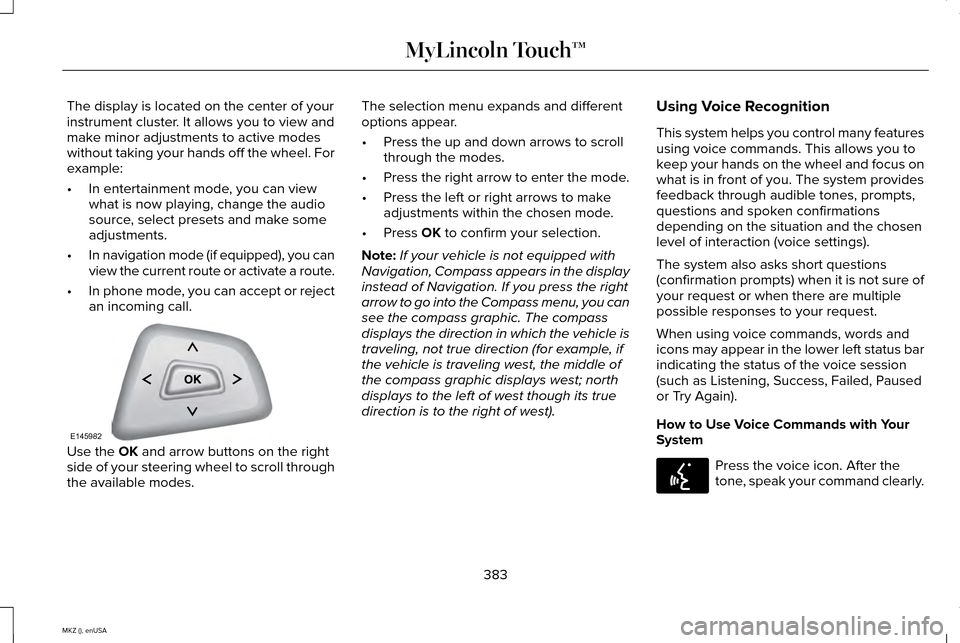
an incoming call. Use the OK and arrow buttons on the right
side of your steering wheel to scroll through
the available modes. The selection menu expands and different
options appear.
•
Press the up and down arrows to scroll
through the modes.
• Press the right arrow to enter the mode.
• Press the left or right arrows to make
adjustments within the chosen mode.
• Press
OK to confirm your selection.
Note: If your vehicle is not equipped with
Navigation, Compass appears in the display
instead of Navigation. If you press the right
arrow to go into the Compass menu, you can
see the compass graphic. The compass
displays the direction in which the vehicle is
traveling, not true direction (for example, if
the vehicle is traveling west, the middle of
the compass graphic displays west; north
displays to the left of west though its true
direction is to the right of west). Using Voice Recognition
This system helps you control many features
using voice commands. This allows you to
keep your hands on the wheel and focus on
what is in front of you. The system provides
feedback through audible tones, prompts,
questions and spoken confirmations
depending on the situation and the chosen
level of interaction (voice settings).
The system also asks short questions
(confirmation prompts) when it is not sure of
your request or when there are multiple
possible responses to your request.
When using voice commands, words and
icons may appear in the lower left status bar
indicating the status of the voice session
(such as Listening, Success, Failed, Paused
or Try Again).
How to Use Voice Commands with Your
System
Press the voice icon. After the
tone, speak your command clearly.
383
MKZ (), enUSA MyLincoln Touch™E145982 E142599
Page 393 of 516
When done making your selections, press
Run Vehicle Health Report Now if you want
your report.
You can find more information on Vehicle
Health Report in this chapter. See
Information (page 429).
Camera Settings
This menu allows you to access settings for
your rear view camera. Press the Settings icon >
Vehicle
> Camera Settings, then select
from the following settings:
• Enhanced Park Aids.
• Rear Camera Delay. You can find more information on the rear
view camera in another chapter.
See Rear
View Camera (page 199).
Enable Valet Mode
Valet mode allows you to lock the system.
No information is accessible until the system
is unlocked with the correct PIN. You can
create your own four-digit PIN to lock and
unlock the system. 1. Press the Settings icon >
Vehicle >
Enable Valet Mode.
2. Enter a four-digit pin twice, as prompted. After you press
Continue, the system locks
until you enter the PIN again.
Note: If the system locks, and you need to
reset the PIN, enter 3681 and the system
unlocks.
Settings
Access and adjust system settings, voice
features, as well as phone, navigation and
wireless settings.
System Press the Settings icon >
Settings
> System, then select from the
following: System
Select to have the touchscreen display in English, Spanish or French.
Language
Select to display units in kilometers or miles.
Distance
Select to display units in Celsius or Fahrenheit.
Temperature
Adjust the volume of voice prompts from the system.
System Prompt Volume
Select to have the system beep to confirm choices made through the touch\
screen.
Touch Screen Button Beep
390
MKZ (), enUSA MyLincoln Touch™E142607 E142607 E142607
Page 394 of 516

System
Select to have the system beep to confirm button choices made through th\
e climate or audio system.
Touch Panel Button Beep
Have the touchscreen keyboard display in QWERTY or ABC format.
Keyboard Layout
Install any downloaded applications or view the current software license\
s.
Install Applications
Select to restore factory defaults. This erases all personal settings an\
d personal data.
Master Reset
Voice Control Press the Settings icon > Settings
> Voice Control, then select from
the following: Voice control
Standard interaction mode provides more detailed interaction and guidance\
. Advanced mode has less audible
interaction and more tone prompts.
Interaction Mode
Have the system ask you short questions if it has not clearly heard or u\
nderstood your request. *
Confirmation Prompts
Candidate lists are possible results from your voice commands. The syste\
m simply makes a best guess at your
request with these turned off.
Media Candidate Lists
391
MKZ (), enUSA MyLincoln Touch™E142607