service LINCOLN MKZ 2015 Owner's Manual
[x] Cancel search | Manufacturer: LINCOLN, Model Year: 2015, Model line: MKZ, Model: LINCOLN MKZ 2015Pages: 516, PDF Size: 4.48 MB
Page 123 of 516
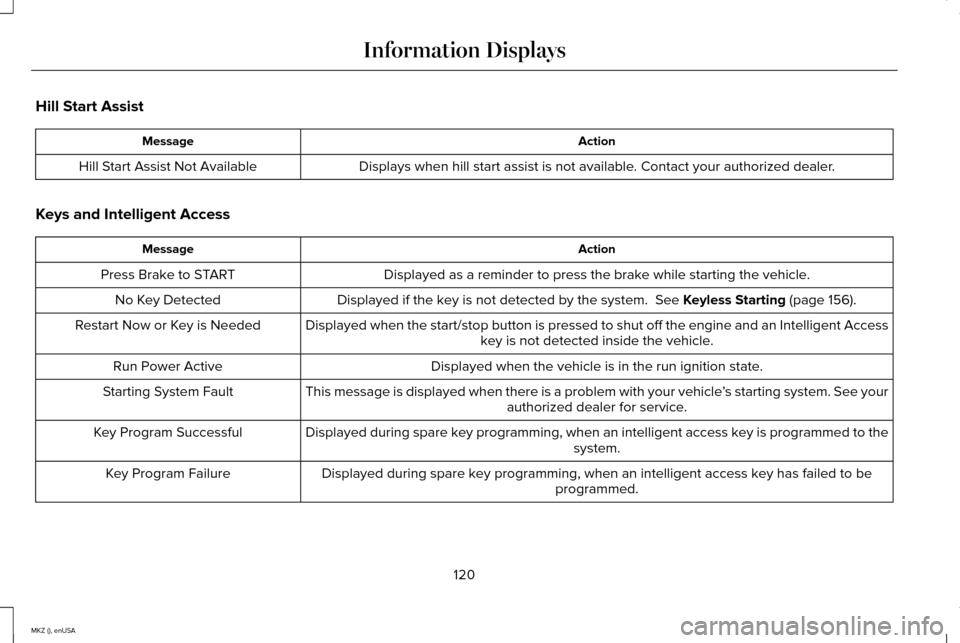
Hill Start Assist
Action
Message
Displays when hill start assist is not available. Contact your authorized dealer.
Hill Start Assist Not Available
Keys and Intelligent Access Action
Message
Displayed as a reminder to press the brake while starting the vehicle.
Press Brake to START
Displayed if the key is not detected by the system. See Keyless Starting (page 156).
No Key Detected
Displayed when the start/stop button is pressed to shut off the engine a\
nd an Intelligent Accesskey is not detected inside the vehicle.
Restart Now or Key is Needed
Displayed when the vehicle is in the run ignition state.
Run Power Active
This message is displayed when there is a problem with your vehicle ’s starting system. See your
authorized dealer for service.
Starting System Fault
Displayed during spare key programming, when an intelligent access key is programmed to the system.
Key Program Successful
Displayed during spare key programming, when an intelligent access key has failed to be programmed.
Key Program Failure
120
MKZ (), enUSA Information Displays
Page 124 of 516
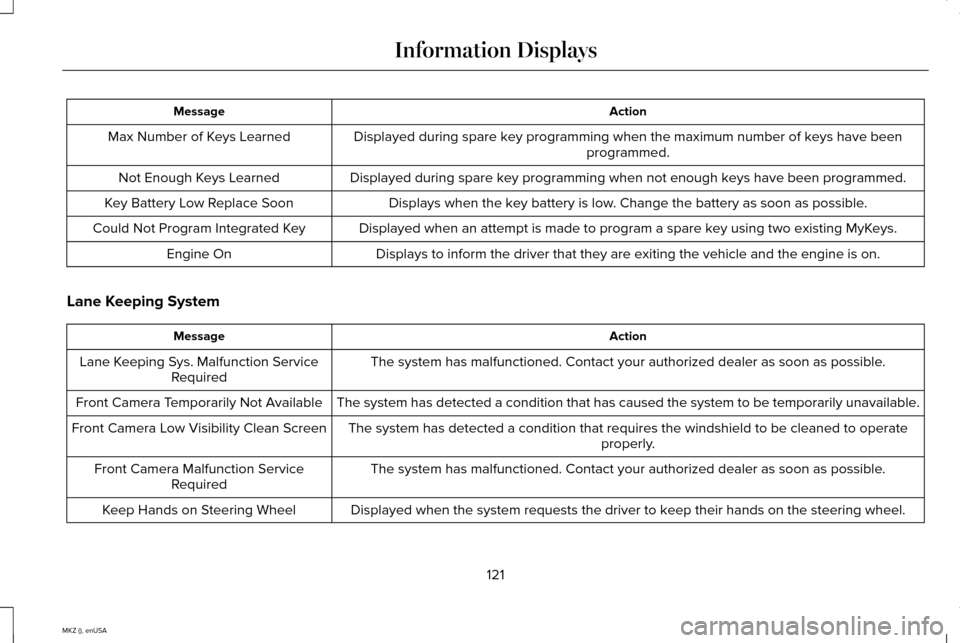
Action
Message
Displayed during spare key programming when the maximum number of keys have been programmed.
Max Number of Keys Learned
Displayed during spare key programming when not enough keys have been programmed.
Not Enough Keys Learned
Displays when the key battery is low. Change the battery as soon as possible.
Key Battery Low Replace Soon
Displayed when an attempt is made to program a spare key using two existing MyKeys.
Could Not Program Integrated Key
Displays to inform the driver that they are exiting the vehicle and the \
engine is on.
Engine On
Lane Keeping System Action
Message
The system has malfunctioned. Contact your authorized dealer as soon as \
possible.
Lane Keeping Sys. Malfunction Service
Required
The system has detected a condition that has caused the system to be tem\
porarily unavailable.
Front Camera Temporarily Not Available
The system has detected a condition that requires the windshield to be c\
leaned to operateproperly.
Front Camera Low Visibility Clean Screen
The system has malfunctioned. Contact your authorized dealer as soon as \
possible.
Front Camera Malfunction Service
Required
Displayed when the system requests the driver to keep their hands on the steering wheel.
Keep Hands on Steering Wheel
121
MKZ (), enUSA Information Displays
Page 125 of 516
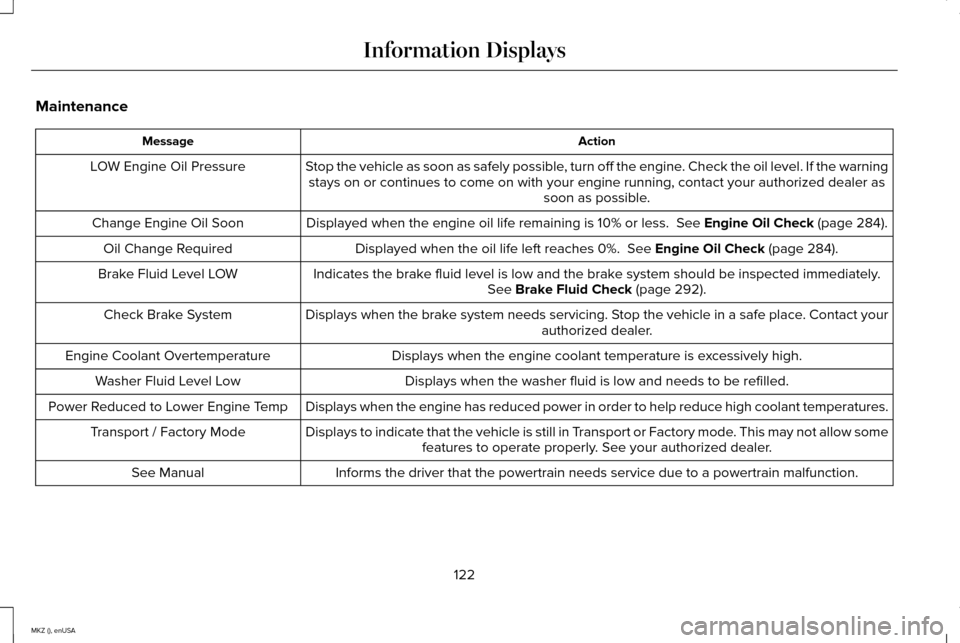
Maintenance
Action
Message
Stop the vehicle as soon as safely possible, turn off the engine. Check the oil level. If the warningstays on or continues to come on with your engine running, contact your \
authorized dealer as soon as possible.
LOW Engine Oil Pressure
Displayed when the engine oil life remaining is 10% or less. See Engine Oil Check (page 284).
Change Engine Oil Soon
Displayed when the oil life left reaches 0%.
See Engine Oil Check (page 284).
Oil Change Required
Indicates the brake fluid level is low and the brake system should be inspected immediately.See
Brake Fluid Check (page 292).
Brake Fluid Level LOW
Displays when the brake system needs servicing. Stop the vehicle in a safe place. Contact your authorized dealer.
Check Brake System
Displays when the engine coolant temperature is excessively high.
Engine Coolant Overtemperature
Displays when the washer fluid is low and needs to be refilled.
Washer Fluid Level Low
Displays when the engine has reduced power in order to help reduce high \
coolant temperatures.
Power Reduced to Lower Engine Temp
Displays to indicate that the vehicle is still in Transport or Factory mode. This may not allow somefeatures to operate properly. See your authorized dealer.
Transport / Factory Mode
Informs the driver that the powertrain needs service due to a powertrain\
malfunction.
See Manual
122
MKZ (), enUSA Information Displays
Page 127 of 516
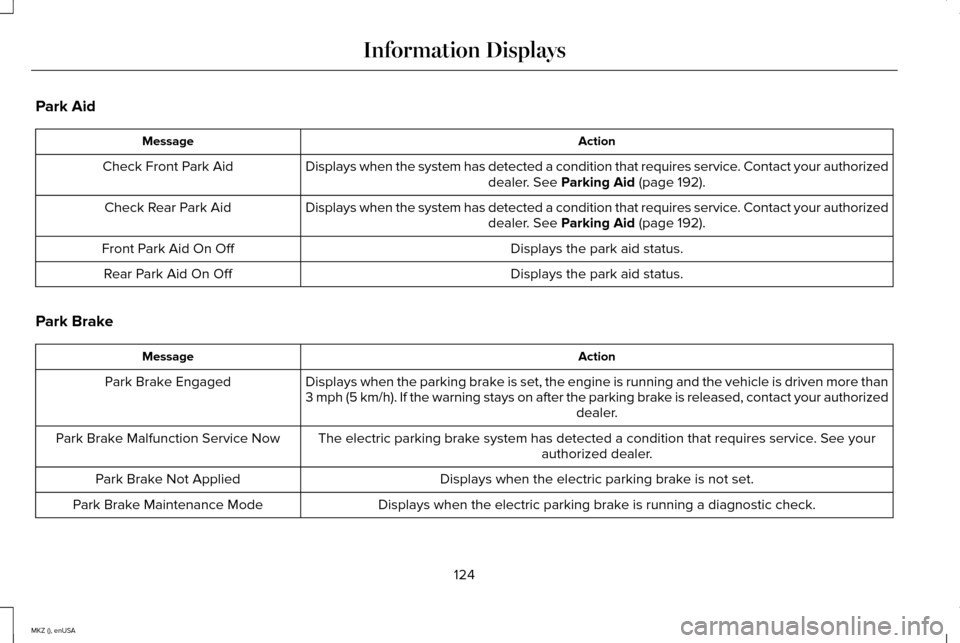
Park Aid
Action
Message
Displays when the system has detected a condition that requires service. Contact your authorized dealer. See Parking Aid (page 192).
Check Front Park Aid
Displays when the system has detected a condition that requires service. Contact your authorizeddealer.
See Parking Aid (page 192).
Check Rear Park Aid
Displays the park aid status.
Front Park Aid On Off
Displays the park aid status.
Rear Park Aid On Off
Park Brake Action
Message
Displays when the parking brake is set, the engine is running and the vehicle is driven more than
3 mph (5 km/h). If the warning stays on after the parking brake is released, contact your authorized dealer.
Park Brake Engaged
The electric parking brake system has detected a condition that requires service. See your authorized dealer.
Park Brake Malfunction Service Now
Displays when the electric parking brake is not set.
Park Brake Not Applied
Displays when the electric parking brake is running a diagnostic check.
Park Brake Maintenance Mode
124
MKZ (), enUSA Information Displays
Page 128 of 516
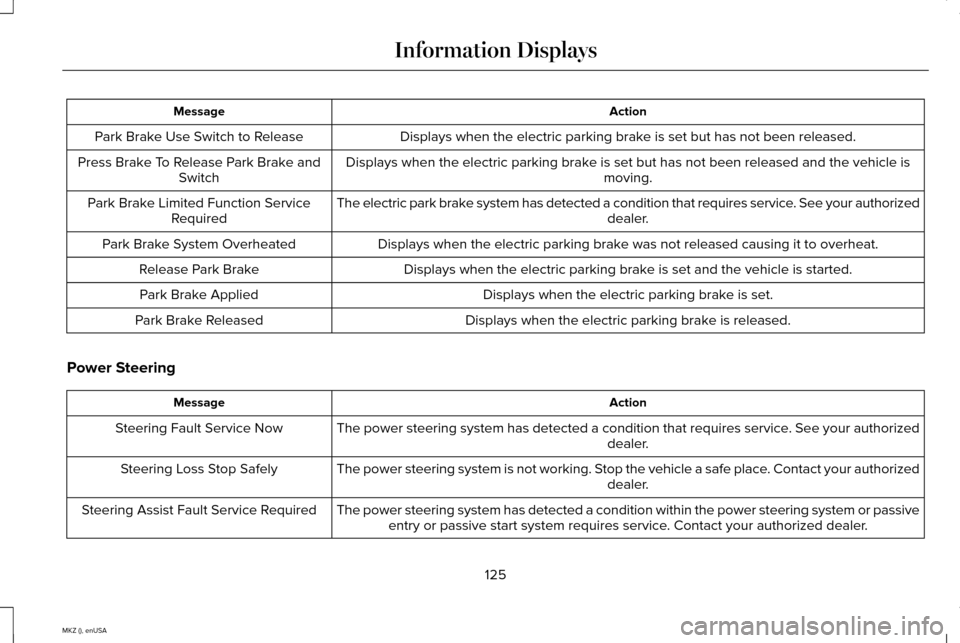
Action
Message
Displays when the electric parking brake is set but has not been released.
Park Brake Use Switch to Release
Displays when the electric parking brake is set but has not been released and the vehicle is moving.
Press Brake To Release Park Brake and
Switch
The electric park brake system has detected a condition that requires service. See your authorized dealer.
Park Brake Limited Function Service
Required
Displays when the electric parking brake was not released causing it to overheat.
Park Brake System Overheated
Displays when the electric parking brake is set and the vehicle is started.
Release Park Brake
Displays when the electric parking brake is set.
Park Brake Applied
Displays when the electric parking brake is released.
Park Brake Released
Power Steering Action
Message
The power steering system has detected a condition that requires service\
. See your authorized dealer.
Steering Fault Service Now
The power steering system is not working. Stop the vehicle a safe place. Contact your authorized dealer.
Steering Loss Stop Safely
The power steering system has detected a condition within the power stee\
ring system or passiveentry or passive start system requires service. Contact your authorized dealer.
Steering Assist Fault Service Required
125
MKZ (), enUSA Information Displays
Page 132 of 516
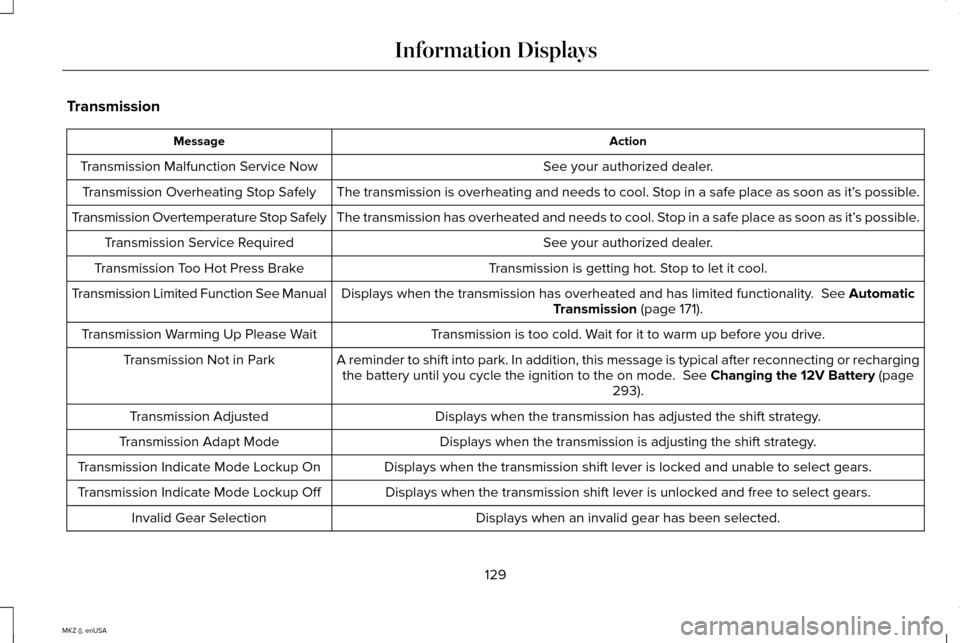
Transmission
Action
Message
See your authorized dealer.
Transmission Malfunction Service Now
The transmission is overheating and needs to cool. Stop in a safe place as soon as it’ s possible.
Transmission Overheating Stop Safely
The transmission has overheated and needs to cool. Stop in a safe place as soon as it’ s possible.
Transmission Overtemperature Stop Safely
See your authorized dealer.
Transmission Service Required
Transmission is getting hot. Stop to let it cool.
Transmission Too Hot Press Brake
Displays when the transmission has overheated and has limited functional\
ity. See Automatic
Transmission (page 171).
Transmission Limited Function See Manual
Transmission is too cold. Wait for it to warm up before you drive.
Transmission Warming Up Please Wait
A reminder to shift into park. In addition, this message is typical afte\
r reconnecting or rechargingthe battery until you cycle the ignition to the on mode.
See Changing the 12V Battery (page
293).
Transmission Not in Park
Displays when the transmission has adjusted the shift strategy.
Transmission Adjusted
Displays when the transmission is adjusting the shift strategy.
Transmission Adapt Mode
Displays when the transmission shift lever is locked and unable to select gears.
Transmission Indicate Mode Lockup On
Displays when the transmission shift lever is unlocked and free to select gears.
Transmission Indicate Mode Lockup Off
Displays when an invalid gear has been selected.
Invalid Gear Selection
129
MKZ (), enUSA Information Displays
Page 133 of 516
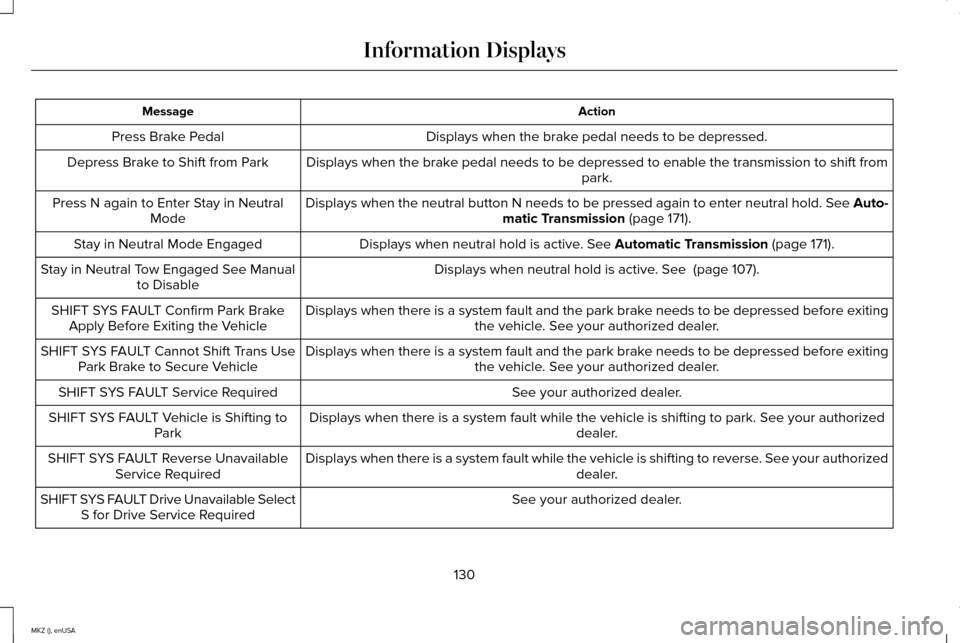
Action
Message
Displays when the brake pedal needs to be depressed.
Press Brake Pedal
Displays when the brake pedal needs to be depressed to enable the transmission to shift from park.
Depress Brake to Shift from Park
Displays when the neutral button N needs to be pressed again to enter ne\
utral hold. See Auto-matic Transmission (page 171).
Press N again to Enter Stay in Neutral
Mode
Displays when neutral hold is active.
See Automatic Transmission (page 171).
Stay in Neutral Mode Engaged
Displays when neutral hold is active.
See (page 107).
Stay in Neutral Tow Engaged See Manual
to Disable
Displays when there is a system fault and the park brake needs to be depressed before exiting the vehicle. See your authorized dealer.
SHIFT SYS FAULT Confirm Park Brake
Apply Before Exiting the Vehicle
Displays when there is a system fault and the park brake needs to be depressed before exitingthe vehicle. See your authorized dealer.
SHIFT SYS FAULT Cannot Shift Trans Use
Park Brake to Secure Vehicle
See your authorized dealer.
SHIFT SYS FAULT Service Required
Displays when there is a system fault while the vehicle is shifting to p\
ark. See your authorized dealer.
SHIFT SYS FAULT Vehicle is Shifting to
Park
Displays when there is a system fault while the vehicle is shifting to r\
everse. See your authorized dealer.
SHIFT SYS FAULT Reverse Unavailable
Service Required
See your authorized dealer.
SHIFT SYS FAULT Drive Unavailable Select
S for Drive Service Required
130
MKZ (), enUSA Information Displays
Page 134 of 516
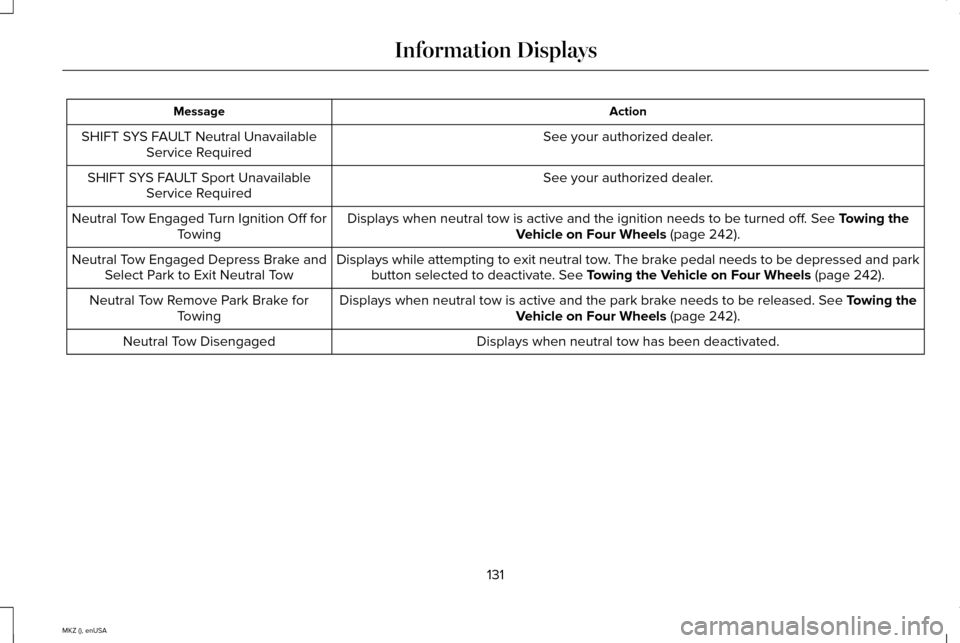
Action
Message
See your authorized dealer.
SHIFT SYS FAULT Neutral Unavailable
Service Required
See your authorized dealer.
SHIFT SYS FAULT Sport Unavailable
Service Required
Displays when neutral tow is active and the ignition needs to be turned \
off. See Towing the
Vehicle on Four Wheels (page 242).
Neutral Tow Engaged Turn Ignition Off for
Towing
Displays while attempting to exit neutral tow. The brake pedal needs to be depressed and parkbutton selected to deactivate.
See Towing the Vehicle on Four Wheels (page 242).
Neutral Tow Engaged Depress Brake and
Select Park to Exit Neutral Tow
Displays when neutral tow is active and the park brake needs to be released.
See Towing the
Vehicle on Four Wheels (page 242).
Neutral Tow Remove Park Brake for
Towing
Displays when neutral tow has been deactivated.
Neutral Tow Disengaged
131
MKZ (), enUSA Information Displays
Page 166 of 516
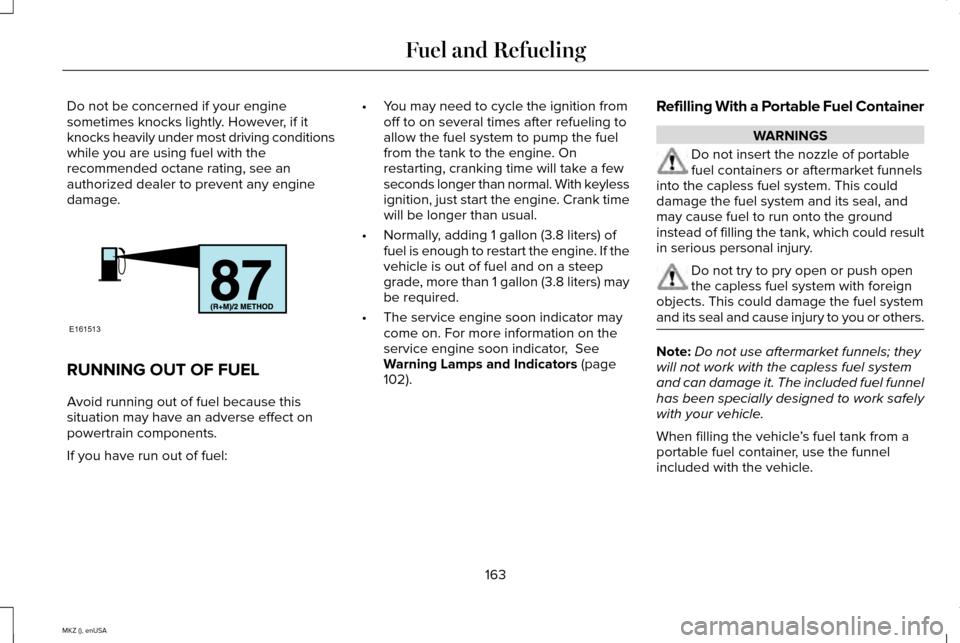
Do not be concerned if your engine
sometimes knocks lightly. However, if it
knocks heavily under most driving conditions
while you are using fuel with the
recommended octane rating, see an
authorized dealer to prevent any engine
damage.
RUNNING OUT OF FUEL
Avoid running out of fuel because this
situation may have an adverse effect on
powertrain components.
If you have run out of fuel: •
You may need to cycle the ignition from
off to on several times after refueling to
allow the fuel system to pump the fuel
from the tank to the engine. On
restarting, cranking time will take a few
seconds longer than normal. With keyless
ignition, just start the engine. Crank time
will be longer than usual.
• Normally, adding 1 gallon (3.8 liters) of
fuel is enough to restart the engine. If the
vehicle is out of fuel and on a steep
grade, more than 1 gallon (3.8 liters) may
be required.
• The service engine soon indicator may
come on. For more information on the
service engine soon indicator, See
Warning Lamps and Indicators (page
102). Refilling With a Portable Fuel Container WARNINGS
Do not insert the nozzle of portable
fuel containers or aftermarket funnels
into the capless fuel system. This could
damage the fuel system and its seal, and
may cause fuel to run onto the ground
instead of filling the tank, which could result
in serious personal injury. Do not try to pry open or push open
the capless fuel system with foreign
objects. This could damage the fuel system
and its seal and cause injury to you or others. Note:
Do not use aftermarket funnels; they
will not work with the capless fuel system
and can damage it. The included fuel funnel
has been specially designed to work safely
with your vehicle.
When filling the vehicle ’s fuel tank from a
portable fuel container, use the funnel
included with the vehicle.
163
MKZ (), enUSA Fuel and RefuelingE161513
Page 170 of 516
If this action corrects the problem, the
message may not reset immediately. It may
take several driving cycles for the message
to turn off. A driving cycle consists of an
engine start-up (after four or more hours with
the engine off ) followed by city or highway
driving. Continuing to drive with the message
on may cause the service engine soon lamp
to turn on as well.
FUEL CONSUMPTION
Note:
The amount of usable fuel in the empty
reserve varies and should not be relied upon
to increase driving range. When refueling
your vehicle after the fuel gauge indicates
empty, you might not be able to refuel the
full amount of the advertised capacity of the
fuel tank due to the empty reserve still
present in the tank. Empty reserve is the amount of fuel
remaining in the tank after the fuel gauge
indicates empty. Do not rely on this fuel for
driving. The usable capacity of the fuel tank
is the amount of fuel that can be put into the
tank after the gauge indicates empty. The
advertised capacity is the total fuel tank size
– it is the combined usable capacity plus the
empty reserve.
Filling the Tank
For consistent results when filling the fuel
tank:
•
Turn the ignition off before fueling; an
inaccurate reading results if the engine
is left running.
• Use the same fill rate (low-medium-high)
each time the tank is filled.
• Allow no more than two automatic
click-offs when filling.
Results are most accurate when the filling
method is consistent. Calculating Fuel Economy
Do not measure fuel economy during the
first 1000 miles (1600 kilometers) of driving
(this is your engine
’s break-in period); a more
accurate measurement is obtained after
2000 miles - 3000 miles (3200 kilometers -
4800 kilometers). Also, fuel expense,
frequency of fill ups or fuel gauge readings
are not accurate ways to measure fuel
economy.
1. Fill the fuel tank completely and record the initial odometer reading.
2. Each time you fill the tank, record the amount of fuel added.
3. After at least three to five tank fill ups, fill
the fuel tank and record the current
odometer reading.
4. Subtract your initial odometer reading from the current odometer reading.
5. Calculate fuel economy by dividing miles
traveled by gallons used (For Metric:
Multiply liters used by 100, then divide
by kilometers traveled).
167
MKZ (), enUSA Fuel and Refueling