ECO mode LINCOLN MKZ 2015 Owner's Guide
[x] Cancel search | Manufacturer: LINCOLN, Model Year: 2015, Model line: MKZ, Model: LINCOLN MKZ 2015Pages: 516, PDF Size: 4.48 MB
Page 253 of 516
Connecting the Jumper Cables
WARNING
Do not attach the cables to fuel lines,
engine rocker covers, the intake
manifold or electrical components as
grounding points. Stay clear of moving parts.
To avoid reverse polarity connections, make
sure that you correctly identify the positive
(+) and negative (-) terminals on both the
disabled and booster vehicles before
connecting the cables. Note:
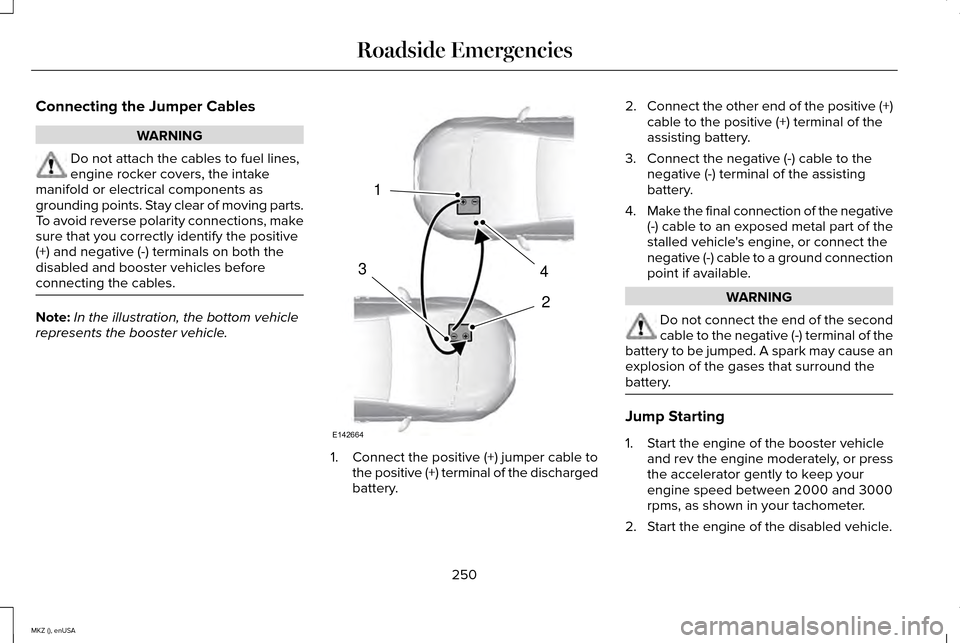
In the illustration, the bottom vehicle
represents the booster vehicle. 1. Connect the positive (+) jumper cable to
the positive (+) terminal of the discharged
battery. 2.
Connect the other end of the positive (+)
cable to the positive (+) terminal of the
assisting battery.
3. Connect the negative (-) cable to the negative (-) terminal of the assisting
battery.
4. Make the final connection of the negative
(-) cable to an exposed metal part of the
stalled vehicle's engine, or connect the
negative (-) cable to a ground connection
point if available. WARNING
Do not connect the end of the second
cable to the negative (-) terminal of the
battery to be jumped. A spark may cause an
explosion of the gases that surround the
battery. Jump Starting
1. Start the engine of the booster vehicle
and rev the engine moderately, or press
the accelerator gently to keep your
engine speed between 2000 and 3000
rpms, as shown in your tachometer.
2. Start the engine of the disabled vehicle.
250
MKZ (), enUSA Roadside Emergencies4
2
1
3
E142664
Page 374 of 516
Do not expose discs to direct sunlight or heat
sources for extended periods.
MP3 and WMA Track and Folder
Structure
Audio systems capable of recognizing and
playing MP3 and WMA individual tracks and
folder structures work as follows:
•
There are two different modes for MP3
and WMA disc playback: MP3 and WMA
track mode (system default) and MP3 and
WMA folder mode.
• MP3 and WMA track mode ignores any
folder structure on the MP3 and WMA
disc. The player numbers each MP3 and
WMA track on the disc (noted by the MP3
or WMA file extension) from T001 to a
maximum of T255. The maximum number
of playable MP3 and WMA files may be
less depending on the structure of the
CD and exact model of radio present. •
MP3 and WMA folder mode represents
a folder structure consisting of one level
of folders. The CD player numbers all
MP3 and WMA tracks on the disc (noted
by the MP3 or WMA file extension) and
all folders containing MP3 and WMA files,
from F001 (folder) T001 (track) to F253
T255.
• Creating discs with only one level of
folders helps with navigation through the
disc files.
If you are burning your own MP3 and WMA
discs, it is important to understand how the
system reads the structures you create. While
various files may be present, (files with
extensions other than MP3 and WMA), only
files with the MP3 and WMA extension are
played; other files are ignored by the system.
This enables you to use the same MP3 and
WMA disc for a variety of tasks on your work
computer, home computer and your
in-vehicle system. In track mode, the system displays and plays
the structure as if it were only one level deep
(all MP3 and WMA files play, regardless of
being in a specific folder). In folder mode,
the system only plays the MP3 and WMA files
in the current folder.
AUDIO UNIT - VEHICLES WITH:
PREMIUM AM/FM/CD
WARNING
Driving while distracted can result in
loss of vehicle control, crash and injury.
We strongly recommend that you use
extreme caution when using any device that
may take your focus off the road. Your
primary responsibility is the safe operation
of your vehicle. We recommend against the
use of any hand-held device while driving
and encourage the use of voice-operated
systems when possible. Make sure you are
aware of all applicable local laws that may
affect the use of electronic devices while
driving. 371
MKZ (), enUSA Audio System
Page 381 of 516
•
SEEK and PHONE ACCEPT:
• While in radio mode, press to seek
between memory presets or press
and hold to seek between stations.
• While in USB or CD mode, press to
seek between stations or press and
hold to fast seek.
• While in phone mode, press to
answer a call, or to switch between
calls.
• SEEK
and PHONE REJECT:
• While in radio mode, press to seek
between memory presets or press
and hold to seek between stations.
• While in USB or CD mode, press to
seek between stations or press and
hold to fast seek.
• While in phone mode, press to end a
call, or to reject and incoming call.
See
Steering Wheel (page 78). Cleaning the Touchscreen Display
Use a clean, soft cloth such as one used for
cleaning glasses. If dirt or fingerprints are
still visible, apply a small amount of alcohol
to the cloth. Do not pour or spray alcohol
onto the display. Do not use detergent or
any type of solvent to clean the display.
Support
The SYNC support team is available to help
you with any questions you are not able to
answer on your own.
Monday-Saturday, 8:30am-9:00pm EST.
Sunday, 10:30am-7:30pm EST.
In the United States, call: 1-800-392-3673.
In Canada, call: 1-800-565-3673.
Times are subject to change due to holidays.
Safety Information WARNING
Driving while distracted can result in
loss of vehicle control, crash and injury.
We strongly recommend that you use
extreme caution when using any device that
may take your focus off the road. Your
primary responsibility is the safe operation
of your vehicle. We recommend against the
use of any hand-held device while driving
and encourage the use of voice-operated
systems when possible. Make sure you are
aware of all applicable local laws that may
affect the use of electronic devices while
driving. •
Do not attempt to service or repair the
system. See an authorized dealer.
• Do not operate playing devices if the
power cords or cables are broken, split
or damaged. Place cords and cables out
of the way, so they do not interfere with
the operation of pedals, seats,
compartments or safe driving abilities.
378
MKZ (), enUSA MyLincoln Touch™
Page 386 of 516
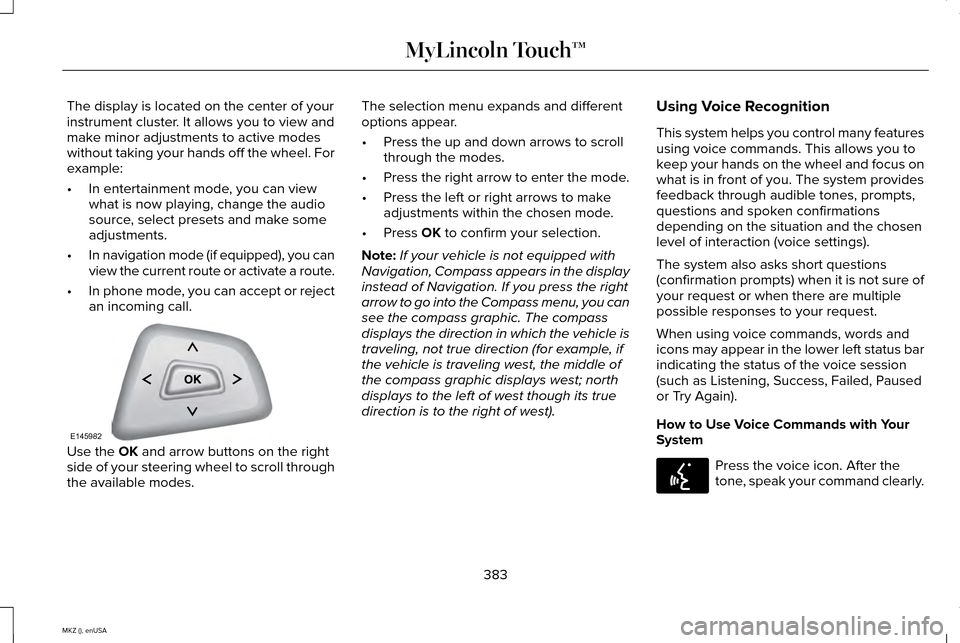
The display is located on the center of your
instrument cluster. It allows you to view and
make minor adjustments to active modes
without taking your hands off the wheel. For
example:
•
In entertainment mode, you can view
what is now playing, change the audio
source, select presets and make some
adjustments.
• In navigation mode (if equipped), you can
view the current route or activate a route.
• In phone mode, you can accept or reject
an incoming call. Use the OK and arrow buttons on the right
side of your steering wheel to scroll through
the available modes. The selection menu expands and different
options appear.
•
Press the up and down arrows to scroll
through the modes.
• Press the right arrow to enter the mode.
• Press the left or right arrows to make
adjustments within the chosen mode.
• Press
OK to confirm your selection.
Note: If your vehicle is not equipped with
Navigation, Compass appears in the display
instead of Navigation. If you press the right
arrow to go into the Compass menu, you can
see the compass graphic. The compass
displays the direction in which the vehicle is
traveling, not true direction (for example, if
the vehicle is traveling west, the middle of
the compass graphic displays west; north
displays to the left of west though its true
direction is to the right of west). Using Voice Recognition
This system helps you control many features
using voice commands. This allows you to
keep your hands on the wheel and focus on
what is in front of you. The system provides
feedback through audible tones, prompts,
questions and spoken confirmations
depending on the situation and the chosen
level of interaction (voice settings).
The system also asks short questions
(confirmation prompts) when it is not sure of
your request or when there are multiple
possible responses to your request.
When using voice commands, words and
icons may appear in the lower left status bar
indicating the status of the voice session
(such as Listening, Success, Failed, Paused
or Try Again).
How to Use Voice Commands with Your
System
Press the voice icon. After the
tone, speak your command clearly.
383
MKZ (), enUSA MyLincoln Touch™E145982 E142599
Page 392 of 516
Note:
Photographs with extremely large
dimensions (such as 2048 x 1536) may not
be compatible and appear as a blank (black)
image on the display.
Your system allows you to upload and view
up to 32 photos. To access, press the Settings icon
> Display > Edit Wallpaper, and
then follow the system prompts to
upload your photographs.
Only the photograph(s), which meets the
following conditions, display:
• Compatible file formats are as follows:
.jpg, .gif, .png, .bmp
• Each file must be 1.5 MB or less.
• Recommended dimensions: 800 x 384
Sound Press the
Settings icon > Sound,
then select from the following: Sound
Bass
Midrange Treble
Set Balance and Fade
DSP*
THX Deep Note Demo *
Occupancy Mode *
Speed Compensated Volume
* Your vehicle may not have these sound
settings.
Vehicle Press the Settings icon >
Vehicle,
then select from the following:
• Ambient Lighting.
• Vehicle Health Report. •
Camera Settings.
• Enable Valet Mode.
Ambient Lighting (If Equipped)
When you turn this feature on, ambient
lighting illuminates footwells and cupholders
with a choice of colors. To access and make
adjustments: 1. Press the Settings icon >
Vehicle >
Ambient Lighting.
2. Touch the desired color.
3. Use the scroll bar to increase or decrease
the intensity.
To turn the feature on or off, press the power
button.
Vehicle Health Report
Turn
Automatic Reminders on and off and
set the mileage interval at which you would
like to receive the reports. Press
? for more
information on these selections.
389
MKZ (), enUSA MyLincoln Touch™E142607 E142607 E142607 E142607
Page 426 of 516
Phone
A
Quick Dial
B
Phonebook
C
History
D
Messaging
E
Settings
F
Hands-free calling is one of the main features
of SYNC. Once you pair your phone, you can
access many options using the touchscreen
or voice commands. While the system
supports a variety of features, many are
dependent on your cellular phone ’s
functionality.
At a minimum, most cellular phones with
Bluetooth wireless technology support the
following functions:
• Answering an incoming call.
• Ending a call.
• Using privacy mode.
• Dialing a number.
• Redialing. •
Call waiting notification.
• Caller ID.
Other features, such as text messaging using
Bluetooth and automatic phonebook
download, are phone-dependent features.
To check your phone ’s compatibility, see
your device ’s manual and visit
www.SYNCMyRide.com,
www.SYNCMyRide.ca or
www.syncmaroute.ca. Pairing Your Phone for the First Time WARNING
Driving while distracted can result in
loss of vehicle control, crash and injury.
We strongly recommend that you use
extreme caution when using any device that
may take your focus off the road. Your
primary responsibility is the safe operation
of your vehicle. We recommend against the
use of any hand-held device while driving
and encourage the use of voice-operated
systems when possible. Make sure you are
aware of all applicable local laws that may
affect the use of electronic devices while
driving 423
MKZ (), enUSA MyLincoln Touch™
Page 445 of 516
Note: The passenger side temperature and the DUAL indicator automatically turn on when the passenger is adjusting their
temperature control.
Fan speed:
Touch + or - to increase or decrease the volume of air circulated in your vehicle.
C
Note:
When the system is controlling the fan speed automatically, all the fan speed indicators turn off.
Recirculated air:
Touch the button to switch between outside air and recirculated air. When you select recirculated air, the air
currently in the passenger compartment recirculates. This may reduce the\
time needed to cool the interior (when used with A/C)
and may reduce unwanted odors from entering your vehicle.
D
Note:
Recirculated air may turn off automatically (or be prevented from turnin\
g on) in all airflow modes except MAX A/C to reduce
risk of fogging. Recirculated air may also turn on and off automatically in Panel or Panel and Floor airflow modes during hot weather
in order to improve cooling efficiency.
MAX A/C:
Touch the button to maximize cooling. Recirculated air flows through the instrument panel vents, air conditioni\
ng
automatically turns on, and the fan automatically adjusts to the highest\
speed.
E
A/C:
Touch the button to switch the air conditioning compressor on or off. Use air conditioning with recirculated air to improve
cooling performance and efficiency.
F
Note:
In certain conditions (such as when using Max Defrost), the air condi\
tioning compressor may continue to operate even after
you switch off the air conditioning with the A/C button.
AUTO:
Touch the button to switch on automatic operation. Select the desired tem\
perature using the temperature control. The
system adjusts fan speed, air distribution, air conditioning operation, \
and selects outside air or recirculated air to heat or cool the
vehicle in order to maintain the desired temperature. You can also use the
AUTO button to switch off dual zone operation by
touching and holding the button for more than two seconds.
G
Heated rear window:
Turns the heated rear window on and off. See Heated Windows and Mirrors (page 135).
H
Air distribution control:
Touch these buttons to switch airflow from the windshield, instrument pan\
el, or footwell vents on or off.
The system can distribute air through any combination of these vents.
I
442
MKZ (), enUSA MyLincoln Touch™
Page 448 of 516
To set a destination, press the green corner
of your touchscreen, then the Dest button
when it appears. See Setting a destination
later in this chapter.
To view the navigation map and your
vehicle's current location, touch the green
bar in the upper right-hand corner of the
touchscreen, or, press
Dest, then Map. See
Map mode later in this chapter.
Setting a Destination
Press the green corner of your touchscreen,
then the
Dest button when it appears.
Choose any of the following: Destination
My HomeFavorites
Previous Destinations Point of InterestEmergency
Street Address Destination
Intersection City Center Map
Edit Route Cancel Route
1. Enter the necessary information into the
highlighted text fields (in any order). For
address destination entry, the Go! button
appears once you enter all the necessary
information. Pressing the Go! button
makes the address location appear on
the map. If you choose
Previous
Destination, the last 20 destinations you
have selected appear.
2. Select
Set as Dest to make this your
destination. You can also choose to set
this as a waypoint (have the system route
to this point on the way to your current
destination) or save it as a favorite. The
system considers any
Avoid Areas
selections in its route calculation.
3. Choose from up to three different types of routes, and then select
Start Route. •
Fastest: Uses the fastest moving roads
possible.
• Shortest: Uses the shortest distance
possible.
• Eco Route: Uses the most fuel-efficient
route.
You can cancel the route or have the system
demo the route for you. Select
Route Prefs
to set route preferences like avoiding
freeways, tollroads, ferries and car trains as
well as to use or not use high-occupancy
vehicle lanes. (High-occupancy vehicle lanes
are also known as carpool or diamond lanes.
People who ride in buses, vanpools or
carpools use these lanes.)
Note: If your vehicle is on a recognized road
and you do not press the Start Route button,
the system defaults to the Fastest Route
option and begins guidance.
445
MKZ (), enUSA MyLincoln Touch™
Page 452 of 516
Other traffic alert features allows you to turn
on certain, or all, traffic icons on the map
such as road work, incident, accidents and
closed roads. Scroll down to view all the
different types of alerts. Switch these
features ON or OFF.
Avoid Areas
Choose areas which you want the system to
avoid when calculating a route for you.
Press
Add to program an entry. Once you
make a selection, the system tries to avoid
the area(s) if possible for all routes. To delete
a selection, choose the listing on the screen.
When the screen changes to
Avoid Areas
Edit, you can press Delete at the bottom
right of the screen.
Map Mode
Press the green bar in the upper right area
of the touchscreen to view map mode. Map
mode shows advanced viewing comprised
of both 2D city maps as well as 3D landmarks
(when available). 2D city maps show detailed outlines of
buildings, visible land use and land elements
and detailed railway infrastructure for the
most essential cities around the globe. These
maps also contain features, such as town
blocks, building footprints and railways.
3D landmarks appear as clear, visible objects
that are typically recognizable and have a
certain tourist value. The 3D landmarks
appear in 3D map mode only. Coverage
varies and improves with updated map
releases.
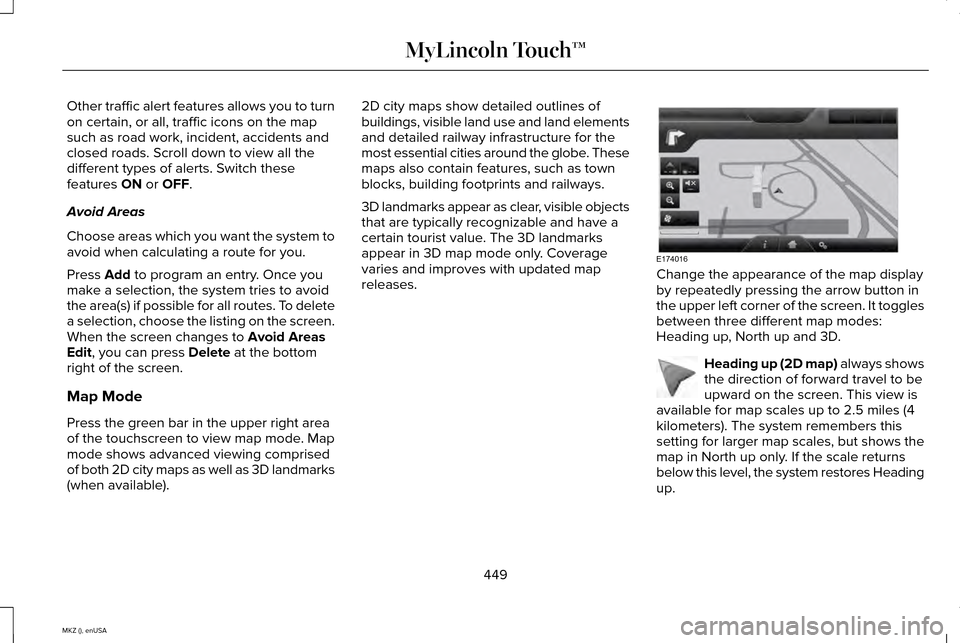
Change the appearance of the map display
by repeatedly pressing the arrow button in
the upper left corner of the screen. It toggles
between three different map modes:
Heading up, North up and 3D.
Heading up (2D map) always shows
the direction of forward travel to be
upward on the screen. This view is
available for map scales up to 2.5 miles (4
kilometers). The system remembers this
setting for larger map scales, but shows the
map in North up only. If the scale returns
below this level, the system restores Heading
up.
449
MKZ (), enUSA MyLincoln Touch™E174016 E142642
Page 507 of 516
EPB
See: Electric Parking Brake..............................184
Essential Towing Checks
............................239
Before Towing a Trailer.....................................240
Hitches..................................................................239
Launching or Retrieving a Boat or Personal
Watercraft (PWC)............................................240
Safety Chains......................................................239
Trailer Brakes.......................................................239
Trailer Lamps.......................................................239
When Towing a Trailer......................................240
Event Data Recording See: Data Recording..............................................9
Export Unique Options...................................14
Extended Service Plan (ESP).....................475 SERVICE PLANS (CANADA ONLY).................
476
SERVICE PLANS (U.S. Only).............................475
Exterior Mirrors
................................................94
Auto-Dimming Feature........................................95
Blind Spot Monitor................................................96
Fold-Away Exterior Mirrors.................................
95
Heated Exterior Mirrors.......................................95
Integrated Blind Spot Mirrors............................96
Memory Mirrors.....................................................95
Power Exterior Mirrors.........................................94
Power-Folding Mirrors.........................................95
Signal Indicator Mirrors.......................................95 F
Fastening the Safety Belts...........................33
Rear Inflatable Safety Belt..................................35
Safety Belt Extension Assembly.......................36
Safety Belt Locking Modes.................................34
Using Safety Belts During Pregnancy.............33
Flat Tire Inflation See: Temporary Mobility Kit...............................311
Floor Mats
......................................................245
Front Passenger Sensing System..............45
Fuel and Refueling.........................................161
Fuel Consumption
.........................................167
Calculating Fuel Economy................................167
Filling the Tank.....................................................167
Fuel Filter
........................................................293
Fuel Quality.....................................................162 Choosing the Right Fuel....................................162
Octane Recommendations...............................162
Fuel Shutoff....................................................248
Fuses...............................................................260
Fuse Specification Chart............................260 Passenger Compartment Fuse Panel............
271
Power Distribution Box.....................................260 G
Garage Door Opener
See: Universal Garage Door Opener.............
148
Gauges............................................................100 Engine Coolant Temperature Gauge.............102
Fuel Gauge............................................................101
Information Display..............................................101
General Information on Radio Frequencies...................................................53
Intelligent Access..................................................53
General Maintenance Information
...........478
Multi-Point Inspection.........................................481
Owner Checks and Services...........................
480
Protecting Your Investment..............................478
Why Maintain Your Vehicle?.............................478
Why Maintain Your Vehicle at Your Dealership?......................................................478
Getting Assistance Outside the U.S. and Canada.........................................................256
Getting the Services You Need................253 Away From Home..............................................253
Global Opening and Closing.......................94 Closing the Windows...........................................94
Opening the Windows.........................................94
504
MKZ (), enUSA Index