tow LINCOLN MKZ 2015 Repair Manual
[x] Cancel search | Manufacturer: LINCOLN, Model Year: 2015, Model line: MKZ, Model: LINCOLN MKZ 2015Pages: 516, PDF Size: 4.48 MB
Page 325 of 516
Second Stage: Checking Tire Pressure
WARNINGS
If you are proceeding from the First
Stage: Re-inflating the Tire with Sealing
Compound and Air section and have injected
sealant in the tire and the pressure is below
20 psi (1.4 bar), continue to the next step. The power plug may get hot after use
and should be handled carefully while
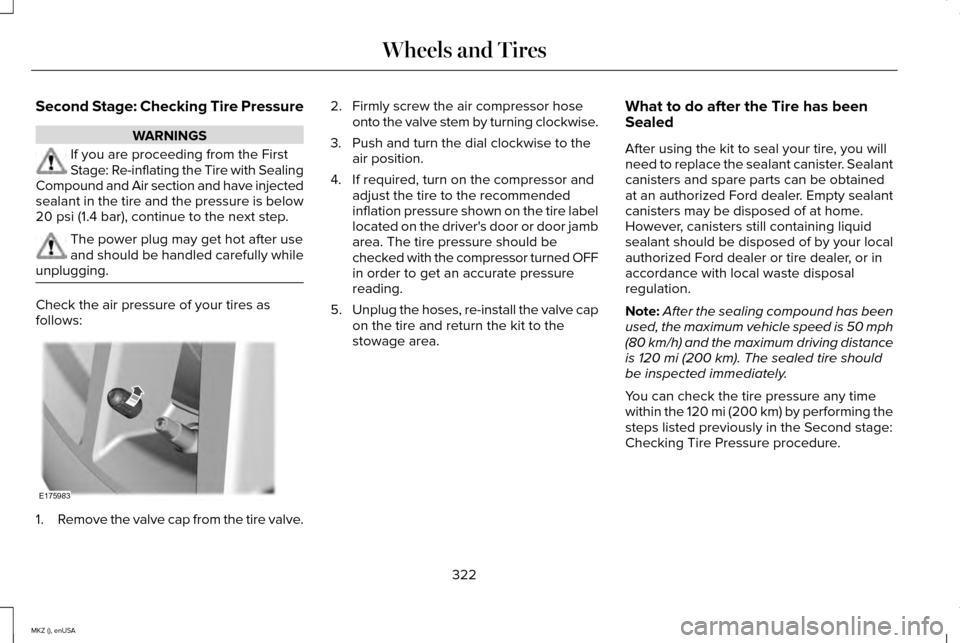
unplugging. Check the air pressure of your tires as
follows:
1.
Remove the valve cap from the tire valve. 2. Firmly screw the air compressor hose
onto the valve stem by turning clockwise.
3. Push and turn the dial clockwise to the air position.
4. If required, turn on the compressor and adjust the tire to the recommended
inflation pressure shown on the tire label
located on the driver's door or door jamb
area. The tire pressure should be
checked with the compressor turned OFF
in order to get an accurate pressure
reading.
5. Unplug the hoses, re-install the valve cap
on the tire and return the kit to the
stowage area. What to do after the Tire has been
Sealed
After using the kit to seal your tire, you will
need to replace the sealant canister. Sealant
canisters and spare parts can be obtained
at an authorized Ford dealer. Empty sealant
canisters may be disposed of at home.
However, canisters still containing liquid
sealant should be disposed of by your local
authorized Ford dealer or tire dealer, or in
accordance with local waste disposal
regulation.
Note:
After the sealing compound has been
used, the maximum vehicle speed is 50 mph
(80 km/h) and the maximum driving distance
is
120 mi (200 km). The sealed tire should
be inspected immediately.
You can check the tire pressure any time
within the
120 mi (200 km) by performing the
steps listed previously in the Second stage:
Checking Tire Pressure procedure.
322
MKZ (), enUSA Wheels and TiresE175983
Page 327 of 516
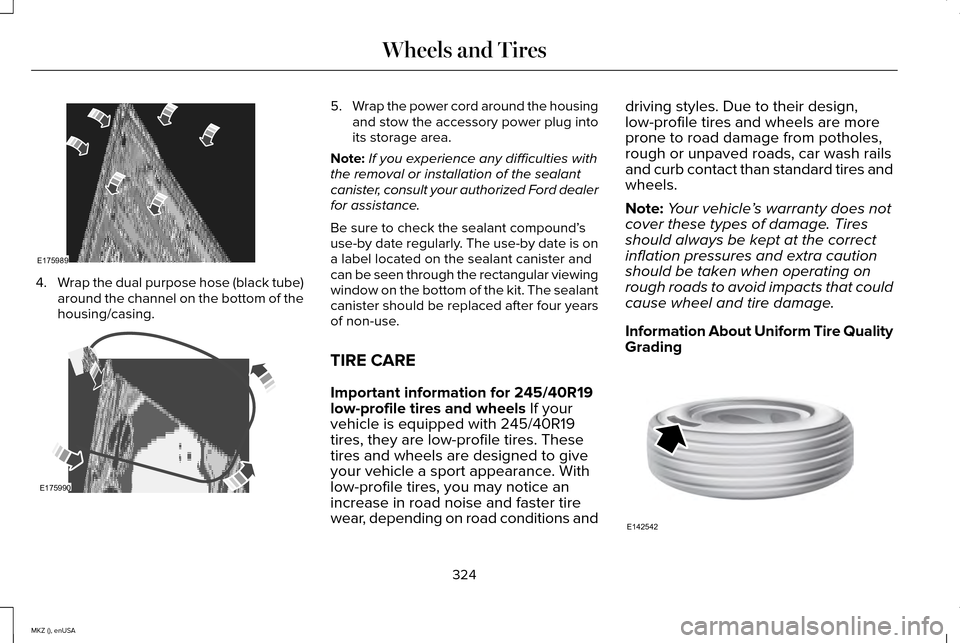
4.
Wrap the dual purpose hose (black tube)
around the channel on the bottom of the
housing/casing. 5.
Wrap the power cord around the housing
and stow the accessory power plug into
its storage area.
Note: If you experience any difficulties with
the removal or installation of the sealant
canister, consult your authorized Ford dealer
for assistance.
Be sure to check the sealant compound’ s
use-by date regularly. The use-by date is on
a label located on the sealant canister and
can be seen through the rectangular viewing
window on the bottom of the kit. The sealant
canister should be replaced after four years
of non-use.
TIRE CARE
Important information for 245/40R19
low-profile tires and wheels If your
vehicle is equipped with 245/40R19
tires, they are low-profile tires. These
tires and wheels are designed to give
your vehicle a sport appearance. With
low-profile tires, you may notice an
increase in road noise and faster tire
wear, depending on road conditions and driving styles. Due to their design,
low-profile tires and wheels are more
prone to road damage from potholes,
rough or unpaved roads, car wash rails
and curb contact than standard tires and
wheels.
Note:
Your vehicle ’s warranty does not
cover these types of damage. Tires
should always be kept at the correct
inflation pressures and extra caution
should be taken when operating on
rough roads to avoid impacts that could
cause wheel and tire damage.
Information About Uniform Tire Quality
Grading 324
MKZ (), enUSA Wheels and TiresE175989 E175990 E142542
Page 340 of 516
Highway Hazards
No matter how carefully you drive there
is always the possibility that you may
eventually have a flat tire on the
highway. Drive slowly to the closest safe
area out of traffic. This may further
damage the flat tire, but your safety is
more important.
If you feel a sudden vibration or ride
disturbance while driving, or you suspect
your tire or vehicle has been damaged,
immediately reduce your speed. Drive
with caution until you can safely pull off
the road. Stop and inspect the tires for
damage. If a tire is under-inflated or
damaged, deflate it, remove the wheel
and replace it with your spare tire and
wheel (if provided). If you cannot detect
a cause, have the vehicle towed to the
nearest repair facility or tire dealer to
have the vehicle inspected.
Tire and Wheel Alignment
A bad jolt from hitting a curb or pothole
can cause the front end of your vehicle
to become misaligned or cause damage
to your tires. If your vehicle seems to
pull to one side when you’re driving, the
wheels may be out of alignment. Have
an authorized dealer check the wheel
alignment periodically.
Wheel misalignment in the front or the
rear can cause uneven and rapid
treadwear of your tires and should be
corrected by an authorized dealer.
Front-wheel drive vehicles and those
with an independent rear suspension (if
equipped) may require alignment of all
four wheels.
The tires should also be balanced
periodically. An unbalanced tire and
wheel assembly may result in irregular
tire wear.Tire Rotation
Note:
If your tires show uneven wear
ask an authorized dealer to check for
and correct any wheel misalignment,
tire imbalance or mechanical problem
involved before tire rotation.
Note: Your vehicle may be equipped
with a dissimilar spare wheel and tire
assembly. A dissimilar spare wheel and
tire assembly is defined as a spare
wheel and tire assembly that is different
in brand, size or appearance from the
road tires and wheels. If you have a
dissimilar spare wheel and tire assembly
it is intended for temporary use only and
should not be used in a tire rotation.
Note: After having your tires rotated,
inflation pressure must be checked and
adjusted to the vehicle requirements.
Rotating your tires at the recommended
interval (as indicated in the Scheduled
Maintenance chapter) will help your tires
wear more evenly, providing better tire
performance and longer tire life.
337
MKZ (), enUSA Wheels and Tires
Page 347 of 516
Dissimilar Spare Wheel and Tire
Assembly Information
WARNING
Failure to follow these guidelines could
result in an increased risk of loss of
vehicle control, injury or death. If you have a dissimilar spare wheel and tire,
then it is intended for temporary use only.
This means that if you need to use it, you
should replace it as soon as possible with a
road wheel and tire assembly that is the
same size and type as the road tires and
wheels that were originally provided by Ford.
If the dissimilar spare tire or wheel is
damaged, it should be replaced rather than
repaired.
A dissimilar spare wheel and tire assembly
is defined as a spare wheel and tire assembly
that is different in brand, size or appearance
from the road tires and wheels and can be
one of three types:
1. T-type mini-spare: This spare tire begins
with the letter T for tire size and may have
Temporary Use Only molded in the sidewall. 2.
Full-size dissimilar spare with label on
wheel: This spare tire has a label on the
wheel that states: THIS WHEEL AND TIRE
ASSEMBLY FOR TEMPORARY USE ONLY.
When driving with one of the dissimilar spare
tires listed above, do not:
• Exceed 50 mph (80 km/h)
• Load the vehicle beyond maximum
vehicle load rating listed on the Safety
Compliance Label.
• Tow a trailer.
• Use snow chains on the end of the
vehicle with the dissimilar spare tire.
• Use more than one dissimilar spare tire
at a time.
• Use commercial car washing equipment.
• Try to repair the dissimilar spare tire.
Use of one of the dissimilar spare tires listed
above at any one wheel location can lead to
impairment of the following:
• Handling, stability and braking
performance.
• Comfort and noise.
• Ground clearance and parking at curbs. •
Winter weather driving capability.
• Wet weather driving capability.
• All-wheel driving capability (if applicable).
3.
Full-size dissimilar spare without label
on wheel
When driving with the full-size dissimilar
spare wheel and tire assembly, do not:
• Exceed 70 mph (113 km/h).
• Use more than one dissimilar spare
wheel and tire assembly at a time.
• Use commercial car washing equipment.
• Use snow chains on the end of the
vehicle with the dissimilar spare wheel
and tire assembly.
The usage of a full-size dissimilar spare
wheel and tire assembly can lead to
impairment of the following:
• Handling, stability and braking
performance.
• Comfort and noise.
• Ground clearance and parking at curbs.
• Winter weather driving capability.
344
MKZ (), enUSA Wheels and Tires
Page 348 of 516
•
Wet weather driving capability.
• All-wheel driving capability
When driving with the full-size dissimilar
spare wheel and tire assembly additional
caution should be given to:
• Towing a trailer.
• Driving vehicles equipped with a camper
body.
• Driving vehicles with a load on the cargo
rack.
Drive cautiously when using a full-size
dissimilar spare wheel and tire assembly and
seek service as soon as possible.
Tire Change Procedure (If Equipped) WARNINGS
When one of the front wheels is off the
ground, the transmission alone will not
prevent the vehicle from moving or slipping
off the jack, even if the transmission is in park
(P). WARNINGS
To help prevent your vehicle from
moving when you change a tire, be
sure to place the transmission in park (P), set
the parking brake and block (in both
directions) the wheel that is diagonally
opposite (other side and end of the vehicle)
to the tire being changed. Never get underneath a vehicle that is
supported only by a jack. If your vehicle
slips off the jack, you or someone else could
be seriously injured. Do not attempt to change a tire on the
side of the vehicle close to moving
traffic. Pull far enough off the road to avoid
the danger of being hit when operating the
jack or changing the wheel. Always use the jack provided as
original equipment with your vehicle.
If using a jack other than the one provided
as original equipment with your vehicle,
make sure the jack capacity is adequate for
the vehicle weight, including any vehicle
cargo or modifications. Note:
Passengers should not remain in your
vehicle when the vehicle is being jacked.
Type 1
1. Park on a level surface, set the parking brake and activate the hazard flashers.
2. Place the transmission in park (P) and turn the engine off. For vehicles with a
manual transmission, place the
transmission in reverse (R) after the
engine is turned off. 3.
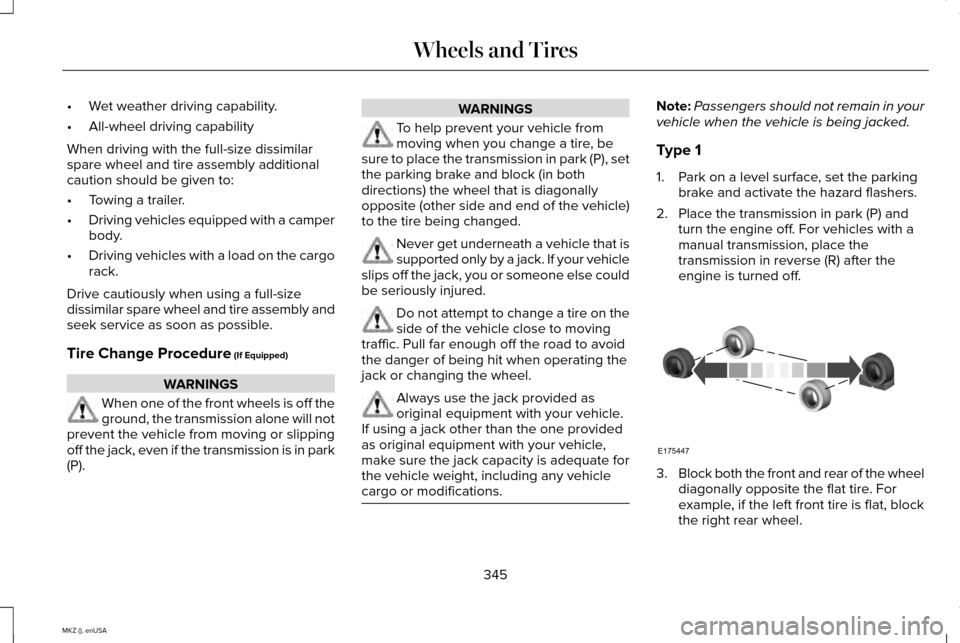
Block both the front and rear of the wheel
diagonally opposite the flat tire. For
example, if the left front tire is flat, block
the right rear wheel.
345
MKZ (), enUSA Wheels and TiresE175447
Page 352 of 516
11. Remove the lug nuts with the lug
wrench.
12. Replace the flat tire with the spare tire,
making sure the valve stem is facing
outward. Reinstall the lug nuts until the
wheel is snug against the hub. Do not
fully tighten the lug nuts until the wheel
has been lowered. If you are using the
temporary tire, the lug nut washers will
not appear to be flush with the rim. This
is normal only when using the
temporary spare tire.
13. Lower the wheel by turning the jack handle counterclockwise. 14. Remove the jack and fully tighten the
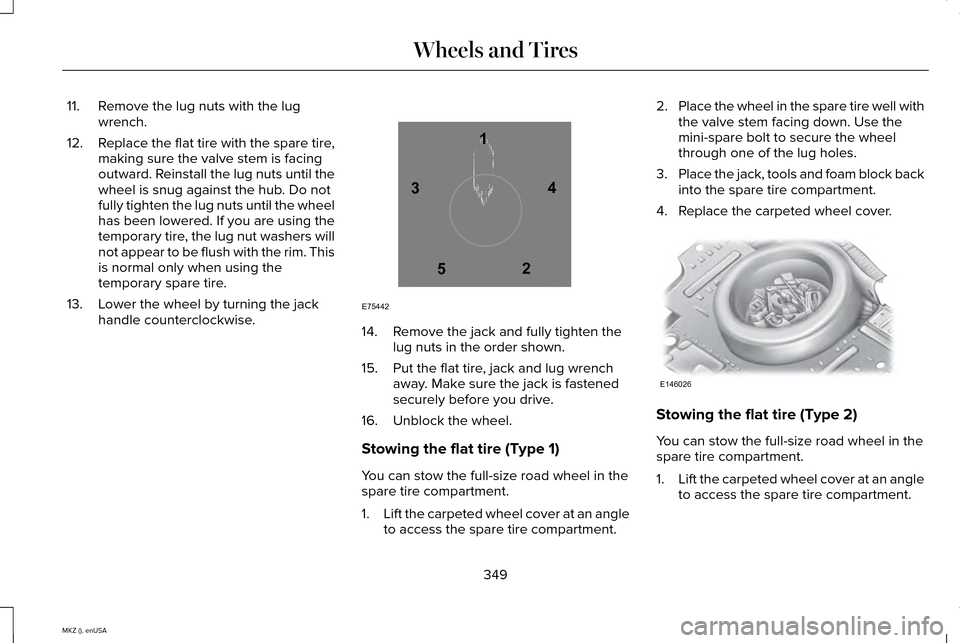
lug nuts in the order shown.
15. Put the flat tire, jack and lug wrench away. Make sure the jack is fastened
securely before you drive.
16. Unblock the wheel.
Stowing the flat tire (Type 1)
You can stow the full-size road wheel in the
spare tire compartment.
1. Lift the carpeted wheel cover at an angle
to access the spare tire compartment. 2.
Place the wheel in the spare tire well with
the valve stem facing down. Use the
mini-spare bolt to secure the wheel
through one of the lug holes.
3. Place the jack, tools and foam block back
into the spare tire compartment.
4. Replace the carpeted wheel cover. Stowing the flat tire (Type 2)
You can stow the full-size road wheel in the
spare tire compartment.
1.
Lift the carpeted wheel cover at an angle
to access the spare tire compartment.
349
MKZ (), enUSA Wheels and Tires12
3
4
5
E75442 E146026
Page 373 of 516
GENERAL INFORMATION
Radio Frequencies and Reception
Factors
AM and FM frequencies are established by
the Federal Communications Commission
(FCC) and the Canadian Radio and
Telecommunications Commission (CRTC).
Those frequencies are:
•
AM: 530, 540-1700, 1710 kHz
• FM: 87.9-107.7, 107.9 MHz Radio Reception Factors
The further you travel from an FM station, the weaker the signal and the weaker the reception.
Distance and Strength
Hills, mountains, tall buildings, bridges, tunnels, freeway overpasses, \
parking garages, dense tree foliage and
thunderstorms can interfere with the reception.
Terrain
When you pass a ground-based broadcast repeating tower, a stronger signal may overtake a weaker one and
result in the audio system muting.
Station overload
CD and CD Player Information
Note: CD units play commercially pressed
4.75-inch (12 centimeter) audio compact
discs only. Due to technical incompatibility,
certain recordable and re-recordable
compact discs may not function correctly
when used in Ford CD players. Note:
Do not insert CDs with homemade
paper (adhesive) labels into the CD player
as the label may peel and cause the CD to
become jammed. You should use a
permanent felt tip marker rather than
adhesive labels on your homemade CDs.
Ballpoint pens may damage CDs. Please
contact an authorized dealer for further
information. Note:
Do not use any irregularly shaped
discs or discs with a scratch protection film
attached.
Always handle discs by their edges only.
Clean the disc with an approved CD cleaner
only. Wipe it from the center of the disc
toward the edge. Do not clean in a circular
motion.
370
MKZ (), enUSA Audio System
Page 414 of 516
Satellite Radio Electronic Serial Number
(ESN)
You need your ESN to activate, modify or
track your satellite radio account. The ESN
is on the System Information Screen (SR
ESN:XXXXXXXXXXXX). To access your ESN,
touch the bottom left corner of the
touchscreen. Touch SIRIUS > Options.
Sirius Satellite Radio Reception Factors and Troubleshooting Potential reception issues
For optimal reception performance, keep the antenna clear of snow and ice build-up and keep luggage and
other materials as far away from the antenna as possible.
Antenna obstructions
Hills, mountains, tall buildings, bridges, tunnels, freeway overpasses, \
parking garages, dense tree foliage and
thunderstorms can interfere with your reception.
Terrain
When you pass a ground-based broadcast-repeating tower, a stronger signal may overtake a weaker one and
the audio system may mute.
Station overload
Your display may show ACQUIRING... to indicate the interference and the a\
udio system may mute.
Satellite radio signal interfer-
ence
411
MKZ (), enUSA MyLincoln Touch™
Page 415 of 516
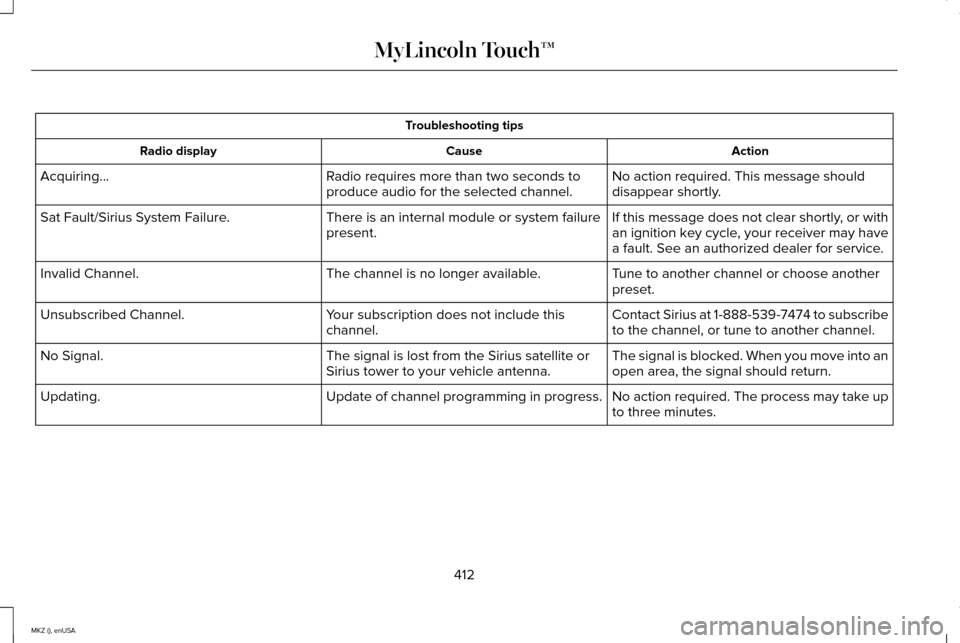
Troubleshooting tips
Action
Cause
Radio display
No action required. This message should
disappear shortly.
Radio requires more than two seconds to
produce audio for the selected channel.
Acquiring...
If this message does not clear shortly, or with
an ignition key cycle, your receiver may have
a fault. See an authorized dealer for service.
There is an internal module or system failure
present.
Sat Fault/Sirius System Failure.
Tune to another channel or choose another
preset.
The channel is no longer available.
Invalid Channel.
Contact Sirius at 1-888-539-7474 to subscribe
to the channel, or tune to another channel.
Your subscription does not include this
channel.
Unsubscribed Channel.
The signal is blocked. When you move into an
open area, the signal should return.
The signal is lost from the Sirius satellite or
Sirius tower to your vehicle antenna.
No Signal.
No action required. The process may take up
to three minutes.
Update of channel programming in progress.
Updating.
412
MKZ (), enUSA MyLincoln Touch™
Page 452 of 516
Other traffic alert features allows you to turn
on certain, or all, traffic icons on the map
such as road work, incident, accidents and
closed roads. Scroll down to view all the
different types of alerts. Switch these
features ON or OFF.
Avoid Areas
Choose areas which you want the system to
avoid when calculating a route for you.
Press
Add to program an entry. Once you
make a selection, the system tries to avoid
the area(s) if possible for all routes. To delete
a selection, choose the listing on the screen.
When the screen changes to
Avoid Areas
Edit, you can press Delete at the bottom
right of the screen.
Map Mode
Press the green bar in the upper right area
of the touchscreen to view map mode. Map
mode shows advanced viewing comprised
of both 2D city maps as well as 3D landmarks
(when available). 2D city maps show detailed outlines of
buildings, visible land use and land elements
and detailed railway infrastructure for the
most essential cities around the globe. These
maps also contain features, such as town
blocks, building footprints and railways.
3D landmarks appear as clear, visible objects
that are typically recognizable and have a
certain tourist value. The 3D landmarks
appear in 3D map mode only. Coverage
varies and improves with updated map
releases.
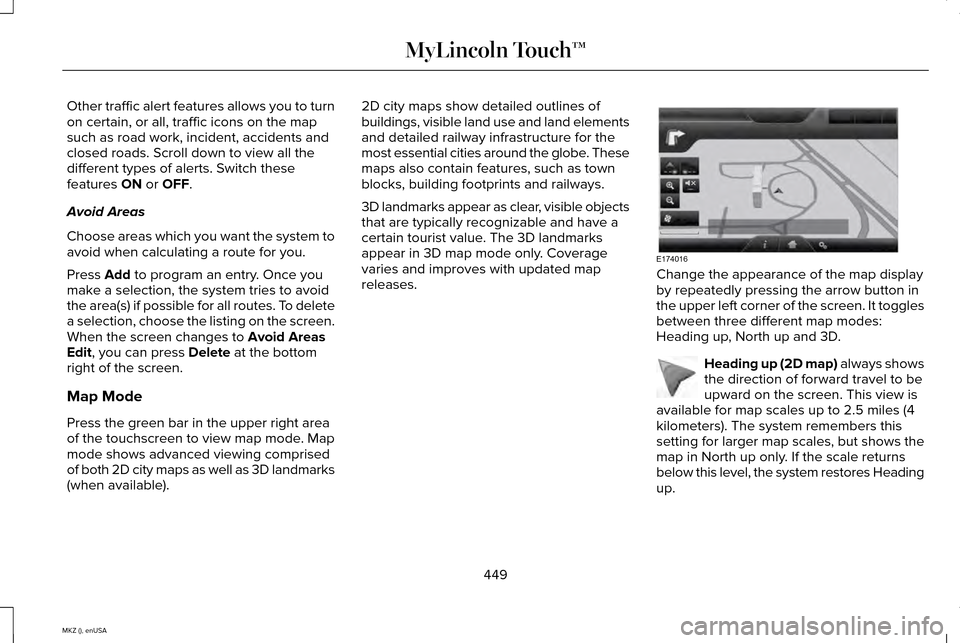
Change the appearance of the map display
by repeatedly pressing the arrow button in
the upper left corner of the screen. It toggles
between three different map modes:
Heading up, North up and 3D.
Heading up (2D map) always shows
the direction of forward travel to be
upward on the screen. This view is
available for map scales up to 2.5 miles (4
kilometers). The system remembers this
setting for larger map scales, but shows the
map in North up only. If the scale returns
below this level, the system restores Heading
up.
449
MKZ (), enUSA MyLincoln Touch™E174016 E142642