head up display LINCOLN MKZ 2016 User Guide
[x] Cancel search | Manufacturer: LINCOLN, Model Year: 2016, Model line: MKZ, Model: LINCOLN MKZ 2016Pages: 544, PDF Size: 5.77 MB
Page 213 of 544
Each time you start the vehicle, the system
selects the last chosen gap for the current
driver.
Disengaging the System
Press the brake pedal or press and release
CNCL. The last set speed displays in grey
but does not erase.
Overriding the System
WARNING
Whenever the driver presses the
accelerator pedal and overrides the
system, the system does not automatically
apply the brakes to maintain the set distance
from any vehicle ahead.
Press the accelerator pedal to override the
set speed and gap distance.
E144529
When you override the system,
the green indicator light
illuminates and the lead vehicle
graphic does not show in the information
display. The system resumes operation when you
release the accelerator pedal. The vehicle
speed decreases to the set speed, or a
slower speed if following a slower vehicle.
Changing the Set Speed
• Accelerate or brake to the desired speed,
then press and release SET+.
• Press and hold SET+ or SET- until the desired set speed shows on the
information display. The vehicle speed
gradually changes to the selected speed.
• Press and release SET+ or SET-. The set speed changes in approximately 1 mph
(2 km/h) increments.
The system may apply the brakes to slow
the vehicle to the new set speed. The set
speed displays continuously in the
information display when the system is
active.
Resuming the Set Speed
Note: Only use resume if you are aware of
the set speed and intend to return to it. Press and release RES. The vehicle returns
to the previously set speed. The set speed
displays continuously in the information
display while the system is active.
Low Speed Automatic Cancellation
The system does not function at speeds
below 12 mph (20 km/h). An audible alarm
sounds and the automatic braking releases
if your vehicle drops below this speed.
Hilly Condition Usage
Note:
An audible alarm sounds and the
system shuts down if it is applying brakes
for an extended period of time. This allows
the brakes to cool. The system functions
normally again when the brakes cool.
Select a lower gear during prolonged
downhill driving on steep slopes, such as
mountainous areas, when the system is
active. In such situations, the system needs
additional engine braking to reduce the load
on the vehicle’s regular brake system to
prevent the brakes from overheating.
210
Cruise Control
Page 215 of 544
System Not Available
Conditions that can cause the system to
deactivate or prevent the system from
activating when requested include:
• A blocked sensor.
• High brake temperature.
• A failure in the system or a relatedsystem.
Blocked Sensor
WARNINGS
Do not use the system when towing a
trailer with brake controls. Aftermarket
trailer brakes do not function properly when
you switch the system on because the
brakes are electronically controlled. Failing
to do so may result in loss of vehicle control,
which could result in serious injury. The
system does operate with non-electronic
trailer brake controllers, such as over-run or
surge brakes.
Do not use tire sizes other than those
recommended because this can affect
the normal operation of the system. Failing
to do so may result in a loss of vehicle
control, which could result in serious injury.
E145632
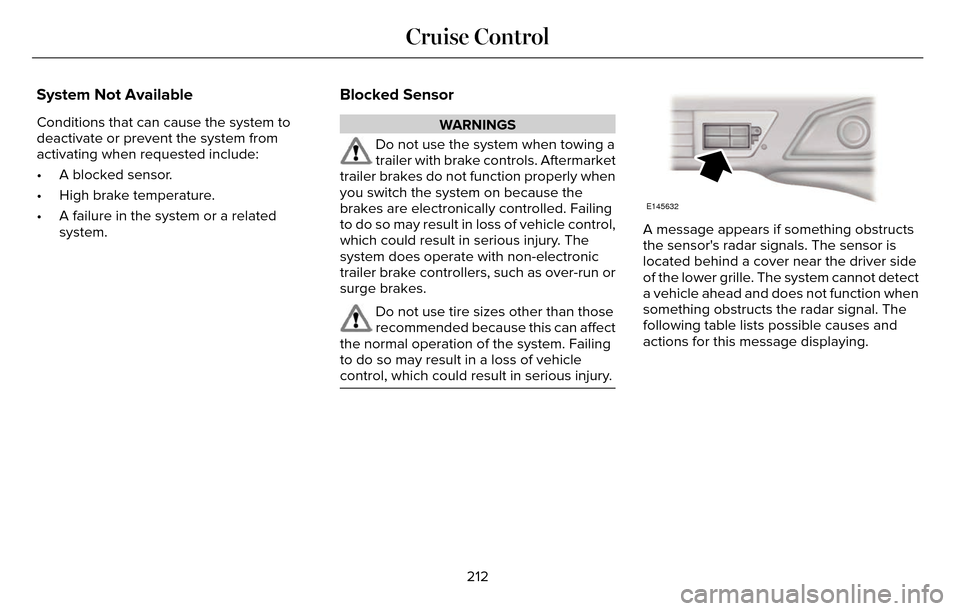
A message appears if something obstructs
the sensor's radar signals. The sensor is
located behind a cover near the driver side
of the lower grille. The system cannot detect
a vehicle ahead and does not function when
something obstructs the radar signal. The
following table lists possible causes and
actions for this message displaying.
212
Cruise Control
Page 216 of 544
Action
Cause
Clean the grille surface in front of the radar or remove the object
causing the obstruction.
The surface of the radar in the grille is dirty or obstructed in some
way.
Wait a short time. It may take several minutes for the radar to detect
that it is free from obstruction.
The surface of the radar in the grille is clean but the message remains
in the display.
Do not use the system in these conditions because it may not detect
any vehicles ahead.
Heavy rain or snow is interfering with the radar signals.
Do not use the system in these conditions because it may not detect
any vehicles ahead.
Swirling water, or snow or ice on the surface of the road may interfere
with the radar signals.
Wait a short time or switch to normal cruise control.
You are in a desert or remote area with no other vehicles and no
roadside objects.
Due to the nature of radar technology, it is
possible to get a blockage warning with no
actual block. This happens, for example,
when driving in sparse rural or desert
environments. A false blocked condition
either self clears or clears after a you restart
your vehicle.
Switching to Normal Cruise Control
WARNING
Normal cruise control does not brake
for slower vehicles. Always be aware
of which mode you have selected and apply
the brakes when necessary.
You can manually change from adaptive
cruise control to normal cruise control
through the information display.
E71340
The cruise control indicator light
replaces the adaptive cruise
control indicator light if you select
normal cruise control. The gap setting does
not display, the system does not
automatically respond to lead vehicles and
automatic braking does not activate.
213
Cruise Control
Page 220 of 544
E165517
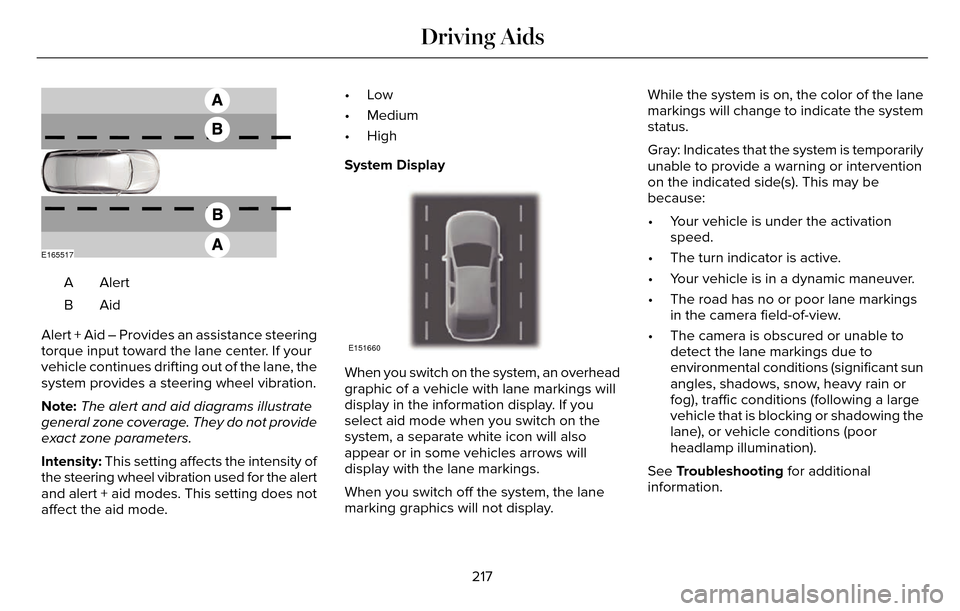
AlertA
AidB
Alert + Aid – Provides an assistance steering
torque input toward the lane center. If your
vehicle continues drifting out of the lane, the
system provides a steering wheel vibration.
Note: The alert and aid diagrams illustrate
general zone coverage. They do not provide
exact zone parameters.
Intensity: This setting affects the intensity of
the steering wheel vibration used for the alert
and alert + aid modes. This setting does not
affect the aid mode. •Low
• Medium
• High
System Display
E151660
When you switch on the system, an overhead
graphic of a vehicle with lane markings will
display in the information display. If you
select aid mode when you switch on the
system, a separate white icon will also
appear or in some vehicles arrows will
display with the lane markings.
When you switch off the system, the lane
marking graphics will not display.
While the system is on, the color of the lane
markings will change to indicate the system
status.
Gray: Indicates that the system is temporarily
unable to provide a warning or intervention
on the indicated side(s). This may be
because:
• Your vehicle is under the activation
speed.
• The turn indicator is active.
• Your vehicle is in a dynamic maneuver.
• The road has no or poor lane markings in the camera field-of-view.
• The camera is obscured or unable to detect the lane markings due to
environmental conditions (significant sun
angles, shadows, snow, heavy rain or
fog), traffic conditions (following a large
vehicle that is blocking or shadowing the
lane), or vehicle conditions (poor
headlamp illumination).
See Troubleshooting for additional
information.
217
Driving Aids
Page 231 of 544
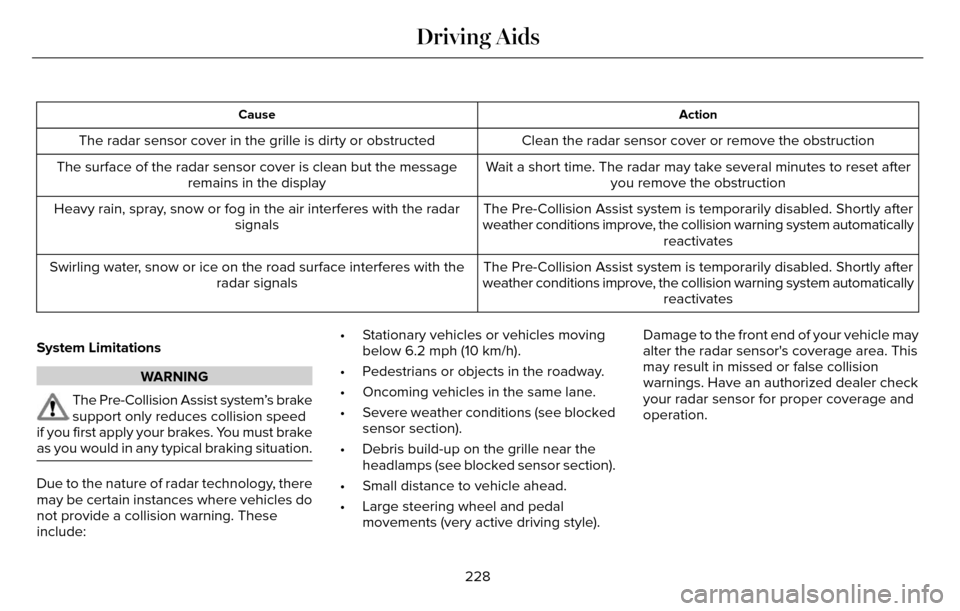
Action
Cause
Clean the radar sensor cover or remove the obstruction
The radar sensor cover in the grille is dirty or obstructed
Wait a short time. The radar may take several minutes to reset afteryou remove the obstruction
The surface of the radar sensor cover is clean but the message
remains in the display
The Pre-Collision Assist system is temporarily disabled. Shortly after
weather conditions improve, the collision warning system automatically reactivates
Heavy rain, spray, snow or fog in the air interferes with the radar
signals
The Pre-Collision Assist system is temporarily disabled. Shortly after
weather conditions improve, the collision warning system automatically reactivates
Swirling water, snow or ice on the road surface interferes with the
radar signals
System Limitations
WARNING
The Pre-Collision Assist system’s brake
support only reduces collision speed
if you first apply your brakes. You must brake
as you would in any typical braking situation.
Due to the nature of radar technology, there
may be certain instances where vehicles do
not provide a collision warning. These
include: • Stationary vehicles or vehicles moving
below 6.2 mph (10 km/h).
• Pedestrians or objects in the roadway.
• Oncoming vehicles in the same lane.
• Severe weather conditions (see blocked sensor section).
• Debris build-up on the grille near the headlamps (see blocked sensor section).
• Small distance to vehicle ahead.
• Large steering wheel and pedal movements (very active driving style). Damage to the front end of your vehicle may
alter the radar sensor's coverage area. This
may result in missed or false collision
warnings. Have an authorized dealer check
your radar sensor for proper coverage and
operation.
228
Driving Aids
Page 269 of 544
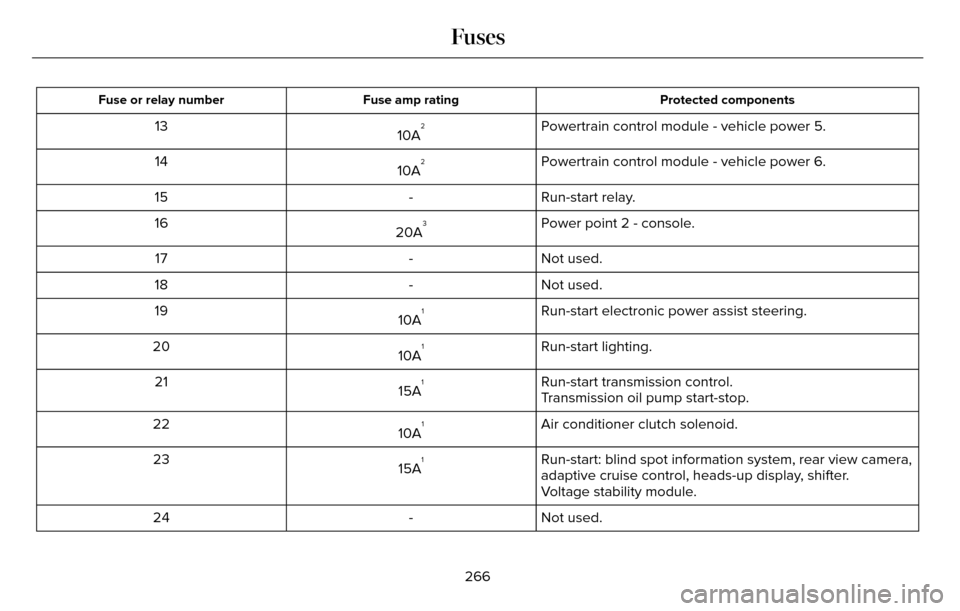
Protected components
Fuse amp rating
Fuse or relay number
Powertrain control module - vehicle power 5.
10A213
Powertrain control module - vehicle power 6.
10A
214
Run-start relay.
-
15
Power point 2 - console.
20A
316
Not used.
-
17
Not used.
-
18
Run-start electronic power assist steering.
10A
119
Run-start lighting.
10A
120
Run-start transmission control.
15A
121
Transmission oil pump start-stop.
Air conditioner clutch solenoid.
10A
122
Run-start: blind spot information system, rear view camera,
adaptive cruise control, heads-up display, shifter.
15A
123
Voltage stability module.
Not used.
-
24
266
Fuses
Page 466 of 544
E174016
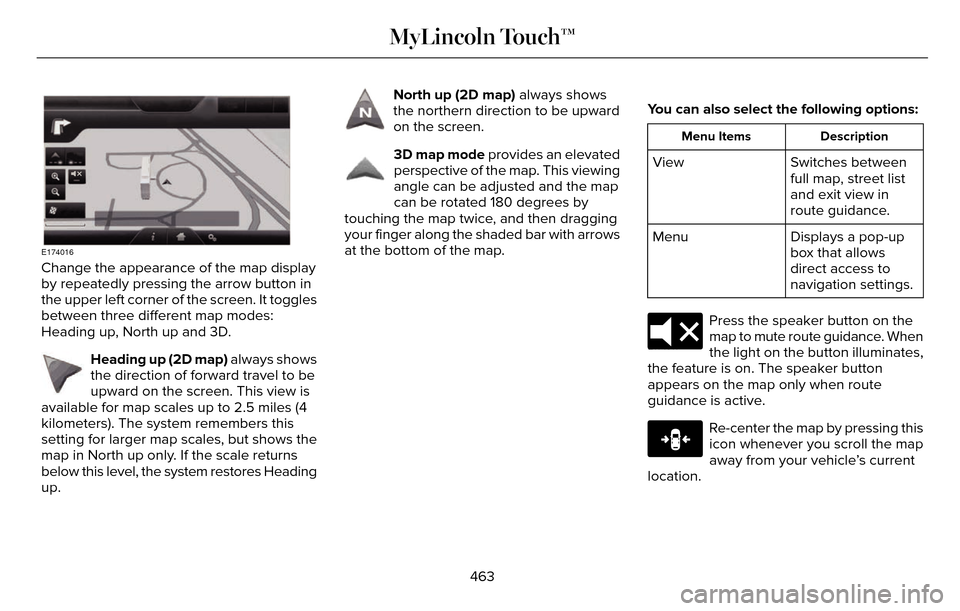
Change the appearance of the map display
by repeatedly pressing the arrow button in
the upper left corner of the screen. It toggles
between three different map modes:
Heading up, North up and 3D.
E142642
Heading up (2D map) always shows
the direction of forward travel to be
upward on the screen. This view is
available for map scales up to 2.5 miles (4
kilometers). The system remembers this
setting for larger map scales, but shows the
map in North up only. If the scale returns
below this level, the system restores Heading
up.
E142643
North up (2D map) always shows
the northern direction to be upward
on the screen.
E142644
3D map mode provides an elevated
perspective of the map. This viewing
angle can be adjusted and the map
can be rotated 180 degrees by
touching the map twice, and then dragging
your finger along the shaded bar with arrows
at the bottom of the map. You can also select the following options:
Description
Menu Items
Switches between
full map, street list
and exit view in
route guidance.
View
Displays a pop-up
box that allows
direct access to
navigation settings.
Menu
E174017
Press the speaker button on the
map to mute route guidance. When
the light on the button illuminates,
the feature is on. The speaker button
appears on the map only when route
guidance is active.
E146188
Re-center the map by pressing this
icon whenever you scroll the map
away from your vehicle’s current
location.
463
MyLincoln Touch™
Page 538 of 544
H
Hazard Warning Flashers...........................252
Headlamp Exit Delay.....................................89
Head Restraints.............................................140
Adjusting the Head Restraint............................141
Tilting Head Restraints ......................................142
Heated Seats..................................................148Front Seats............................................................1\
48
Rear Seats.............................................................14\
8
Heated Steering Wheel.................................83
Heated Windows and Mirrors....................138
Heated Exterior Mirror.......................................138
Heated Rear Window.........................................138
HeatingSee: Climate Control..........................................135
Hill Start Assist...............................................190Switching the System On and Off....................191
Using Hill Start Assist..........................................191
Hints on Controlling the InteriorClimate........................................................... 137
Cooling the Interior Quickly..............................137
General Hints........................................................137\
Heating the Interior Quickly..............................137
Recommended Settings for Cooling .............137
Recommended Settings for Heating..............137
Side Window Defogging in Cold
Weather.............................................................137
Hints on Driving With Anti-LockBrakes............................................................187
Hood Lock
See: Opening and Closing the Hood.............281
I
In California (U.S. Only)...............................257
Information Display Control.........................82
Cluster Display Control Features.....................82
Information Displays.....................................109General Information............................................109
Information .....................................................436911 Assist..............................................................\
.445
Alerts..................................................................\
.... 445
Calendar...............................................................445
Sirius Travel Link.................................................443
SYNC Services (If Equipped, United States Only)..................................................................437
Vehicle Health Report.......................................448
535
Index
Page 540 of 544

Locking and Unlocking..................................67Activating Intelligent Access.............................68
Autolock ...............................................................\
..69
Auto Relock............................................................69
Battery Saver..........................................................7\
0
Illuminated Entry...................................................70
Illuminated Exit......................................................70\
Luggage Compartment.......................................70
Power Decklid.........................................................71
Power Door Locks................................................67
Remote Control.....................................................67
Smart Unlocks for Intelligent AccessKeys.....................................................................69
Locks..................................................................67
Lug Nuts
See: Changing a Road Wheel.........................346
M
Maintenance...................................................281General Information............................................281
Media Hub......................................................372
Memory Function..........................................145
Easy Entry and Exit Feature..............................147
Linking a PreSet Position to your RemoteControl or Intelligent Access Key Fob.......146
Saving a PreSet Position...................................146
Message CenterSee: Information Displays.................................109
MirrorsSee: Heated Windows and Mirrors.................138
See: Windows and Mirrors.................................95
Mobile Communications Equipment...........14
Moonroof.........................................................100
Bounce-Back.........................................................101
Opening and Closing the Moonroof..............100
Motorcraft Parts............................................354
MyKey Troubleshooting................................65
MyKey™..............................................................60
Principle of Operation.........................................60
MyLincoln Touch™.........................................373General Information...........................................373
MyLincoln Touch™ Troubleshooting.........467
N
Navigation ......................................................454cityseekr................................................................457
Destination Mode...............................................454
Map Mode............................................................462
Navigation Map Updates.................................466
Navigation Voice Commands.........................466
Point of Interest (POI) Categories..................456
Quick-touch Buttons..........................................465
Setting Your Navigation Preferences............458
Normal Scheduled Maintenance..............484Intelligent Oil-Life Monitor™..............................484
Maintenance Intervals.......................................486
O
Oil Change Indicator Reset.......................288
Oil Check
See: Engine Oil Check......................................287
Opening and Closing the Hood................281
Ordering Additional Owner's
Literature......................................................261
Obtaining a French Owner’s Manual.............261
Overhead Console.......................................160
P
Parking Aids....................................................196Principle of Operation........................................196
Passive Anti-Theft System............................77SecuriLock...............................................................77
PA T SSee: Passive Anti-Theft System.........................77
Perchlorate........................................................ 12
Personal Safety System™..............................43
How Does the Personal Safety System
Work?...................................................................43
537
Index
Page 544 of 544
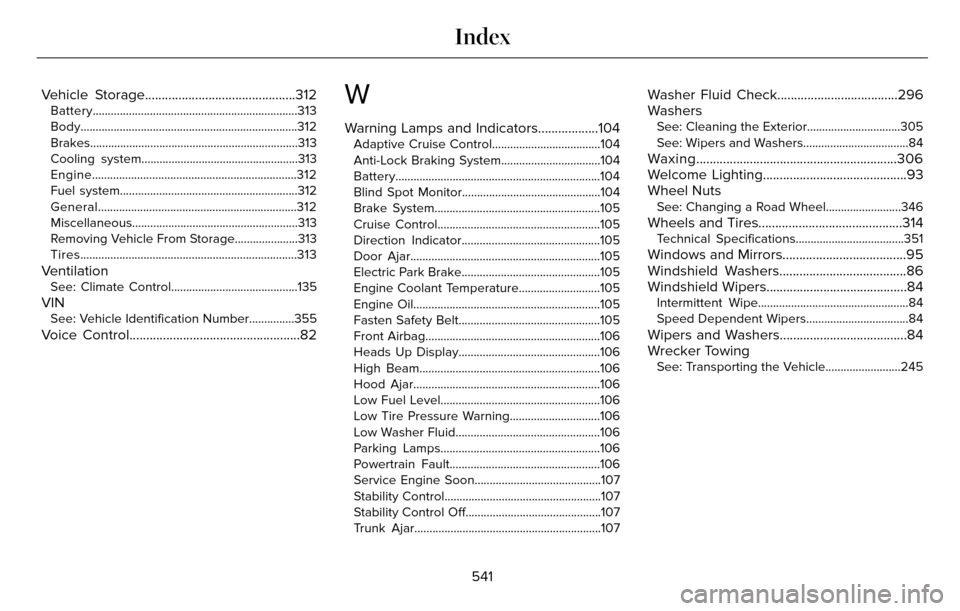
Vehicle Storage.............................................312Battery....................................................................313
Body........................................................................\
312
Brakes..................................................................\
...313
Cooling system....................................................313
Engine....................................................................312
Fuel system...........................................................31\
2
General..................................................................312
Miscellaneous.......................................................313
Removing Vehicle From Storage.....................313
Tires........................................................................\
313
VentilationSee: Climate Control..........................................135
VINSee: Vehicle Identification Number...............355
Voice Control...................................................82
W
Warning Lamps and Indicators..................104Adaptive Cruise Control....................................104
Anti-Lock Braking System.................................104
Battery....................................................................104
Blind Spot Monitor..............................................104
Brake System.......................................................105
Cruise Control......................................................105
Direction Indicator..............................................105
Door Ajar...............................................................\
105
Electric Park Brake..............................................105
Engine Coolant Temperature...........................105
Engine Oil..............................................................\
105
Fasten Safety Belt...............................................105
Front Airbag..........................................................10\
6
Heads Up Display...............................................106
High Beam............................................................106\
Hood Ajar..............................................................1\
06
Low Fuel Level.....................................................106
Low Tire Pressure Warning..............................106
Low Washer Fluid................................................106
Parking Lamps.....................................................106
Powertrain Fault..................................................106
Service Engine Soon..........................................107
Stability Control....................................................107
Stability Control Off.............................................107
Trunk Ajar..............................................................1\
07
Washer Fluid Check....................................296
Washers
See: Cleaning the Exterior...............................305
See: Wipers and Washers...................................84
Waxing............................................................306
Welcome Lighting...........................................93
Wheel Nuts
See: Changing a Road Wheel.........................346
Wheels and Tires...........................................314Technical Specifications....................................351
Windows and Mirrors.....................................95
Windshield Washers......................................86
Windshield Wipers..........................................84
Intermittent Wipe..................................................84
Speed Dependent Wipers..................................84
Wipers and Washers......................................84
Wrecker Towing
See: Transporting the Vehicle.........................245
541
Index