wheel LINCOLN MKZ 2016 User Guide
[x] Cancel search | Manufacturer: LINCOLN, Model Year: 2016, Model line: MKZ, Model: LINCOLN MKZ 2016Pages: 544, PDF Size: 5.77 MB
Page 86 of 544
Use this control to access some of the
MyLincoln Touch features in the information
display. Navigate through the screen and
press OK to select. See MyLincoln Touch™
(page 373).
HEATED STEERING WHEEL (If Equipped)
See MyLincoln Touch™ (page 373).83
Steering Wheel
Page 94 of 544
Once the system is active, the high beams
will switch on if:
• the ambient light level is low enough
• there is no traffic in front of the vehicle
• the vehicle speed is greater thanapproximately 32 mph (52 km/h).
The high beams will switch off if:
• the system detects the headlamps of an approaching vehicle or the tail lamps of
a preceding vehicle.
• vehicle speed falls below approximately 27 mph (44 km/h)
• the ambient light level is high enough that high beams are not required
• the system detects severe rain, snow or fog
• the camera is blocked.
Activating the System
Switch on the system using the information
display and autolamps. See Information
Displays (page 109). See Autolamps (page
87).
E142451
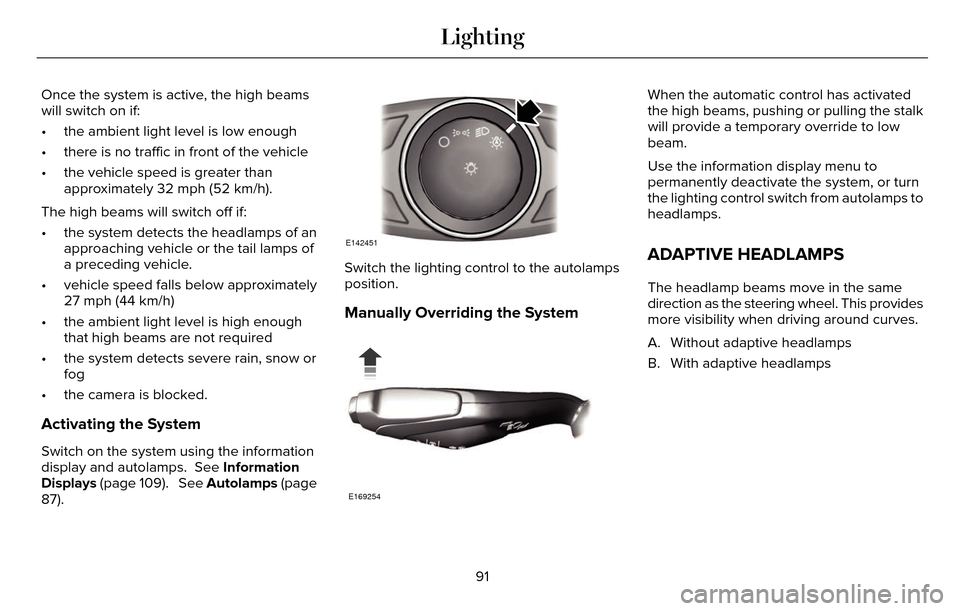
Switch the lighting control to the autolamps
position.
Manually Overriding the System
E169254
When the automatic control has activated
the high beams, pushing or pulling the stalk
will provide a temporary override to low
beam.
Use the information display menu to
permanently deactivate the system, or turn
the lighting control switch from autolamps to
headlamps.
ADAPTIVE HEADLAMPS
The headlamp beams move in the same
direction as the steering wheel. This provides
more visibility when driving around curves.
A. Without adaptive headlamps
B. With adaptive headlamps
91
Lighting
Page 112 of 544
GENERAL INFORMATION
WARNING
Driving while distracted can result in
loss of vehicle control, crash and injury.
We strongly recommend that you use
extreme caution when using any device that
may take your focus off the road. Your
primary responsibility is the safe operation
of your vehicle. We recommend against the
use of any hand-held device while driving
and encourage the use of voice-operated
systems when possible. Make sure you are
aware of all applicable local laws that may
affect the use of electronic devices while
driving.
Various systems on your vehicle can be
controlled using the information display
controls on the steering wheel.
Corresponding information is displayed in
the information display.
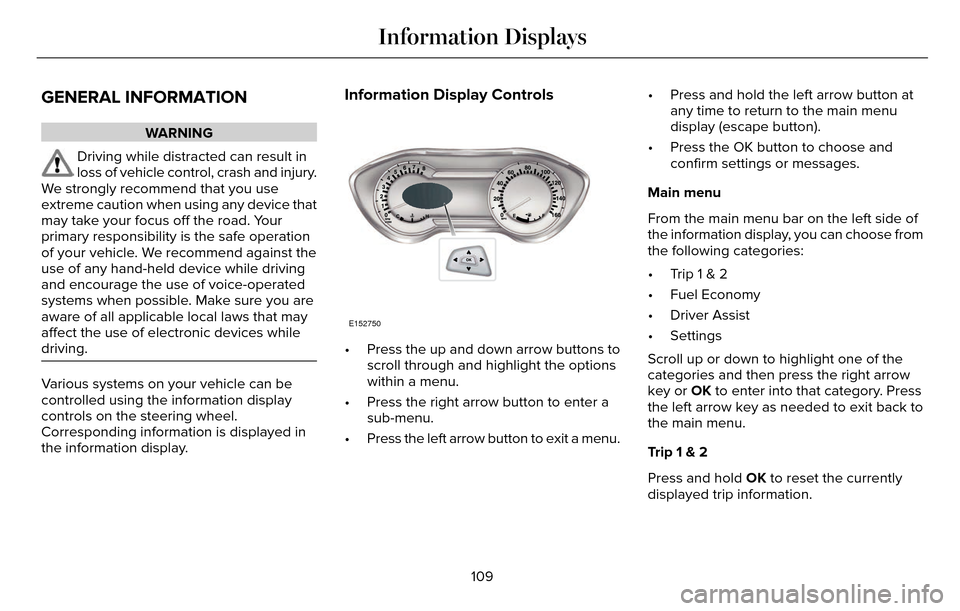
Information Display Controls
E152750
• Press the up and down arrow buttons to scroll through and highlight the options
within a menu.
• Press the right arrow button to enter a sub-menu.
• Press the left arrow button to exit a menu. • Press and hold the left arrow button at
any time to return to the main menu
display (escape button).
• Press the OK button to choose and confirm settings or messages.
Main menu
From the main menu bar on the left side of
the information display, you can choose from
the following categories:
• Trip 1 & 2
• Fuel Economy
• Driver Assist
• Settings
Scroll up or down to highlight one of the
categories and then press the right arrow
key or OK to enter into that category. Press
the left arrow key as needed to exit back to
the main menu.
Trip 1 & 2
Press and hold OK to reset the currently
displayed trip information.
109
Information Displays
Page 116 of 544
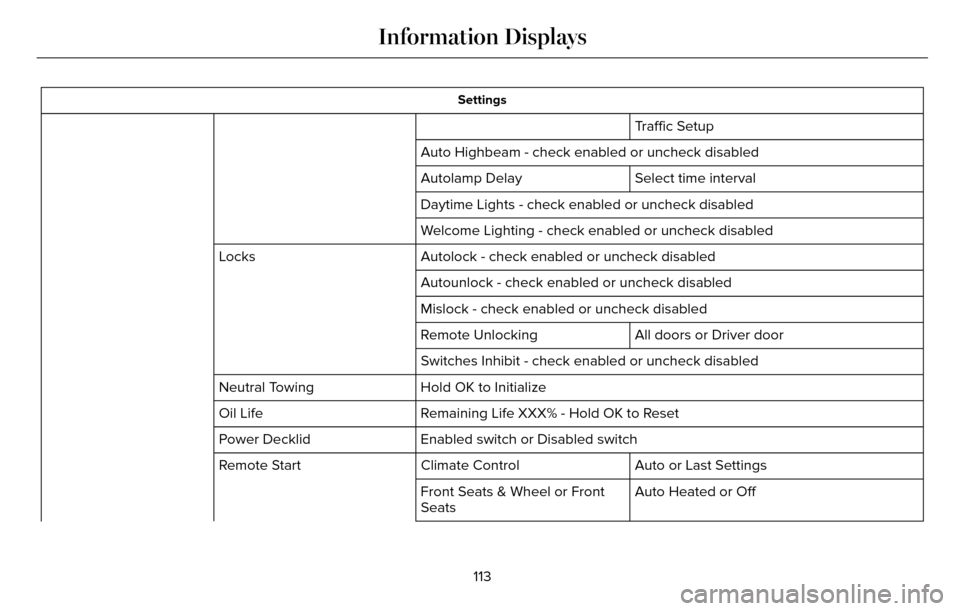
Settings
Traffic Setup
Auto Highbeam - check enabled or uncheck disabled Select time interval
Autolamp Delay
Daytime Lights - check enabled or uncheck disabled
Welcome Lighting - check enabled or uncheck disabled
Autolock - check enabled or uncheck disabled
Locks
Autounlock - check enabled or uncheck disabled
Mislock - check enabled or uncheck disabled
All doors or Driver door
Remote Unlocking
Switches Inhibit - check enabled or uncheck disabled
Hold OK to Initialize
Neutral Towing
Remaining Life XXX% - Hold OK to Reset
Oil Life
Enabled switch or Disabled switch
Power Decklid
Auto or Last Settings
Climate Control
Remote Start
Auto Heated or Off
Front Seats & Wheel or Front
Seats
113
Information Displays
Page 121 of 544
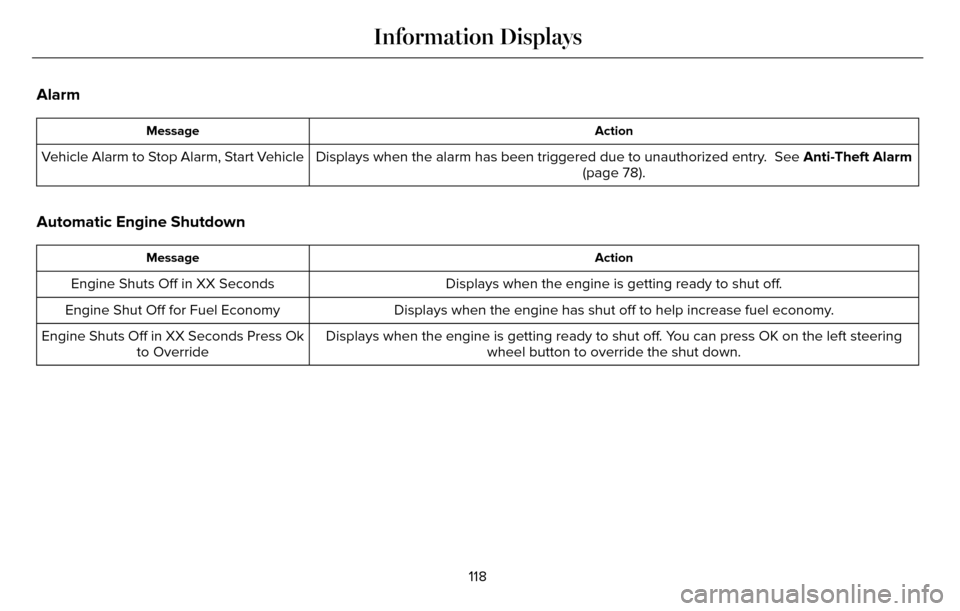
Alarm
Action
Message
Displays when the alarm has been triggered due to unauthorized entry. See Anti-Theft Alarm
(page 78).
Vehicle Alarm to Stop Alarm, Start Vehicle
Automatic Engine Shutdown
Action
Message
Displays when the engine is getting ready to shut off.
Engine Shuts Off in XX Seconds
Displays when the engine has shut off to help increase fuel economy.
Engine Shut Off for Fuel Economy
Displays when the engine is getting ready to shut off. You can press OK on the left steeringwheel button to override the shut down.
Engine Shuts Off in XX Seconds Press Ok
to Override
118
Information Displays
Page 127 of 544

Action
Message
Displayed during spare key programming when the maximum number of keys h\
ave been
programmed.
Max Number of Keys Learned
Displayed during spare key programming when not enough keys have been pr\
ogrammed.
Not Enough Keys Learned
Displays when the key battery is low. Change the battery as soon as possible.
Key Battery Low Replace Soon
Displayed when an attempt is made to program a spare key using two exist\
ing MyKeys.
Could Not Program Integrated Key
Displays to inform the driver that they are exiting the vehicle and the \
engine is on.
Engine On
Lane Keeping System
Action
Message
The system has malfunctioned. Contact your authorized dealer as soon as \
possible.
Lane Keeping Sys. Malfunction Service
Required
The system has detected a condition that has caused the system to be tem\
porarily unavailable.
Front Camera Temporarily Not Available
The system has detected a condition that requires the windshield to be c\
leaned to operateproperly.
Front Camera Low Visibility Clean Screen
The system has malfunctioned. Contact your authorized dealer as soon as \
possible.
Front Camera Malfunction Service
Required
Displayed when the system requests the driver to keep their hands on the\
steering wheel.
Keep Hands on Steering Wheel
124
Information Displays
Page 137 of 544
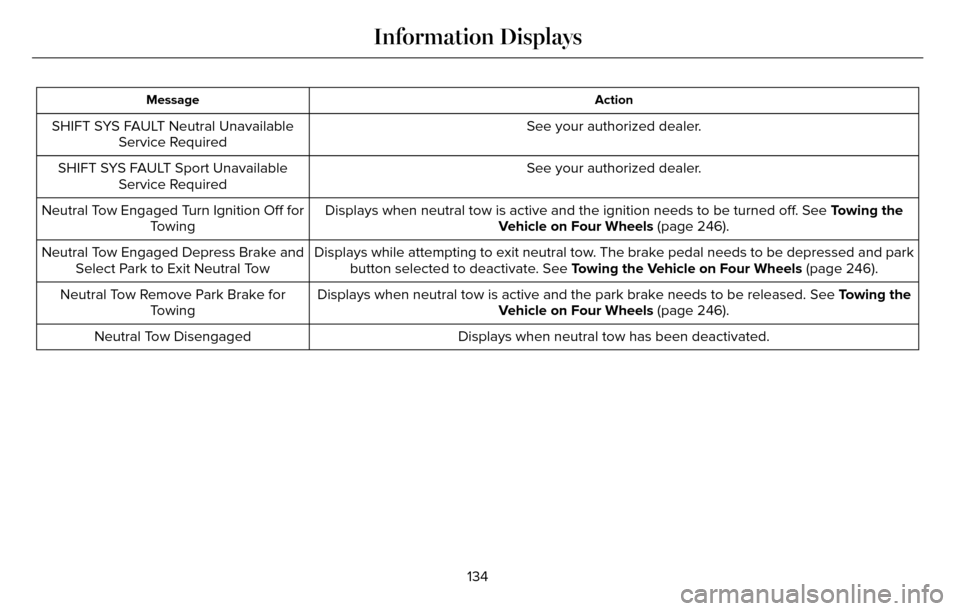
Action
Message
See your authorized dealer.
SHIFT SYS FAULT Neutral Unavailable
Service Required
See your authorized dealer.
SHIFT SYS FAULT Sport Unavailable
Service Required
Displays when neutral tow is active and the ignition needs to be turned \
off. See Towing the
Vehicle on Four Wheels (page 246).
Neutral Tow Engaged Turn Ignition Off for
Towing
Displays while attempting to exit neutral tow. The brake pedal needs to be depressed and parkbutton selected to deactivate. See Towing the Vehicle on Four Wheels (page 246).
Neutral Tow Engaged Depress Brake and
Select Park to Exit Neutral Tow
Displays when neutral tow is active and the park brake needs to be relea\
sed. See Towing the
Vehicle on Four Wheels (page 246).
Neutral Tow Remove Park Brake for
Towing
Displays when neutral tow has been deactivated.
Neutral Tow Disengaged
134
Information Displays
Page 142 of 544
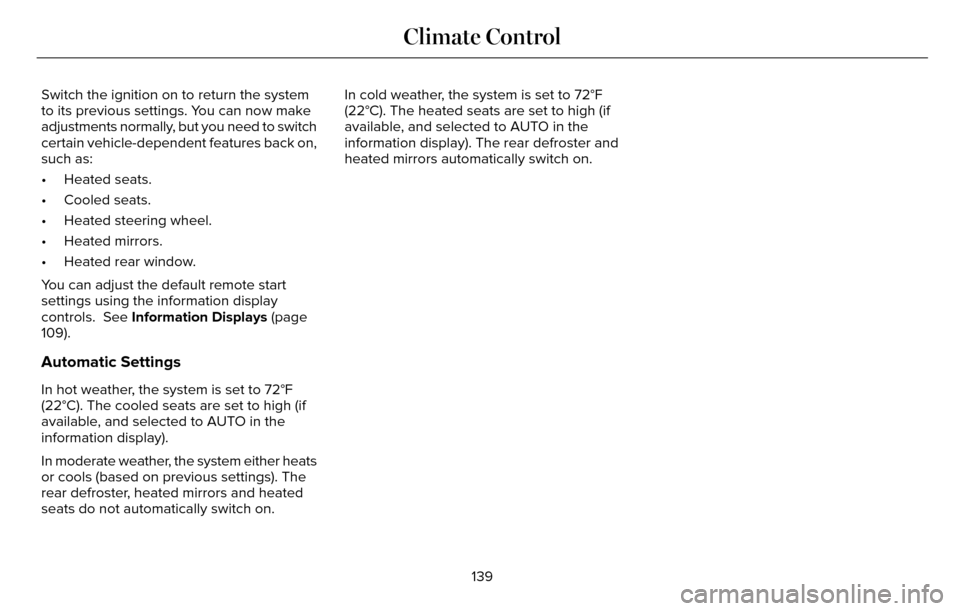
Switch the ignition on to return the system
to its previous settings. You can now make
adjustments normally, but you need to switch
certain vehicle-dependent features back on,
such as:
• Heated seats.
• Cooled seats.
• Heated steering wheel.
• Heated mirrors.
• Heated rear window.
You can adjust the default remote start
settings using the information display
controls. See Information Displays (page
109).
Automatic Settings
In hot weather, the system is set to 72°F
(22°C). The cooled seats are set to high (if
available, and selected to AUTO in the
information display).
In moderate weather, the system either heats
or cools (based on previous settings). The
rear defroster, heated mirrors and heated
seats do not automatically switch on.In cold weather, the system is set to 72°F
(22°C). The heated seats are set to high (if
available, and selected to AUTO in the
information display). The rear defroster and
heated mirrors automatically switch on.
139
Climate Control
Page 143 of 544
SITTING IN THE CORRECT
POSITION
WARNINGS
Sitting improperly, out of position or
with the seatback reclined too far can
take weight off the seat cushion and affect
the decision of the passenger sensing
system, resulting in serious injury or death
in the event of a crash. Always sit upright
against your seat back, with your feet on the
floor.
Do not recline the seatback as this can
cause the occupant to slide under the
safety belt, resulting in serious injury in the
event of a crash.
Do not place objects higher than the
seatback to reduce the risk of serious
injury in the event of a crash or during heavy
braking.
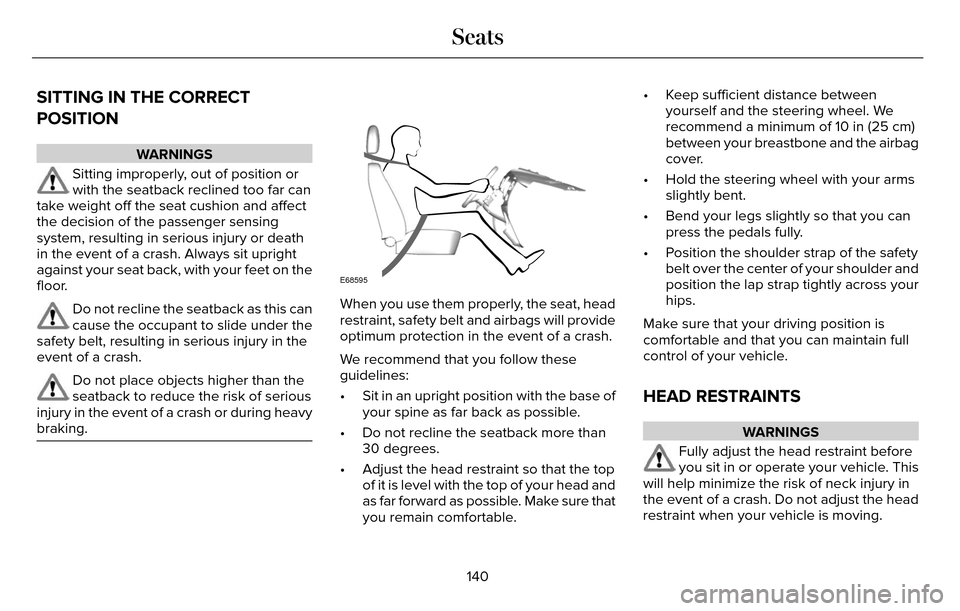
E68595
When you use them properly, the seat, head
restraint, safety belt and airbags will provide
optimum protection in the event of a crash.
We recommend that you follow these
guidelines:
• Sit in an upright position with the base of your spine as far back as possible.
• Do not recline the seatback more than 30 degrees.
• Adjust the head restraint so that the top of it is level with the top of your head and
as far forward as possible. Make sure that
you remain comfortable. • Keep sufficient distance between
yourself and the steering wheel. We
recommend a minimum of 10 in (25 cm)
between your breastbone and the airbag
cover.
• Hold the steering wheel with your arms slightly bent.
• Bend your legs slightly so that you can press the pedals fully.
• Position the shoulder strap of the safety belt over the center of your shoulder and
position the lap strap tightly across your
hips.
Make sure that your driving position is
comfortable and that you can maintain full
control of your vehicle.
HEAD RESTRAINTS
WARNINGS
Fully adjust the head restraint before
you sit in or operate your vehicle. This
will help minimize the risk of neck injury in
the event of a crash. Do not adjust the head
restraint when your vehicle is moving.
140
Seats
Page 179 of 544
Note:To put your vehicle in gear with the
door open, perform steps 1-4. See the
Automatic Return to Park section in this
chapter for more information on this feature.
Park (P)
With the transmission in park (P), your vehicle
locks the transmission and prevents the front
wheels from turning. Always come to a
complete stop before putting your vehicle
into and out of park (P). An audible chime
sounds once you select park (P).
When the ignition is turned off, the vehicle
will automatically shift into park (P). If the
ignition is turned off while the vehicle is
moving, it will first shift into neutral (N) until
a slow enough speed is reached. The vehicle
will then shift into park (P) automatically.
Automatic Return to Park
Note: This feature will not operate when your
vehicle is in Stay in Neutral mode or neutral
tow.
Your vehicle has a safety feature that will
automatically shift your vehicle into park (P)
when any of the following conditions occur: • You turn the ignition off
• You open the driver's door with your
safety belt unlatched
• Your safety belt is unlatched while the driver's door is open
If you turn the ignition off while your vehicle
is moving, your vehicle will first shift into
neutral (N) until it slows down enough to shift
into park (P) automatically.
Note: If you have waited an extended period
of time, (2-15 minutes) before starting your
vehicle, unlatching your safety belt will cause
this feature to activate, even with the driver's
door closed.
Note: This feature may not work properly if
the door ajar switch is malfunctioning. If your
door ajar indicator does not illuminate when
you open the driver’s door or the indicator
illuminates with the driver’s door closed. See
your authorized dealer. Reverse (R)
With the transmission in reverse (R), your
vehicle will move backward. Always come
to a complete stop before shifting into and
out of reverse (R).
Neutral (N)
With the transmission in neutral (N), you can
start your vehicle and it is free to roll. Hold
the brake pedal down while in this position.
Stay in Neutral mode
Stay in Neutral mode allows your vehicle to
stay in neutral (N) when you exit the vehicle.
Your vehicle must be stationary to enter this
mode.
To enter Stay in Neutral mode:
1. Press the neutral (N) button on your
shifter assembly.
2. A message will appear in your information display screen prompting you
to press the neutral (N) button.
3. Press the neutral (N) button again to enter Stay in Neutral mode.
176
Transmission