key LINCOLN MKZ 2016 Workshop Manual
[x] Cancel search | Manufacturer: LINCOLN, Model Year: 2016, Model line: MKZ, Model: LINCOLN MKZ 2016Pages: 544, PDF Size: 5.77 MB
Page 254 of 544
ROADSIDE ASSISTANCE
Vehicles Sold In the United States:
Getting Roadside Assistance
If you ever need help on the road, the Lincoln
Motor Company is there for you with
nationwide, 24-hours-a-day,
seven-days-a-week assistance.
The service is available:
• Throughout the life of the vehicle fororiginal owners.
• For six years or 70,000 mi (112,654.08 km) (whichever comes first)
within the extended powertrain warranty
coverage period for subsequent owners.
• For the coverage period listed on the Roadside Assistance Card included in
your Owner's Manual portfolio.
This complimentary Roadside Assistance
program is separate from the New Vehicle
Limited Warranty, and includes:
• A flat tire change with a good spare (except vehicles supplied with a tire
inflation kit).
• Battery jump start. • Lock-out assistance (key replacement
cost is the client's responsibility).
• Fuel delivery — independent service contractors, if not prohibited by state,
local or municipal law shall deliver up to
2.0 gal (7.5 L) of gasoline or 5.0 gal
(18.9 L) of diesel fuel to a disabled
vehicle. Roadside Assistance limits fuel
delivery service to two no-charge
occurrences within a 12-month period.
• Winch out — available within 100 ft (30.48 m) of a paved or county
maintained road, no recoveries.
• Towing — independent service contractors, if not prohibited by state,
local or municipal law shall tow Lincoln
eligible vehicles to the client's selling or
preferred dealer within 100 mi (161 km) of
the disablement location or to the nearest
Lincoln dealer. If a client requests a tow
to a selling or preferred dealer that is
more than 100 mi (161 km) from the
disablement location, the client shall be
responsible for any mileage costs in
excess of 100 mi (161 km). Roadside Assistance includes up to $200
coverage for a towed trailer if the disabled
eligible vehicle requires service at the
nearest authorized dealer. If the towing
vehicle is operational but the trailer is not,
then the trailer does not qualify for any
roadside services.
Vehicles Sold In the United States:
Using Roadside Assistance
United States Lincoln vehicle clients who
require Roadside Assistance, call
1-800-521-4140.
If you need to arrange roadside assistance
for yourself, Ford Motor Company will
reimburse a reasonable amount for towing
to the nearest Lincoln dealership within
100 mi (161 km). To obtain reimbursement
information, United States Lincoln vehicle
clients, call 1-800-521-4140. Ford Motor
Company will ask you to submit your original
receipts.
251
Roadside Emergencies
Page 256 of 544
Should your vehicle shut off after a collision,
you may restart your vehicle. For vehicles
equipped with a key system:
1. Switch off the ignition.
2. Switch on the ignition.
3. Repeat Steps 1 and 2 to re-enable thefuel pump.
For vehicles equipped with a push button
start system:
1. Press the START/STOP button to switch off the ignition.
2. Press the brake pedal and press the START/STOP button to switch on the
ignition.
3. Remove your foot from the brake pedal and press the START/STOP button to
switch off the ignition.
4. You can either attempt to start the engine by pressing the brake pedal and the
START/STOP button, or switch on the
ignition only by pressing the
START/STOP button without pressing
the brake pedal. Both ways re-enable the
fuel system. Note:
When you try to restart your vehicle
after a fuel shutoff, the vehicle makes sure
that various systems are safe to restart.
Once your vehicle determines that the
systems are safe, then the vehicle will allow
you to restart.
Note: In the event that your vehicle does not
restart after your third attempt, contact an
authorized dealer.
JUMP STARTING THE VEHICLE
WARNINGS
Batteries normally produce explosive
gases which can cause personal injury.
Therefore, do not allow flames, sparks or
lighted substances to come near the battery.
When working near the battery, always shield
your face and protect your eyes. Always
provide correct ventilation.
WARNINGS
Keep batteries out of reach of children.
Batteries contain sulfuric acid. Avoid
contact with skin, eyes or clothing. Shield
your eyes when working near the battery to
protect against possible splashing of acid
solution. In case of acid contact with skin or
eyes, flush immediately with water for a
minimum of 15 minutes and get prompt
medical attention. If acid is swallowed, call a
physician immediately.
Use only adequately sized cables with
insulated clamps.
Preparing Your Vehicle
Do not attempt to push-start your automatic
transmission vehicle.
Note: Attempting to push-start a vehicle with
an automatic transmission may cause
transmission damage.
Note: Use only a 12-volt supply to start your
vehicle.
Note: Do not disconnect the battery of the
disabled vehicle as this could damage the
vehicle electrical system.
253
Roadside Emergencies
Page 279 of 544
Protected components
Fuse amp rating
Fuse or relay number
Lighting (ambient, glove box, vanity, dome, trunk).
10A11
Memory seats, Lumbar, Power mirror.
7.5A
12
Driver door unlock.
20A
13
Not used (spare).
5A
14
Subwoofer amplifier.
20A
15
Heated seat relay coil.
10A
26
Not used (spare).
10A
27
Not used (spare).
10A
28
Not used (spare).
10A
29
Power trunk logic.
5A
210
Keypad.
Cellphone passport module.
276
Fuses
Page 382 of 544
Safety Information
WARNING
Driving while distracted can result in
loss of vehicle control, crash and injury.
We strongly recommend that you use
extreme caution when using any device that
may take your focus off the road. Your
primary responsibility is the safe operation
of your vehicle. We recommend against the
use of any hand-held device while driving
and encourage the use of voice-operated
systems when possible. Make sure you are
aware of all applicable local laws that may
affect the use of electronic devices while
driving.
• Do not attempt to service or repair the system. Have your vehicle checked by
an authorized dealer.
• Do not operate media devices if the power cables are broken or damaged.
• Make sure the power cables do not interfere with the safe operation of your
vehicle's controls or affect your safe
driving abilities.
• Some SYNC functions are speed-dependent. Their use is limited to
when your vehicle is traveling at speeds
below 3 mph (5 km/h).
Make sure that you review your device's
manual before using it with SYNC.Speed-restricted Features
Some features of this system are restricted
from use unless your vehicle is stationary.
• Screens crowded with information, for example:
• Point of Interest reviews and ratings
• SIRIUS Travel Link sports scores
• Movie times
• Ski conditions.
• Any action that requires keyboard use, for example: entering a navigation
destination or editing information.
• All lists are limited, for example: phone contacts.
See the following chart for more specific
examples.
Speed-restricted Features
Pairing a cell phone
Cell phone
Adding or editing phonebook contacts
Phone contacts and recent phone call entries
379
MyLincoln Touch™
Page 383 of 544

Speed-restricted Features
Enabling Valet Mode
System Functionality
Editing settings while the rear view camera or active park assist are ac\
tive
Editing wireless settings
Wi-Fi and Wireless
Editing the list of wireless networks
Adding or editing wallpaper
Photos and Graphics
Composing text messages
Text Messages
Viewing received text messages
Editing preset text messages
Using the keyboard to enter a destination
Navigation
Demo navigation route
Adding or editing Address Book or Avoid Area entries
380
MyLincoln Touch™
Page 395 of 544
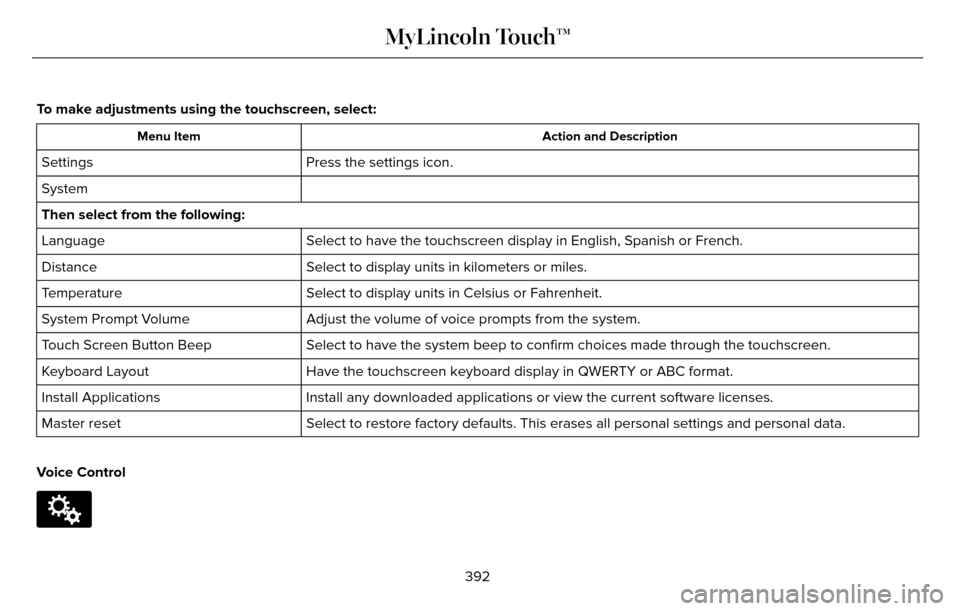
To make adjustments using the touchscreen, select:
Action and Description
Menu Item
Press the settings icon.
Settings
System
Then select from the following:
Select to have the touchscreen display in English, Spanish or French.
Language
Select to display units in kilometers or miles.
Distance
Select to display units in Celsius or Fahrenheit.
Temperature
Adjust the volume of voice prompts from the system.
System Prompt Volume
Select to have the system beep to confirm choices made through the touch\
screen.
Touch Screen Button Beep
Have the touchscreen keyboard display in QWERTY or ABC format.
Keyboard Layout
Install any downloaded applications or view the current software license\
s.
Install Applications
Select to restore factory defaults. This erases all personal settings an\
d personal data.
Master reset
Voice Control
E142607
392
MyLincoln Touch™
Page 420 of 544
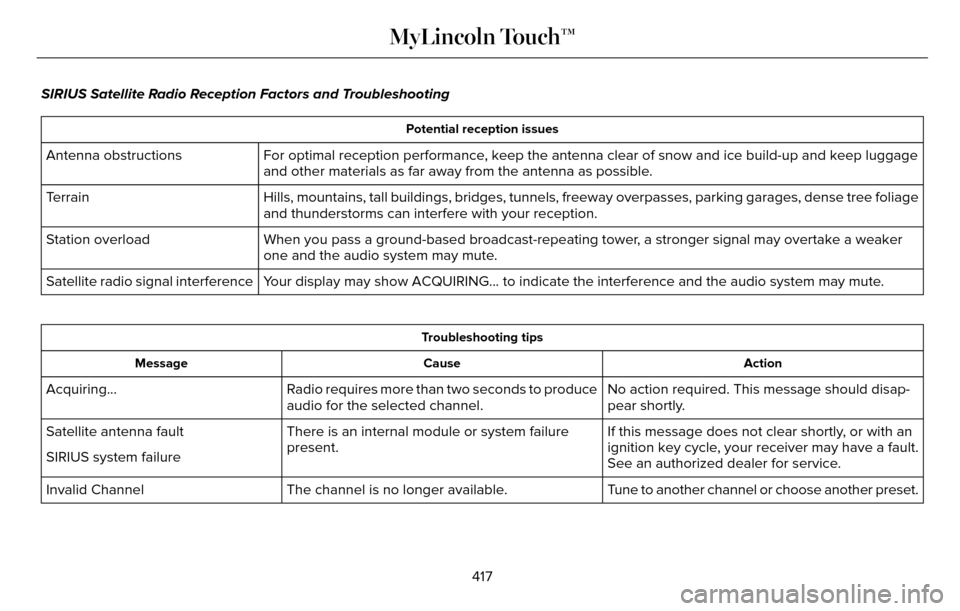
SIRIUS Satellite Radio Reception Factors and Troubleshooting
Potential reception issues
For optimal reception performance, keep the antenna clear of snow and ice build-up and keep luggage
and other materials as far away from the antenna as possible.
Antenna obstructions
Hills, mountains, tall buildings, bridges, tunnels, freeway overpasses, \
parking garages, dense tree foliage
and thunderstorms can interfere with your reception.
Terrain
When you pass a ground-based broadcast-repeating tower, a stronger signal may overtake a weaker
one and the audio system may mute.
Station overload
Your display may show ACQUIRING... to indicate the interference and the a\
udio system may mute.
Satellite radio signal interference
Troubleshooting tips
Action
Cause
Message
No action required. This message should disap-
pear shortly.
Radio requires more than two seconds to produce
audio for the selected channel.
Acquiring…
If this message does not clear shortly, or with an
ignition key cycle, your receiver may have a fault.
See an authorized dealer for service.
There is an internal module or system failure
present.
Satellite antenna fault
SIRIUS system failure
Tune to another channel or choose another preset.
The channel is no longer available.
Invalid Channel
417
MyLincoln Touch™
Page 534 of 544
A
A/CSee: Climate Control..........................................135
About This Manual............................................7Protecting the Environment..................................7
ABSSee: Brakes...........................................................18\
7
ABS driving hintsSee: Hints on Driving With Anti-LockBrakes................................................................187
Accessories....................................................475Exterior style........................................................47\
5
Interior style.........................................................4\
75
Lifestyle.................................................................475
Peace of mind......................................................475
AccessoriesSee: Replacement Parts Recommendation.....12
ACCSee: Using Adaptive Cruise Control..............207
Active Park Assist..........................................198Automatic Steering into Parking Space........199
Deactivating the Park Assist Feature...........200
Troubleshooting the System............................201
Using Active Park Assist....................................198
Adaptive Headlamps......................................91 Adjusting the Headlamps..........................299
Horizontal Aim Adjustment...............................301
Vertical Aim Adjustment...................................299
Adjusting the Steering Wheel.....................80Power Tilt and Telescope Steering
Column................................................................80\
AFSSee: Adaptive Headlamps...................................91
Airbag Disposal...............................................53
Air Conditioning
See: Climate Control..........................................135
AlarmSee: Anti-Theft Alarm...........................................78
All-Wheel Drive...............................................181
Ambient Lighting.............................................94
Anti-Theft Alarm..............................................78
Arming the Alarm..................................................79
Disarming the Alarm.............................................79
Appendices...................................................503
Audible Warnings and Indicators..............107
Headlamps On Warning Chime.......................108
Key in Ignition Warning Chime.........................107
Keyless Warning Alert........................................108
Parking Brake On Warning Chime..................108
Audio Control....................................................81Seek, Next or Previous.........................................81
Audio System................................................369General Information...........................................369
Audio Unit - Vehicles With: Premium AM/FM/CD...........................................................370
Autolamps.........................................................87
Windshield Wiper Activated Headlamps........88
Automatic Climate Control..........................135
Automatic High Beam Control....................90
Activating the System...........................................91
Manually Overriding the System.......................91
Automatic Transmission...............................175Automatic Transmission Adaptive
Learning.............................................................179
Brake-Shift Interlock Override..........................178
If Your Vehicle Gets Stuck In Mud or Snow..................................................................180
Push Button Shift Transmission.......................175
SelectShift Automatic™ Transmission..............177
Automatic Transmission Fluid Check...........................................................292
6F35/HF35 transmission..................................292
6F50/6F55 Transmission.................................292
Autowipers.......................................................85
Auxiliary Power Points..................................157
110 Volt AC Power Point and Twisting Auxiliary
Cover..................................................................157
12 Volt DC Power Point......................................157
Locations................................................................\
157
AWDSee: All-Wheel Drive............................................181
531
Index
Page 535 of 544
B
Blind Spot Information System.................220Blind Spot Information System (BLIS®) withCross Traffic Alert..........................................220
Bonnet LockSee: Opening and Closing the Hood.............281
Booster Seats...................................................27Types of Booster Seats.......................................27
Brake Fluid Check.......................................296
Brakes...............................................................187\
General Information............................................187
Breaking-In.....................................................248
Bulb Specification Chart..............................301
C
Cabin Air Filter...............................................138
California Proposition 65................................11
Capacities and Specifications - 2.0LEcoBoost™....................................................357
Specifications......................................................358
Capacities and Specifications - 3.7L........363Specifications......................................................364
Capacities and Specifications...................353
Car Wash
See: Cleaning the Exterior...............................305
Center Console.............................................160 Changing a Bulb............................................301
Lamp Assembly Condensation........................301
Replacing Bulbs...................................................301
Changing a Fuse..........................................280Fuses.....................................................................280
Changing a Road Wheel.............................346Dissimilar Spare Wheel and Tire Assembly
Information.......................................................347
Stowing the flat tire............................................350
Tire Change Procedure....................................348
Changing the 12V Battery..........................297
Changing the Engine Air Filter.................303
2.0L EcoBoost Engine.......................................303
3.7L Engine...........................................................303
Changing the Wiper Blades......................299
Checking MyKey System Status.................64
Checking the Wiper Blades.......................299
Child Restraint and Safety Belt Maintenance...................................................41
Child Safety.......................................................16
General Information..............................................16
Child Safety Locks...........................................31Left-Hand Side.......................................................32
Right-Hand Side....................................................32
Child Seat Positioning...................................29
Cigar Lighter...................................................158
Cleaning Leather Seats................................311
Cleaning Products.......................................305 Cleaning the Alloy Wheels...........................311
Cleaning the Engine....................................307
Cleaning the Exterior..................................305
Exterior Chrome Parts.......................................306
Exterior Plastic Parts..........................................306
Stripes or Graphics............................................306
Underbody...........................................................306
Cleaning the Instrument Panel and
Instrument Cluster Lens............................310
Cleaning the Interior....................................308
Cleaning Black Label Interior (If
Equipped).........................................................308
Cleaning the Windows and WiperBlades...........................................................307
Clearing All MyKeys.......................................62
Climate............................................................450
Climate Control Voice Commands................453
Climate Control..............................................135
Climate Controlled Seats............................149
Cooled Seats........................................................150
Coolant CheckSee: Engine Coolant Check............................289
Crash Sensors and Airbag Indicator..........52
Creating a MyKey............................................61
Programming/Changing Configurable
Settings................................................................61
532
Index
Page 539 of 544
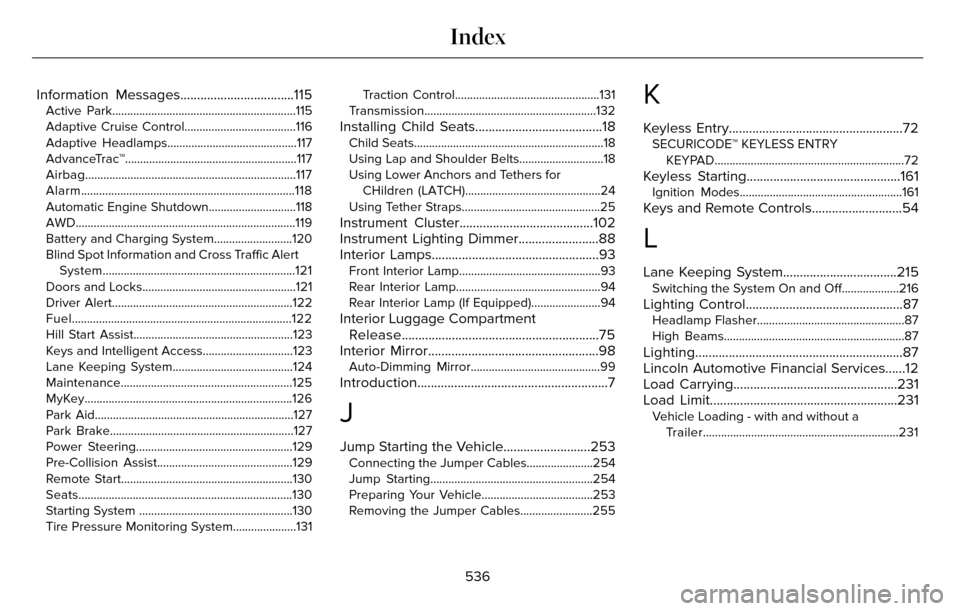
Information Messages..................................115Active Park.............................................................115
Adaptive Cruise Control.....................................116
Adaptive Headlamps...........................................117
AdvanceTrac™.........................................................117
Airbag......................................................................117
Alarm.......................................................................1\
18
Automatic Engine Shutdown.............................118
AWD........................................................................\
.119
Battery and Charging System..........................120
Blind Spot Information and Cross Traffic AlertSystem................................................................121
Doors and Locks...................................................121
Driver Alert............................................................\
122
Fuel........................................................................\
.122
Hill Start Assist.....................................................123
Keys and Intelligent Access..............................123
Lane Keeping System........................................124
Maintenance.........................................................125
MyKey.....................................................................126
Park Aid.................................................................\
.127
Park Brake.............................................................12\
7
Power Steering....................................................129
Pre-Collision Assist.............................................129
Remote Start.........................................................130
Seats.......................................................................1\
30
Starting System ...................................................130
Tire Pressure Monitoring System.....................131 Traction Control................................................131
Transmission.........................................................132
Installing Child Seats......................................18Child Seats.............................................................\
..18
Using Lap and Shoulder Belts............................18
Using Lower Anchors and Tethers for CHildren (LATCH).............................................24
Using Tether Straps..............................................25
Instrument Cluster........................................102
Instrument Lighting Dimmer........................88
Interior Lamps..................................................93
Front Interior Lamp...............................................93
Rear Interior Lamp................................................94
Rear Interior Lamp (If Equipped).......................94
Interior Luggage Compartment Release...........................................................75
Interior Mirror...................................................98
Auto-Dimming Mirror...........................................99
Introduction.........................................................7
J
Jump Starting the Vehicle..........................253Connecting the Jumper Cables......................254
Jump Starting......................................................254
Preparing Your Vehicle.....................................253
Removing the Jumper Cables........................255
K
Keyless Entry....................................................72SECURICODE™ KEYLESS ENTRY
KEYPAD...............................................................72
Keyless Starting..............................................161Ignition Modes......................................................161
Keys and Remote Controls...........................54
L
Lane Keeping System..................................215Switching the System On and Off...................216
Lighting Control...............................................87Headlamp Flasher.................................................87
High Beams............................................................87\
Lighting..............................................................87
Lincoln Automotive Financial Services......12
Load Carrying.................................................231
Load Limit........................................................231
Vehicle Loading - with and without aTrailer.................................................................231
536
Index