parking LINCOLN MKZ 2016 Workshop Manual
[x] Cancel search | Manufacturer: LINCOLN, Model Year: 2016, Model line: MKZ, Model: LINCOLN MKZ 2016Pages: 544, PDF Size: 5.77 MB
Page 372 of 544
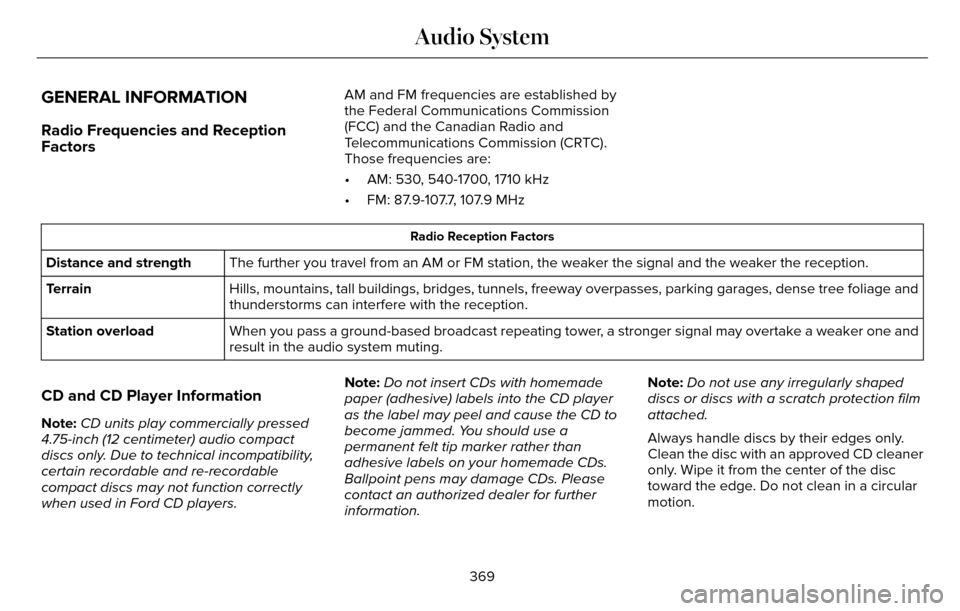
GENERAL INFORMATION
Radio Frequencies and Reception
Factors
AM and FM frequencies are established by
the Federal Communications Commission
(FCC) and the Canadian Radio and
Telecommunications Commission (CRTC).
Those frequencies are:
• AM: 530, 540-1700, 1710 kHz
• FM: 87.9-107.7, 107.9 MHz
Radio Reception Factors
The further you travel from an AM or FM station, the weaker the signal a\
nd the weaker the reception.
Distance and strength
Hills, mountains, tall buildings, bridges, tunnels, freeway overpasses, \
parking garages, dense tree foliage and
thunderstorms can interfere with the reception.
Terrain
When you pass a ground-based broadcast repeating tower, a stronger signal may overtake a weaker one and
result in the audio system muting.
Station overload
CD and CD Player Information
Note:
CD units play commercially pressed
4.75-inch (12 centimeter) audio compact
discs only. Due to technical incompatibility,
certain recordable and re-recordable
compact discs may not function correctly
when used in Ford CD players. Note:
Do not insert CDs with homemade
paper (adhesive) labels into the CD player
as the label may peel and cause the CD to
become jammed. You should use a
permanent felt tip marker rather than
adhesive labels on your homemade CDs.
Ballpoint pens may damage CDs. Please
contact an authorized dealer for further
information. Note:
Do not use any irregularly shaped
discs or discs with a scratch protection film
attached.
Always handle discs by their edges only.
Clean the disc with an approved CD cleaner
only. Wipe it from the center of the disc
toward the edge. Do not clean in a circular
motion.
369
Audio System
Page 393 of 544
Action and Description
Menu Item
Mileage Interval (Miles)
To run the vehicle health report immediately.
Run Vehicle Health Report Now
You can find more information on Vehicle Health Report in this chapter.
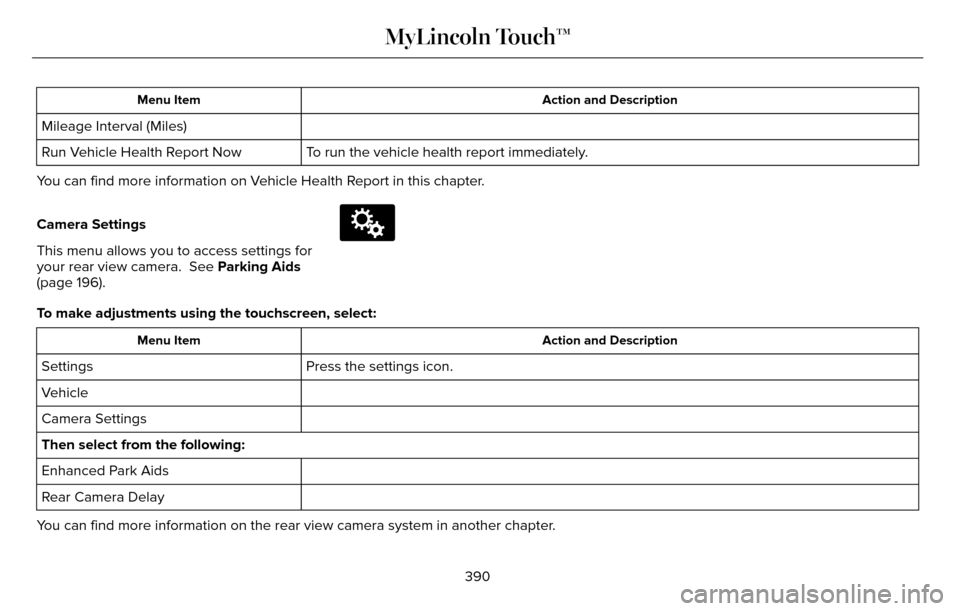
Camera Settings
This menu allows you to access settings for
your rear view camera. See Parking Aids
(page 196).
E142607
To make adjustments using the touchscreen, select:
Action and Description
Menu Item
Press the settings icon.
Settings
Vehicle
Camera Settings
Then select from the following:
Enhanced Park Aids
Rear Camera Delay
You can find more information on the rear view camera system in another c\
hapter.
390
MyLincoln Touch™
Page 398 of 544
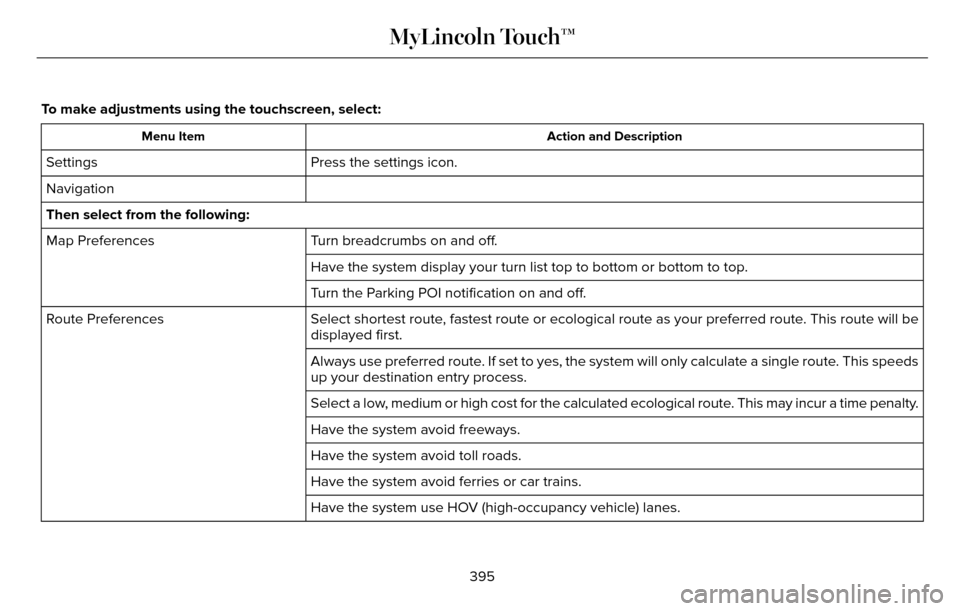
To make adjustments using the touchscreen, select:
Action and Description
Menu Item
Press the settings icon.
Settings
Navigation
Then select from the following:
Turn breadcrumbs on and off.
Map Preferences
Have the system display your turn list top to bottom or bottom to top.
Turn the Parking POI notification on and off.
Select shortest route, fastest route or ecological route as your preferred route. This route will be
displayed first.
Route Preferences
Always use preferred route. If set to yes, the system will only calculate a single route. This speeds
up your destination entry process.
Select a low, medium or high cost for the calculated ecological route. This may incur a time penalty.
Have the system avoid freeways.
Have the system avoid toll roads.
Have the system avoid ferries or car trains.
Have the system use HOV (high-occupancy vehicle) lanes.
395
MyLincoln Touch™
Page 420 of 544
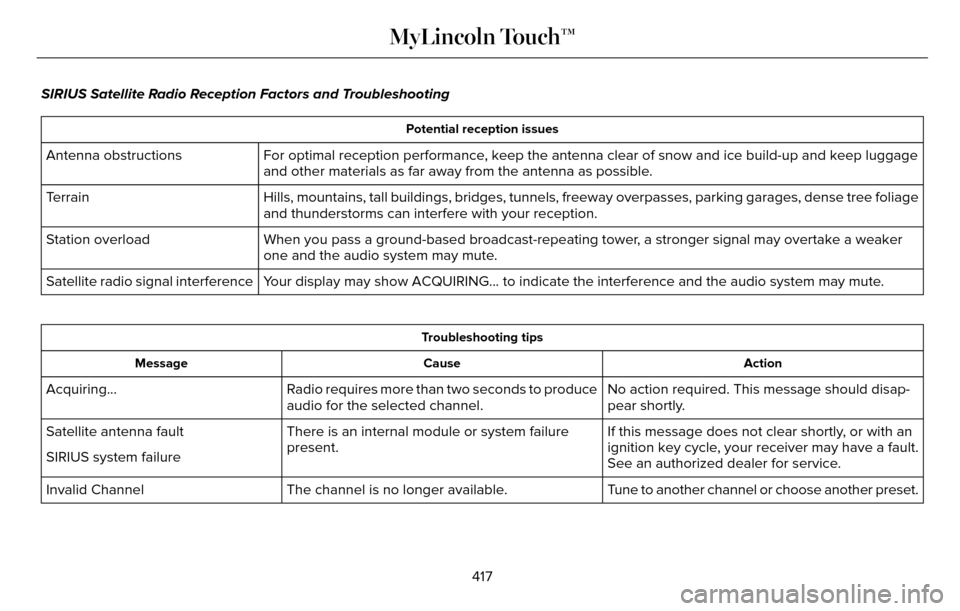
SIRIUS Satellite Radio Reception Factors and Troubleshooting
Potential reception issues
For optimal reception performance, keep the antenna clear of snow and ice build-up and keep luggage
and other materials as far away from the antenna as possible.
Antenna obstructions
Hills, mountains, tall buildings, bridges, tunnels, freeway overpasses, \
parking garages, dense tree foliage
and thunderstorms can interfere with your reception.
Terrain
When you pass a ground-based broadcast-repeating tower, a stronger signal may overtake a weaker
one and the audio system may mute.
Station overload
Your display may show ACQUIRING... to indicate the interference and the a\
udio system may mute.
Satellite radio signal interference
Troubleshooting tips
Action
Cause
Message
No action required. This message should disap-
pear shortly.
Radio requires more than two seconds to produce
audio for the selected channel.
Acquiring…
If this message does not clear shortly, or with an
ignition key cycle, your receiver may have a fault.
See an authorized dealer for service.
There is an internal module or system failure
present.
Satellite antenna fault
SIRIUS system failure
Tune to another channel or choose another preset.
The channel is no longer available.
Invalid Channel
417
MyLincoln Touch™
Page 459 of 544
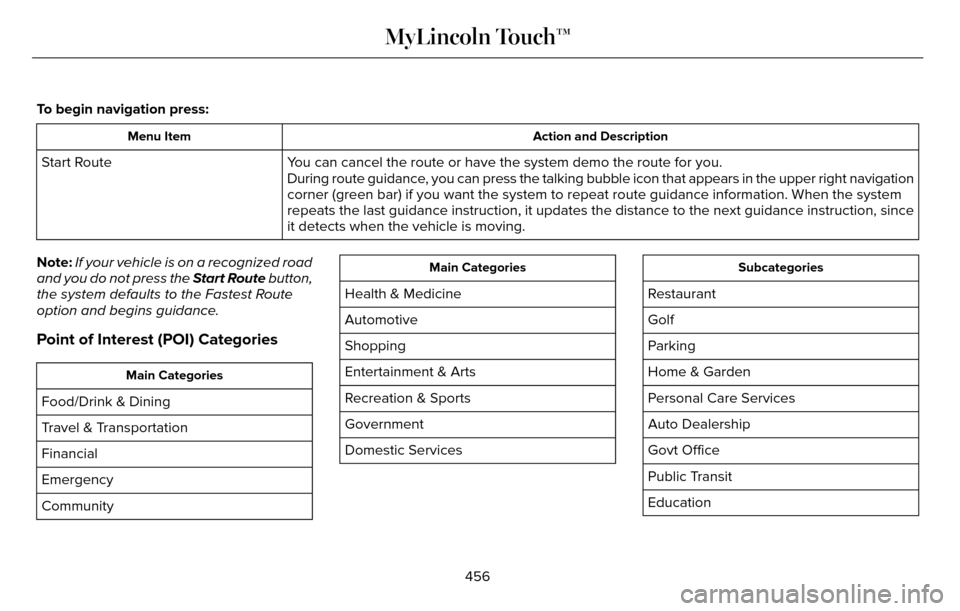
To begin navigation press:
Action and Description
Menu Item
You can cancel the route or have the system demo the route for you.
Start Route
During route guidance, you can press the talking bubble icon that appears in the upper right \
navigation
corner (green bar) if you want the system to repeat route guidance inf\
ormation. When the system
repeats the last guidance instruction, it updates the distance to the ne\
xt guidance instruction, since
it detects when the vehicle is moving.
Note: If your vehicle is on a recognized road
and you do not press the Start Route button,
the system defaults to the Fastest Route
option and begins guidance.
Point of Interest (POI) Categories
Main Categories
Food/Drink & Dining
Travel & Transportation
Financial
Emergency
Community
Main Categories
Health & Medicine
Automotive
Shopping
Entertainment & Arts
Recreation & Sports
Government
Domestic Services
Subcategories
Restaurant
Golf
Parking
Home & Garden
Personal Care Services
Auto Dealership
Govt Office
Public Transit
Education
456
MyLincoln Touch™
Page 462 of 544

Second Level Messages, Actions and Descriptions
Menu Item
Bottom to Top
Top to Bottom
When parking point of interest notification is on, the icons display on \
the map when you get close
to your destination. This may not be very useful in dense areas, and may\
clutter the map when other
points of interest display. Set the automatic parking point of interest notification. You can switch
this feature:
Parking POI Notification
Off
On
Route Preferences
Second Level Messages, Actions and Descriptions
Menu Item
Route Preferences
Then select any of the following:
Choose to have the system display your chosen route type.
Preferred Route
Ecological
Fastest Route
Shortest Route
Bypass route selection in destination programming. The system only calcu\
lates one route based on preferred
route setting.
Always use Preferred
Route
When activated, the system uses your selected route type to calculate on\
ly one route to the desired destination.
459
MyLincoln Touch™
Page 485 of 544
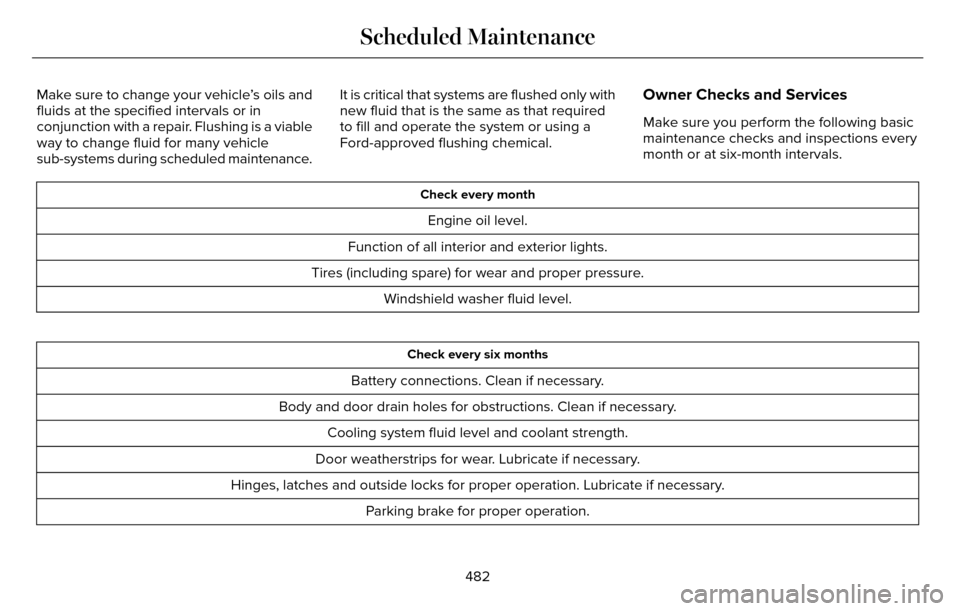
Make sure to change your vehicle’s oils and
fluids at the specified intervals or in
conjunction with a repair. Flushing is a viable
way to change fluid for many vehicle
sub-systems during scheduled maintenance.It is critical that systems are flushed only with
new fluid that is the same as that required
to fill and operate the system or using a
Ford-approved flushing chemical.Owner Checks and Services
Make sure you perform the following basic
maintenance checks and inspections every
month or at six-month intervals.
Check every month
Engine oil level.
Function of all interior and exterior lights.
Tires (including spare) for wear and proper pressure. Windshield washer fluid level.
Check every six months
Battery connections. Clean if necessary.
Body and door drain holes for obstructions. Clean if necessary. Cooling system fluid level and coolant strength.
Door weatherstrips for wear. Lubricate if necessary.
Hinges, latches and outside locks for proper operation. Lubricate if necessary. Parking brake for proper operation.
482
Scheduled Maintenance
Page 489 of 544
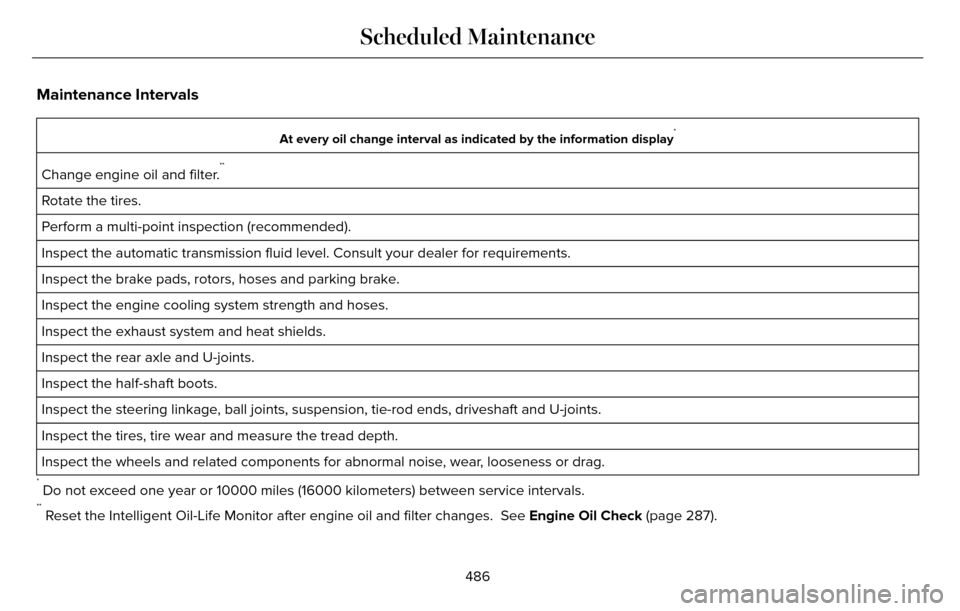
Maintenance Intervals
At every oil change interval as indicated by the information display*
Change engine oil and filter.**
Rotate the tires.
Perform a multi-point inspection (recommended).
Inspect the automatic transmission fluid level. Consult your dealer for \
requirements.
Inspect the brake pads, rotors, hoses and parking brake.
Inspect the engine cooling system strength and hoses.
Inspect the exhaust system and heat shields.
Inspect the rear axle and U-joints.
Inspect the half-shaft boots.
Inspect the steering linkage, ball joints, suspension, tie-rod ends, driveshaft and U-joints.
Inspect the tires, tire wear and measure the tread depth.
Inspect the wheels and related components for abnormal noise, wear, looseness or drag.
* Do not exceed one year or 10000 miles (16000 kilometers) between service interv\
als.** Reset the Intelligent Oil-Life Monitor after engine oil and filter change\
s. See Engine Oil Check (page 287).
486
Scheduled Maintenance
Page 534 of 544
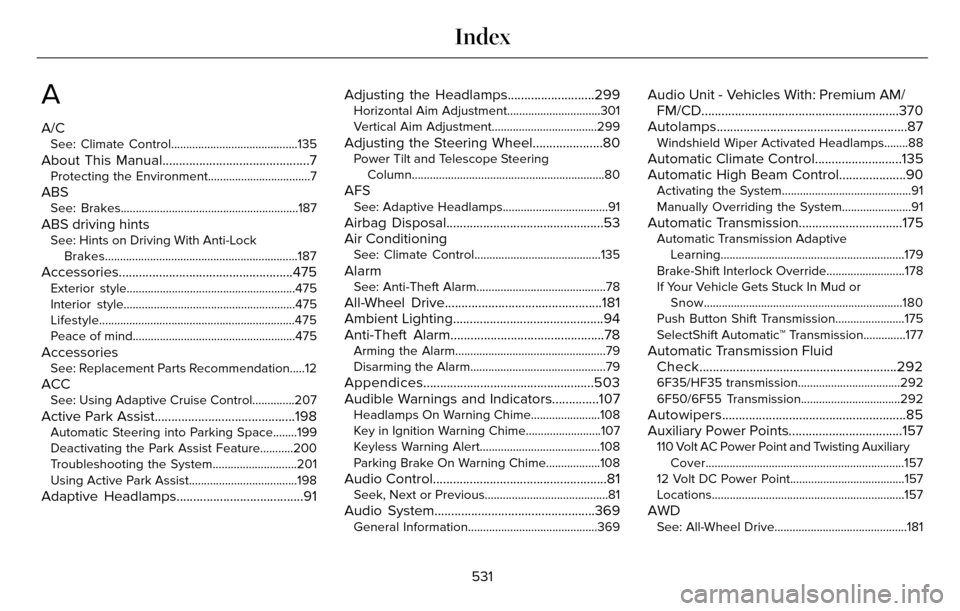
A
A/CSee: Climate Control..........................................135
About This Manual............................................7Protecting the Environment..................................7
ABSSee: Brakes...........................................................18\
7
ABS driving hintsSee: Hints on Driving With Anti-LockBrakes................................................................187
Accessories....................................................475Exterior style........................................................47\
5
Interior style.........................................................4\
75
Lifestyle.................................................................475
Peace of mind......................................................475
AccessoriesSee: Replacement Parts Recommendation.....12
ACCSee: Using Adaptive Cruise Control..............207
Active Park Assist..........................................198Automatic Steering into Parking Space........199
Deactivating the Park Assist Feature...........200
Troubleshooting the System............................201
Using Active Park Assist....................................198
Adaptive Headlamps......................................91 Adjusting the Headlamps..........................299
Horizontal Aim Adjustment...............................301
Vertical Aim Adjustment...................................299
Adjusting the Steering Wheel.....................80Power Tilt and Telescope Steering
Column................................................................80\
AFSSee: Adaptive Headlamps...................................91
Airbag Disposal...............................................53
Air Conditioning
See: Climate Control..........................................135
AlarmSee: Anti-Theft Alarm...........................................78
All-Wheel Drive...............................................181
Ambient Lighting.............................................94
Anti-Theft Alarm..............................................78
Arming the Alarm..................................................79
Disarming the Alarm.............................................79
Appendices...................................................503
Audible Warnings and Indicators..............107
Headlamps On Warning Chime.......................108
Key in Ignition Warning Chime.........................107
Keyless Warning Alert........................................108
Parking Brake On Warning Chime..................108
Audio Control....................................................81Seek, Next or Previous.........................................81
Audio System................................................369General Information...........................................369
Audio Unit - Vehicles With: Premium AM/FM/CD...........................................................370
Autolamps.........................................................87
Windshield Wiper Activated Headlamps........88
Automatic Climate Control..........................135
Automatic High Beam Control....................90
Activating the System...........................................91
Manually Overriding the System.......................91
Automatic Transmission...............................175Automatic Transmission Adaptive
Learning.............................................................179
Brake-Shift Interlock Override..........................178
If Your Vehicle Gets Stuck In Mud or Snow..................................................................180
Push Button Shift Transmission.......................175
SelectShift Automatic™ Transmission..............177
Automatic Transmission Fluid Check...........................................................292
6F35/HF35 transmission..................................292
6F50/6F55 Transmission.................................292
Autowipers.......................................................85
Auxiliary Power Points..................................157
110 Volt AC Power Point and Twisting Auxiliary
Cover..................................................................157
12 Volt DC Power Point......................................157
Locations................................................................\
157
AWDSee: All-Wheel Drive............................................181
531
Index
Page 536 of 544
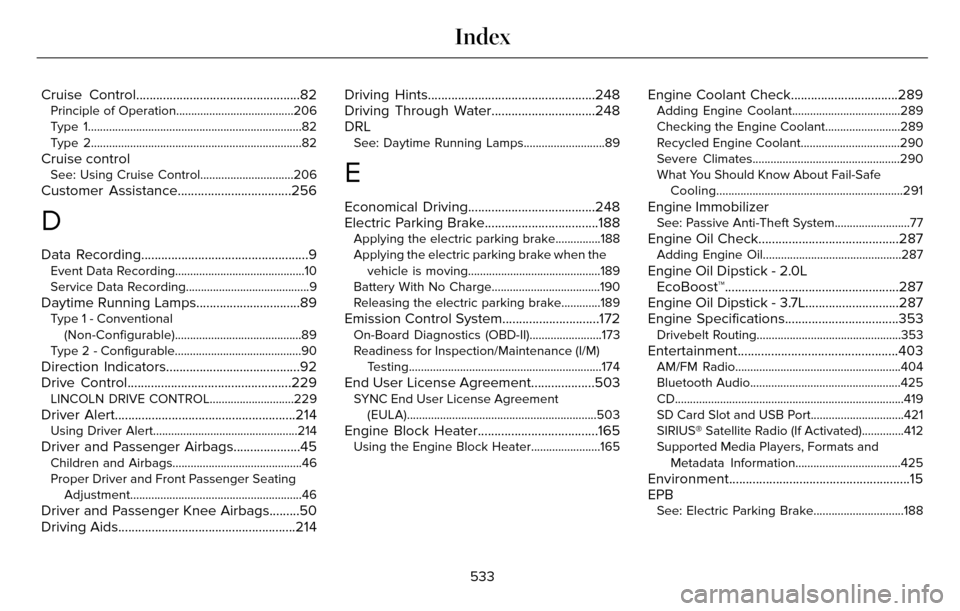
Cruise Control.................................................82Principle of Operation.......................................206
Type 1...................................................................\
....82
Type 2...................................................................\
...82
Cruise controlSee: Using Cruise Control...............................206
Customer Assistance..................................256
D
Data Recording..................................................9Event Data Recording...........................................10
Service Data Recording.........................................9
Daytime Running Lamps...............................89Type 1 - Conventional(Non-Configurable)..........................................89
Type 2 - Configurable..........................................90
Direction Indicators........................................92
Drive Control.................................................229
LINCOLN DRIVE CONTROL............................229
Driver Alert......................................................214Using Driver Alert................................................214
Driver and Passenger Airbags....................45Children and Airbags...........................................46
Proper Driver and Front Passenger Seating Adjustment.........................................................46
Driver and Passenger Knee Airbags.........50
Driving Aids.....................................................214 Driving Hints..................................................248
Driving Through Water...............................248
DRL
See: Daytime Running Lamps...........................89
E
Economical Driving......................................248
Electric Parking Brake..................................188
Applying the electric parking brake...............188
Applying the electric parking brake when the
vehicle is moving............................................189
Battery With No Charge....................................190
Releasing the electric parking brake.............189
Emission Control System.............................172On-Board Diagnostics (OBD-II)........................173
Readiness for Inspection/Maintenance (I/M) Testing................................................................174
End User License Agreement...................503SYNC End User License Agreement(EULA)...............................................................503
Engine Block Heater....................................165Using the Engine Block Heater.......................165
Engine Coolant Check................................289Adding Engine Coolant....................................289
Checking the Engine Coolant.........................289
Recycled Engine Coolant.................................290
Severe Climates.................................................290
What You Should Know About Fail-SafeCooling..............................................................291
Engine ImmobilizerSee: Passive Anti-Theft System.........................77
Engine Oil Check..........................................287Adding Engine Oil..............................................287
Engine Oil Dipstick - 2.0LEcoBoost™....................................................287
Engine Oil Dipstick - 3.7L............................287
Engine Specifications..................................353
Drivebelt Routing................................................353
Entertainment................................................403AM/FM Radio.......................................................404
Bluetooth Audio..................................................425
CD......................................................................\
......419
SD Card Slot and USB Port...............................421
SIRIUS® Satellite Radio (If Activated)..............412
Supported Media Players, Formats and
Metadata Information...................................425
Environment......................................................15
EPB
See: Electric Parking Brake..............................188
533
Index