Side mirror LINCOLN MKZ 2016 Owners Manual
[x] Cancel search | Manufacturer: LINCOLN, Model Year: 2016, Model line: MKZ, Model: LINCOLN MKZ 2016Pages: 544, PDF Size: 5.77 MB
Page 89 of 544
Note:When you set the wiper system to
intermittent wipe and the autowiper system
is on, the autowiper sensitivity setting adjusts
the wiper speed according to the moisture
on the windshield only. Use the wiper lever
to wipe the windshield on-demand.
Keep the outside of the windshield clean.
The rain sensor is very sensitive. If the area
around the mirror is dirty, then the wipers
may operate if dirt, mist or insects hit the
windshield.
WINDSHIELD WASHERS
Note: Do not operate the washers when the
washer reservoir is empty. This may cause
the washer pump to overheat.
E169316
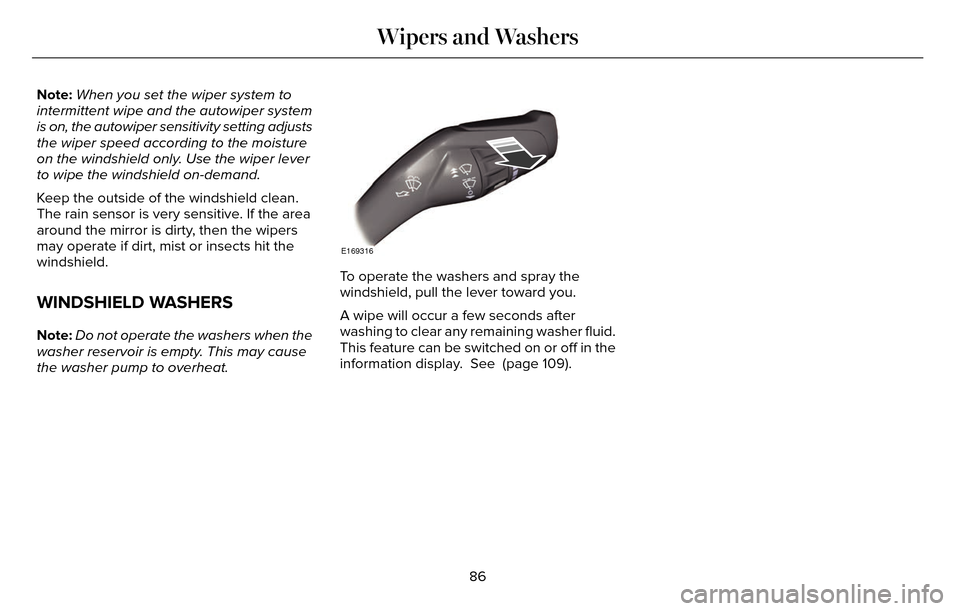
To operate the washers and spray the
windshield, pull the lever toward you.
A wipe will occur a few seconds after
washing to clear any remaining washer fluid.
This feature can be switched on or off in the
information display. See (page 109).
86
Wipers and Washers
Page 101 of 544
Lincoln Welcome Mat
Projection lights, on the bottom of the mirror
housings, project an image onto the ground
a short distance from the vehicle. See
Lighting (page 87).
Integrated Blind Spot Mirrors
WARNING
Objects in the blind spot mirror are
closer than they appear.
Blind spot mirrors have an integrated convex
mirror built into the upper outboard corner
of the exterior mirrors. Their design can
increase your visibility along the side of your
vehicle.
Check the main mirror first before a lane
change, then check the blind spot mirror. If
no vehicles are present in the blind spot
mirror and the traffic in the adjacent lane is
at a safe distance, signal that you intend to
change lanes. Glance over your shoulder to
verify traffic is clear and carefully change
lanes.
A
B
C
E138665
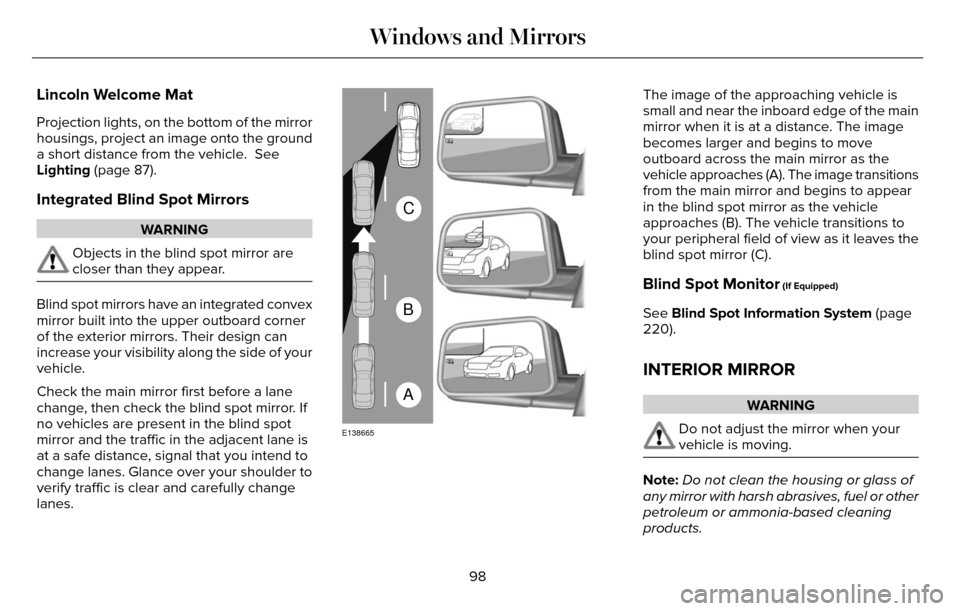
The image of the approaching vehicle is
small and near the inboard edge of the main
mirror when it is at a distance. The image
becomes larger and begins to move
outboard across the main mirror as the
vehicle approaches (A). The image transitions
from the main mirror and begins to appear
in the blind spot mirror as the vehicle
approaches (B). The vehicle transitions to
your peripheral field of view as it leaves the
blind spot mirror (C).
Blind Spot Monitor (If Equipped)
See Blind Spot Information System (page
220).
INTERIOR MIRROR
WARNING
Do not adjust the mirror when your
vehicle is moving.
Note: Do not clean the housing or glass of
any mirror with harsh abrasives, fuel or other
petroleum or ammonia-based cleaning
products.
98
Windows and Mirrors
Page 102 of 544
You can adjust the interior mirror to your
preference. Some mirrors also have a second
pivot point. This lets you move the mirror
head up or down and from side to side.
Auto-Dimming Mirror
Note:Do not block the sensors on the front
and back of the mirror. Mirror performance
may be affected. A rear center passenger
or raised rear center head restraint may also
block light from reaching the sensor.
The mirror will dim automatically to reduce
glare when bright lights are detected from
behind your vehicle. It will automatically
return to normal reflection when you select
reverse gear to make sure you have a clear
view when backing up.
SUN VISORS
E138666
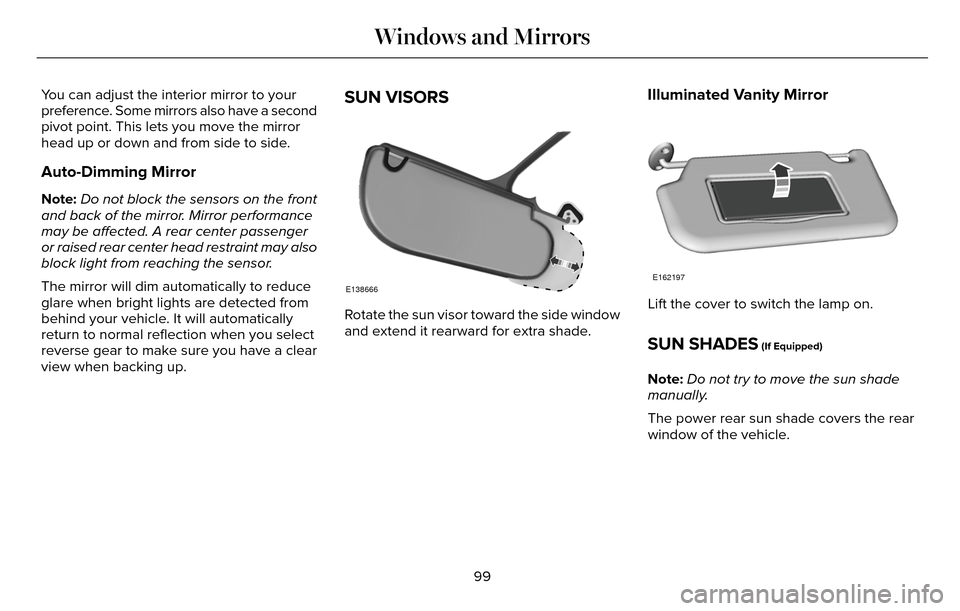
Rotate the sun visor toward the side window
and extend it rearward for extra shade.
Illuminated Vanity Mirror
E162197
Lift the cover to switch the lamp on.
SUN SHADES (If Equipped)
Note: Do not try to move the sun shade
manually.
The power rear sun shade covers the rear
window of the vehicle.
99
Windows and Mirrors
Page 139 of 544
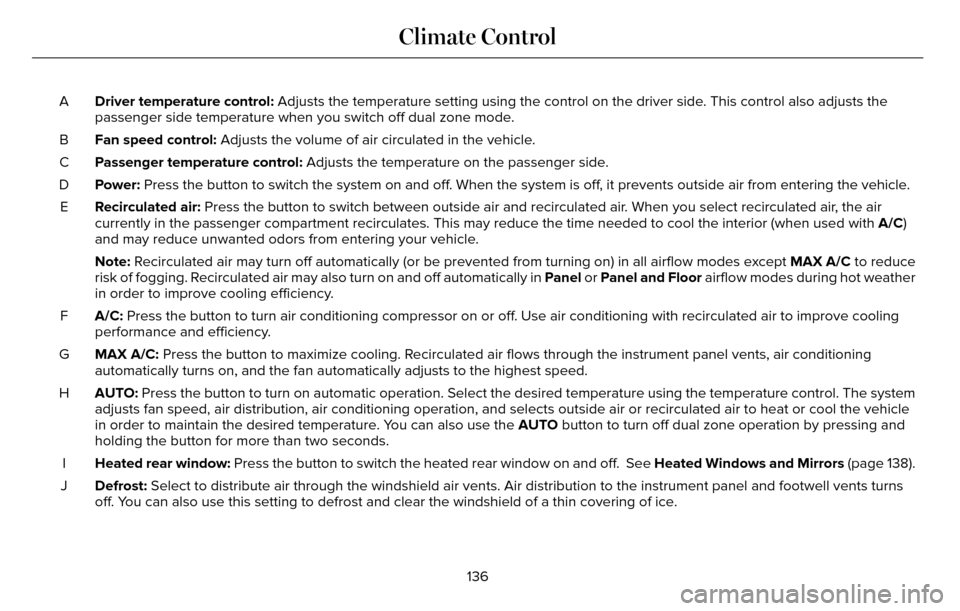
Driver temperature control: Adjusts the temperature setting using the control on the driver side. This control also adjusts the
passenger side temperature when you switch off dual zone mode.
A
Fan speed control: Adjusts the volume of air circulated in the vehicle.
B
Passenger temperature control: Adjusts the temperature on the passenger side.
C
Power: Press the button to switch the system on and off. When the system is off, it prevents outside air from entering the vehicle.
D
Recirculated air: Press the button to switch between outside air and recirculated air. When you select recirculated air, the air
currently in the passenger compartment recirculates. This may reduce the\
time needed to cool the interior (when used with A/C)
and may reduce unwanted odors from entering your vehicle.
E
Note: Recirculated air may turn off automatically (or be prevented from turnin\
g on) in all airflow modes except MAX A/C to reduce
risk of fogging. Recirculated air may also turn on and off automatically in Panel or Panel and Floor airflow modes during hot weather
in order to improve cooling efficiency.
A/C: Press the button to turn air conditioning compressor on or off. Use air conditioning with recirculated air to improve cooling
performance and efficiency.
F
MAX A/C: Press the button to maximize cooling. Recirculated air flows through the instrument panel vents, air conditioni\
ng
automatically turns on, and the fan automatically adjusts to the highest\
speed.
G
AUTO: Press the button to turn on automatic operation. Select the desired tem\
perature using the temperature control. The system
adjusts fan speed, air distribution, air conditioning operation, and sel\
ects outside air or recirculated air to heat or cool the vehicle
in order to maintain the desired temperature. You can also use the AUTO button to turn off dual zone operation by pressing and
holding the button for more than two seconds.
H
Heated rear window: Press the button to switch the heated rear window on and off. See Heated Windows and Mirrors (page 138).
I
Defrost: Select to distribute air through the windshield air vents. Air distribu\
tion to the instrument panel and footwell vents turns
off. You can also use this setting to defrost and clear the windshield of a th\
in covering of ice.
J
136
Climate Control
Page 141 of 544
2. Adjust the temperature control to thedesired setting. Use 72°F (22°C) as a
starting point, then adjust the setting as
necessary.
HEATED WINDOWS AND MIRRORS
Heated Rear Window
Note: Make sure the engine is running
before operating the heated windows.
E184884
Press the button to clear the
heated rear window of thin ice and
fog. The heated rear window will
automatically turn off after a short period of
time. Start the engine before you switch the
heated rear window on.
Note: Do not use razor blades or other sharp
objects to clean or remove decals from the
inside of the heated rear window. The
vehicle warranty does not cover damage
caused to the heated rear window grid lines.
Heated Exterior Mirror
When you switch the heated rear window
on, the heated exterior mirrors will
automatically turn on.
Note: Do not remove ice from the mirrors
with a scraper or adjust the mirror glass
when it is frozen in place.
Note: Do not clean the mirror housing or
glass with harsh abrasives, fuel or other
petroleum-based cleaning products.
CABIN AIR FILTER
Your vehicle is equipped with a cabin air
filter, which gives you and your passengers
the following benefits:
• It improves your driving comfort by reducing particle concentration.
• It improves the interior compartment cleanliness.
• It protects the climate control components from particle deposits.
You can locate the cabin air filter behind the
glove box. Note:
Make sure you have a cabin air filter
installed at all times. This prevents foreign
objects from entering the system. Running
the system without a filter in place could
result in degradation or damage to the
system.
Replace the filter at regular intervals. See
Scheduled Maintenance (page 480).
For additional cabin air filter information, or
to replace the filter, see an authorized dealer.
REMOTE START
The remote start feature allows you to
pre-condition the interior of your vehicle. The
climate control system works to achieve
comfort according to your previous settings.
Note: You cannot adjust the system during
remote start operation. You cannot switch
on the displays or indicators during remote
start.
138
Climate Control
Page 207 of 544
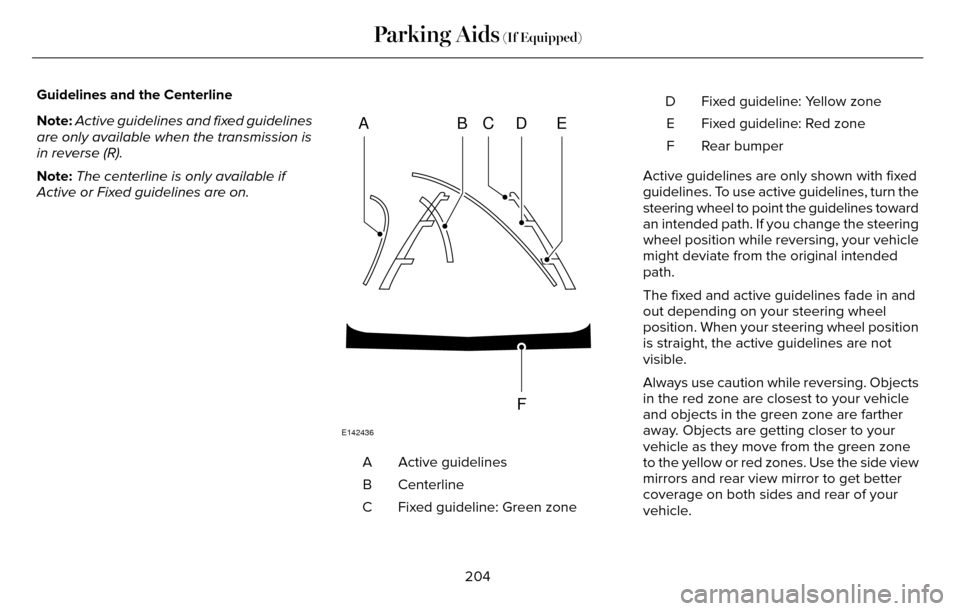
Guidelines and the Centerline
Note:Active guidelines and fixed guidelines
are only available when the transmission is
in reverse (R).
Note: The centerline is only available if
Active or Fixed guidelines are on.
ABCD
F
E
E142436
Active guidelines
A
Centerline
B
Fixed guideline: Green zone
C Fixed guideline: Yellow zone
D
Fixed guideline: Red zone
E
Rear bumper
F
Active guidelines are only shown with fixed
guidelines. To use active guidelines, turn the
steering wheel to point the guidelines toward
an intended path. If you change the steering
wheel position while reversing, your vehicle
might deviate from the original intended
path.
The fixed and active guidelines fade in and
out depending on your steering wheel
position. When your steering wheel position
is straight, the active guidelines are not
visible.
Always use caution while reversing. Objects
in the red zone are closest to your vehicle
and objects in the green zone are farther
away. Objects are getting closer to your
vehicle as they move from the green zone
to the yellow or red zones. Use the side view
mirrors and rear view mirror to get better
coverage on both sides and rear of your
vehicle.
204
Parking Aids (If Equipped)
Page 223 of 544
BLIND SPOT INFORMATION
SYSTEM
Blind Spot Information System (BLIS®)
with Cross Traffic Alert
(If Equipped)
WARNING
To help avoid injuries, NEVER use the
BLIS as a replacement for using the
interior and exterior mirrors and looking over
your shoulder before changing lanes. BLIS
is not a replacement for careful driving.
A
A
E124788
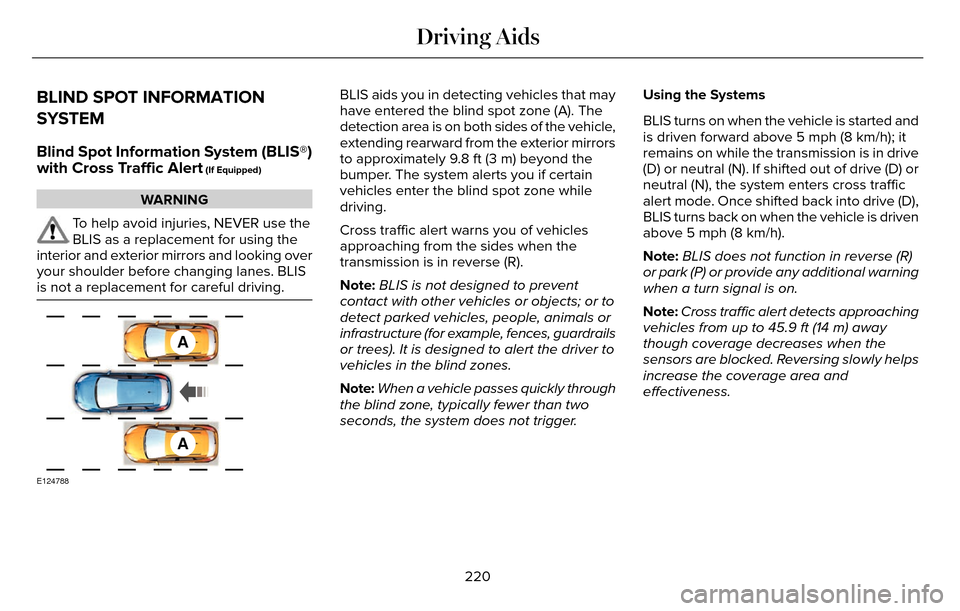
BLIS aids you in detecting vehicles that may
have entered the blind spot zone (A). The
detection area is on both sides of the vehicle,
extending rearward from the exterior mirrors
to approximately 9.8 ft (3 m) beyond the
bumper. The system alerts you if certain
vehicles enter the blind spot zone while
driving.
Cross traffic alert warns you of vehicles
approaching from the sides when the
transmission is in reverse (R).
Note: BLIS is not designed to prevent
contact with other vehicles or objects; or to
detect parked vehicles, people, animals or
infrastructure (for example, fences, guardrails
or trees). It is designed to alert the driver to
vehicles in the blind zones.
Note: When a vehicle passes quickly through
the blind zone, typically fewer than two
seconds, the system does not trigger. Using the Systems
BLIS turns on when the vehicle is started and
is driven forward above 5 mph (8 km/h); it
remains on while the transmission is in drive
(D) or neutral (N). If shifted out of drive (D) or
neutral (N), the system enters cross traffic
alert mode. Once shifted back into drive (D),
BLIS turns back on when the vehicle is driven
above 5 mph (8 km/h).
Note:
BLIS does not function in reverse (R)
or park (P) or provide any additional warning
when a turn signal is on.
Note: Cross traffic alert detects approaching
vehicles from up to 45.9 ft (14 m) away
though coverage decreases when the
sensors are blocked. Reversing slowly helps
increase the coverage area and
effectiveness.
220
Driving Aids
Page 226 of 544
System Lights and Messages
E142442
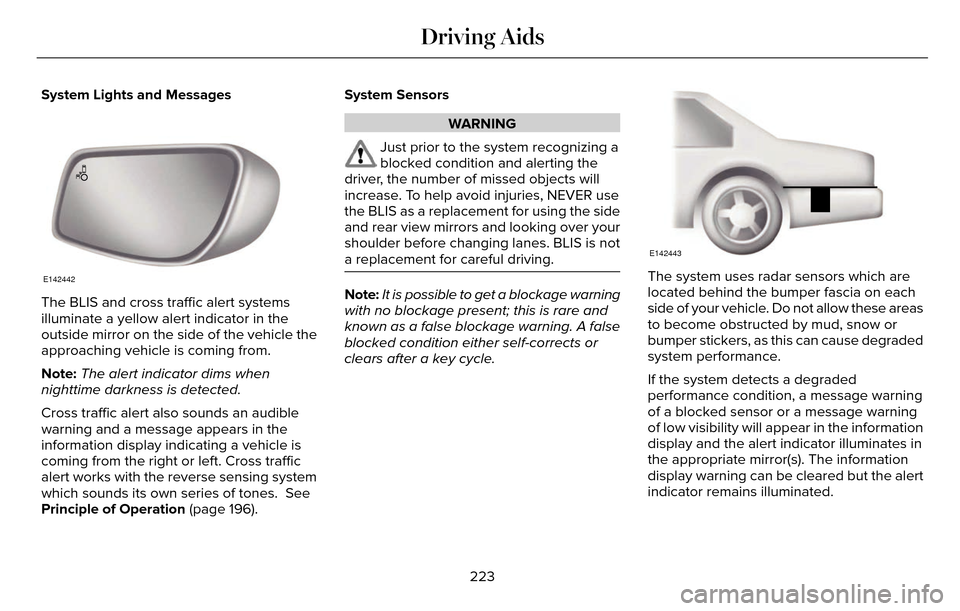
The BLIS and cross traffic alert systems
illuminate a yellow alert indicator in the
outside mirror on the side of the vehicle the
approaching vehicle is coming from.
Note:The alert indicator dims when
nighttime darkness is detected.
Cross traffic alert also sounds an audible
warning and a message appears in the
information display indicating a vehicle is
coming from the right or left. Cross traffic
alert works with the reverse sensing system
which sounds its own series of tones. See
Principle of Operation (page 196). System Sensors
WARNING
Just prior to the system recognizing a
blocked condition and alerting the
driver, the number of missed objects will
increase. To help avoid injuries, NEVER use
the BLIS as a replacement for using the side
and rear view mirrors and looking over your
shoulder before changing lanes. BLIS is not
a replacement for careful driving.
Note: It is possible to get a blockage warning
with no blockage present; this is rare and
known as a false blockage warning. A false
blocked condition either self-corrects or
clears after a key cycle.
E142443
The system uses radar sensors which are
located behind the bumper fascia on each
side of your vehicle. Do not allow these areas
to become obstructed by mud, snow or
bumper stickers, as this can cause degraded
system performance.
If the system detects a degraded
performance condition, a message warning
of a blocked sensor or a message warning
of low visibility will appear in the information
display and the alert indicator illuminates in
the appropriate mirror(s). The information
display warning can be cleared but the alert
indicator remains illuminated.
223
Driving Aids
Page 228 of 544
There may be certain instances when either
the BLIS or cross traffic alert systems
illuminate the alert indicator with no vehicle
in the coverage zone; this is known as a false
alert. Some amount of false alerts are normal;
they are temporary and self-correct.
System Errors
If either system senses a problem with the
left or right sensor, the BLIS telltale will
illuminate and a message will appear in the
information display.
All other system faults will only be displayed
by a message in the information display.
Switching the Systems Off and On
One or both systems can be switched off
temporarily by using the information display
control. See (page 109). When the BLIS is
switched off, you will not receive alerts and
a telltale illuminates in the information
display. The yellow alert indicator in the
outside mirror will also flash twice.Note:
The CTA system always switches on
whenever the ignition is switched on.
However, the BLIS system will remember the
last selected on or off setting.
One or both systems cannot be switched off
when MyKey is used. See Principle of
Operation (page 60).
One or both systems can also be switched
off permanently at your authorized dealer.
Once switched off, switching it back on must
also be done at your authorized dealer.STEERING
Electric Power Steering
WARNING
The electric power steering system has
diagnostic checks that continuously
monitor the system. If a fault is detected, a
message displays in the information display.
Stop your vehicle as soon as it is safe to do
so. Switch the ignition off. After at least 10
seconds, switch the ignition on and watch
the information display for a steering system
warning message. If a steering system
warning message returns, have the system
checked by an authorized dealer.
Your vehicle has an electric power steering
system. There is no fluid reservoir. No
maintenance is required.
If your vehicle loses electrical power while
you are driving, electric power steering
assistance is lost. The steering system still
operates and you can steer your vehicle
manually. Manually steering your vehicle
requires more effort.
225
Driving Aids
Page 281 of 544
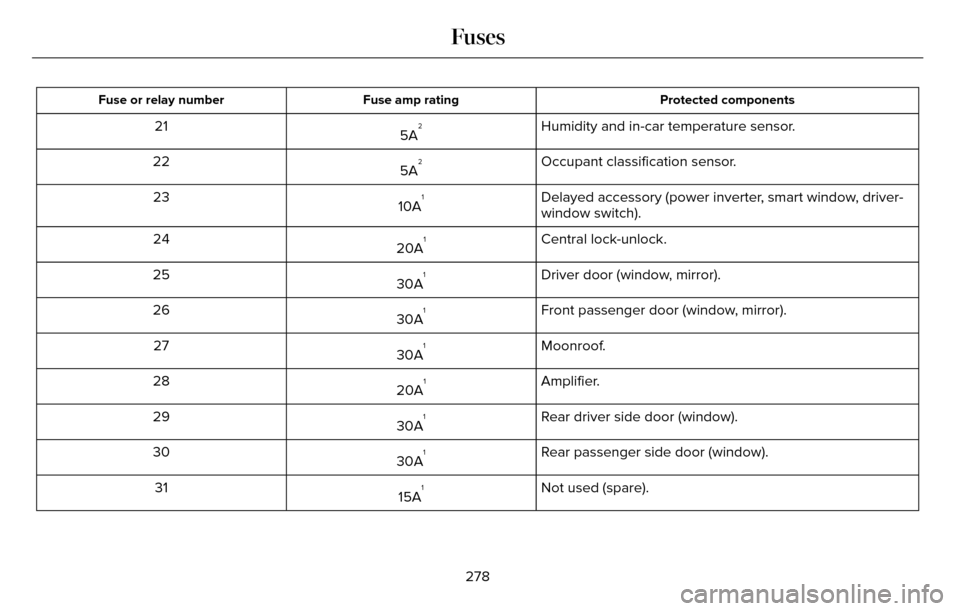
Protected components
Fuse amp rating
Fuse or relay number
Humidity and in-car temperature sensor.
5A221
Occupant classification sensor.
5A
222
Delayed accessory (power inverter, smart window, driver-
window switch).
10A
123
Central lock-unlock.
20A
124
Driver door (window, mirror).
30A
125
Front passenger door (window, mirror).
30A
126
Moonroof.
30A
127
Amplifier.
20A
128
Rear driver side door (window).
30A
129
Rear passenger side door (window).
30A
130
Not used (spare).
15A
131
278
Fuses