power mirror LINCOLN MKZ 2016 Owners Manual
[x] Cancel search | Manufacturer: LINCOLN, Model Year: 2016, Model line: MKZ, Model: LINCOLN MKZ 2016Pages: 544, PDF Size: 5.77 MB
Page 5 of 544
Anti-Theft Alarm..............................................78
Steering Wheel
Adjusting the Steering Wheel.....................80
Audio Control....................................................81
Voice Control...................................................82
Cruise Control.................................................82
Information Display Control.........................82
Heated Steering Wheel.................................83
Wipers and Washers
Windshield Wipers..........................................84
Autowipers.......................................................85
Windshield Washers......................................86
Lighting
Lighting Control...............................................87
Autolamps.........................................................87
Instrument Lighting Dimmer........................88
Headlamp Exit Delay.....................................89
Daytime Running Lamps...............................89
Automatic High Beam Control....................90
Adaptive Headlamps......................................91Direction Indicators........................................92
Welcome Lighting...........................................93
Interior Lamps..................................................93
Ambient Lighting.............................................94
Windows and Mirrors
Power Windows..............................................95
Global Opening and Closing.......................96
Exterior Mirrors................................................96
Interior Mirror...................................................98
Sun Visors.........................................................99
Sun Shades......................................................99
Moonroof.........................................................100
Instrument Cluster
Gauges............................................................102
Warning Lamps and Indicators..................104
Audible Warnings and Indicators..............107
Information Displays
General Information.....................................109
Information Messages..................................115
Climate Control
Automatic Climate Control..........................135
Hints on Controlling the Interior
Climate.........................................................137
Heated Windows and Mirrors....................138
Cabin Air Filter...............................................138
Remote Start...................................................138
Seats
Sitting in the Correct Position....................140
Head Restraints.............................................140
Power Seats....................................................142
Memory Function..........................................145
Rear Seats.......................................................147
Heated Seats..................................................148
Climate Controlled Seats............................149
Rear Seat Armrest.........................................150
Universal Garage Door Opener
Universal Garage Door Opener................152
Auxiliary Power Points
Auxiliary Power Points..................................157
2
Table of Contents
Page 62 of 544
Memory Feature
If programmed to a pre-set position, the
integrated keyhead transmitter or intelligent
access key recalls the driver seat and
exterior mirror positions when you unlock
your vehicle. It also recalls the power
steering column and pedal positions. See
Memory Function (page 145).
REPLACING A LOST KEY OR
REMOTE CONTROL
Replacement keys or remote controls can
be purchased from an authorized dealer.
Authorized dealers can program remote
controls for your vehicle. See Passive
Anti-Theft System (page 77).
To re-program the passive anti-theft system
see an authorized dealer.59
Keys and Remote Controls
Page 76 of 544
Note:If you enter your entry code too fast
on the keypad, the unlock function may not
work. Re-enter your entry code more slowly.
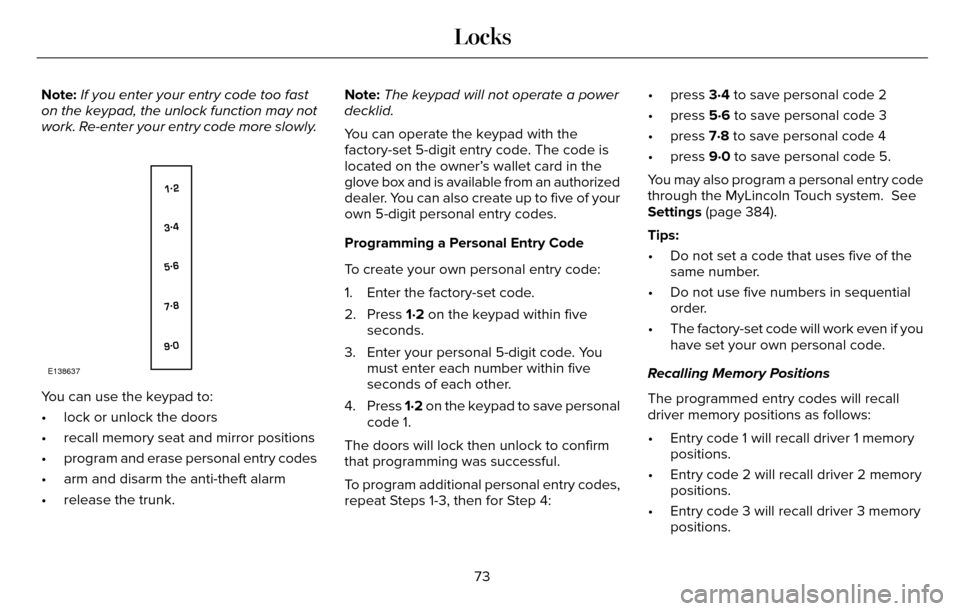
E138637
You can use the keypad to:
• lock or unlock the doors
• recall memory seat and mirror positions
• program and erase personal entry codes
• arm and disarm the anti-theft alarm
• release the trunk. Note:
The keypad will not operate a power
decklid.
You can operate the keypad with the
factory-set 5-digit entry code. The code is
located on the owner’s wallet card in the
glove box and is available from an authorized
dealer. You can also create up to five of your
own 5-digit personal entry codes.
Programming a Personal Entry Code
To create your own personal entry code:
1. Enter the factory-set code.
2. Press 1·2 on the keypad within five seconds.
3. Enter your personal 5-digit code. You must enter each number within five
seconds of each other.
4. Press 1·2 on the keypad to save personal
code 1.
The doors will lock then unlock to confirm
that programming was successful.
To program additional personal entry codes,
repeat Steps 1-3, then for Step 4: • press 3·4 to save personal code 2
• press 5·6 to save personal code 3
• press 7·8 to save personal code 4
• press 9·0 to save personal code 5.
You may also program a personal entry code
through the MyLincoln Touch system. See
Settings (page 384).
Tips:
• Do not set a code that uses five of the
same number.
• Do not use five numbers in sequential order.
• The factory-set code will work even if you have set your own personal code.
Recalling Memory Positions
The programmed entry codes will recall
driver memory positions as follows:
• Entry code 1 will recall driver 1 memory positions.
• Entry code 2 will recall driver 2 memory positions.
• Entry code 3 will recall driver 3 memory positions.
73
Locks
Page 98 of 544
POWER WINDOWS
WARNINGS
Do not leave children unattended in
your vehicle and do not let them play
with the power windows. They may seriously
injure themselves.
When closing the power windows, you
should verify they are free of
obstructions and make sure that children and
pets are not in the proximity of the window
openings.
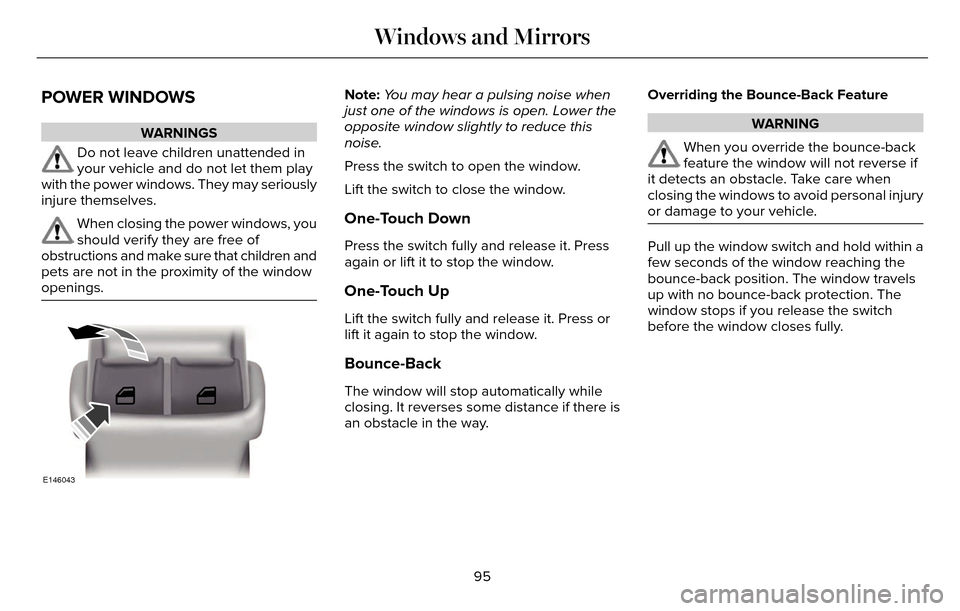
E146043
Note: You may hear a pulsing noise when
just one of the windows is open. Lower the
opposite window slightly to reduce this
noise.
Press the switch to open the window.
Lift the switch to close the window.
One-Touch Down
Press the switch fully and release it. Press
again or lift it to stop the window.
One-Touch Up
Lift the switch fully and release it. Press or
lift it again to stop the window.
Bounce-Back
The window will stop automatically while
closing. It reverses some distance if there is
an obstacle in the way. Overriding the Bounce-Back Feature
WARNING
When you override the bounce-back
feature the window will not reverse if
it detects an obstacle. Take care when
closing the windows to avoid personal injury
or damage to your vehicle.
Pull up the window switch and hold within a
few seconds of the window reaching the
bounce-back position. The window travels
up with no bounce-back protection. The
window stops if you release the switch
before the window closes fully.
95
Windows and Mirrors
Page 99 of 544
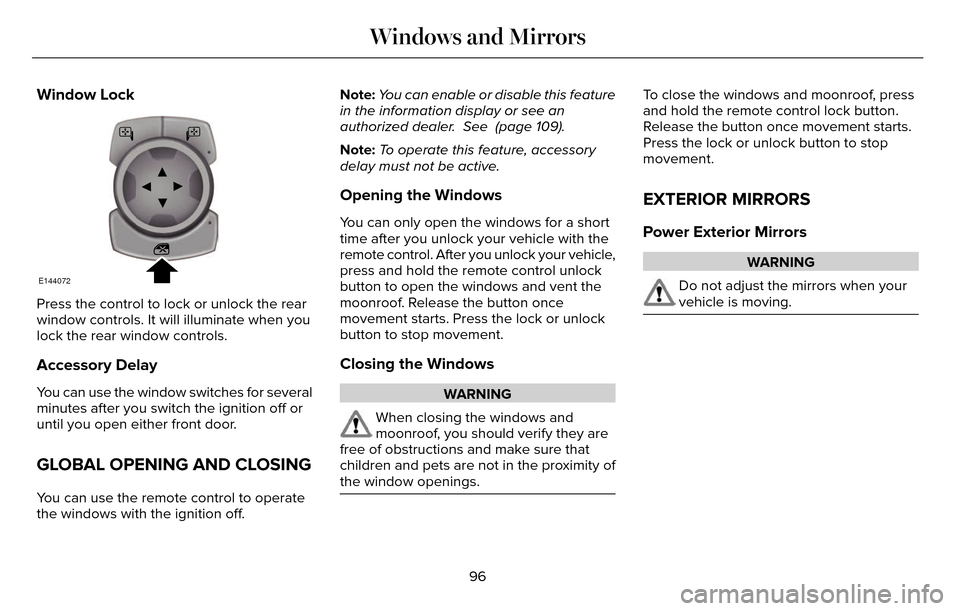
Window Lock
E144072
Press the control to lock or unlock the rear
window controls. It will illuminate when you
lock the rear window controls.
Accessory Delay
You can use the window switches for several
minutes after you switch the ignition off or
until you open either front door.
GLOBAL OPENING AND CLOSING
You can use the remote control to operate
the windows with the ignition off.Note:
You can enable or disable this feature
in the information display or see an
authorized dealer. See (page 109).
Note: To operate this feature, accessory
delay must not be active.
Opening the Windows
You can only open the windows for a short
time after you unlock your vehicle with the
remote control. After you unlock your vehicle,
press and hold the remote control unlock
button to open the windows and vent the
moonroof. Release the button once
movement starts. Press the lock or unlock
button to stop movement.
Closing the Windows
WARNING
When closing the windows and
moonroof, you should verify they are
free of obstructions and make sure that
children and pets are not in the proximity of
the window openings.
To close the windows and moonroof, press
and hold the remote control lock button.
Release the button once movement starts.
Press the lock or unlock button to stop
movement.
EXTERIOR MIRRORS
Power Exterior Mirrors
WARNING
Do not adjust the mirrors when your
vehicle is moving.
96
Windows and Mirrors
Page 100 of 544
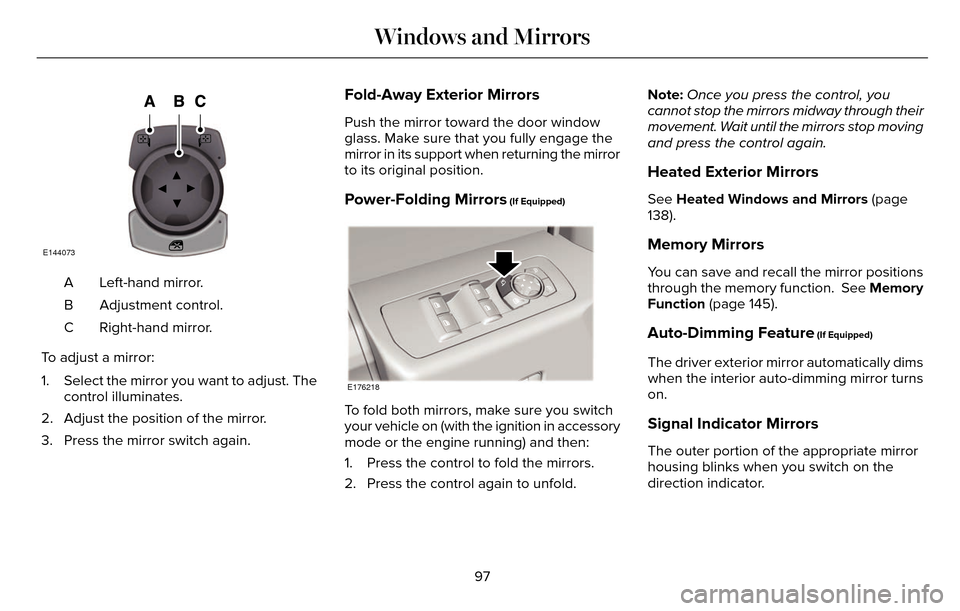
E144073
Left-hand mirror.
A
Adjustment control.
B
Right-hand mirror.
C
To adjust a mirror:
1. Select the mirror you want to adjust. The control illuminates.
2. Adjust the position of the mirror.
3. Press the mirror switch again.
Fold-Away Exterior Mirrors
Push the mirror toward the door window
glass. Make sure that you fully engage the
mirror in its support when returning the mirror
to its original position.
Power-Folding Mirrors (If Equipped)
E176218
To fold both mirrors, make sure you switch
your vehicle on (with the ignition in accessory
mode or the engine running) and then:
1. Press the control to fold the mirrors.
2. Press the control again to unfold. Note:
Once you press the control, you
cannot stop the mirrors midway through their
movement. Wait until the mirrors stop moving
and press the control again.
Heated Exterior Mirrors
See Heated Windows and Mirrors (page
138).
Memory Mirrors
You can save and recall the mirror positions
through the memory function. See Memory
Function (page 145).
Auto-Dimming Feature (If Equipped)
The driver exterior mirror automatically dims
when the interior auto-dimming mirror turns
on.
Signal Indicator Mirrors
The outer portion of the appropriate mirror
housing blinks when you switch on the
direction indicator.
97
Windows and Mirrors
Page 102 of 544
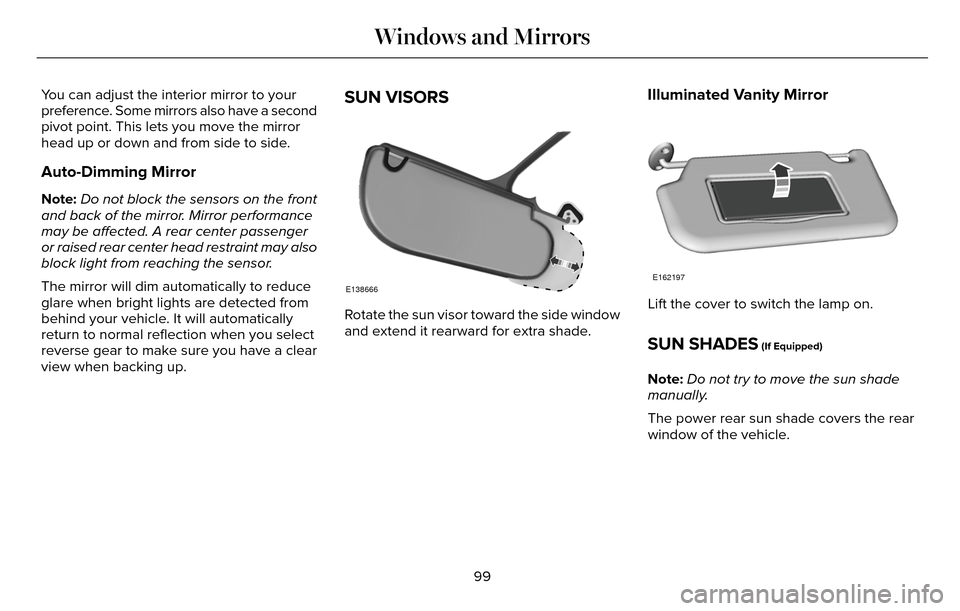
You can adjust the interior mirror to your
preference. Some mirrors also have a second
pivot point. This lets you move the mirror
head up or down and from side to side.
Auto-Dimming Mirror
Note:Do not block the sensors on the front
and back of the mirror. Mirror performance
may be affected. A rear center passenger
or raised rear center head restraint may also
block light from reaching the sensor.
The mirror will dim automatically to reduce
glare when bright lights are detected from
behind your vehicle. It will automatically
return to normal reflection when you select
reverse gear to make sure you have a clear
view when backing up.
SUN VISORS
E138666
Rotate the sun visor toward the side window
and extend it rearward for extra shade.
Illuminated Vanity Mirror
E162197
Lift the cover to switch the lamp on.
SUN SHADES (If Equipped)
Note: Do not try to move the sun shade
manually.
The power rear sun shade covers the rear
window of the vehicle.
99
Windows and Mirrors
Page 139 of 544
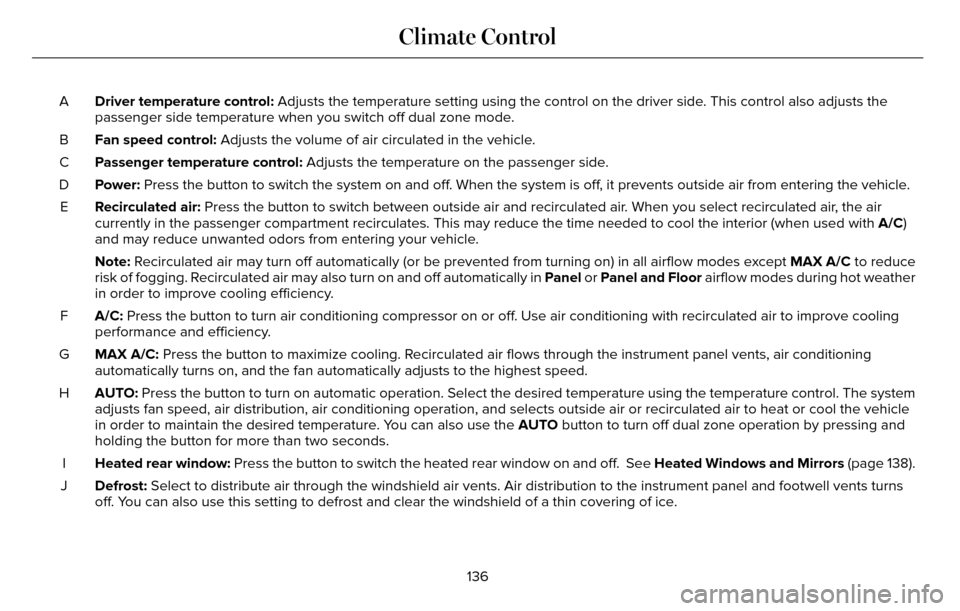
Driver temperature control: Adjusts the temperature setting using the control on the driver side. This control also adjusts the
passenger side temperature when you switch off dual zone mode.
A
Fan speed control: Adjusts the volume of air circulated in the vehicle.
B
Passenger temperature control: Adjusts the temperature on the passenger side.
C
Power: Press the button to switch the system on and off. When the system is off, it prevents outside air from entering the vehicle.
D
Recirculated air: Press the button to switch between outside air and recirculated air. When you select recirculated air, the air
currently in the passenger compartment recirculates. This may reduce the\
time needed to cool the interior (when used with A/C)
and may reduce unwanted odors from entering your vehicle.
E
Note: Recirculated air may turn off automatically (or be prevented from turnin\
g on) in all airflow modes except MAX A/C to reduce
risk of fogging. Recirculated air may also turn on and off automatically in Panel or Panel and Floor airflow modes during hot weather
in order to improve cooling efficiency.
A/C: Press the button to turn air conditioning compressor on or off. Use air conditioning with recirculated air to improve cooling
performance and efficiency.
F
MAX A/C: Press the button to maximize cooling. Recirculated air flows through the instrument panel vents, air conditioni\
ng
automatically turns on, and the fan automatically adjusts to the highest\
speed.
G
AUTO: Press the button to turn on automatic operation. Select the desired tem\
perature using the temperature control. The system
adjusts fan speed, air distribution, air conditioning operation, and sel\
ects outside air or recirculated air to heat or cool the vehicle
in order to maintain the desired temperature. You can also use the AUTO button to turn off dual zone operation by pressing and
holding the button for more than two seconds.
H
Heated rear window: Press the button to switch the heated rear window on and off. See Heated Windows and Mirrors (page 138).
I
Defrost: Select to distribute air through the windshield air vents. Air distribu\
tion to the instrument panel and footwell vents turns
off. You can also use this setting to defrost and clear the windshield of a th\
in covering of ice.
J
136
Climate Control
Page 149 of 544
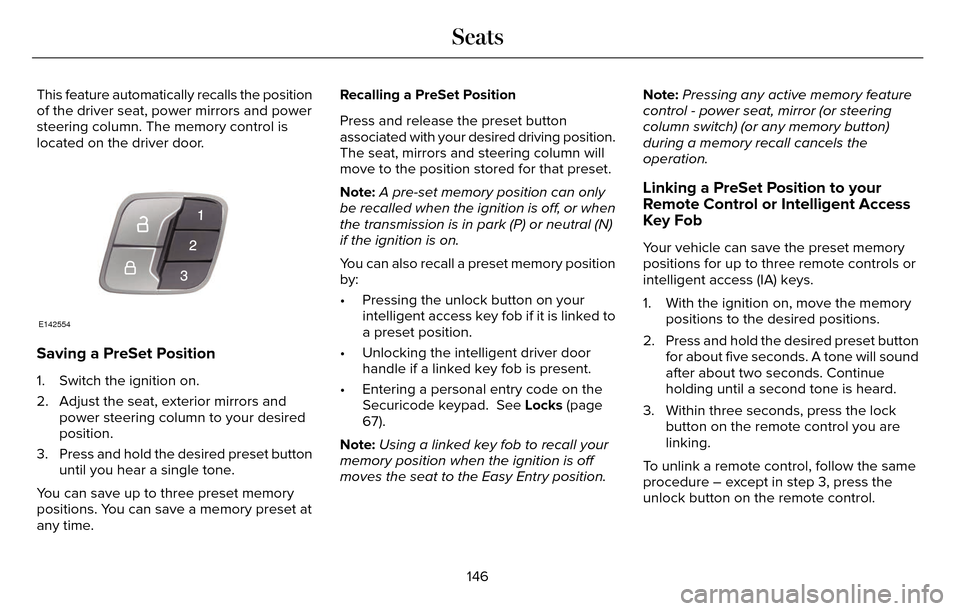
This feature automatically recalls the position
of the driver seat, power mirrors and power
steering column. The memory control is
located on the driver door.
E142554
Saving a PreSet Position
1. Switch the ignition on.
2. Adjust the seat, exterior mirrors andpower steering column to your desired
position.
3. Press and hold the desired preset button until you hear a single tone.
You can save up to three preset memory
positions. You can save a memory preset at
any time. Recalling a PreSet Position
Press and release the preset button
associated with your desired driving position.
The seat, mirrors and steering column will
move to the position stored for that preset.
Note:
A pre-set memory position can only
be recalled when the ignition is off, or when
the transmission is in park (P) or neutral (N)
if the ignition is on.
You can also recall a preset memory position
by:
• Pressing the unlock button on your intelligent access key fob if it is linked to
a preset position.
• Unlocking the intelligent driver door handle if a linked key fob is present.
• Entering a personal entry code on the Securicode keypad. See Locks (page
67).
Note: Using a linked key fob to recall your
memory position when the ignition is off
moves the seat to the Easy Entry position. Note:
Pressing any active memory feature
control - power seat, mirror (or steering
column switch) (or any memory button)
during a memory recall cancels the
operation.
Linking a PreSet Position to your
Remote Control or Intelligent Access
Key Fob
Your vehicle can save the preset memory
positions for up to three remote controls or
intelligent access (IA) keys.
1. With the ignition on, move the memory positions to the desired positions.
2. Press and hold the desired preset button for about five seconds. A tone will sound
after about two seconds. Continue
holding until a second tone is heard.
3. Within three seconds, press the lock button on the remote control you are
linking.
To unlink a remote control, follow the same
procedure – except in step 3, press the
unlock button on the remote control.
146
Seats
Page 228 of 544
There may be certain instances when either
the BLIS or cross traffic alert systems
illuminate the alert indicator with no vehicle
in the coverage zone; this is known as a false
alert. Some amount of false alerts are normal;
they are temporary and self-correct.
System Errors
If either system senses a problem with the
left or right sensor, the BLIS telltale will
illuminate and a message will appear in the
information display.
All other system faults will only be displayed
by a message in the information display.
Switching the Systems Off and On
One or both systems can be switched off
temporarily by using the information display
control. See (page 109). When the BLIS is
switched off, you will not receive alerts and
a telltale illuminates in the information
display. The yellow alert indicator in the
outside mirror will also flash twice.Note:
The CTA system always switches on
whenever the ignition is switched on.
However, the BLIS system will remember the
last selected on or off setting.
One or both systems cannot be switched off
when MyKey is used. See Principle of
Operation (page 60).
One or both systems can also be switched
off permanently at your authorized dealer.
Once switched off, switching it back on must
also be done at your authorized dealer.STEERING
Electric Power Steering
WARNING
The electric power steering system has
diagnostic checks that continuously
monitor the system. If a fault is detected, a
message displays in the information display.
Stop your vehicle as soon as it is safe to do
so. Switch the ignition off. After at least 10
seconds, switch the ignition on and watch
the information display for a steering system
warning message. If a steering system
warning message returns, have the system
checked by an authorized dealer.
Your vehicle has an electric power steering
system. There is no fluid reservoir. No
maintenance is required.
If your vehicle loses electrical power while
you are driving, electric power steering
assistance is lost. The steering system still
operates and you can steer your vehicle
manually. Manually steering your vehicle
requires more effort.
225
Driving Aids