steering wheel adjustment LINCOLN MKZ 2016 Owners Manual
[x] Cancel search | Manufacturer: LINCOLN, Model Year: 2016, Model line: MKZ, Model: LINCOLN MKZ 2016Pages: 544, PDF Size: 5.77 MB
Page 84 of 544
The steering column sets a stopping position
just short of the end of the column position
to prevent damage to the steering column.
A new stopping position sets if the steering
column encounters an object when tilting or
telescoping.
To reset the steering column to its normal
stopping position:
1. Press the steering column control againafter encountering the new stopping
position.
2. Continue pressing the control until it reaches the end of the column position.
A new stopping position is set. The next time
you tilt or telescope the steering column, it
will stop just short of the end of the column
position.
Memory Feature
You can save and recall the steering column
position with the memory function. See
Memory Function (page 145).
Note: Pressing the adjustment control during
memory recall cancels the operation. The
column responds to the adjustment control. Easy Entry and Exit Feature
When you switch the ignition off, the steering
column will move to the full up position to
allow extra room to exit your vehicle. The
column will return to the previous setting
when you switch the ignition on. You can
enable or disable this feature in the
information display. See Information
Displays (page 109).
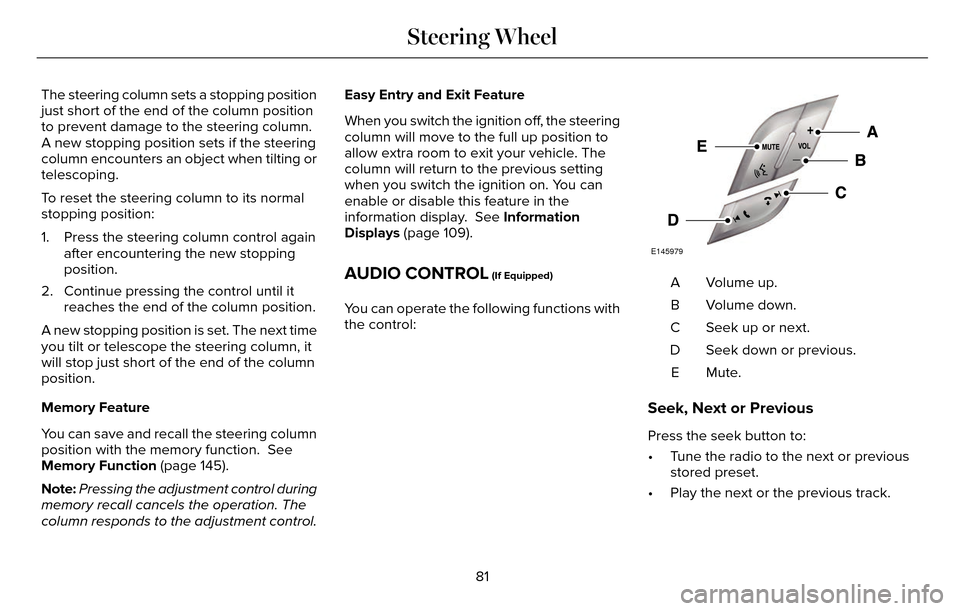
AUDIO CONTROL (If Equipped)
You can operate the following functions with
the control:
E145979
Volume up.
A
Volume down.
B
Seek up or next.
C
Seek down or previous.
D
Mute.E
Seek, Next or Previous
Press the seek button to:
• Tune the radio to the next or previousstored preset.
• Play the next or the previous track.
81
Steering Wheel
Page 142 of 544
Switch the ignition on to return the system
to its previous settings. You can now make
adjustments normally, but you need to switch
certain vehicle-dependent features back on,
such as:
• Heated seats.
• Cooled seats.
• Heated steering wheel.
• Heated mirrors.
• Heated rear window.
You can adjust the default remote start
settings using the information display
controls. See Information Displays (page
109).
Automatic Settings
In hot weather, the system is set to 72°F
(22°C). The cooled seats are set to high (if
available, and selected to AUTO in the
information display).
In moderate weather, the system either heats
or cools (based on previous settings). The
rear defroster, heated mirrors and heated
seats do not automatically switch on.In cold weather, the system is set to 72°F
(22°C). The heated seats are set to high (if
available, and selected to AUTO in the
information display). The rear defroster and
heated mirrors automatically switch on.
139
Climate Control
Page 388 of 544
To make adjustments using the touchscreen, select:
Action and Description
Menu Item
Press the settings icon.
Settings
Press the + or - to adjust the time.
Clock
From this screen, you can also make other adjustments such as 12-hour or\
24-hour mode, activate
GPS time synchronization and have the system automatically update new ti\
me zones.
You can also switch the outside air temperature display off and on. It ap\
pears at the top center
of the touchscreen, next to the time and date.
Note: You cannot manually set the date. Your vehicle’s GPS does this for you.
Note: If the battery has been disconnected, your vehicle needs to acquire a GP\
S signal to update the clock. Once your vehicle acquires the
signal, it may take a few minutes for the update to display the correct \
time.
Display
E142607
You can adjust the display using
the touchscreen or the voice
button on the steering wheel
controls.
385
MyLincoln Touch™
Page 534 of 544
A
A/CSee: Climate Control..........................................135
About This Manual............................................7Protecting the Environment..................................7
ABSSee: Brakes...........................................................18\
7
ABS driving hintsSee: Hints on Driving With Anti-LockBrakes................................................................187
Accessories....................................................475Exterior style........................................................47\
5
Interior style.........................................................4\
75
Lifestyle.................................................................475
Peace of mind......................................................475
AccessoriesSee: Replacement Parts Recommendation.....12
ACCSee: Using Adaptive Cruise Control..............207
Active Park Assist..........................................198Automatic Steering into Parking Space........199
Deactivating the Park Assist Feature...........200
Troubleshooting the System............................201
Using Active Park Assist....................................198
Adaptive Headlamps......................................91 Adjusting the Headlamps..........................299
Horizontal Aim Adjustment...............................301
Vertical Aim Adjustment...................................299
Adjusting the Steering Wheel.....................80Power Tilt and Telescope Steering
Column................................................................80\
AFSSee: Adaptive Headlamps...................................91
Airbag Disposal...............................................53
Air Conditioning
See: Climate Control..........................................135
AlarmSee: Anti-Theft Alarm...........................................78
All-Wheel Drive...............................................181
Ambient Lighting.............................................94
Anti-Theft Alarm..............................................78
Arming the Alarm..................................................79
Disarming the Alarm.............................................79
Appendices...................................................503
Audible Warnings and Indicators..............107
Headlamps On Warning Chime.......................108
Key in Ignition Warning Chime.........................107
Keyless Warning Alert........................................108
Parking Brake On Warning Chime..................108
Audio Control....................................................81Seek, Next or Previous.........................................81
Audio System................................................369General Information...........................................369
Audio Unit - Vehicles With: Premium AM/FM/CD...........................................................370
Autolamps.........................................................87
Windshield Wiper Activated Headlamps........88
Automatic Climate Control..........................135
Automatic High Beam Control....................90
Activating the System...........................................91
Manually Overriding the System.......................91
Automatic Transmission...............................175Automatic Transmission Adaptive
Learning.............................................................179
Brake-Shift Interlock Override..........................178
If Your Vehicle Gets Stuck In Mud or Snow..................................................................180
Push Button Shift Transmission.......................175
SelectShift Automatic™ Transmission..............177
Automatic Transmission Fluid Check...........................................................292
6F35/HF35 transmission..................................292
6F50/6F55 Transmission.................................292
Autowipers.......................................................85
Auxiliary Power Points..................................157
110 Volt AC Power Point and Twisting Auxiliary
Cover..................................................................157
12 Volt DC Power Point......................................157
Locations................................................................\
157
AWDSee: All-Wheel Drive............................................181
531
Index